door lock Hyundai Equus 2016 Owner's Guide
[x] Cancel search | Manufacturer: HYUNDAI, Model Year: 2016, Model line: Equus, Model: Hyundai Equus 2016Pages: 477, PDF Size: 16.25 MB
Page 114 of 477
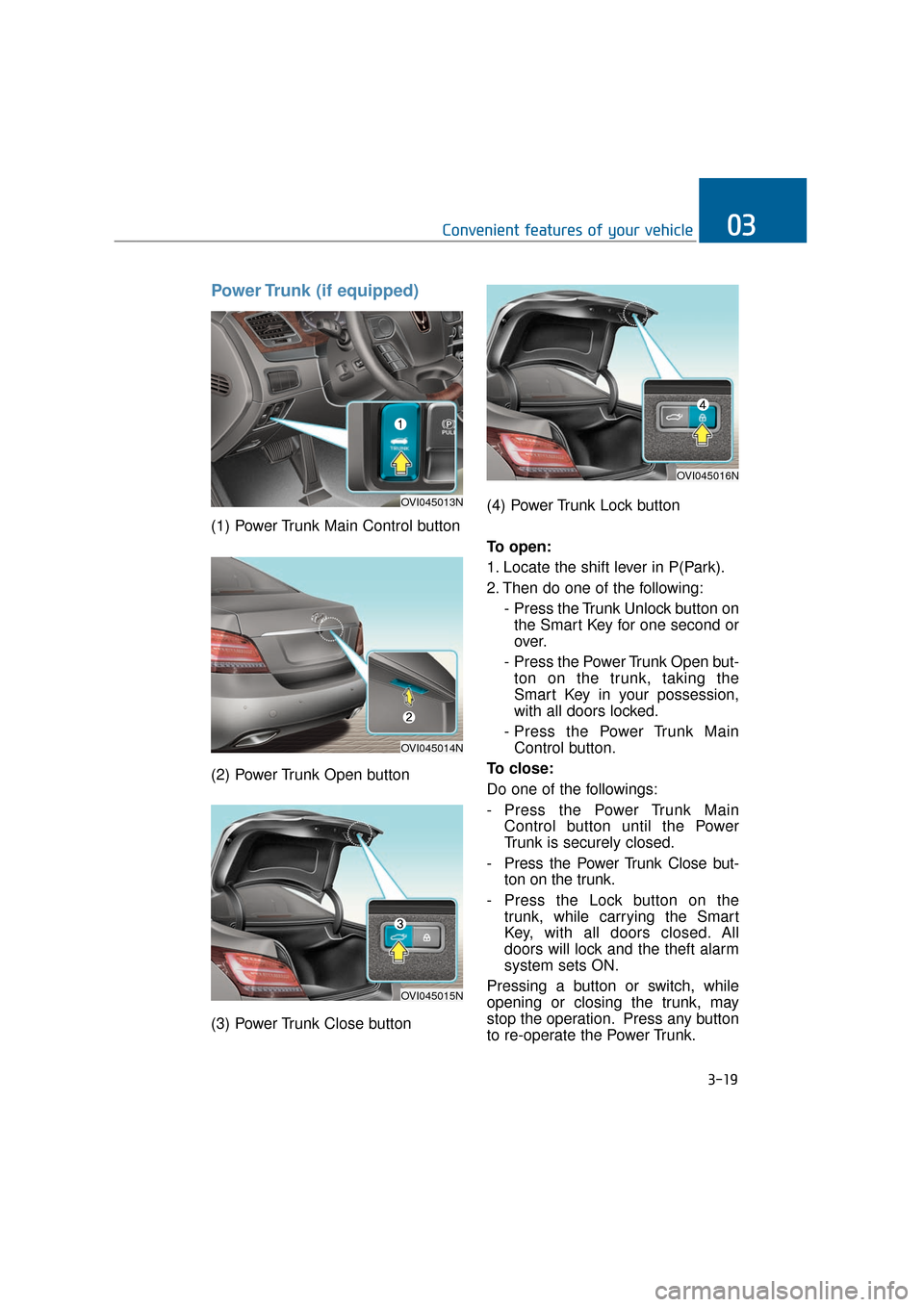
Power Trunk (if equipped)
(1) Power Trunk Main Control button
(2) Power Trunk Open button
(3) Power Trunk Close button(4) Power Trunk Lock button
To open:
1. Locate the shift lever in P(Park).
2. Then do one of the following:
- Press the Trunk Unlock button onthe Smart Key for one second or
over.
- Press the Power Trunk Open but- ton on the trunk, taking the
Smart Key in your possession,
with all doors locked.
- Press the Power Trunk Main Control button.
To close:
Do one of the followings:
- Press the Power Trunk Main Control button until the Power
Trunk is securely closed.
- Press the Power Trunk Close but- ton on the trunk.
- Press the Lock button on the trunk, while carrying the Smart
Key, with all doors closed. All
doors will lock and the theft alarm
system sets ON.
Pressing a button or switch, while
opening or closing the trunk, may
stop the operation. Press any button
to re-operate the Power Trunk.
3-19
Convenient features of your vehicle03
OVI045013N
OVI045014N
OVI045015N
OVI045016N
Page 115 of 477
Information
The Power Trunk Lock button will
not operate in one of the following sit-
uations:
- Any door is open.
- The Engine Start/Stop Button is notOFF.
- The Smart Key is in the vehicle. Do not manually close or open
the Power Trunk. This may dam-
age the Power Trunk. If neces-
sary, when the battery is drained
or disconnected, do not apply
excessive force.
Do not leave the Power Trunk open for a long period of time.
This may drain the battery.
To prevent the trunk lift cylin- ders and other attached compo-
nents from being damaged,
always close the trunk before
driving.
Information
In a cold and wet temperature, trunk
lock and trunk mechanisms may not
properly operate due to freezing con-
ditions.
i
NOTICEi
3-20
Convenient features of your vehicle
Always securely close the trunk
lid while the vehicle is in
motion. When it is still open or
ajar, poisonous exhaust gases
containing carbon monoxide
(CO) may enter the vehicle,
resulting serious illness or
death.
WARNING
Make sure there are no people
or objects around the trunk
before opening or closing the
Power Trunk. Wait until the trunk
is fully open, before loading or
unloading.
WARNING
Never leave children or animals
unattended in your vehicle.
Children or animals may oper-
ate the power trunk, injuring
themselves, others, or vehicle
damage.
WARNING
Page 119 of 477
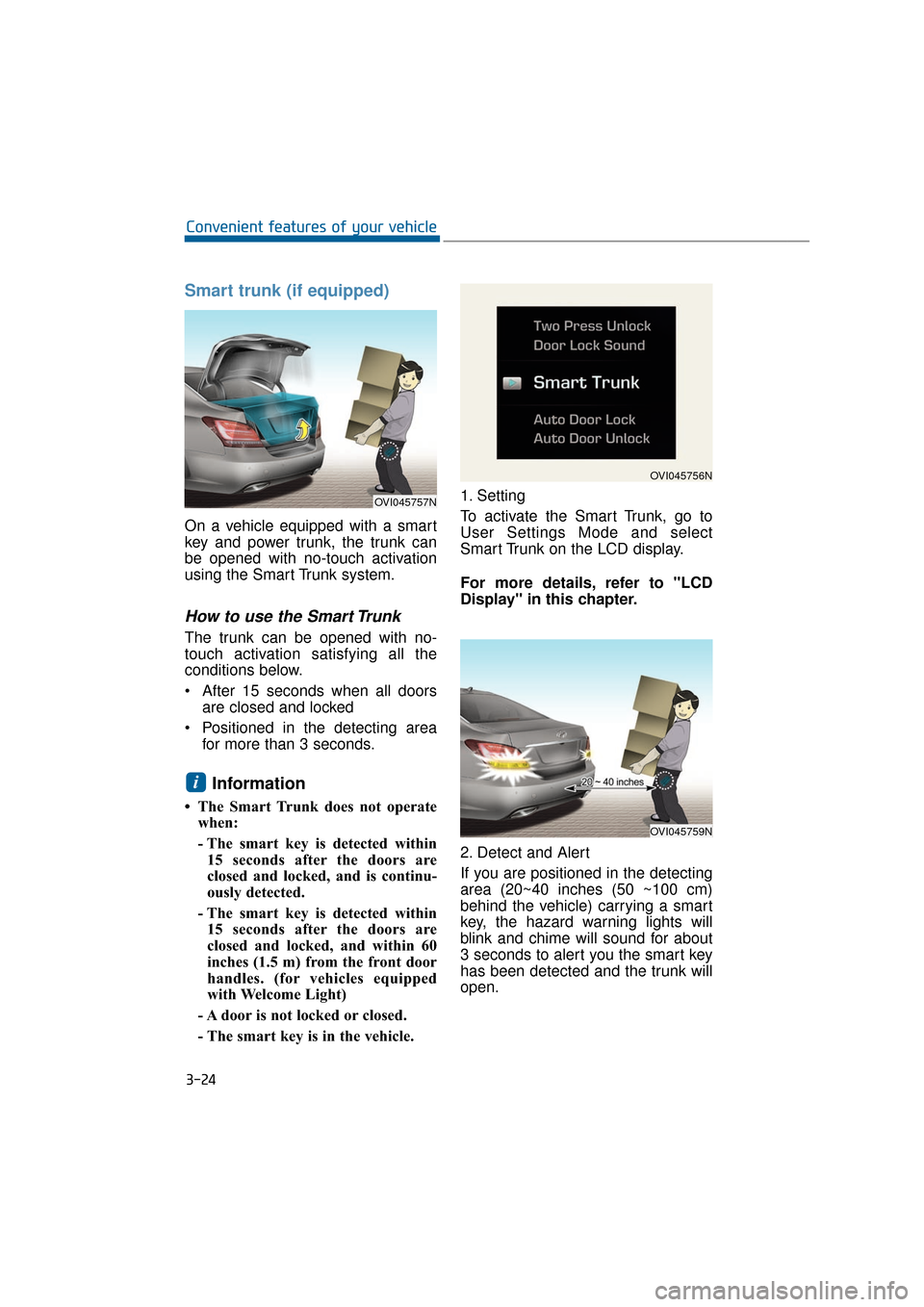
Smart trunk (if equipped)
On a vehicle equipped with a smart
key and power trunk, the trunk can
be opened with no-touch activation
using the Smart Trunk system.
How to use the Smart Trunk
The trunk can be opened with no-
touch activation satisfying all the
conditions below.
After 15 seconds when all doorsare closed and locked
Positioned in the detecting area for more than 3 seconds.
Information
• The Smart Trunk does not operatewhen:
- The smart key is detected within15 seconds after the doors are
closed and locked, and is continu-
ously detected.
- The smart key is detected within 15 seconds after the doors are
closed and locked, and within 60
inches (1.5 m) from the front door
handles. (for vehicles equipped
with Welcome Light)
- A door is not locked or closed.
- The smart key is in the vehicle. 1. Setting
To activate the Smart Trunk, go to
User Settings Mode and select
Smart Trunk on the LCD display.
For more details, refer to "LCD
Display" in this chapter.
2. Detect and Alert
If you are positioned in the detecting
area (20~40 inches (50 ~100 cm)
behind the vehicle) carrying a smart
key, the hazard warning lights will
blink and chime will sound for about
3 seconds to alert you the smart key
has been detected and the trunk will
open.
i
3-24
Convenient features of your vehicle
OVI045757N
OVI045756N
OVI045759N
Page 121 of 477
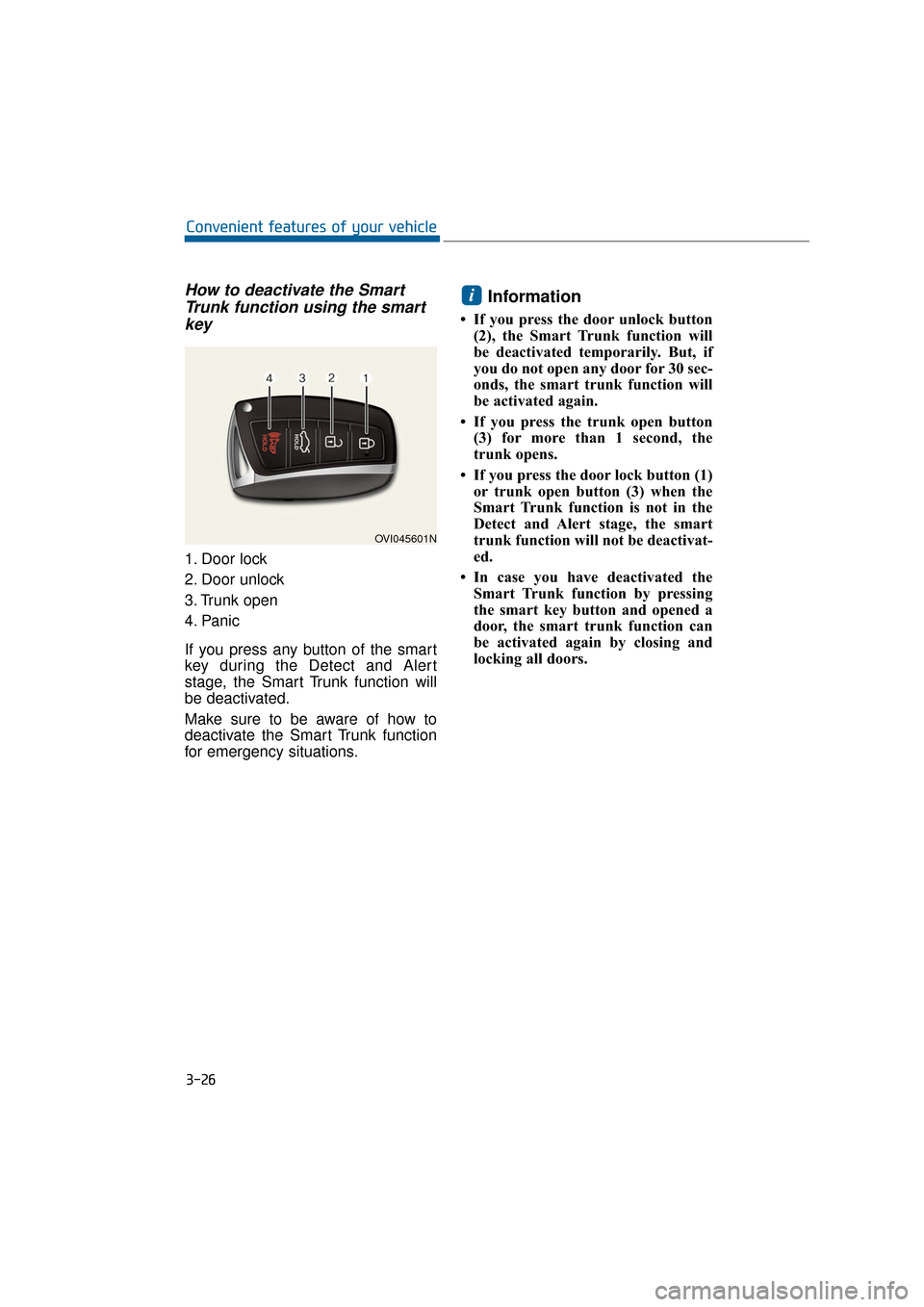
How to deactivate the SmartTrunk function using the smartkey
1. Door lock
2. Door unlock
3. Trunk open
4. Panic
If you press any button of the smart
key during the Detect and Alert
stage, the Smart Trunk function will
be deactivated.
Make sure to be aware of how to
deactivate the Smart Trunk function
for emergency situations.
Information
• If you press the door unlock button
(2), the Smart Trunk function will
be deactivated temporarily. But, if
you do not open any door for 30 sec-
onds, the smart trunk function will
be activated again.
• If you press the trunk open button (3) for more than 1 second, the
trunk opens.
• If you press the door lock button (1) or trunk open button (3) when the
Smart Trunk function is not in the
Detect and Alert stage, the smart
trunk function will not be deactivat-
ed.
• In case you have deactivated the Smart Trunk function by pressing
the smart key button and opened a
door, the smart trunk function can
be activated again by closing and
locking all doors.
i
3-26
Convenient features of your vehicle
OVI045601N
Page 123 of 477
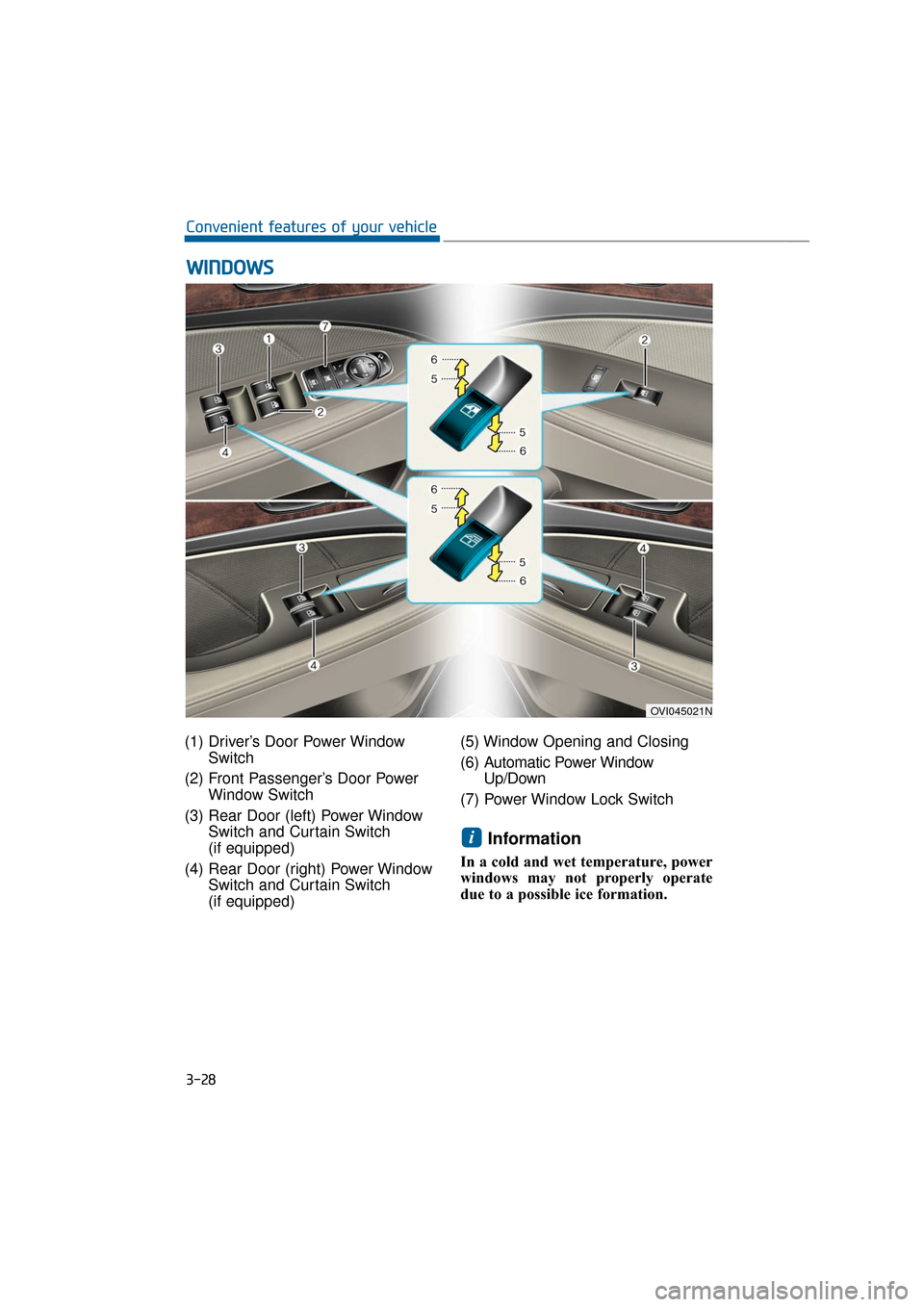
3-28
Convenient features of your vehicle
OVI045021N
(1) Driver’s Door Power WindowSwitch
(2) Front Passenger’s Door Power Window Switch
(3) Rear Door (left) Power Window Switch and Curtain Switch
(if equipped)
(4) Rear Door (right) Power Window Switch and Curtain Switch
(if equipped) (5) Window Opening and Closing
(6) A
utomatic Power Window
Up/Down
(7) Power Window Lock Switch
Information
In a cold and wet temperature, power
windows may not properly operate
due to a possible ice formation.
i
W W I
IN
N D
DO
O W
W S
S
Page 124 of 477
Power Windows
The Engine Start/Stop Button must
be ON, before raising or lowering the
windows.
Each door has a Power Window
switch to control that door's window.
The driver has a Power Window Lock
switch to block the operation of pas-
senger windows. The power windows
even operate for approximately 30
seconds after turning the Engine
Start/Stop Button to the ACC or
LOCK position. However, after open-
ing a front door, the Power Windows
do not operate.
Information
While driving with the rear windows
down or with the sunroof (if equipped)
open (or partially open), your vehicle
may experience noise due to the wind
resistance. This is normal, and the
noise can be reduced or eliminated by
taking the following actions. When the
noise occurs with one or both of the
rear windows down, lower both the
front windows approximately by one
inch. When you experience the noise
with the sunroof open, slightly close
the sunroof to reduce the opening size.
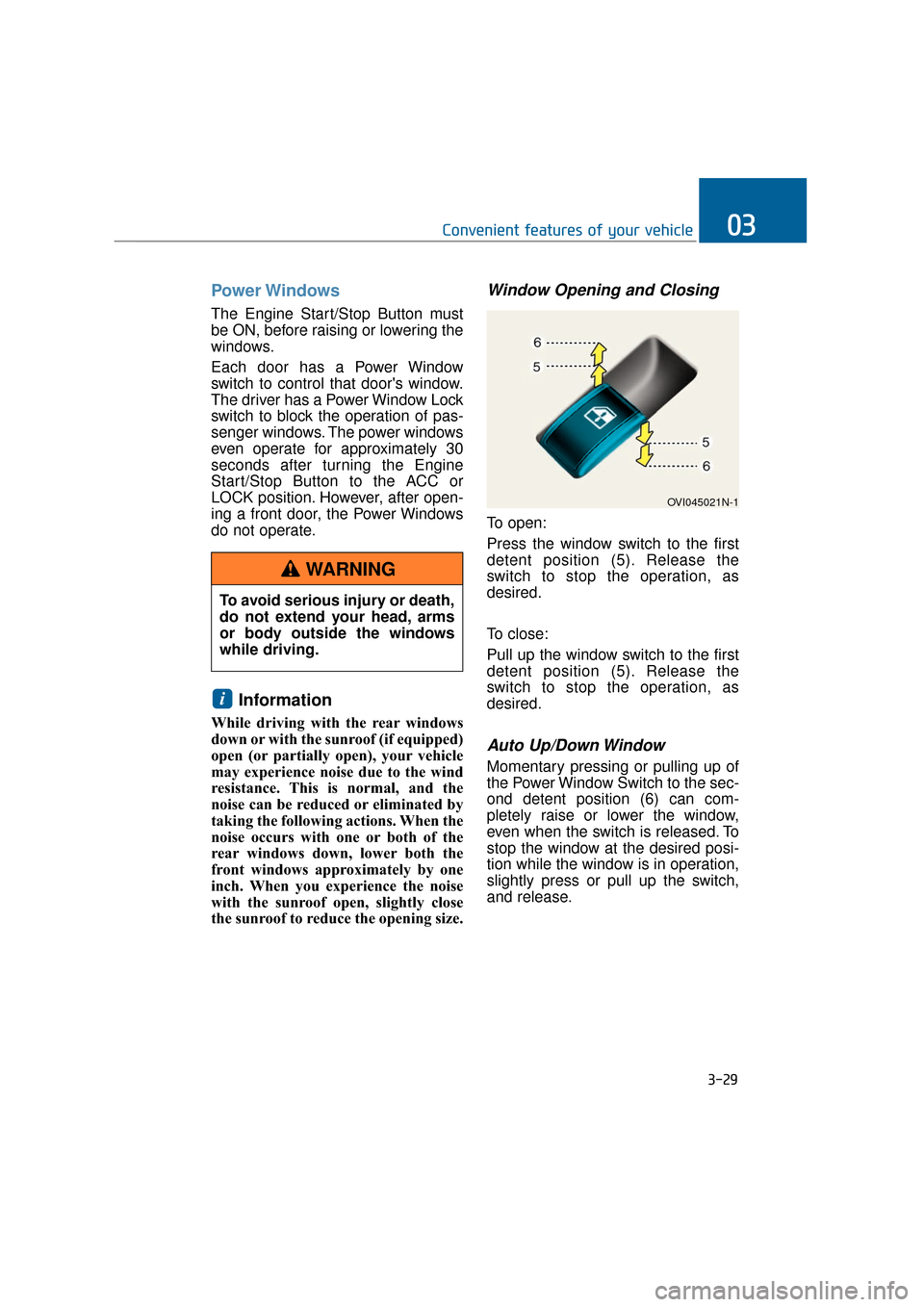
Window Opening and Closing
To open:
Press the window switch to the first
detent position (5). Release the
switch to stop the operation, as
desired.
To close:
Pull up the window switch to the first
detent position (5). Release the
switch to stop the operation, as
desired.
Auto Up/Down Window
Momentary pressing or pulling up of
the Power Window Switch to the sec-
ond detent position (6) can com-
pletely raise or lower the window,
even when the switch is released. To
stop the window at the desired posi-
tion while the window is in operation,
slightly press or pull up the switch,
and release.
i
3-29
Convenient features of your vehicle03
To avoid serious injury or death,
do not extend your head, arms
or body outside the windows
while driving.
WARNING
OVI045021N-1
Page 126 of 477
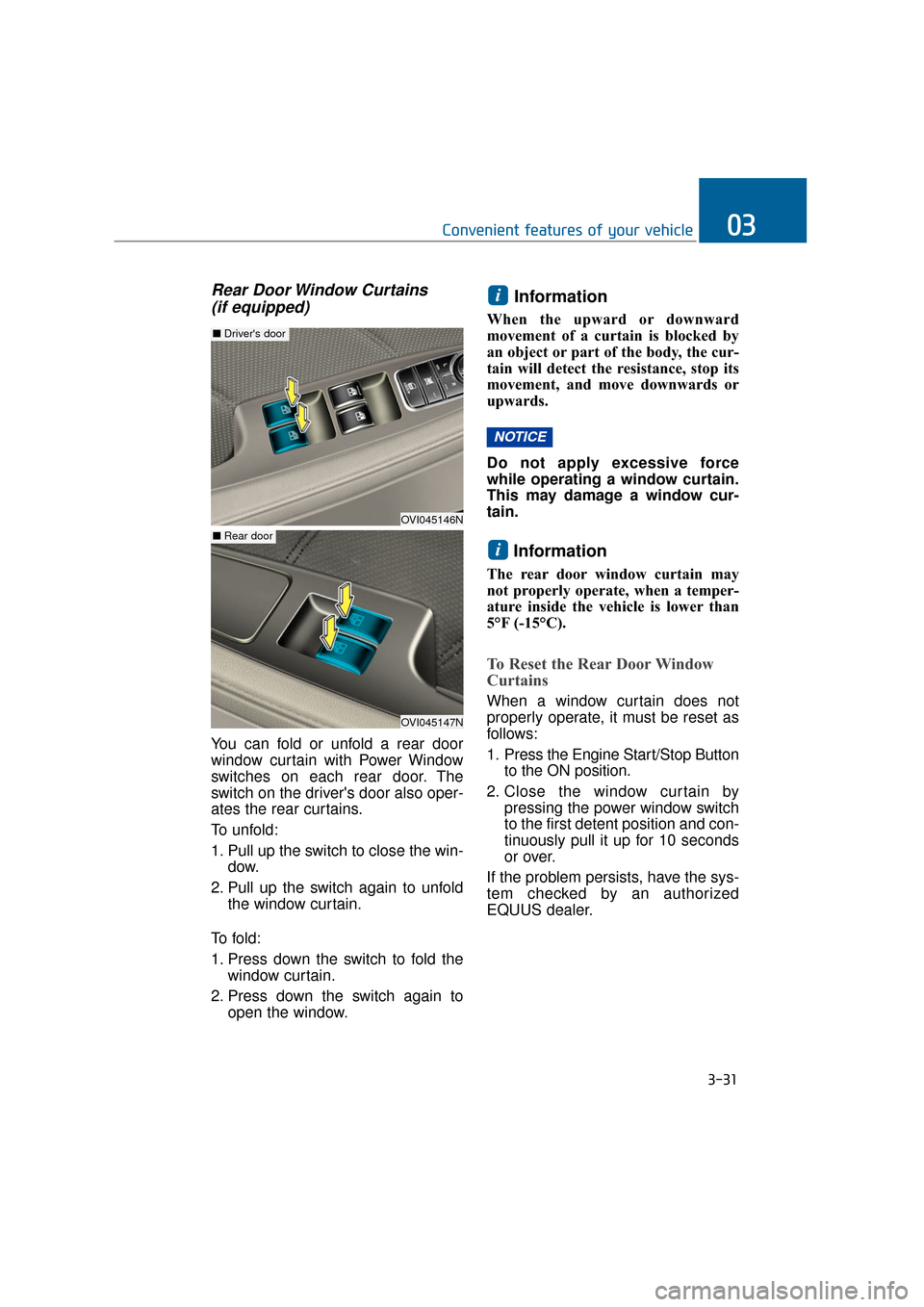
Rear Door Window Curtains (if equipped)
You can fold or unfold a rear door
window curtain with Power Window
switches on each rear door. The
switch on the driver's door also oper-
ates the rear curtains.
To unfold:
1. Pull up the switch to close the win-
dow.
2. Pull up the switch again to unfold the window curtain.
To f o l d :
1. Press down the switch to fold the window curtain.
2. Press down the switch again to open the window.
Information
When the upward or downward
movement of a curtain is blocked by
an object or part of the body, the cur-
tain will detect the resistance, stop its
movement, and move downwards or
upwards.
Do not apply excessive force
while operating a window curtain.
This may damage a window cur-
tain.
Information
The rear door window curtain may
not properly operate, when a temper-
ature inside the vehicle is lower than
5°F (-15°C).
To Reset the Rear Door Window
Curtains
When a window curtain does not
properly operate, it must be reset as
follows:
1. Press the Engine Start/Stop Button to the ON position.
2. Close the window curtain by pressing the power window switch
to the first detent position and con-
tinuously pull it up for 10 seconds
or over.
If the problem persists, have the sys-
tem checked by an authorized
EQUUS dealer.
i
NOTICE
i
3-31
Convenient features of your vehicle03
OVI045146N
■ Driver's door
OVI045147N
■ Rear door
Page 127 of 477
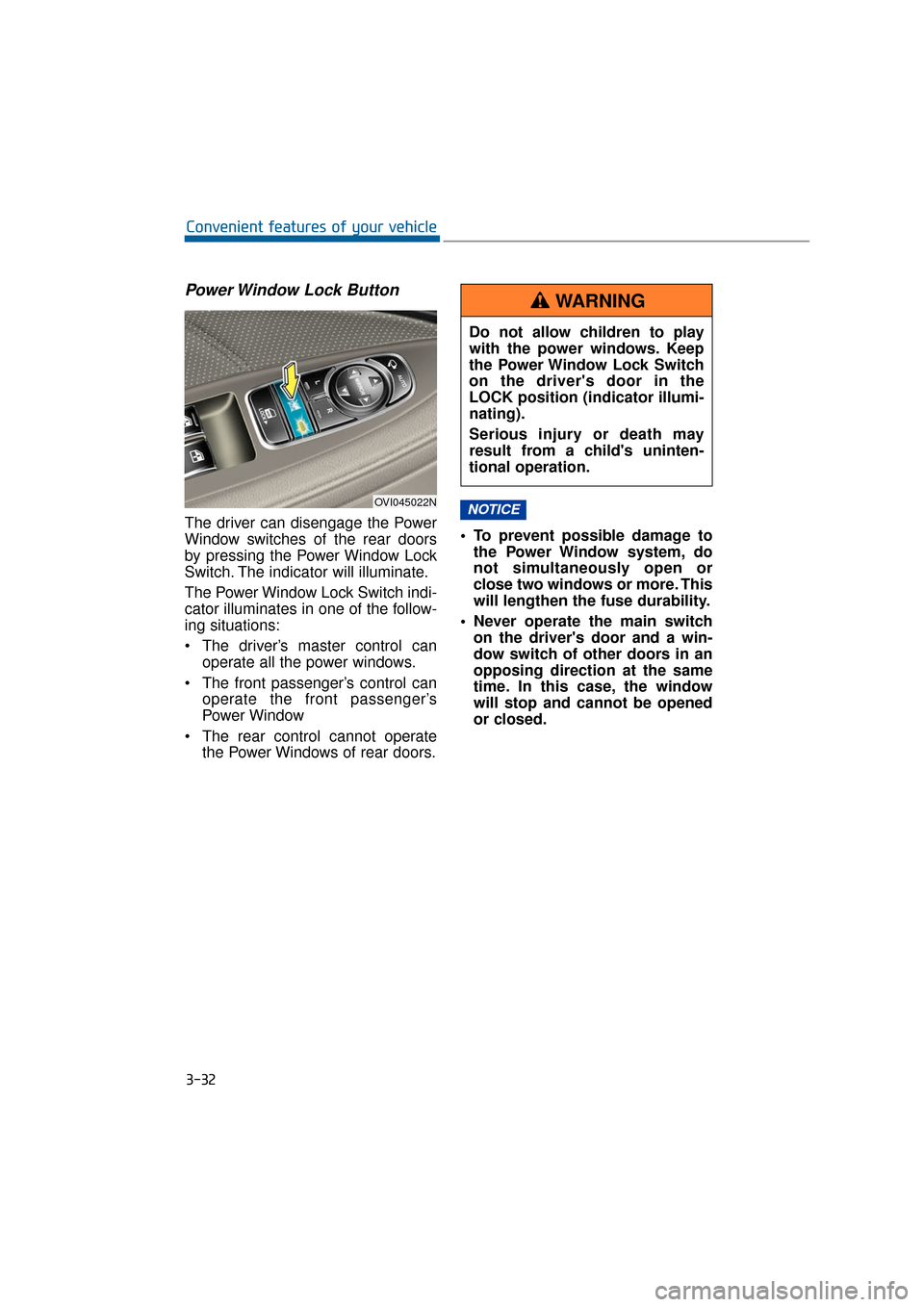
Power Window Lock Button
The driver can disengage the Power
Window switches of the rear doors
by pressing the Power Window Lock
Switch. The indicator will illuminate.
The Power Window Lock Switch indi-
cator illuminates in one of the follow-
ing situations:
The driver’s master control canoperate all the power windows.
The front passenger’s control can operate the front passenger’s
Power Window
The rear control cannot operate the Power Windows of rear doors. To prevent possible damage to
the Power Window system, do
not simultaneously open or
close two windows or more. This
will lengthen the fuse durability.
Never operate the main switch on the driver's door and a win-
dow switch of other doors in an
opposing direction at the same
time. In this case, the window
will stop and cannot be opened
or closed.NOTICE
3-32
Convenient features of your vehicle
OVI045022N
Do not allow children to play
with the power windows. Keep
the Power Window Lock Switch
on the driver's door in the
LOCK position (indicator illumi-
nating).
Serious injury or death may
result from a child's uninten-
tional operation.
WARNING
Page 129 of 477
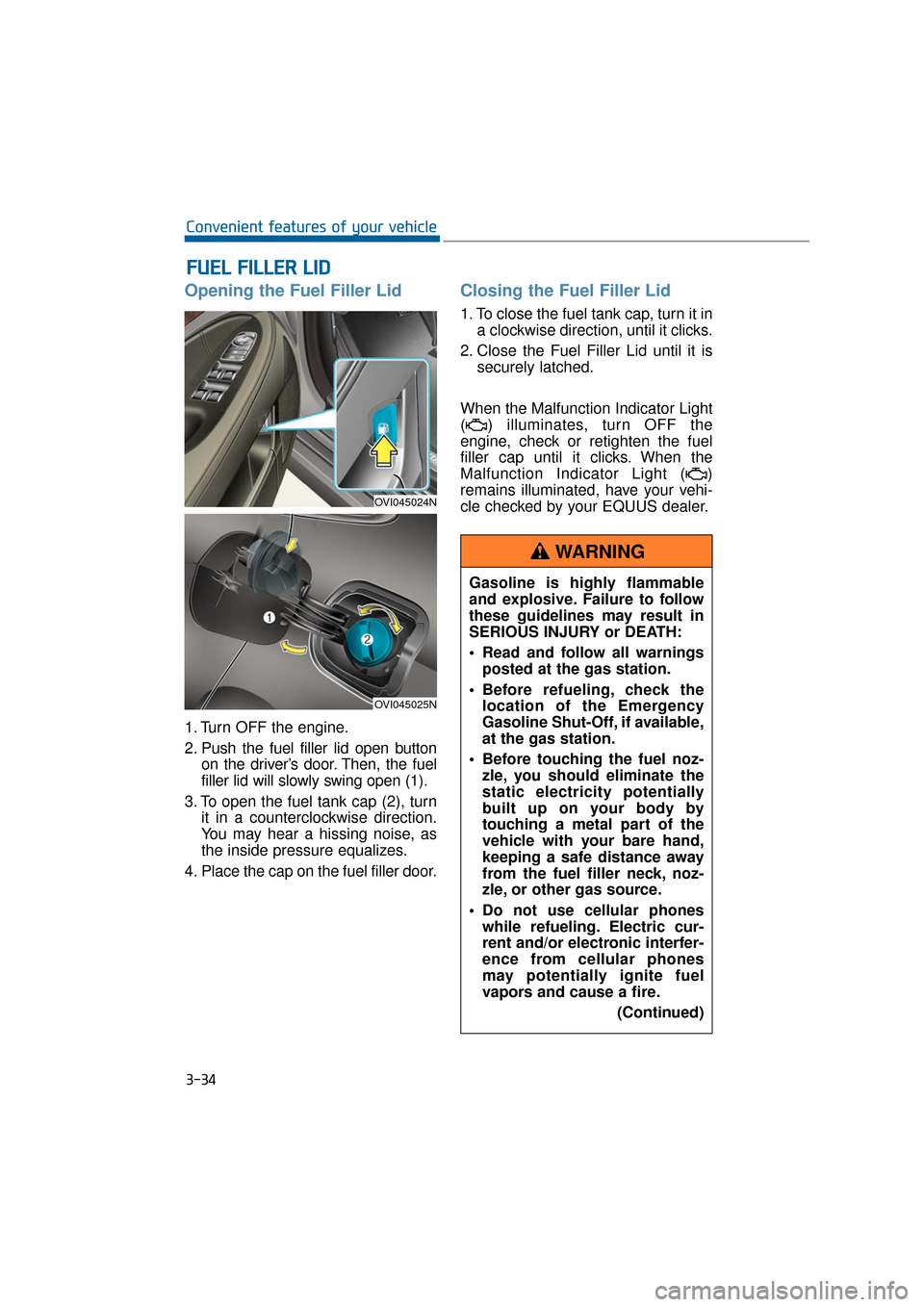
Opening the Fuel Filler Lid
1. Turn OFF the engine.
2. Push the fuel filler lid open buttonon the driver’s door. Then, the fuel
filler lid will slowly swing open (1).
3. To open the fuel tank cap (2), turn it in a counterclockwise direction.
You may hear a hissing noise, as
the inside pressure equalizes.
4. Place the cap on the fuel filler door.
Closing the Fuel Filler Lid
1. To close the fuel tank cap, turn it in a clockwise direction, until it clicks.
2. Close the Fuel Filler Lid until it is securely latched.
When the Malfunction Indicator Light
( ) illuminates, turn OFF the
engine, check or retighten the fuel
filler cap until it clicks. When the
Malfunction Indicator Light ( )
remains illuminated, have your vehi-
cle checked by your EQUUS dealer.
F
F U
U E
EL
L
F
F I
IL
L L
LE
E R
R
L
L I
ID
D
3-34
Convenient features of your vehicle
OVI045024N
OVI045025N
Gasoline is highly flammable
and explosive. Failure to follow
these guidelines may result in
SERIOUS INJURY or DEATH:
Read and follow all warnings
posted at the gas station.
Before refueling, check the location of the Emergency
Gasoline Shut-Off, if available,
at the gas station.
Before touching the fuel noz- zle, you should eliminate the
static electricity potentially
built up on your body by
touching a metal part of the
vehicle with your bare hand,
keeping a safe distance away
from the fuel filler neck, noz-
zle, or other gas source.
Do not use cellular phones while refueling. Electric cur-
rent and/or electronic interfer-
ence from cellular phones
may potentially ignite fuel
vapors and cause a fire.
(Continued)
WARNING
Page 142 of 477
There are some conditions that can
cause changes to the vehicle mag-
nets, such as installing a ski rack or
a CB antenna. Body repair work on
the vehicle can also cause changes
to the vehicle's magnetic field. In
these situations, the compass will
need to be re-calibrated to quickly
correct these changes. To re-cali-
brate the compass:
1. Press and hold the button formore than 9 seconds. When the
compass memory is deleted, a let-
ter "C" will appear on the display.
2. To calibrate the compass, drive the vehicle in a circle twice at less
than 5 mph (8 km/h).
Integrated HomeLink®Wireless
Control System
The HomeLink®Wireless Control
System provides a convenient way to
replace up to three hand-held
radiofrequency (RF) transmitters
with a single built-in device. This
innovative feature will learn the radio
frequency codes of most current
transmitters to operate devices such
as gate operators, garage door
openers, entry door locks, security
systems, and even home lighting.
Both standard and rolling code-
equipped transmitters can be pro-
grammed by following the outlined
procedures. Additional HomeLink
®
information can be found at:
www.homelink.com or by calling 1-
800-355-3515. Retain the original transmitter of the
RF device you programmed for use
in other vehicles as well as for future
HomeLink
®programming. It is also
suggested that upon the sale of the
vehicle, the programmed HomeLink
®
buttons be erased for security pur-
poses.
3-47
Convenient features of your vehicle03
Before programming
HomeLink®to a garage door
opener or gate operator, make
sure that people and objects are
out of the way from the device
to prevent potential harm or
damage. Do not use HomeLink
®
with any garage door opener
that lacks the safety stop and
reverse features required by
U.S. federal safety standards
(this includes any garage door
opener model manufactured
before April 1, 1982). A garage
door that cannot detect an
object - signaling the door to
stop and reverse - does not
meet current U.S. federal safety
standards. Using a garage door
opener without these features
increases the risk of serious
injury or death.
WARNING