steering wheel Hyundai Equus 2016 Owner's Guide
[x] Cancel search | Manufacturer: HYUNDAI, Model Year: 2016, Model line: Equus, Model: Hyundai Equus 2016Pages: 477, PDF Size: 16.25 MB
Page 175 of 477
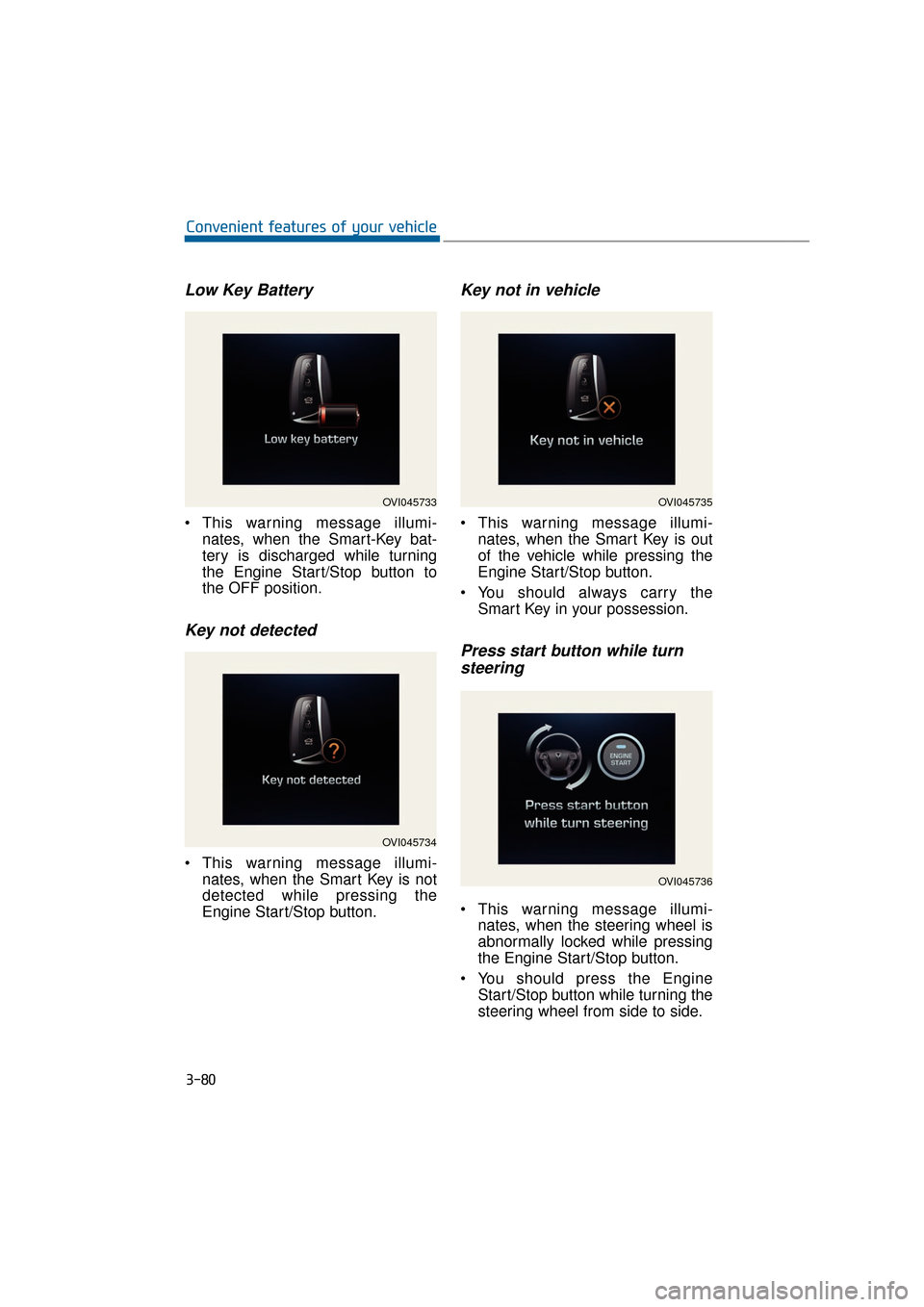
Low Key Battery
This warning message illumi-nates, when the Smart-Key bat-
tery is discharged while turning
the Engine Start/Stop button to
the OFF position.
Key not detected
This warning message illumi-nates, when the Smart Key is not
detected while pressing the
Engine Start/Stop button.
Key not in vehicle
This warning message illumi-nates, when the Smart Key is out
of the vehicle while pressing the
Engine Start/Stop button.
You should always carry the Smart Key in your possession.
Press start button while turnsteering
This warning message illumi-
nates, when the steering wheel is
abnormally locked while pressing
the Engine Start/Stop button.
You should press the Engine Start/Stop button while turning the
steering wheel from side to side.
3-80
Convenient features of your vehicle
OVI045733
OVI045734
OVI045735
OVI045736
Page 176 of 477
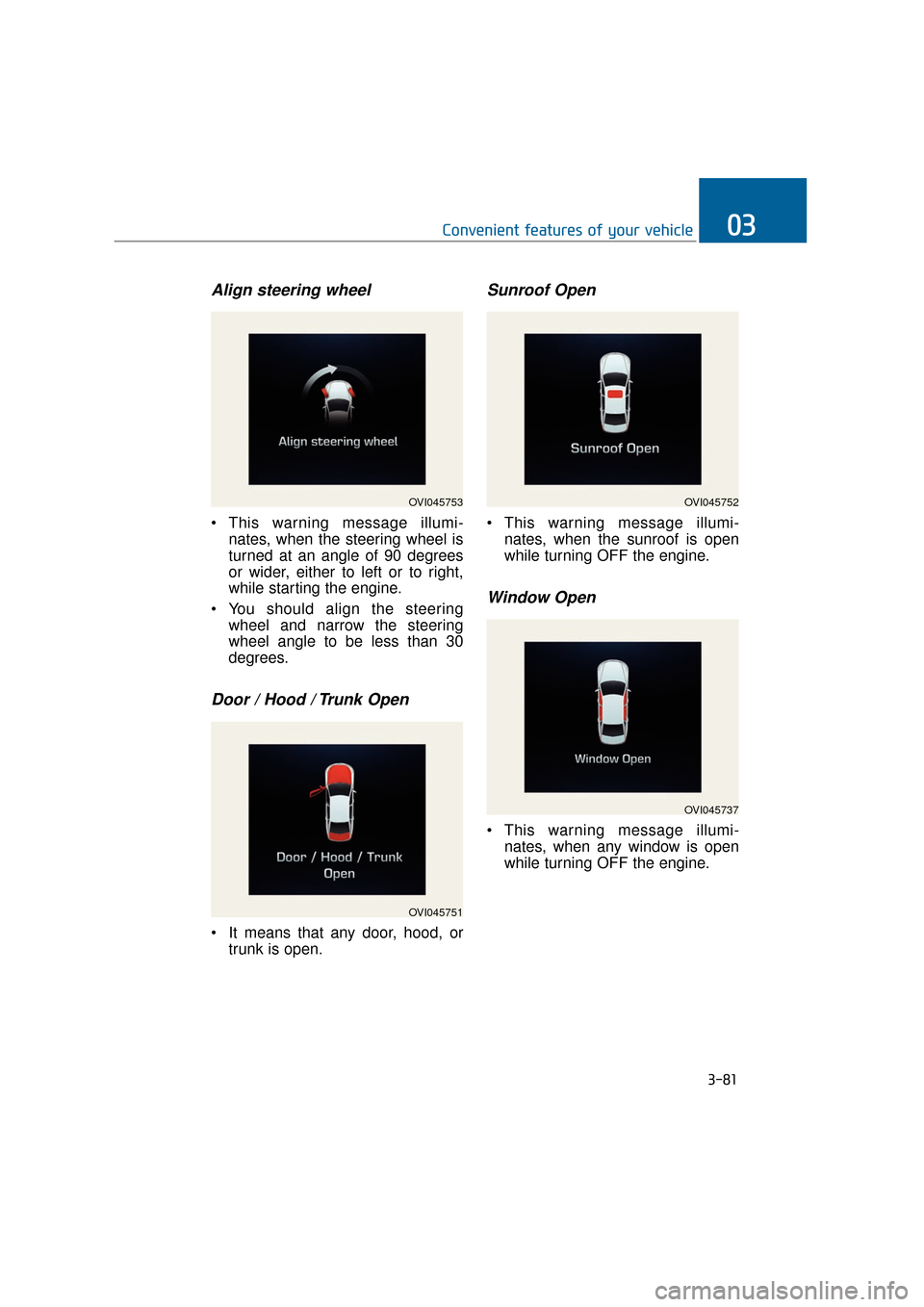
Align steering wheel
This warning message illumi-nates, when the steering wheel is
turned at an angle of 90 degrees
or wider, either to left or to right,
while starting the engine.
You should align the steering wheel and narrow the steering
wheel angle to be less than 30
degrees.
Door / Hood / Trunk Open
It means that any door, hood, ortrunk is open.
Sunroof Open
This warning message illumi-nates, when the sunroof is open
while turning OFF the engine.
Window Open
This warning message illumi-nates, when any window is open
while turning OFF the engine.
3-81
Convenient features of your vehicle03
OVI045753
OVI045751
OVI045752
OVI045737
Page 181 of 477
Overview
Description
The trip computer is a driving infor-
mation system, controlled by a
micro-computer. This displays driv-
ing-related information.
Information
Some driving information, stored in
the trip computer (i.e. average vehicle
speed), is reset, when the battery is
disconnected.
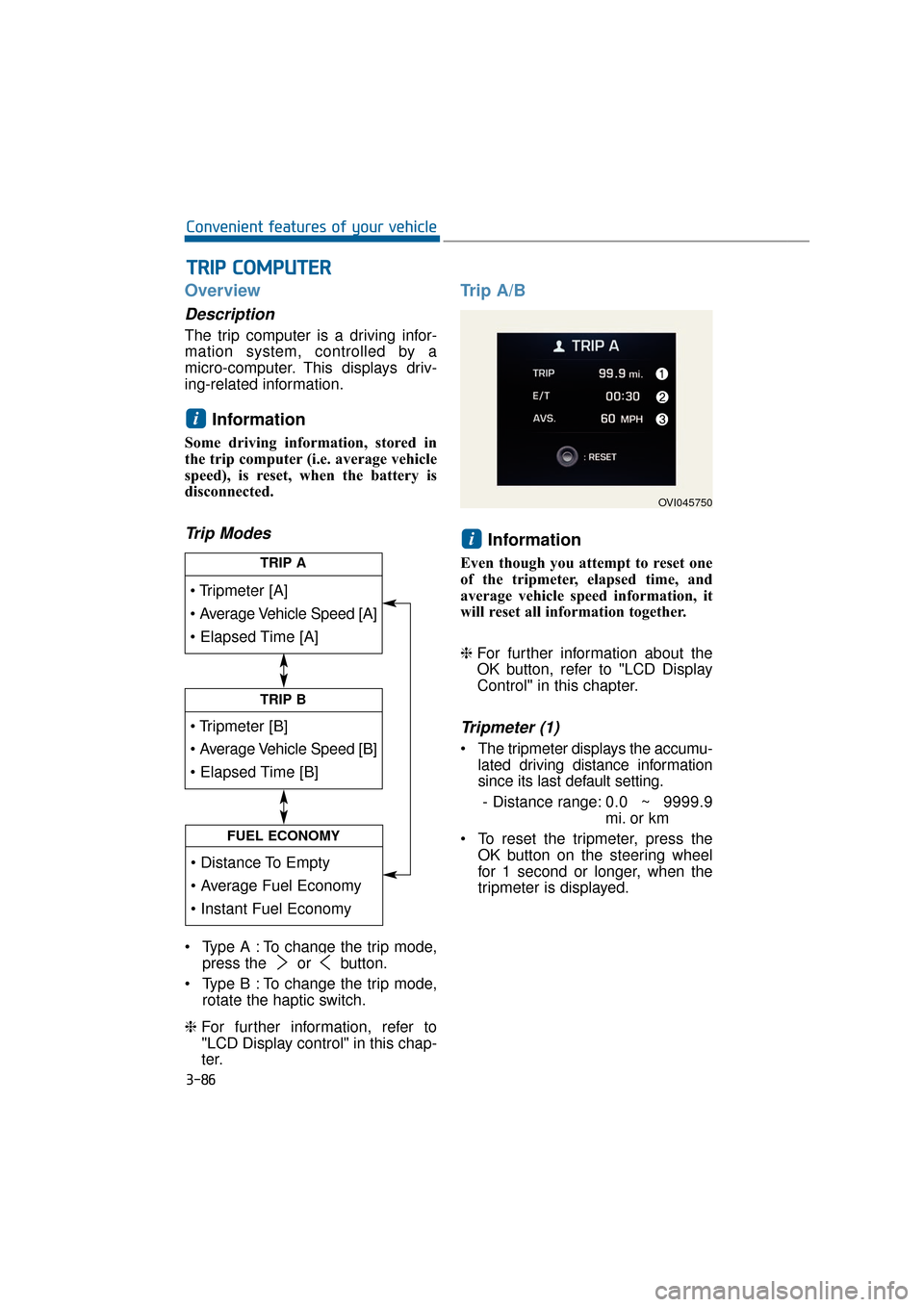
Trip Modes
Type A : To change the trip mode,press the or button.
Type B : To change the trip mode, rotate the haptic switch.
❈ For further information, refer to
"LCD Display control" in this chap-
ter.
Trip A/B
Information
Even though you attempt to reset one
of the tripmeter, elapsed time, and
average vehicle speed information, it
will reset all information together.
❈For further information about the
OK button, refer to "LCD Display
Control" in this chapter.
Tripmeter (1)
The tripmeter displays the accumu-
lated driving distance information
since its last default setting.
- Distance range: 0.0 ~ 9999.9
mi. or km
To reset the tripmeter, press the OK button on the steering wheel
for 1 second or longer, when the
tripmeter is displayed.
i
i
T
TR
R I
IP
P
C
C O
O M
M P
PU
U T
TE
ER
R
3-86
Convenient features of your vehicle
TRIP A
TRIP B
FUEL ECONOMY
OVI045750
Page 182 of 477
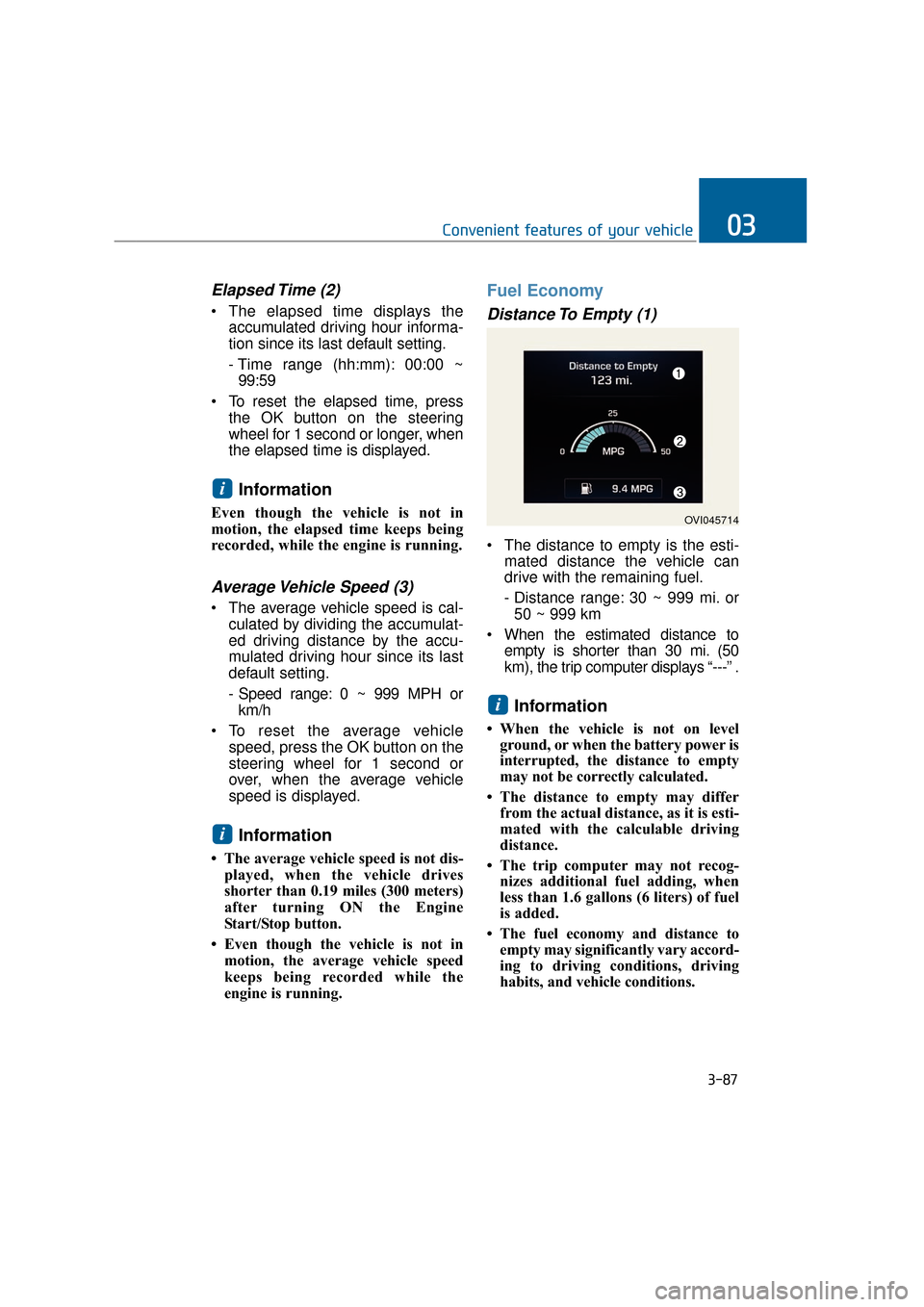
Elapsed Time (2)
The elapsed time displays theaccumulated driving hour informa-
tion since its last default setting.
- Time range (hh:mm): 00:00 ~99:59
To reset the elapsed time, press the OK button on the steering
wheel for 1 second or longer, when
the elapsed time is displayed.
Information
Even though the vehicle is not in
motion, the elapsed time keeps being
recorded, while the engine is running.
Average Vehicle Speed (3)
The average vehicle speed is cal-culated by dividing the accumulat-
ed driving distance by the accu-
mulated driving hour since its last
default setting.
- Speed range: 0 ~ 999 MPH orkm/h
To reset the average vehicle speed, press the OK button on the
steering wheel for 1 second or
over, when the average vehicle
speed is displayed.
Information
• The average vehicle speed is not dis-played, when the vehicle drives
shorter than 0.19 miles (300 meters)
after turning ON the Engine
Start/Stop button.
• Even though the vehicle is not in motion, the average vehicle speed
keeps being recorded while the
engine is running.
Fuel Economy
Distance To Empty (1)
The distance to empty is the esti- mated distance the vehicle can
drive with the remaining fuel.
- Distance range: 30 ~ 999 mi. or50 ~ 999 km
When the estimated distance to empty is shorter than 30 mi. (50
km), the trip computer displays “---” .
Information
• When the vehicle is not on levelground, or when the battery power is
interrupted, the distance to empty
may not be correctly calculated.
• The distance to empty may differ from the actual distance, as it is esti-
mated with the calculable driving
distance.
• The trip computer may not recog- nizes additional fuel adding, when
less than 1.6 gallons (6 liters) of fuel
is added.
• The fuel economy and distance to empty may significantly vary accord-
ing to driving conditions, driving
habits, and vehicle conditions.
i
i
i
3-87
Convenient features of your vehicle03
OVI045714
Page 183 of 477
Instant Fuel Economy (2)
This mode displays the instant fueleconomy during the last few sec-
onds when a driving speed exceeds
6.2 MPH (10 km/h).
- Fuel economy range: 0 ~ 50MPG or 0 ~ 20 L/100km
Average Fuel Economy (3)
The average fuel economy is cal- culated by dividing the total driving
distance by the fuel consumption
since its last default setting.
- Fuel economy range: 0.0 ~ 99.9MPG or L/100km
The average fuel economy can be reset both manually and automati-
cally.
Manual reset
To manually reset the average fuel
economy, press the OK button on the
steering wheel for 1 second or over,
when the average fuel economy is
displayed.
❈For further information about the
OK button, refer to "LCD Display
Control" in this chapter.
Automatic reset
To automatically reset the average
fuel economy after refueling, select
the "Auto Reset" mode in User
Setting menu on the LCD display
(Refer to "LCD Display").
In "Auto Reset" mode, the average
fuel economy will be reset to zero
(---), when more than 1.6 gallons (6
liters) of fuel is added, and then a
driving speed exceeds 1 km/h.
Information
The average fuel economy may dis-
play inaccurate calculation, when the
vehicle drives shorter than 0.19 miles
(300 meters) after turning ON the
Engine Start/Stop button.
i
3-88
Convenient features of your vehicle
Page 186 of 477
Information
- Electronic Brake forceDistribution (EBD) System
Warning Light
When the ABS warning light illumi-
nates, or when both the ABS and the
Parking Brake & Brake Fluid warn-
ing lights illuminate, the speedometer,
the odometer, or the tripmeter may
not properly operate. Also, the EPS
warning light may illuminate, and the
efforts to operate the steering wheel
may require to increase or decrease.
In this case, have your vehicle inspect-
ed by an authorized EQUUS dealer.
Malfunction Indicator Lamp (MIL)
This warning light illuminates in
one of the following situations:
You turn ON either the ignition
switch or the Engine Start/Stop
button.
- It remains ON until the engine isstarted.
There is a malfunction with the emission control system.
In this case, have your vehicle
inspected by an authorized
EQUUS dealer.
- Malfunction Indicator Lamp (MIL)
Driving with the Malfunction
Indicator Lamp (MIL) ON may
damage the emission control sys-
tems which could affect drivability
and/or fuel economy.
- Gasoline Engine
When the Malfunction Indicator
Lamp (MIL) illuminates, the cat-
alytic converter is possibly dam-
aged, resulting in loss of engine
power.
In this case, have your vehicle
inspected by an authorized
EQUUS dealer.
NOTICE
NOTICE
i
3-91
Convenient features of your vehicle03
- Electronic Brake force Distribution (EBD) System
Warning Light
When both ABS and the Parking
Brake & Brake Fluid warning
lights illuminate, the brake sys-
tem does not properly operate.
You may experience an unex-
pected and dangerous situation
in a sudden braking.
In this case, avoid sharp driving
and abrupt braking. Have your
vehicle inspected by an author-
ized EQUUS dealer.
WARNING
Page 249 of 477

Multimedia system
Multimedia system .................................................4-2
Antenna ........................................................................\
.......4-2
Steering wheel audio control .........................................4-3
Page 251 of 477
Steering wheel audio control
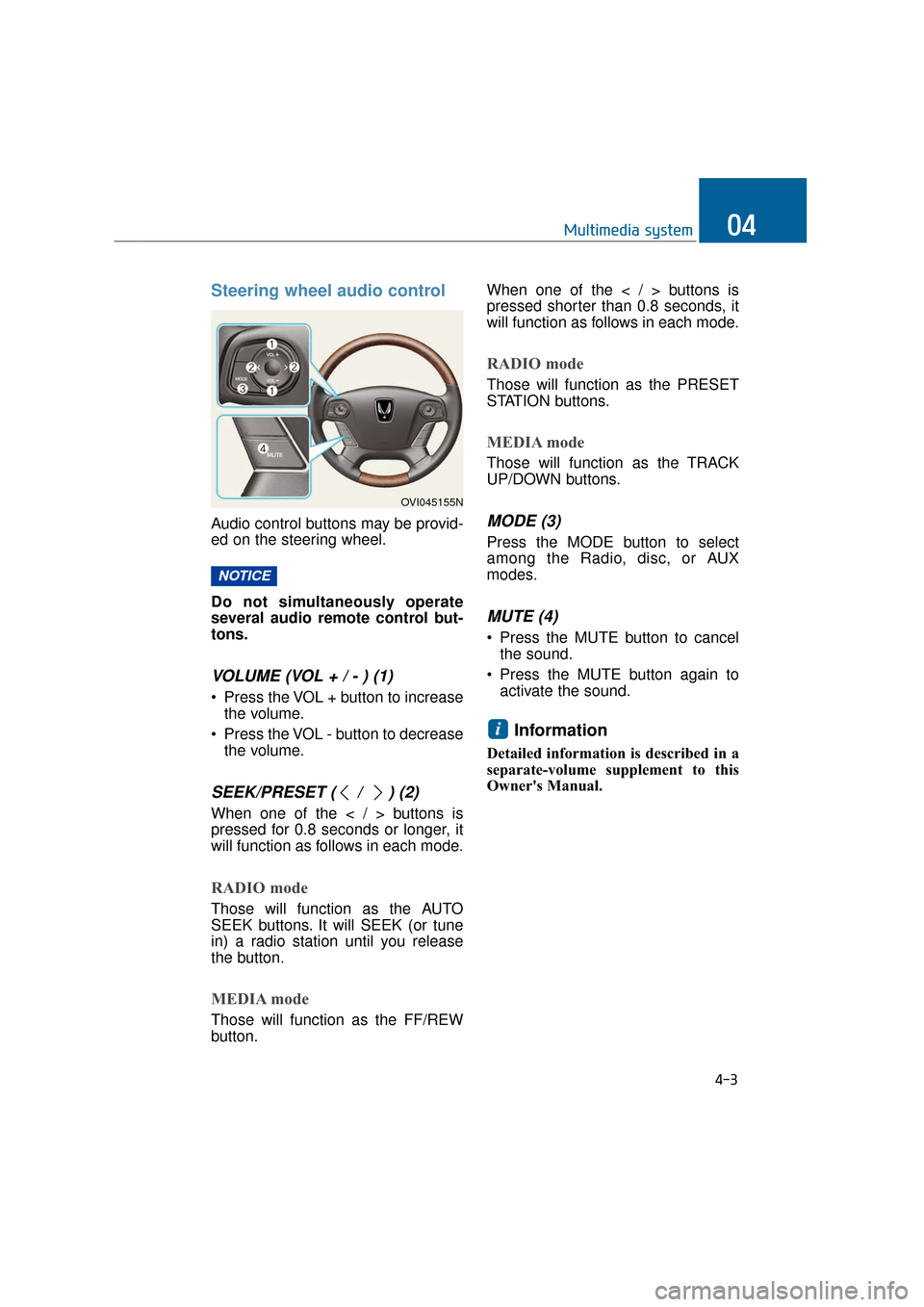
Audio control buttons may be provid-
ed on the steering wheel.
Do not simultaneously operate
several audio remote control but-
tons.
VOLUME (VOL + / - ) (1)
• Press the VOL + button to increasethe volume.
Press the VOL - button to decrease the volume.
SEEK/PRESET ( / ) (2)
When one of the < / > buttons is
pressed for 0.8 seconds or longer, it
will function as follows in each mode.
RADIO mode
Those will function as the AUTO
SEEK buttons. It will SEEK (or tune
in) a radio station until you release
the button.
MEDIA mode
Those will function as the FF/REW
button. When one of the < / > buttons is
pressed shorter than 0.8 seconds, it
will function as follows in each mode.
RADIO mode
Those will function as the PRESET
STATION buttons.
MEDIA mode
Those will function as the TRACK
UP/DOWN buttons.
MODE (3)
Press the MODE button to select
among the Radio, disc, or AUX
modes.
MUTE (4)
Press the MUTE button to cancel
the sound.
Press the MUTE button again to activate the sound.
Information
Detailed information is described in a
separate-volume supplement to this
Owner's Manual.
i
NOTICE
4-3
Multimedia system04
OVI045155N
Page 259 of 477
START
To start the engine, depress the
brake pedal and press the Engine
Start/Stop Button with the shift gear
in P(Park) or N(Neutral).
For your safety, start the engine with
the shift gear in P(Park).
Information
• If you press the Engine Start/Stopbutton without depressing the brake
pedal, the engine does not start.
When the Engine Start/Stop button
is pressed, it changes as follows:
OFF → →
ACC →
→
ON →
→
OFF
• If you leave the Engine Start/Stop Button in the ACC or the ON posi-
tion for a long time, the battery will
be discharged.
i
5-8
Driving your vehicle
Never press the Engine Start/Stop button while the
vehicle is in motion except in
an emergency situation. This
would turn the engine OFF,
resulting in loss of power
assist for the steering wheel
and brake. This may lead to
loss of directional control and
braking function, which could
cause an accident.
(Continued)
(Continued)
Before leaving the driver’sseat, always make sure the
shift gear is engaged in P
(Park), fully set the parking
brake and turn the engine
OFF. Unexpected and sudden
vehicle movement may occur
if these precautions are not
taken.
Never touch the Engine Start/Stop button, or any other
controls on the steering wheel
while the vehicle is in motion.
Reaching out for those con-
trols with your hand or arm
may cause a loss of vehicle
control, an accident, serious
bodily injury or death.
Do not place any loose objects around the driver’s
seat, as they may toss about
while driving, interfering with
the driver's pedal operation
and leading to an accident.
WARNING
Page 267 of 477
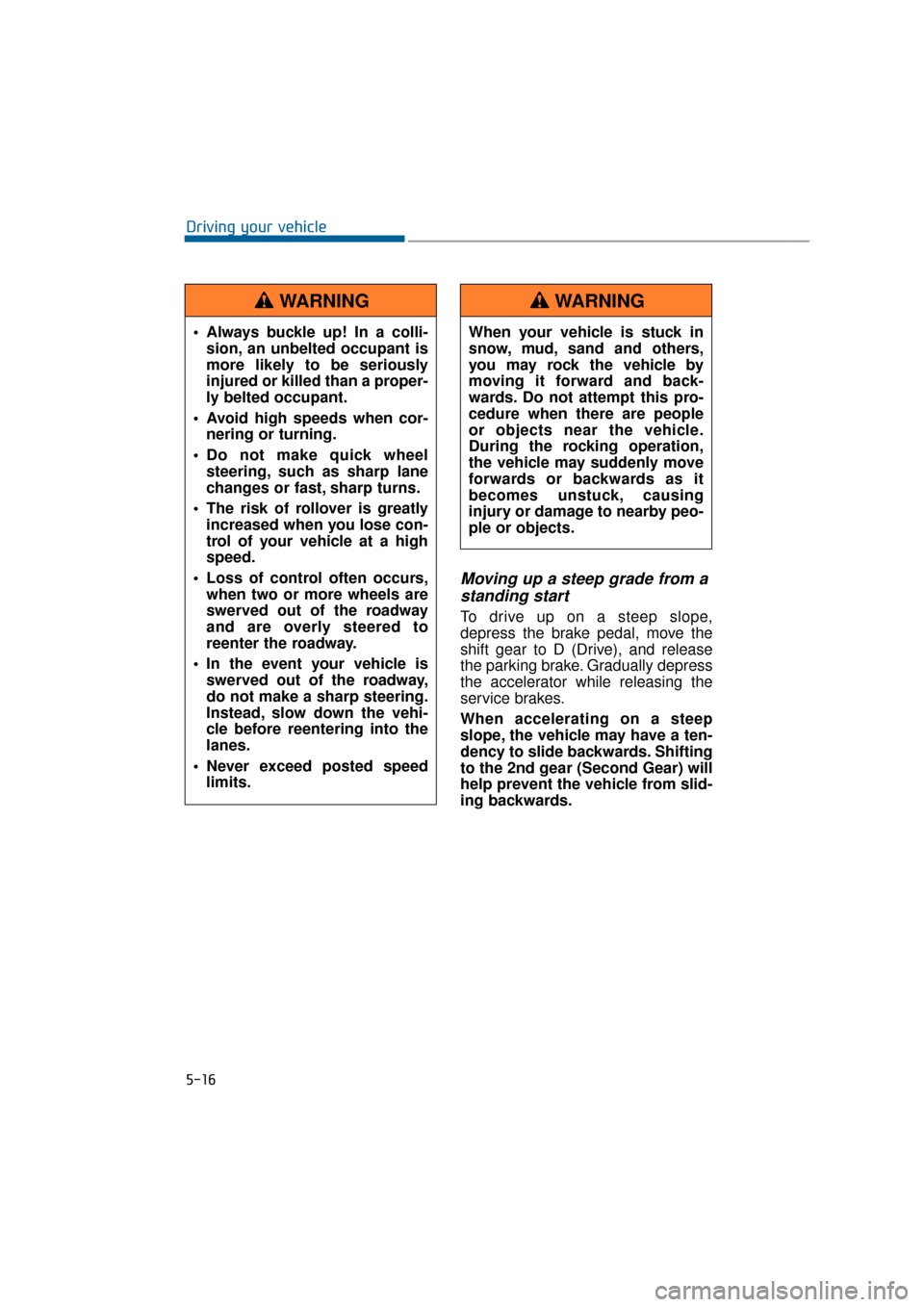
Moving up a steep grade from astanding start
To drive up on a steep slope,
depress the brake pedal, move the
shift gear to D (Drive), and release
the parking brake. Gradually depress
the accelerator while releasing the
service brakes.
When accelerating on a steep
slope, the vehicle may have a ten-
dency to slide backwards. Shifting
to the 2nd gear (Second Gear) will
help prevent the vehicle from slid-
ing backwards.
5-16
Driving your vehicle
Always buckle up! In a colli- sion, an unbelted occupant is
more likely to be seriously
injured or killed than a proper-
ly belted occupant.
Avoid high speeds when cor- nering or turning.
Do not make quick wheel steering, such as sharp lane
changes or fast, sharp turns.
The risk of rollover is greatly increased when you lose con-
trol of your vehicle at a high
speed.
Loss of control often occurs, when two or more wheels are
swerved out of the roadway
and are overly steered to
reenter the roadway.
In the event your vehicle is swerved out of the roadway,
do not make a sharp steering.
Instead, slow down the vehi-
cle before reentering into the
lanes.
Never exceed posted speed limits.
WARNING
When your vehicle is stuck in
snow, mud, sand and others,
you may rock the vehicle by
moving it forward and back-
wards. Do not attempt this pro-
cedure when there are people
or objects near the vehicle.
During the rocking operation,
the vehicle may suddenly move
forwards or backwards as it
becomes unstuck, causing
injury or damage to nearby peo-
ple or objects.
WARNING