cruise control Hyundai Genesis 2010 User Guide
[x] Cancel search | Manufacturer: HYUNDAI, Model Year: 2010, Model line: Genesis, Model: Hyundai Genesis 2010Pages: 399, PDF Size: 10 MB
Page 267 of 399
Driving your vehicle
40 5
Decreasing the vehicle speed to less
than approximately 6.2 mph (10 km/h)
as the vehicle in front of you.
Accelerating the vehicle speed to more
than approximately 113 mph (180
km/h).
The ESC is turned off.
The sensor or the cover is dirty or
obscured with foreign matter.
Each of these actions will cancel smart
cruise control operation (the SET indica-
tor light, set speed and vehicle to vehicle
distance on the LCD screen will go off),
but it will not turn the system off. If you
wish to resume smart cruise control
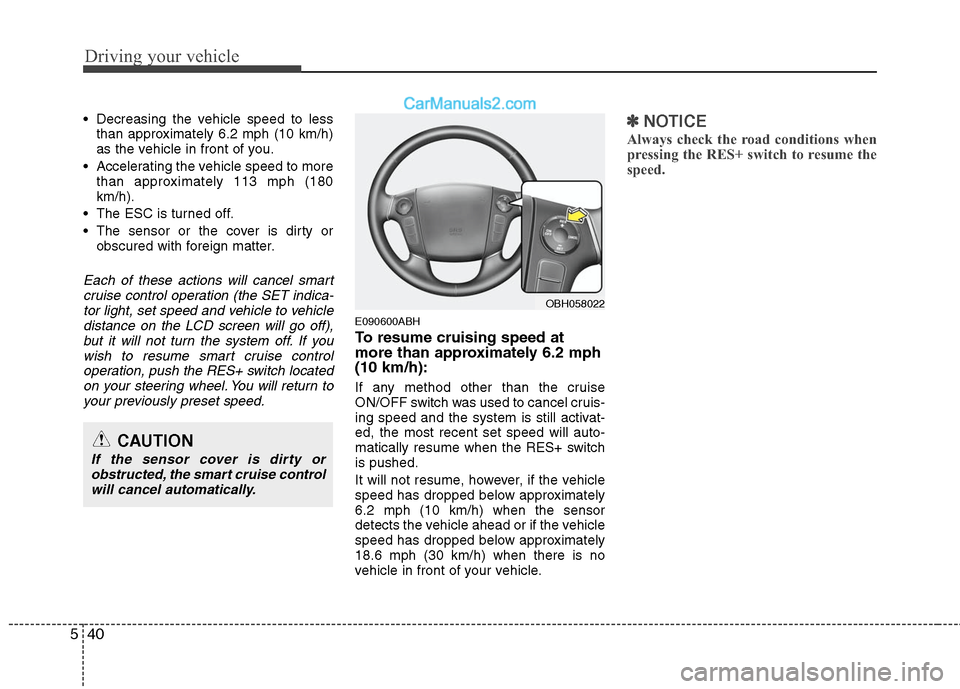
operation, push the RES+ switch located
on your steering wheel. You will return to
your previously preset speed.
E090600ABH
To resume cruising speed at
more than approximately 6.2 mph
(10 km/h):
If any method other than the cruise
ON/OFF switch was used to cancel cruis-
ing speed and the system is still activat-
ed, the most recent set speed will auto-
matically resume when the RES+ switch
is pushed.
It will not resume, however, if the vehicle
speed has dropped below approximately
6.2 mph (10 km/h) when the sensor
detects the vehicle ahead or if the vehicle
speed has dropped below approximately
18.6 mph (30 km/h) when there is no
vehicle in front of your vehicle.
✽ ✽
NOTICE
Always check the road conditions when
pressing the RES+ switch to resume the
speed.
OBH058022
CAUTION
If the sensor cover is dirty or
obstructed, the smart cruise control
will cancel automatically.
Page 268 of 399
541
Driving your vehicle
E150700ABH
To turn cruise control off, do one
of the following:
Push the cruise ON/OFF button (the
CRUISE indicator light in the instru-
ment cluster will go off).
Turn the engine off.
Both of these actions cancel smart cruise
control operation. If you want to resume
smart cruise control operation, repeat
the steps provided in “To set cruise con-
trol speed” on the previous page.
E150800ABH
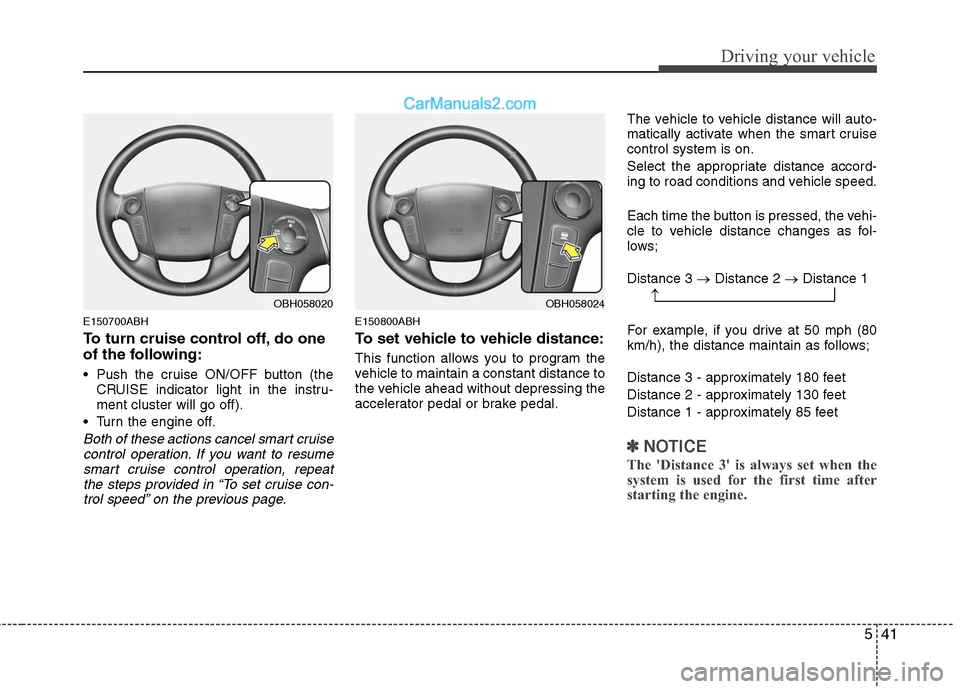
To set vehicle to vehicle distance:
This function allows you to program the
vehicle to maintain a constant distance to
the vehicle ahead without depressing the
accelerator pedal or brake pedal.The vehicle to vehicle distance will auto-
matically activate when the smart cruise
control system is on.
Select the appropriate distance accord-
ing to road conditions and vehicle speed.
Each time the button is pressed, the vehi-
cle to vehicle distance changes as fol-
lows;
Distance 3 →Distance 2 →Distance 1
For example, if you drive at 50 mph (80
km/h), the distance maintain as follows;
Distance 3 - approximately 180 feet
Distance 2 - approximately 130 feet
Distance 1 - approximately 85 feet
✽ ✽
NOTICE
The 'Distance 3' is always set when the
system is used for the first time after
starting the engine.
OBH058024OBH058020→
Page 269 of 399
Driving your vehicle
42 5
E150801ABH
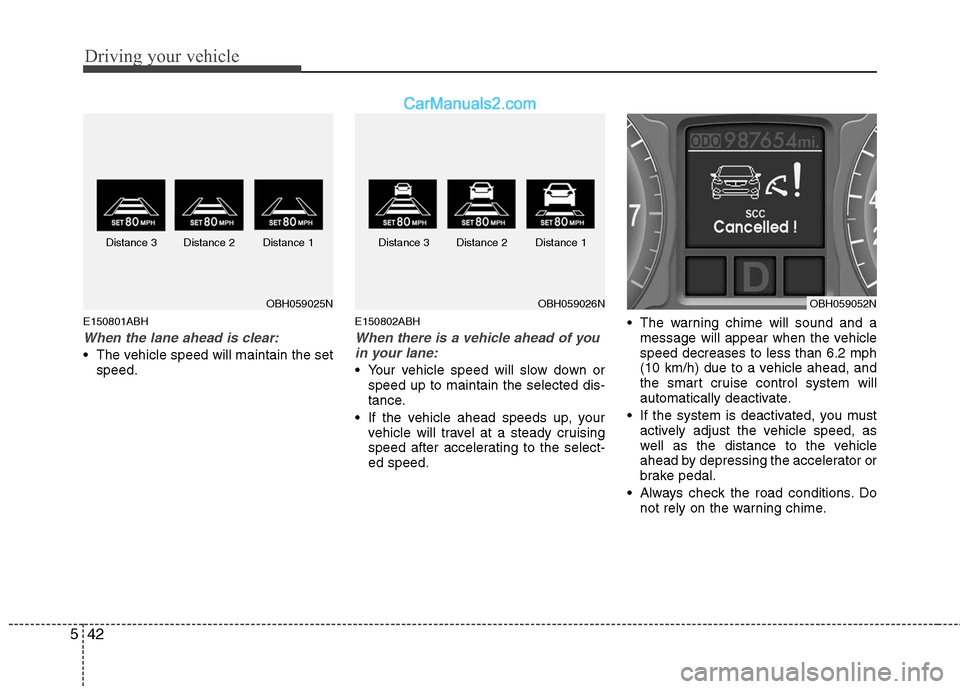
When the lane ahead is clear:
The vehicle speed will maintain the set
speed.
E150802ABH
When there is a vehicle ahead of you
in your lane:
Your vehicle speed will slow down or
speed up to maintain the selected dis-
tance.
If the vehicle ahead speeds up, your
vehicle will travel at a steady cruising
speed after accelerating to the select-
ed speed. The warning chime will sound and a
message will appear when the vehicle
speed decreases to less than 6.2 mph
(10 km/h) due to a vehicle ahead, and
the smart cruise control system will
automatically deactivate.
If the system is deactivated, you must
actively adjust the vehicle speed, as
well as the distance to the vehicle
ahead by depressing the accelerator or
brake pedal.
Always check the road conditions. Do
not rely on the warning chime.
OBH059025NOBH059026N Distance 3 Distance 2 Distance 1 Distance 3 Distance 2 Distance 1OBH059052N
Page 271 of 399
Driving your vehicle
44 5
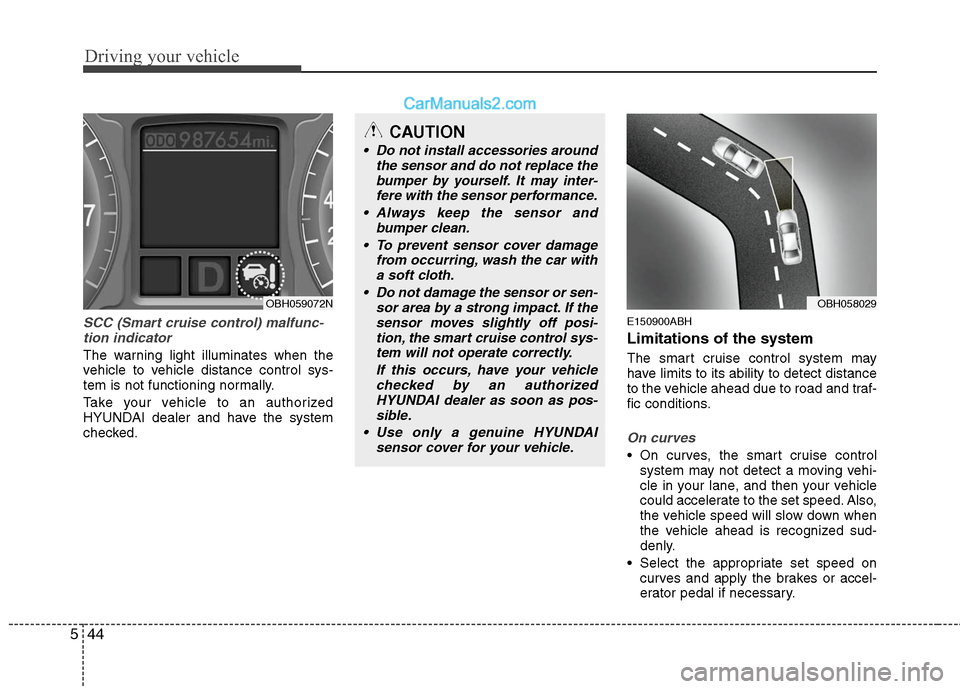
SCC (Smart cruise control) malfunc-
tion indicator
The warning light illuminates when the
vehicle to vehicle distance control sys-
tem is not functioning normally.
Take your vehicle to an authorized
HYUNDAI dealer and have the system
checked.
E150900ABH
Limitations of the system
The smart cruise control system may
have limits to its ability to detect distance
to the vehicle ahead due to road and traf-
fic conditions.
On curves
On curves, the smart cruise control
system may not detect a moving vehi-
cle in your lane, and then your vehicle
could accelerate to the set speed. Also,
the vehicle speed will slow down when
the vehicle ahead is recognized sud-
denly.
Select the appropriate set speed on
curves and apply the brakes or accel-
erator pedal if necessary.
CAUTION
Do not install accessories around
the sensor and do not replace the
bumper by yourself. It may inter-
fere with the sensor performance.
Always keep the sensor and
bumper clean.
To prevent sensor cover damage
from occurring, wash the car with
a soft cloth.
Do not damage the sensor or sen-
sor area by a strong impact. If the
sensor moves slightly off posi-
tion, the smart cruise control sys-
tem will not operate correctly.
If this occurs, have your vehicle
checked by an authorized
HYUNDAI dealer as soon as pos-
sible.
Use only a genuine HYUNDAI
sensor cover for your vehicle.
OBH059072NOBH058029
Page 272 of 399
545
Driving your vehicle
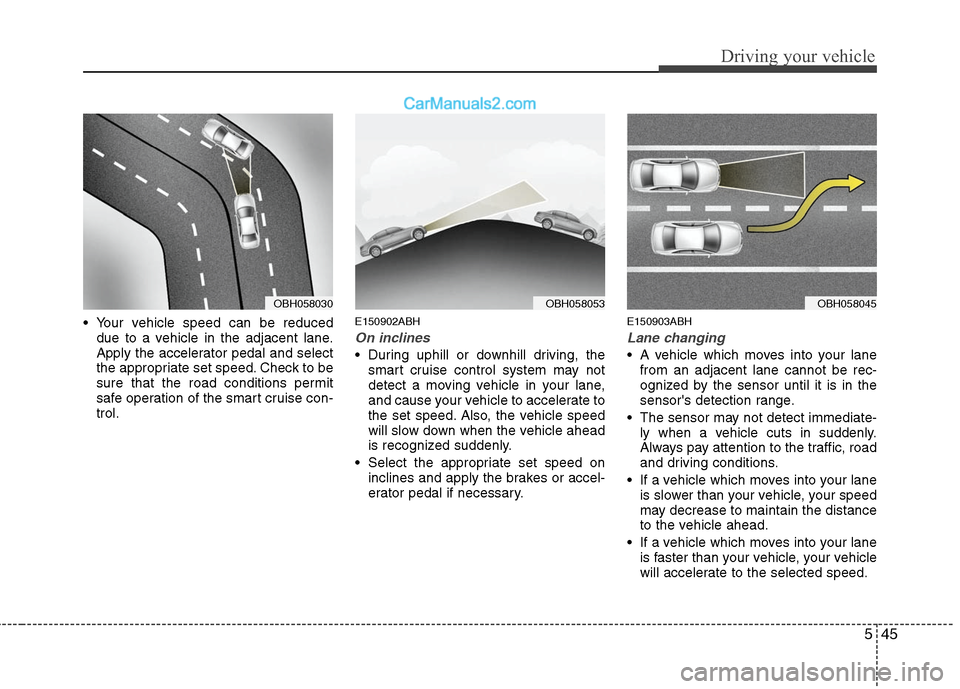
Your vehicle speed can be reduced
due to a vehicle in the adjacent lane.
Apply the accelerator pedal and select
the appropriate set speed. Check to be
sure that the road conditions permit
safe operation of the smart cruise con-
trol.E150902ABH
On inclines
During uphill or downhill driving, the
smart cruise control system may not
detect a moving vehicle in your lane,
and cause your vehicle to accelerate to
the set speed. Also, the vehicle speed
will slow down when the vehicle ahead
is recognized suddenly.
Select the appropriate set speed on
inclines and apply the brakes or accel-
erator pedal if necessary.
E150903ABH
Lane changing
A vehicle which moves into your lane
from an adjacent lane cannot be rec-
ognized by the sensor until it is in the
sensor's detection range.
The sensor may not detect immediate-
ly when a vehicle cuts in suddenly.
Always pay attention to the traffic, road
and driving conditions.
If a vehicle which moves into your lane
is slower than your vehicle, your speed
may decrease to maintain the distance
to the vehicle ahead.
If a vehicle which moves into your lane
is faster than your vehicle, your vehicle
will accelerate to the selected speed.
OBH058030OBH058053OBH058045
Page 273 of 399
Driving your vehicle
46 5
E150904ABH
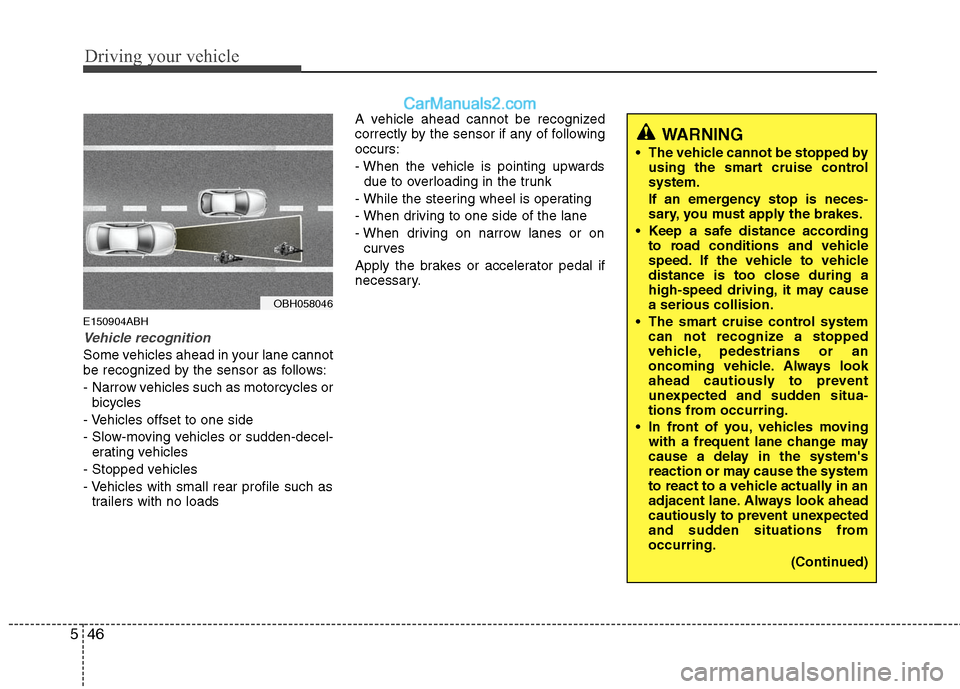
Vehicle recognition
Some vehicles ahead in your lane cannot
be recognized by the sensor as follows:
- Narrow vehicles such as motorcycles or
bicycles
- Vehicles offset to one side
- Slow-moving vehicles or sudden-decel-
erating vehicles
- Stopped vehicles
- Vehicles with small rear profile such as
trailers with no loadsA vehicle ahead cannot be recognized
correctly by the sensor if any of following
occurs:
- When the vehicle is pointing upwards
due to overloading in the trunk
- While the steering wheel is operating
- When driving to one side of the lane
- When driving on narrow lanes or on
curves
Apply the brakes or accelerator pedal if
necessary.
OBH058046
WARNING
The vehicle cannot be stopped by
using the smart cruise control
system.
If an emergency stop is neces-
sary, you must apply the brakes.
Keep a safe distance according
to road conditions and vehicle
speed. If the vehicle to vehicle
distance is too close during a
high-speed driving, it may cause
a serious collision.
The smart cruise control system
can not recognize a stopped
vehicle, pedestrians or an
oncoming vehicle. Always look
ahead cautiously to prevent
unexpected and sudden situa-
tions from occurring.
In front of you, vehicles moving
with a frequent lane change may
cause a delay in the system's
reaction or may cause the system
to react to a vehicle actually in an
adjacent lane. Always look ahead
cautiously to prevent unexpected
and sudden situations from
occurring.
(Continued)
Page 274 of 399
547
Driving your vehicle
(Continued)
The smart cruise control system
is not a substitute for safe driving
practices but a convenience
function only. It is the responsi-
bility of the driver to always
check the speed and the distance
to the vehicle ahead.
Always be aware of the selected
speed and vehicle to vehicle dis-
tance.
Always maintain sufficient brak-
ing distance and decelerate your
vehicle by applying the brakes if
necessary.
As the smart cruise control sys-
tem may not recognize complex
driving situations, always pay
attention to driving conditions
and control your vehicle speed.
For safe operation, carefully read
and follow the instructions in this
manual before use.CAUTION
The smart cruise control system
may not operate temporarily due to
electrical interferene.
Page 364 of 399
749
Maintenance
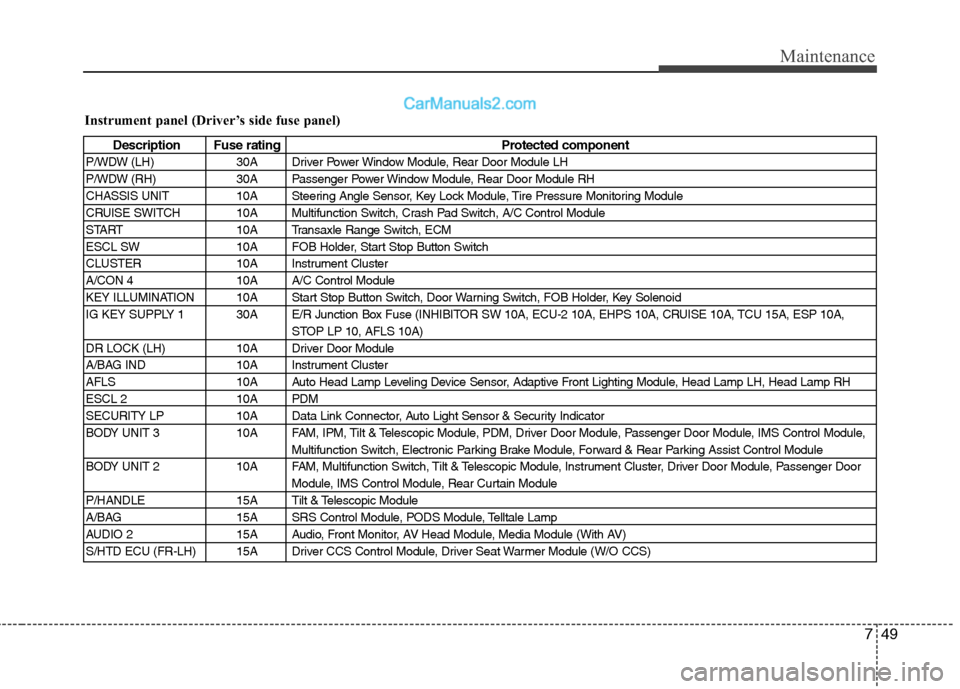
Instrument panel (Driver’s side fuse panel)
Description Fuse rating Protected component
P/WDW (LH) 30A Driver Power Window Module, Rear Door Module LH
P/WDW (RH) 30A Passenger Power Window Module, Rear Door Module RH
CHASSIS UNIT 10A Steering Angle Sensor, Key Lock Module, Tire Pressure Monitoring Module
CRUISE SWITCH 10A Multifunction Switch, Crash Pad Switch, A/C Control Module
START 10A Transaxle Range Switch, ECM
ESCL SW 10A FOB Holder, Start Stop Button Switch
CLUSTER 10A Instrument Cluster
A/CON 4 10A A/C Control Module
KEY ILLUMINATION 10A Start Stop Button Switch, Door Warning Switch, FOB Holder, Key Solenoid
IG KEY SUPPLY 1 30A E/R Junction Box Fuse (INHIBITOR SW 10A, ECU-2 10A, EHPS 10A, CRUISE 10A, TCU 15A, ESP 10A,
STOP LP 10, AFLS 10A)
DR LOCK (LH) 10A Driver Door Module
A/BAG IND 10A Instrument Cluster
AFLS 10A Auto Head Lamp Leveling Device Sensor, Adaptive Front Lighting Module, Head Lamp LH, Head Lamp RH
ESCL 2 10A PDM
SECURITY LP 10A Data Link Connector, Auto Light Sensor & Security Indicator
BODY UNIT 3 10A FAM, IPM, Tilt & Telescopic Module, PDM, Driver Door Module, Passenger Door Module, IMS Control Module,
Multifunction Switch, Electronic Parking Brake Module, Forward & Rear Parking Assist Control Module
BODY UNIT 2 10A FAM, Multifunction Switch, Tilt & Telescopic Module, Instrument Cluster, Driver Door Module, Passenger Door
Module, IMS Control Module, Rear Curtain Module
P/HANDLE 15A Tilt & Telescopic Module
A/BAG 15A SRS Control Module, PODS Module, Telltale Lamp
AUDIO 2 15A Audio, Front Monitor, AV Head Module, Media Module (With AV)
S/HTD ECU (FR-LH) 15A Driver CCS Control Module, Driver Seat Warmer Module (W/O CCS)
Page 367 of 399
Maintenance
52 7
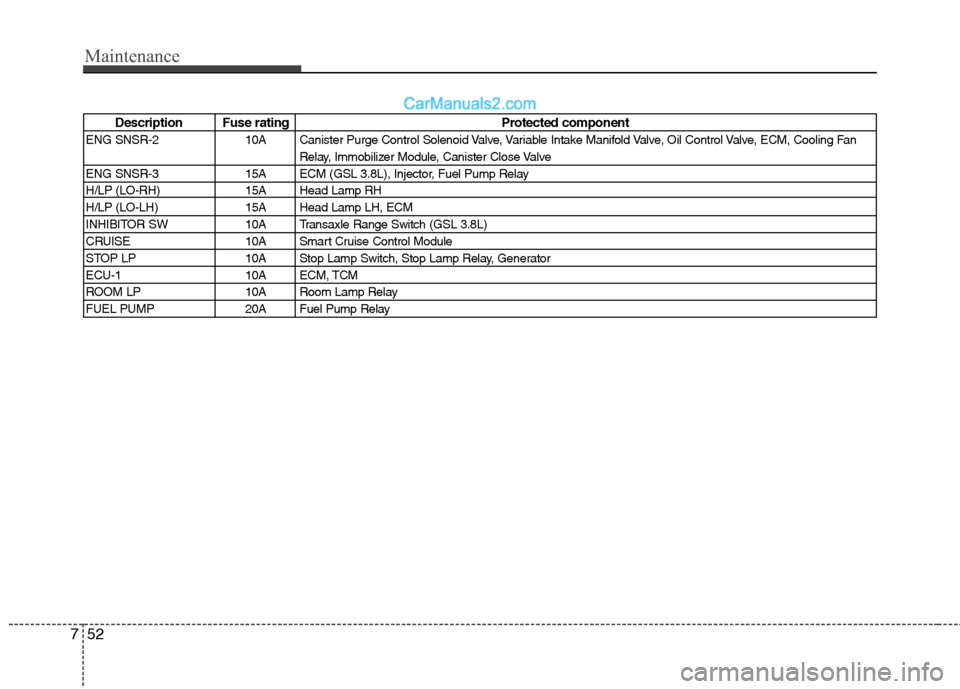
Description Fuse rating Protected component
ENG SNSR-2 10A Canister Purge Control Solenoid Valve, Variable Intake Manifold Valve, Oil Control Valve, ECM, Cooling Fan
Relay, Immobilizer Module, Canister Close Valve
ENG SNSR-3 15A ECM (GSL 3.8L), Injector, Fuel Pump Relay
H/LP (LO-RH) 15A Head Lamp RH
H/LP (LO-LH) 15A Head Lamp LH, ECM
INHIBITOR SW 10A Transaxle Range Switch (GSL 3.8L)
CRUISE 10A Smart Cruise Control Module
STOP LP 10A Stop Lamp Switch, Stop Lamp Relay, Generator
ECU-1 10A ECM, TCM
ROOM LP 10A Room Lamp Relay
FUEL PUMP 20A Fuel Pump Relay
Page 394 of 399
Index
2I
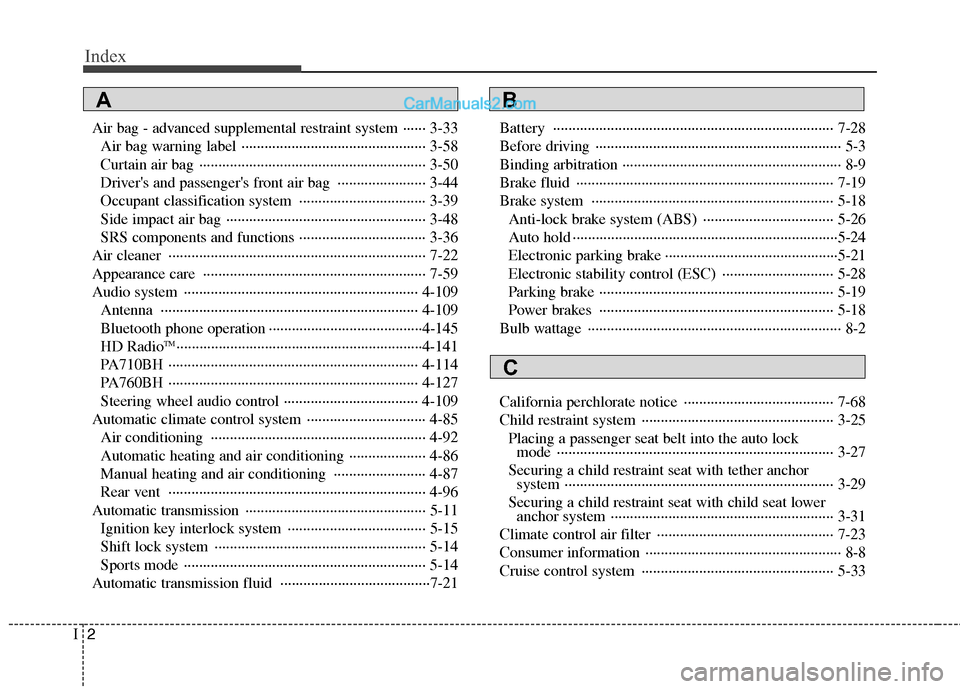
Air bag - advanced supplemental restraint system ······ 3-33
Air bag warning label ················································ 3-58
Curtain air bag ··························································· 3-50
Driver's and passenger's front air bag ······················· 3-44
Occupant classification system ································· 3-39
Side impact air bag ···················································· 3-48
SRS components and functions ································· 3-36
Air cleaner ··································································· 7-22
Appearance care ·························································· 7-59
Audio system ····························································· 4-109
Antenna ··································································· 4-109
Bluetooth phone operation ········································4-145
HD Radio
TM································································4-141
PA710BH ································································· 4-114
PA760BH ································································· 4-127
Steering wheel audio control ··································· 4-109
Automatic climate control system ······························· 4-85
Air conditioning ························································ 4-92
Automatic heating and air conditioning ···················· 4-86
Manual heating and air conditioning ························ 4-87
Rear vent ··································································· 4-96
Automatic transmission ··············································· 5-11
Ignition key interlock system ···································· 5-15
Shift lock system ······················································· 5-14
Sports mode ······························································· 5-14
Automatic transmission fluid ·······································7-21Battery ········································································· 7-28
Before driving ································································ 5-3
Binding arbitration ························································· 8-9
Brake fluid ··································································· 7-19
Brake system ······························································· 5-18
Anti-lock brake system (ABS) ·································· 5-26
Auto hold ·····································································5-24
Electronic parking brake ·············································5-21
Electronic stability control (ESC) ····························· 5-28
Parking brake ····························································· 5-19
Power brakes ····························································· 5-18
Bulb wattage ·································································· 8-2
California perchlorate notice ······································· 7-68
Child restraint system ·················································· 3-25
Placing a passenger seat belt into the auto lock
mode ········································································ 3-27
Securing a child restraint seat with tether anchor
system ······································································ 3-29
Securing a child restraint seat with child seat lower
anchor system ·························································· 3-31
Climate control air filter ·············································· 7-23
Consumer information ··················································· 8-8
Cruise control system ·················································· 5-33
AB
C