deactivate Hyundai Genesis 2010 Owner's Manual
[x] Cancel search | Manufacturer: HYUNDAI, Model Year: 2010, Model line: Genesis, Model: Hyundai Genesis 2010Pages: 399, PDF Size: 10 MB
Page 58 of 399
339
Safety features of your vehicle
C040300ABH
Occupant classification system
Your vehicle is equipped with an occu-
pant classification system in the front
passenger's seat.
The occupant classification system is
designed to detect the presence of a
properly-seated front passenger and
determine if the passenger's front air bag
should be enabled (may inflate) or not.
The driver's front air bag is not affected
or controlled by the occupant classifica-
tion system.
Main components of occupant
classification system
A detection device located within the
front passenger seat cushion.
Electronic system to determine
whether the passenger air bag sys-
tems (both front and side) should be
activated or deactivated.
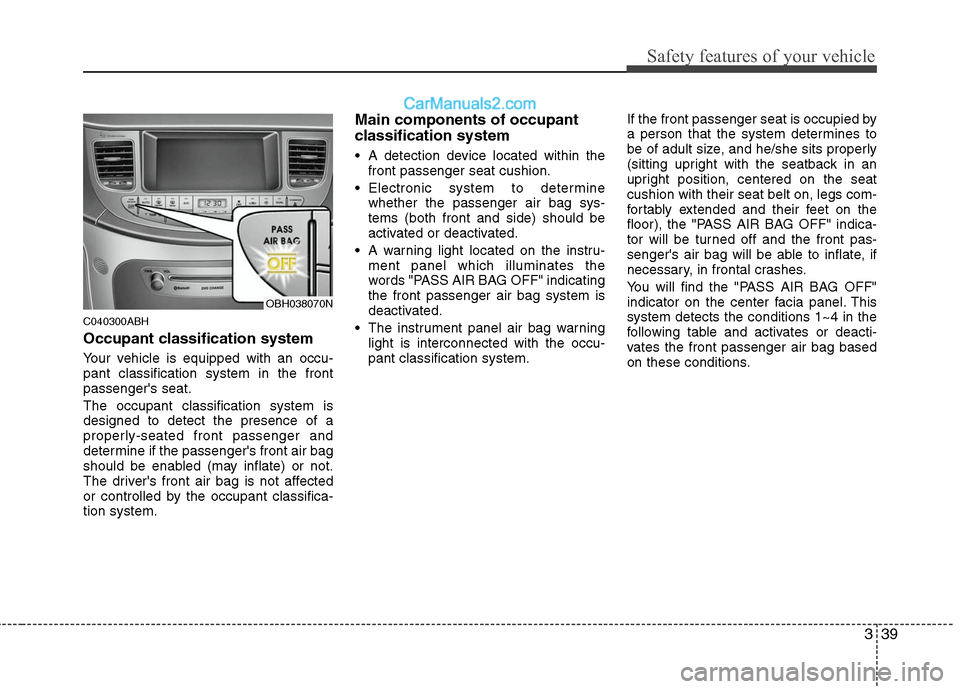
A warning light located on the instru-
ment panel which illuminates the
words "PASS AIR BAG OFF" indicating
the front passenger air bag system is
deactivated.
The instrument panel air bag warning
light is interconnected with the occu-
pant classification system.If the front passenger seat is occupied by
a person that the system determines to
be of adult size, and he/she sits properly
(sitting upright with the seatback in an
upright position, centered on the seat
cushion with their seat belt on, legs com-
fortably extended and their feet on the
floor), the "PASS AIR BAG OFF" indica-
tor will be turned off and the front pas-
senger's air bag will be able to inflate, if
necessary, in frontal crashes.
You will find the "PASS AIR BAG OFF"
indicator on the center facia panel. This
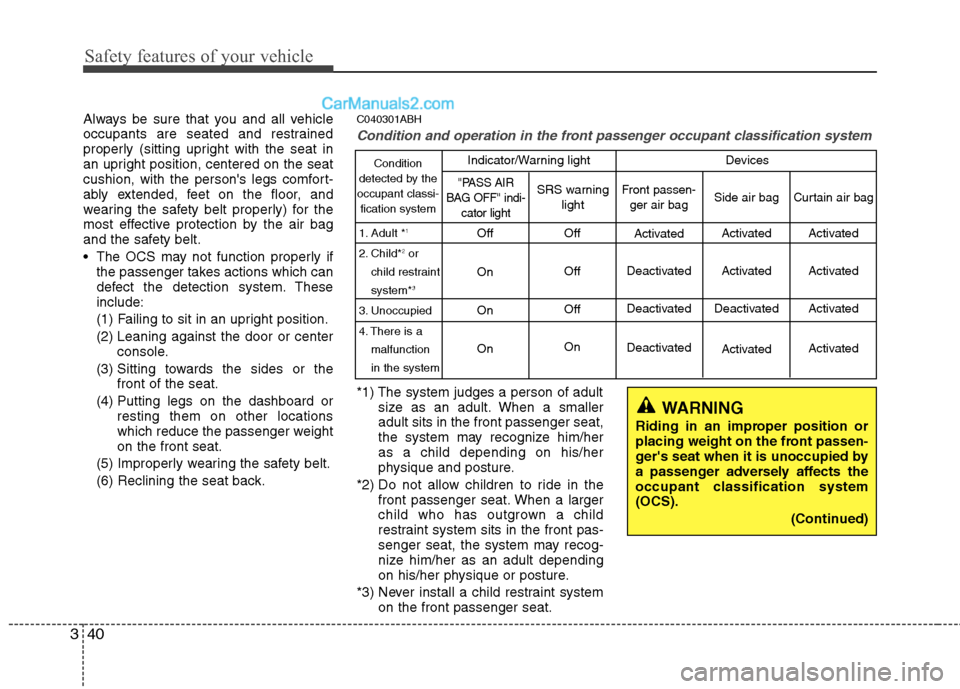
system detects the conditions 1~4 in the
following table and activates or deacti-
vates the front passenger air bag based
on these conditions.
OBH038070N
Page 59 of 399
Safety features of your vehicle
40 3
Always be sure that you and all vehicle
occupants are seated and restrained
properly (sitting upright with the seat in
an upright position, centered on the seat
cushion, with the person's legs comfort-
ably extended, feet on the floor, and
wearing the safety belt properly) for the
most effective protection by the air bag
and the safety belt.
The OCS may not function properly if
the passenger takes actions which can
defect the detection system. These
include:
(1) Failing to sit in an upright position.
(2) Leaning against the door or center
console.
(3) Sitting towards the sides or the
front of the seat.
(4) Putting legs on the dashboard or
resting them on other locations
which reduce the passenger weight
on the front seat.
(5) Improperly wearing the safety belt.
(6) Reclining the seat back.C040301ABH
Condition and operation in the front passenger occupant classification system
*1) The system judges a person of adult
size as an adult. When a smaller
adult sits in the front passenger seat,
the system may recognize him/her
as a child depending on his/her
physique and posture.
*2) Do not allow children to ride in the
front passenger seat. When a larger
child who has outgrown a child
restraint system sits in the front pas-
senger seat, the system may recog-
nize him/her as an adult depending
on his/her physique or posture.
*3) Never install a child restraint system
on the front passenger seat.
WARNING
Riding in an improper position or
placing weight on the front passen-
ger's seat when it is unoccupied by
a passenger adversely affects the
occupant classification system
(OCS).
(Continued)
Condition
detected by the
occupant classi-
fication system
1. Adult *
1
2. Child*2or
child restraint
system*
3
3. Unoccupied
4. There is a
malfunction
in the system
Off
On
On
OnOff
Off
Off
OnActivated
Deactivated
Deactivated
Deactivated
"PASS AIR
BAG OFF" indi-
cator lightSRS warning
lightFront passen-
ger air bag
Activated
Activated
Deactivated
Activated
Side air bag
Activated
Activated
Activated
Activated
Curtain air bag
Indicator/Warning light Devices
Page 81 of 399

Features of your vehicle
4 4
D010400ABH
Trunk lock system
The trunk lid control button located in the
vehicle glove box is used to prevent
unauthorized access to the trunk.Trunk locking
To activate the trunk lock system so that
the trunk can only be opened with the
master key, perform the following:
1. Open the glove box by pushing the
button (1).
2. Set the trunk lid control button to OFF
position (not depressed).
3. Close the glove box and lock the glove
box with the master key.
When leaving the key with a parking lot
attendant or valet, perform steps 1 to 3
above and leave the sub key with the
attendent. The sub key can start the
engine and operate door locks only.
Lock release
To release the trunk lock feature, open
the glove box with the master key and set
the trunk lid control button to ON position
(depressed). In this position the trunk will
open with the trunk lid release lever or
transmitter. The trunk can never be
opened with the sub key.
D010300CBH-EU
Immobilizer system
Your vehicle is equipped with an elec-
tronic engine immobilizer system to
reduce the risk of unauthorized vehicle
use.
Your immobilizer system is comprised of
a small transponder in the ignition key
and electronic devices inside the vehicle.
With the immobilizer system, whenever
you insert your ignition key into the igni-
tion switch and turn it to ON, it checks
and determines and verifies if the ignition
key is valid or not.
If the key is determined to be valid, the
engine will start.
If the key is determined to be invalid, the
engine will not start.
To deactivate the immobilizer sys-
tem:
Insert the ignition key into the key cylin-
der and turn it to the ON position.
To activate the immobilizer system:
Turn the ignition key to the OFF position.
The immobilizer system activates auto-
matically. Without a valid ignition key for
your vehicle, the engine will not start.
OBH049016
Page 96 of 399
419
Features of your vehicle
✽ ✽
NOTICE
You can activate or deactivate some auto
door lock/unlock features in the INFO
menu of DIS (Driver Information
System, if equipped) as follows;
• Speed sensing auto door lock
• Auto door unlock by unlocking the
driver's door
• Auto door unlock when the ignition
key is removed from the ignition
switch or the smart key is removed
from the smart key holder.
• Auto door lock/unlock by shifting the
transmission shift lever out of P
(Park) or into P (Park)
If you want to activate or deactivate
some door lock/unlock feature, refer to
the DIS manual (if equipped) supplied
separately.
D050500ABH
Child-protector rear door lock
The child safety lock is provided to help
prevent children from accidentally open-
ing the rear doors from inside the vehicle.
The rear door safety locks should be
used whenever children are in the vehi-
cle.
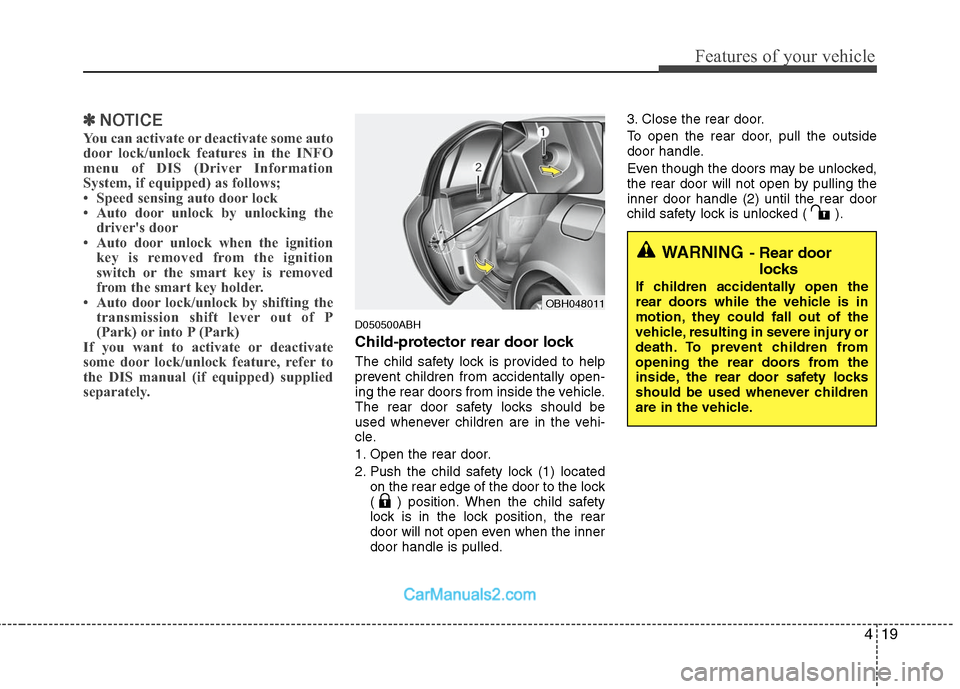
1. Open the rear door.
2. Push the child safety lock (1) located
on the rear edge of the door to the lock
( ) position. When the child safety
lock is in the lock position, the rear
door will not open even when the inner
door handle is pulled.3. Close the rear door.
To open the rear door, pull the outside
door handle.
Even though the doors may be unlocked,
the rear door will not open by pulling the
inner door handle (2) until the rear door
child safety lock is unlocked ( ).
OBH048011
WARNING- Rear door
locks
If children accidentally open the
rear doors while the vehicle is in
motion, they could fall out of the
vehicle, resulting in severe injury or
death. To prevent children from
opening the rear doors from the
inside, the rear door safety locks
should be used whenever children
are in the vehicle.
Page 112 of 399
435
Features of your vehicle
D120102ABH
Recalling positions from memory
1. Shift the shift lever into P while the
ignition switch is ON.
2. To recall the position in memory, press
the desired memory button (1 or 2).
The system will beep once, then the
driver seat, outside rearview mirror
and steering wheel will automatically
adjust to the stored positions.
Adjusting one of the control knobs for the
driver seat, outside rearview mirror and
steering wheel while the system is recall-
ing the stored positions will cause the
movement for that component to stop
and move in the direction that the control
knob is moved. Other components will
continue to the recalled position.
D120300BBH
Easy access function
(if equipped)
With the shift lever in the P position, the
system will move the steering wheel for-
ward and driver’s seat rearward automat-
ically so you can comfortably enter and
exit the vehicle.
Without smart key system
- It will move the steering wheel away
from the driver and the driver’s seat
rearward when the ignition key is
removed.
-
It will move the steering wheel toward
the driver and the driver’s seat for-
ward when the ignition key is inserted.
With smart key system
- It will move the steering wheel away
from the driver and the driver’s seat
rearward when the engine start/stop
button is turned to the OFF position
or the smart key is removed from the
smart key holder with engine
start/stop button in OFF position.
- It will move the steering wheel toward
the driver and the driver’s seat for-
ward when the engine start/stop but-
ton is turned to the ACC position or
the smart key is inserted to the smart
key holder with engine start/stop but-
ton in OFF position.
✽ ✽
NOTICE
You can activate or deactivate the easy
access function in the INFO menu of
DIS (Driver Information System, if
equipped) as follows;
• Seat easy access
• Steering easy access
If you want detailed informations, refer
to the DIS manual supplied separately.
WARNING
Use caution when recalling adjust-
ment memory while sitting in the
vehicle. Push the seat position con-
trol knob to the desired position
immediately if the seat moves too
far in any direction.
Page 200 of 399
4123
Features of your vehicle
Using un iPod when the exclusive cable
is connected to the multiple terminal
inside the console on the right hand side
of the driver's seat.
1. RANDOM Playback Button
Press the button for less than 0.8 second
to activate or deactivate the random play-
back of the songs within the current cat-
egory. Press the button for longer than
0.8 second to randomly play all songs in
the entire album of the iPod. Press the
button once again to cancel the mode.
2. REPEAT Button
Repeats the song currently played.
3. CD/AUX Selection Button
If an iPod is connected, it switches to the
iPod mode to play the song files stored in
the iPod.
4. Automatic Track Selection
Button
Push [SEEK ] button for less than
0.8 second to play from the beginning
of the current song. Push [SEEK ] button for less than
0.8 second and press again within 1
seconds to play the previous song.
Push [SEEK ] button for 0.8 second
or longer to initiate reverse direction
high speed sound search of current
song.
Push [SEEK ] button for less than
0.8 second to play the next song.
Push [SEEK ] button for 0.8 second
or longer to initiate high speed sound
search of current song.
5. Category Selection Button
Press [CAT FOLDER
/ ] button to
move the category and display the first
song in the category. Press [TUNE/
SETUP] button to move to the category
displayed. It will play the first song in the
folder.
(PLAYLISTS
➟ARTISTS➟ALBUMS➟GEN
RES➟SONGS➟COMPOSERS➟PLAYLISTS➟...)
6. TUNE/SETUP Button
Turn this button clockwise or counter-
clockwise, it will display the category
menu. To select the displayed menu,
press the button.
7. INFO Button
Displays the information of the file cur-
rently played in order of TITLE➟ARTIST➟ALBUM➟Play Screen➟TITLE...
Page 201 of 399
Features of your vehicle
124 4
✽
✽
NOTICE FOR USING iPod
DEVICE
• Some iPod models might not sup-
port the communication protocol
and the files will not be played.
(iPod models supported: Mini, 4G,
Photo, Nano, 5G)
• The order of search or playback of
songs in the iPod can be different
from the order searched in the
audio system.
• If the iPod crashes due to its own
trouble, reset the iPod. (Reset:
Refer to iPod manual)
• An iPod may not operate normally
on low battery.
CAUTION IN USING
iPod DEVICE
You need the power cable exclu-
sive for an iPod in order to oper-
ate an iPod with the buttons on
the audio system. The PC cable
provided by Apple may cause a
malfunction and do not use it for
vehicle use.
When connecting the device with
an iPod cable, push in the jack
fully to not interfere with commu-
nication.
When adjusting the sound effects
of an iPod and the audio system,
the sound effects of both devices
will overlap and might reduce or
distort the quality of the sound.
Deactivate (turn off) the equalizer
function of an iPod when adjust-
ing the audio system’s volume,
and turn off the equalizer of the
audio system when using the
equalizer of an iPod.
(Continued)
(Continued)
When the iPod cable is connected,
the system can be switched to the
AUX mode even without the iPod
device and can cause noise.
Disconnect iPod cable when you
are not using the iPod device.
When the iPod is not used for the
audio system, the iPod cable has
to be separate from the iPod
device. Origin display of iPod may
not be displayed.
Page 214 of 399
4137
Features of your vehicle
Using un iPod when the exclusive cable
is connected to the multiple terminal
inside the console on the right hand side
of the driver's seat.
1. RANDOM Playback Button
Press the button for less than 0.8 second
to activate or deactivate the random play-
back of the songs within the current cat-
egory. Press the button for longer than
0.8 second to randomly play all songs in
the entire album of the iPod. Press the
button once again to cancel the mode.
2. REPEAT Button
Repeats the song currently played.
3. CD/AUX Selection Button
If an iPod is connected, it switches to the
iPod mode to play the song files stored in
the iPod.
4. Automatic Track Selection
Button
Push [SEEK ] button for less than
0.8 second to play from the beginning
of the current song. Push [SEEK ] button for less than
0.8 second and press again within 1
seconds to play the previous song.
Push [SEEK ] button for 0.8 second
or longer to initiate reverse direction
high speed sound search of current
song.
Push [SEEK ] button for less than
0.8 second to play the next song.
Push [SEEK ] button for 0.8 second
or longer to initiate high speed sound
search of current song.
5. Category Selection Button
Press [CAT FOLDER
/ ] button to
move the category and display the first
song in the category. Press [TUNE/
SETUP] button to move to the category
displayed. It will play the first song in the
folder.
(PLAYLISTS
➟ARTISTS➟ALBUMS➟GEN
RES➟SONGS➟COMPOSERS➟PLAYLISTS➟...)
6. TUNE/SETUP Button
Turn this button clockwise or counter-
clockwise, it will display the category
menu. To select the displayed menu,
press the button.
7. INFO Button
Displays the information of the file cur-
rently played in order of TITLE➟ARTIST➟ALBUM➟Play Screen➟TITLE...
Page 215 of 399
Features of your vehicle
138 4
✽
✽
NOTICE FOR USING iPod
DEVICE
• Some iPod models might not sup-
port the communication protocol
and the files will not be played.
(iPod models supported: Mini, 4G,
Photo, Nano, 5G)
• The order of search or playback of
songs in the iPod can be different
from the order searched in the
audio system.
• If the iPod crashes due to its own
trouble, reset the iPod. (Reset:
Refer to iPod manual)
• An iPod may not operate normally
on low battery.
CAUTION IN USING
iPod DEVICE
You need the power cable exclu-
sive for an iPod in order to oper-
ate an iPod with the buttons on
the audio system. The PC cable
provided by Apple may cause a
malfunction and do not use it for
vehicle use.
When connecting the device with
an iPod cable, push in the jack
fully to not interfere with commu-
nication.
When adjusting the sound effects
of an iPod and the audio system,
the sound effects of both devices
will overlap and might reduce or
distort the quality of the sound.
Deactivate (turn off) the equalizer
function of an iPod when adjust-
ing the audio system’s volume,
and turn off the equalizer of the
audio system when using the
equalizer of an iPod.
(Continued)
(Continued)
When the iPod cable is connected,
the system can be switched to the
AUX mode even without the iPod
device and can cause noise.
Disconnect iPod cable when you
are not using the iPod device.
When the iPod is not used for the
audio system, the iPod cable has
to be separate from the iPod
device. Origin display of iPod may
not be displayed.
Page 269 of 399
Driving your vehicle
42 5
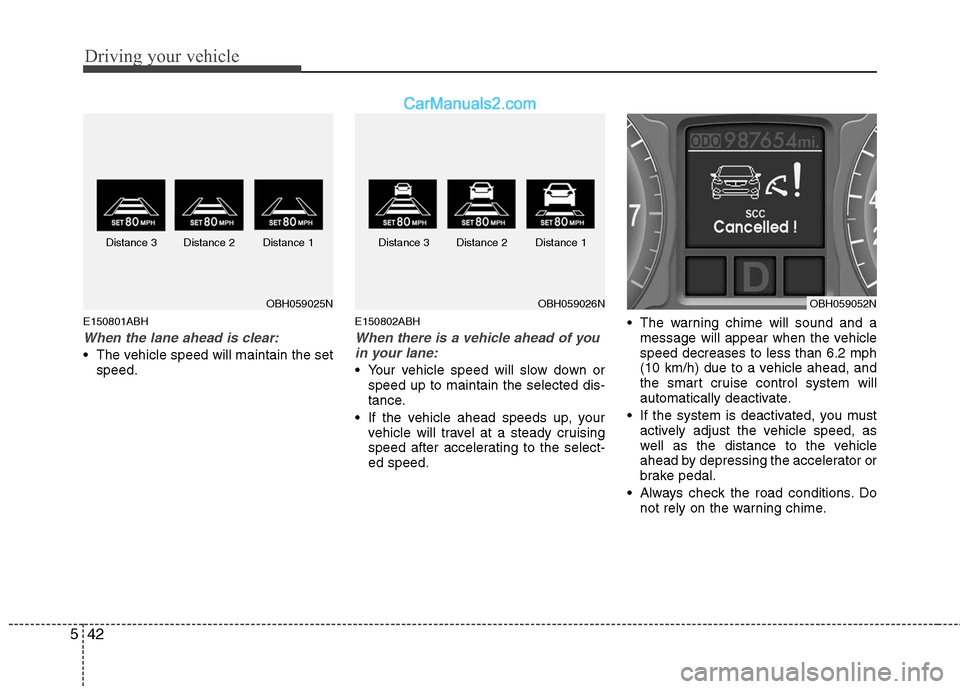
E150801ABH
When the lane ahead is clear:
The vehicle speed will maintain the set
speed.
E150802ABH
When there is a vehicle ahead of you
in your lane:
Your vehicle speed will slow down or
speed up to maintain the selected dis-
tance.
If the vehicle ahead speeds up, your
vehicle will travel at a steady cruising
speed after accelerating to the select-
ed speed. The warning chime will sound and a
message will appear when the vehicle
speed decreases to less than 6.2 mph
(10 km/h) due to a vehicle ahead, and
the smart cruise control system will
automatically deactivate.
If the system is deactivated, you must
actively adjust the vehicle speed, as
well as the distance to the vehicle
ahead by depressing the accelerator or
brake pedal.
Always check the road conditions. Do
not rely on the warning chime.
OBH059025NOBH059026N Distance 3 Distance 2 Distance 1 Distance 3 Distance 2 Distance 1OBH059052N