key Hyundai Genesis 2011 User Guide
[x] Cancel search | Manufacturer: HYUNDAI, Model Year: 2011, Model line: Genesis, Model: Hyundai Genesis 2011Pages: 409, PDF Size: 38.54 MB
Page 87 of 409
Features of your vehicle
10 4
D040500BBH
Battery replacement
A smart key battery should last for sever-
al years, but if the smart key is not work-
ing properly, try replacing the battery with
a new one. If you are unsure how to use
your smart key or replace the battery,
contact an authorized HYUNDAI dealer.
✽ ✽
NOTICE
The circuit inside the smart key can
have a problem if exposed to moisture
or static electricity. If you are unsure
how to use your smart key or replace the
battery, contact an authorized
HYUNDAI dealer.
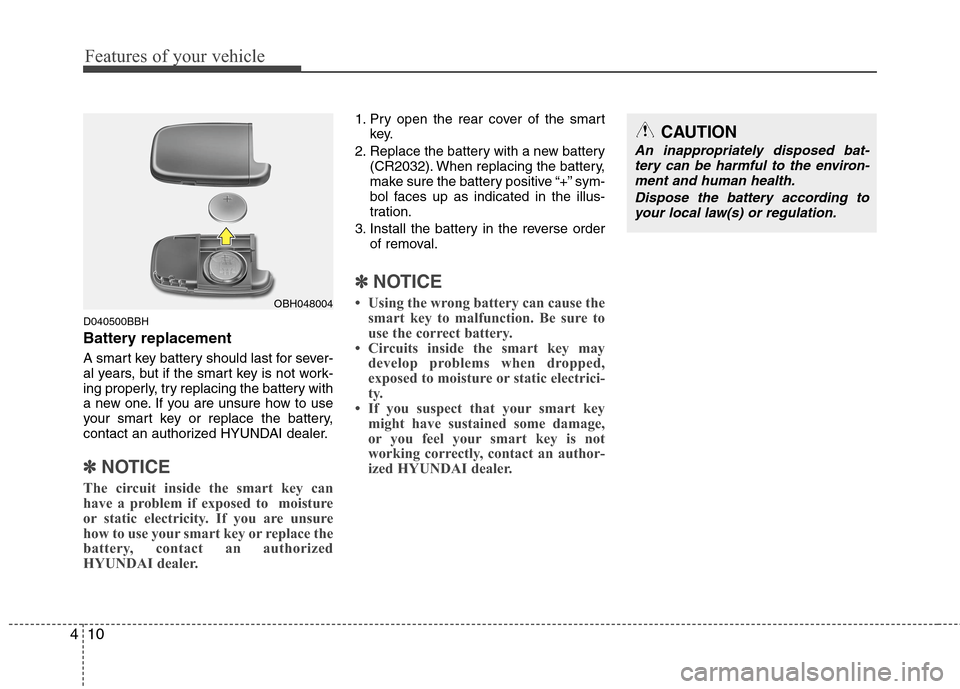
1. Pry open the rear cover of the smart
key.
2. Replace the battery with a new battery
(CR2032). When replacing the battery,
make sure the battery positive “+” sym-
bol faces up as indicated in the illus-
tration.
3. Install the battery in the reverse order
of removal.
✽ ✽
NOTICE
• Using the wrong battery can cause the
smart key to malfunction. Be sure to
use the correct battery.
• Circuits inside the smart key may
develop problems when dropped,
exposed to moisture or static electrici-
ty.
• If you suspect that your smart key
might have sustained some damage,
or you feel your smart key is not
working correctly, contact an author-
ized HYUNDAI dealer.OBH048004
CAUTION
An inappropriately disposed bat-
tery can be harmful to the environ-
ment and human health.
Dispose the battery according to
your local law(s) or regulation.
Page 88 of 409
411
Features of your vehicle
Remote keyless entry system
operations
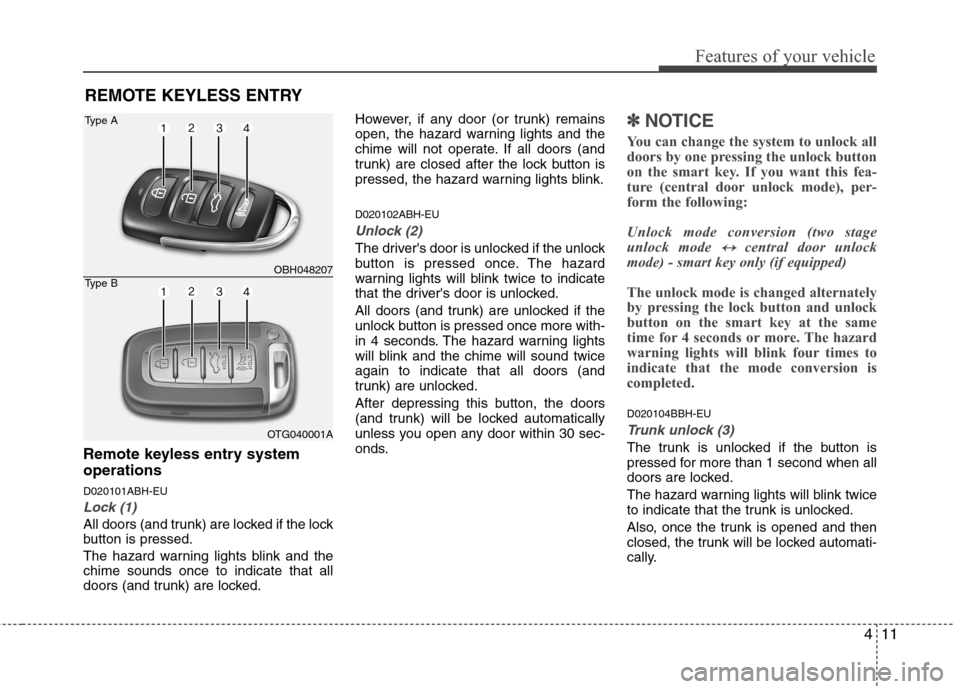
D020101ABH-EU
Lock (1)
All doors (and trunk) are locked if the lock
button is pressed.
The hazard warning lights blink and the
chime sounds once to indicate that all
doors (and trunk) are locked.However, if any door (or trunk) remains
open, the hazard warning lights and the
chime will not operate. If all doors (and
trunk) are closed after the lock button is
pressed, the hazard warning lights blink.
D020102ABH-EU
Unlock (2)
The driver's door is unlocked if the unlock
button is pressed once. The hazard
warning lights will blink twice to indicate
that the driver's door is unlocked.
All doors (and trunk) are unlocked if the
unlock button is pressed once more with-
in 4 seconds. The hazard warning lights
will blink and the chime will sound twice
again to indicate that all doors (and
trunk) are unlocked.
After depressing this button, the doors
(and trunk) will be locked automatically
unless you open any door within 30 sec-
onds.
✽ ✽
NOTICE
You can change the system to unlock all
doors by one pressing the unlock button
on the smart key. If you want this fea-
ture (central door unlock mode), per-
form the following:
Unlock mode conversion (two stage
unlock mode
↔ ↔central door unlock
mode) - smart key only (if equipped)
The unlock mode is changed alternately
by pressing the lock button and unlock
button on the smart key at the same
time for 4 seconds or more. The hazard
warning lights will blink four times to
indicate that the mode conversion is
completed.
D020104BBH-EU
Trunk unlock (3)
The trunk is unlocked if the button is
pressed for more than 1 second when all
doors are locked.
The hazard warning lights will blink twice
to indicate that the trunk is unlocked.
Also, once the trunk is opened and then
closed, the trunk will be locked automati-
cally.
REMOTE KEYLESS ENTRY
OBH048207
OTG040001A
Type A
Type B
Page 89 of 409

Features of your vehicle
12 4
WARNING
Changes or modifications not
expressly approved by the party
responsible for compliance could
void the user’s authority to operate
the equipment. If the keyless entry
system is inoperative due to
changes or modifications not
expressly approved by the party
responsible for compliance, it will
not be covered by your manufactur-
er’s vehicle warranty.
D020105ABH
Alarm (4)
The horn sounds and hazard warning
lights flash for about 30 seconds if this
button is pressed for more than 0.5 sec-
ond. To stop the horn and lights, press
any button on the transmitter (or the
smart key).
D020200AEN-EU
Transmitter precautions
✽ ✽
NOTICE
The transmitter will not work if any of
following occur:
• The ignition key is in ignition switch.
• You exceed the operating distance
limit (about 90 feet [30 m]).
• The battery in the transmitter is
weak.
• Other vehicles or objects may be
blocking the signal.
• The weather is extremely cold.
• The transmitter is close to a radio
transmitter such as a radio station or
an airport which can interfere with
normal operation of the transmitter.
When the transmitter does not work
correctly, open and close the door with
the ignition key. If you have a problem
with the transmitter, contact an author-
ized HYUNDAI dealer.
This device complies with Part 15 of
the FCC rules.
Operation is subject to the following two
conditions:
1. This device may not cause harmful
interference, and
2. This device must accept any interfer-
ence received, including interference
that may cause undesired operation.
CAUTION
Keep the transmitter away from
water or any liquid. If the keyless
entry system is inoperative due to
exposure to water or liquids, it will
not be covered by your manufactur-
er’s vehicle warranty.
Page 90 of 409
413
Features of your vehicle
D020300BBH
Battery replacement
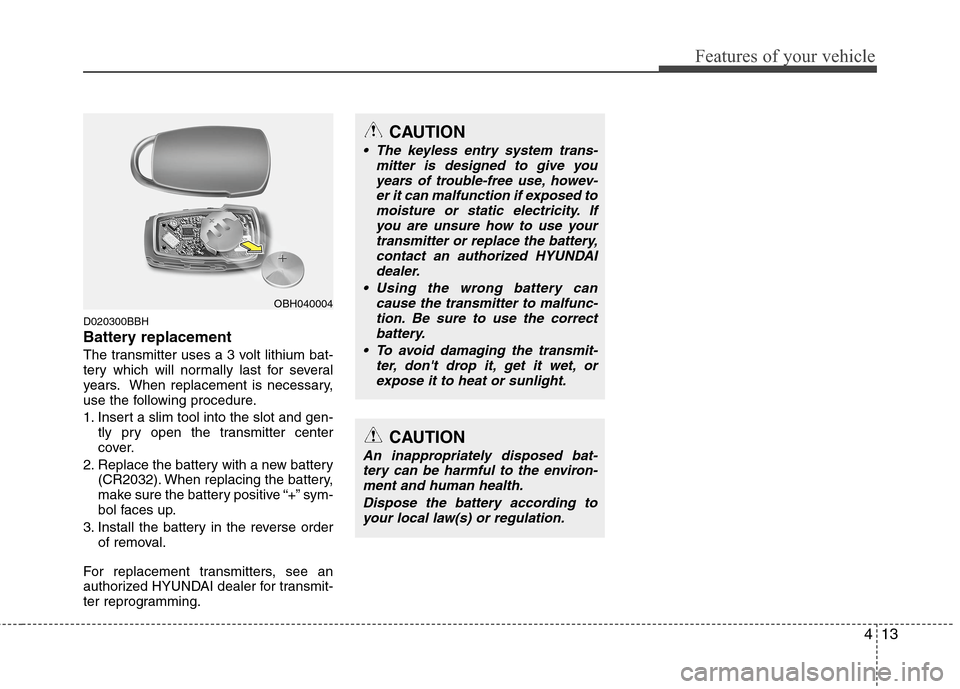
The transmitter uses a 3 volt lithium bat-
tery which will normally last for several
years. When replacement is necessary,
use the following procedure.
1. Insert a slim tool into the slot and gen-
tly pry open the transmitter center
cover.
2. Replace the battery with a new battery
(CR2032). When replacing the battery,
make sure the battery positive “+” sym-
bol faces up.
3. Install the battery in the reverse order
of removal.
For replacement transmitters, see an
authorized HYUNDAI dealer for transmit-
ter reprogramming.
CAUTION
The keyless entry system trans-
mitter is designed to give you
years of trouble-free use, howev-
er it can malfunction if exposed to
moisture or static electricity. If
you are unsure how to use your
transmitter or replace the battery,
contact an authorized HYUNDAI
dealer.
Using the wrong battery can
cause the transmitter to malfunc-
tion. Be sure to use the correct
battery.
To avoid damaging the transmit-
ter, don't drop it, get it wet, or
expose it to heat or sunlight.
CAUTION
An inappropriately disposed bat-
tery can be harmful to the environ-
ment and human health.
Dispose the battery according to
your local law(s) or regulation.
OBH040004
Page 91 of 409
Features of your vehicle
14 4
D030000AEN
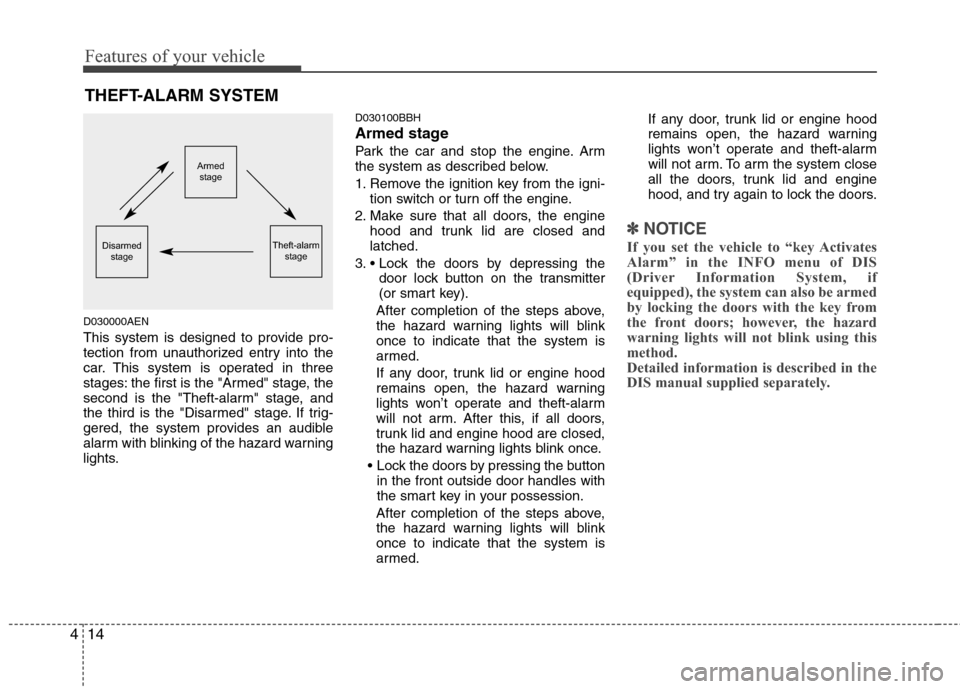
This system is designed to provide pro-
tection from unauthorized entry into the
car. This system is operated in three
stages: the first is the "Armed" stage, the
second is the "Theft-alarm" stage, and
the third is the "Disarmed" stage. If trig-
gered, the system provides an audible
alarm with blinking of the hazard warning
lights.
D030100BBH
Armed stage
Park the car and stop the engine. Arm
the system as described below.
1. Remove the ignition key from the igni-
tion switch or turn off the engine.
2. Make sure that all doors, the engine
hood and trunk lid are closed and
latched.
3.
door lock button on the transmitter
(or smart key).
After completion of the steps above,
the hazard warning lights will blink
once to indicate that the system is
armed.
If any door, trunk lid or engine hood
remains open, the hazard warning
lights won’t operate and theft-alarm
will not arm. After this, if all doors,
trunk lid and engine hood are closed,
the hazard warning lights blink once.
in the front outside door handles with
the smart key in your possession.
After completion of the steps above,
the hazard warning lights will blink
once to indicate that the system is
armed.If any door, trunk lid or engine hood
remains open, the hazard warning
lights won’t operate and theft-alarm
will not arm. To arm the system close
all the doors, trunk lid and engine
hood, and try again to lock the doors.
✽ ✽
NOTICE
If you set the vehicle to “key Activates
Alarm” in the INFO menu of DIS
(Driver Information System, if
equipped), the system can also be armed
by locking the doors with the key from
the front doors; however, the hazard
warning lights will not blink using this
method.
Detailed information is described in the
DIS manual supplied separately.
THEFT-ALARM SYSTEM
Armed
stage
Theft-alarm
stageDisarmed
stage
Page 92 of 409
415
Features of your vehicle
Do not arm the system until all pas-
sengers have left the vehicle. If the
system is armed while a passenger(s)
remains in the vehicle, the alarm may
be activated when the remaining pas-
senger(s) leave the vehicle. If any
door (or trunk) or engine hood is
opened within 30 seconds after the
system enters the armed stage, the
system is disarmed to prevent an
unnecessary alarm.
D030200ABH-EU
Theft-alarm stage
The alarm will be activated if any of the
following occurs while the system is
armed.
A door is opened without using the
transmitter (or smart key).
The trunk is opened without using the
transmitter (or smart key).
The engine hood is opened.
The horn will sound and the hazard
warning lights will blink continuously for
approximately 30 seconds, and the alarm
will repeat once more unless the system
is disarmed. To turn off the system,
unlock the doors with the ignition key or
transmitter.
D020106ABH
Opening the trunk with the alarm
armed (if equipped)
When the alarm is armed, the alarm will
not sound if the trunk lid is opened with
the transmitter (or the smart key).
Once the trunk is opened and then
closed, the trunk will be locked automati-
cally and the system will be armed again.
Also, if any of the doors or hood is
opened while the trunk lid open and the
alarm armed, the alarm will sound.
D030400ABH-EE
Disarmed stage
The system will be disarmed when the
doors are unlocked with the transmitter
(or smart key).
After depressing the unlock button, the
hazard warning lights will blink and the
chime will sound twice to indicate that the
system is disarmed.
After depressing the unlock button, if any
door (or trunk) is not opened within 30
seconds, the system will be rearmed.
✽ ✽
NOTICE
• Avoid trying to start the engine while
the alarm is activated. The vehicle
starter motor is disabled during the
theft-alarm stage.
If the system is not disarmed with the
transmitter, insert the key into the
ignition switch, turn the ignition
switch to the ON position and wait for
30 seconds. Then the system will be
disarmed. (for Canada)
• If you lose your keys, consult your
authorized HYUNDAI dealer.
CAUTION
Do not change, alter or adjust the
theft-alarm system because it could
cause the theft-alarm system to
malfunction. The system should
only be serviced by an authorized
HYUNDAI dealer.
Malfunctions caused by improper
alterations, adjustments or modifi-
cations to the theft-alarm system
are not covered by your vehicle
manufacturer warranty.
Page 93 of 409
Features of your vehicle
16 4
D050100ABH-EU
Operating door locks from out-
side the vehicle
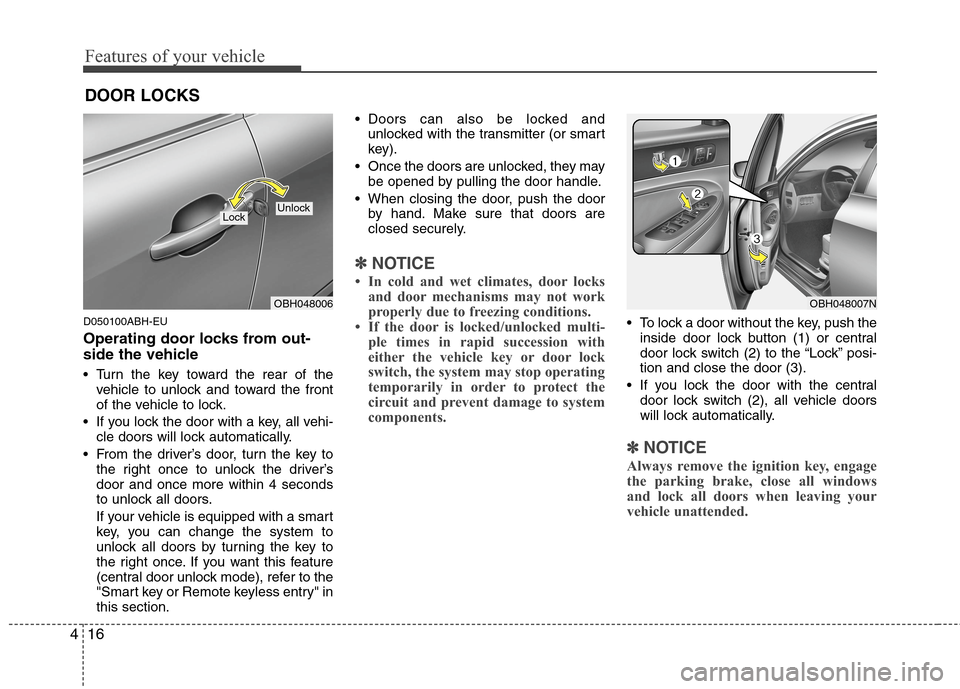
Turn the key toward the rear of the
vehicle to unlock and toward the front
of the vehicle to lock.
If you lock the door with a key, all vehi-
cle doors will lock automatically.
From the driver’s door, turn the key to
the right once to unlock the driver’s
door and once more within 4 seconds
to unlock all doors.
If your vehicle is equipped with a smart
key, you can change the system to
unlock all doors by turning the key to
the right once. If you want this feature
(central door unlock mode), refer to the
"Smart key or Remote keyless entry" in
this section. Doors can also be locked and
unlocked with the transmitter (or smart
key).
Once the doors are unlocked, they may
be opened by pulling the door handle.
When closing the door, push the door
by hand. Make sure that doors are
closed securely.
✽ ✽
NOTICE
• In cold and wet climates, door locks
and door mechanisms may not work
properly due to freezing conditions.
• If the door is locked/unlocked multi-
ple times in rapid succession with
either the vehicle key or door lock
switch, the system may stop operating
temporarily in order to protect the
circuit and prevent damage to system
components.
To lock a door without the key, push the
inside door lock button (1) or central
door lock switch (2
) to the “Lock” posi-
tion and close the door (3).
If you lock the door with the central
door lock switch (2), all vehicle doors
will lock automatically.
✽ ✽
NOTICE
Always remove the ignition key, engage
the parking brake, close all windows
and lock all doors when leaving your
vehicle unattended.
DOOR LOCKS
OBH048006
LockUnlock
OBH048007N
Page 94 of 409
417
Features of your vehicle
Operating door locks from inside
the vehicle
D050201BBH-EE
With the door lock button
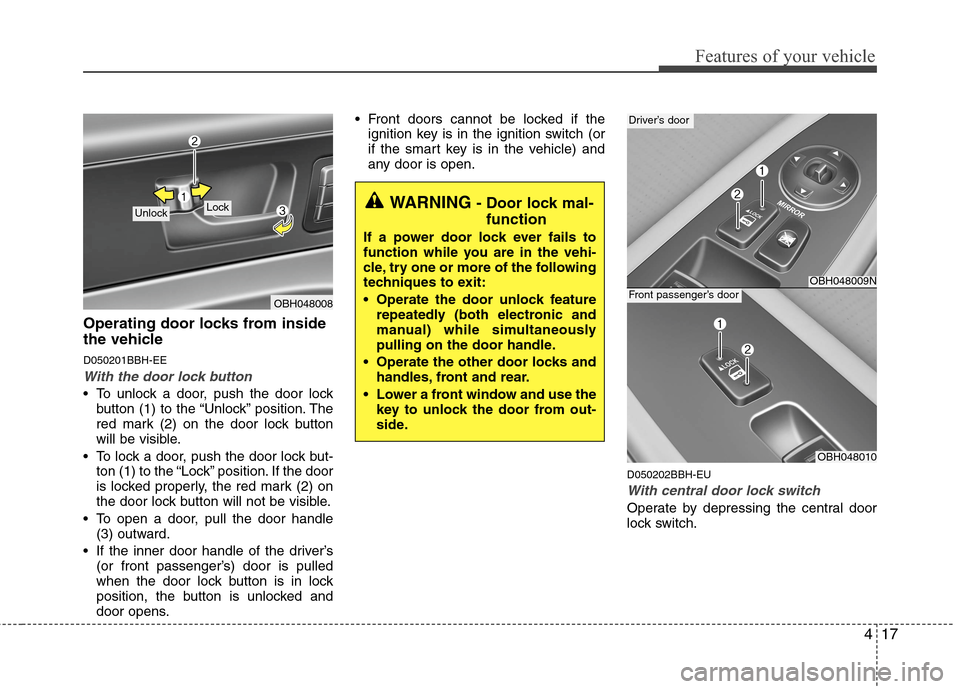
To unlock a door, push the door lock
button (1) to the “Unlock” position. The
red mark (2) on the door lock button
will be visible.
To lock a door, push the door lock but-
ton (1) to the “Lock” position. If the door
is locked properly, the red mark (2) on
the door lock button will not be visible.
To open a door, pull the door handle
(3) outward.
If the inner door handle of the driver’s
(or front passenger’s) door is pulled
when the door lock button is in lock
position, the button is unlocked and
door opens. Front doors cannot be locked if the
ignition key is in the ignition switch (or
if the smart key is in the vehicle) and
any door is open.
D050202BBH-EU
With central door lock switch
Operate by depressing the central door
lock switch.
OBH048008
Lock UnlockWARNING - Door lock mal-
function
If a power door lock ever fails to
function while you are in the vehi-
cle, try one or more of the following
techniques to exit:
Operate the door unlock feature
repeatedly (both electronic and
manual) while simultaneously
pulling on the door handle.
Operate the other door locks and
handles, front and rear.
Lower a front window and use the
key to unlock the door from out-
side.
OBH048009N
Driver’s door
OBH048010
Front passenger’s door
Page 95 of 409
Features of your vehicle
18 4
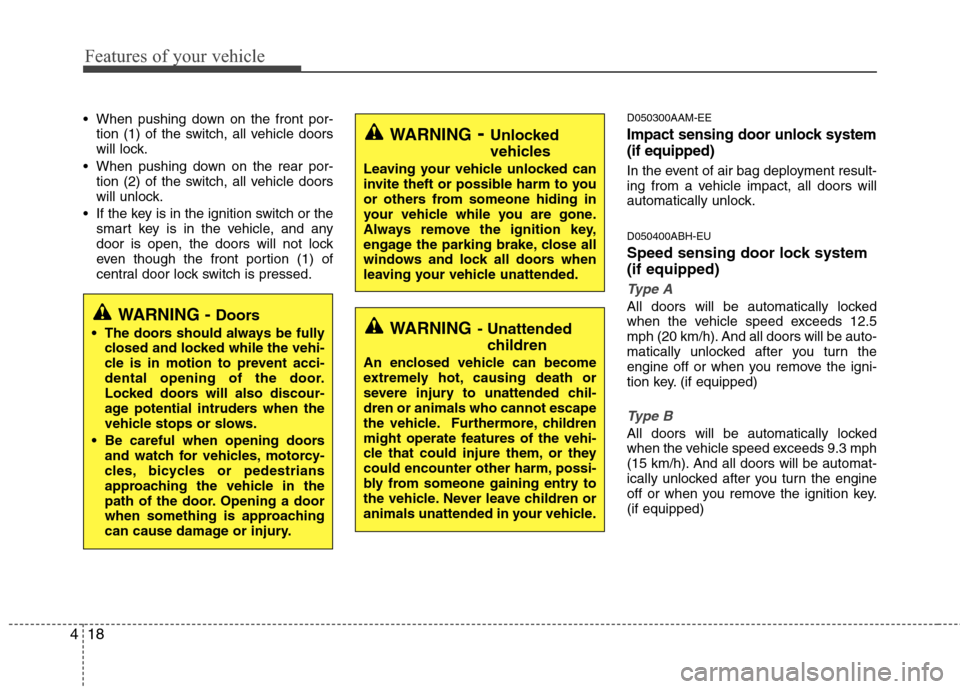
When pushing down on the front por-
tion (1) of the switch, all vehicle doors
will lock.
When pushing down on the rear por-
tion (2) of the switch, all vehicle doors
will unlock.
If the key is in the ignition switch or the
smart key is in the vehicle, and any
door is open, the doors will not lock
even though the front portion (1) of
central door lock switch is pressed.D050300AAM-EE
Impact sensing door unlock system
(if equipped)
In the event of air bag deployment result-
ing from a vehicle impact, all doors will
automatically unlock.
D050400ABH-EU
Speed sensing door lock system
(if equipped)
Type A
All doors will be automatically locked
when the vehicle speed exceeds 12.5
mph (20 km/h). And all doors will be auto-
matically unlocked after you turn the
engine off or when you remove the igni-
tion key. (if equipped)
Type B
All doors will be automatically locked
when the vehicle speed exceeds 9.3 mph
(15 km/h). And all doors will be automat-
ically unlocked after you turn the engine
off or when you remove the ignition key.
(if equipped)
WARNING- Unlocked
vehicles
Leaving your vehicle unlocked can
invite theft or possible harm to you
or others from someone hiding in
your vehicle while you are gone.
Always remove the ignition key,
engage the parking brake, close all
windows and lock all doors when
leaving your vehicle unattended.
WARNING- Unattended
children
An enclosed vehicle can become
extremely hot, causing death or
severe injury to unattended chil-
dren or animals who cannot escape
the vehicle. Furthermore, children
might operate features of the vehi-
cle that could injure them, or they
could encounter other harm, possi-
bly from someone gaining entry to
the vehicle. Never leave children or
animals unattended in your vehicle.
WARNING - Doors
The doors should always be fully
closed and locked while the vehi-
cle is in motion to prevent acci-
dental opening of the door.
Locked doors will also discour-
age potential intruders when the
vehicle stops or slows.
Be careful when opening doors
and watch for vehicles, motorcy-
cles, bicycles or pedestrians
approaching the vehicle in the
path of the door. Opening a door
when something is approaching
can cause damage or injury.
Page 96 of 409
419
Features of your vehicle
✽ ✽
NOTICE
You can activate or deactivate some auto
door lock/unlock features in the INFO
menu of DIS (Driver Information
System, if equipped) as follows;
• Speed sensing auto door lock
• Auto door unlock by unlocking the
driver's door
• Auto door unlock when the ignition
key is removed from the ignition
switch or the smart key is removed
from the smart key holder.
• Auto door lock/unlock by shifting the
transmission shift lever out of P
(Park) or into P (Park)
If you want to activate or deactivate
some door lock/unlock feature, refer to
the DIS manual (if equipped) supplied
separately.
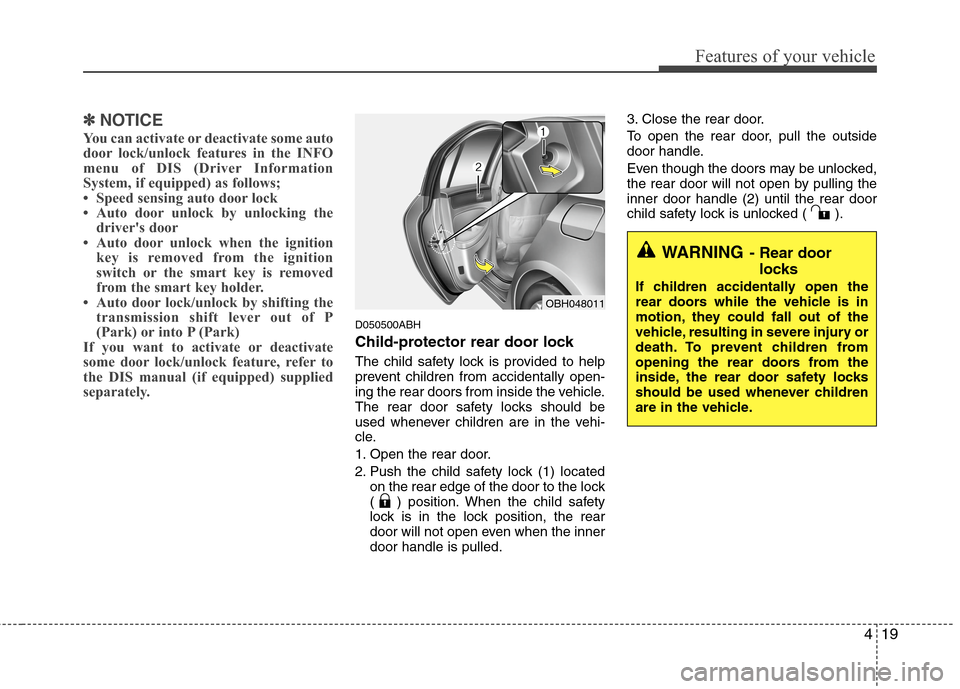
D050500ABH
Child-protector rear door lock
The child safety lock is provided to help
prevent children from accidentally open-
ing the rear doors from inside the vehicle.
The rear door safety locks should be
used whenever children are in the vehi-
cle.
1. Open the rear door.
2. Push the child safety lock (1) located
on the rear edge of the door to the lock
( ) position. When the child safety
lock is in the lock position, the rear
door will not open even when the inner
door handle is pulled.3. Close the rear door.
To open the rear door, pull the outside
door handle.
Even though the doors may be unlocked,
the rear door will not open by pulling the
inner door handle (2) until the rear door
child safety lock is unlocked ( ).
OBH048011
WARNING- Rear door
locks
If children accidentally open the
rear doors while the vehicle is in
motion, they could fall out of the
vehicle, resulting in severe injury or
death. To prevent children from
opening the rear doors from the
inside, the rear door safety locks
should be used whenever children
are in the vehicle.