warning Hyundai Genesis 2011 Workshop Manual
[x] Cancel search | Manufacturer: HYUNDAI, Model Year: 2011, Model line: Genesis, Model: Hyundai Genesis 2011Pages: 409, PDF Size: 38.54 MB
Page 78 of 409
4
Keys / 4-3
Smart key / 4-6
Remote keyless entry / 4-11
Theft-alarm system / 4-14
Door locks / 4-16
Trunk / 4-20
Windows / 4-23
Hood / 4-27
Fuel filler lid / 4-28
Sunroof / 4-30
Driver position memory system / 4-34
Steering wheel / 4-37
Mirrors / 4-39
Instrument cluster / 4-47
Parking assist system / 4-71
Rear view camera / 4-74
Hazard warning flasher / 4-74
Lighting / 4-75
Wipers and washers / 4-80
Interior light / 4-83
Defroster / 4-86
Automatic climate control system / 4-87
Features of your vehicle
Page 80 of 409
43
Features of your vehicle
D010100AEN
Record your key number
The key code number is stamped on the
bar code tag attached to the key set.
Should you lose your keys, this number
will enable an authorized HYUNDAI deal-
er to duplicate the keys easily. Remove
the bar code tag and store it in a safe
place. Also, record the code number and
keep it in a safe place (not in the vehicle).
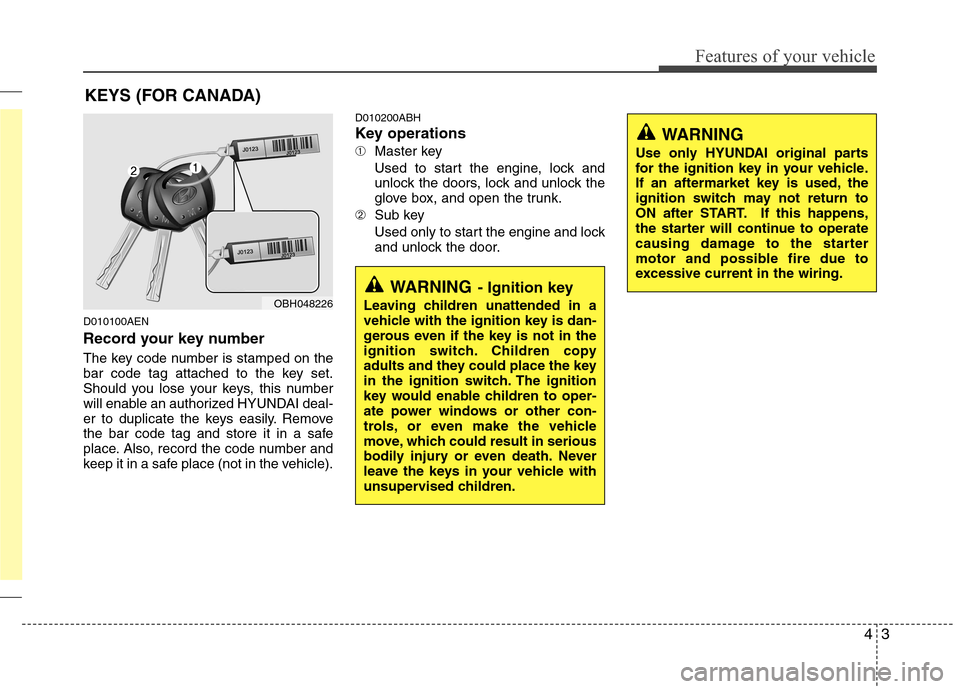
D010200ABH
Key operations
➀Master key
Used to start the engine, lock and
unlock the doors, lock and unlock the
glove box, and open the trunk.
➁Sub key
Used only to start the engine and lock
and unlock the door.
KEYS (FOR CANADA)
WARNING- Ignition key
Leaving children unattended in a
vehicle with the ignition key is dan-
gerous even if the key is not in the
ignition switch. Children copy
adults and they could place the key
in the ignition switch. The ignition
key would enable children to oper-
ate power windows or other con-
trols, or even make the vehicle
move, which could result in serious
bodily injury or even death. Never
leave the keys in your vehicle with
unsupervised children.OBH048226
WARNING
Use only HYUNDAI original parts
for the ignition key in your vehicle.
If an aftermarket key is used, the
ignition switch may not return to
ON after START. If this happens,
the starter will continue to operate
causing damage to the starter
motor and possible fire due to
excessive current in the wiring.
Page 82 of 409
45
Features of your vehicle
✽ ✽
NOTICE
When starting the engine, do not use the
key with other immobilizer keys around.
Otherwise the engine may not start or
may stop soon after it starts. Keep each
key separate in order to avoid a starting
malfunction.
✽ ✽
NOTICE
If you need additional keys or lose your
keys, consult an authorized HYUNDAI
dealer.
This device complies with Part 15 of
the FCC rules.
Operation is subject to the following two
conditions:
1. This device may not cause harmful
interference, and
2. This device must accept any interfer-
ence received, including interference
that may cause undesired operation.
CAUTION
The transponder in your ignition
key is an important part of the
immobilizer system. It is designed
to give years of trouble-free service,
however you should avoid expo-
sure to moisture, static electricity
and rough handling. Immobilizer
system malfunction could occur.
CAUTION
Do not put metal accessories near
the ignition switch.
The engine may not start because
the metal accessories may interrupt
the transponder signal from trans-
mitting normally.
WARNING
In order to prevent theft of your
vehicle, do not leave spare keys
anywhere in your vehicle. Your
Immobilizer password is a cus-
tomer unique password and should
be kept confidential. Do not leave
this number anywhere in your vehi-
cle.
CAUTION
Do not change, alter or adjust the
immobilizer system because it
could cause the immobilizer sys-
tem to malfunction and should only
be serviced by an authorized
HYUNDAI dealer.
Malfunctions caused by improper
alterations, adjustments or modifi-
cations to the immobilizer system
are not covered by your vehicle
manufacturer warranty.
WARNING
Changes or modifications not
expressly approved by the party
responsible for compliance could
void the user’s authority to operate
the equipment.
Page 84 of 409
47
Features of your vehicle
Even though you press the outside door
handle buttons, the doors will not lock
and the chime will sound for 3 seconds if
any of following occur:
The smart key is in the vehicle.
The ignition switch is in ACC or ON
position.
Any door, except the trunk, is open.
D040102BBH-EU
Unlocking
Press the button in the driver’s outside
door handle with all doors (and trunk)
closed and locked, to unlock the driver’s
door. The hazard warning lights blink and
the chime sounds twice to indicate that
the driver’s door is unlocked. All doors
(and trunk) are unlocked if the button is
pressed once more within 4 seconds.
The hazard warning lights will blink and
the chime will sound twice to indicate that
all doors (and trunk) are unlocked.
Press the button in the front passenger’s
outside door handle with all doors (and
trunk) closed and locked, to unlock all
doors (and trunk). The hazard warning
lights blink and the chime sounds twice
to indicate that all doors (and trunk) are
unlocked. The button will only operate
when the smart key is within 28~40 in.
(0.7~1 m) from the outside door handle.When the smart key is recognized in the
area of 28~40 in. (0.7~1 m) from the front
outside door handle, other people can
also open the doors without possession
of the smart key.
✽ ✽
NOTICE
You can change the system to unlock all
doors by one pushing the button in the
driver's outside door handle. If you
want this feature (central door unlock
mode), perform the following:
Unlock mode conversion (two stage
unlock mode
↔ ↔central door unlock
mode) - smart key only (if equipped)
The unlock mode is changed alternately
by pressing the lock button and unlock
button on the smart key at the same
time for 4 seconds or more. The hazard
warning lights will blink four times to
indicate that the mode conversion is
completed.
D040103ABH-EU
Trunk unlocking
When all doors are locked if you are with-
in 0.7~1 m (28~40 in.) from the outside
trunk handle, with your smart key in your
possession, the trunk will unlock when
you press the trunk handle switch.
The hazard warning lights will blink twice
to indicate that the trunk is unlocked.
Also, once the trunk is opened and then
closed, the trunk will be locked automati-
cally.
D040104ABH
Start-up
You can start the engine without inserting
the key. For detailed information refer to
the “Engine start/stop button” in section
5.
Page 85 of 409

Features of your vehicle
8 4
D040300AEN-EU
Smart key precautions
✽
✽
NOTICE
• If, for some reason, you happen to lose
your smart key, you will not be able to
start the engine. Tow the vehicle, if
necessary, and contact an authorized
HYUNDAI dealer.
• A maximum of 2 smart keys can be
registered to a single vehicle. If you
lose a smart key, you should immedi-
ately take the vehicle and key to your
authorized HYUNDAI dealer to pro-
tect it from potential theft.
• The smart key will not work if any of
following occur:
- The smart key is close to a radio
transmitter such as a radio station or
an airport which can interfere with
normal operation of the smart key.
- You keep the smart key near a
mobile two-way radio system or a
cellular phone.
- Another vehicle’s smart key is being
operated close to your vehicle.
When the smart key does not work
correctly, open and close the door with
the mechanical key. If you have a
problem with the smart key, contact
an authorized HYUNDAI dealer.
This device complies with Part 15 of
the FCC rules.
Operation is subject to the following two
conditions:
1. This device may not cause harmful
interference, and
2. This device must accept any interfer-
ence received, including interference
that may cause undesired operation.CAUTION
Keep the smart key away from
water or any liquid. If the keyless
entry system is inoperative due to
exposure to water or other liquids,
it will not be covered by your manu-
facturer’s vehicle warranty.
WARNING
Changes or modifications not
expressly approved by the party
responsible for compliance could
void the user’s authority to operate
the equipment. If the keyless entry
system is inoperative due to
changes or modifications not
expressly approved by the party
responsible for compliance, it will
not be covered by your manufactur-
er’s vehicle warranty.
Page 88 of 409
411
Features of your vehicle
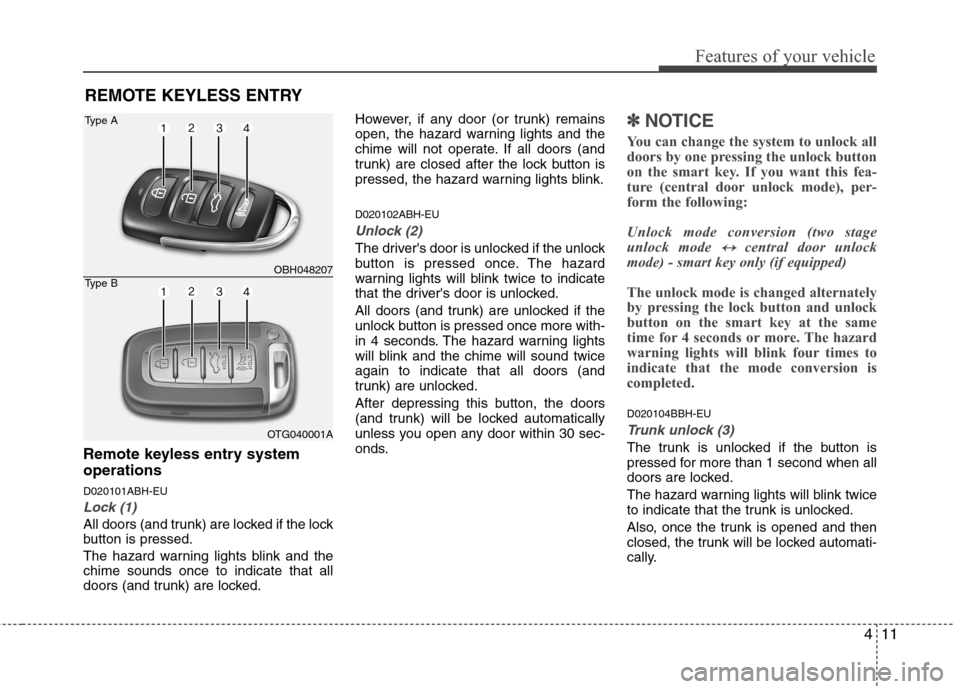
Remote keyless entry system
operations
D020101ABH-EU
Lock (1)
All doors (and trunk) are locked if the lock
button is pressed.
The hazard warning lights blink and the
chime sounds once to indicate that all
doors (and trunk) are locked.However, if any door (or trunk) remains
open, the hazard warning lights and the
chime will not operate. If all doors (and
trunk) are closed after the lock button is
pressed, the hazard warning lights blink.
D020102ABH-EU
Unlock (2)
The driver's door is unlocked if the unlock
button is pressed once. The hazard
warning lights will blink twice to indicate
that the driver's door is unlocked.
All doors (and trunk) are unlocked if the
unlock button is pressed once more with-
in 4 seconds. The hazard warning lights
will blink and the chime will sound twice
again to indicate that all doors (and
trunk) are unlocked.
After depressing this button, the doors
(and trunk) will be locked automatically
unless you open any door within 30 sec-
onds.
✽ ✽
NOTICE
You can change the system to unlock all
doors by one pressing the unlock button
on the smart key. If you want this fea-
ture (central door unlock mode), per-
form the following:
Unlock mode conversion (two stage
unlock mode
↔ ↔central door unlock
mode) - smart key only (if equipped)
The unlock mode is changed alternately
by pressing the lock button and unlock
button on the smart key at the same
time for 4 seconds or more. The hazard
warning lights will blink four times to
indicate that the mode conversion is
completed.
D020104BBH-EU
Trunk unlock (3)
The trunk is unlocked if the button is
pressed for more than 1 second when all
doors are locked.
The hazard warning lights will blink twice
to indicate that the trunk is unlocked.
Also, once the trunk is opened and then
closed, the trunk will be locked automati-
cally.
REMOTE KEYLESS ENTRY
OBH048207
OTG040001A
Type A
Type B
Page 89 of 409

Features of your vehicle
12 4
WARNING
Changes or modifications not
expressly approved by the party
responsible for compliance could
void the user’s authority to operate
the equipment. If the keyless entry
system is inoperative due to
changes or modifications not
expressly approved by the party
responsible for compliance, it will
not be covered by your manufactur-
er’s vehicle warranty.
D020105ABH
Alarm (4)
The horn sounds and hazard warning
lights flash for about 30 seconds if this
button is pressed for more than 0.5 sec-
ond. To stop the horn and lights, press
any button on the transmitter (or the
smart key).
D020200AEN-EU
Transmitter precautions
✽ ✽
NOTICE
The transmitter will not work if any of
following occur:
• The ignition key is in ignition switch.
• You exceed the operating distance
limit (about 90 feet [30 m]).
• The battery in the transmitter is
weak.
• Other vehicles or objects may be
blocking the signal.
• The weather is extremely cold.
• The transmitter is close to a radio
transmitter such as a radio station or
an airport which can interfere with
normal operation of the transmitter.
When the transmitter does not work
correctly, open and close the door with
the ignition key. If you have a problem
with the transmitter, contact an author-
ized HYUNDAI dealer.
This device complies with Part 15 of
the FCC rules.
Operation is subject to the following two
conditions:
1. This device may not cause harmful
interference, and
2. This device must accept any interfer-
ence received, including interference
that may cause undesired operation.
CAUTION
Keep the transmitter away from
water or any liquid. If the keyless
entry system is inoperative due to
exposure to water or liquids, it will
not be covered by your manufactur-
er’s vehicle warranty.
Page 91 of 409
Features of your vehicle
14 4
D030000AEN
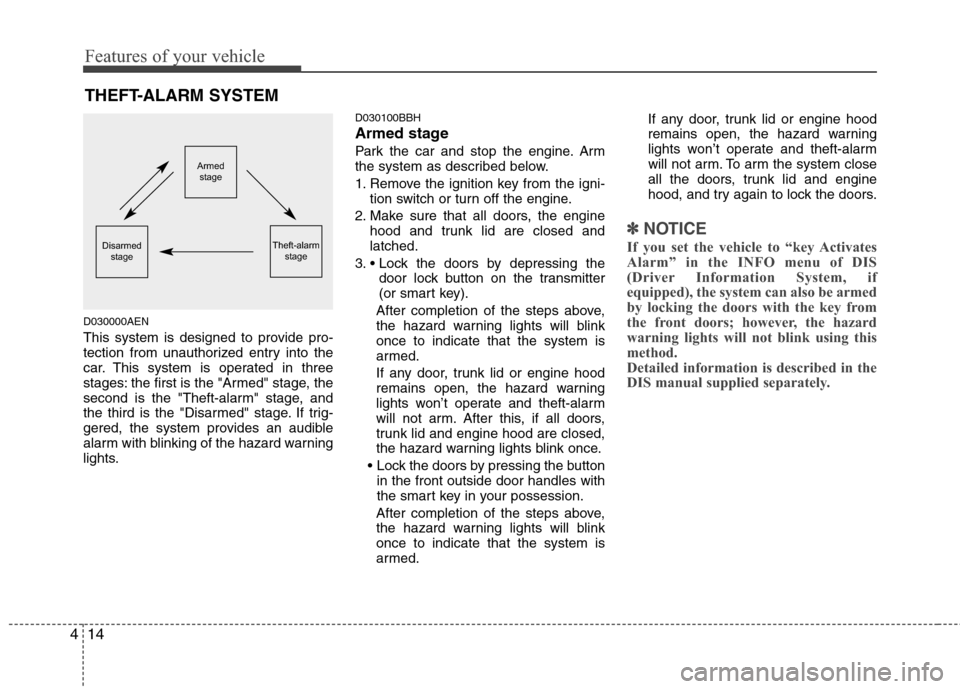
This system is designed to provide pro-
tection from unauthorized entry into the
car. This system is operated in three
stages: the first is the "Armed" stage, the
second is the "Theft-alarm" stage, and
the third is the "Disarmed" stage. If trig-
gered, the system provides an audible
alarm with blinking of the hazard warning
lights.
D030100BBH
Armed stage
Park the car and stop the engine. Arm
the system as described below.
1. Remove the ignition key from the igni-
tion switch or turn off the engine.
2. Make sure that all doors, the engine
hood and trunk lid are closed and
latched.
3.
door lock button on the transmitter
(or smart key).
After completion of the steps above,
the hazard warning lights will blink
once to indicate that the system is
armed.
If any door, trunk lid or engine hood
remains open, the hazard warning
lights won’t operate and theft-alarm
will not arm. After this, if all doors,
trunk lid and engine hood are closed,
the hazard warning lights blink once.
in the front outside door handles with
the smart key in your possession.
After completion of the steps above,
the hazard warning lights will blink
once to indicate that the system is
armed.If any door, trunk lid or engine hood
remains open, the hazard warning
lights won’t operate and theft-alarm
will not arm. To arm the system close
all the doors, trunk lid and engine
hood, and try again to lock the doors.
✽ ✽
NOTICE
If you set the vehicle to “key Activates
Alarm” in the INFO menu of DIS
(Driver Information System, if
equipped), the system can also be armed
by locking the doors with the key from
the front doors; however, the hazard
warning lights will not blink using this
method.
Detailed information is described in the
DIS manual supplied separately.
THEFT-ALARM SYSTEM
Armed
stage
Theft-alarm
stageDisarmed
stage
Page 92 of 409
415
Features of your vehicle
Do not arm the system until all pas-
sengers have left the vehicle. If the
system is armed while a passenger(s)
remains in the vehicle, the alarm may
be activated when the remaining pas-
senger(s) leave the vehicle. If any
door (or trunk) or engine hood is
opened within 30 seconds after the
system enters the armed stage, the
system is disarmed to prevent an
unnecessary alarm.
D030200ABH-EU
Theft-alarm stage
The alarm will be activated if any of the
following occurs while the system is
armed.
A door is opened without using the
transmitter (or smart key).
The trunk is opened without using the
transmitter (or smart key).
The engine hood is opened.
The horn will sound and the hazard
warning lights will blink continuously for
approximately 30 seconds, and the alarm
will repeat once more unless the system
is disarmed. To turn off the system,
unlock the doors with the ignition key or
transmitter.
D020106ABH
Opening the trunk with the alarm
armed (if equipped)
When the alarm is armed, the alarm will
not sound if the trunk lid is opened with
the transmitter (or the smart key).
Once the trunk is opened and then
closed, the trunk will be locked automati-
cally and the system will be armed again.
Also, if any of the doors or hood is
opened while the trunk lid open and the
alarm armed, the alarm will sound.
D030400ABH-EE
Disarmed stage
The system will be disarmed when the
doors are unlocked with the transmitter
(or smart key).
After depressing the unlock button, the
hazard warning lights will blink and the
chime will sound twice to indicate that the
system is disarmed.
After depressing the unlock button, if any
door (or trunk) is not opened within 30
seconds, the system will be rearmed.
✽ ✽
NOTICE
• Avoid trying to start the engine while
the alarm is activated. The vehicle
starter motor is disabled during the
theft-alarm stage.
If the system is not disarmed with the
transmitter, insert the key into the
ignition switch, turn the ignition
switch to the ON position and wait for
30 seconds. Then the system will be
disarmed. (for Canada)
• If you lose your keys, consult your
authorized HYUNDAI dealer.
CAUTION
Do not change, alter or adjust the
theft-alarm system because it could
cause the theft-alarm system to
malfunction. The system should
only be serviced by an authorized
HYUNDAI dealer.
Malfunctions caused by improper
alterations, adjustments or modifi-
cations to the theft-alarm system
are not covered by your vehicle
manufacturer warranty.
Page 94 of 409
417
Features of your vehicle
Operating door locks from inside
the vehicle
D050201BBH-EE
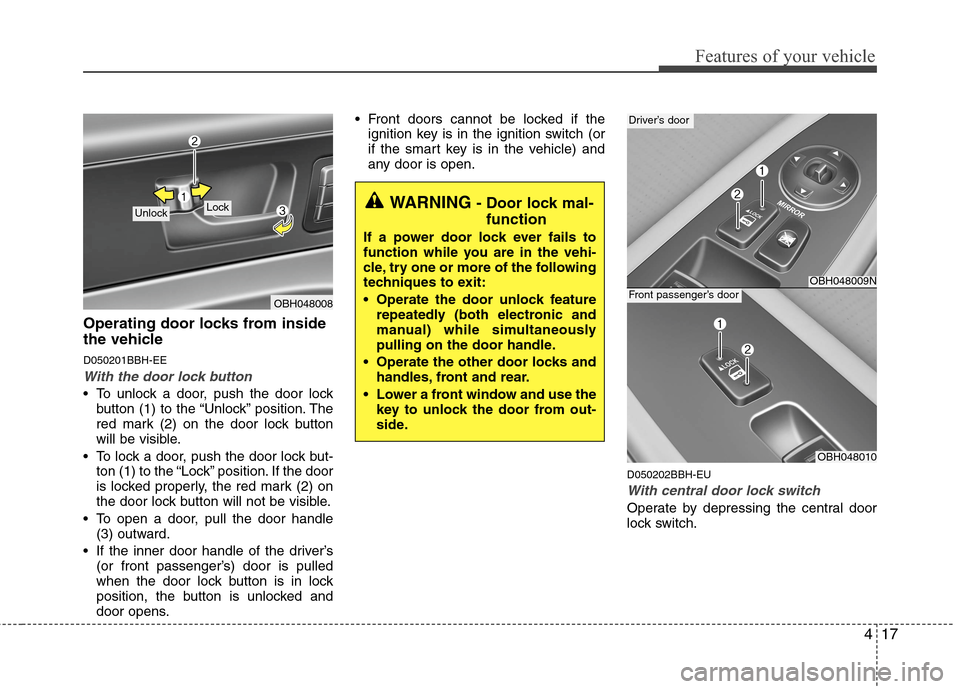
With the door lock button
To unlock a door, push the door lock
button (1) to the “Unlock” position. The
red mark (2) on the door lock button
will be visible.
To lock a door, push the door lock but-
ton (1) to the “Lock” position. If the door
is locked properly, the red mark (2) on
the door lock button will not be visible.
To open a door, pull the door handle
(3) outward.
If the inner door handle of the driver’s
(or front passenger’s) door is pulled
when the door lock button is in lock
position, the button is unlocked and
door opens. Front doors cannot be locked if the
ignition key is in the ignition switch (or
if the smart key is in the vehicle) and
any door is open.
D050202BBH-EU
With central door lock switch
Operate by depressing the central door
lock switch.
OBH048008
Lock UnlockWARNING - Door lock mal-
function
If a power door lock ever fails to
function while you are in the vehi-
cle, try one or more of the following
techniques to exit:
Operate the door unlock feature
repeatedly (both electronic and
manual) while simultaneously
pulling on the door handle.
Operate the other door locks and
handles, front and rear.
Lower a front window and use the
key to unlock the door from out-
side.
OBH048009N
Driver’s door
OBH048010
Front passenger’s door