change wheel Hyundai Genesis 2011 Owner's Manual
[x] Cancel search | Manufacturer: HYUNDAI, Model Year: 2011, Model line: Genesis, Model: Hyundai Genesis 2011Pages: 409, PDF Size: 38.54 MB
Page 114 of 409
437
Features of your vehicle
D130100ABH
Power steering
Power steering uses energy from the
engine to assist you in steering the vehi-
cle. If the engine is off or if the power
steering system becomes inoperative,
the vehicle may still be steered, but it will
require increased steering effort.
Should you notice any change in the
effort required to steer during normal
vehicle operation, have the power steer-
ing checked by an authorized HYUNDAI
dealer.
Electronic Hydraulic Power Steering
(EHPS) (if equipped)
EHPS uses an electromotor to assist you
in steering the vehicle. It senses the vehi-
cle speed and road condition.
If the engine is off or if the power steer-
ing system becomes inoperative, the
vehicle may still be steered, but it will
require increased steering effort.
Should you notice any change in the
effort required to steer during normal
vehicle operation, have the power steer-
ing checked by an authorized HYUNDAI
dealer.
✽ ✽
NOTICE
If the power steering drive belt breaks
or if the power steering pump malfunc-
tions, the steering effort will greatly
increase.
✽ ✽
NOTICE
If the vehicle is parked for extended
periods outside in cold weather (below
14°F/-10°C), the power steering may
require increased effort when the engine
is first started. This is caused by
increased fluid viscosity due to the cold
weather and does not indicate a mal-
function.
When this happens, increase the engine
RPM by depressing accelerator until the
RPM reaches 1,500 rpm then release or
let the engine idle for two or three min-
utes to warm up the fluid.
D130300AEN
Tilt steering/Telescope steering
(if equipped)
Tilt steering allows you to adjust the
steering wheel before you drive. You can
also raise the steering wheel to give your
legs more room when you exit and enter
the vehicle.
The steering wheel should be positioned
so that it is comfortable for you to drive,
while permitting you to see the instru-
ment panel warning lights and gauges.
STEERING WHEEL
CAUTION
Never hold the steering wheel
against a stop (extreme right or left
turn) for more than 5 seconds with
the engine running. Holding the
steering wheel for more than 5 sec-
onds in either position may cause
damage to the power steering
pump.
WARNING
Never adjust the angle of the
steering wheel while driving. You
may lose steering control and
cause severe personal injury,
death or accidents.
After adjusting, push the steering
wheel both up and down to be
certain it is locked in position.
Page 115 of 409
Features of your vehicle
38 4
D130301ABH
Manual type
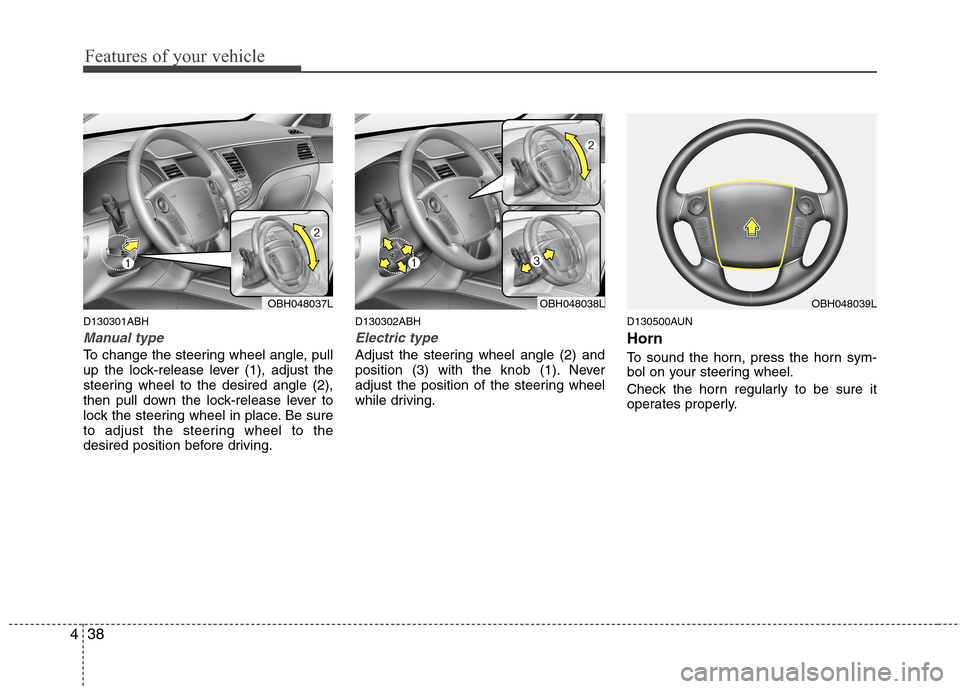
To change the steering wheel angle, pull
up the lock-release lever (1), adjust the
steering wheel to the desired angle (2),
then pull down the lock-release lever to
lock the steering wheel in place. Be sure
to adjust the steering wheel to the
desired position before driving.
D130302ABH
Electric type
Adjust the steering wheel angle (2) and
position (3) with the knob (1). Never
adjust the position of the steering wheel
while driving.
D130500AUN
Horn
To sound the horn, press the horn sym-
bol on your steering wheel.
Check the horn regularly to be sure it
operates properly.
OBH048037LOBH048038LOBH048039L
Page 224 of 409
4147
Features of your vehicle
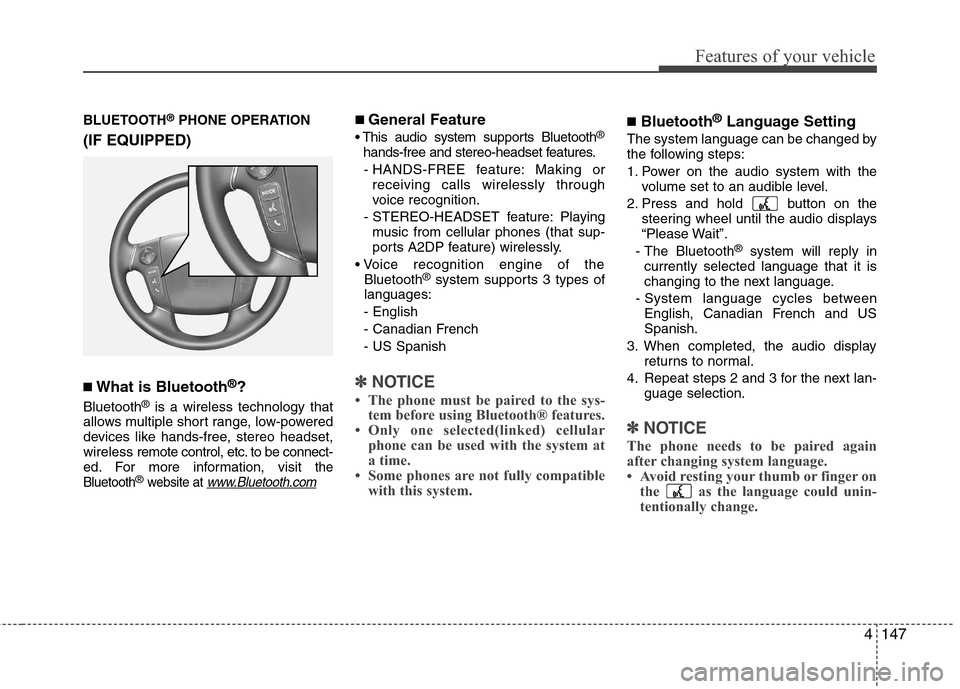
BLUETOOTH®PHONE OPERATION
(IF EQUIPPED)
■What is Bluetooth®?
Bluetooth®is a wireless technology that
allows multiple short range, low-powered
devices like hands-free, stereo headset,
wireless remote control, etc. to be connect-
ed. For more information, visit
the
Bluetooth®website at www.Bluetooth.com
■ General Feature
®
hands-free and stereo-headset features.
- HANDS-FREE feature: Making or
receiving calls wirelessly through
voice recognition.
- STEREO-HEADSET feature: Playing
music from cellular phones (that sup-
ports A2DP feature) wirelessly.
Bluetooth
®system supports 3 types of
languages:
- English
- Canadian French
- US Spanish
✽ ✽
NOTICE
• The phone must be paired to the sys-
tem before using Bluetooth® features.
• Only one selected(linked) cellular
phone can be used with the system at
a time.
• Some phones are not fully compatible
with this system.
■Bluetooth®Language Setting
The system language can be changed by
the following steps:
1. Power on the audio system with the
volume set to an audible level.
2. Press and hold button on the
steering wheel until the audio displays
“Please Wait”.
- The Bluetooth
®system will reply in
currently selected language that it is
changing to the next language.
- System language cycles between
English, Canadian French and US
Spanish.
3. When completed, the audio display
returns to normal.
4. Repeat steps 2 and 3 for the next lan-
guage selection.
✽ ✽
NOTICE
The phone needs to be paired again
after changing system language.
• Avoid resting your thumb or finger on
the as the language could unin-
tentionally change.
Page 226 of 409
4149
Features of your vehicle
■Phone Setup
All Bluetooth®related operations can be
performed by voice command or by man-
ual operation.
Press button on the steering
wheel to activate voice recognition.
Push the TUNE/SETUP knob to enter
SETUP mode. Select “BLUETOOTH”
item by rotating the TUNE/SETUP
knob, then push the knob.
Before using Bluetooth
®features, the
phone must be paired (registered) to the
audio system. Up to 5 phones can be
paired in the system.
✽ ✽
NOTICE
• The pairing procedure of the phone
varies according to each phone model.
Before attempting to pair phone,
please see your phone’s User’s Guide
for instructions.
• Once pairing with the phone is com-
pleted, there is no need to pair with
that phone again unless the phone is
deleted manually from the audio sys-
tem (refer “Deleting Phone” section)
or the vehicle’s information is
removed from the phone.
1. Press button.
2. Say “Set Up”.
- The system replies with available
commands.
- To skip the information message,
press again and then a beep is
heard.
3. Say “Pair Phone”
4. Say “Yes” to proceed.
5. Say the name of your phone when
prompted.
- Use any name to uniquely describe
your phone.
- Use Full name to voice tag.
- Do not use a short name or similar
name to voice command.
6. Bluetooth
®system will repeat the
name you stated.
7. Say "Yes" to confirm.
8. The audio displays “searching
----
passkey: 0000” and asks you to initiate
pairing procedure from the phone.
9. Search the Bluetooth
®system on your
phone. Your phone should display your
[vehicle model name] on the
Bluetooth
®device list. Then attempt
pairing on your phone.
10. After Pairing is completed, your phone
will start to transfer phone/contact list
to the audio system.- This process may take from a few
minutes to over 10 minutes depend-
ing on the phone model and number
of entries in the phone/contact list.
11. By manual operation:
- Select “PAIR” in PHONE menu, then
proceed from step 5.
✽ ✽
NOTICE
Depending on the phone make and
model, the phone book contact list may
not transfer to the audio system.
✽ ✽
NOTICE
• Until the audio displays “Transfer
Complete”, Bluetooth® hands-free
feature may not be fully operational.
• If the phone is paired to two or more
vehicles of the same model, i.e. both
vehicles are HYUNDAI GENESIS,
some phones may not handle
Bluetooth® devices of that name cor-
rectly. In this case, you may need to
change the name displayed on your
phone from GENESIS.
• Refer to your phone’s User’s Guide,
or contact your cellular carrier or
phone manufacturer for instructions.
Page 229 of 409
Features of your vehicle
152 4
■Making a Phone Call
A phone call can be made by speaking
names registered in the audio system.
1. Press button.
2. Say "Call".
3. Say “Name” when prompted.
4. Say desired name (voice tag).
5. Say desired location (phone number
type). Only stored locations can be
selected.
6. Say “Yes” to confirm and make a call.
✽ ✽
Tip
A shortcut to each of the following func-
tions is available:
1. Say “Call Name”
2. Say “Call
3. Say “Call
A phone call can be made by dialing the
spoken numbers. The system can recog-
nize single digits from zero to nine.
1. Press button.
2. Say “Call”.
3. Say “Number” when prompted.
4. Say desired phone numbers.
5. Say “Dial” to complete the number and
make a call.✽ ✽
Tip
A shortcut to each of the following func-
tions is available:
1. Say “Dial Number”
2. Say “Dial
■Receiving a Phone Call
When receiving a phone call, a ringtone
is audible from speakers and the audio
system changes into telephone mode.
When receiving a phone call, “Incoming”
message and incoming phone number
(if available) are displayed on the audio.
- Press button on the steering wheel.
- Press button for 0.8 second or
longer on the steering wheel.
- Use VOLUME buttons on the steering
wheel.
- Press button on the steering
wheel.
■Talking on the Phone
When talking on the phone, “Active Calls”
message and the other party’s phone
number (if available) are displayed on the
audio.
-
Press button for 0.8 second or longer
on the steering wheel.
✽ ✽
NOTICE
In the following situations, you or the
other party may have difficulty hearing
each other:
1. Speaking at the same time, your voice
may not reach the otherparties. (This
is not a malfunction.) Speak alter-
nately with the other party on the
phone.
2. Keep the Bluetooth
®volume to a low
level. High-level volume may result in
distortion and echo.
3. When driving on a rough road.
4. When driving at high speeds.
5. When the window is open.
6. When the air conditioning vents are
facing the microphone.
7. When the sound of the air condition-
ing fan is loud.
Page 240 of 409
Driving your vehicle
8 5
E030202ABH-EU
ACC(Accessory)
Press the engine start/stop button when
the button is in the OFF position without
depressing the brake pedal.
The electrical accessories are operative.
If you leave the engine start/stop button
in the ACC position for more than 1 hour,
the battery power will turn off automati-
cally to prevent the battery from dis-
charging.
E030203AHM
ON
Press the engine start/stop button when
the button is in the ACC position without
depressing the brake pedal.
The warning lights can be checked
before the engine is started. Do not leave
the ON position if the engine is not run-
ning to prevent battery discharge.
E030704ABH
START
To start the engine, press the brake
pedal and press the engine start/stop
button with the shift lever in the P(Park)
or the N(Neutral) position.
For your safety, start the engine with the
shift lever in the P(Park) position.
✽ ✽
NOTICE
• If you press the engine start/stop but-
ton without depressing the brake
pedal, the engine does not start and
the engine start/stop button changes
as follows :
OFF→ →
ACC → →
ON → →
OFF
• If you leave the engine start/stop but-
ton in the ACC or the ON position for
a long time, the battery will be dis-
charged.
E030205ABH-EU
WARNING
Never press the engine start/stop
button while the vehicle is in
motion. This would result in the
engine turning off and loss of
power assist for the steering and
brakes, which may lead to loss of
directional control and braking
function, which could cause an
accident.
(Continued)
(Continued)
Before leaving the driver’s seat,
always make sure the shift lever
is engaged in P (Park), set the
parking brake fully and shut the
engine off. Unexpected and sud-
den vehicle movement may occur
if these precautions are not
taken.
Never reach for the engine
start/stop button, or any other
controls through the steering
wheel while the vehicle is in
motion. The presence of your
hand or arm in this area could
cause a loss of vehicle control,
an accident and serious bodily
injury or death.
Do not place any movable objects
around the driver’s seat as they
may move while driving, interfere
with the driver and lead to an
accident.
Page 248 of 409
Driving your vehicle
16 5
Always use the parking brake. Do not
depend on placing the transmission in
P (Park) to keep the car from moving.
Exercise extreme caution when driving
on a slippery surface. Be especially
careful when braking, accelerating or
shifting gears. On a slippery surface,
an abrupt change in vehicle speed can
cause the drive wheels to lose traction
and the vehicle to go out of control.
Optimum vehicle performance and
economy is obtained by smoothly
depressing and releasing the accelera-
tor pedal.
WARNING
Always buckle-up! In a collision,
an unbelted occupant is signifi-
cantly more likely to be seriously
injured or killed than a properly
belted occupant.
Avoid high speeds when corner-
ing or turning.
Do not make quick steering
wheel movements, such as sharp
lane changes or fast, sharp turns.
The risk of rollover is greatly
increased if you lose control of
your vehicle at highway speeds.
Loss of control often occurs if
two or more wheels drop off the
roadway and the driver over-
steers to reenter the roadway.
In the event your vehicle leaves
the roadway, do not steer sharply.
Instead, slow down before pulling
back into the travel lanes.
Never exceed posted speed lim-
its.
WARNING
If your vehicle becomes stuck in
snow, mud, sand, etc., then you
may attempt to rock the vehicle free
by moving it forward and backward.
Do not attempt this procedure if
people or objects are anywhere
near the vehicle. During the rocking
operation the vehicle may suddenly
move forward or backward as it
becomes unstuck, causing injury
or damage to nearby people or
objects.
Page 269 of 409
537
Driving your vehicle
E090300ABH-EU
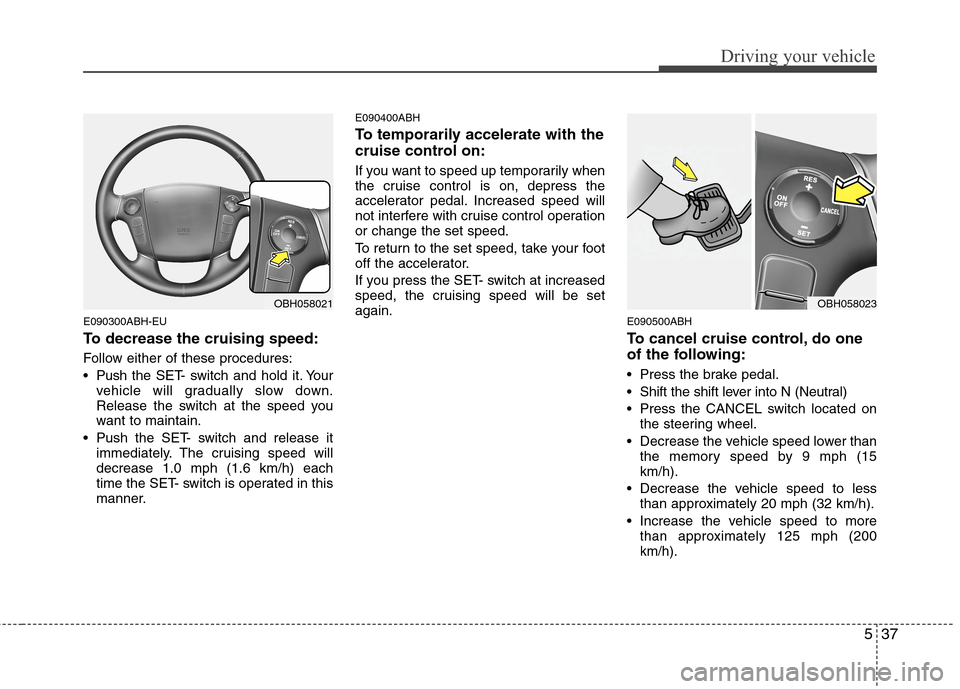
To decrease the cruising speed:
Follow either of these procedures:
Pushthe SET- switch and hold it. Your
vehicle will gradually slow down.
Release the switch at the speed you
want to maintain.
Push the SET- switch and release it
immediately. The cruising speed will
decrease 1.0 mph (1.6 km/h) each
time the SET- switch is operated in this
manner.
E090400ABH
To temporarily accelerate with the
cruise control on:
If you want to speed up temporarily when
the cruise control is on, depress the
accelerator pedal. Increased speed will
not interfere with cruise control operation
or change the set speed.
To return to the set speed, take your foot
off the accelerator.
If you press the SET- switch at increased
speed, the cruising speed will be set
again.
E090500ABH
To cancel cruise control, do one
of the following:
Press the brake pedal.
Shift the shift lever into N (Neutral)
Press the CANCEL switch located on
the steering wheel.
Decrease the vehicle speed lower than
the memory speed by 9 mph (15
km/h).
Decrease the vehicle speed to less
than approximately 20 mph (32 km/h).
Increase the vehicle speed to more
than approximately 125 mph (200
km/h).
OBH058023OBH058021
Page 273 of 409
541
Driving your vehicle
E150300ABH
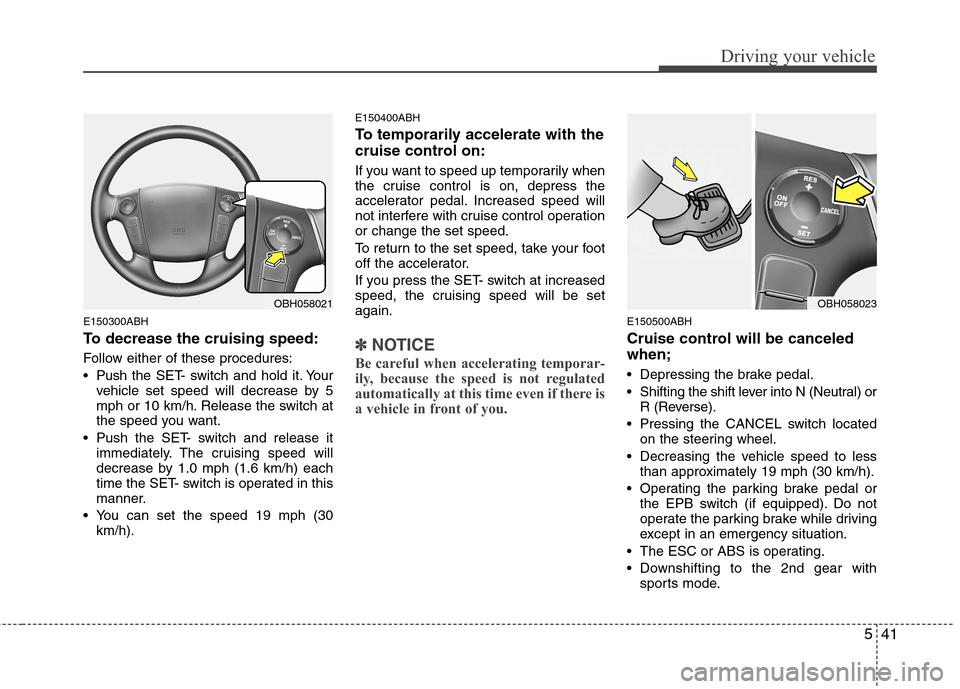
To decrease the cruising speed:
Follow either of these procedures:
Pushthe SET- switch and hold it. Your
vehicle set speed will decrease by 5
mph or 10 km/h. Release the switch at
the speed you want.
Push the SET- switch and release it
immediately. The cruising speed will
decrease by 1.0 mph (1.6 km/h) each
time the SET- switch is operated in this
manner.
You can set the speed 19 mph (30
km/h).
E150400ABH
To temporarily accelerate with the
cruise control on:
If you want to speed up temporarily when
the cruise control is on, depress the
accelerator pedal. Increased speed will
not interfere with cruise control operation
or change the set speed.
To return to the set speed, take your foot
off the accelerator.
If you press the SET- switch at increased
speed, the cruising speed will be set
again.
✽ ✽
NOTICE
Be careful when accelerating temporar-
ily, because the speed is not regulated
automatically at this time even if there is
a vehicle in front of you.
E150500ABH
Cruise control will be canceled
when;
Depressing the brake pedal.
Shifting the shift lever into N (Neutral) or
R (Reverse).
Pressing the CANCEL switch located
on the steering wheel.
Decreasing the vehicle speed to less
than approximately 19 mph (30 km/h).
Operating the parking brake pedal or
the EPB switch (if equipped). Do not
operate the parking brake while driving
except in an emergency situation.
The ESC or ABS is operating.
Downshifting to the 2nd gear with
sports mode.
OBH058021OBH058023
Page 280 of 409
Driving your vehicle
48 5
E150904ABH
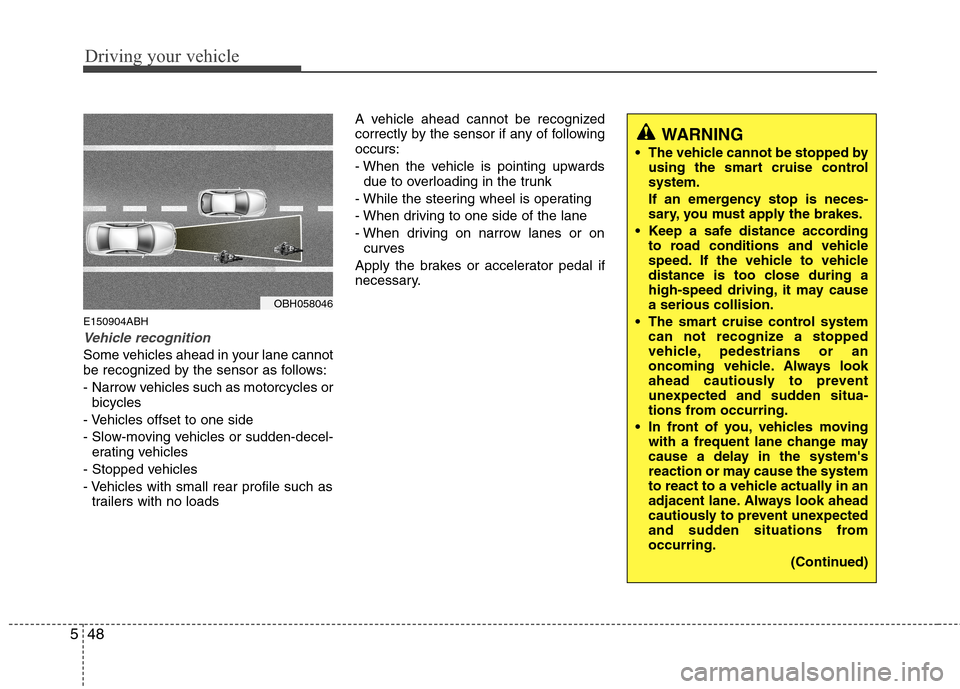
Vehicle recognition
Some vehicles ahead in your lane cannot
be recognized by the sensor as follows:
- Narrow vehicles such as motorcycles or
bicycles
- Vehicles offset to one side
- Slow-moving vehicles or sudden-decel-
erating vehicles
- Stopped vehicles
- Vehicles with small rear profile such as
trailers with no loadsA vehicle ahead cannot be recognized
correctly by the sensor if any of following
occurs:
- When the vehicle is pointing upwards
due to overloading in the trunk
- While the steering wheel is operating
- When driving to one side of the lane
- When driving on narrow lanes or on
curves
Apply the brakes or accelerator pedal if
necessary.
OBH058046
WARNING
The vehicle cannot be stopped by
using the smart cruise control
system.
If an emergency stop is neces-
sary, you must apply the brakes.
Keep a safe distance according
to road conditions and vehicle
speed. If the vehicle to vehicle
distance is too close during a
high-speed driving, it may cause
a serious collision.
The smart cruise control system
can not recognize a stopped
vehicle, pedestrians or an
oncoming vehicle. Always look
ahead cautiously to prevent
unexpected and sudden situa-
tions from occurring.
In front of you, vehicles moving
with a frequent lane change may
cause a delay in the system's
reaction or may cause the system
to react to a vehicle actually in an
adjacent lane. Always look ahead
cautiously to prevent unexpected
and sudden situations from
occurring.
(Continued)