Dis Hyundai Genesis 2012 Owners Manual
[x] Cancel search | Manufacturer: HYUNDAI, Model Year: 2012, Model line: Genesis, Model: Hyundai Genesis 2012Pages: 393, PDF Size: 8.81 MB
Page 249 of 393
527
Driving your vehicle
- the hood is open with transmission
in D (Drive).
- the trunk lid is open with transmis-
sion in R (Reverse).
- the driver's seat belt is unbuckled
and the driver's door is open.
- AUTO HOLD is operating for a long
period of time.
- the vehicle is standing on a steep
slope.
In these cases, the brake warning light
comes on, the AUTO HOLD indicator
changes from green to white, and a
warning sounds and a message will
appear to inform you that EPB has
been automatically engaged.
Before driving off again, press foot
brake pedal, check the surrounding
area near your vehicle and release
parking brake manually with the EPB
switch.
• When AUTO HOLD is ON and the
vehicle comes to a stop on a steep
slope (about 25% gradient or more),
the EPB will be automatically
engaged. In this case, when you
release EPB manually by pressing the
EPB switch with foot brake pedal
pressed, AUTO HOLD will hold the
vehicle for 3 seconds in order to pre-
vent the vehicle from rolling back
during the launch.• If the AUTO HOLD malfunction indi-
cator lights up yellow on the LCD
screen, the AUTO HOLD is not work-
ing properly. Take your vehicle to an
authorized HYUNDAI dealer and
have the system checked.
• While operating Auto Hold, you may
hear mechanical noise. However, it is
normal operating noise.E070300AEN-EE
Anti-lock brake system (ABS)
WARNING
ABS (or ESP) will not prevent acci-
dents due to improper or danger-
ous driving maneuvers. Even
though vehicle control is improved
during emergency braking, always
maintain a safe distance between
you and objects ahead. Vehicle
speeds should always be reduced
during extreme road conditions.
The braking distance for cars
equipped with an anti-lock braking
system (or Electronic Stability
Program system) may be longer
than for those without it in the fol-
lowing road conditions.
During these conditions the vehicle
should be driven at reduced
speeds:
• Rough, gravel or snow-covered
roads.
• With tire chains installed.
(Continued)
WARNING
• Press the accelerator pedal slow-
ly when you start the vehicle.
• For your safety, cancel the AUTO
HOLD when you drive downhill or
back up the vehicle or park the
vehicle.
CAUTION
If there is a malfunction with the dri-
ver’s door, hood or trunk open
detection system, the AUTO HOLD
may not work properly.
Take your vehicle to an authorized
HYUNDAI dealer and have the sys-
tem checked.
Page 250 of 393
Driving your vehicle
28 5
The ABS continuously senses the speed
of the wheels. If the wheels are going to
lock, the ABS system repeatedly modu-
lates the hydraulic brake pressure to the
wheels.
When you apply your brakes under con-
ditions which may lock the wheels, you
may hear a “tik-tik’’ sound from the
brakes, or feel a corresponding sensation
in the brake pedal. This is normal and it
means your ABS is active.
In order to obtain the maximum benefit
from your ABS in an emergency situa-
tion, do not attempt to modulate your
brake pressure and do not try to pump
your brakes. Press your brake pedal as
hard as possible or as hard as the situa-
tion warrants and allow the ABS to con-
trol the force being delivered to the
brakes.✽NOTICE
A click sound may be heard in the
engine compartment when the vehicle
begins to move after the engine is start-
ed. These conditions are normal and
indicate that the anti-lock brake system
is functioning properly.
• Even with the anti-lock brake system,
your vehicle still requires sufficient
stopping distance. Always maintain a
safe distance from the vehicle in front
of you.
• Always slow down when cornering.
The anti-lock brake system cannot pre-
vent accidents resulting from exces-
sive speeds.
• On loose or uneven road surfaces,
operation of the anti-lock brake system
may result in a longer stopping dis-
tance than for vehicles equipped with a
conventional brake system.
(Continued)
• On roads where the road surface
is pitted or has different surface
height.
The safety features of an ABS (or
ESP) equipped vehicle should not
be tested by high speed driving or
cornering. This could endanger the
safety of yourself or others.
Page 259 of 393
537
Driving your vehicle
E130300ABH
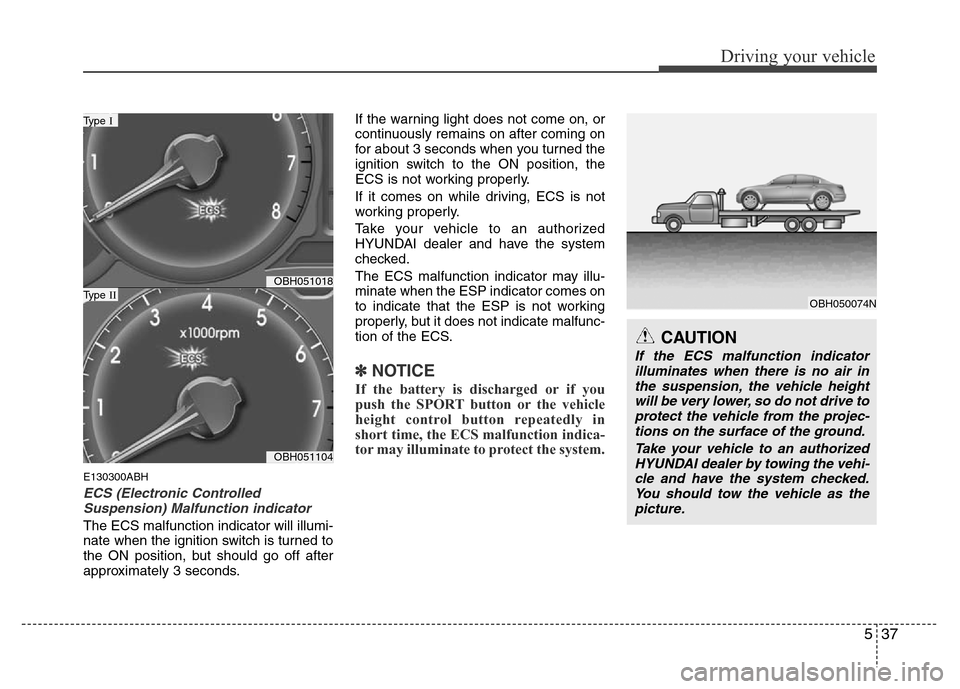
ECS (Electronic Controlled
Suspension) Malfunction indicator
The ECS malfunction indicator will illumi-
nate when the ignition switch is turned to
the ON position, but should go off after
approximately 3 seconds.If the warning light does not come on, or
continuously remains on after coming on
for about 3 seconds when you turned the
ignition switch to the ON position, the
ECS is not working properly.
If it comes on while driving, ECS is not
working properly.
Take your vehicle to an authorized
HYUNDAI dealer and have the system
checked.
The ECS malfunction indicator may illu-
minate when the ESP indicator comes on
to indicate that the ESP is not working
properly, but it does not indicate malfunc-
tion of the ECS.
✽NOTICE
If the battery is discharged or if you
push the SPORT button or the vehicle
height control button repeatedly in
short time, the ECS malfunction indica-
tor may illuminate to protect the system.
OBH051018
OBH051104
Type I
Type II
CAUTION
If the ECS malfunction indicator
illuminates when there is no air in
the suspension, the vehicle height
will be very lower, so do not drive to
protect the vehicle from the projec-
tions on the surface of the ground.
Take your vehicle to an authorized
HYUNDAI dealer by towing the vehi-
cle and have the system checked.
You should tow the vehicle as the
picture.
OBH050074N
Page 265 of 393
543
Driving your vehicle
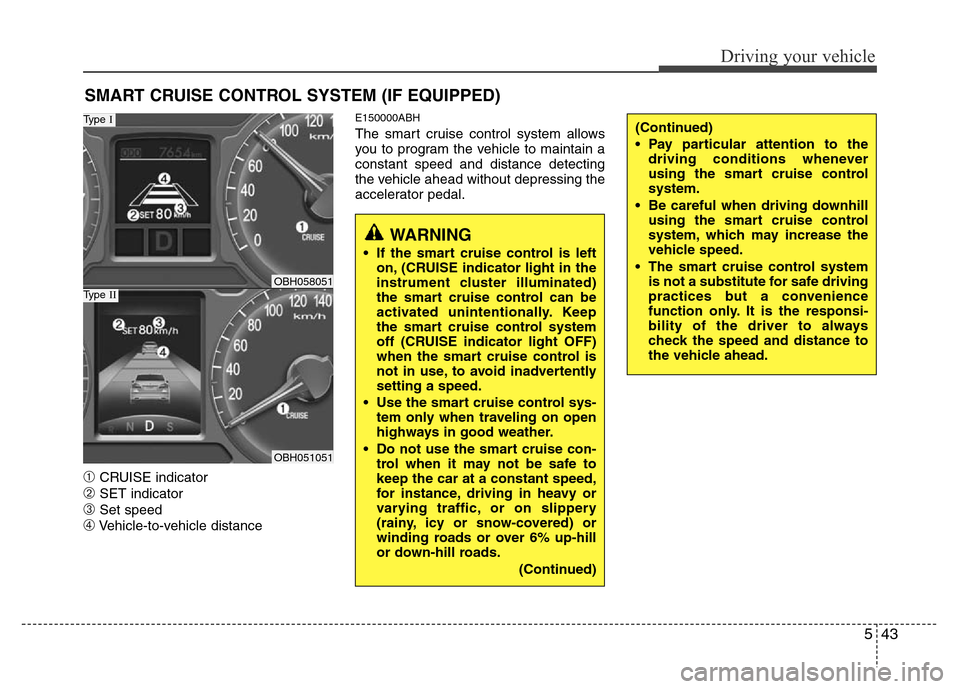
➀CRUISE indicator
➁SET indicator
➂Set speed
➃Vehicle-to-vehicle distance
E150000ABH
The smart cruise control system allows
you to program the vehicle to maintain a
constant speed and distance detecting
the vehicle ahead without depressing the
accelerator pedal.
SMART CRUISE CONTROL SYSTEM (IF EQUIPPED)
OBH058051
Type I
OBH051051
Type II
WARNING
• If the smart cruise control is left
on, (CRUISE indicator light in the
instrument cluster illuminated)
the smart cruise control can be
activated unintentionally. Keep
the smart cruise control system
off (CRUISE indicator light OFF)
when the smart cruise control is
not in use, to avoid inadvertently
setting a speed.
• Use the smart cruise control sys-
tem only when traveling on open
highways in good weather.
• Do not use the smart cruise con-
trol when it may not be safe to
keep the car at a constant speed,
for instance, driving in heavy or
varying traffic, or on slippery
(rainy, icy or snow-covered) or
winding roads or over 6% up-hill
or down-hill roads.
(Continued)
(Continued)
• Pay particular attention to the
driving conditions whenever
using the smart cruise control
system.
• Be careful when driving downhill
using the smart cruise control
system, which may increase the
vehicle speed.
• The smart cruise control system
is not a substitute for safe driving
practices but a convenience
function only. It is the responsi-
bility of the driver to always
check the speed and distance to
the vehicle ahead.
Page 266 of 393
Driving your vehicle
44 5
✽NOTICE
• During normal smart cruise control
operation, when the SET switch is
activated or reactivated after applying
the brakes, the smart cruise control
will energize after approximately 3
seconds. This delay is normal.
• To activate smart cruise control,
depress the brake pedal at least once
after turning the ignition switch to the
ON position or starting the engine. This
is to check if the brake switch which is
important part to cancel smart cruise
control is in normal condition.
E150100ABH
To set cruise control speed:
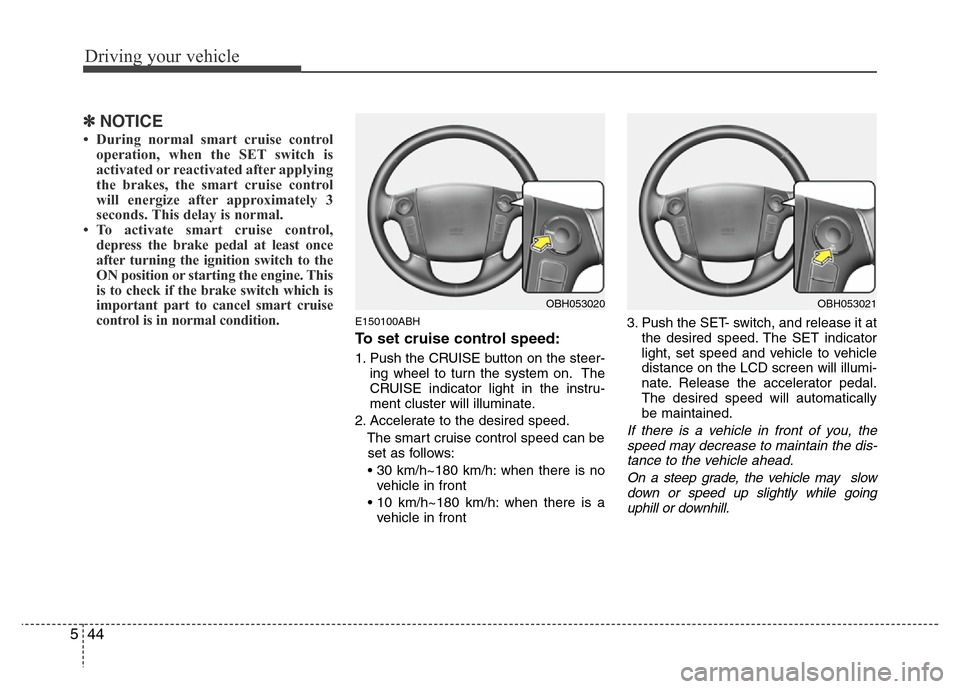
1. Push the CRUISE button on the steer-
ing wheel to turn the system on. The
CRUISE indicator light in the instru-
ment cluster will illuminate.
2. Accelerate to the desired speed.
The smart cruise control speed can be
set as follows:
• 30 km/h~180 km/h: when there is no
vehicle in front
• 10 km/h~180 km/h: when there is a
vehicle in front3. Push the SET- switch, and release it at
the desired speed. The SET indicator
light, set speed and vehicle to vehicle
distance on the LCD screen will illumi-
nate. Release the accelerator pedal.
The desired speed will automatically
be maintained.
If there is a vehicle in front of you, the
speed may decrease to maintain the dis-
tance to the vehicle ahead.
On a steep grade, the vehicle may slow
down or speed up slightly while going
uphill or downhill.
OBH053020OBH053021
Page 268 of 393
Driving your vehicle
46 5
E150500ABH
Cruise control will be canceled
when;
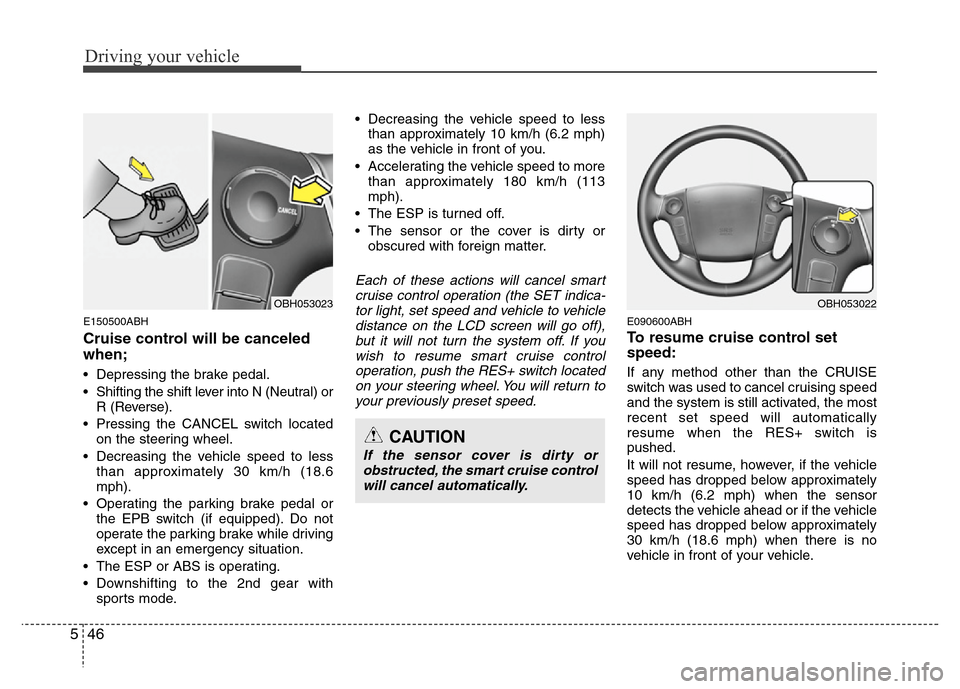
• Depressing the brake pedal.
• Shifting the shift lever into N (Neutral) or
R (Reverse).
• Pressing the CANCEL switch located
on the steering wheel.
• Decreasing the vehicle speed to less
than approximately 30 km/h (18.6
mph).
• Operating the parking brake pedal or
the EPB switch (if equipped). Do not
operate the parking brake while driving
except in an emergency situation.
• The ESP or ABS is operating.
• Downshifting to the 2nd gear with
sports mode.• Decreasing the vehicle speed to less
than approximately 10 km/h (6.2 mph)
as the vehicle in front of you.
• Accelerating the vehicle speed to more
than approximately 180 km/h (113
mph).
• The ESP is turned off.
• The sensor or the cover is dirty or
obscured with foreign matter.
Each of these actions will cancel smart
cruise control operation (the SET indica-
tor light, set speed and vehicle to vehicle
distance on the LCD screen will go off),
but it will not turn the system off. If you
wish to resume smart cruise control
operation, push the RES+ switch located
on your steering wheel. You will return to
your previously preset speed.
E090600ABH
To resume cruise control set
speed:
If any method other than the CRUISE
switch was used to cancel cruising speed
and the system is still activated, the most
recent set speed will automatically
resume when the RES+ switch is
pushed.
It will not resume, however, if the vehicle
speed has dropped below approximately
10 km/h (6.2 mph) when the sensor
detects the vehicle ahead or if the vehicle
speed has dropped below approximately
30 km/h (18.6 mph) when there is no
vehicle in front of your vehicle.
CAUTION
If the sensor cover is dirty or
obstructed, the smart cruise control
will cancel automatically.
OBH053022OBH053023
Page 269 of 393
547
Driving your vehicle
✽NOTICE
Always check the road conditions when
pressing the RES+ switch to resume the
speed.
E150700ABH
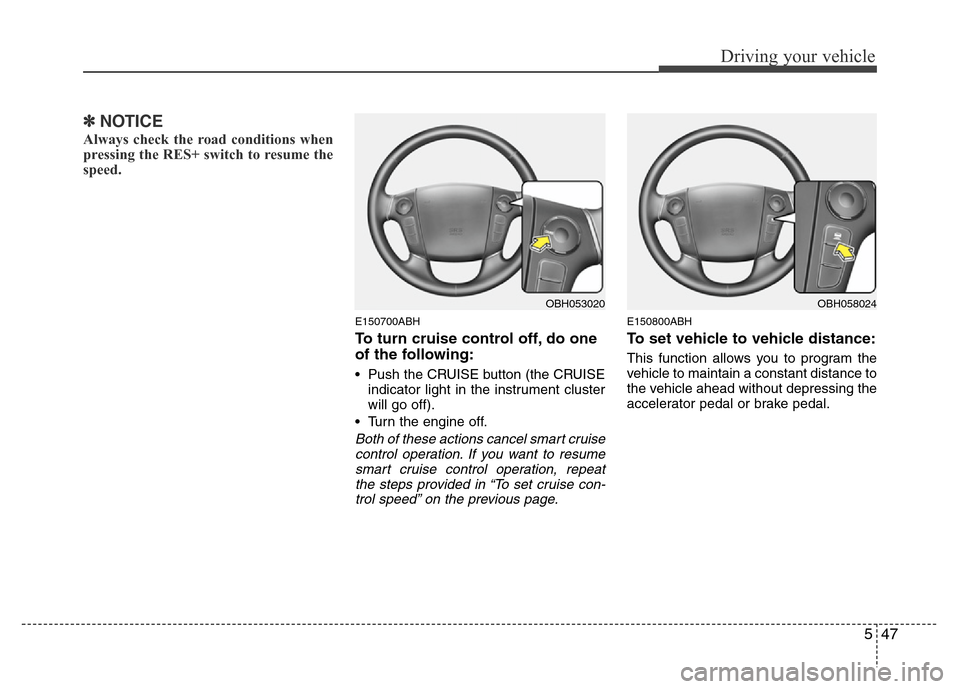
To turn cruise control off, do one
of the following:
• Push the CRUISE button (the CRUISE
indicator light in the instrument cluster
will go off).
• Turn the engine off.
Both of these actions cancel smart cruise
control operation. If you want to resume
smart cruise control operation, repeat
the steps provided in “To set cruise con-
trol speed” on the previous page.
E150800ABH
To set vehicle to vehicle distance:
This function allows you to program the
vehicle to maintain a constant distance to
the vehicle ahead without depressing the
accelerator pedal or brake pedal.
OBH053020OBH058024
Page 270 of 393
Driving your vehicle
48 5
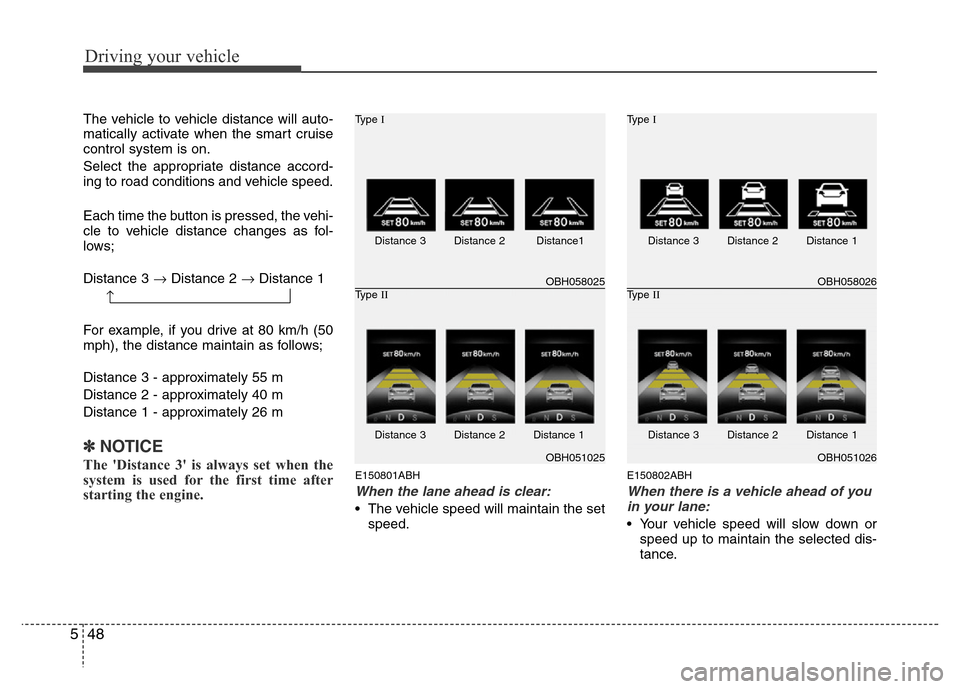
The vehicle to vehicle distance will auto-
matically activate when the smart cruise
control system is on.
Select the appropriate distance accord-
ing to road conditions and vehicle speed.
Each time the button is pressed, the vehi-
cle to vehicle distance changes as fol-
lows;
Distance 3 →Distance 2 →Distance 1
For example, if you drive at 80 km/h (50
mph), the distance maintain as follows;
Distance 3 - approximately 55 m
Distance 2 - approximately 40 m
Distance 1 - approximately 26 m
✽NOTICE
The 'Distance 3' is always set when the
system is used for the first time after
starting the engine.E150801ABH
When the lane ahead is clear:
• The vehicle speed will maintain the set
speed.
E150802ABH
When there is a vehicle ahead of you
in your lane:
• Your vehicle speed will slow down or
speed up to maintain the selected dis-
tance.
OBH058025 Type I
OBH051025 Type II
Distance 3 Distance 2 Distance1
Distance 3 Distance 2 Distance 1
OBH058026 Type I
OBH051026 Type II
Distance 3 Distance 2 Distance 1
Distance 3 Distance 2 Distance 1
→
Page 271 of 393
549
Driving your vehicle
• If the vehicle ahead speeds up, your
vehicle will travel at a steady cruising
speed after accelerating to the select-
ed speed.
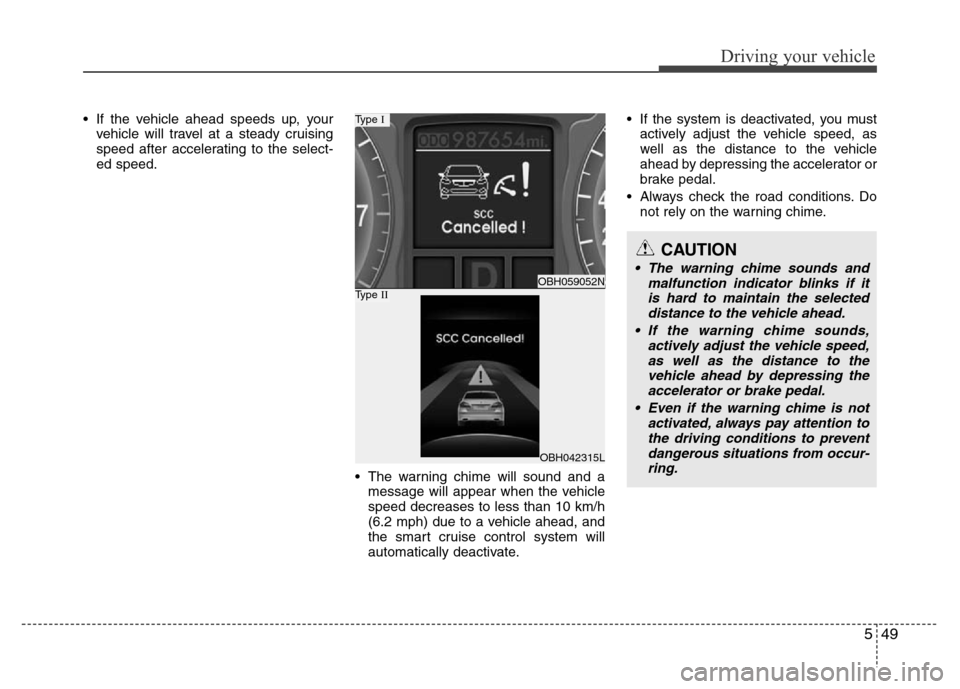
• The warning chime will sound and a
message will appear when the vehicle
speed decreases to less than 10 km/h
(6.2 mph) due to a vehicle ahead, and
the smart cruise control system will
automatically deactivate.• If the system is deactivated, you must
actively adjust the vehicle speed, as
well as the distance to the vehicle
ahead by depressing the accelerator or
brake pedal.
• Always check the road conditions. Do
not rely on the warning chime.
OBH059052N
Type I
OBH042315L
Type II
CAUTION
• The warning chime sounds and
malfunction indicator blinks if it
is hard to maintain the selected
distance to the vehicle ahead.
• If the warning chime sounds,
actively adjust the vehicle speed,
as well as the distance to the
vehicle ahead by depressing the
accelerator or brake pedal.
• Even if the warning chime is not
activated, always pay attention to
the driving conditions to prevent
dangerous situations from occur-
ring.
Page 272 of 393
Driving your vehicle
50 5
E150803ABH
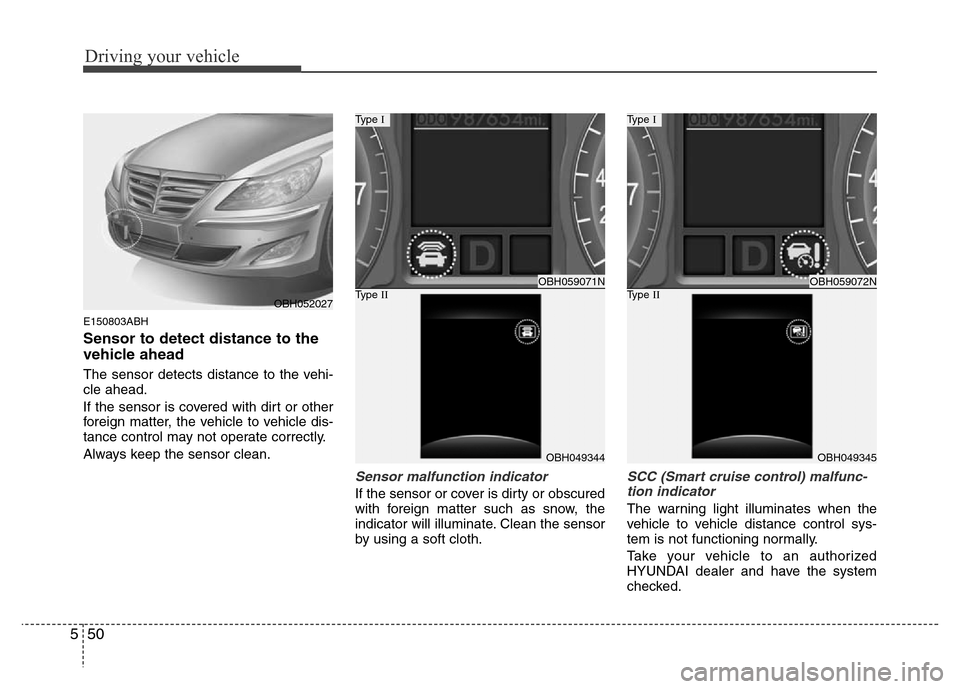
Sensor to detect distance to the
vehicle ahead
The sensor detects distance to the vehi-
cle ahead.
If the sensor is covered with dirt or other
foreign matter, the vehicle to vehicle dis-
tance control may not operate correctly.
Always keep the sensor clean.
Sensor malfunction indicator
If the sensor or cover is dirty or obscured
with foreign matter such as snow, the
indicator will illuminate. Clean the sensor
by using a soft cloth.
SCC (Smart cruise control) malfunc-
tion indicator
The warning light illuminates when the
vehicle to vehicle distance control sys-
tem is not functioning normally.
Take your vehicle to an authorized
HYUNDAI dealer and have the system
checked.
OBH059071N
Type I
OBH049344
Type IIOBH059072N
Type I
OBH049345
Type IIOBH052027