cat Hyundai Genesis 2012 Owners Manual
[x] Cancel search | Manufacturer: HYUNDAI, Model Year: 2012, Model line: Genesis, Model: Hyundai Genesis 2012Pages: 393, PDF Size: 8.81 MB
Page 189 of 393
Features of your vehicle
116 4
D281000AEN
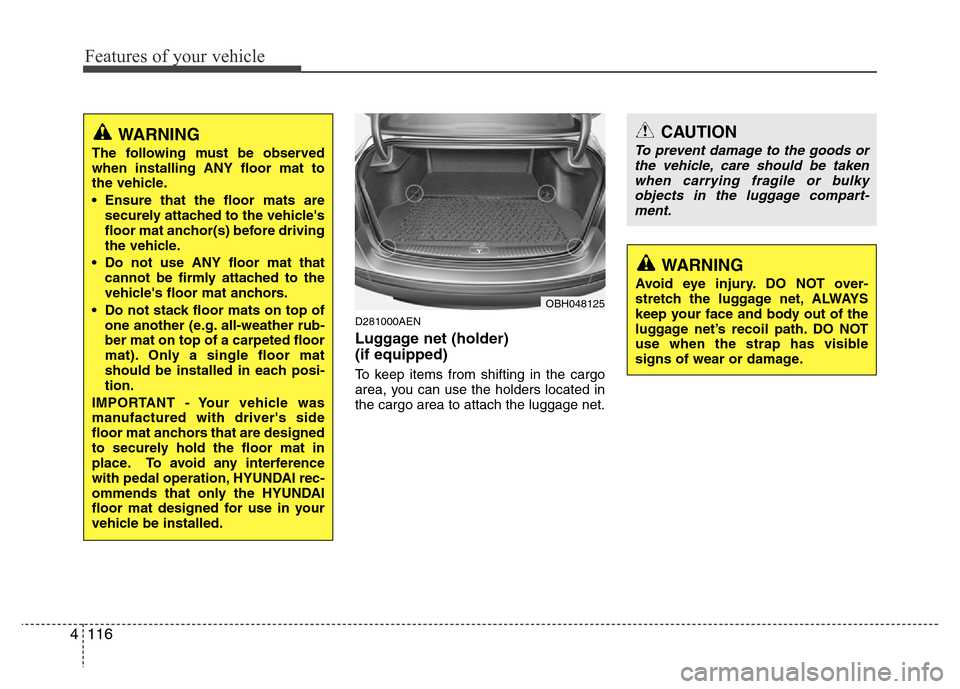
Luggage net (holder)
(if equipped)
To keep items from shifting in the cargo
area, you can use the holders located in
the cargo area to attach the luggage net.
CAUTION
To prevent damage to the goods or
the vehicle, care should be taken
when carrying fragile or bulky
objects in the luggage compart-
ment.
WARNING
Avoid eye injury. DO NOT over-
stretch the luggage net, ALWAYS
keep your face and body out of the
luggage net’s recoil path. DO NOT
use when the strap has visible
signs of wear or damage.
OBH048125
WARNING
The following must be observed
when installing ANY floor mat to
the vehicle.
• Ensure that the floor mats are
securely attached to the vehicle's
floor mat anchor(s) before driving
the vehicle.
• Do not use ANY floor mat that
cannot be firmly attached to the
vehicle's floor mat anchors.
• Do not stack floor mats on top of
one another (e.g. all-weather rub-
ber mat on top of a carpeted floor
mat). Only a single floor mat
should be installed in each posi-
tion.
IMPORTANT - Your vehicle was
manufactured with driver's side
floor mat anchors that are designed
to securely hold the floor mat in
place. To avoid any interference
with pedal operation, HYUNDAI rec-
ommends that only the HYUNDAI
floor mat designed for use in your
vehicle be installed.
Page 194 of 393
4121
Features of your vehicle
D300800AEN
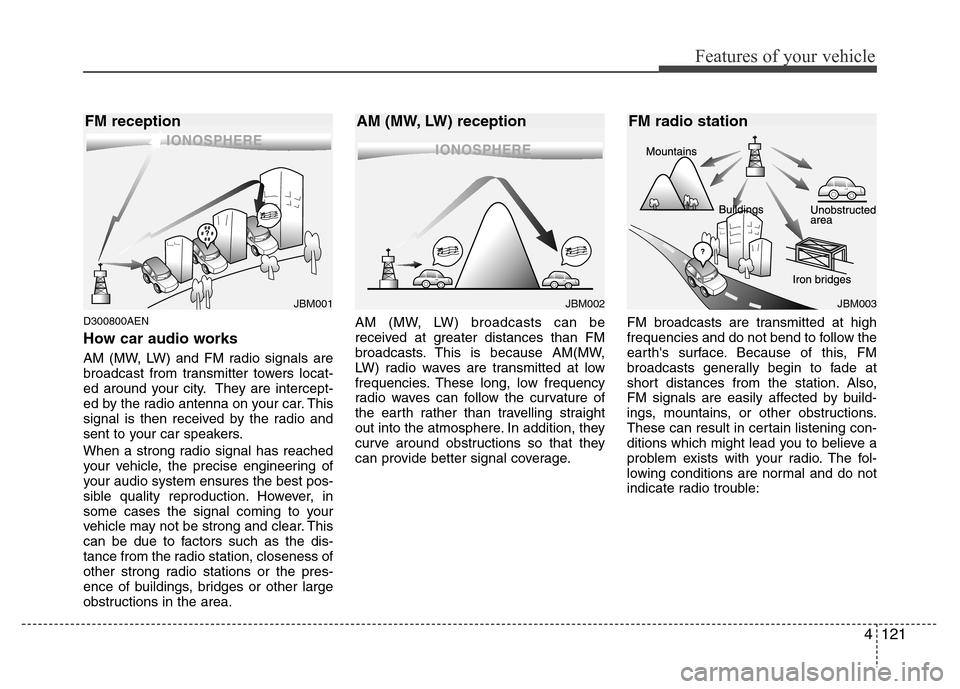
How car audio works
AM (MW, LW) and FM radio signals are
broadcast from transmitter towers locat-
ed around your city. They are intercept-
ed by the radio antenna on your car. This
signal is then received by the radio and
sent to your car speakers.
When a strong radio signal has reached
your vehicle, the precise engineering of
your audio system ensures the best pos-
sible quality reproduction. However, in
some cases the signal coming to your
vehicle may not be strong and clear. This
can be due to factors such as the dis-
tance from the radio station, closeness of
other strong radio stations or the pres-
ence of buildings, bridges or other large
obstructions in the area.AM (MW, LW) broadcasts can be
received at greater distances than FM
broadcasts. This is because AM(MW,
LW) radio waves are transmitted at low
frequencies. These long, low frequency
radio waves can follow the curvature of
the earth rather than travelling straight
out into the atmosphere. In addition, they
curve around obstructions so that they
can provide better signal coverage.FM broadcasts are transmitted at high
frequencies and do not bend to follow the
earth's surface. Because of this, FM
broadcasts generally begin to fade at
short distances from the station. Also,
FM signals are easily affected by build-
ings, mountains, or other obstructions.
These can result in certain listening con-
ditions which might lead you to believe a
problem exists with your radio. The fol-
lowing conditions are normal and do not
indicate radio trouble:
JBM002JBM003
AM (MW, LW) reception FM radio station
JBM001
FM reception
Page 195 of 393
Features of your vehicle
122 4
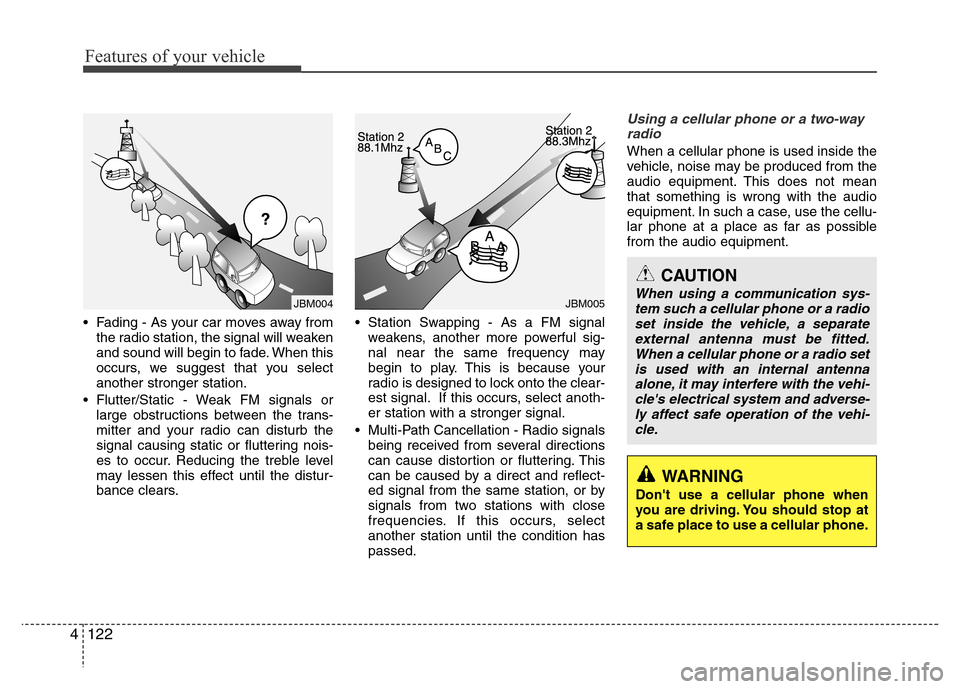
• Fading - As your car moves away from
the radio station, the signal will weaken
and sound will begin to fade. When this
occurs, we suggest that you select
another stronger station.
• Flutter/Static - Weak FM signals or
large obstructions between the trans-
mitter and your radio can disturb the
signal causing static or fluttering nois-
es to occur. Reducing the treble level
may lessen this effect until the distur-
bance clears.• Station Swapping - As a FM signal
weakens, another more powerful sig-
nal near the same frequency may
begin to play. This is because your
radio is designed to lock onto the clear-
est signal. If this occurs, select anoth-
er station with a stronger signal.
• Multi-Path Cancellation - Radio signals
being received from several directions
can cause distortion or fluttering. This
can be caused by a direct and reflect-
ed signal from the same station, or by
signals from two stations with close
frequencies. If this occurs, select
another station until the condition has
passed.
Using a cellular phone or a two-way
radio
When a cellular phone is used inside the
vehicle, noise may be produced from the
audio equipment. This does not mean
that something is wrong with the audio
equipment. In such a case, use the cellu-
lar phone at a place as far as possible
from the audio equipment.
JBM005
CAUTION
When using a communication sys-
tem such a cellular phone or a radio
set inside the vehicle, a separate
external antenna must be fitted.
When a cellular phone or a radio set
is used with an internal antenna
alone, it may interfere with the vehi-
cle's electrical system and adverse-
ly affect safe operation of the vehi-
cle.
WARNING
Don't use a cellular phone when
you are driving. You should stop at
a safe place to use a cellular phone.
JBM004
Page 199 of 393
Features of your vehicle
126 4
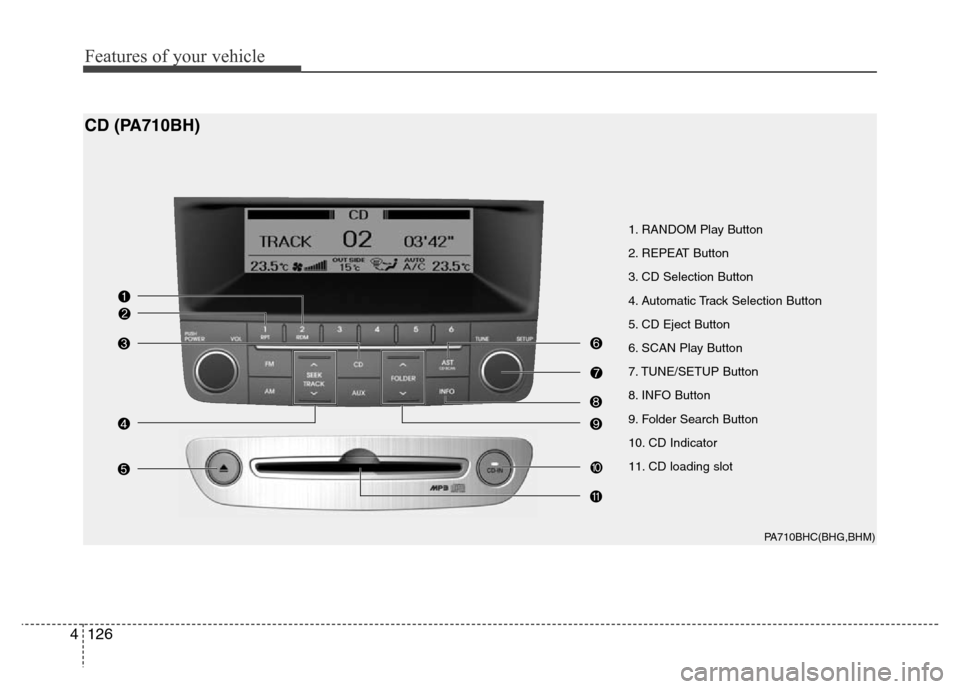
1. RANDOM Play Button
2. REPEAT Button
3. CD Selection Button
4. Automatic Track Selection Button
5. CD Eject Button
6. SCAN Play Button
7. TUNE/SETUP Button
8. INFO Button
9. Folder Search Button
10. CD Indicator
11. CD loading slot
PA710BHC(BHG,BHM)
CD (PA710BH)
Page 201 of 393
![Hyundai Genesis 2012 Owners Manual Features of your vehicle
128 4
9. Folder Search Button
• Push [FOLDER ] button child folder
of the current folder and display the first
song in the folder. Press TUNE/SETUP
button to move to the fol](/img/35/14676/w960_14676-200.png "Hyundai Genesis 2012 Owners Manual Features of your vehicle
128 4
9. Folder Search Button
• Push [FOLDER ] button child folder
of the current folder and display the first
song in the folder. Press TUNE/SETUP
button to move to the fol")
Features of your vehicle
128 4
9. Folder Search Button
• Push [FOLDER ] button child folder
of the current folder and display the first
song in the folder. Press TUNE/SETUP
button to move to the folder displayed. It
will play the first song in the folder.
• Push [FOLDER ] button parent fold-
er and displays the first song in the fold-
er. Press TUNE/SETUP button to move
to the folder displayed. It will play the
first song in the folder.
(MP3 only)
10. CD Indicator
When the ignition switch is in ACC or ON
and if the CD is loaded, this indicator is
illuminated. If the CD is ejected the light
turnes off.
11. CD loading slot
Face the printed side upward and gently
push in. When the ignition switch is on
ACC or ON and power is off, power is
automatically turned on if the CD is
loaded. CDP supports 12 cm CDs. But if
VCD, Data CD, DVD are loaded, "Media
Error" message will appear.
Page 202 of 393
4129
Features of your vehicle
CAUTION IN USING
USB DEVICE
• To use the external USB device,
make sure the device is not
mounted when starting up the
vehicle and mount the device
after starting up.
• If you start the vehicle when the
USB device is mounted, it may
damage the USB device. (USB is
not ESA)
• If the vehicle is started up or
turned off while the external USB
device is connected, the external
USB device may not work.
• It may not play inauthentic MP3 or
WMA files.
1) It can only play MP3 files with
the compression rate between
8Kbps~320Kbps.
2) It can only play WMA music
files with the compression rate
between 8Kbps~320Kbps.
• Take cautions for static electricity
when mounting or dismounting
the external USB device.
• Encoded MP3 PLAYER is not rec-
ognizable.
(Continued)
(Continued)
• Depending on the condition of
the external USB device, the con-
nected external USB device can
be unrecognizable.
• When the formatted byte/sector
setting of External USB devices is
not either 512BYTE or 2048BYTE,
then the device will not be recog-
nized.
• Only the USB device formatted to
FAT 12/16/32.
• USB device without USB IF authen-
tication may not be recognizable.
• Make sure the USB connection
terminal does not come in contact
with human body or any object.
• If you repeat mounting or dis-
mounting USB device in a short
period of time, it may break the
device.
• You might hear strange noise
when mounting or dismounting a
USB device.
(Continued)(Continued)
• If you dismount the external USB
device during playback in USB
mode, the external USB device can
be damaged or malfunction.
Therefore, mount the external USB
device when the engine is turned
off or in another mode.
• Depending on the type and capac-
ity of the external USB device or
the type of the files stored in the
device, there is a difference in the
time taken for recognition of the
device, but this is not a trouble
and you only have to wait.
• Do not use the USB device for other
purposes than playing music files.
• Use of USB accessories such as
the recharger or heater using
USB I/F may lower the perform-
ance or cause trouble.
• If you use devices such as the
USB hub you purchased sepa-
rately, the vehicle’s audio system
may not recognize the USB
device. Connect the USB device
directly to the multimedia termi-
nal of the vehicle.
(Continued)
Page 207 of 393
Features of your vehicle
134 4
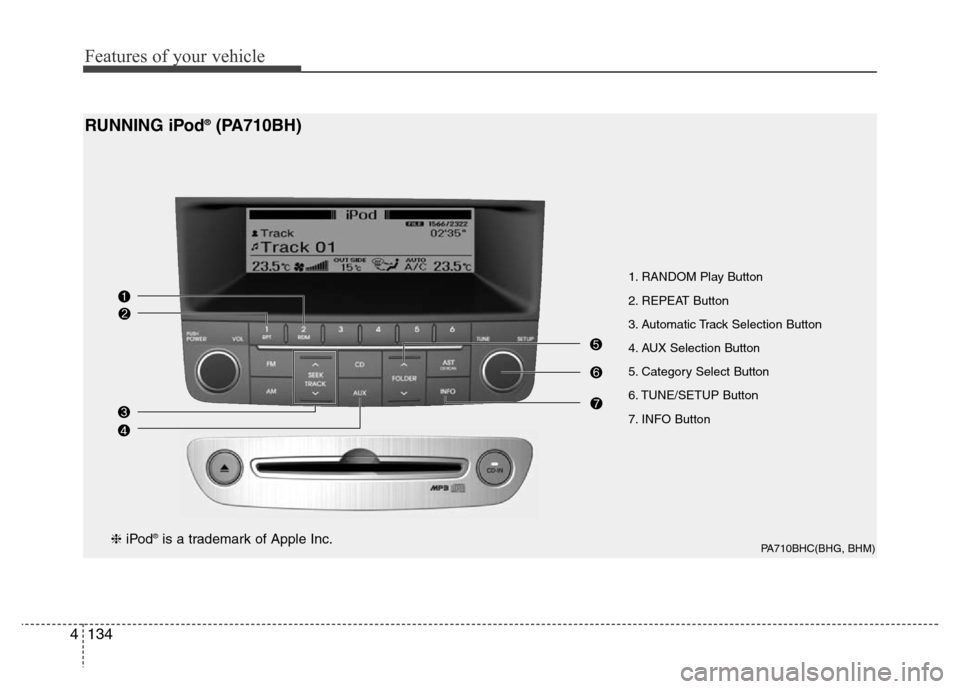
1. RANDOM Play Button
2. REPEAT Button
3. Automatic Track Selection Button
4. AUX Selection Button
5. Category Select Button
6. TUNE/SETUP Button
7. INFO Button
PA710BHC(BHG, BHM)
RUNNING iPod®(PA710BH)
❈iPod®is a trademark of Apple Inc.
Page 208 of 393
4135
Features of your vehicle
Using un iPod®when the exclusive cable
is connected to the multiple terminal
inside the console on the right hand side
of the driver's seat.
1. RANDOM Playback Button
Press the button for less than 0.8 second
to activate or deactivate the random play-
back of the songs within the current cat-
egory. Press the button for longer than
0.8 second to randomly play all songs in
the entire album of the iPod
®. Press the
button once again to cancel the mode.
2. REPEAT Button
Repeats the song currently played.
3. Automatic Track Selection
Button
• Push [SEEK ] button for less than
0.8 second to play from the beginning
of the current song.
• Push [SEEK ] button for less than
0.8 second and press again within 1
seconds to play the previous song.
• Push [SEEK ] button for 0.8 second
or longer to initiate reverse direction
high speed sound search of current
song.
• Push [SEEK ] button for less than
0.8 second to play the next song.
• Push [SEEK ] button for 0.8 second
or longer to initiate high speed sound
search of current song.
4. AUX Selection Button
If an iPod®is connected, it switches to the
iPod®mode to play the song files stored
in the iPod®.
5. Category Selection Button
Press [CAT FOLDER
/ ] button to
move the category and display the first
song in the category. Press TUNE/
SETUP button to move to the category
displayed. It will play the first song in the
folder.
(PLAYLISTS
➟ARTISTS➟ ALBUMS ➟
GENRES ➟ SONGS ➟ COMPOSERS ➟
PLAYLISTS ➟ ...)
6. TUNE/SETUP Button
Turn this button clockwise or counter-
clockwise, it will display the category
menu. To select the displayed menu,
press the button.
7. INFO Button
Displays the information of the file cur-
rently played in order of TITLE ➟ ARTIST➟ ALBUM ➟ Play Screen ➟ TITLE...
Page 209 of 393
Features of your vehicle
136 4
✽NOTICE FOR USING iPod®
DEVICE
• Some iPod®models might not support
the communication protocol and the
files will not be played. (iPod
®models
supported: Mini, 4G, Photo, Nano,
5G)
• The order of search or playback of
songs in the iPod
®can be different
from the order searched in the audio
system.
• If the iPod
®crashes due to its own
trouble, reset iPod®. (Reset: Refer to
iPod®manual)
• iPod®may not operate normally on
low battery.
CAUTION IN USING iPod®
DEVICE
• You need the power cable exclu-
sive for iPod®in order to operate
iPod®with the buttons on the
audio system. The PC cable pro-
vided by Apple may cause mal-
function and do not use it for
vehicle use.
• When connecting the device with
iPod
®cable, push in the jack fully
not to interfere with communica-
tion.
• When adjusting the sound effects
of iPod
®and the audio system, the
sound effects of both devices will
overlap each and might cause
reduce or distort the quality of the
sound.
• Deactivate (turn off) the equalizer
function of iPod
®when adjusting
the audio system’s volume, and
turn off the equalizer of the audio
system when using the equalizer
of iPod
®.
(Continued)
(Continued)
• When the iPod®cable is connect-
ed, the system can be switched to
the AUX mode even without the
iPod
®device and can cause
noise. Disconnect iPod®cable
when you are not using the iPod®
device.
• When the iPod®is not used at
audio system, iPod®cable has to
be separate from iPod®device.
Origin display of iPod®may not be
displayed.
Page 215 of 393
Features of your vehicle
142 4
CAUTION IN USING USB
DEVICE
• To use the external USB device,
make sure the device is not
mounted when starting up the
vehicle and mount the device
after starting up.
• If you start the vehicle when the
USB device is mounted, it may
damage the USB device. (USB is
not ESA)
• If the vehicle is started up or
turned off while the external USB
device is connected, the external
USB device may not work.
• It may not play inauthentic MP3 or
WMA files.
1) It can only play MP3 files with
the compression rate between
8Kbps~320Kbps.
2) It can only play WMA music
files with the compression rate
between 8Kbps~320Kbps.
• Take cautions for static electricity
when mounting or dismounting
the external USB device.
• Encoded MP3 PLAYER is not rec-
ognizable.
(Continued)
(Continued)
• Depending on the condition of
the external USB device, the con-
nected external USB device can
be unrecognizable.
• When the formatted byte/sector
setting of External USB devices is
not either 512BYTE or 2048BYTE,
then the device will not be recog-
nized.
• Only the USB device formatted to
FAT 12/16/32.
• USB device without USB IF authen-
tication may not be recognizable.
• Make sure the USB connection
terminal does not come in contact
with human body or any object.
• If you repeat mounting or dis-
mounting USB device in a short
period of time, it may break the
device.
• You might hear strange noise
when mounting or dismounting a
USB device.
(Continued)(Continued)
• If you dismount the external USB
device during playback in USB
mode, the external USB device
can be damaged or malfunction.
Therefore, mount the external
USB device when the engine is
turned off or in another mode.
• Depending on the type and capac-
ity of the external USB device or
the type of the files stored in the
device, there is a difference in the
time taken for recognition of the
device, but this is not a trouble
and you only have to wait.
• Do not use the USB device for other
purposes than playing music files.
• Use of USB accessories such as
the recharger or heater using
USB I/F may lower the perform-
ance or cause trouble.
• If you use devices such as the
USB hub you purchased sepa-
rately, the vehicle’s audio system
may not recognize the USB
device. Connect the USB device
directly to the multimedia termi-
nal of the vehicle.
(Continued)