charg Hyundai Genesis 2012 User Guide
[x] Cancel search | Manufacturer: HYUNDAI, Model Year: 2012, Model line: Genesis, Model: Hyundai Genesis 2012Pages: 393, PDF Size: 8.81 MB
Page 122 of 393
449
Features of your vehicle
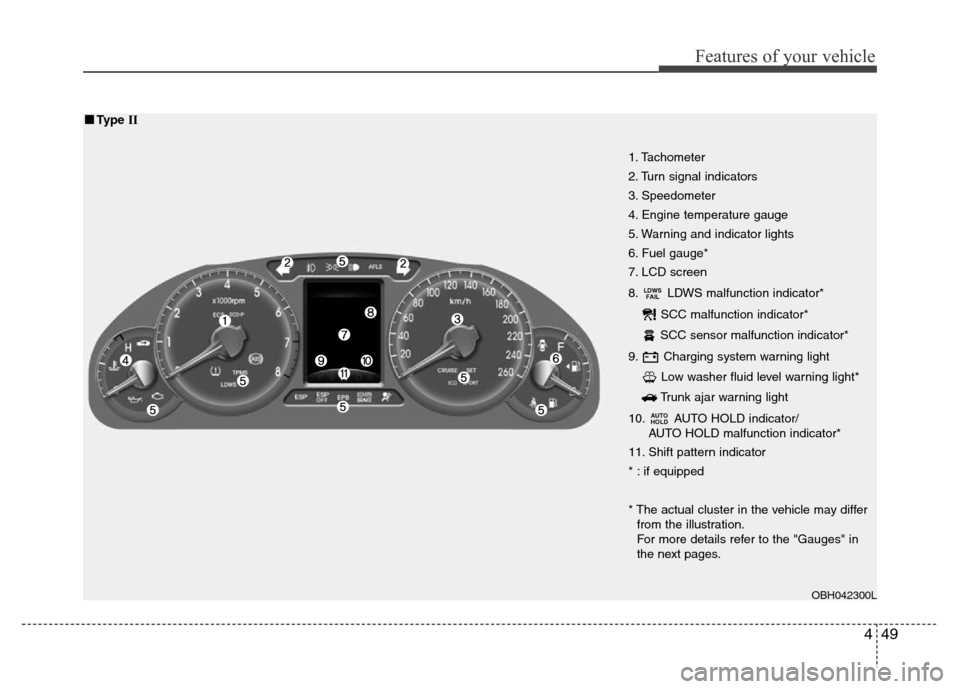
1. Tachometer
2. Turn signal indicators
3. Speedometer
4. Engine temperature gauge
5. Warning and indicator lights
6. Fuel gauge*
7. LCD screen
8. LDWS malfunction indicator*
SCC malfunction indicator*
SCC sensor malfunction indicator*
9. Charging system warning light
Low washer fluid level warning light*
Trunk ajar warning light
10. AUTO HOLD indicator/
AUTO HOLD malfunction indicator*
11. Shift pattern indicator
* : if equipped
* The actual cluster in the vehicle may differ
from the illustration.
For more details refer to the "Gauges" in
the next pages.
AUTO
HOLD
LDWS
FAIL
OBH042300L
■■Type II
Page 136 of 393
463
Features of your vehicle
If this happens, the system may not mon-
itor the tire pressure. Have the system
checked by an authorized HYUNDAI
dealer as soon as possible.
For more information about the TPMS,
refer to “Tire Pressure Monitoring
System” in section 6.D150312ABH
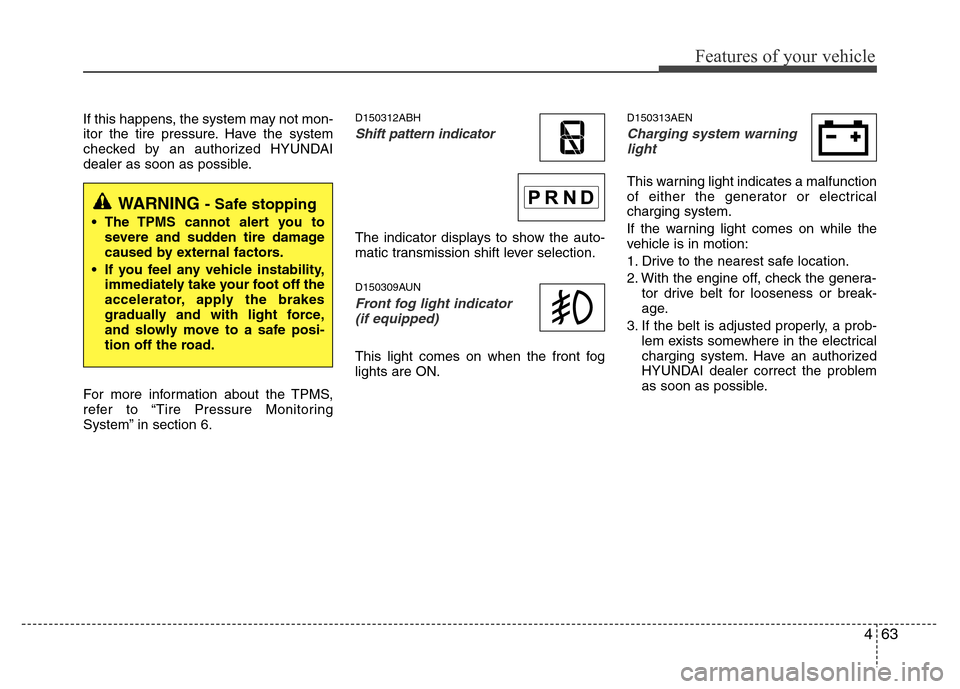
Shift pattern indicator
The indicator displays to show the auto-
matic transmission shift lever selection.
D150309AUN
Front fog light indicator
(if equipped)
This light comes on when the front fog
lights are ON.
D150313AEN
Charging system warning
light
This warning light indicates a malfunction
of either the generator or electrical
charging system.
If the warning light comes on while the
vehicle is in motion:
1. Drive to the nearest safe location.
2. With the engine off, check the genera-
tor drive belt for looseness or break-
age.
3. If the belt is adjusted properly, a prob-
lem exists somewhere in the electrical
charging system. Have an authorized
HYUNDAI dealer correct the problem
as soon as possible.
WARNING - Safe stopping
• The TPMS cannot alert you to
severe and sudden tire damage
caused by external factors.
• If you feel any vehicle instability,
immediately take your foot off the
accelerator, apply the brakes
gradually and with light force,
and slowly move to a safe posi-
tion off the road.
Page 142 of 393
469
Features of your vehicle
D150401ABH
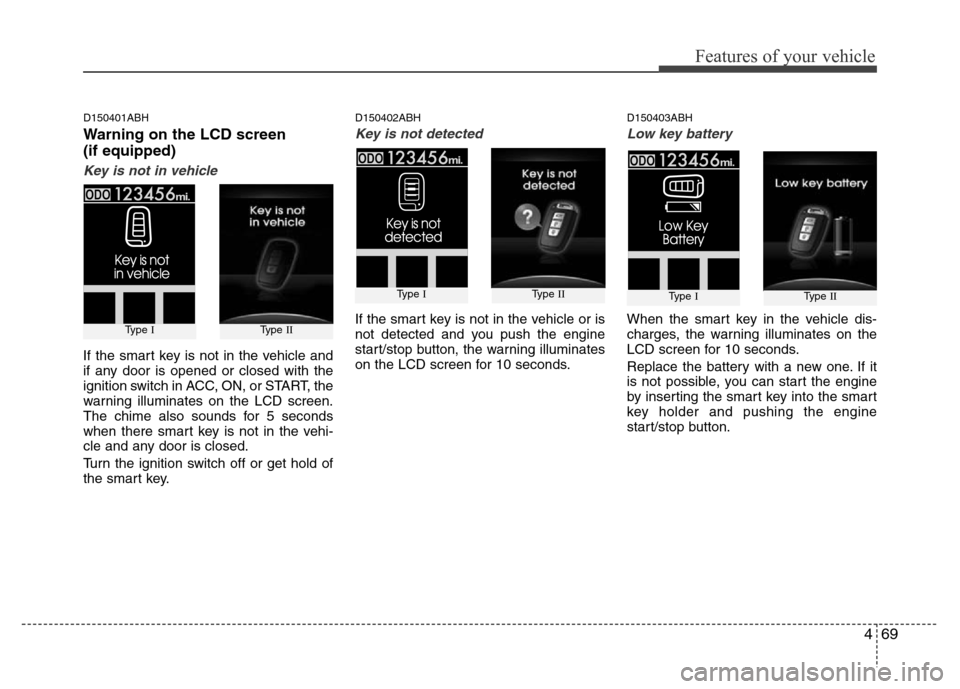
Warning on the LCD screen
(if equipped)
Key is not in vehicle
If the smart key is not in the vehicle and
if any door is opened or closed with the
ignition switch in ACC, ON, or START, the
warning illuminates on the LCD screen.
The chime also sounds for 5 seconds
when there smart key is not in the vehi-
cle and any door is closed.
Turn the ignition switch off or get hold of
the smart key.
D150402ABH
Key is not detected
If the smart key is not in the vehicle or is
not detected and you push the engine
start/stop button, the warning illuminates
on the LCD screen for 10 seconds.
D150403ABH
Low key battery
When the smart key in the vehicle dis-
charges, the warning illuminates on the
LCD screen for 10 seconds.
Replace the battery with a new one. If it
is not possible, you can start the engine
by inserting the smart key into the smart
key holder and pushing the engine
start/stop button.
Type IType II
Type IType II
Type IType II
Page 151 of 393
Features of your vehicle
78 4
D190100ABH
Battery saver function
• The purpose of this feature is to pre-
vent the battery from being dis-
charged. The system automatically
turns off the parking lights when the
driver removes the ignition key (smart
key: turns off the engine) and opens
the driver-side door.
• With this feature, the parking lights will
be turned off automatically if the driver
parks on the side of road at night.
If necessary, to keep the lights on
when the ignition key is removed
(smart key: turns off the engine), per-
form the following:
1) Open the driver-side door.
2) Turn the parking lights OFF and ON
again using the light switch on the
steering column.
Headlight welcome function
(if equipped)
When the headlight is ON or AUTO posi-
tion and all doors (and trunk) are closed
and locked, if you press the door unlock
button on the transmitter (or the smart
key), the headlights will come on for
about 15 seconds. At this time, if you
press the door lock or unlock button, the
headlights will turn off immediately.
Headlight escort function (Type A)
(if equipped)
If you turn the ignition switch to the ACC
or OFF position with the headlights ON,
the headlights (and/or tail lights) remain
on for about 20 minutes. However, if the
driver’s door is opened and closed, the
headlights are turned off after 30 sec-
onds.
The headlights can be turned off by
pressing the lock button on the transmit-
ter (or smart key) twice or turning the
light switch to the OFF or Auto position.
If the headlight switch is in the AUTO
position, the function can only operate at
night.
Headlight escort function (Type B)
(if equipped)
If you turn the ignition switch to the ACC
or OFF position with the headlights ON,
the headlights (and/or tail lights) remain
on for about 5 minutes. However, if the
driver’s door is opened and closed, the
headlights are turned off after 15 sec-
onds.
The headlights can be turned off by
pressing the lock button on the transmit-
ter (or smart key) twice or turning the
light switch to the OFF or Auto position.
If the headlight switch is in the AUTO
position, the function can only operate at
night.
LIGHTING
CAUTION
If the driver gets out of the vehicle
through other doors (except dri-
ver's door and front passenger’s
door), the battery saver function
does not operate and the headlight
escort function does not turn off
automatically. Therefore, it causes
the battery to be discharged. In this
case, make sure to turn off the lamp
before getting out of the vehicle.
CAUTION
If the driver gets out of the vehicle
through other doors (except dri-
ver's door and front passenger’s
door), the battery saver function
does not operate and the headlight
escort function does not turn off
automatically. Therefore, it causes
the battery to be discharged. In this
case, make sure to turn off the lamp
before getting out of the vehicle.
Page 153 of 393
Features of your vehicle
80 4
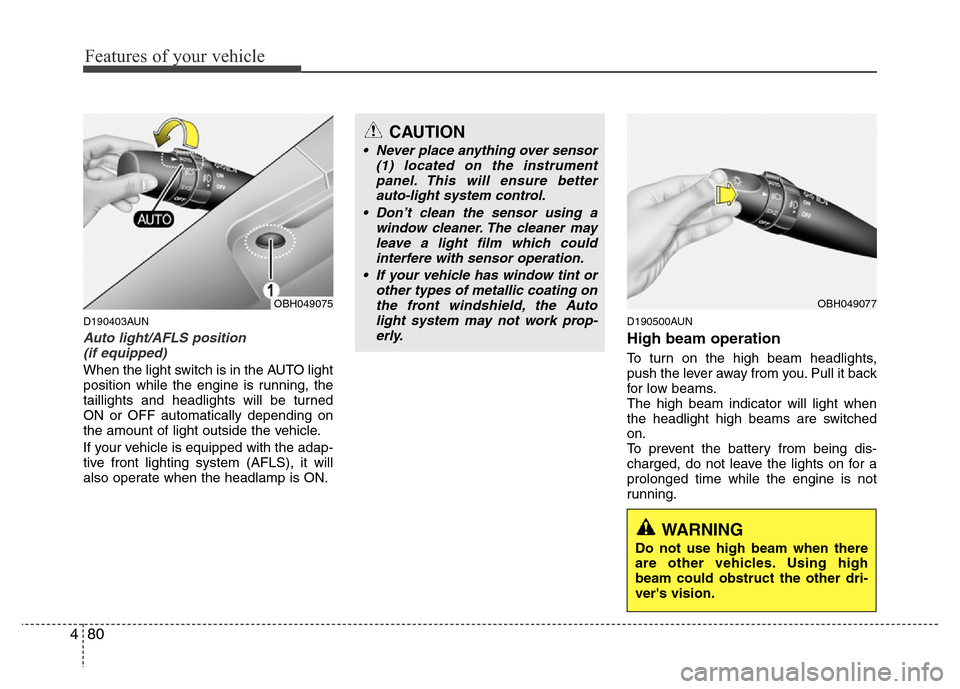
D190403AUN
Auto light/AFLS position
(if equipped)
When the light switch is in the AUTO light
position while the engine is running, the
taillights and headlights will be turned
ON or OFF automatically depending on
the amount of light outside the vehicle.
If your vehicle is equipped with the adap-
tive front lighting system (AFLS), it will
also operate when the headlamp is ON.
D190500AUN
High beam operation
To turn on the high beam headlights,
push the lever away from you. Pull it back
for low beams.
The high beam indicator will light when
the headlight high beams are switched
on.
To prevent the battery from being dis-
charged, do not leave the lights on for a
prolonged time while the engine is not
running.
OBH049075
CAUTION
• Never place anything over sensor
(1) located on the instrument
panel. This will ensure better
auto-light system control.
• Don’t clean the sensor using a
window cleaner. The cleaner may
leave a light film which could
interfere with sensor operation.
• If your vehicle has window tint or
other types of metallic coating on
the front windshield, the Auto
light system may not work prop-
erly.
OBH049077
WARNING
Do not use high beam when there
are other vehicles. Using high
beam could obstruct the other dri-
ver's vision.
Page 162 of 393
489
Features of your vehicle
D210000AEN
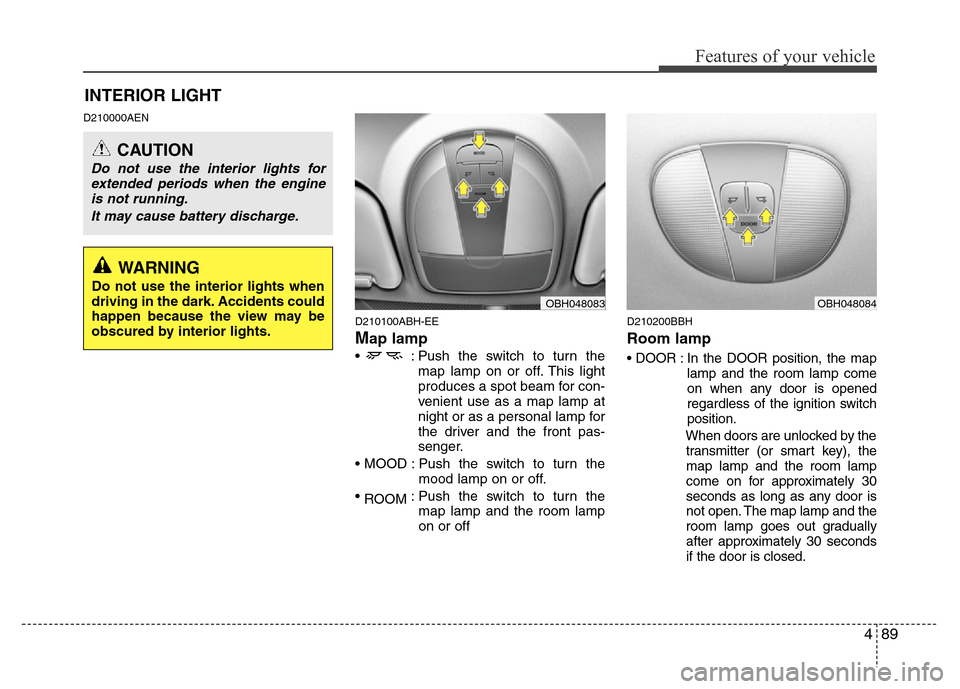
D210100ABH-EE
Map lamp
• : Push the switch to turn the
map lamp on or off. This light
produces a spot beam for con-
venient use as a map lamp at
night or as a personal lamp for
the driver and the front pas-
senger.
• MOOD : Push the switch to turn the
mood lamp on or off.
•
ROOM: Push the switch to turn the
map lamp and the room lamp
on or off
D210200BBH
Room lamp
• DOOR : In the DOOR position, the map
lamp and the room lamp come
on when any door is opened
regardless of the ignition switch
position.
When doors are unlocked by the
transmitter (or smart key), the
map lamp and the room lamp
come on for approximately 30
seconds as long as any door is
not open. The map lamp and the
room lamp goes out gradually
after approximately 30 seconds
if the door is closed.
INTERIOR LIGHT
CAUTION
Do not use the interior lights for
extended periods when the engine
is not running.
It may cause battery discharge.
OBH048083OBH048084
WARNING
Do not use the interior lights when
driving in the dark. Accidents could
happen because the view may be
obscured by interior lights.
Page 163 of 393
Features of your vehicle
90 4
However, if the ignition switch
is ON or all doors are locked,
the map lamp and the room
lamp will turn off immediately.
If a door is opened with the
ignition switch in the ACC or
LOCK position, the map lamp
and the room lamp stays on for
about 20 minutes. However, if a
door is opened with the ignition
switch in the ON position, the
map lamp and the room lamp
stays on continuously. Also, if
you turn the engine start/stop
button off or remove the igni-
tion key from the ignition switch
when the room lamp is in off
position with all doors closed,
the room lamp will turn on.
• : Push the switch to turn the
room lamp on or off. This light
produces a spot beam for con-
venient use as a room lamp at
night or as a personal lamp for
the rear passenger.
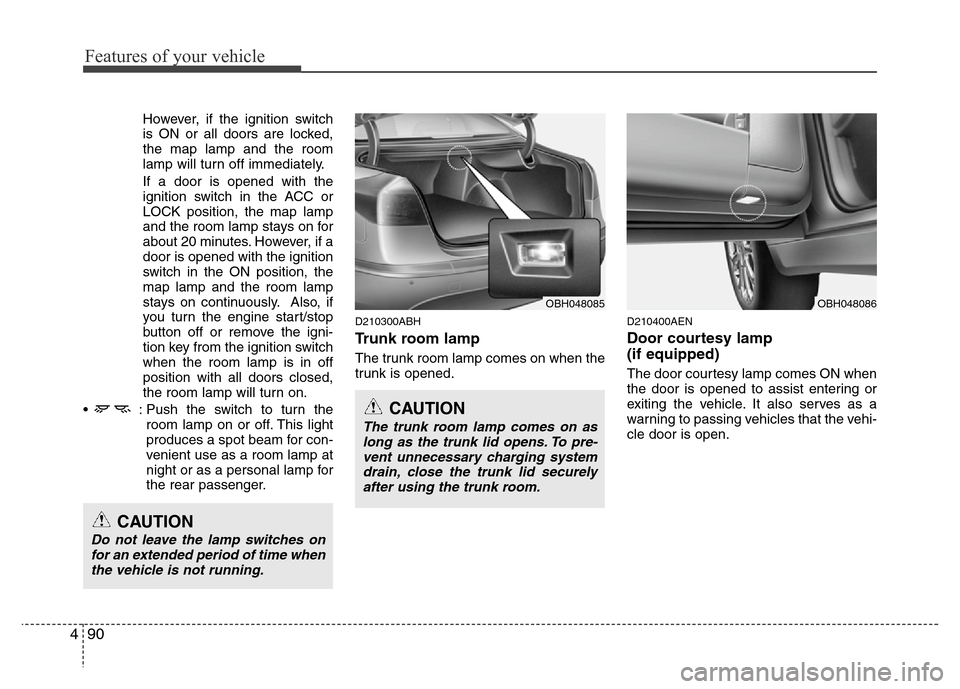
D210300ABH
Trunk room lamp
The trunk room lamp comes on when the
trunk is opened.
D210400AEN
Door courtesy lamp
(if equipped)
The door courtesy lamp comes ON when
the door is opened to assist entering or
exiting the vehicle. It also serves as a
warning to passing vehicles that the vehi-
cle door is open.
OBH048085
CAUTION
Do not leave the lamp switches on
for an extended period of time when
the vehicle is not running.
CAUTION
The trunk room lamp comes on as
long as the trunk lid opens. To pre-
vent unnecessary charging system
drain, close the trunk lid securely
after using the trunk room.
OBH048086
Page 164 of 393
491
Features of your vehicle
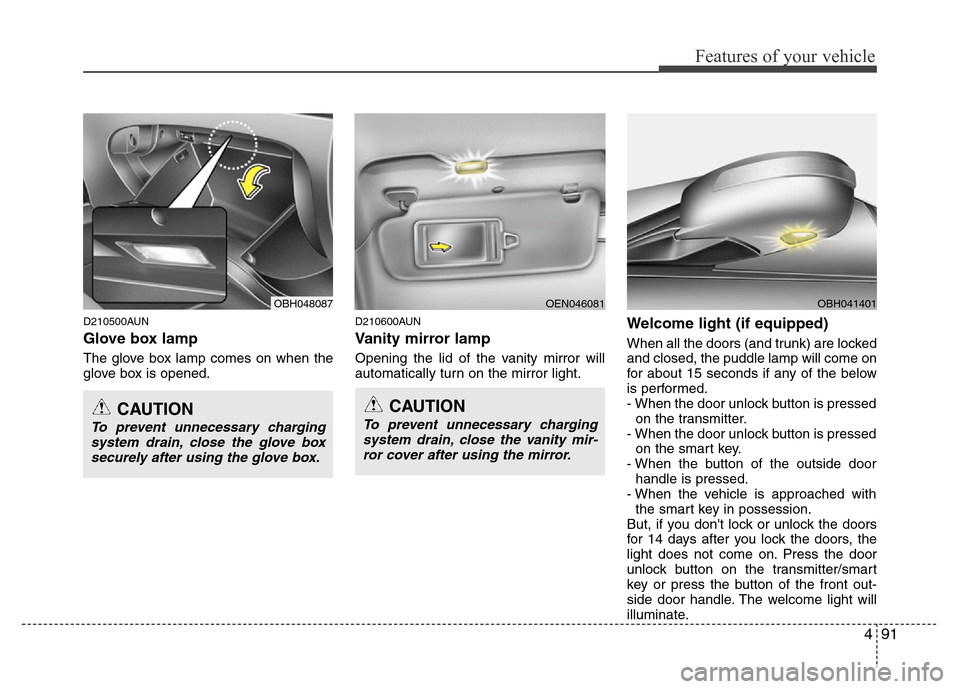
D210500AUN
Glove box lamp
The glove box lamp comes on when the
glove box is opened.
D210600AUN
Vanity mirror lamp
Opening the lid of the vanity mirror will
automatically turn on the mirror light.
Welcome light (if equipped)
When all the doors (and trunk) are locked
and closed, the puddle lamp will come on
for about 15 seconds if any of the below
is performed.
- When the door unlock button is pressed
on the transmitter.
- When the door unlock button is pressed
on the smart key.
- When the button of the outside door
handle is pressed.
- When the vehicle is approached with
the smart key in possession.
But, if you don't lock or unlock the doors
for 14 days after you lock the doors, the
light does not come on. Press the door
unlock button on the transmitter/smart
key or press the button of the front out-
side door handle. The welcome light will
illuminate.
OBH048087OEN046081
CAUTION
To prevent unnecessary charging
system drain, close the glove box
securely after using the glove box.
CAUTION
To prevent unnecessary charging
system drain, close the vanity mir-
ror cover after using the mirror.
OBH041401
Page 169 of 393
Features of your vehicle
96 4
❈ Rear outlet vents (F)
• The air flow of the Rear outlet vents is
controlled by the front climate control
system and delivered through the
inside air duct of the front doors. If the
door is open or not closed completely,
the air flow of the Rear outlet vent is
not delivered properly. Make sure the
front doors are closed completely.
• The air flow of the Rear outlet vents
may be weaker than the instrument
panel vents for the long air duct in the
front doors.
D240201ABH
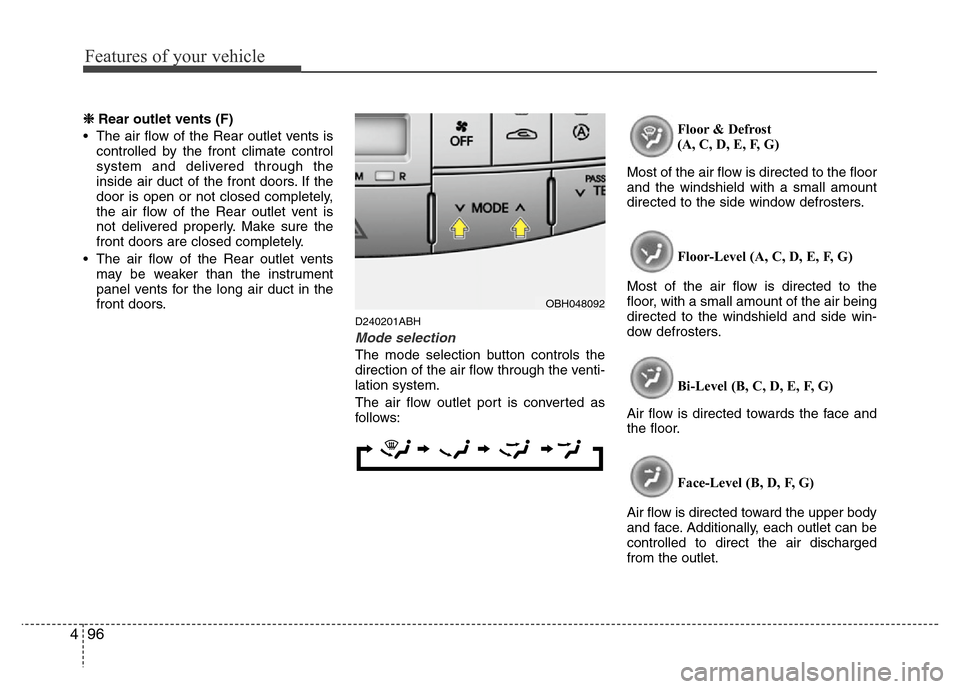
Mode selection
The mode selection button controls the
direction of the air flow through the venti-
lation system.
The air flow outlet port is converted as
follows:Floor & Defrost
(A, C, D, E, F, G)
Most of the air flow is directed to the floor
and the windshield with a small amount
directed to the side window defrosters.
Floor-Level (A, C, D, E, F, G)
Most of the air flow is directed to the
floor, with a small amount of the air being
directed to the windshield and side win-
dow defrosters.
Bi-Level (B, C, D, E, F, G)
Air flow is directed towards the face and
the floor.
Face-Level (B, D, F, G)
Air flow is directed toward the upper body
and face. Additionally, each outlet can be
controlled to direct the air discharged
from the outlet.
OBH048092
Page 171 of 393
Features of your vehicle
98 4
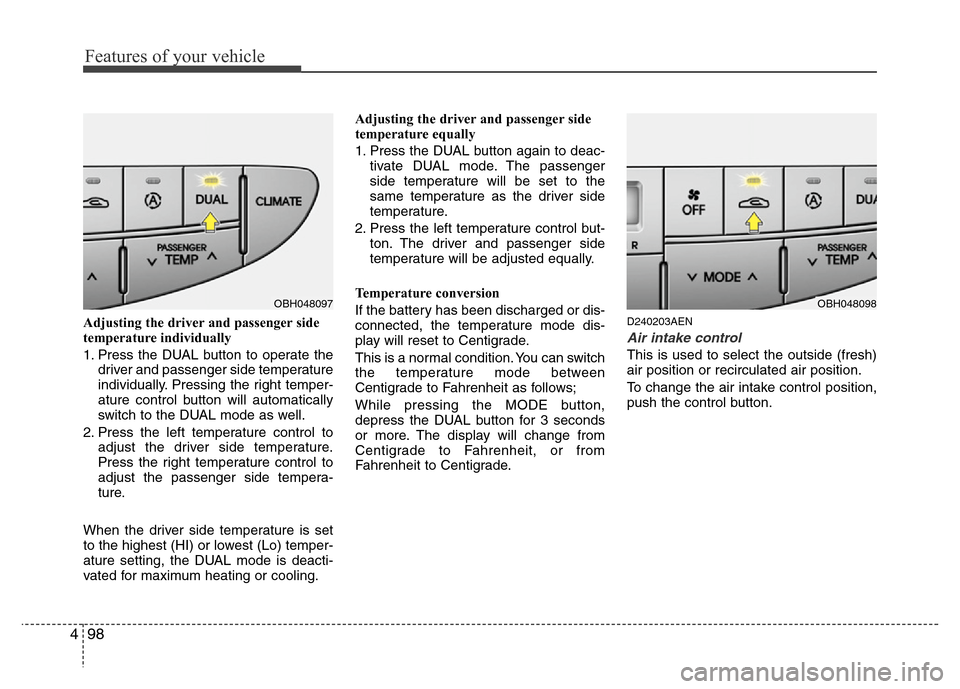
Adjusting the driver and passenger side
temperature individually
1. Press the DUAL button to operate the
driver and passenger side temperature
individually. Pressing the right temper-
ature control button will automatically
switch to the DUAL mode as well.
2. Press the left temperature control to
adjust the driver side temperature.
Press the right temperature control to
adjust the passenger side tempera-
ture.
When the driver side temperature is set
to the highest (HI) or lowest (Lo) temper-
ature setting, the DUAL mode is deacti-
vated for maximum heating or cooling.Adjusting the driver and passenger side
temperature equally
1. Press the DUAL button again to deac-
tivate DUAL mode. The passenger
side temperature will be set to the
same temperature as the driver side
temperature.
2. Press the left temperature control but-
ton. The driver and passenger side
temperature will be adjusted equally.
Temperature conversion
If the battery has been discharged or dis-
connected, the temperature mode dis-
play will reset to Centigrade.
This is a normal condition. You can switch
the temperature mode between
Centigrade to Fahrenheit as follows;
While pressing the MODE button,
depress the DUAL button for 3 seconds
or more. The display will change from
Centigrade to Fahrenheit, or from
Fahrenheit to Centigrade.D240203AEN
Air intake control
This is used to select the outside (fresh)
air position or recirculated air position.
To change the air intake control position,
push the control button.
OBH048097OBH048098