reset Hyundai Genesis 2012 User Guide
[x] Cancel search | Manufacturer: HYUNDAI, Model Year: 2012, Model line: Genesis, Model: Hyundai Genesis 2012Pages: 393, PDF Size: 8.81 MB
Page 180 of 393
4107
Features of your vehicle
D250305ABH
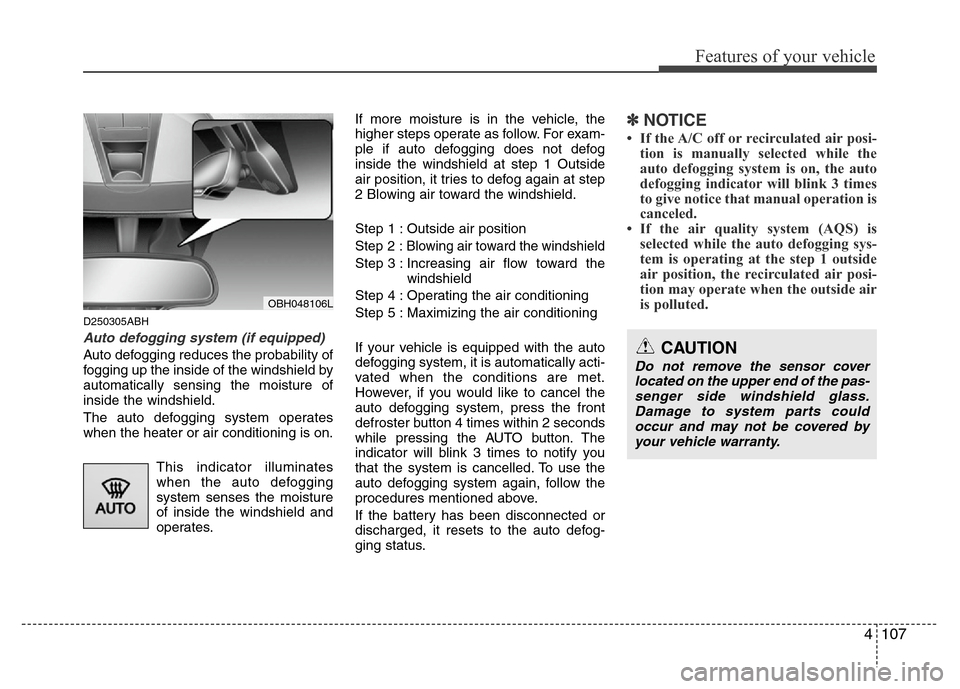
Auto defogging system (if equipped)
Auto defogging reduces the probability of
fogging up the inside of the windshield by
automatically sensing the moisture of
inside the windshield.
The auto defogging system operates
when the heater or air conditioning is on.
This indicator illuminates
when the auto defogging
system senses the moisture
of inside the windshield and
operates.If more moisture is in the vehicle, the
higher steps operate as follow. For exam-
ple if auto defogging does not defog
inside the windshield at step 1 Outside
air position, it tries to defog again at step
2 Blowing air toward the windshield.
Step 1 : Outside air position
Step 2 :Blowing air toward the windshield
Step 3 : Increasing air flow toward the
windshield
Step 4 : Operating the air conditioning
Step 5 : Maximizing the air conditioning
If your vehicle is equipped with the auto
defogging system, it is automatically acti-
vated when the conditions are met.
However, if you would like to cancel the
auto defogging system, press the front
defroster button 4 times within 2 seconds
while pressing the AUTO button. The
indicator will blink 3 times to notify you
that the system is cancelled. To use the
auto defogging system again, follow the
procedures mentioned above.
If the battery has been disconnected or
discharged, it resets to the auto defog-
ging status.
✽NOTICE
• If the A/C off or recirculated air posi-
tion is manually selected while the
auto defogging system is on, the auto
defogging indicator will blink 3 times
to give notice that manual operation is
canceled.
• If the air quality system (AQS) is
selected while the auto defogging sys-
tem is operating at the step 1 outside
air position, the recirculated air posi-
tion may operate when the outside air
is polluted.
OBH048106L
CAUTION
Do not remove the sensor cover
located on the upper end of the pas-
senger side windshield glass.
Damage to system parts could
occur and may not be covered by
your vehicle warranty.
Page 186 of 393
4113
Features of your vehicle
D280600AEN
Digital clock
Whenever the battery terminals or relat-
ed fuses are disconnected, you must
reset the time.
When the ignition switch is in the ACC or
ON position, the clock buttons operate as
follows:
CAUTION
• Use the power outlet only when
the engine is running and remove
the accessory plug after use.
Using the accessory plug for pro-
longed periods of time with the
engine off could cause the bat-
tery to discharge.
• Only use 12V electric accessories
which are less than 10A in elec-
tric capacity.
• Adjust the air-conditioner or
heater to the lowest operating
level when using the power outlet.
• Close the cover when not in use.
• Some electronic devices can
cause electronic interference
when plugged into a vehicle’s
power outlet. These devices may
cause excessive audio static and
malfunctions in other electronic
systems or devices used in your
vehicle.
WARNING
Do not adjust the clock while driv-
ing. You may lose your steering
control and cause an accident that
results in severe personal injury or
death.
WARNING
Do not put a finger or a foreign ele-
ment (pin, etc.) into a power outlet
and do not touch with a wet hand.
You may get an electric shock.
Page 187 of 393
Features of your vehicle
114 4
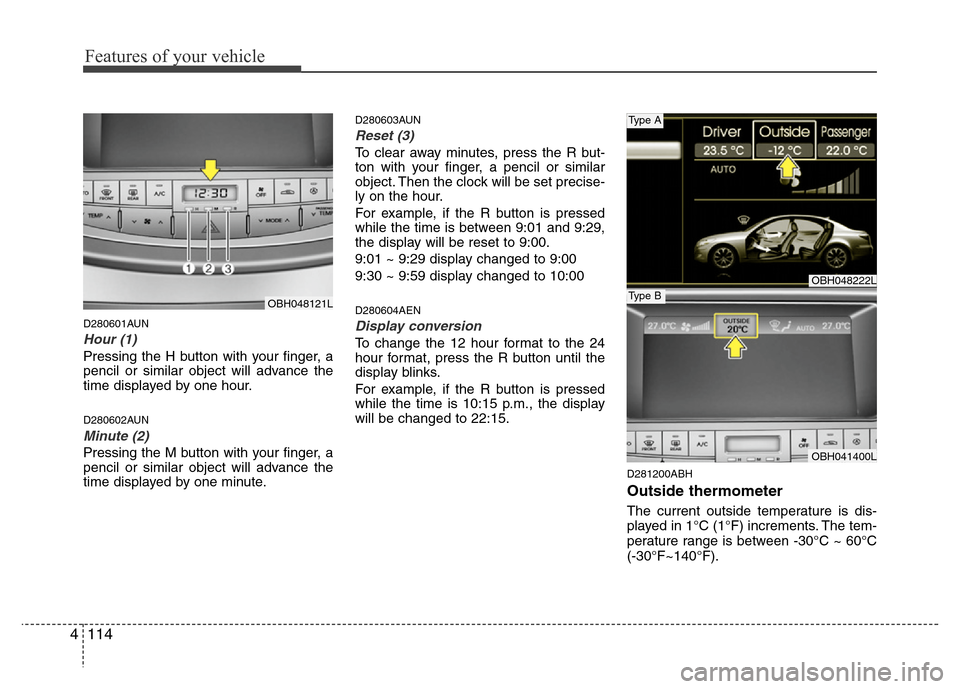
D280601AUN
Hour (1)
Pressing the H button with your finger, a
pencil or similar object will advance the
time displayed by one hour.
D280602AUN
Minute (2)
Pressing the M button with your finger, a
pencil or similar object will advance the
time displayed by one minute.
D280603AUN
Reset (3)
To clear away minutes, press the R but-
ton with your finger, a pencil or similar
object. Then the clock will be set precise-
ly on the hour.
For example, if the R button is pressed
while the time is between 9:01 and 9:29,
the display will be reset to 9:00.
9:01 ~ 9:29 display changed to 9:00
9:30 ~ 9:59 display changed to 10:00
D280604AEN
Display conversion
To change the 12 hour format to the 24
hour format, press the R button until the
display blinks.
For example, if the R button is pressed
while the time is 10:15 p.m., the display
will be changed to 22:15.
D281200ABH
Outside thermometer
The current outside temperature is dis-
played in 1°C (1°F) increments. The tem-
perature range is between -30°C ~ 60°C
(-30°F~140°F).
OBH048222L
OBH041400L
Type A
Type BOBH048121L
Page 188 of 393
4115
Features of your vehicle
Temperature conversion
If the battery has been discharged or dis-
connected, the temperature mode dis-
play will reset to Centigrade.
This is a normal condition. You can switch
the temperature mode between
Centigrade to Fahrenheit as follows;
While pressing the MODE button,
depress the DUAL button for 3 seconds
or more. The display will change from
Centigrade to Fahrenheit, or from
Fahrenheit to Centigrade.
The outside temperature onthe display
may not change immediately like a gen-
eral thermometer to prevent the driver
from being inattentive.
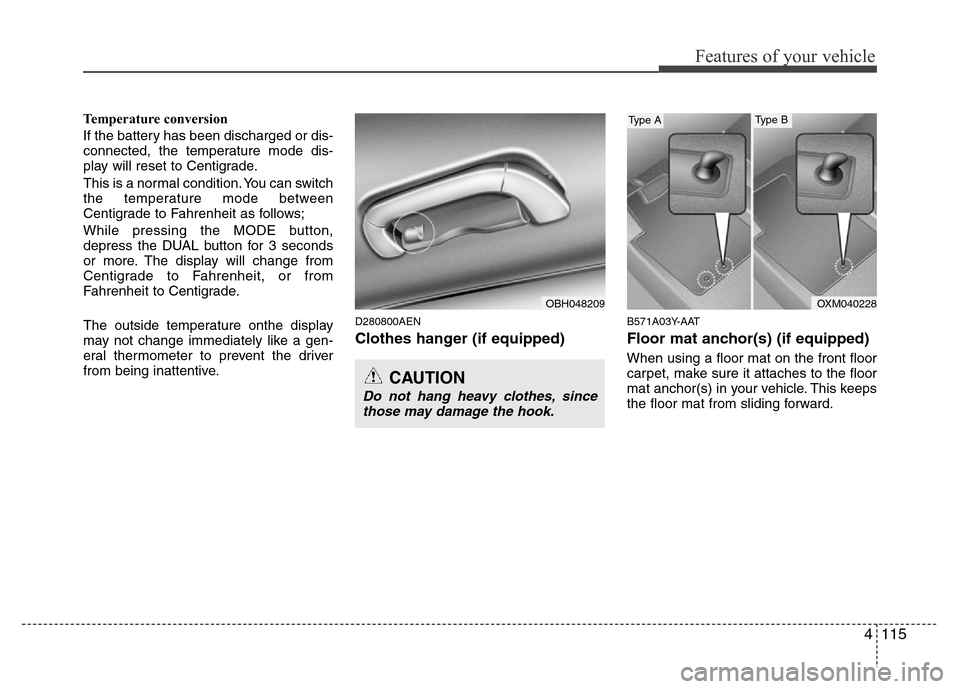
D280800AEN
Clothes hanger (if equipped)
B571A03Y-AAT
Floor mat anchor(s) (if equipped)
When using a floor mat on the front floor
carpet, make sure it attaches to the floor
mat anchor(s) in your vehicle. This keeps
the floor mat from sliding forward.
CAUTION
Do not hang heavy clothes, since
those may damage the hook.
OBH048209OXM040228
Type AType B
Page 193 of 393
Features of your vehicle
120 4
D300200AEN
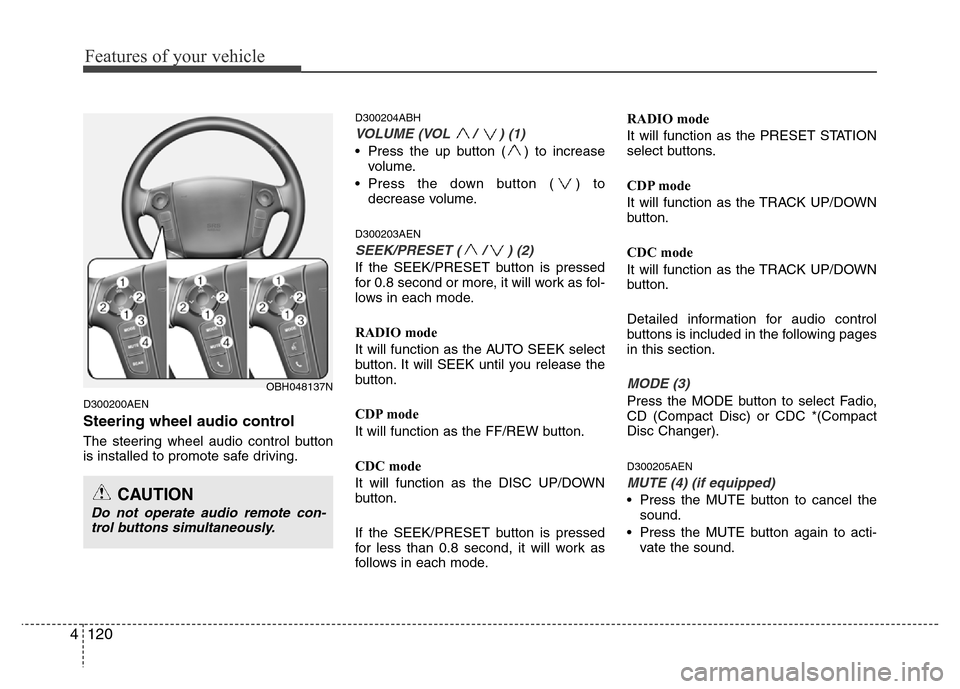
Steering wheel audio control
The steering wheel audio control button
is installed to promote safe driving.
D300204ABH
VOLUME (VOL / ) (1)
• Press the up button ( ) to increase
volume.
• Press the down button ( ) to
decrease volume.
D300203AEN
SEEK/PRESET ( / ) (2)
If the SEEK/PRESET button is pressed
for 0.8 second or more, it will work as fol-
lows in each mode.
RADIO mode
It will function as the AUTO SEEK select
button. It will SEEK until you release the
button.
CDP mode
It will function as the FF/REW button.
CDC mode
It will function as the DISC UP/DOWN
button.
If the SEEK/PRESET button is pressed
for less than 0.8 second, it will work as
follows in each mode.RADIO mode
It will function as the PRESET STATION
select buttons.
CDP mode
It will function as the TRACK UP/DOWN
button.
CDC mode
It will function as the TRACK UP/DOWN
button.
Detailed information for audio control
buttons is included in the following pages
in this section.
MODE (3)
Press the MODE button to select Fadio,
CD (Compact Disc) or CDC *(Compact
Disc Changer).
D300205AEN
MUTE (4) (if equipped)
• Press the MUTE button to cancel the
sound.
• Press the MUTE button again to acti-
vate the sound.
OBH048137N
CAUTION
Do not operate audio remote con-
trol buttons simultaneously.
Page 197 of 393
Features of your vehicle
124 4
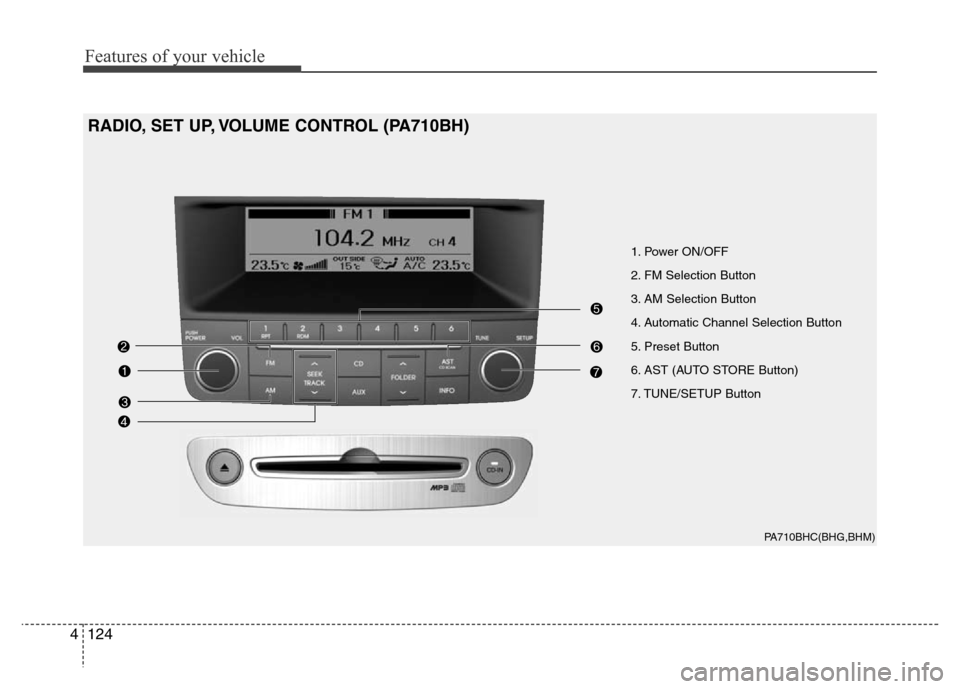
PA710BHC(BHG,BHM)
1. Power ON/OFF
2. FM Selection Button
3. AM Selection Button
4. Automatic Channel Selection Button
5. Preset Button
6. AST (AUTO STORE Button)
7. TUNE/SETUP Button
RADIO, SET UP, VOLUME CONTROL (PA710BH)
Page 198 of 393
4125
Features of your vehicle
1. Power ON/OFF & Volume
Control Switch
Turns ON/OFF when the ignition switch
is in ACC or ON. Turn the switch to the
right to increase the volume, turn the
switch to the left to decrease the volume.
2. FM Selection Button
Turns to FM mode and toggles FM1 and
FM2 when the button is pressed each
time.
3. AM Selection Button
Turns to AM mode.
4. Automatic Channel Selection
Button
• When the [SEEK ] button is pressed,
it reduces the band frequency to auto-
matically select channel. Stops at the
previous frequency if no channel is
found.
• When the [SEEK ] button is pressed,
it increases the band frequency to auto-
matically select channel. Stops at the
previous frequency if no channel is
found.
5. Pre-set Button
Push [1]~[6] buttons less than 0.8 second
to play the channel saved in each button.
Push pre-set button for more than 0.8 sec-
ond to save current channel to the respec-
tive button with a beep.
6. AST (AUTO STORE) Button
When the button is pressed, it automati-
cally selects and saves channels with
high reception rate to PRESET but-
tons(1~6) and plays the most strong fre-
quency saved in PRESET.
If no channel is saved after AST, it will
play the previous channel.
7. TUNE/SETUP Button
When you turn the button clockwise or
counterclockwise, the frequency increas-
es or decreases by each step.
General(AM 9kHz, FM 100kHz), USA
(AM 10kHz, FM 200kHz)
Press the button to enter the SETUP
mode. If no action is taken for 5 seconds
after pressing the button, it will return to
the play mode. (After entering SETUP
mode, move between items using the
left, right and push functions of the
TUNE/SETUP button.)
Page 209 of 393
Features of your vehicle
136 4
✽NOTICE FOR USING iPod®
DEVICE
• Some iPod®models might not support
the communication protocol and the
files will not be played. (iPod
®models
supported: Mini, 4G, Photo, Nano,
5G)
• The order of search or playback of
songs in the iPod
®can be different
from the order searched in the audio
system.
• If the iPod
®crashes due to its own
trouble, reset iPod®. (Reset: Refer to
iPod®manual)
• iPod®may not operate normally on
low battery.
CAUTION IN USING iPod®
DEVICE
• You need the power cable exclu-
sive for iPod®in order to operate
iPod®with the buttons on the
audio system. The PC cable pro-
vided by Apple may cause mal-
function and do not use it for
vehicle use.
• When connecting the device with
iPod
®cable, push in the jack fully
not to interfere with communica-
tion.
• When adjusting the sound effects
of iPod
®and the audio system, the
sound effects of both devices will
overlap each and might cause
reduce or distort the quality of the
sound.
• Deactivate (turn off) the equalizer
function of iPod
®when adjusting
the audio system’s volume, and
turn off the equalizer of the audio
system when using the equalizer
of iPod
®.
(Continued)
(Continued)
• When the iPod®cable is connect-
ed, the system can be switched to
the AUX mode even without the
iPod
®device and can cause
noise. Disconnect iPod®cable
when you are not using the iPod®
device.
• When the iPod®is not used at
audio system, iPod®cable has to
be separate from iPod®device.
Origin display of iPod®may not be
displayed.
Page 210 of 393
4137
Features of your vehicle
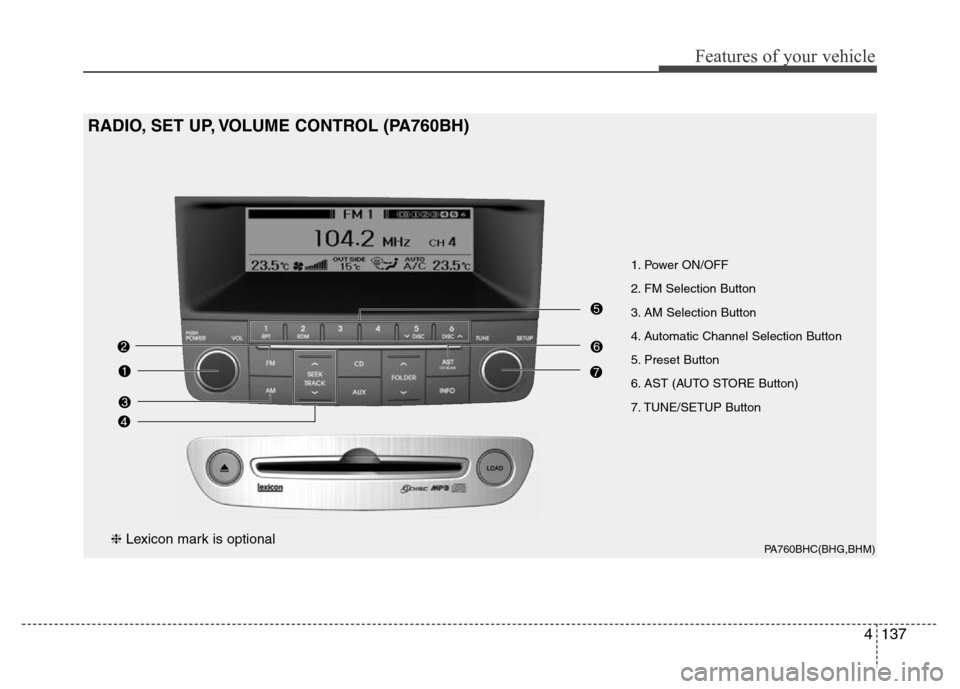
PA760BHC(BHG,BHM)
1. Power ON/OFF
2. FM Selection Button
3. AM Selection Button
4. Automatic Channel Selection Button
5. Preset Button
6. AST (AUTO STORE Button)
7. TUNE/SETUP Button
RADIO, SET UP, VOLUME CONTROL (PA760BH)
❈Lexicon mark is optional
Page 211 of 393
Features of your vehicle
138 4
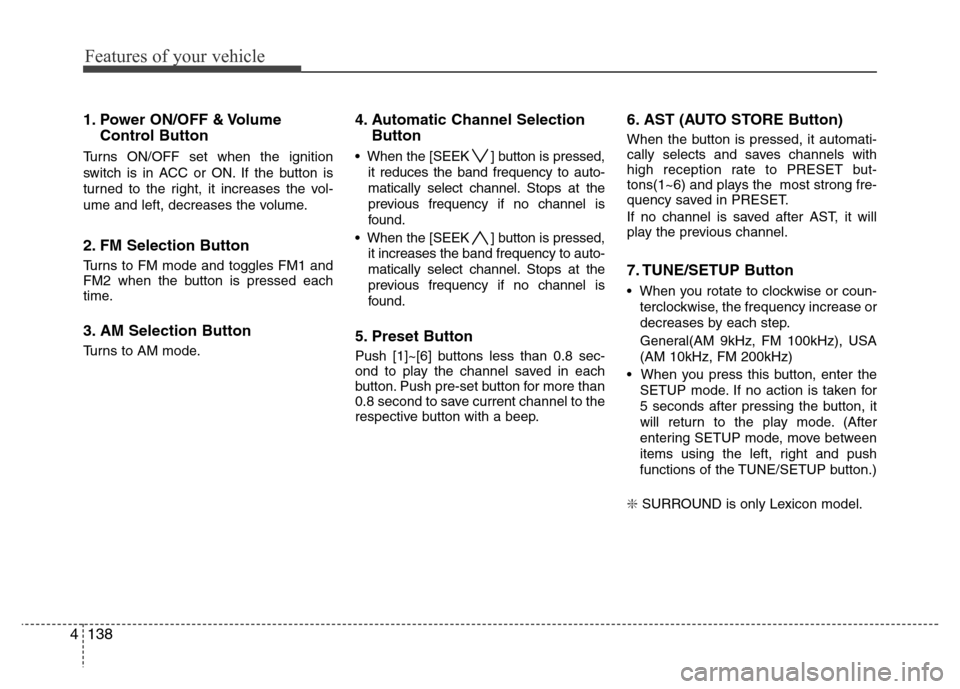
1. Power ON/OFF & Volume
Control Button
Turns ON/OFF set when the ignition
switch is in ACC or ON. If the button is
turned to the right, it increases the vol-
ume and left, decreases the volume.
2. FM Selection Button
Turns to FM mode and toggles FM1 and
FM2 when the button is pressed each
time.
3. AM Selection Button
Turns to AM mode.
4. Automatic Channel Selection
Button
• When the [SEEK ] button is pressed,
it reduces the band frequency to auto-
matically select channel. Stops at the
previous frequency if no channel is
found.
• When the [SEEK ] button is pressed,
it increases the band frequency to auto-
matically select channel. Stops at the
previous frequency if no channel is
found.
5. Preset Button
Push [1]~[6] buttons less than 0.8 sec-
ond to play the channel saved in each
button. Push pre-set button for more than
0.8 second to save current channel to the
respective button with a beep.
6. AST (AUTO STORE Button)
When the button is pressed, it automati-
cally selects and saves channels with
high reception rate to PRESET but-
tons(1~6) and plays the most strong fre-
quency saved in PRESET.
If no channel is saved after AST, it will
play the previous channel.
7. TUNE/SETUP Button
• When you rotate to clockwise or coun-
terclockwise, the frequency increase or
decreases by each step.
General(AM 9kHz, FM 100kHz), USA
(AM 10kHz, FM 200kHz)
• When you press this button, enter the
SETUP mode. If no action is taken for
5 seconds after pressing the button, it
will return to the play mode. (After
entering SETUP mode, move between
items using the left, right and push
functions of the TUNE/SETUP button.)
❇ SURROUND is only Lexicon model.