Dis Hyundai Genesis 2012 Owner's Guide
[x] Cancel search | Manufacturer: HYUNDAI, Model Year: 2012, Model line: Genesis, Model: Hyundai Genesis 2012Pages: 393, PDF Size: 8.81 MB
Page 91 of 393
Features of your vehicle
18 4
D050400ABH
✽NOTICE
You can select some auto door
lock/unlock features in the INFO menu
of DIS (Driver Information System, if
equipped) as follows;
• Speed sensing auto door lock
• Auto door unlock by unlocking the
driver's door lock button
• Auto door unlock when the ignition
key is removed from the ignition
switch or the smart key is removed
from the smart key holder.
• Auto door lock/unlock by shifting the
shift lever out of P (Park) or into P
(Park)
If you want this feature, refer to the DIS
manual (if equipped) supplied separate-
ly (if equipped).
D050500ABH
Child-protector rear door lock
The child safety lock is provided to help
prevent children from accidentally open-
ing the rear doors from inside the vehicle.
The rear door safety locks should be
used whenever children are in the vehi-
cle.
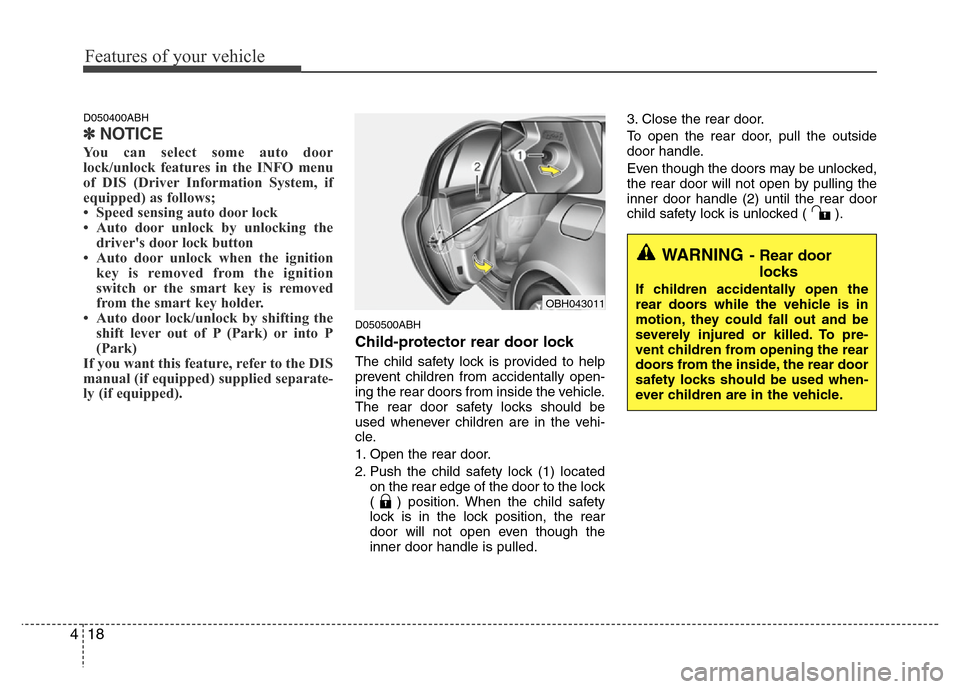
1. Open the rear door.
2. Push the child safety lock (1) located
on the rear edge of the door to the lock
( ) position. When the child safety
lock is in the lock position, the rear
door will not open even though the
inner door handle is pulled.3. Close the rear door.
To open the rear door, pull the outside
door handle.
Even though the doors may be unlocked,
the rear door will not open by pulling the
inner door handle (2) until the rear door
child safety lock is unlocked ( ).
WARNING- Rear door
locks
If children accidentally open the
rear doors while the vehicle is in
motion, they could fall out and be
severely injured or killed. To pre-
vent children from opening the rear
doors from the inside, the rear door
safety locks should be used when-
ever children are in the vehicle.OBH043011
Page 95 of 393
Features of your vehicle
22 4
D070405ABH
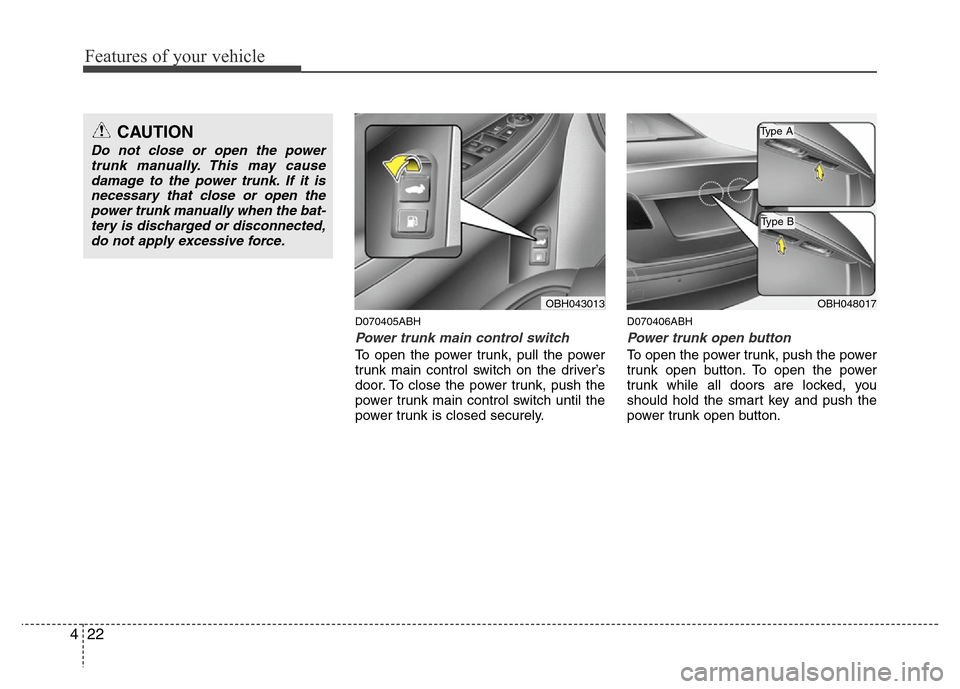
Power trunk main control switch
To open the power trunk, pull the power
trunk main control switch on the driver’s
door. To close the power trunk, push the
power trunk main control switch until the
power trunk is closed securely.
D070406ABH
Power trunk open button
To open the power trunk, push the power
trunk open button. To open the power
trunk while all doors are locked, you
should hold the smart key and push the
power trunk open button.
OBH043013OBH048017
CAUTION
Do not close or open the power
trunk manually. This may cause
damage to the power trunk. If it is
necessary that close or open the
power trunk manually when the bat-
tery is discharged or disconnected,
do not apply excessive force.
Type B
Type A
Page 96 of 393
423
Features of your vehicle
D070407ABH
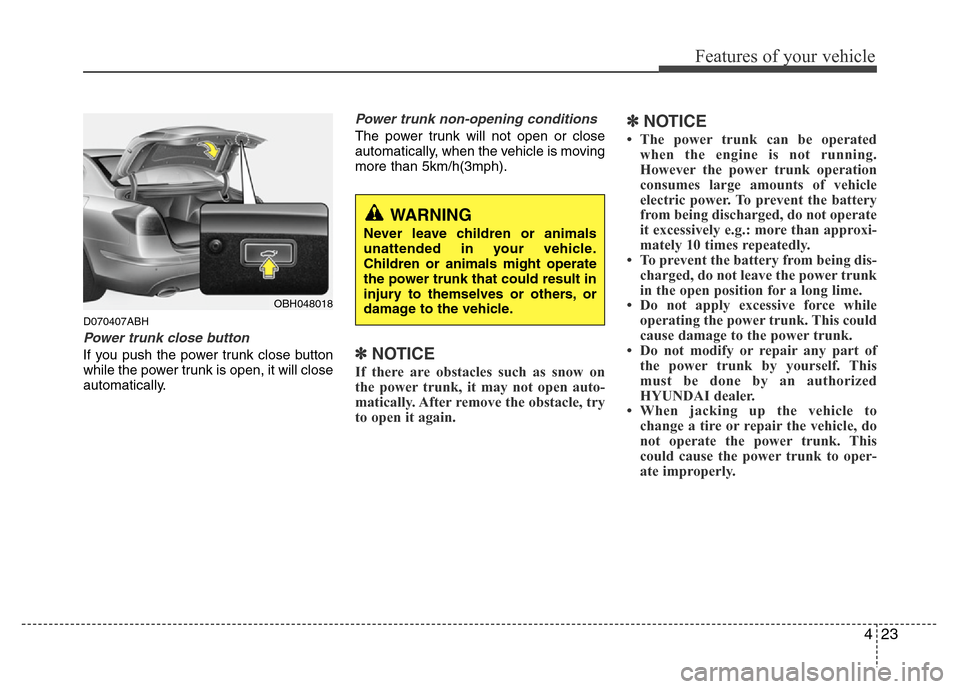
Power trunk close button
If you push the power trunk close button
while the power trunk is open, it will close
automatically.
Power trunk non-opening conditions
The power trunk will not open or close
automatically, when the vehicle is moving
more than 5km/h(3mph).
✽NOTICE
If there are obstacles such as snow on
the power trunk, it may not open auto-
matically. After remove the obstacle, try
to open it again.
✽NOTICE
• The power trunk can be operated
when the engine is not running.
However the power trunk operation
consumes large amounts of vehicle
electric power. To prevent the battery
from being discharged, do not operate
it excessively e.g.: more than approxi-
mately 10 times repeatedly.
• To prevent the battery from being dis-
charged, do not leave the power trunk
in the open position for a long lime.
• Do not apply excessive force while
operating the power trunk. This could
cause damage to the power trunk.
• Do not modify or repair any part of
the power trunk by yourself. This
must be done by an authorized
HYUNDAI dealer.
• When jacking up the vehicle to
change a tire or repair the vehicle, do
not operate the power trunk. This
could cause the power trunk to oper-
ate improperly.
OBH048018
WARNING
Never leave children or animals
unattended in your vehicle.
Children or animals might operate
the power trunk that could result in
injury to themselves or others, or
damage to the vehicle.
Page 97 of 393
Features of your vehicle
24 4
D070401ABH
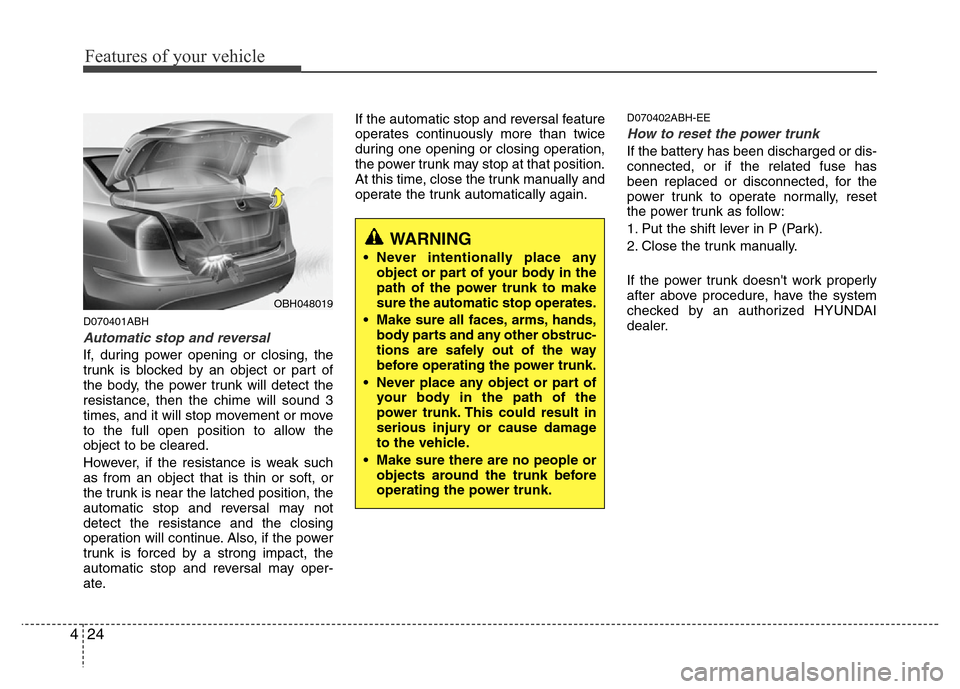
Automatic stop and reversal
If, during power opening or closing, the
trunk is blocked by an object or part of
the body, the power trunk will detect the
resistance, then the chime will sound 3
times, and it will stop movement or move
to the full open position to allow the
object to be cleared.
However, if the resistance is weak such
as from an object that is thin or soft, or
the trunk is near the latched position, the
automatic stop and reversal may not
detect the resistance and the closing
operation will continue. Also, if the power
trunk is forced by a strong impact, the
automatic stop and reversal may oper-
ate.If the automatic stop and reversal feature
operates continuously more than twice
during one opening or closing operation,
the power trunk may stop at that position.
At this time, close the trunk manually and
operate the trunk automatically again.
D070402ABH-EE
How to reset the power trunk
If the battery has been discharged or dis-
connected, or if the related fuse has
been replaced or disconnected, for the
power trunk to operate normally, reset
the power trunk as follow:
1. Put the shift lever in P (Park).
2. Close the trunk manually.
If the power trunk doesn't work properly
after above procedure, have the system
checked by an authorized HYUNDAI
dealer.
OBH048019
WARNING
• Never intentionally place any
object or part of your body in the
path of the power trunk to make
sure the automatic stop operates.
• Make sure all faces, arms, hands,
body parts and any other obstruc-
tions are safely out of the way
before operating the power trunk.
• Never place any object or part of
your body in the path of the
power trunk. This could result in
serious injury or cause damage
to the vehicle.
• Make sure there are no people or
objects around the trunk before
operating the power trunk.
Page 99 of 393
Features of your vehicle
26 4
D070500ABH
Close the power trunk when the
battery negative cable is discon-
nected or the battery is separated.
The power trunk is not closed complete-
ly when the battery negative cable is dis-
connected or the battery is separated.
When you disconnect the battery nega-
tive cable or separate the battery, do as
follow.
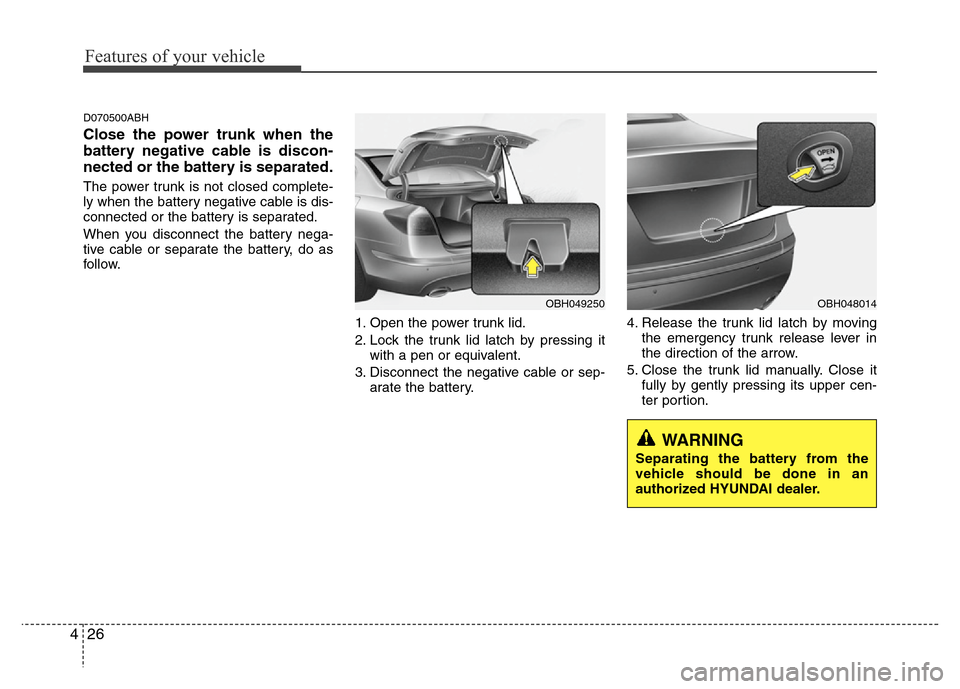
1. Open the power trunk lid.
2. Lock the trunk lid latch by pressing it
with a pen or equivalent.
3. Disconnect the negative cable or sep-
arate the battery.4. Release the trunk lid latch by moving
the emergency trunk release lever in
the direction of the arrow.
5. Close the trunk lid manually. Close it
fully by gently pressing its upper cen-
ter portion.
OBH049250OBH048014
WARNING
Separating the battery from the
vehicle should be done in an
authorized HYUNDAI dealer.
Page 102 of 393
429
Features of your vehicle
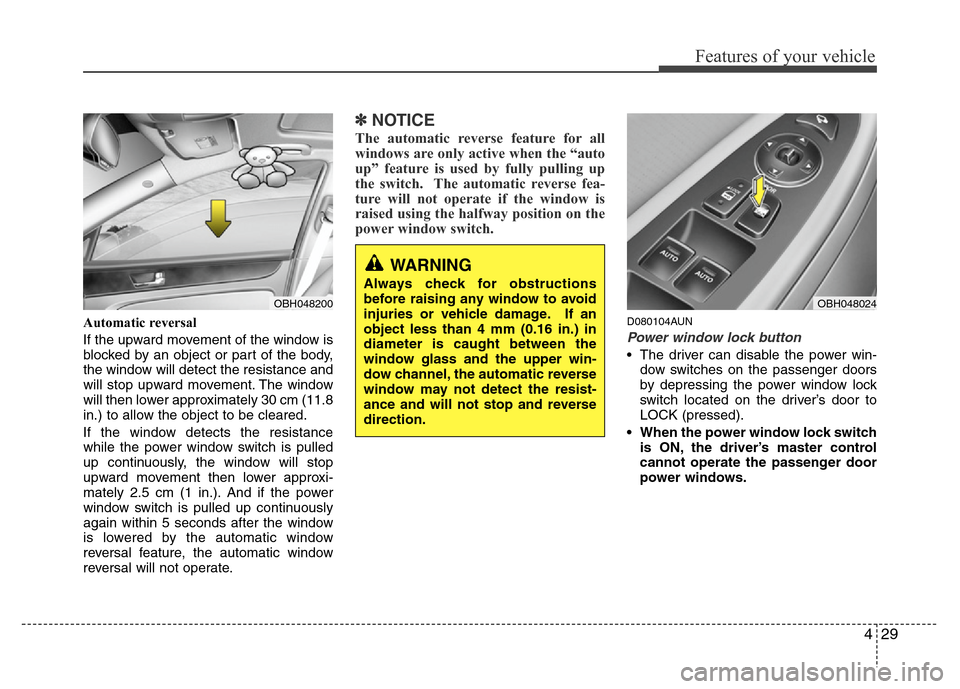
Automatic reversal
If the upward movement of the window is
blocked by an object or part of the body,
the window will detect the resistance and
will stop upward movement. The window
will then lower approximately 30 cm (11.8
in.) to allow the object to be cleared.
If the window detects the resistance
while the power window switch is pulled
up continuously, the window will stop
upward movement then lower approxi-
mately 2.5 cm (1 in.). And if the power
window switch is pulled up continuously
again within 5 seconds after the window
is lowered by the automatic window
reversal feature, the automatic window
reversal will not operate.
✽NOTICE
The automatic reverse feature for all
windows are only active when the “auto
up” feature is used by fully pulling up
the switch. The automatic reverse fea-
ture will not operate if the window is
raised using the halfway position on the
power window switch.
D080104AUN
Power window lock button
• The driver can disable the power win-
dow switches on the passenger doors
by depressing the power window lock
switch located on the driver’s door to
LOCK (pressed).
• When the power window lock switch
is ON, the driver’s master control
cannot operate the passenger door
power windows.
WARNING
Always check for obstructions
before raising any window to avoid
injuries or vehicle damage. If an
object less than 4 mm (0.16 in.) in
diameter is caught between the
window glass and the upper win-
dow channel, the automatic reverse
window may not detect the resist-
ance and will not stop and reverse
direction.
OBH048200OBH048024
Page 106 of 393
433
Features of your vehicle
(Continued)
• Do not get back into a vehicle
once you have begun refueling
since you can generate static
electricity by touching, rubbing
or sliding against any item or fab-
ric (polyester, satin, nylon, etc.)
capable of producing static elec-
tricity. Static electricity discharge
can ignite fuel vapors resulting in
rapid burning. If you must re-
enter the vehicle, you should
once again eliminate potentially
dangerous static electricity dis-
charge by touching a metal part
of the vehicle, away from the fuel
filler neck, nozzle or other gaso-
line source.
• When using an approved
portable fuel container, be sure to
place the container on the
ground prior to refueling. Static
electricity discharge from the
container can ignite fuel vapors
causing a fire. Once refueling has
begun, contact with the vehicle
should be maintained until the
filling is complete.
(Continued)WARNING - Refueling dan-
gers
Automotive fuels are flammable
materials. When refueling, please
note the following guidelines care-
fully. Failure to follow these guide-
lines may result in severe personal
injury, severe burns or death by fire
or explosion.
• Read and follow all warnings at
the gas station facility.
• Before refueling note the location
of the Emergency Gasoline Shut-
Off, if available, at the gas station
facility.
• Before touching the fuel nozzle,
you should eliminate potentially
dangerous static electricity dis-
charge by touching another metal
part of the vehicle, a safe dis-
tance away from the fuel filler
neck, nozzle, or other gas source.
(Continued)
(Continued)
Use only approved portable plas-
tic fuel containers designed to
carry and store gasoline.
• Do not use cellular phones while
refueling. Electric current and/or
electronic interference from cel-
lular phones can potentially
ignite fuel vapors causing a fire.
• When refueling, always shut the
engine off. Sparks produced by
electrical components related to
the engine can ignite fuel vapors
causing a fire. Once refueling is
complete, check to make sure the
filler cap and filler door are
securely closed, before starting
the engine.
• DO NOT use matches or a lighter
and DO NOT SMOKE or leave a lit
cigarette in your vehicle while at
a gas station especially during
refueling. Automotive fuel is
highly flammable and can, when
ignited, result in fire.
(Continued)
Page 111 of 393
Features of your vehicle
38 4
D110500BBH
Resetting the sunroof
Whenever the vehicle battery is discon-
nected or discharged, or related fuse is
blown, you must reset your sunroof sys-
tem as follows:
1. Turn the ignition switch to the ON
position and close the sunroof com-
pletely.
2. Type A: Release the control lever.
Type B: Press and hold the control
lever upward until the sunroof
tilts completely upward. Then,
release the lever.
3. Type A: Pull and hold the control lever
downward until the sunroof
tilts and slightly moves up
and down. Then, release the
lever.
Type B: Press and hold the control
lever upward until the sunroof
slightly moves up and down.
Then, release the lever.4. Pull and hold the control lever down-
ward (Type B: Press and hold the con-
trol lever upward) until the sunroof is
operated as follows;
TILT DOWN →SLIDE OPEN →
SLIDE CLOSE
Then, release the control lever.
When this is complete, the sunroof sys-
tem is reset.
❈For more detailed information, contact
an authorized HYUNDAI dealer.
CAUTION
If the sunroof is not reset when the
vehicle battery is disconnected or
discharged, or related fuse is
blown, the sunroof may operate
improperly.
Page 112 of 393
439
Features of your vehicle
D120000AEN
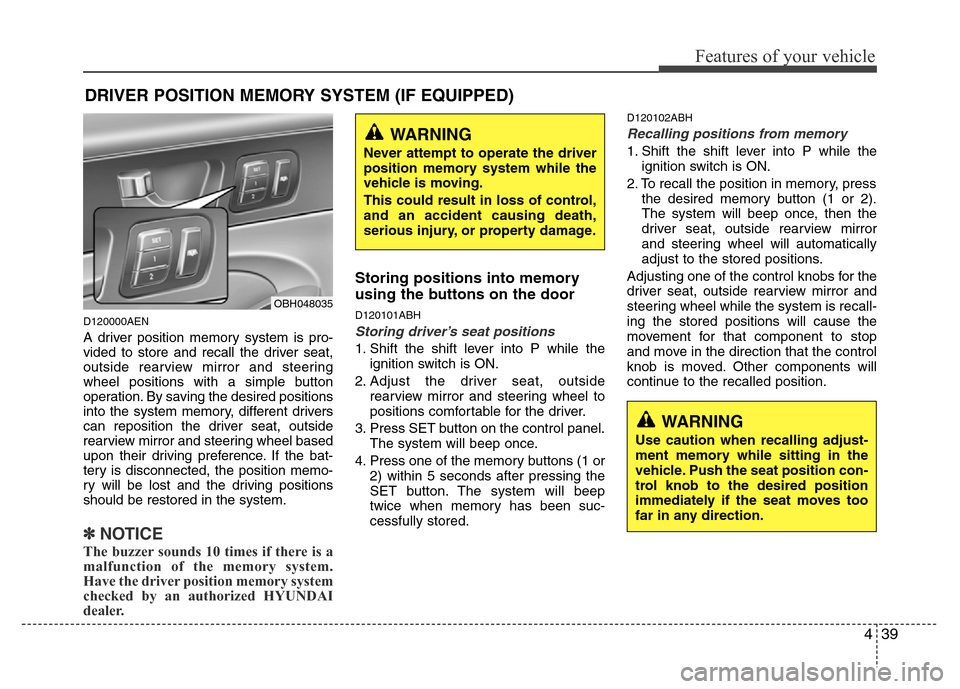
A driver position memory system is pro-
vided to store and recall the driver seat,
outside rearview mirror and steering
wheel positions with a simple button
operation. By saving the desired positions
into the system memory, different drivers
can reposition the driver seat, outside
rearview mirror and steering wheel based
upon their driving preference. If the bat-
tery is disconnected, the position memo-
ry will be lost and the driving positions
should be restored in the system.
✽NOTICE
The buzzer sounds 10 times if there is a
malfunction of the memory system.
Have the driver position memory system
checked by an authorized HYUNDAI
dealer.
Storing positions into memory
using the buttons on the door
D120101ABH
Storing driver’s seat positions
1. Shift the shift lever into P while the
ignition switch is ON.
2. Adjust the driver seat, outside
rearview mirror and steering wheel to
positions comfortable for the driver.
3. Press SET button on the control panel.
The system will beep once.
4. Press one of the memory buttons (1 or
2) within 5 seconds after pressing the
SET button. The system will beep
twice when memory has been suc-
cessfully stored.
D120102ABH
Recalling positions from memory
1. Shift the shift lever into P while the
ignition switch is ON.
2. To recall the position in memory, press
the desired memory button (1 or 2).
The system will beep once, then the
driver seat, outside rearview mirror
and steering wheel will automatically
adjust to the stored positions.
Adjusting one of the control knobs for the
driver seat, outside rearview mirror and
steering wheel while the system is recall-
ing the stored positions will cause the
movement for that component to stop
and move in the direction that the control
knob is moved. Other components will
continue to the recalled position.
DRIVER POSITION MEMORY SYSTEM (IF EQUIPPED)
WARNING
Never attempt to operate the driver
position memory system while the
vehicle is moving.
This could result in loss of control,
and an accident causing death,
serious injury, or property damage.
WARNING
Use caution when recalling adjust-
ment memory while sitting in the
vehicle. Push the seat position con-
trol knob to the desired position
immediately if the seat moves too
far in any direction.
OBH048035
Page 113 of 393
Features of your vehicle
40 4
D120300ABH
Easy access function
(if equipped)
With the shift lever in the P position, the
system will move the steering wheel for-
ward and driver’s seat rearward automat-
ically so you can comfortably enter and
exit the vehicle.
• Without smart key system
- It will move the steering wheel away
from the driver and the driver’s seat
rearward when the ignition key is
removed.
-
It will move the steering wheel toward
the driver and the driver’s seat for-
ward when the ignition key is inserted.
• With smart key system
- It will move the steering wheel away
from the driver and the driver’s seat
rearward when the ENGINE
START/STOP button is turned to the
OFF position.
- It will move the steering wheel toward
the driver and the driver’s seat for-
ward when the ENGINE
START/STOP button is turned to the
ACC position.
✽NOTICE
You can activate or deactivate the easy
access function in the INFO menu of
DIS (Driver Information System, if
equipped) as follows (if equipped);
• Seat easy access
• Steering easy access
If you want detailed informations, refer
to the DIS manual (if equipped) sup-
plied separately.
D120400BBH
Reverse parking aid function
(if equipped)
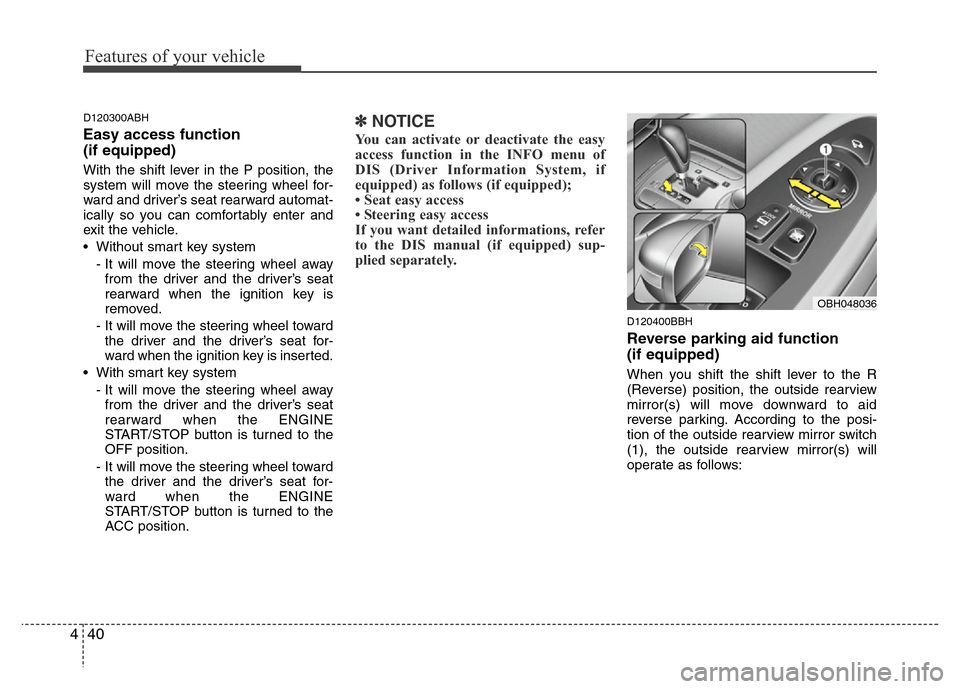
When you shift the shift lever to the R
(Reverse) position, the outside rearview
mirror(s) will move downward to aid
reverse parking. According to the posi-
tion of the outside rearview mirror switch
(1), the outside rearview mirror(s) will
operate as follows:
OBH048036