battery Hyundai Genesis 2012 Owner's Guide
[x] Cancel search | Manufacturer: HYUNDAI, Model Year: 2012, Model line: Genesis, Model: Hyundai Genesis 2012Pages: 393, PDF Size: 8.81 MB
Page 186 of 393
4113
Features of your vehicle
D280600AEN
Digital clock
Whenever the battery terminals or relat-
ed fuses are disconnected, you must
reset the time.
When the ignition switch is in the ACC or
ON position, the clock buttons operate as
follows:
CAUTION
• Use the power outlet only when
the engine is running and remove
the accessory plug after use.
Using the accessory plug for pro-
longed periods of time with the
engine off could cause the bat-
tery to discharge.
• Only use 12V electric accessories
which are less than 10A in elec-
tric capacity.
• Adjust the air-conditioner or
heater to the lowest operating
level when using the power outlet.
• Close the cover when not in use.
• Some electronic devices can
cause electronic interference
when plugged into a vehicle’s
power outlet. These devices may
cause excessive audio static and
malfunctions in other electronic
systems or devices used in your
vehicle.
WARNING
Do not adjust the clock while driv-
ing. You may lose your steering
control and cause an accident that
results in severe personal injury or
death.
WARNING
Do not put a finger or a foreign ele-
ment (pin, etc.) into a power outlet
and do not touch with a wet hand.
You may get an electric shock.
Page 188 of 393
4115
Features of your vehicle
Temperature conversion
If the battery has been discharged or dis-
connected, the temperature mode dis-
play will reset to Centigrade.
This is a normal condition. You can switch
the temperature mode between
Centigrade to Fahrenheit as follows;
While pressing the MODE button,
depress the DUAL button for 3 seconds
or more. The display will change from
Centigrade to Fahrenheit, or from
Fahrenheit to Centigrade.
The outside temperature onthe display
may not change immediately like a gen-
eral thermometer to prevent the driver
from being inattentive.
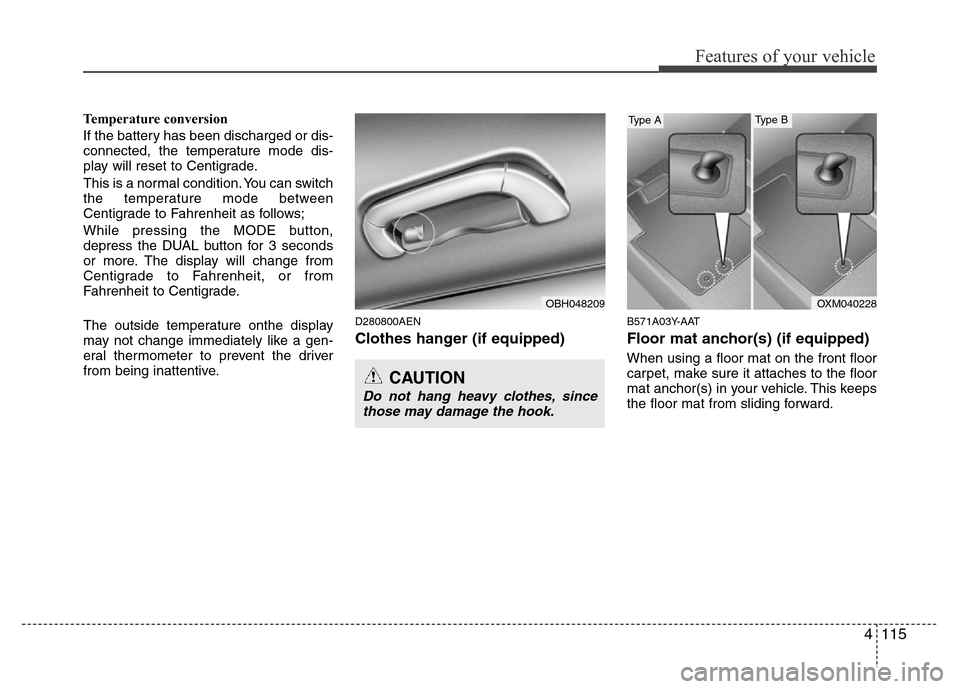
D280800AEN
Clothes hanger (if equipped)
B571A03Y-AAT
Floor mat anchor(s) (if equipped)
When using a floor mat on the front floor
carpet, make sure it attaches to the floor
mat anchor(s) in your vehicle. This keeps
the floor mat from sliding forward.
CAUTION
Do not hang heavy clothes, since
those may damage the hook.
OBH048209OXM040228
Type AType B
Page 209 of 393
Features of your vehicle
136 4
✽NOTICE FOR USING iPod®
DEVICE
• Some iPod®models might not support
the communication protocol and the
files will not be played. (iPod
®models
supported: Mini, 4G, Photo, Nano,
5G)
• The order of search or playback of
songs in the iPod
®can be different
from the order searched in the audio
system.
• If the iPod
®crashes due to its own
trouble, reset iPod®. (Reset: Refer to
iPod®manual)
• iPod®may not operate normally on
low battery.
CAUTION IN USING iPod®
DEVICE
• You need the power cable exclu-
sive for iPod®in order to operate
iPod®with the buttons on the
audio system. The PC cable pro-
vided by Apple may cause mal-
function and do not use it for
vehicle use.
• When connecting the device with
iPod
®cable, push in the jack fully
not to interfere with communica-
tion.
• When adjusting the sound effects
of iPod
®and the audio system, the
sound effects of both devices will
overlap each and might cause
reduce or distort the quality of the
sound.
• Deactivate (turn off) the equalizer
function of iPod
®when adjusting
the audio system’s volume, and
turn off the equalizer of the audio
system when using the equalizer
of iPod
®.
(Continued)
(Continued)
• When the iPod®cable is connect-
ed, the system can be switched to
the AUX mode even without the
iPod
®device and can cause
noise. Disconnect iPod®cable
when you are not using the iPod®
device.
• When the iPod®is not used at
audio system, iPod®cable has to
be separate from iPod®device.
Origin display of iPod®may not be
displayed.
Page 222 of 393
4149
Features of your vehicle
✽NOTICE FOR USING iPod®
DEVICE
• Some iPod®models might not support
the communication protocol and the
files will not be played. (iPod
®models
supported: Mini, 4G, Photo, Nano,
5G)
• The order of search or playback of
songs in the iPod
®can be different
from the order searched in the audio
system.
• If the iPod
®crashes due to its own
trouble, reset iPod®. (Reset: Refer to
iPod®manual)
• iPod®may not operate normally on
low battery.
CAUTION IN USING iPod®
DEVICE
• You need the power cable exclu-
sive for iPod®in order to operate
iPod®with the buttons on the
audio system. The PC cable pro-
vided by Apple may cause mal-
function and do not use it for
vehicle use.
• When connecting the device with
iPod
®cable, push in the jack fully
not to interfere with communica-
tion.
• When adjusting the sound effects
of iPod
®and the audio system, the
sound effects of both devices will
overlap each and might cause
reduce or distort the quality of the
sound.
• Deactivate (turn off) the equalizer
function of iPod
®when adjusting
the audio system’s volume, and
turn off the equalizer of the audio
system when using the equalizer
of iPod
®.
(Continued)
(Continued)
• When the iPod®cable is connect-
ed, the system can be switched to
the AUX mode even without the
iPod
®device and can cause
noise. Disconnect iPod®cable
when you are not using the iPod®
device.
• When the iPod®is not used at
audio system, iPod®cable has to
be separate from iPod®device.
Origin display of iPod®may not be
displayed.
Page 229 of 393
57
Driving your vehicle
E030100ABH
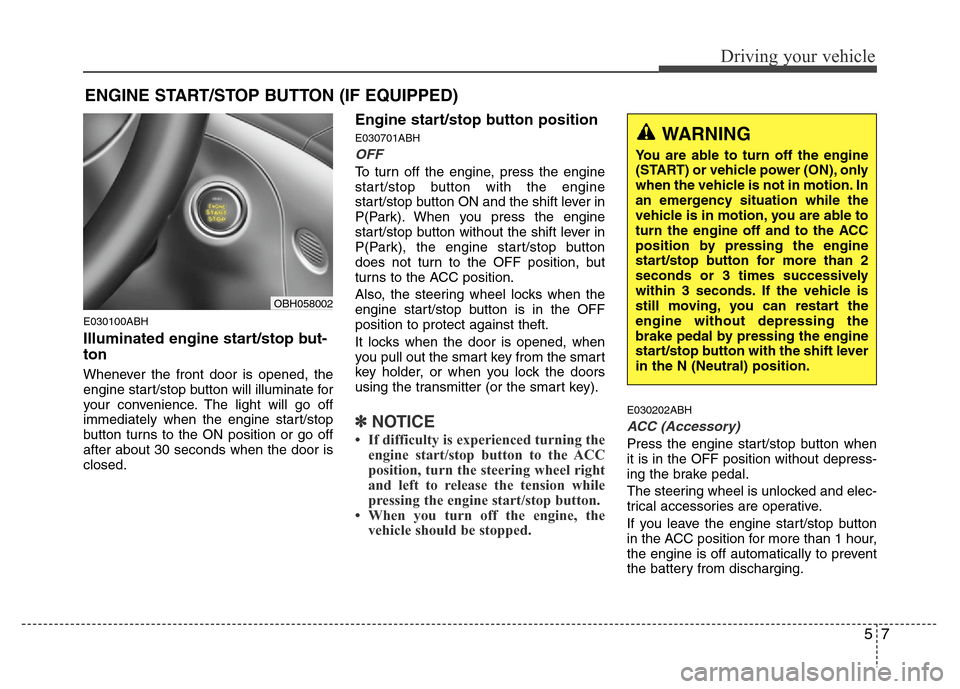
Illuminated engine start/stop but-
ton
Whenever the front door is opened, the
engine start/stop button will illuminate for
your convenience. The light will go off
immediately when the engine start/stop
button turns to the ON position or go off
after about 30 seconds when the door is
closed.
Engine start/stop button position
E030701ABH
OFF
To turn off the engine, press the engine
start/stop button with the engine
start/stop button ON and the shift lever in
P(Park). When you press the engine
start/stop button without the shift lever in
P(Park), the engine start/stop button
does not turn to the OFF position, but
turns to the ACC position.
Also, the steering wheel locks when the
engine start/stop button is in the OFF
position to protect against theft.
It locks when the door is opened, when
you pull out the smart key from the smart
key holder, or when you lock the doors
using the transmitter (or the smart key).
✽NOTICE
• If difficulty is experienced turning the
engine start/stop button to the ACC
position, turn the steering wheel right
and left to release the tension while
pressing the engine start/stop button.
• When you turn off the engine, the
vehicle should be stopped.
E030202ABH
ACC (Accessory)
Press the engine start/stop button when
it is in the OFF position without depress-
ing the brake pedal.
The steering wheel is unlocked and elec-
trical accessories are operative.
If you leave the engine start/stop button
in the ACC position for more than 1 hour,
the engine is off automatically to prevent
the battery from discharging.
ENGINE START/STOP BUTTON (IF EQUIPPED)
WARNING
You are able to turn off the engine
(START) or vehicle power (ON), only
when the vehicle is not in motion. In
an emergency situation while the
vehicle is in motion, you are able to
turn the engine off and to the ACC
position by pressing the engine
start/stop button for more than 2
seconds or 3 times successively
within 3 seconds. If the vehicle is
still moving, you can restart the
engine without depressing the
brake pedal by pressing the engine
start/stop button with the shift lever
in the N (Neutral) position.
OBH058002
Page 230 of 393
Driving your vehicle
8 5
E030203ABH
ON
Press the engine start/stop button while it
is in the ACC position without depressing
the brake pedal.
The warning lights can be checked
before the engine is started. Do not leave
the button in the ON position if the engine
is not running to prevent the battery from
discharging.
E030704ABH
START
To start the engine, press the brake
pedal and press the engine start/stop
button with the shift lever in the P(Park)
or the N(Neutral) position. For your safe-
ty, start the engine with the shift lever in
the P (Park) position.
✽NOTICE
• If you press the engine start/stop but-
ton without depressing the brake
pedal, the engine does not start and
the engine start/stop button changes
as follow :
OFF
→ACC →ON →OFF
Page 232 of 393
Driving your vehicle
10 5
✽NOTICE
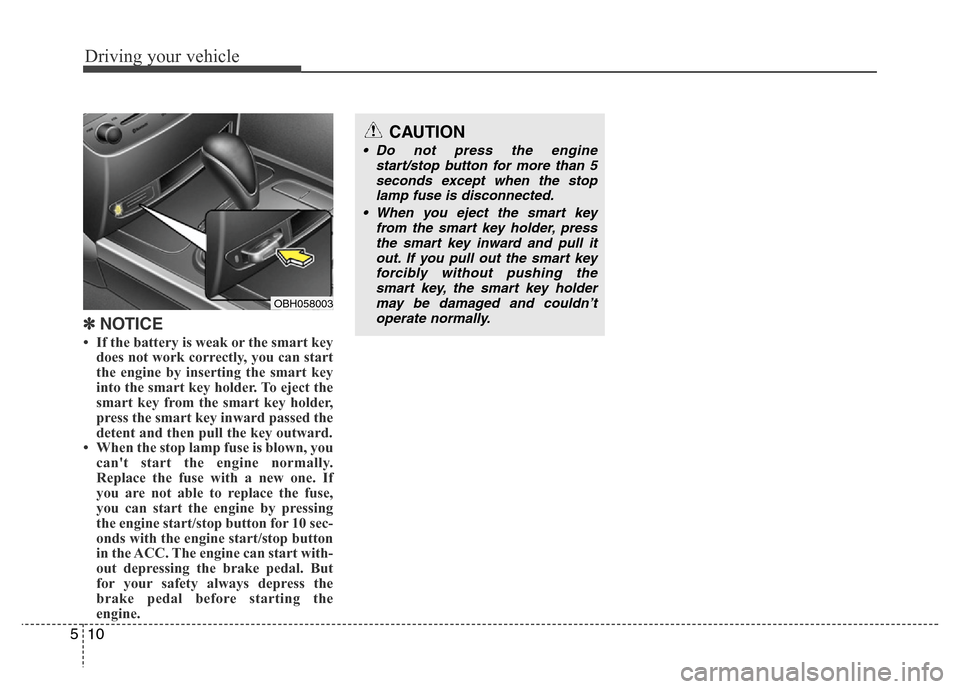
• If the battery is weak or the smart key
does not work correctly, you can start
the engine by inserting the smart key
into the smart key holder. To eject the
smart key from the smart key holder,
press the smart key inward passed the
detent and then pull the key outward.
• When the stop lamp fuse is blown, you
can't start the engine normally.
Replace the fuse with a new one. If
you are not able to replace the fuse,
you can start the engine by pressing
the engine start/stop button for 10 sec-
onds with the engine start/stop button
in the ACC. The engine can start with-
out depressing the brake pedal. But
for your safety always depress the
brake pedal before starting the
engine.
OBH058003
CAUTION
• Do not press the engine
start/stop button for more than 5
seconds except when the stop
lamp fuse is disconnected.
• When you eject the smart key
from the smart key holder, press
the smart key inward and pull it
out. If you pull out the smart key
forcibly without pushing the
smart key, the smart key holder
may be damaged and couldn’t
operate normally.
Page 233 of 393
511
Driving your vehicle
E060000AENE060100ABH
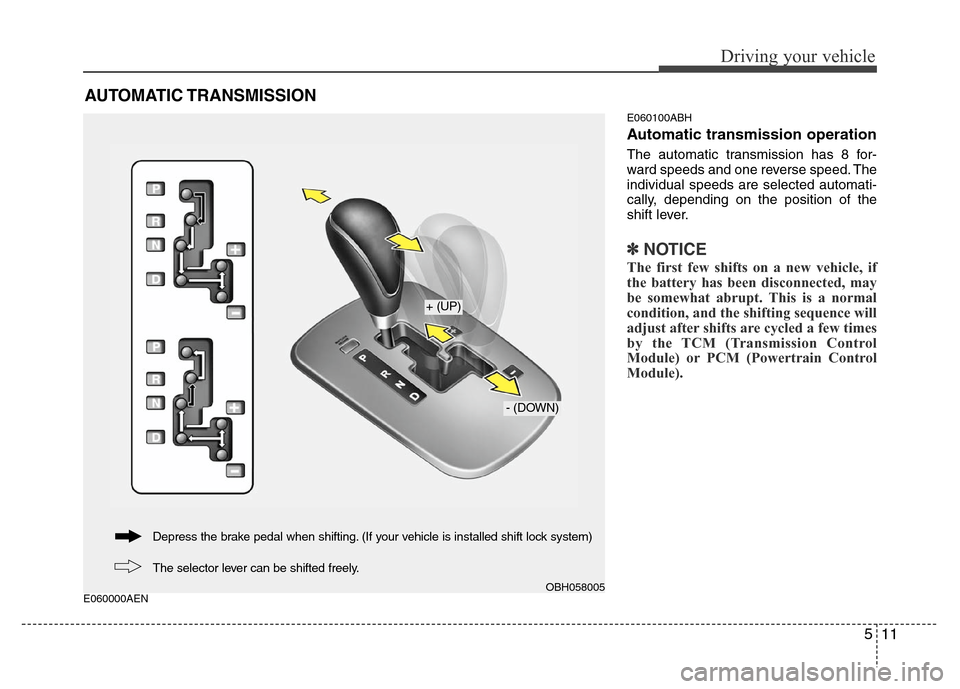
Automatic transmission operation
The automatic transmission has 8 for-
ward speeds and one reverse speed. The
individual speeds are selected automati-
cally, depending on the position of the
shift lever.
✽NOTICE
The first few shifts on a new vehicle, if
the battery has been disconnected, may
be somewhat abrupt. This is a normal
condition, and the shifting sequence will
adjust after shifts are cycled a few times
by the TCM (Transmission Control
Module) or PCM (Powertrain Control
Module).
AUTOMATIC TRANSMISSION
OBH058005
+ (UP)
- (DOWN)
The selector lever can be shifted freely. Depress the brake pedal when shifting. (If your vehicle is installed shift lock system)
Page 251 of 393
529
Driving your vehicle
✽NOTICE
When you jump start your vehicle
because of a drained battery, the engine
may not run as smoothly and the ABS
warning light may turn on at the same
time. This happens because of the low
battery voltage. It does not mean your
ABS is malfunctioning.
• Do not pump your brakes!
• Have the battery recharged before
driving the vehicle.
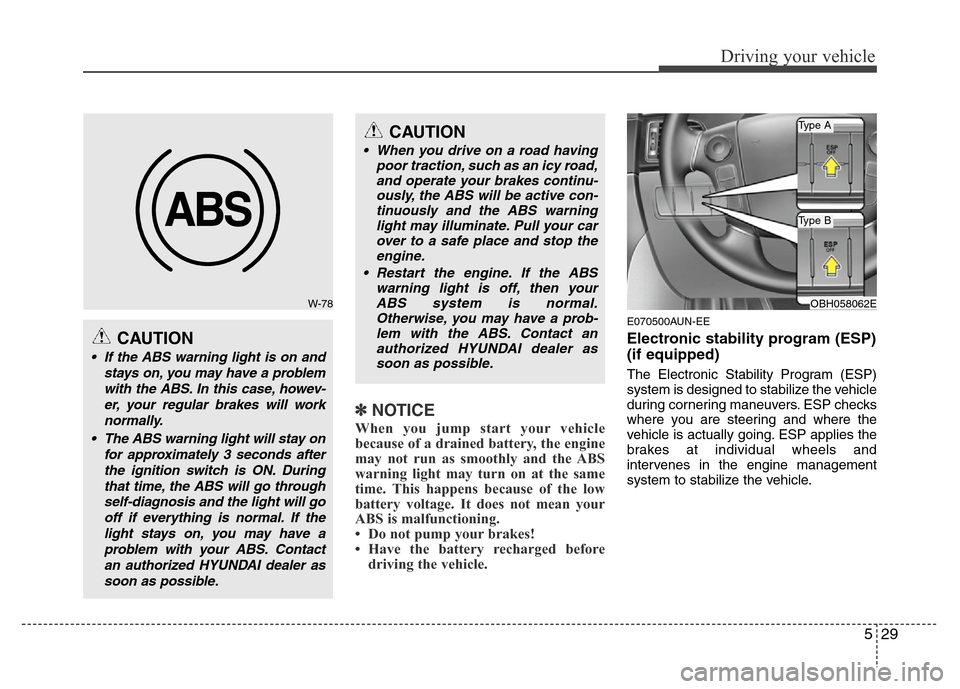
E070500AUN-EE
Electronic stability program (ESP)
(if equipped)
The Electronic Stability Program (ESP)
system is designed to stabilize the vehicle
during cornering maneuvers. ESP checks
where you are steering and where the
vehicle is actually going. ESP applies the
brakes at individual wheels and
intervenes in the engine management
system to stabilize the vehicle.
W-78
CAUTION
• If the ABS warning light is on and
stays on, you may have a problem
with the ABS. In this case, howev-
er, your regular brakes will work
normally.
• The ABS warning light will stay on
for approximately 3 seconds after
the ignition switch is ON. During
that time, the ABS will go through
self-diagnosis and the light will go
off if everything is normal. If the
light stays on, you may have a
problem with your ABS. Contact
an authorized HYUNDAI dealer as
soon as possible.
CAUTION
• When you drive on a road having
poor traction, such as an icy road,
and operate your brakes continu-
ously, the ABS will be active con-
tinuously and the ABS warning
light may illuminate. Pull your car
over to a safe place and stop the
engine.
• Restart the engine. If the ABS
warning light is off, then your
ABS system is normal.
Otherwise, you may have a prob-
lem with the ABS. Contact an
authorized HYUNDAI dealer as
soon as possible.
OBH058062E
Type A
Type B
Page 259 of 393
537
Driving your vehicle
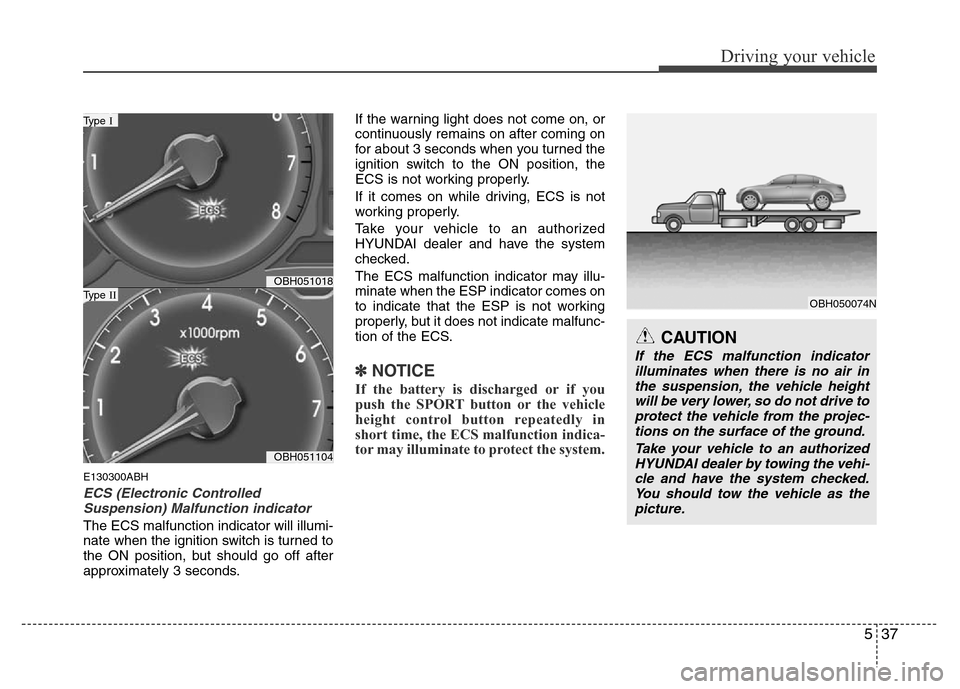
E130300ABH
ECS (Electronic Controlled
Suspension) Malfunction indicator
The ECS malfunction indicator will illumi-
nate when the ignition switch is turned to
the ON position, but should go off after
approximately 3 seconds.If the warning light does not come on, or
continuously remains on after coming on
for about 3 seconds when you turned the
ignition switch to the ON position, the
ECS is not working properly.
If it comes on while driving, ECS is not
working properly.
Take your vehicle to an authorized
HYUNDAI dealer and have the system
checked.
The ECS malfunction indicator may illu-
minate when the ESP indicator comes on
to indicate that the ESP is not working
properly, but it does not indicate malfunc-
tion of the ECS.
✽NOTICE
If the battery is discharged or if you
push the SPORT button or the vehicle
height control button repeatedly in
short time, the ECS malfunction indica-
tor may illuminate to protect the system.
OBH051018
OBH051104
Type I
Type II
CAUTION
If the ECS malfunction indicator
illuminates when there is no air in
the suspension, the vehicle height
will be very lower, so do not drive to
protect the vehicle from the projec-
tions on the surface of the ground.
Take your vehicle to an authorized
HYUNDAI dealer by towing the vehi-
cle and have the system checked.
You should tow the vehicle as the
picture.
OBH050074N