lights Hyundai Genesis 2012 Owner's Guide
[x] Cancel search | Manufacturer: HYUNDAI, Model Year: 2012, Model line: Genesis, Model: Hyundai Genesis 2012Pages: 393, PDF Size: 8.81 MB
Page 152 of 393
479
Features of your vehicle
D190400AUN
Lighting control
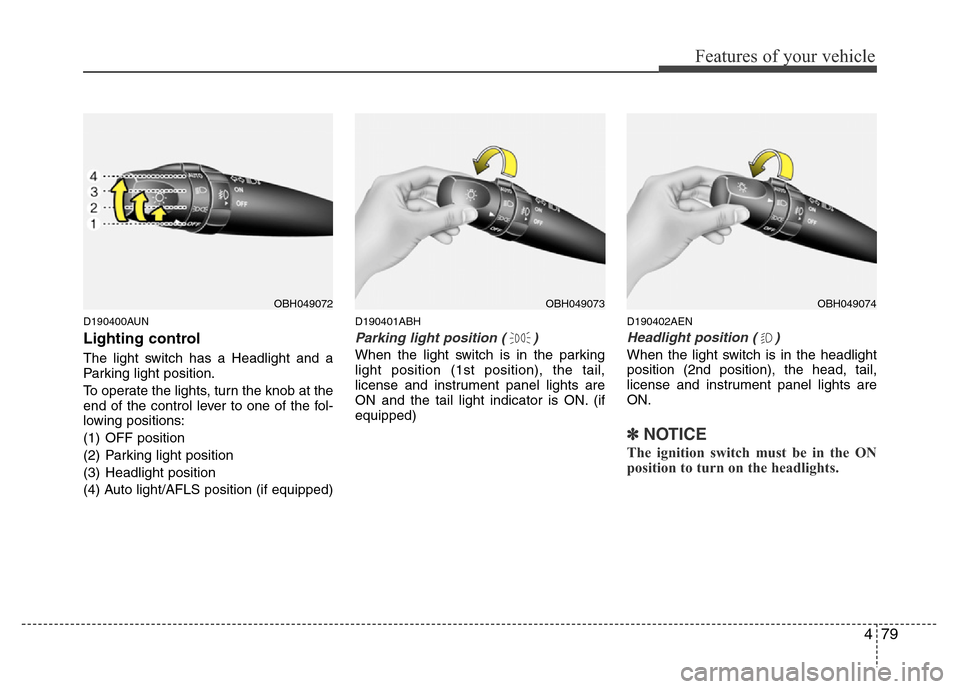
The light switch has a Headlight and a
Parking light position.
To operate the lights, turn the knob at the
end of the control lever to one of the fol-
lowing positions:
(1) OFF position
(2) Parking light position
(3) Headlight position
(4) Auto light/AFLS position (if equipped)
D190401ABH
Parking light position ( )
When the light switch is in the parking
light position (1st position), the tail,
license and instrument panel lights are
ON and the tail light indicator is ON. (if
equipped)
D190402AEN
Headlight position ( )
When the light switch is in the headlight
position (2nd position), the head, tail,
license and instrument panel lights are
ON.
✽NOTICE
The ignition switch must be in the ON
position to turn on the headlights.
OBH049072OBH049074OBH049073
Page 153 of 393
Features of your vehicle
80 4
D190403AUN
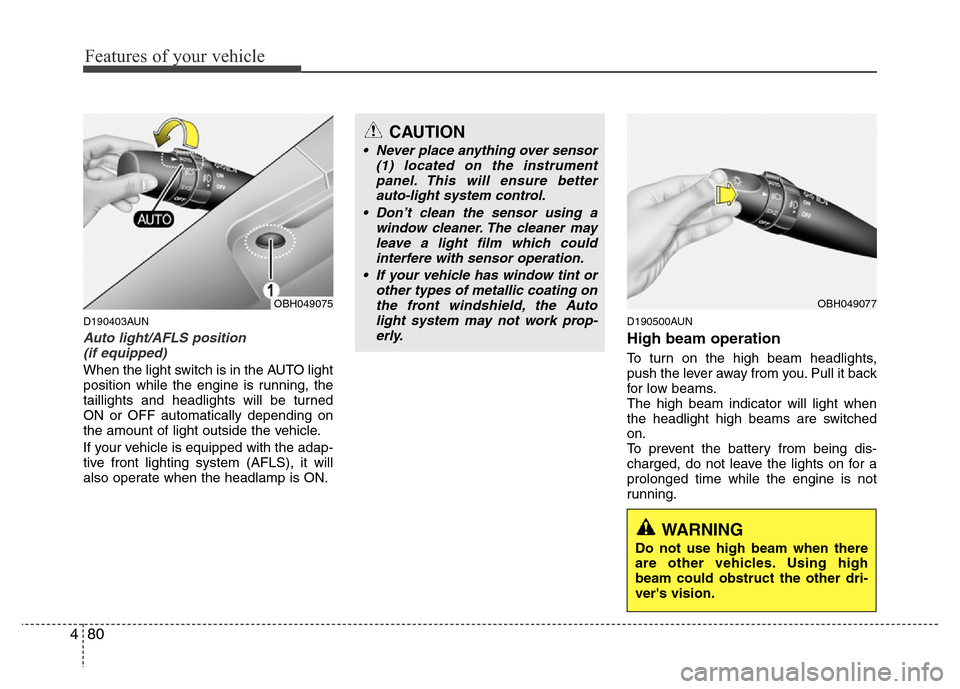
Auto light/AFLS position
(if equipped)
When the light switch is in the AUTO light
position while the engine is running, the
taillights and headlights will be turned
ON or OFF automatically depending on
the amount of light outside the vehicle.
If your vehicle is equipped with the adap-
tive front lighting system (AFLS), it will
also operate when the headlamp is ON.
D190500AUN
High beam operation
To turn on the high beam headlights,
push the lever away from you. Pull it back
for low beams.
The high beam indicator will light when
the headlight high beams are switched
on.
To prevent the battery from being dis-
charged, do not leave the lights on for a
prolonged time while the engine is not
running.
OBH049075
CAUTION
• Never place anything over sensor
(1) located on the instrument
panel. This will ensure better
auto-light system control.
• Don’t clean the sensor using a
window cleaner. The cleaner may
leave a light film which could
interfere with sensor operation.
• If your vehicle has window tint or
other types of metallic coating on
the front windshield, the Auto
light system may not work prop-
erly.
OBH049077
WARNING
Do not use high beam when there
are other vehicles. Using high
beam could obstruct the other dri-
ver's vision.
Page 154 of 393
481
Features of your vehicle
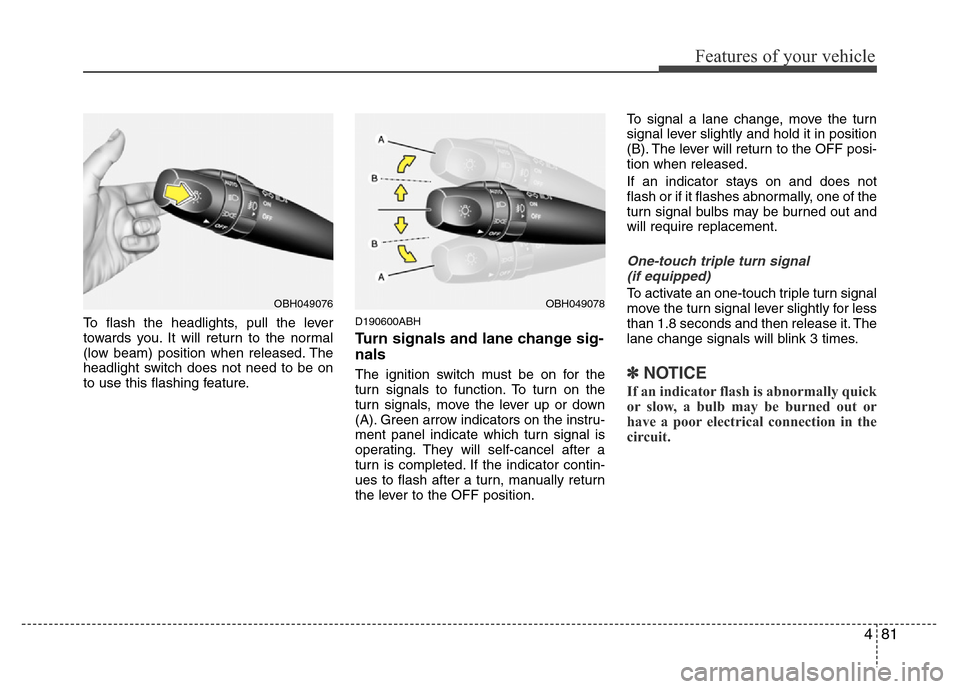
To flash the headlights, pull the lever
towards you. It will return to the normal
(low beam) position when released. The
headlight switch does not need to be on
to use this flashing feature.D190600ABH
Turn signals and lane change sig-
nals
The ignition switch must be on for the
turn signals to function. To turn on the
turn signals, move the lever up or down
(A). Green arrow indicators on the instru-
ment panel indicate which turn signal is
operating. They will self-cancel after a
turn is completed. If the indicator contin-
ues to flash after a turn, manually return
the lever to the OFF position.To signal a lane change, move the turn
signal lever slightly and hold it in position
(B). The lever will return to the OFF posi-
tion when released.
If an indicator stays on and does not
flash or if it flashes abnormally, one of the
turn signal bulbs may be burned out and
will require replacement.
One-touch triple turn signal
(if equipped)
To activate an one-touch triple turn signal
move the turn signal lever slightly for less
than 1.8 seconds and then release it. The
lane change signals will blink 3 times.
✽NOTICE
If an indicator flash is abnormally quick
or slow, a bulb may be burned out or
have a poor electrical connection in the
circuit.
OBH049076OBH049078
Page 155 of 393
Features of your vehicle
82 4
D190700ABH
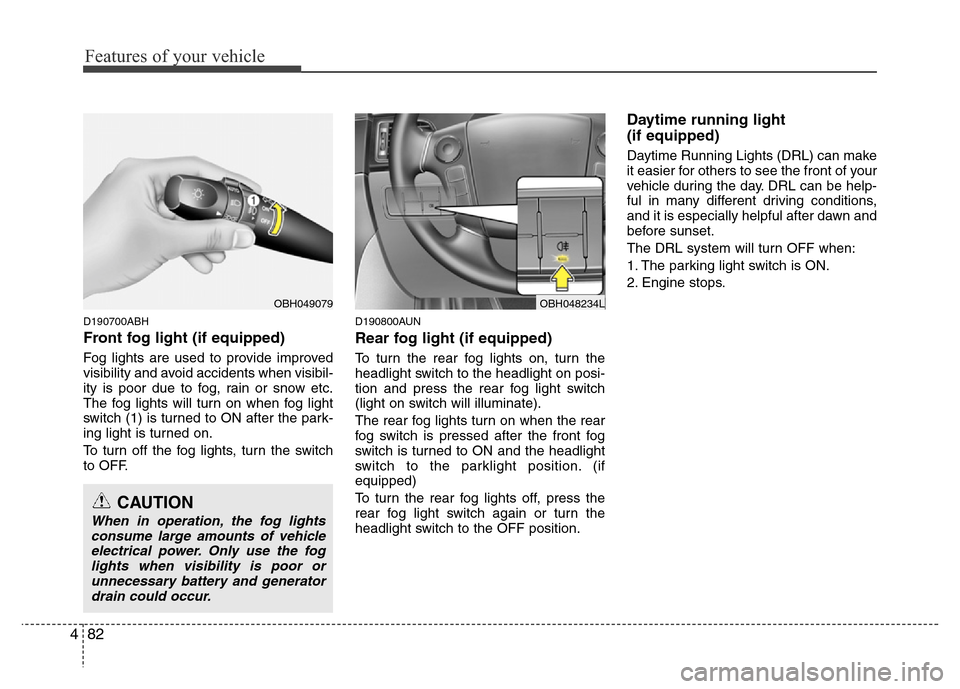
Front fog light (if equipped)
Fog lights are used to provide improved
visibility and avoid accidents when visibil-
ity is poor due to fog, rain or snow etc.
The fog lights will turn on when fog light
switch (1) is turned to ON after the park-
ing light is turned on.
To turn off the fog lights, turn the switch
to OFF.
D190800AUN
Rear fog light (if equipped)
To turn the rear fog lights on, turn the
headlight switch to the headlight on posi-
tion and press the rear fog light switch
(light on switch will illuminate).
The rear fog lights turn on when the rear
fog switch is pressed after the front fog
switch is turned to ON and the headlight
switch to the parklight position. (if
equipped)
To turn the rear fog lights off, press the
rear fog light switch again or turn the
headlight switch to the OFF position.
Daytime running light
(if equipped)
Daytime Running Lights (DRL) can make
it easier for others to see the front of your
vehicle during the day. DRL can be help-
ful in many different driving conditions,
and it is especially helpful after dawn and
before sunset.
The DRL system will turn OFF when:
1. The parking light switch is ON.
2. Engine stops.
OBH049079
CAUTION
When in operation, the fog lights
consume large amounts of vehicle
electrical power. Only use the fog
lights when visibility is poor or
unnecessary battery and generator
drain could occur.
OBH048234L
Page 157 of 393
Features of your vehicle
84 4
D191100ABH
Headlight washer (if equipped)
If your vehicle is equipped with the head-
light washer it will be operating at the
same time when you operate the wind-
shield washer. It will operate when the
headlight switch is in the first or second
position and the ignition switch is in the
ON position.
The washer fluid will be sprayed on to the
headlights.
✽NOTICE
Check the headlight washers periodical-
ly to confirm that the washer fluid is
being sprayed properly onto the head-
light lenses.
Page 162 of 393
489
Features of your vehicle
D210000AEN
D210100ABH-EE
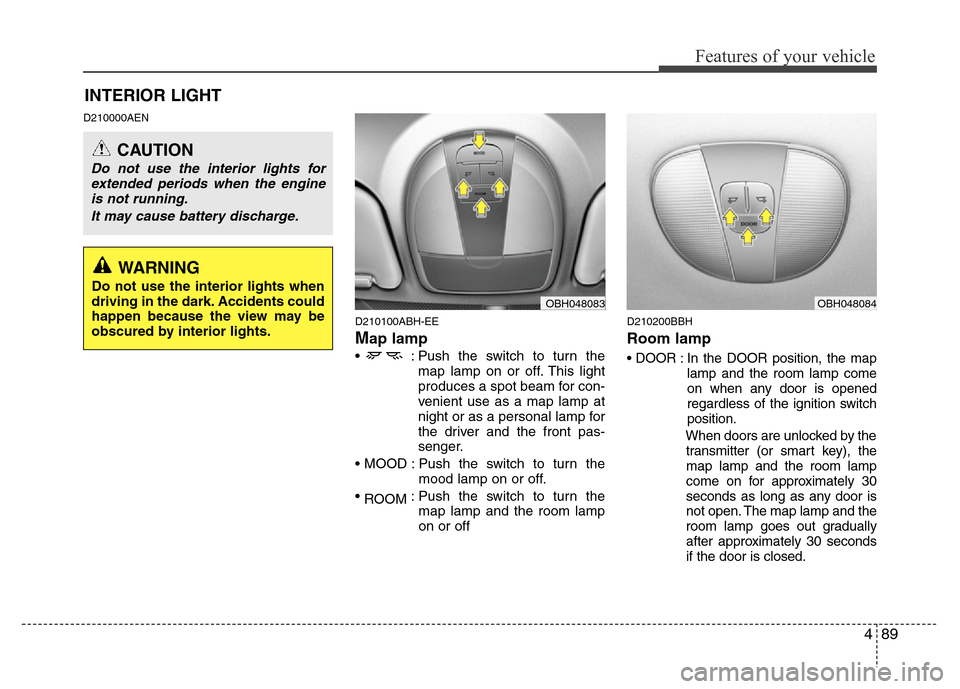
Map lamp
• : Push the switch to turn the
map lamp on or off. This light
produces a spot beam for con-
venient use as a map lamp at
night or as a personal lamp for
the driver and the front pas-
senger.
• MOOD : Push the switch to turn the
mood lamp on or off.
•
ROOM: Push the switch to turn the
map lamp and the room lamp
on or off
D210200BBH
Room lamp
• DOOR : In the DOOR position, the map
lamp and the room lamp come
on when any door is opened
regardless of the ignition switch
position.
When doors are unlocked by the
transmitter (or smart key), the
map lamp and the room lamp
come on for approximately 30
seconds as long as any door is
not open. The map lamp and the
room lamp goes out gradually
after approximately 30 seconds
if the door is closed.
INTERIOR LIGHT
CAUTION
Do not use the interior lights for
extended periods when the engine
is not running.
It may cause battery discharge.
OBH048083OBH048084
WARNING
Do not use the interior lights when
driving in the dark. Accidents could
happen because the view may be
obscured by interior lights.
Page 225 of 393
53
Driving your vehicle
E020100AUN
Before entering vehicle
• Be sure that all windows, outside mir-
ror(s), and outside lights are clean.
• Check the condition of the tires.
• Check under the vehicle for any sign of
leaks.
• Be sure there are no obstacles behind
you if you intend to back up.
E020200AUN
Necessary inspections
Fluid levels, such as engine oil, engine
coolant, brake fluid, and washer fluid
should be checked on a regular basis,
with the exact interval depending on the
fluid. Further details are provided in sec-
tion 7, “Maintenance”.
E020300AUN
Before starting
• Close and lock all doors.
• Position the seat so that all controls are
easily reached.
• Adjust the inside and outside rearview
mirrors.
• Be sure that all lights work.
• Check all gauges.
• Check the operation of warning lights
when the ignition switch is turned to
the ON position.
• Release the parking brake and make
sure the brake warning light goes out.
For safe operation, be sure you are famil-
iar with your vehicle and its equipment.
BEFORE DRIVING
WARNING
All passengers must be properly
belted whenever the vehicle is mov-
ing. Refer to “Seat belts” in section
3 for more information on their
proper use.
WARNING
Always check the surrounding
areas near your vehicle for people,
especially children, before putting a
car into D (Drive) or R (Reverse).
WARNING
Driving while distracted can result
in a loss of vehicle control, that
may lead to an accident, severe
personal injury, and death. The dri-
ver’s primary responsibility is in
the safe and legal operation of a
vehicle, and use of any handheld
devices, other equipment, or vehi-
cle systems which take the driver’s
eyes, attention and focus away
from the safe operation of a vehicle
or which are not permissible by law
should never be used during oper-
ation of the vehicle.
Page 227 of 393
55
Driving your vehicle
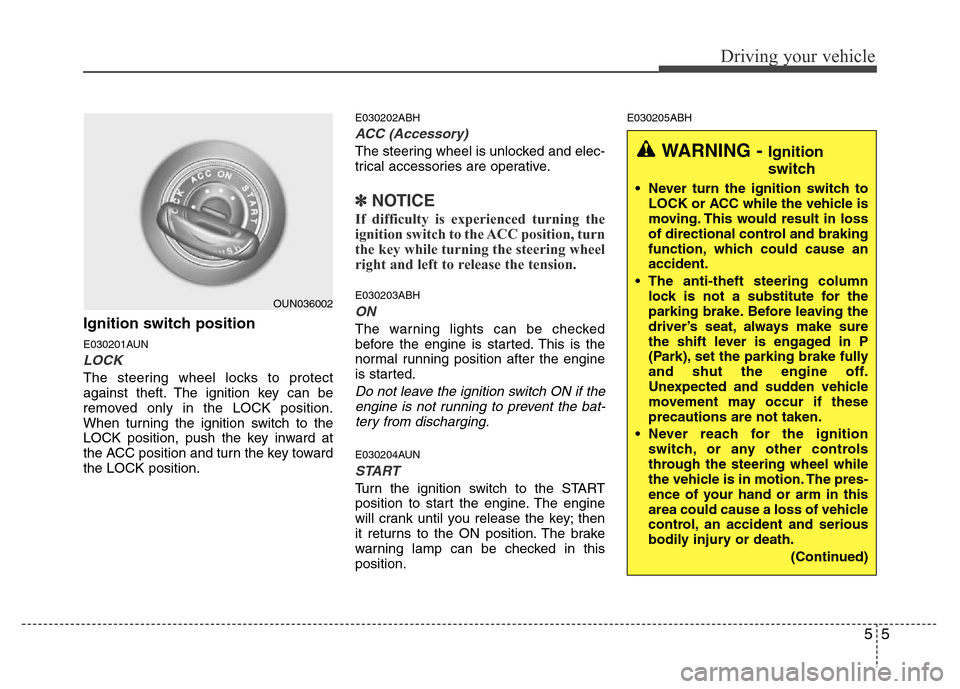
Ignition switch position
E030201AUN
LOCK
The steering wheel locks to protect
against theft. The ignition key can be
removed only in the LOCK position.
When turning the ignition switch to the
LOCK position, push the key inward at
the ACC position and turn the key toward
the LOCK position.
E030202ABH
ACC (Accessory)
The steering wheel is unlocked and elec-
trical accessories are operative.
✽NOTICE
If difficulty is experienced turning the
ignition switch to the ACC position, turn
the key while turning the steering wheel
right and left to release the tension.
E030203ABH
ON
The warning lights can be checked
before the engine is started. This is the
normal running position after the engine
is started.
Do not leave the ignition switch ON if the
engine is not running to prevent the bat-
tery from discharging.
E030204AUN
START
Turn the ignition switch to the START
position to start the engine. The engine
will crank until you release the key; then
it returns to the ON position. The brake
warning lamp can be checked in this
position.
E030205ABH
OUN036002
WARNING - Ignition
switch
• Never turn the ignition switch to
LOCK or ACC while the vehicle is
moving. This would result in loss
of directional control and braking
function, which could cause an
accident.
• The anti-theft steering column
lock is not a substitute for the
parking brake. Before leaving the
driver’s seat, always make sure
the shift lever is engaged in P
(Park), set the parking brake fully
and shut the engine off.
Unexpected and sudden vehicle
movement may occur if these
precautions are not taken.
• Never reach for the ignition
switch, or any other controls
through the steering wheel while
the vehicle is in motion. The pres-
ence of your hand or arm in this
area could cause a loss of vehicle
control, an accident and serious
bodily injury or death.
(Continued)
Page 230 of 393
Driving your vehicle
8 5
E030203ABH
ON
Press the engine start/stop button while it
is in the ACC position without depressing
the brake pedal.
The warning lights can be checked
before the engine is started. Do not leave
the button in the ON position if the engine
is not running to prevent the battery from
discharging.
E030704ABH
START
To start the engine, press the brake
pedal and press the engine start/stop
button with the shift lever in the P(Park)
or the N(Neutral) position. For your safe-
ty, start the engine with the shift lever in
the P (Park) position.
✽NOTICE
• If you press the engine start/stop but-
ton without depressing the brake
pedal, the engine does not start and
the engine start/stop button changes
as follow :
OFF
→ACC →ON →OFF
Page 249 of 393
527
Driving your vehicle
- the hood is open with transmission
in D (Drive).
- the trunk lid is open with transmis-
sion in R (Reverse).
- the driver's seat belt is unbuckled
and the driver's door is open.
- AUTO HOLD is operating for a long
period of time.
- the vehicle is standing on a steep
slope.
In these cases, the brake warning light
comes on, the AUTO HOLD indicator
changes from green to white, and a
warning sounds and a message will
appear to inform you that EPB has
been automatically engaged.
Before driving off again, press foot
brake pedal, check the surrounding
area near your vehicle and release
parking brake manually with the EPB
switch.
• When AUTO HOLD is ON and the
vehicle comes to a stop on a steep
slope (about 25% gradient or more),
the EPB will be automatically
engaged. In this case, when you
release EPB manually by pressing the
EPB switch with foot brake pedal
pressed, AUTO HOLD will hold the
vehicle for 3 seconds in order to pre-
vent the vehicle from rolling back
during the launch.• If the AUTO HOLD malfunction indi-
cator lights up yellow on the LCD
screen, the AUTO HOLD is not work-
ing properly. Take your vehicle to an
authorized HYUNDAI dealer and
have the system checked.
• While operating Auto Hold, you may
hear mechanical noise. However, it is
normal operating noise.E070300AEN-EE
Anti-lock brake system (ABS)
WARNING
ABS (or ESP) will not prevent acci-
dents due to improper or danger-
ous driving maneuvers. Even
though vehicle control is improved
during emergency braking, always
maintain a safe distance between
you and objects ahead. Vehicle
speeds should always be reduced
during extreme road conditions.
The braking distance for cars
equipped with an anti-lock braking
system (or Electronic Stability
Program system) may be longer
than for those without it in the fol-
lowing road conditions.
During these conditions the vehicle
should be driven at reduced
speeds:
• Rough, gravel or snow-covered
roads.
• With tire chains installed.
(Continued)
WARNING
• Press the accelerator pedal slow-
ly when you start the vehicle.
• For your safety, cancel the AUTO
HOLD when you drive downhill or
back up the vehicle or park the
vehicle.
CAUTION
If there is a malfunction with the dri-
ver’s door, hood or trunk open
detection system, the AUTO HOLD
may not work properly.
Take your vehicle to an authorized
HYUNDAI dealer and have the sys-
tem checked.