ECO mode Hyundai Genesis 2012 Owner's Manual
[x] Cancel search | Manufacturer: HYUNDAI, Model Year: 2012, Model line: Genesis, Model: Hyundai Genesis 2012Pages: 393, PDF Size: 8.81 MB
Page 126 of 393
453
Features of your vehicle
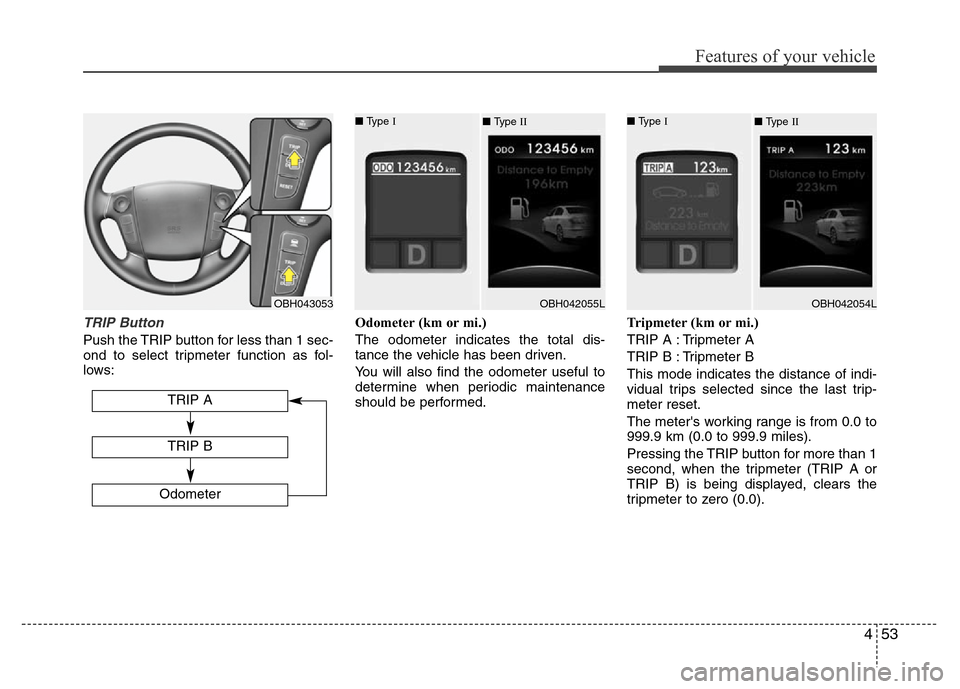
TRIP Button
Push the TRIP button for less than 1 sec-
ond to select tripmeter function as fol-
lows:Odometer (km or mi.)
The odometer indicates the total dis-
tance the vehicle has been driven.
You will also find the odometer useful to
determine when periodic maintenance
should be performed.Tripmeter (km or mi.)
TRIP A : Tripmeter A
TRIP B : Tripmeter B
This mode indicates the distance of indi-
vidual trips selected since the last trip-
meter reset.
The meter's working range is from 0.0 to
999.9 km (0.0 to 999.9 miles).
Pressing the TRIP button for more than 1
second, when the tripmeter (TRIP A or
TRIP B) is being displayed, clears the
tripmeter to zero (0.0).
OBH043053
TRIP A
Odometer
TRIP B
■ Type I
OBH042055L ■ Type II■ Type I
OBH042054L ■ Type II
Page 127 of 393
Features of your vehicle
54 4
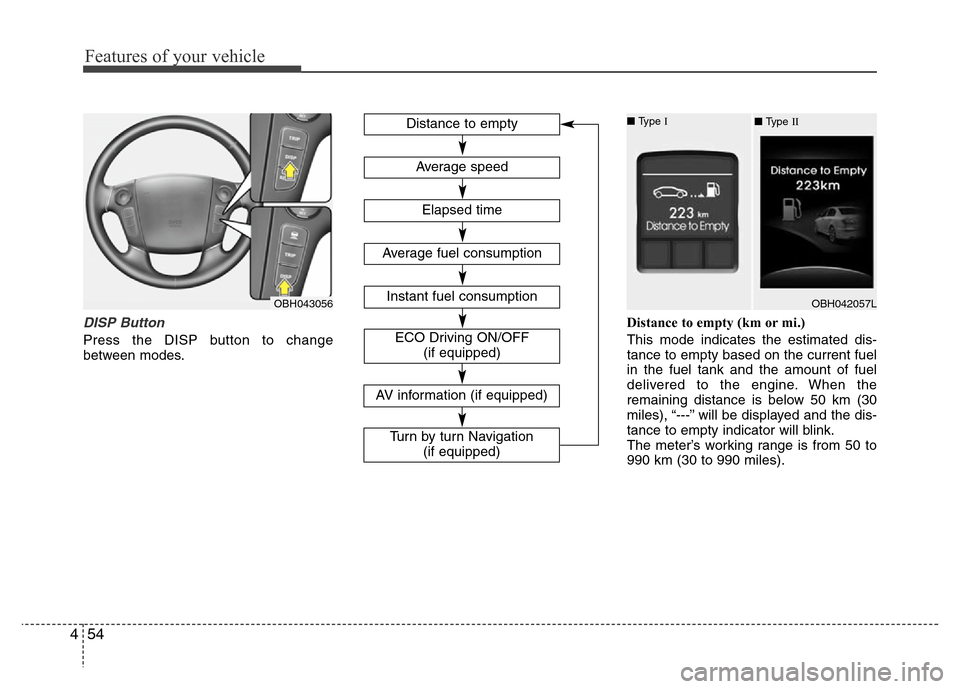
DISP Button
Press the DISP button to change
between modes.Distance to empty (km or mi.)
This mode indicates the estimated dis-
tance to empty based on the current fuel
in the fuel tank and the amount of fuel
delivered to the engine. When the
remaining distance is below 50 km (30
miles), “---” will be displayed and the dis-
tance to empty indicator will blink.
The meter’s working range is from 50 to
990 km (30 to 990 miles).
OBH043056
Distance to empty
Elapsed time
Average speed
Instant fuel consumption
Average fuel consumption
ECO Driving ON/OFF
(if equipped)
■ Type I
OBH042057L ■ Type II
AV information (if equipped)
Turn by turn Navigation
(if equipped)
Page 128 of 393
455
Features of your vehicle
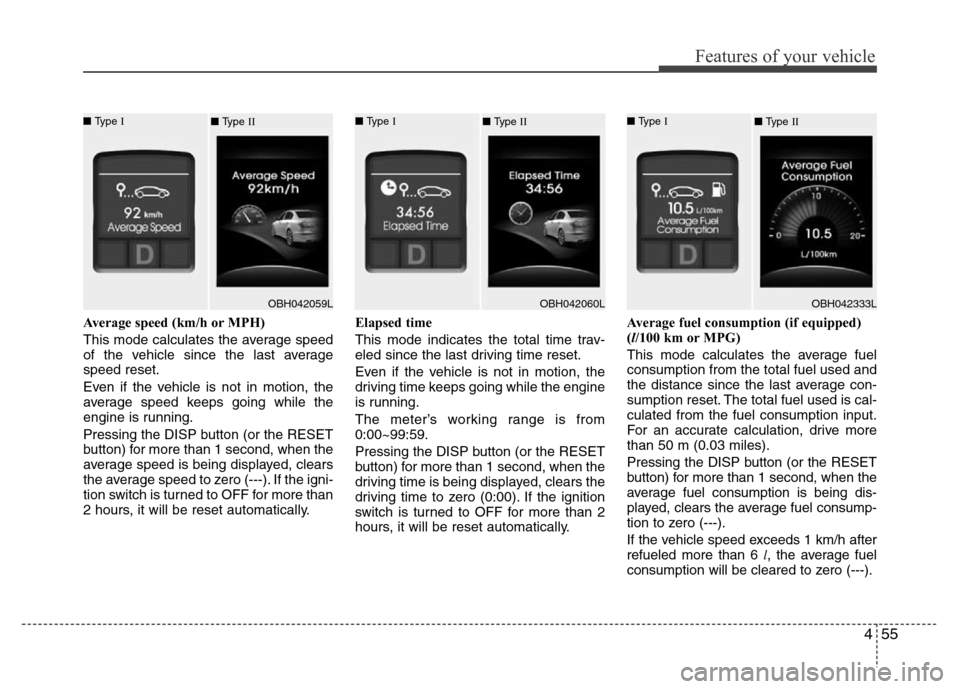
Average speed (km/h or MPH)
This mode calculates the average speed
of the vehicle since the last average
speed reset.
Even if the vehicle is not in motion, the
average speed keeps going while the
engine is running.
Pressing the DISP button (or the RESET
button) for more than 1 second, when the
average speed is being displayed, clears
the average speed to zero (---). If the igni-
tion switch is turned to OFF for more than
2 hours, it will be reset automatically.Elapsed time
This mode indicates the total time trav-
eled since the last driving time reset.
Even if the vehicle is not in motion, the
driving time keeps going while the engine
is running.
The meter’s working range is from
0:00~99:59.
Pressing the DISP button (or the RESET
button) for more than 1 second, when the
driving time is being displayed, clears the
driving time to zero (0:00). If the ignition
switch is turned to OFF for more than 2
hours, it will be reset automatically.Average fuel consumption (if equipped)
(l/100 km or MPG)
This mode calculates the average fuel
consumption from the total fuel used and
the distance since the last average con-
sumption reset. The total fuel used is cal-
culated from the fuel consumption input.
For an accurate calculation, drive more
than 50 m (0.03 miles).
Pressing the DISP button (or the RESET
button) for more than 1 second, when the
average fuel consumption is being dis-
played, clears the average fuel consump-
tion to zero (---).
If the vehicle speed exceeds 1 km/h after
refueled more than 6 l, the average fuel
consumption will be cleared to zero (---).
■ Type I
OBH042059L ■ Type II■ Type I
OBH042060L ■ Type II■ Type I
OBH042333L ■ Type II
Page 129 of 393
Features of your vehicle
56 4
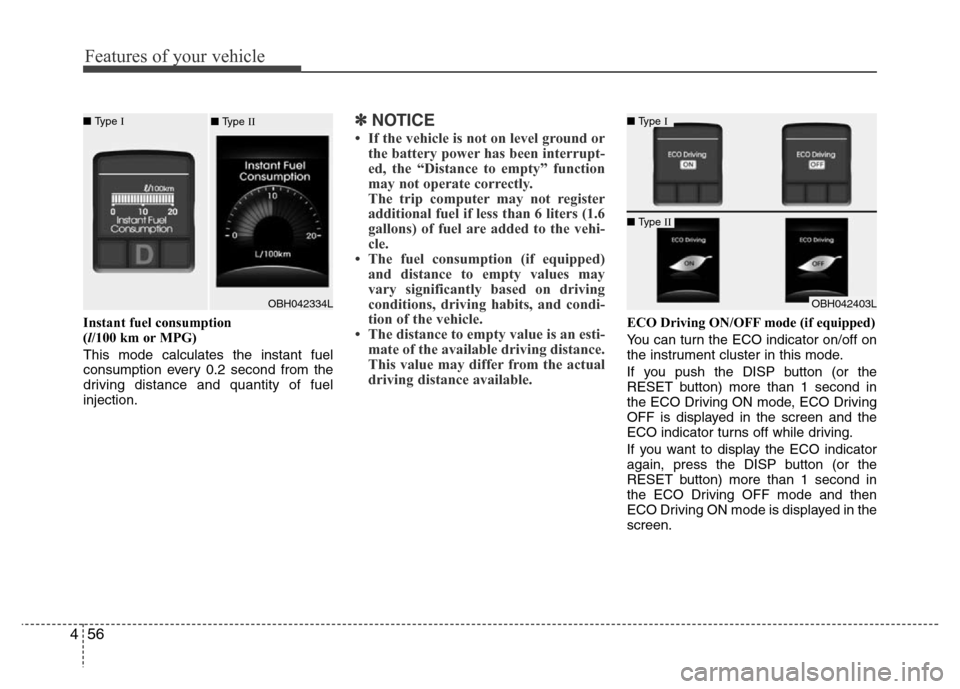
Instant fuel consumption
(l/100 km or MPG)
This mode calculates the instant fuel
consumption every 0.2 second from the
driving distance and quantity of fuel
injection.
✽NOTICE
• If the vehicle is not on level ground or
the battery power has been interrupt-
ed, the “Distance to empty” function
may not operate correctly.
The trip computer may not register
additional fuel if less than 6 liters (1.6
gallons) of fuel are added to the vehi-
cle.
• The fuel consumption (if equipped)
and distance to empty values may
vary significantly based on driving
conditions, driving habits, and condi-
tion of the vehicle.
• The distance to empty value is an esti-
mate of the available driving distance.
This value may differ from the actual
driving distance available.
ECO Driving ON/OFF mode (if equipped)
You can turn the ECO indicator on/off on
the instrument cluster in this mode.
If you push the DISP button (or the
RESET button) more than 1 second in
the ECO Driving ON mode, ECO Driving
OFF is displayed in the screen and the
ECO indicator turns off while driving.
If you want to display the ECO indicator
again, press the DISP button (or the
RESET button) more than 1 second in
the ECO Driving OFF mode and then
ECO Driving ON mode is displayed in the
screen.
■ Type I
OBH042403L
■ Type II
■ Type I
OBH042334L ■ Type II
Page 131 of 393
Features of your vehicle
58 4
ECO indicator
(if equipped)
The ECO indicator is a system that
informs you to drive economically.
It is displayed if you drive fuel efficiently
to help you improve fuel efficiency.
• The ECO indicator (green) will turn on
when you are driving fuel efficiently in
the ECO Driving ON mode.
If you don't want the indicator dis-
played, you can turn the ECO Driving
ON mode to OFF mode by pressing
the DISP button (or the RESET but-
ton).
As per ECO Driving ON/OFF mode
operation, refer to the previous page.
• The fuel-efficiency can be changed by
the driver's driving habit and road con-
dition.
• It doesn't work at the condition which
doesn't meet economical driving such
as P (Park), N (Neutral), R (Reverse)
or sports mode.
• While the instant fuel consumption
mode is displayed on the LCD screen,
the ECO indicator turns off (if
equipped).
ECO-P indicator
(if equipped)
With intelligent accelerator
pedal (if equipped)
The ECO-P (pedal) indicator light will illu-
minate when the ECO-P button is
pressed. If the fuel efficiency is low, the
reactive force of intelligent accelerator
pedal will be increased. It is allow to con-
trol over excess acceleration and you can
drive fuel efficiently to help you improve
fuel efficiency.
If you press the ECO-P button again, the
indicator light turns off and the intelligent
accelerator pedal is not operated in ECO
driving mode.
For more information, refer to "Intelligent
accelerator pedal" in section 5.ECO-PWARNING
Don't keep watching the indicator
while driving. It will distract you
while driving and cause an acci-
dent that results in severe personal
injury.ECO
Page 138 of 393
465
Features of your vehicle
D150320ABH-EE
Malfunction indicator light
(MIL) (check engine light)
This indicator light is part of the Engine
Control System which monitors various
emission control system components. If
this light illuminates while driving, it indi-
cates that a potential malfunction has
been detected somewhere in the emis-
sion control system.
This light will also illuminate when the
ignition switch is turned to the ON posi-
tion, and will go out in a few seconds
after the engine is started. If it illuminates
while driving, or does not illuminate when
the ignition switch is turned to the ON
position, take your vehicle to your near-
est authorized HYUNDAI dealer and
have the system checked.
Generally, your vehicle will continue to be
drivable, but have the system checked by
an authorized HYUNDAI dealer promptly.
D150323BBH-EE
ESP (Electronic Stability
Program) indicator
The ESP indicator will illuminate when
the ignition switch is turned ON, but
should go off after approximately 3 sec-
onds. If the indicator does not come on,
or continuously remains on after coming
on for about 3 seconds when you turned
the ignition switch to the ON position, or
if the indicator comes on while driving,
the ESP is not working properly. Take
your car to an authorized HYUNDAI deal-
er and have the system checked.
When the ESP is on, it monitors the driv-
ing conditions and under normal driving
conditions, the ESP light will remain off.
When a slippery or low traction condition
is encountered, the ESP will operate,
and the ESP indicator will blink to indi-
cate the ESP is operating.
D150324ABH-EE
ESP OFF indicator
The ESP OFF indicator will illuminate
when the ignition switch is turned ON,
but should go off after approximately 3
seconds. To switch to ESP OFF mode,
press the ESP OFF button. The ESP
OFF indicator will illuminate indicating
the ESP is deactivated.
ESP
ESP
OFF
CAUTION
Prolonged driving with the
Malfunction Indicator Light illumi-
nated may cause damage to the
emission control systems which
could effect drivability and/or fuel
economy.
CAUTION
If the Malfunction Indicator Light
illuminates, potential catalytic con-
verter damage is possible which
could result in loss of engine
power. Have the Engine Control
System inspected as soon as pos-
sible by an authorized HYUNDAI
dealer.
Page 141 of 393
Features of your vehicle
68 4
D150333ABH
AUTO HOLD indicator
(if equipped)
If you press the AUTO HOLD switch, the
AUTO HOLD indicator on the cluster
comes on white. And when you stop the
vehicle completely by pressing the brake
pedal, the indicator changes from white
to green.
If the AUTO HOLD malfunction indicator
on the LCD screen lights up yellow, the
AUTO HOLD is not working properly. Take
your vehicle to an authorized HYUNDAI
dealer and have the system checked.
For more information, refer to “AUTO
HOLD” in section 5.
D150334ABH
AFLS (Adaptive Front
Lighting System)
malfunction indicator
(if equipped)
If the AFLS malfunction indicator comes
on, the AFLS is not working properly.
Drive to the nearest safe location and
restart the engine. If the indicator contin-
uously remains on, take your vehicle to
an authorized HYUNDAI dealer and have
the system checked.
SPORT indicator
(if equipped)
With electronic controlled
suspension (if equipped)
The SPORT indicator light will illuminate
when the SPORT button is pressed. It
enables you to drive dynamically. The
indicator light turns off when the SPORT
button is pressed again. The sporty driv-
ing mode returns to the normal mode.
For more information, refer to "Electronic
controlled suspension" in section 5.
D150335ABH
ECS (Electronic Control
Suspension) malfunction
indicator (if equipped)
The ECS malfunction indicator will illumi-
nate when the ignition switch is turned
ON, but should go off after approximate-
ly 3 seconds. If the warning light does not
come on, or continuously remains on
after coming on for about 3 seconds
when you turned the ignition switch to the
ON position, the ECS is not working
properly.
If it comes on while driving, the electron-
ic control suspension is not working
properly.
Take your vehicle to an authorized
HYUNDAI dealer and have the system
checked.
ECS malfunction indicator may illuminate
when the ESP indicator comes on to indi-
cate that the ESP is not working proper-
ly, but it does not indicate malfunction of
the ECS.
ECSAFLSAUTO
HOLD
SPORT
Page 171 of 393
Features of your vehicle
98 4
Adjusting the driver and passenger side
temperature individually
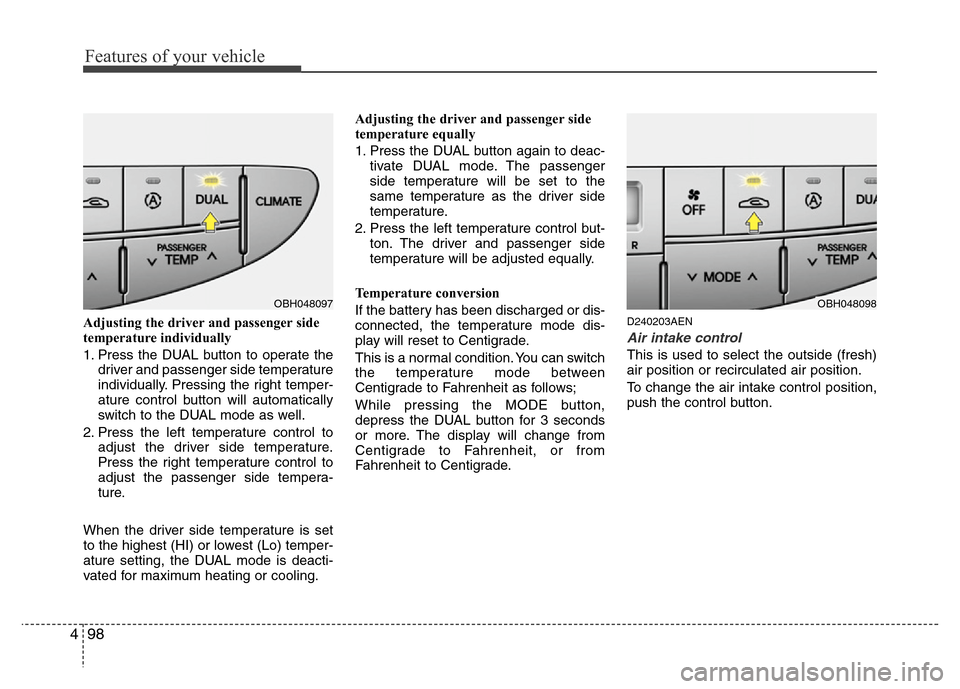
1. Press the DUAL button to operate the
driver and passenger side temperature
individually. Pressing the right temper-
ature control button will automatically
switch to the DUAL mode as well.
2. Press the left temperature control to
adjust the driver side temperature.
Press the right temperature control to
adjust the passenger side tempera-
ture.
When the driver side temperature is set
to the highest (HI) or lowest (Lo) temper-
ature setting, the DUAL mode is deacti-
vated for maximum heating or cooling.Adjusting the driver and passenger side
temperature equally
1. Press the DUAL button again to deac-
tivate DUAL mode. The passenger
side temperature will be set to the
same temperature as the driver side
temperature.
2. Press the left temperature control but-
ton. The driver and passenger side
temperature will be adjusted equally.
Temperature conversion
If the battery has been discharged or dis-
connected, the temperature mode dis-
play will reset to Centigrade.
This is a normal condition. You can switch
the temperature mode between
Centigrade to Fahrenheit as follows;
While pressing the MODE button,
depress the DUAL button for 3 seconds
or more. The display will change from
Centigrade to Fahrenheit, or from
Fahrenheit to Centigrade.D240203AEN
Air intake control
This is used to select the outside (fresh)
air position or recirculated air position.
To change the air intake control position,
push the control button.
OBH048097OBH048098
Page 172 of 393
499
Features of your vehicle
Recirculated air position
With the recirculated air
position selected, air from
the passenger compart-
ment will be drawn through
the heating system and
heated or cooled according
to the function selected.
Outside (fresh) air position
With the outside (fresh) air
position selected, air enters
the vehicle from outside and
is heated or cooled accord-
ing to the function selected.
✽NOTICE
Prolonged operation of the heater in the
recirculated air position (without air
conditioning selected) may cause fog-
ging of the windshield and side windows
and the air within the passenger com-
partment may become stale.
In addition, prolonged use of the air con-
ditioning with the recirculated air posi-
tion selected will result in excessively dry
air in the passenger compartment.
D240204ABH
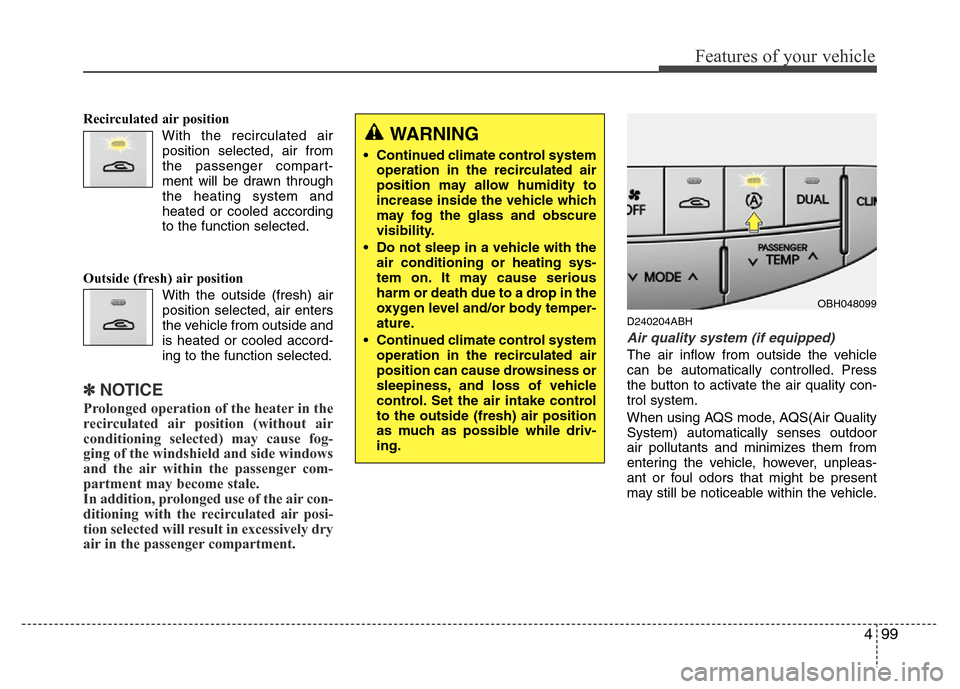
Air quality system (if equipped)
The air inflow from outside the vehicle
can be automatically controlled. Press
the button to activate the air quality con-
trol system.
When using AQS mode, AQS(Air Quality
System) automatically senses outdoor
air pollutants and minimizes them from
entering the vehicle, however, unpleas-
ant or foul odors that might be present
may still be noticeable within the vehicle.
WARNING
• Continued climate control system
operation in the recirculated air
position may allow humidity to
increase inside the vehicle which
may fog the glass and obscure
visibility.
• Do not sleep in a vehicle with the
air conditioning or heating sys-
tem on. It may cause serious
harm or death due to a drop in the
oxygen level and/or body temper-
ature.
• Continued climate control system
operation in the recirculated air
position can cause drowsiness or
sleepiness, and loss of vehicle
control. Set the air intake control
to the outside (fresh) air position
as much as possible while driv-
ing.
OBH048099
Page 173 of 393
Features of your vehicle
100 4
Exhaust gas cutoff mode :
Air enters the vehicle from the outside.
If exhaust gas enters the vehicle from the
outside, the exhaust gas cutoff mode is
automatically converted from the outside
air position to the recirculated air position
to prevent exhaust gas from entering the
vehicle.
✽NOTICE
It should be noted that prolonged oper-
ation of the heating system in recircula-
tion mode will give rise to misting of the
windshield and side windows and the air
within the passenger compartment will
become stale. In addition, prolonged use
of the air conditioning with the recircu-
lation mode selected may result in the
air within the passenger compartment
becoming excessively dry.
D240205ABH
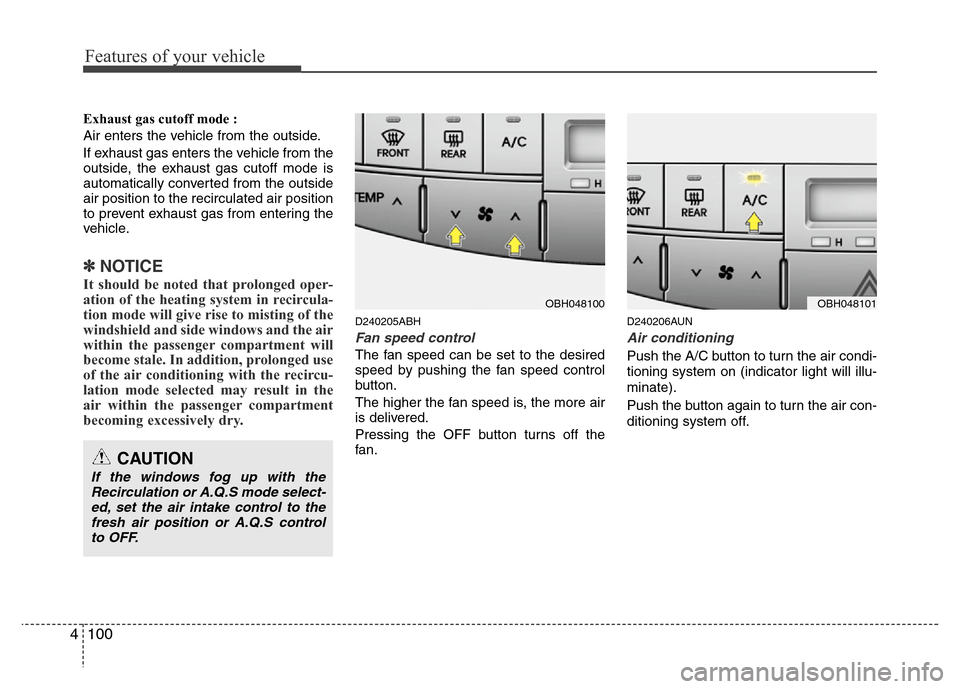
Fan speed control
The fan speed can be set to the desired
speed by pushing the fan speed control
button.
The higher the fan speed is, the more air
is delivered.
Pressing the OFF button turns off the
fan.
D240206AUN
Air conditioning
Push the A/C button to turn the air condi-
tioning system on (indicator light will illu-
minate).
Push the button again to turn the air con-
ditioning system off.
CAUTION
If the windows fog up with the
Recirculation or A.Q.S mode select-
ed, set the air intake control to the
fresh air position or A.Q.S control
to OFF.
OBH048100OBH048101