Push start Hyundai Genesis 2013 User Guide
[x] Cancel search | Manufacturer: HYUNDAI, Model Year: 2013, Model line: Genesis, Model: Hyundai Genesis 2013Pages: 429, PDF Size: 8.94 MB
Page 164 of 429
485
Features of your vehicle
D210000AEND210100ABH-EU
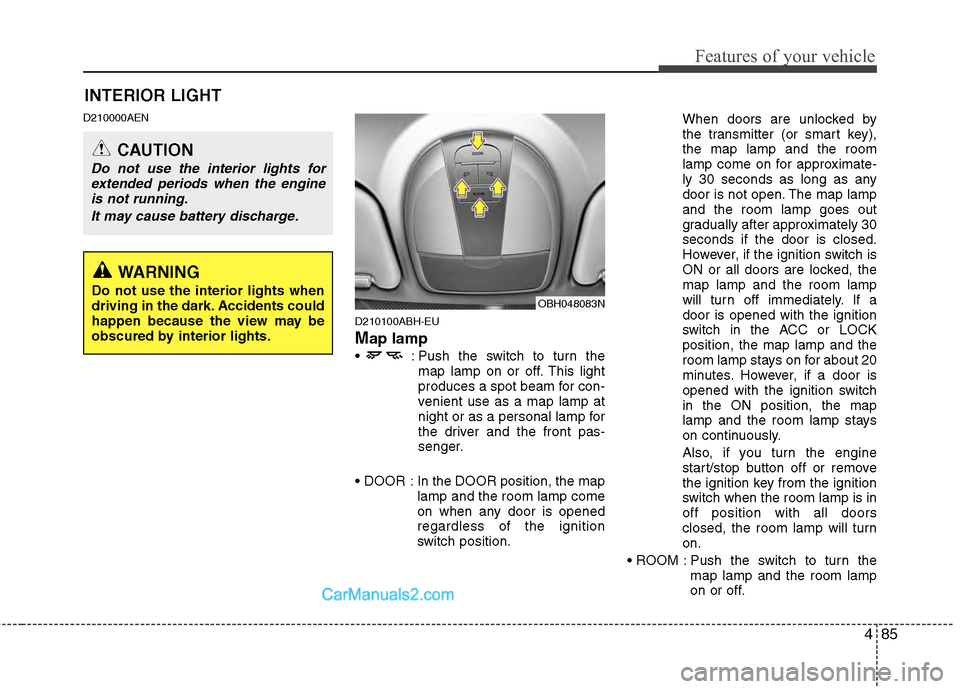
Map lamp
: Push the switch to turn themap lamp on or off. This light
produces a spot beam for con-
venient use as a map lamp at
night or as a personal lamp for
the driver and the front pas-
senger.
In the DOOR position, the map lamp and the room lamp come
on when any door is opened
regardless of the ignition
switch position. When doors are unlocked by
the transmitter (or smart key),
the map lamp and the room
lamp come on for approximate-
ly 30 seconds as long as any
door is not open. The map lamp
and the room lamp goes out
gradually after approximately 30
seconds if the door is closed.
However, if the ignition switch is
ON or all doors are locked, the
map lamp and the room lamp
will turn off immediately. If a
door is opened with the ignition
switch in the ACC or LOCK
position, the map lamp and the
room lamp stays on for about 20
minutes. However, if a door is
opened with the ignition switch
in the ON position, the map
lamp and the room lamp stays
on continuously.
Also, if you turn the engine
start/stop button off or remove
the ignition key from the ignition
switch when the room lamp is in
off position with all doors
closed, the room lamp will turn
on.
Push the switch to turn the map lamp and the room lamp
on or off.
OBH048083N
INTERIOR LIGHT
CAUTION
Do not use the interior lights forextended periods when the engineis not running.
It may cause battery discharge.
WARNING
Do not use the interior lights when
driving in the dark. Accidents could
happen because the view may be
obscured by interior lights.
Page 170 of 429
491
Features of your vehicle
D240200ABH
Manual heating and air condition-
ing
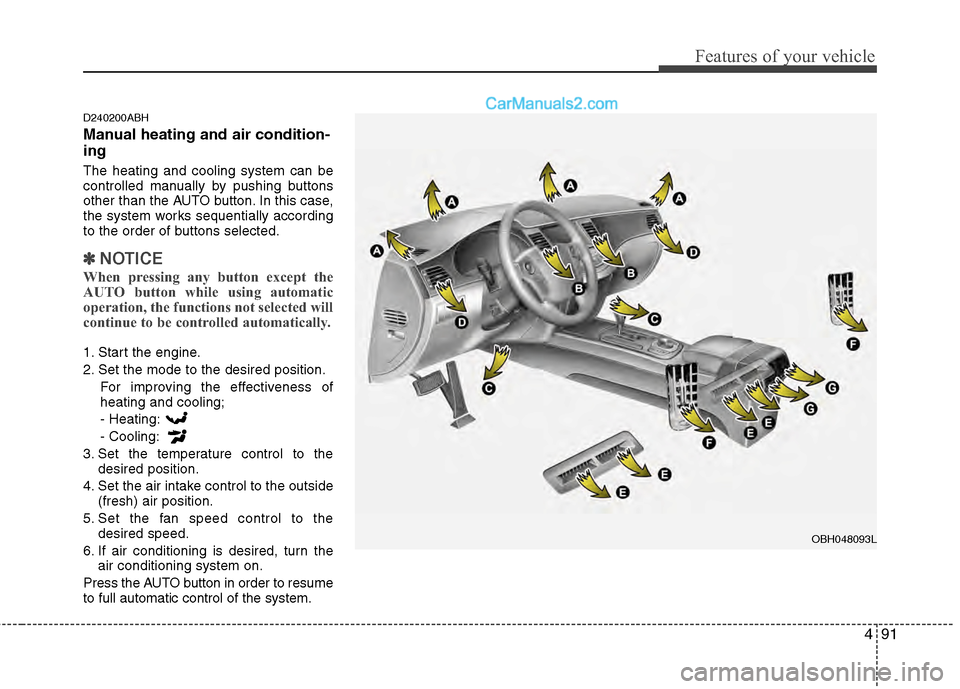
The heating and cooling system can be
controlled manually by pushing buttons
other than the AUTO button. In this case,
the system works sequentially according
to the order of buttons selected.
✽ ✽NOTICE
When pressing any button except the
AUTO button while using automatic
operation, the functions not selected will
continue to be controlled automatically.
1. Start the engine.
2. Set the mode to the desired position.
For improving the effectiveness of
heating and cooling;
- Heating:
- Cooling:
3. Set the temperature control to the desired position.
4. Set the air intake control to the outside (fresh) air position.
5. Set the fan speed control to the desired speed.
6. If air conditioning is desired, turn the air conditioning system on.
Press the AUTO button in order to resume
to full automatic control of the system.
OBH048093L
Page 177 of 429
Features of your vehicle
98
4
D230503AEN
Air conditioning
HYUNDAI Air Conditioning Systems are
filled with environmentally friendly
R-134a refrigerant.
1. Start the engine. Push the air condi-
tioning button.
2. Set the mode to the position.
3. Set the air intake control to the outside air or recirculated air position.
4. Adjust the fan speed control and tem- perature control to maintain maximum
comfort.
✽ ✽NOTICE
• When using the air conditioning sys-
tem, monitor the engine temperature
gauge closely while driving up hills or
in heavy traffic when outside temper-
atures are high. Air conditioning sys-
tem operation may cause engine over-
heating. Continue to use the blower
fan but turn the air conditioning sys-
tem off if the engine temperature
gauge indicates engine overheating.
• When opening the windows in humid weather air conditioning may create
water droplets inside the vehicle.
Since excessive water droplets may
cause damage to electrical equipment,
air conditioning should only be oper-
ated with the windows closed.
Air conditioning system operation tips
If the vehicle has been parked in direct
sunlight during hot weather, open the
windows for a short time to let the hot
air inside the vehicle escape.
To help reduce moisture inside of the windows on rainy or humid days,
decrease the humidity inside the vehi-
cle by operating the air conditioning
system.
During air conditioning system opera- tion, you may occasionally notice a
slight change in engine speed as the
air conditioning compressor cycles.
This is a normal system operation
characteristic.
Use the air conditioning system every month only for a few minutes to ensure
maximum system performance.
Page 203 of 429
Features of your vehicle
124
4
10. CD Indicator
When the ignition switch is in ACC or ON
and if the CD is loaded, this indicator
icon is on. If the CD is ejected the icon is
off.
11. CD Slot
Insert CD with printed side upward and
gently push in. When the ignition switch
is on ACC or ON and power is off, power
is automatically turned on if the CD is
loaded. This CDP supports 12 cm CDs.
But if a VCD, Data CD, or DVD are
loaded, "Media Error" message will
appear.
CAUTION IN USING
USB DEVICE
To use an external USB device,
make sure the device is not con-nected when starting up the vehi-cle. Connect the device afterstarting up.
If you start the engine when the USB device is connected, it maydamage the USB device. (USBflashdrives are very sensitive toelectric shock.)
If the engine is started up or turned off while the external USBdevice is connected, the externalUSB device may not work.
It may not play inauthentic MP3 or WMA files.
1) It can only play MP3 files with the compression rate between8Kbps~320Kbps.
2) It can only play WMA music files with the compression ratebetween 8Kbps~320Kbps.
Take precautions for static electrici- ty when connecting or disconnect-ing the external USB device.
(Continued)
(Continued) An encrypted MP3 PLAYER is not recognizable.
Depending on the condition of the external USB device, the con-nected external USB device canbe unrecognizable.
When the formatted byte/sector setting of External USB device isnot either 512BYTE or 2048BYTE, then the device will not be recog-nized.
Use only a USB device formatted to FAT 12/16/32.
USB devices without USB I/F authentication may not be recog-nizable.
Make sure the USB connection terminal does not come in contactwith the human body or otherobjects.
If you repeatedly connect or dis- connect the USB device in a shortperiod of time, it may break the device.
You may hear a strange noise when connecting or disconnect-ing a USB device.
(Continued)
Page 232 of 429
4153
Features of your vehicle
■Phone Setup
All Bluetooth®Wireless Technology relat-
ed operations can be performed by voice
command or by manual operation.
Press button on the steeringwheel to activate voice recognition.
Push the TUNE/SETUP knob to enterSETUP mode. Select “BLUETOOTH”
item by rotating the TUNE/SETUP
knob, then push the knob.
Before using
Bluetooth®Wireless
Technology features, the phone must be
paired (registered) to the audio system.
Up to 5 phones can be paired in the sys-
tem.
✽ ✽ NOTICE
• The pairing procedure of the phone
varies according to each phone model.
Before attempting to pair phone,
please see your phone’s User’s Guide
for instructions.
• Once pairing with the phone is com- pleted, there is no need to pair with
that phone again unless the phone is
deleted manually from the audio sys-
tem (refer “Deleting Phone” section)
or the vehicle’s information is
removed from the phone.
• Need to confirm if pairing can be done by voice. Need to confirm which sys-
tem can paired by voice, CDC, CDP.1. Press button.
2. Say “Set Up”.
- The system replies with availablecommands.
- To skip the information message, press again and then a beep is
heard.
3. Say “Pair Phone”
4. Say “Yes” to proceed.
5. Say the name of your phone when prompted.
- Use any name to uniquely describe your phone.
- Use Full name to voice tag.
- Do not use a short name or similar name to voice command.
6.
Bluetooth®Wireless Technology sys-
tem will repeat the name you stated.
7. Say "Yes" to confirm.
8. The audio displays “searching ----
passkey: 0000” and asks you to initiate
pairing procedure from the phone.
9. Search the
Bluetooth®Wireless
Technology system on your phone.
Your phone should display your [vehi-
cle model name] on the
Bluetooth®
Wireless Technology device list. Then
attempt pairing on your phone.
10. After Pairing is completed, your phone will start to transfer phone/contact list
to the audio system.
Page 244 of 429
55
Driving your vehicle
E030100AEN
Illuminated ignition switch
Whenever a front door is opened, the
ignition switch will be illuminated for your
convenience, provided the ignition switch
is not in the ON position. The light will go
off immediately when the ignition switch
is turned on or go off after about 30 sec-
onds when the door is closed.
Ignition switch position
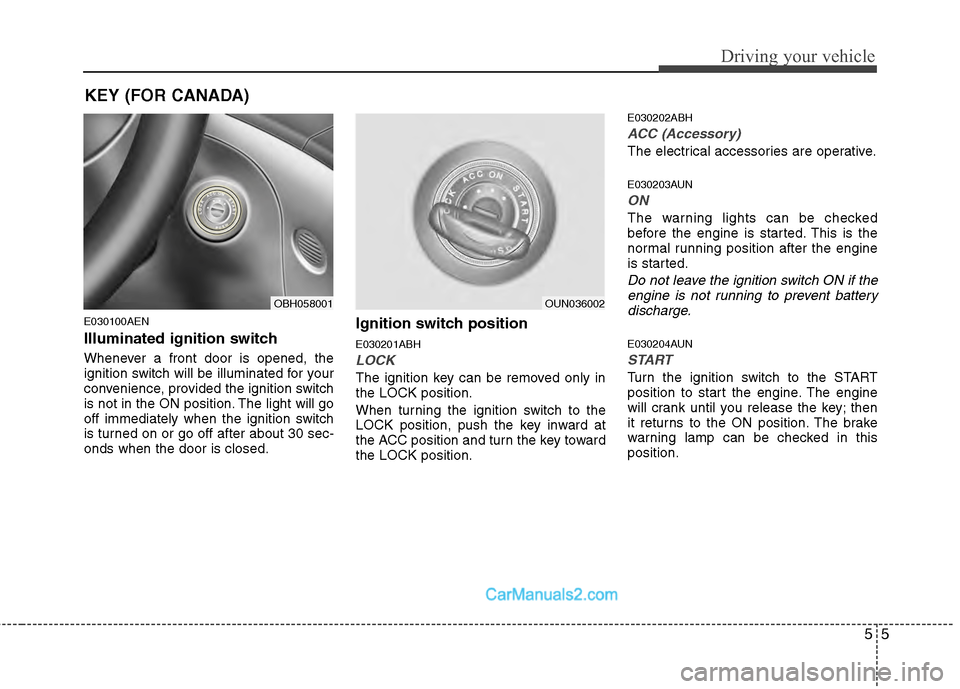
E030201ABH
LOCK
The ignition key can be removed only in
the LOCK position.
When turning the ignition switch to the
LOCK position, push the key inward at
the ACC position and turn the key toward
the LOCK position.
E030202ABH
ACC (Accessory)
The electrical accessories are operative.
E030203AUN
ON
The warning lights can be checked
before the engine is started. This is the
normal running position after the engine
is started.
Do not leave the ignition switch ON if theengine is not running to prevent battery discharge.
E030204AUN
START
Turn the ignition switch to the START
position to start the engine. The engine
will crank until you release the key; then
it returns to the ON position. The brake
warning lamp can be checked in this
position.
OBH058001OUN036002
KEY (FOR CANADA)
Page 249 of 429
Driving your vehicle
10
5
✽
✽
NOTICE
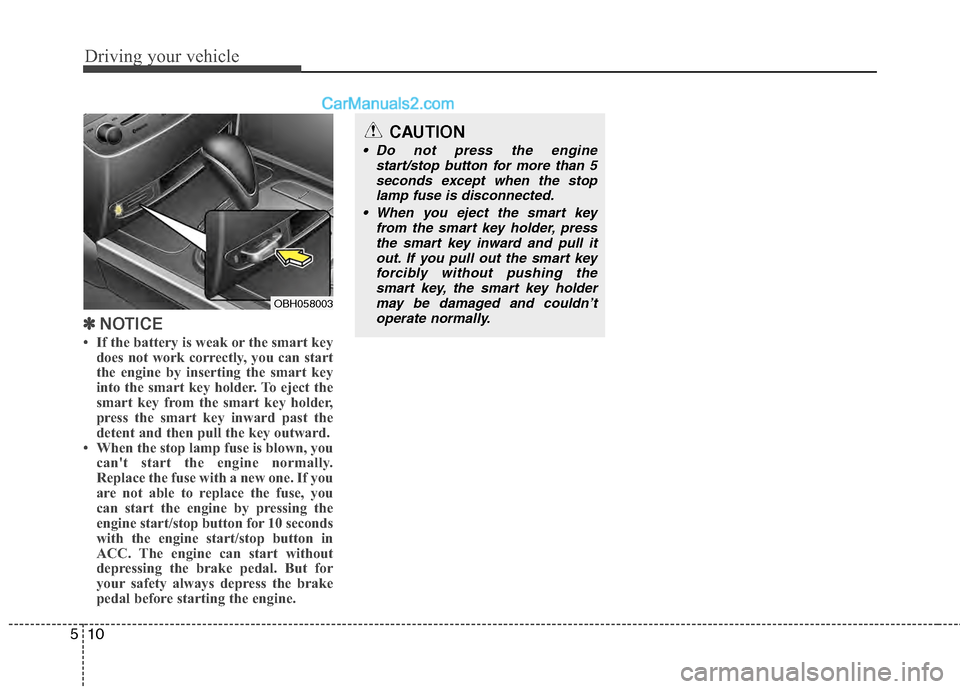
• If the battery is weak or the smart key
does not work correctly, you can start
the engine by inserting the smart key
into the smart key holder. To eject the
smart key from the smart key holder,
press the smart key inward past the
detent and then pull the key outward.
• When the stop lamp fuse is blown, you can't start the engine normally.
Replace the fuse with a new one. If you
are not able to replace the fuse, you
can start the engine by pressing the
engine start/stop button for 10 seconds
with the engine start/stop button in
ACC. The engine can start without
depressing the brake pedal. But for
your safety always depress the brake
pedal before starting the engine.
OBH058003
CAUTION
Do not press the engine
start/stop button for more than 5seconds except when the stoplamp fuse is disconnected.
When you eject the smart key from the smart key holder, pressthe smart key inward and pull it out. If you pull out the smart keyforcibly without pushing thesmart key, the smart key holdermay be damaged and couldn’toperate normally.
Page 253 of 429
WARNING
Always fully depress the brake
pedal before and while shifting out
of the P (Park) position into anoth-
er position to avoid inadvertent
motion of the vehicle which could
injure persons in or around the car.
Driving your vehicle
14
5
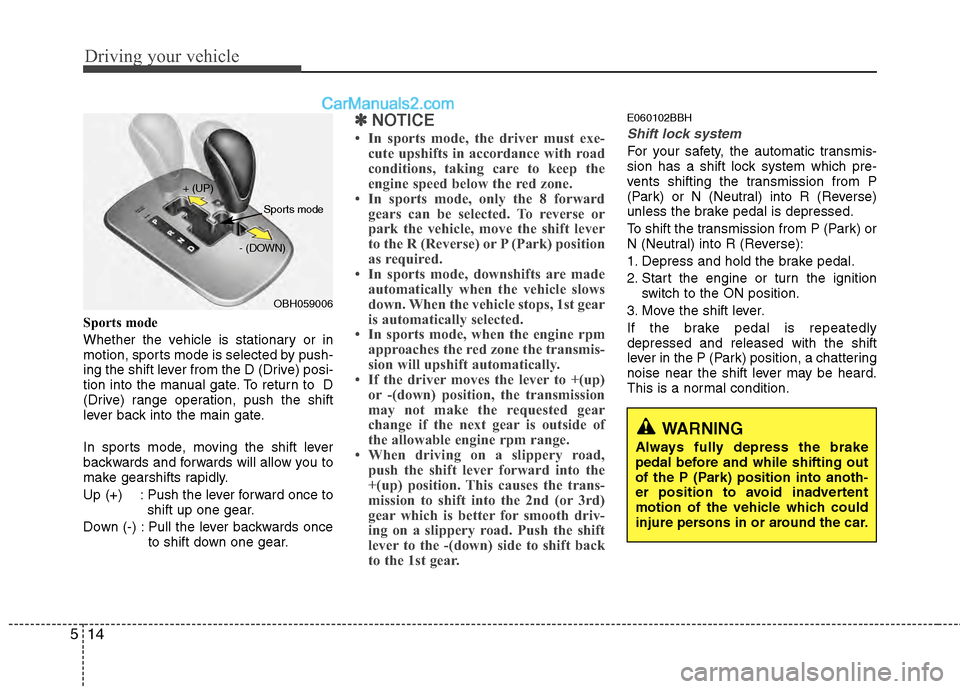
Sports mode
Whether the vehicle is stationary or in
motion, sports mode is selected by push-
ing the shift lever from the D (Drive) posi-
tion into the manual gate. To return to D
(Drive) range operation, push the shift
lever back into the main gate.
In sports mode, moving the shift lever
backwards and forwards will allow you to
make gearshifts rapidly.
Up (+) : Push the lever forward once to
shift up one gear.
Down (-) : Pull the lever backwards once to shift down one gear.
✽ ✽NOTICE
• In sports mode, the driver must exe-
cute upshifts in accordance with road
conditions, taking care to keep the
engine speed below the red zone.
• In sports mode, only the 8 forward gears can be selected. To reverse or
park the vehicle, move the shift lever
to the R (Reverse) or P (Park) position
as required.
• In sports mode, downshifts are made automatically when the vehicle slows
down. When the vehicle stops, 1st gear
is automatically selected.
• In sports mode, when the engine rpm approaches the red zone the transmis-
sion will upshift automatically.
• If the driver moves the lever to +(up) or -(down) position, the transmission
may not make the requested gear
change if the next gear is outside of
the allowable engine rpm range.
• When driving on a slippery road, push the shift lever forward into the
+(up) position. This causes the trans-
mission to shift into the 2nd (or 3rd)
gear which is better for smooth driv-
ing on a slippery road. Push the shift
lever to the -(down) side to shift back
to the 1st gear.
E060102BBH
Shift lock system
For your safety, the automatic transmis-
sion has a shift lock system which pre-
vents shifting the transmission from P
(Park) or N (Neutral) into R (Reverse)
unless the brake pedal is depressed.
To shift the transmission from P (Park) or
N (Neutral) into R (Reverse):
1. Depress and hold the brake pedal.
2. Start the engine or turn the ignition
switch to the ON position.
3. Move the shift lever.
If the brake pedal is repeatedly
depressed and released with the shift
lever in the P (Park) position, a chattering
noise near the shift lever may be heard.
This is a normal condition.
OBH059006
+ (UP)
- (DOWN)
Sports mode
Page 283 of 429
Driving your vehicle
44
5
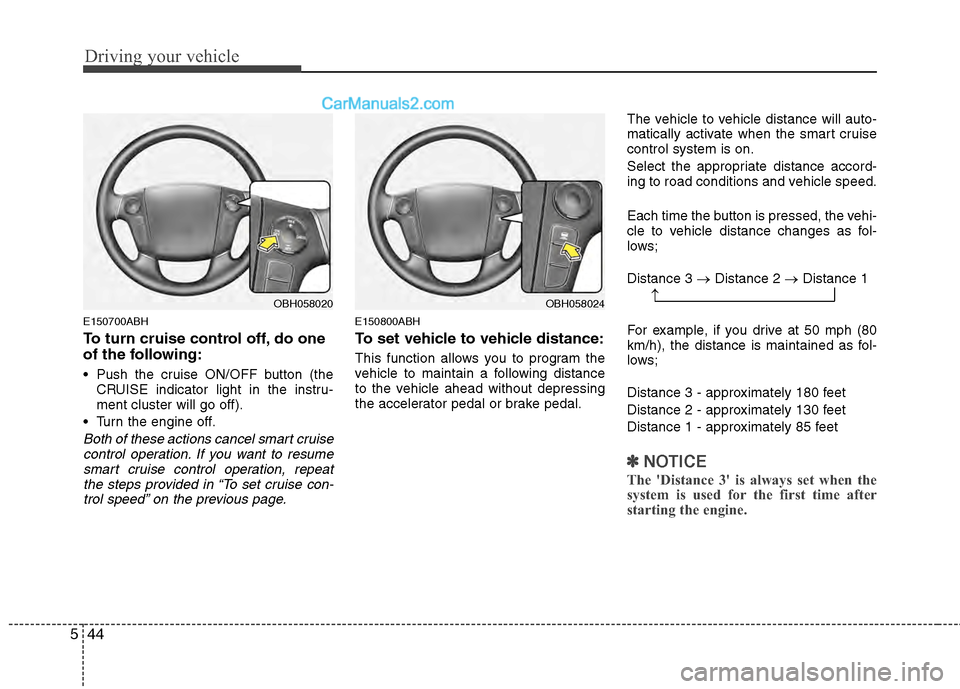
E150700ABH
To turn cruise control off, do one
of the following:
Push the cruise ON/OFF button (the
CRUISE indicator light in the instru-
ment cluster will go off).
Turn the engine off.
Both of these actions cancel smart cruise control operation. If you want to resumesmart cruise control operation, repeatthe steps provided in “To set cruise con-trol speed” on the previous page.
E150800ABH
To set vehicle to vehicle distance:
This function allows you to program the
vehicle to maintain a following distance
to the vehicle ahead without depressing
the accelerator pedal or brake pedal. The vehicle to vehicle distance will auto-
matically activate when the smart cruise
control system is on.
Select the appropriate distance accord-
ing to road conditions and vehicle speed.
Each time the button is pressed, the vehi-
cle to vehicle distance changes as fol-
lows;
Distance 3 →
Distance 2 →Distance 1
For example, if you drive at 50 mph (80
km/h), the distance is maintained as fol-
lows;
Distance 3 - approximately 180 feet
Distance 2 - approximately 130 feet
Distance 1 - approximately 85 feet
✽ ✽ NOTICE
The 'Distance 3' is always set when the
system is used for the first time after
starting the engine.
OBH058024OBH058020→
Page 312 of 429
63
What to do in an emergency
2. When the car is stopped, turn on youremergency hazard flashers, set the
parking brake and put the shift lever in
P.
3. Have all passengers get out of the car. Be sure they all get out on the side of
the car that is away from traffic.
4. When changing a flat tire, follow the instruction provided later in this sec-
tion.
F020300AEN
If engine stalls while driving
1. Reduce your speed gradually, keeping a straight line. Move cautiously off the
road to a safe place.
2. Turn on your emergency flashers.
3. Try to start the engine again. If your vehicle will not start, contact an
authorized HYUNDAI dealer or seek
other qualified assistance.
F030100BBH
If engine doesn't turn over or
turns over slowly
1. Be sure the shift lever is in N (Neutral)or P (Park) and the emergency brake
is set.
2. Check the battery connections to be sure they are clean and tight.
3. Turn on the interior light. If the light dims or goes out when you operate the
starter, the battery is discharged.
4. Check the starter connections to be sure they are securely tightened.
5. Do not push or pull the vehicle to start it. See instructions for "Jump starting".
F030200ABH
If engine turns over normally but
does not start
1. Check fuel level.
2. With the ignition switch in the LOCKposition, check all connectors at igni-
tion coils and spark plugs. Reconnect
any that may be disconnected or
loose.
3. If the engine still does not start, call an authorized HYUNDAI dealer or seek
other qualified assistance.
IF THE ENGINE WILL NOT START
WARNING
If the engine will not start, do not
push or pull the car to start it. This
could result in a collision or cause
other damage.