audio Hyundai Genesis 2013 Owner's Guide
[x] Cancel search | Manufacturer: HYUNDAI, Model Year: 2013, Model line: Genesis, Model: Hyundai Genesis 2013Pages: 429, PDF Size: 8.94 MB
Page 237 of 429
Features of your vehicle
158
4
■Talking on the Phone
When talking on the phone, “Active Calls”
message and the other party’s phone
number (if available) are displayed on the
audio.
-
Press button for 0.8 second or longer
on the steering wheel.
✽ ✽ NOTICE
In the following situations, you or the
other party may have difficulty hearing
each other:
1. Speaking at the same time, your voice
may not reach the other parties. (This
is not a malfunction.) Speak alter-
nately with the other party on the
phone.
2. Keep the Bluetooth
®Wireless
Technology volume to a low level.
High-level volume may result in dis-
tortion and echo.
3. When driving on a rough road.
4. When driving at high speeds.
5. When the window is open.
6. When the air conditioning vents are facing the microphone.
7. When the sound of the air condition- ing fan is loud.
■Using the head unit asBluetooth®Wireless Technology
music
The head unit supports A2DP (Audio
Advanced Distribution Profile) and
AVRCP(Audio Video Remote Control
Profile).
Both profiles are available for listening to
MP3 music via
Bluetooth®Wireless
Technology cellular phone supporting
above
Bluetooth®Wireless Technology
profiles.
To play MP3 music from the
Bluetooth®
Wireless Technology cellular phone,
press the [CD/AUX] button until “MP3
Play” is displayed on the LCD.
Then try playing music by phone.
When playing music from the
Bluetooth®
Wireless Technology cellular phone, the
head unit displays MP3 MODE.
✽ ✽ NOTICE
• Not only MP3 files, but all the sounds
that the phone supports can be heard
by the audio system.
• Bluetooth
®Wireless Technology cellu-
lar phones must feature A2DP and
AVRCP functions.
• Some A2DP and AVRCP Bluetooth
®
Wireless Technology cellular phones
may not play music through the head
unit on the first try. Please try the
below;
i.e : Menu ➟ ➟
Filemanager ➟
➟
Music ➟
➟
Option ➟
➟
Play via Bluetooth
• Please refer to User's Guide of your phone for more detailed information.
• To stop music, try stop music by the phone or change audio mode to
AM/FM/XM, CD, iPod
®, etc.
Page 238 of 429
![Hyundai Genesis 2013 Owners Guide 4159
Features of your vehicle
■ Key matrix
No.
Disconnected(BT Icon off)Connected (BT Icon On)
Paired H/P Empty Paired H/P
Exist
1 SHORT
LONG
STEERING
MODE KEY
SHORT
LONG
[10sec]
AUDIO
POWER KEY Nor](/img/35/14675/w960_14675-237.png "Hyundai Genesis 2013 Owners Guide 4159
Features of your vehicle
■ Key matrix
No.
Disconnected(BT Icon off)Connected (BT Icon On)
Paired H/P Empty Paired H/P
Exist
1 SHORT
LONG
STEERING
MODE KEY
SHORT
LONG
[10sec]
AUDIO
POWER KEY Nor")
4159
Features of your vehicle
■ Key matrix
No.
Disconnected(BT Icon off)Connected (BT Icon On)
Paired H/P Empty Paired H/P
Exist
1 SHORT
LONG
STEERING
MODE KEY
SHORT
LONG
[10sec]
AUDIO
POWER KEY Normal mode
BT SETUP menuIncoming Call
Outgoing Call
Active CallTRANSFER
CALL
Not Connect---Accept Call
Connected
-
Transfer Call
(Handsfree <->Phone)
KEY
--
VR
MODE Cancel-Reject Call End Call End Call
End Call
-Active ActiveActiveActive-- -
Change
language
-
-
Change
language
-
Change
language
- -
- --
Change
language
- --Reject Call
-
End call
-
2nd call
1st Call:waiting 2nd Call:active
-
-
End call-
2
3
4
Page 239 of 429
Features of your vehicle
160
4
✽
✽
NOTICE
Bluetooth®Wireless Technology phone
compatibility can be checked by visiting
www.hyundaiusa.com and under the
SERVICE & PARTS - BLUETOOTH
COMPATIBILITY menu.
• Areas that can be checked - 9 areas, such as Pairing, Connection,
Handsfree Calling, Streaming, etc.(Continued)
If the cellular phone signal is poor or the vehicles interior noise is tooloud, it may be difficult to hear theother person’s voice during a call.
Do not place the phone near or inside metallic objects, otherwise
communications with Bluetooth
®
Wireless Technology system orcellular service stations can bedisrupted.
While a phone is connected through Bluetooth
®Wireless
Technology your phone may dis- charge quicker than usual as aresult of additional Bluetooth
®
Wireless Technology-related operations.
Some cellular phones or other devices may cause interferencenoise or malfunction to audiosystem. In this case, storing thedevice in a different location mayresolve the situation.
Please save your phone name in English, or your phone name maynot be displayed correctly.
CAUTION IN USING
BLUETOOTH®WIRELESS
TECHNOLOGY CELLU-
LAR PHONE
Do not use a cellular phone or
perform Bluetooth®Wireless
Technology settings (e.g. pairing a phone) while driving.
Some Bluetooth
®Wireless
Technology-enab led phones may
not be recognized by the system or fully compatible with the sys-tem.
Before using Bluetooth
®Wireless
Technology related features of the audio system, refer to yourphone’s User’s Manual for phone-side Bluetooth
®Wireless
Technology operations.
The phone must be paired to the audio system to use Bluetooth®
Wireless Technologyrelated fea-
tures.
You will not be able to use the hands-free feature when yourphone (in the car) is outside of the cellular service area (e.g. in atunnel, in a underground, in amountainous area, etc.).
(Continued)
Page 243 of 429
Driving your vehicle
45
E020300AUN
Before starting
Close and lock all doors.
Position the seat so that all controls areeasily reached.
Adjust the inside and outside rearview mirrors.
Be sure that all lights work.
Check all gauges.
Check the operation of warning lights when the ignition switch is turned to
the ON position.
Release the parking brake and make sure the brake warning light goes out.
For safe operation, be sure you are famil-
iar with your vehicle and its equipment.
WARNING
Always check the surrounding
areas near your vehicle for people,
especially children, before putting a
car into D (Drive) or R (Reverse).
WARNING
When you intend to park or stop the vehicle with the engine on, be
careful not to depress the accel-
erator pedal for a long period of
time. It may overheat the engine
or exhaust system and cause fire.
When you make a sudden stop or turn the steering wheel rapidly,
loose objects may drop on the
floor and it could interfere with
the operation of the foot pedals,
possibly causing an accident.
Keep all things in the vehicle
safely stored.
If you do not focus on driving, it may cause an accident. Be care-
ful when operating controls such
as the audio or heater. It is the
responsibility of the driver to
always be attentive to the task of
driving and drive safely.
WARNING- Driving under
the influence of alcohol or
drugs
Drinking and driving is dangerous.
Drunk driving is the number one
contributor to the highway death
toll each year. Even a small amount
of alcohol will affect your reflexes,
perceptions and judgment. Driving
while under the influence of drugs
is as dangerous or more dangerous
than driving drunk.
You are much more likely to have a
serious accident if you drink or
take drugs and drive.
If you are drinking or taking drugs,
don’t drive. Do not ride with a driv-
er who has been drinking or taking
drugs. Choose a designated driver
or call a cab.
WARNING
All passengers must be properly
belted whenever the vehicle is mov-
ing. Refer to “Seat belts” in section
3 for more information on their
proper use.
Page 290 of 429
551
Driving your vehicle
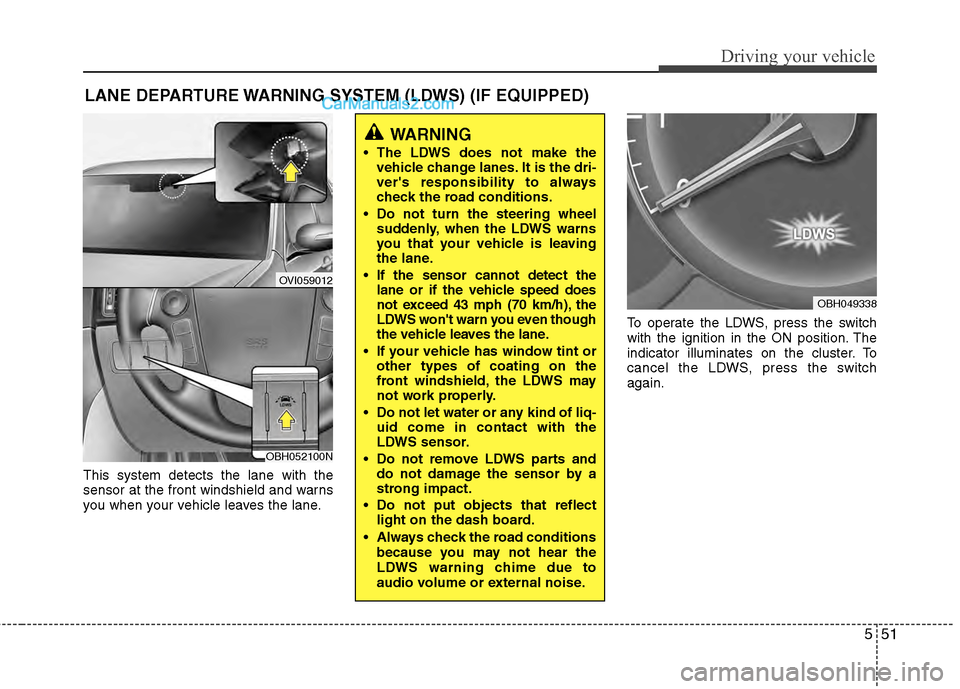
This system detects the lane with the
sensor at the front windshield and warns
you when your vehicle leaves the lane.To operate the LDWS, press the switch
with the ignition in the ON position. The
indicator illuminates on the cluster. To
cancel the LDWS, press the switch
again.
LANE DEPARTURE WARNING SYSTEM (LDWS) (IF EQUIPPED)
OVI059012
WARNING
The LDWS does not make the
vehicle change lanes. It is the dri-
ver's responsibility to always
check the road conditions.
Do not turn the steering wheel suddenly, when the LDWS warns
you that your vehicle is leaving
the lane.
If the sensor cannot detect the lane or if the vehicle speed does
not exceed 43 mph (70 km/h), the
LDWS won't warn you even though
the vehicle leaves the lane.
If your vehicle has window tint or other types of coating on the
front windshield, the LDWS may
not work properly.
Do not let water or any kind of liq- uid come in contact with the
LDWS sensor.
Do not remove LDWS parts and do not damage the sensor by a
strong impact.
Do not put objects that reflect light on the dash board.
Always check the road conditions because you may not hear the
LDWS warning chime due to
audio volume or external noise.
OBH049338
OBH052100N
Page 368 of 429
Maintenance
34
7
G190300ABH
Reset items
Items should be reset after the battery
has been discharged or the battery has
been disconnected.
Auto up/down window (See section 4)
Sunroof (See section 4)
Driver position memory system
(See section 4)
Trip computer (See section 4)
Climate control system (See section 4)
Clock (See section 4)
Audio (See section 4)
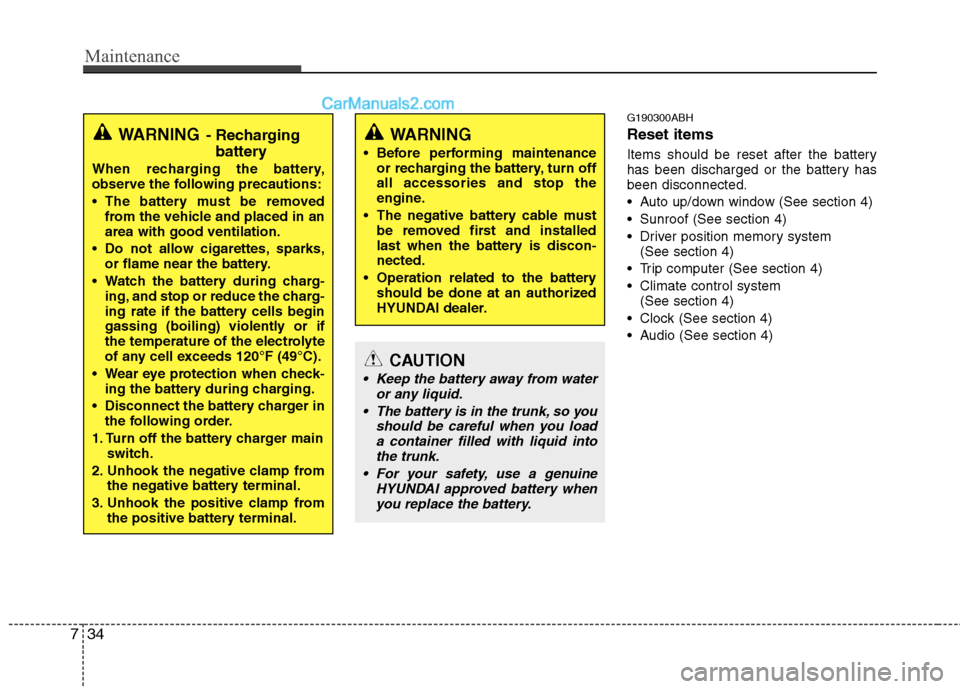
WARNING
Before performing maintenance or recharging the battery, turn off
all accessories and stop the
engine.
The negative battery cable must be removed first and installed
last when the battery is discon-
nected.
Operation related to the battery should be done at an authorized
HYUNDAI dealer.
CAUTION
Keep the battery away from water or any liquid.
The battery is in the trunk, so you should be careful when you loada container filled with liquid intothe trunk.
For your safety, use a genuine HYUNDAI approved battery whenyou replace the battery.
WARNING- Recharging battery
When recharging the battery,
observe the following precautions:
The battery must be removed
from the vehicle and placed in an
area with good ventilation.
Do not allow cigarettes, sparks, or flame near the battery.
Watch the battery during charg- ing, and stop or reduce the charg-
ing rate if the battery cells begin
gassing (boiling) violently or if
the temperature of the electrolyte
of any cell exceeds 120°F (49°C).
Wear eye protection when check- ing the battery during charging.
Disconnect the battery charger in the following order.
1. Turn off the battery charger main switch.
2. Unhook the negative clamp from the negative battery terminal.
3. Unhook the positive clamp from the positive battery terminal.
Page 385 of 429
751
Maintenance
If the headlights or other electrical com-
ponents do not work and the fuses are
OK, check the fuse panel in the engine
compartment. If a fuse is blown, it must
be replaced.
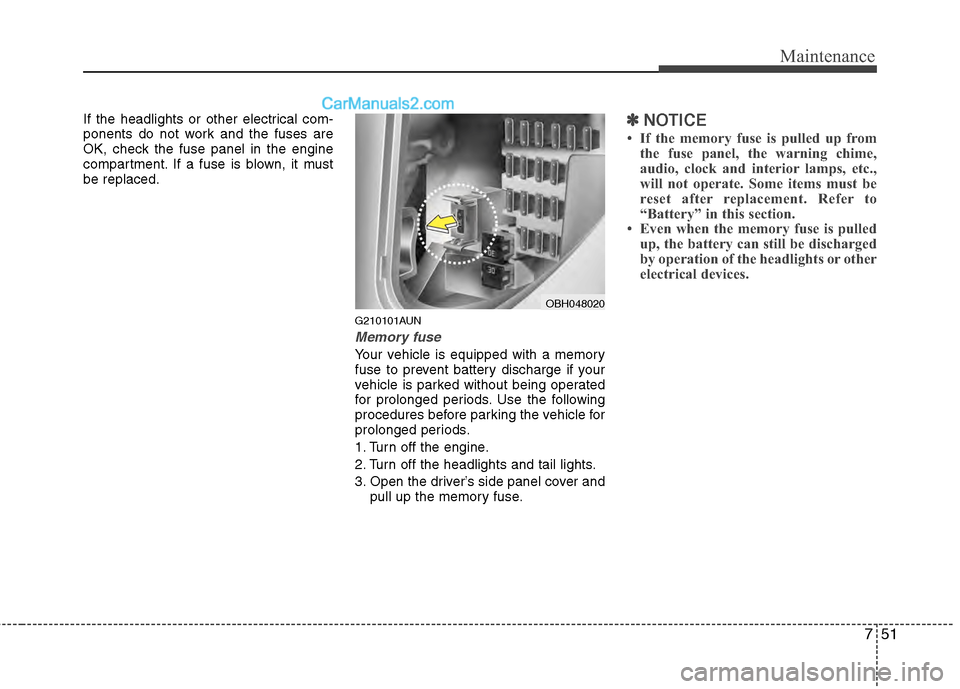
G210101AUN
Memory fuse
Your vehicle is equipped with a memory
fuse to prevent battery discharge if your
vehicle is parked without being operated
for prolonged periods. Use the following
procedures before parking the vehicle for
prolonged periods.
1. Turn off the engine.
2. Turn off the headlights and tail lights.
3. Open the driver’s side panel cover andpull up the memory fuse.
✽ ✽NOTICE
• If the memory fuse is pulled up from
the fuse panel, the warning chime,
audio, clock and interior lamps, etc.,
will not operate. Some items must be
reset after replacement. Refer to
“Battery” in this section.
• Even when the memory fuse is pulled up, the battery can still be discharged
by operation of the headlights or other
electrical devices.
OBH048020
Page 389 of 429
755
Maintenance
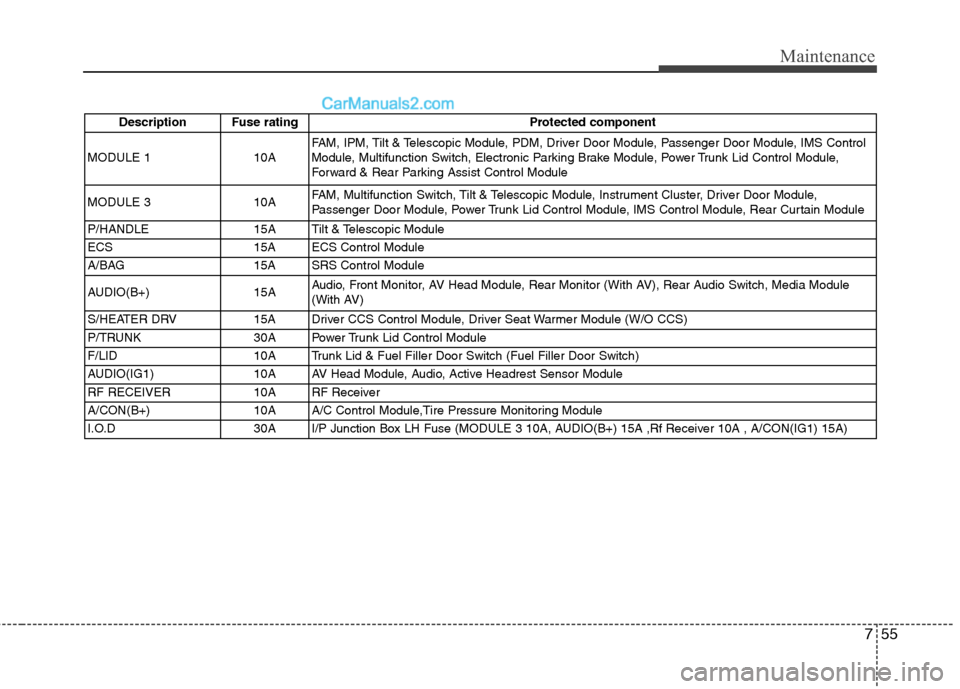
Description Fuse ratingProtected component
MODULE 110AFAM, IPM, Tilt & Telescopic Module, PDM, Driver Door Module, Passenger Door Module, IMS Control
Module, Multifunction Switch, Electronic Parking Brake Module, Power Trunk Lid Control Module,
Forward & Rear Parking Assist Control Module
MODULE 3 10A FAM, Multifunction Switch, Tilt & Telescopic Module, Instrument Cluster, Driver Door Module,
Passenger Door Module, Power Trunk Lid Control Module, IMS Control Module, Rear Curtain Module
P/HANDLE 15A Tilt & Telescopic Module
ECS 15A ECS Control Module
A/BAG 15A SRS Control Module
AUDIO(B+) 15A Audio, Front Monitor, AV Head Module, Rear Monitor (With AV), Rear Audio Switch, Media Module
(With AV)
S/HEATER DRV 15A Driver CCS Control Module, Driver Seat Warmer Module (W/O CCS)
P/TRUNK 30A Power Trunk Lid Control Module
F/LID 10A Trunk Lid & Fuel Filler Door Switch (Fuel Filler Door Switch)
AUDIO(IG1) 10A AV Head Module, Audio, Active Headrest Sensor Module
RF RECEIVER 10A RF Receiver
A/CON(B+) 10A A/C Control Module,Tire Pressure Monitoring Module
I.O.D 30A I/P Junction Box LH Fuse (MODULE 3 10A, AUDIO(B+) 15A ,Rf Receiver 10A , A/CON(IG1) 15A)
Page 390 of 429
Maintenance
56
7
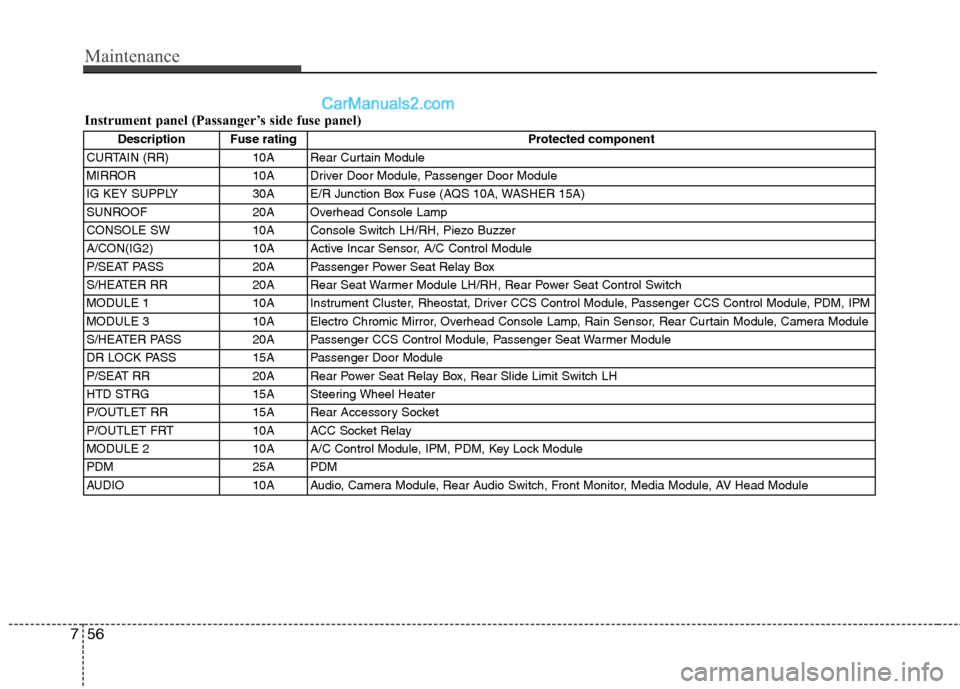
Description Fuse rating Protected component
CURTAIN (RR) 10A Rear Curtain Module
MIRROR 10A Driver Door Module, Passenger Door Module
IG KEY SUPPLY 30A E/R Junction Box Fuse (AQS 10A, WASHER 15A)
SUNROOF 20A Overhead Console Lamp
CONSOLE SW 10A Console Switch LH/RH, Piezo Buzzer
A/CON(IG2) 10A Active Incar Sensor, A/C Control Module
P/SEAT PASS 20A Passenger Power Seat Relay Box
S/HEATER RR 20A Rear Seat Warmer Module LH/RH, Rear Power Seat Control Switch
MODULE 1 10A Instrument Cluster, Rheostat, Driver CCS Control Module, Passenger CCS Control Module, PDM, IPM
MODULE 3 10A Electro Chromic Mirror, Overhead Console Lamp, Rain Sensor, Rear Curtain Module, Camera Module
S/HEATER PASS 20A Passenger CCS Control Module, Passenger Seat Warmer Module
DR LOCK PASS 15A Passenger Door Module
P/SEAT RR 20A Rear Power Seat Relay Box, Rear Slide Limit Switch LH
HTD STRG 15A Steering Wheel Heater
P/OUTLET RR 15A Rear Accessory Socket
P/OUTLET FRT 10A ACC Socket Relay
MODULE 2 10A A/C Control Module, IPM, PDM, Key Lock Module
PDM 25A PDM
AUDIO 10A Audio, Camera Module, Rear Audio Switch, Front Monitor, Media Module, AV Head Module
Instrument panel (Passanger’s side fuse panel)
Page 424 of 429

Index
2I
Air bag - advanced supplemental restraint system ······ 3-35Air bag warning label ··················\
··················\
············ 3-60
Curtain air bag ··················\
··················\
··················\
····· 3-52
Driver's and passenger's front air bag ··················\
····· 3-46
Occupant classification system ··················\
··············· 3-41
Side impact air bag ··················\
··················\
················ 3-50
SRS components and functions ··················\
··············· 3-38
Air cleaner ··················\
··················\
··················\
············· 7-24
Appearance care ··················\
··················\
··················\
···· 7-69
Audio system ··················\
··················\
··················\
······· 4-115 Antenna ················\
··················\
··················\
··············· 4-115
Bluetooth
®Wireless Technology phone operation ····4-151
HD RadioTM··················\
··················\
··················\
··········4-147
PA710BH ·················\
··················\
··················\
············ 4-120
PA760BH ·················\
··················\
··················\
············ 4-133
Steering wheel audio control ··················\
················· 4-115
Automatic climate control system ··················\
············· 4-89 Air conditioning ··················\
··················\
··················\
·· 4-96
Automatic heating and air conditioning ··················\
·· 4-90
Manual heating and air conditioning ··················\
······ 4-91
Rear vent ··················\
··················\
··················\
··········· 4-100
Automatic transmission ··················\
··················\
··········· 5-11 Ignition key interlock system ··················\
··················\
5-15
Shift lock system ··················\
··················\
··················\
· 5-14
Sports mode ··················\
··················\
··················\
········· 5-14 Battery ················\
··················\
··················\
··················\
··· 7-32
Before driving ··················\
··················\
··················\
·········· 5-3
Binding arbitration ··················\
··················\
··················\
· 8-10
Brake fluid ··················\
··················\
··················\
············· 7-21
Brake system ··················\
··················\
··················\
········· 5-18
Anti-lock brake system (ABS) ··················\
················ 5-28
Auto hold ··················\
··················\
··················\
···············5-25
Electric parking brake (EPB) ··················\
··················\
··5-20
Electronic stability control (ESC) ··················\
··········· 5-30
Parking brake ··················\
··················\
··················\
······· 5-19
Power brakes ··················\
··················\
··················\
······· 5-18
Bulb wattage ··················\
··················\
··················\
············ 8-2
California perchlorate notice ··················\
··················\
··· 7-78
Child restraint system ··················\
··················\
·············· 3-27 Placing a passenger seat belt into the auto lock mode ·················\
··················\
··················\
··················\
· 3-29
Securing a child restraint seat with tether anchor system ·················\
··················\
··················\
················· 3-31
Securing a child restraint seat with child seat lower anchor system ··················\
··················\
··················\
···· 3-33
Climate control air filter ··················\
··················\
·········· 7-27
Consumer information ··················\
··················\
··············· 8-9
Cruise control system ··················\
··················\
·············· 5-36
AB
C