LDWS Hyundai Genesis 2013 Owner's Manual
[x] Cancel search | Manufacturer: HYUNDAI, Model Year: 2013, Model line: Genesis, Model: Hyundai Genesis 2013Pages: 429, PDF Size: 8.94 MB
Page 13 of 429
17
Introduction
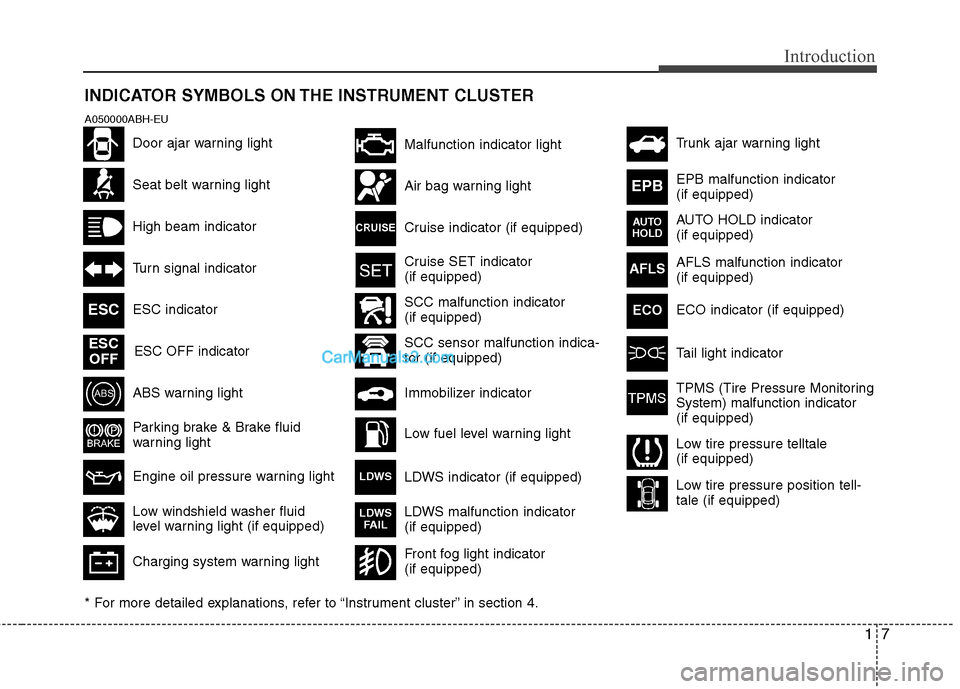
INDICATOR SYMBOLS ON THE INSTRUMENT CLUSTER
Seat belt warning light
High beam indicator
Turn signal indicator
ABS warning light
Parking brake & Brake fluid
warning light
Engine oil pressure warning light ESC indicator ESC OFF indicator
Malfunction indicator light
Air bag warning light
Cruise indicator (if equipped)
Cruise SET indicator
(if equipped)
Immobilizer indicator
Low fuel level warning light
* For more detailed explanations, refer to “Instrument cluster” in section 4.
Charging system warning light
Low windshield washer fluid
level warning light (if equipped)
A050000ABH-EU
Door ajar warning light AFLS malfunction indicator
(if equipped)
Tail light indicator
Trunk ajar warning light
Front fog light indicator
(if equipped)
ESC
ESCOFF
AFLS
ECO
TPMS (Tire Pressure Monitoring
System) malfunction indicator
(if equipped)
Low tire pressure telltale
(if equipped)
Low tire pressure position tell-
tale (if equipped)
SCC malfunction indicator
(if equipped)
SCC sensor malfunction indica-
tor (if equipped) EPB malfunction indicator
(if equipped)
AUTO HOLD indicator
(if equipped)
EPB
AUTO
HOLD
LDWS indicator (if equipped)LDWS
LDWS malfunction indicator
(if equipped)LDWS FAIL
ECO indicator (if equipped)
Page 128 of 429
449
Features of your vehicle
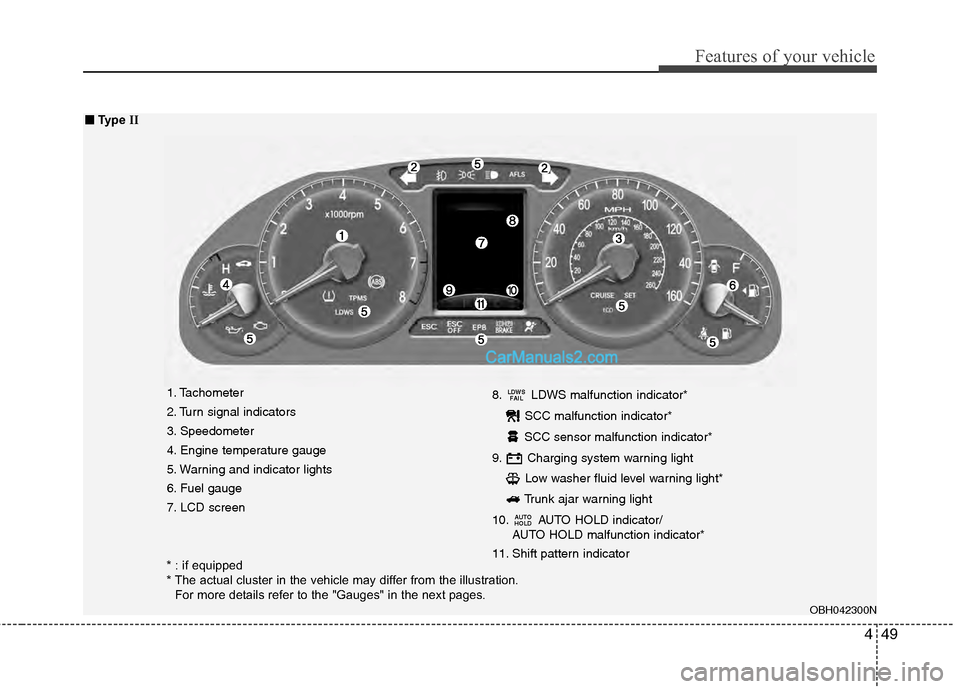
1. Tachometer
2. Turn signal indicators
3. Speedometer
4. Engine temperature gauge
5. Warning and indicator lights
6. Fuel gauge
7. LCD screen8. LDWS malfunction indicator*
SCC malfunction indicator*
SCC sensor malfunction indicator*
9. Charging system warning light Low washer fluid level warning light*
Trunk ajar warning light
10. AUTO HOLD indicator/ AUTO HOLD malfunction indicator*
11. Shift pattern indicator
AUTO
HOLD
LDWS FAIL
OBH042300N
■
■ Type II
* : if equipped
* The actual cluster in the vehicle may differ from the illustration.
For more details refer to the "Gauges" in the next pages.
Page 145 of 429
Features of your vehicle
66
4
D150320ABH
Smart cruise control indicator
(if equipped)
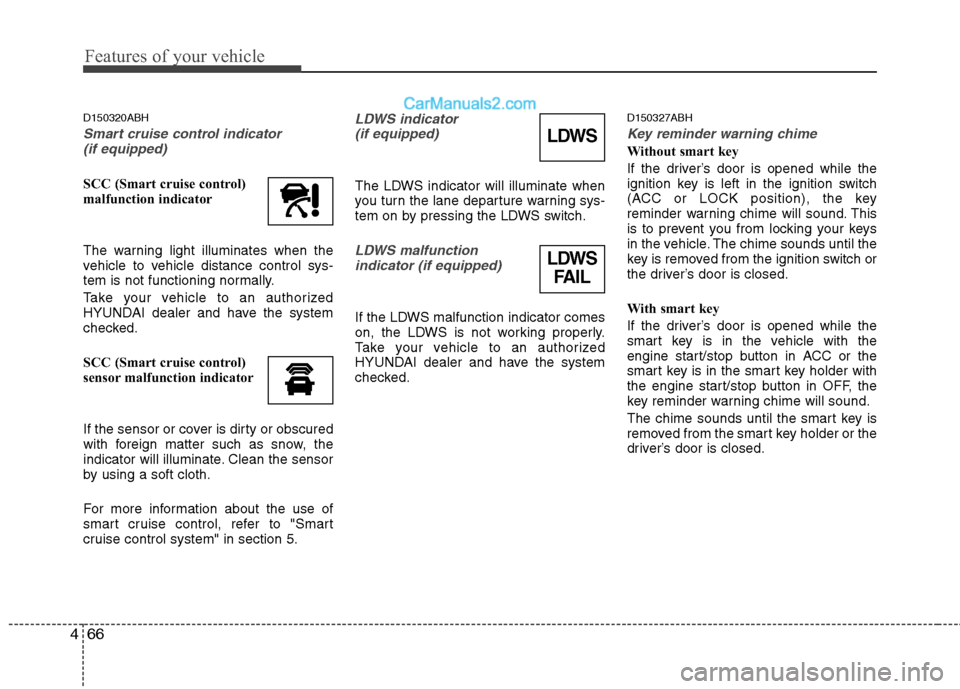
SCC (Smart cruise control)
malfunction indicator
The warning light illuminates when the
vehicle to vehicle distance control sys-
tem is not functioning normally.
Take your vehicle to an authorized
HYUNDAI dealer and have the system
checked.
SCC (Smart cruise control)
sensor malfunction indicator
If the sensor or cover is dirty or obscured
with foreign matter such as snow, the
indicator will illuminate. Clean the sensor
by using a soft cloth.
For more information about the use of
smart cruise control, refer to "Smart
cruise control system" in section 5.
LDWS indicator (if equipped)
The LDWS indicator will illuminate when
you turn the lane departure warning sys-
tem on by pressing the LDWS switch.
LDWS malfunction indicator (if equipped)
If the LDWS malfunction indicator comes
on, the LDWS is not working properly.
Take your vehicle to an authorized
HYUNDAI dealer and have the system
checked.
D150327ABH
Key reminder warning chime
Without smart key
If the driver’s door is opened while the
ignition key is left in the ignition switch
(ACC or LOCK position), the key
reminder warning chime will sound. This
is to prevent you from locking your keys
in the vehicle. The chime sounds until the
key is removed from the ignition switch or
the driver’s door is closed.
With smart key
If the driver’s door is opened while the
smart key is in the vehicle with the
engine start/stop button in ACC or the
smart key is in the smart key holder with
the engine start/stop button in OFF, the
key reminder warning chime will sound.
The chime sounds until the smart key is
removed from the smart key holder or the
driver’s door is closed.LDWS
LDWS FAIL
Page 240 of 429
5
Before driving / 5-3
Key / 5-5
Engine start/stop button / 5-7
Automatic transmission / 5-11
Brake system / 5-18
Cruise control system / 5-36
Smart cruise control system / 5-40
Lane departure warning system (LDWS) / 5-51
Economical operation / 5-54
Special driving conditions / 5-56
Winter driving / 5-60
Vehicle load limit / 5-64
Vehicle weight / 5-69
Trailer towing / 5-70
Driving your vehicle
Page 290 of 429
551
Driving your vehicle
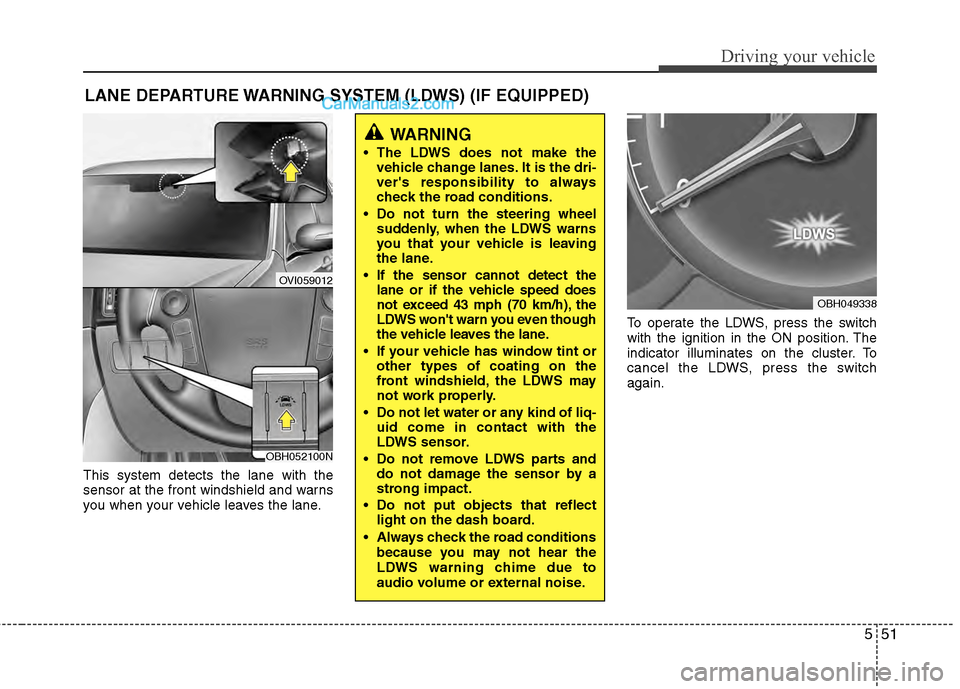
This system detects the lane with the
sensor at the front windshield and warns
you when your vehicle leaves the lane.To operate the LDWS, press the switch
with the ignition in the ON position. The
indicator illuminates on the cluster. To
cancel the LDWS, press the switch
again.
LANE DEPARTURE WARNING SYSTEM (LDWS) (IF EQUIPPED)
OVI059012
WARNING
The LDWS does not make the
vehicle change lanes. It is the dri-
ver's responsibility to always
check the road conditions.
Do not turn the steering wheel suddenly, when the LDWS warns
you that your vehicle is leaving
the lane.
If the sensor cannot detect the lane or if the vehicle speed does
not exceed 43 mph (70 km/h), the
LDWS won't warn you even though
the vehicle leaves the lane.
If your vehicle has window tint or other types of coating on the
front windshield, the LDWS may
not work properly.
Do not let water or any kind of liq- uid come in contact with the
LDWS sensor.
Do not remove LDWS parts and do not damage the sensor by a
strong impact.
Do not put objects that reflect light on the dash board.
Always check the road conditions because you may not hear the
LDWS warning chime due to
audio volume or external noise.
OBH049338
OBH052100N
Page 291 of 429
Driving your vehicle
52
5
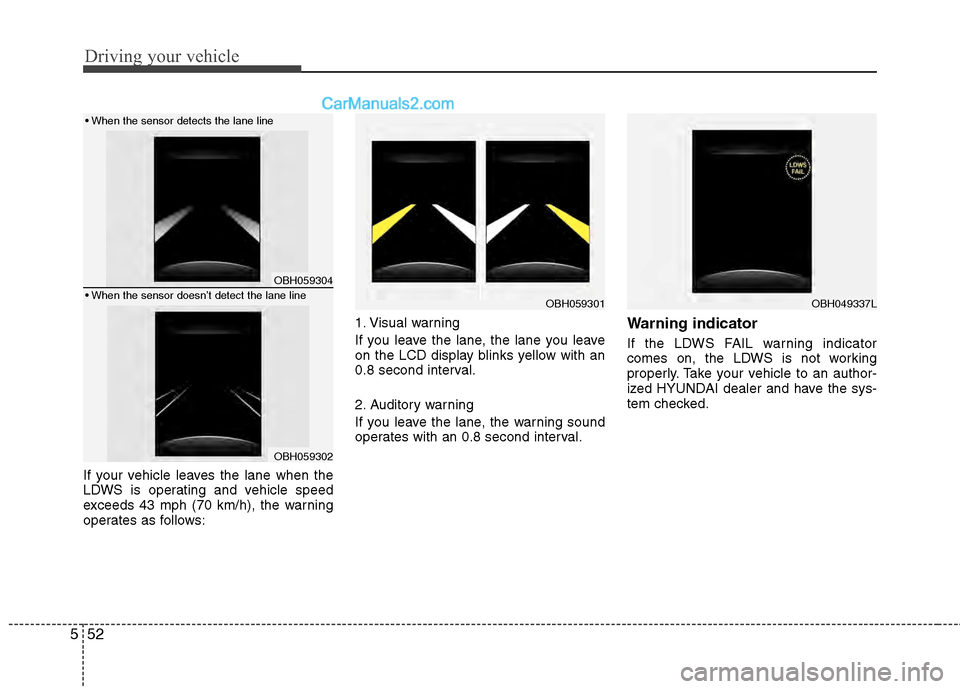
If your vehicle leaves the lane when the
LDWS is operating and vehicle speed
exceeds 43 mph (70 km/h), the warning
operates as follows: 1. Visual warning
If you leave the lane, the lane you leave
on the LCD display blinks yellow with an
0.8 second interval.
2. Auditory warning
If you leave the lane, the warning sound
operates with an 0.8 second interval.
Warning indicator
If the LDWS FAIL warning indicator
comes on, the LDWS is not working
properly. Take your vehicle to an author-
ized HYUNDAI dealer and have the sys-
tem checked.
OBH059304
OBH059302
OBH059301
OBH049337L
Page 292 of 429
553
Driving your vehicle
The LDWS does not operate
when:
The driver turns on the turn signal tochange lane.
However, when the hazard warning
flasher is operating, the LDWS oper-
ates normally.
Operating the wiper switch with HI mode due to heavy rain.
Driving on the lane line.
✽ ✽ NOTICE
To change lane, operate the turn signal
switch then change the lane.
The LDWS may not warn you even
if the vehicle leaves the lane, or
may warn you even if the vehicle
does not leave the lane when:
The lane can't be visible due to snow,
rain, stain, a puddle or many other
things.
The brightness outside changes sud- denly.
Not turning on the headlights at night or in a tunnel.
Difficult to distinguish the color of the lane marking from the road.
Driving on a steep grade or a curve.
Light reflects from the water on the road.
The lens or windshield is stained with foreign matter.
The sensor cannot detect the lane because of fog, heavy rain or heavy
snow.
The surrounding of the inside rear view mirror temperature is high due to a
direct sun light.
The lane is very wide or narrow.
The lane line is damaged or indistinct.
A shadow is on the lane line by a medi- an strip.
There is a mark that looks like lane line.
There is a boundary structure. The distance from vehicle ahead is
very short or the vehicle ahead drives
hiding the lane line.
The vehicle shakes heavily.
The lane number increases or decreases or the lane lines are cross-
ing.
Putting something on the dashboard.
Driving with the sun in front of you.
Driving in areas under construction.
The lane line is more than two.
Page 426 of 429

Index
4I
Indicator symbols on the instrument cluster ················· 1-7
Instrument cluster ··················\
··················\
··················\
·· 4-48Engine temperature gauge ··················\
··················\
····· 4-51
Fuel gauge ··················\
··················\
··················\
··········· 4-52
Instrument panel illumination ··················\
················· 4-50
Speedometer ···············\
··················\
··················\
··········· 4-50
Tachometer ················\
··················\
··················\
············ 4-50
Trip computer ··················\
··················\
··················\
······ 4-52
Warning and indicators ··················\
··················\
·········· 4-57
Warning on the LCD screen ··················\
··················\
·· 4-68
Instrument panel overview ··················\
··················\
········ 2-3
Interior features ··················\
··················\
··················\
··· 4-106 Ashtray ················\
··················\
··················\
················ 4-106
AUX, USB and iPod
®port ·················\
··················\
··· 4-113
Bluetooth®Wireless Technology hands-free ··········· 4-114
Cigarette lighter ··················\
··················\
··················\
· 4-106
Clothes hanger ··················\
··················\
··················\
··· 4-111
Cup holder ··················\
··················\
··················\
········· 4-107
Digital clock ··················\
··················\
··················\
······ 4-109
DIS(Driver Information System) ··················\
·········· 4-114
Floor mat anchor(s) ··················\
··················\
···············4-111
Luggage net (holder) ··················\
··················\
··········· 4-112
Navigation system ··················\
··················\
··············· 4-113
Outside thermometer ··················\
··················\
··········· 4-110
Power outlet ··················\
··················\
··················\
······· 4-108
Rear curtain ··················\
··················\
··················\
······· 4-112
Sunvisor ·················\
··················\
··················\
·············· 4-107 Interior light ··················\
··················\
··················\
··········· 4-85
Interior overview ··················\
··················\
··················\
····· 2-2
Key ··················\
··················\
··················\
··················\
········· 5-5
Ignition switch position ··················\
··················\
··········· 5-5
Starting the engine ··················\
··················\
··················\
· 5-6
Keys ··················\
··················\
··················\
··················\
······· 4-3
Lane departure warning system (LDWS) ··················\
····5-51
Light bulbs ··················\
··················\
··················\
············· 7-60 Headlight, position light, turn signal light, side marker light and front fog light bulb replacement ············· 7-60
High mounted stop light replacement ··················\
····· 7-63
Interior light bulb replacement ··················\
················ 7-68
License plate light bulb replacement ··················\
······ 7-67
Door courtesy lamp bulb replacement ··················\
···· 7-68
Rear combination light bulb replacement ················· 7-62
Side repeater light bulb replacement ··················\
······· 7-62
Lighting ················\
··················\
··················\
··················\
· 4-77 AFLS(Adaptive Front Lighting System) ··················\
4-81
Battery saver function ··················\
··················\
··········· 4-77
Headlight escort function ··················\
··················\
········4-77
L
K