air vent Hyundai Genesis 2015 Owner's Guide
[x] Cancel search | Manufacturer: HYUNDAI, Model Year: 2015, Model line: Genesis, Model: Hyundai Genesis 2015Pages: 501, PDF Size: 38.76 MB
Page 115 of 501
3-21
Convenient features of your vehicle
3
M MI
IR
RR
RO
OR
RS
S
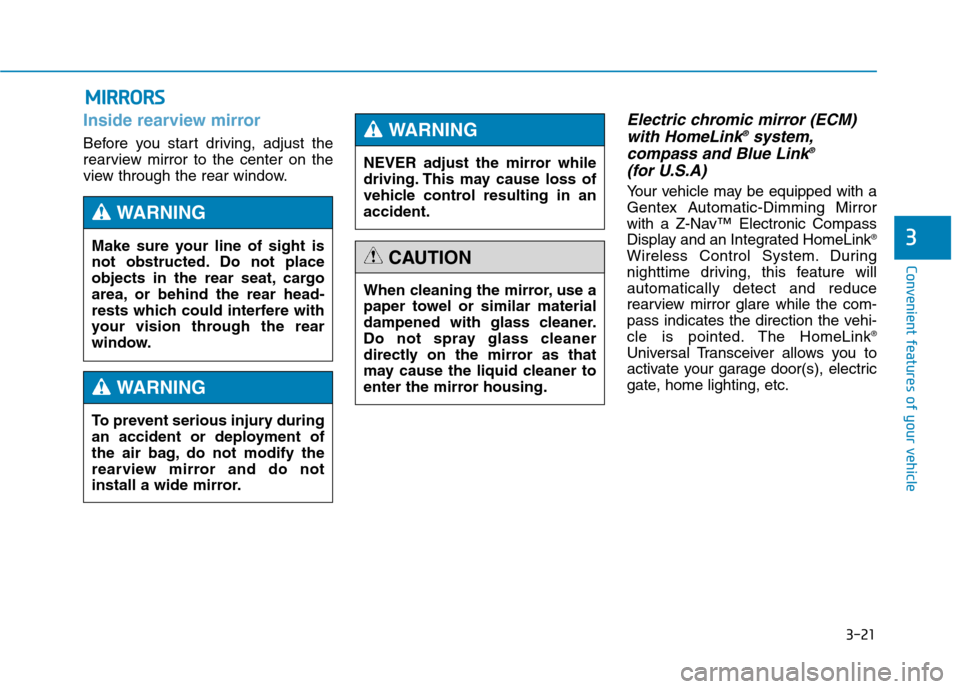
Inside rearview mirror
Before you start driving, adjust the
rearview mirror to the center on the
view through the rear window.
Electric chromic mirror (ECM)
with HomeLink®system,
compass and Blue Link®
(for U.S.A)
Your vehicle may be equipped with a
Gentex Automatic-Dimming Mirror
with a Z-Nav™ Electronic Compass
Display and an Integrated HomeLink
®
Wireless Control System. During
nighttime driving, this feature will
automatically detect and reduce
rearview mirror glare while the com-
pass indicates the direction the vehi-
cle is pointed. The HomeLink
®
Universal Transceiver allows you to
activate your garage door(s), electric
gate, home lighting, etc. Make sure your line of sight is
not obstructed. Do not place
objects in the rear seat, cargo
area, or behind the rear head-
rests which could interfere with
your vision through the rear
window.
WARNING
NEVER adjust the mirror while
driving. This may cause loss of
vehicle control resulting in an
accident.
WARNING
To prevent serious injury during
an accident or deployment of
the air bag, do not modify the
rearview mirror and do not
install a wide mirror.
WARNING
When cleaning the mirror, use a
paper towel or similar material
dampened with glass cleaner.
Do not spray glass cleaner
directly on the mirror as that
may cause the liquid cleaner to
enter the mirror housing.
CAUTION
Page 145 of 501
3-51
Convenient features of your vehicle
3
✽ ✽
NOTICE
In cold and wet climates, trunk lock
and trunk mechanisms may not
work properly due to freezing condi-
tions.Power Trunk Non-Opening or
Closing Conditions:
The Power Trunk will not open or
close automatically, when the vehi-
cle is moving more than 1.8 mph (3
km/h).
The Power Trunk can be operated
when the engine is not running.
However, the Power Trunk operation
consumes large amounts of vehicle
electric power. To prevent the bat-
tery from draining, do not operate it
excessively (e.g., more than
approximately 10 times repeatedly.)
Do not modify or repair any part of
the Power Trunk by yourself. This
must be done by an authorized
HYUNDAI dealer.
Before jacking up the vehicle to
change a tire or repair the vehicle,
open the Power Trunk. Do not oper-
ate the Power Trunk when the vehi-
cle is raised or this could cause the
Power Trunk to operate improperly.
If there are obstacles such as snow
on the Power Trunk, it may not open
automatically. After removing the
obstacle, try to open it again.
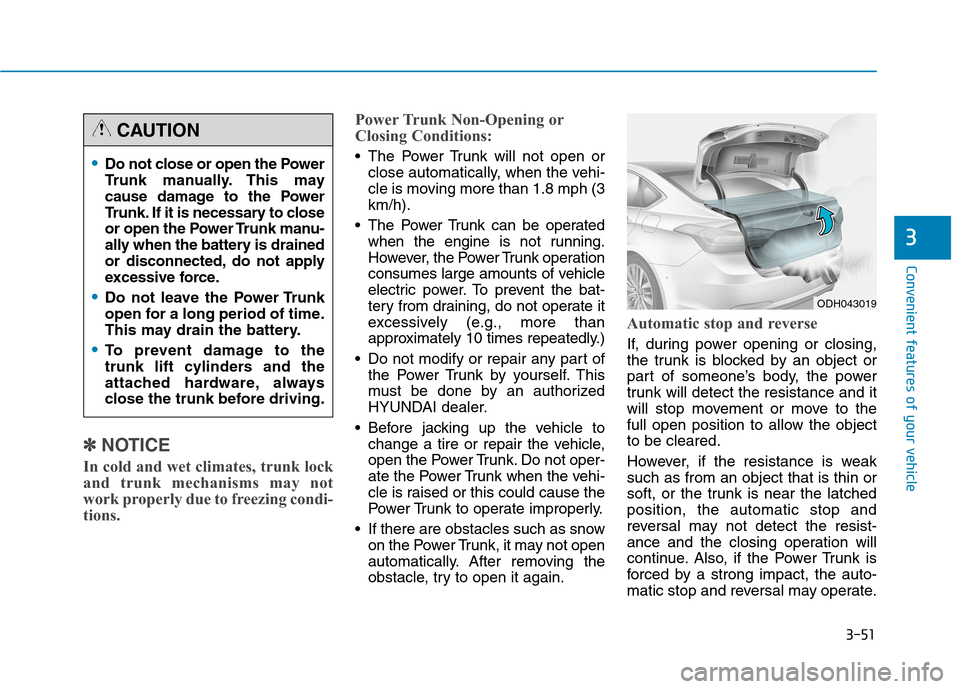
Automatic stop and reverse
If, during power opening or closing,
the trunk is blocked by an object or
part of someone’s body, the power
trunk will detect the resistance and it
will stop movement or move to the
full open position to allow the object
to be cleared.
However, if the resistance is weak
such as from an object that is thin or
soft, or the trunk is near the latched
position, the automatic stop and
reversal may not detect the resist-
ance and the closing operation will
continue. Also, if the Power Trunk is
forced by a strong impact, the auto-
matic stop and reversal may operate.
Do not close or open the Power
Trunk manually. This may
cause damage to the Power
Trunk. If it is necessary to close
or open the Power Trunk manu-
ally when the battery is drained
or disconnected, do not apply
excessive force.
Do not leave the Power Trunk
open for a long period of time.
This may drain the battery.
To prevent damage to the
trunk lift cylinders and the
attached hardware, always
close the trunk before driving.
CAUTION
ODH043019
Page 160 of 501
3-66
Convenient features of your vehicle
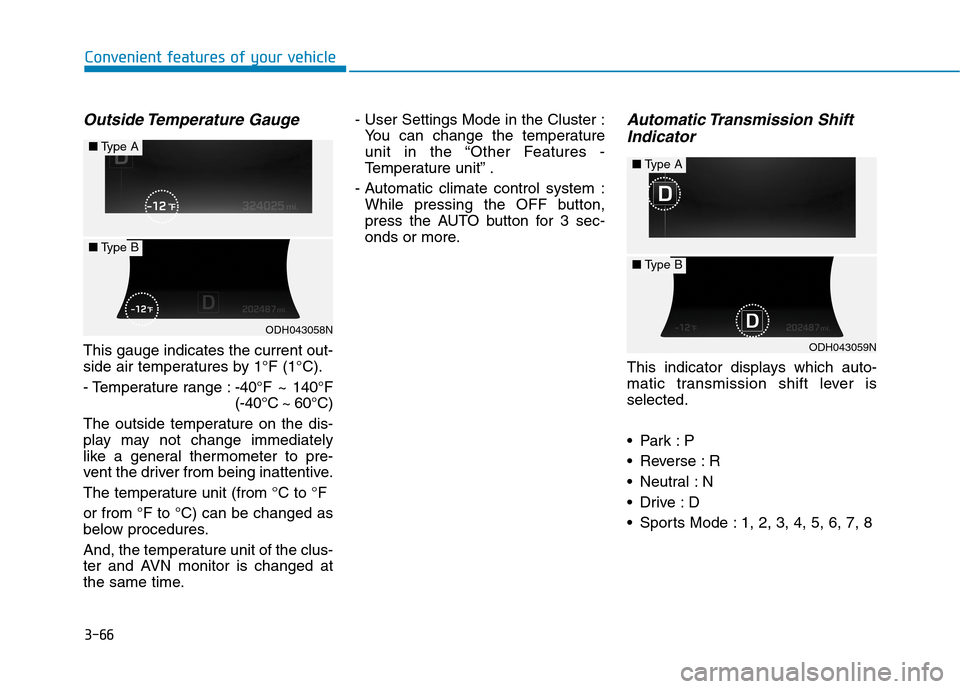
Outside Temperature Gauge
This gauge indicates the current out-
side air temperatures by 1°F (1°C).
- Temperature range :-40°F ~ 140°F
(-40°C ~ 60°C)
The outside temperature on the dis-
play may not change immediately
like a general thermometer to pre-
vent the driver from being inattentive.
The temperature unit (from °C to °F
or from °F to °C) can be changed as
below procedures.
And, the temperature unit of the clus-
ter and AVN monitor is changed at
the same time.- User Settings Mode in the Cluster :
You can change the temperature
unit in the “Other Features -
Temperature unit” .
- Automatic climate control system :
While pressing the OFF button,
press the AUTO button for 3 sec-
onds or more.
Automatic Transmission Shift
Indicator
This indicator displays which auto-
matic transmission shift lever is
selected.
Reverse : R
Neutral : N
Sports Mode : 1, 2, 3, 4, 5, 6, 7, 8
ODH043058N
■Type A
■Type B
ODH043059N
■Type A
■Type B
Page 193 of 501
3-99
Convenient features of your vehicle
3
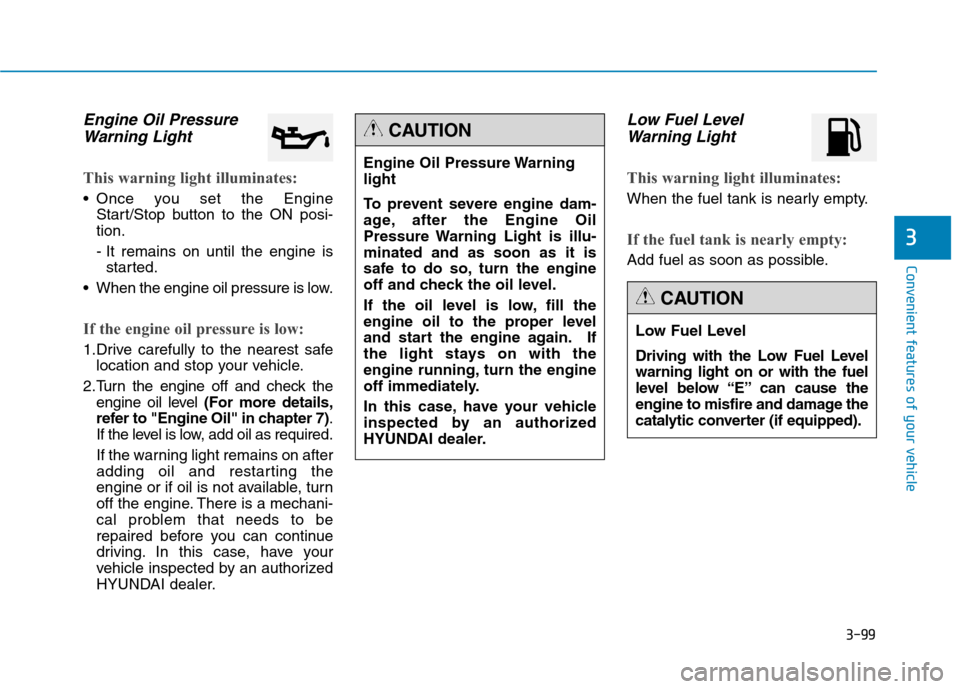
Engine Oil Pressure
Warning Light
This warning light illuminates:
Once you set the Engine
Start/Stop button to the ON posi-
tion.
- It remains on until the engine is
started.
When the engine oil pressure is low.
If the engine oil pressure is low:
1.Drive carefully to the nearest safe
location and stop your vehicle.
2.Turn the engine off and check the
engine oil level (For more details,
refer to "Engine Oil" in chapter 7).
If the level is low, add oil as required.
If the warning light remains on after
adding oil and restarting the
engine or if oil is not available, turn
off the engine. There is a mechani-
cal problem that needs to be
repaired before you can continue
driving. In this case, have your
vehicle inspected by an authorized
HYUNDAI dealer.
Low Fuel Level
Warning Light
This warning light illuminates:
When the fuel tank is nearly empty.
If the fuel tank is nearly empty:
Add fuel as soon as possible.
Engine Oil Pressure Warning
light
To prevent severe engine dam-
age, after the Engine Oil
Pressure Warning Light is illu-
minated and as soon as it is
safe to do so, turn the engine
off and check the oil level.
If the oil level is low, fill the
engine oil to the proper level
and start the engine again. If
the light stays on with the
engine running, turn the engine
off immediately.
In this case, have your vehicle
inspected by an authorized
HYUNDAI dealer.
CAUTION
Low Fuel Level
Driving with the Low Fuel Level
warning light on or with the fuel
level below “E” can cause the
engine to misfire and damage the
catalytic converter (if equipped).
CAUTION
Page 227 of 501
3-133
Convenient features of your vehicle
3
A AU
UT
TO
OM
MA
AT
TI
IC
C
C
CL
LI
IM
MA
AT
TE
E
C
CO
ON
NT
TR
RO
OL
L
S
SY
YS
ST
TE
EM
M
ODH043081/ODH043146/ODH043082
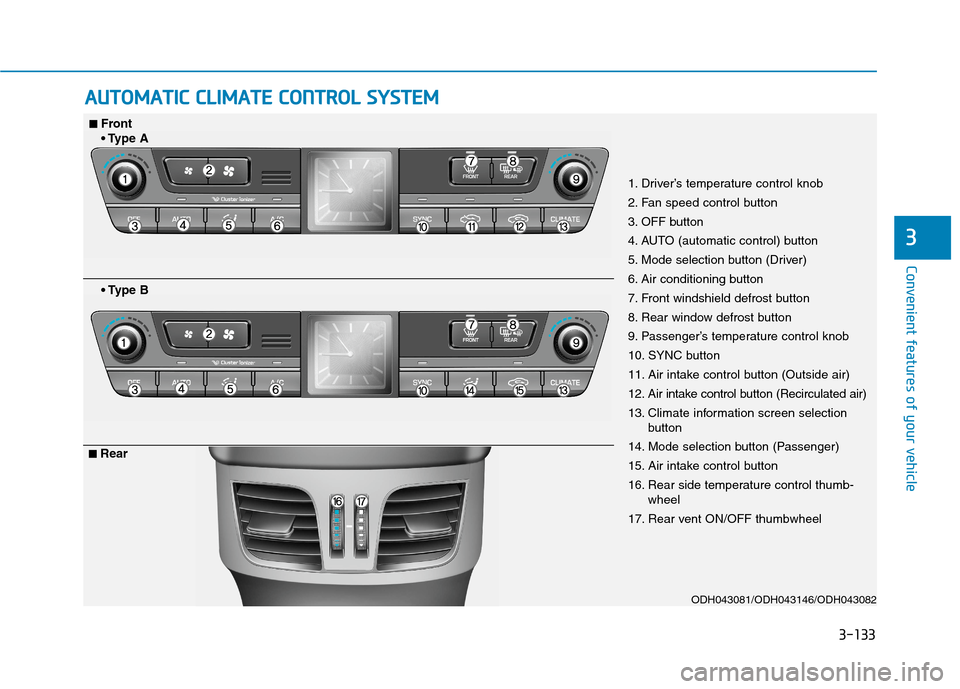
1. Driver’s temperature control knob
2. Fan speed control button
3. OFF button
4. AUTO (automatic control) button
5. Mode selection button (Driver)
6. Air conditioning button
7. Front windshield defrost button
8. Rear window defrost button
9. Passenger’s temperature control knob
10. SYNC button
11. Air intake control button (Outside air)
12. Air intake control button (Recirculated air)
13. Climate information screen selection
button
14. Mode selection button (Passenger)
15. Air intake control button
16. Rear side temperature control thumb-
wheel
17. Rear vent ON/OFF thumbwheel
■ ■Front
A
B
■ ■Rear
Page 230 of 501
3-136
Convenient features of your vehicle
Mode selection
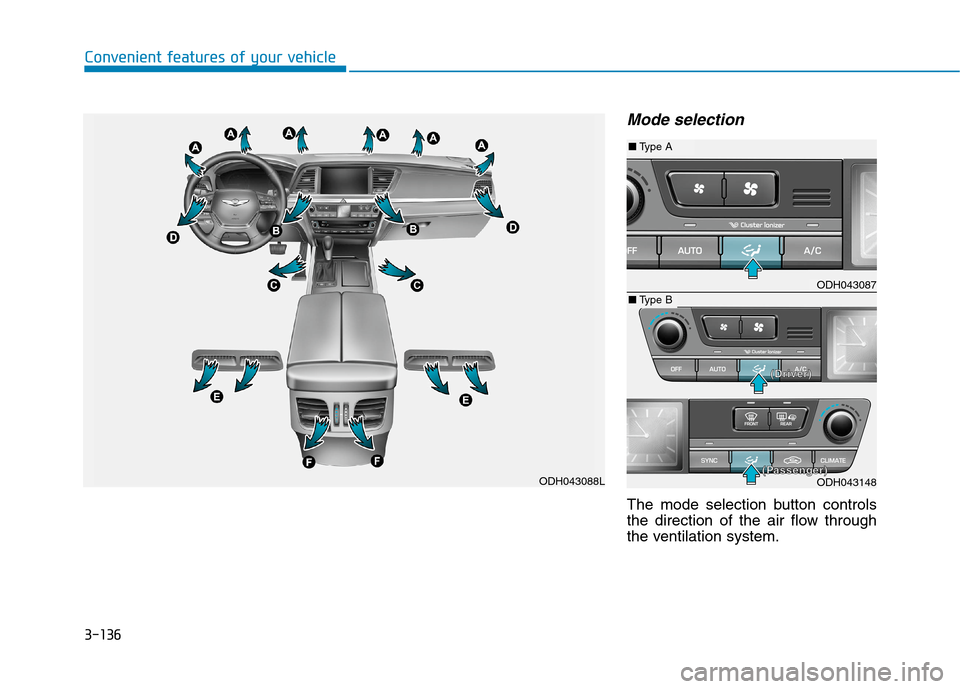
The mode selection button controls
the direction of the air flow through
the ventilation system.
ODH043088L
ODH043087
ODH043148
■Type A
■Type B
(
(D
Dr
ri
iv
ve
er
r)
)
( (P
Pa
as
ss
se
en
ng
ge
er
r)
)
Page 232 of 501
3-138
Convenient features of your vehicle
Instrument panel vents
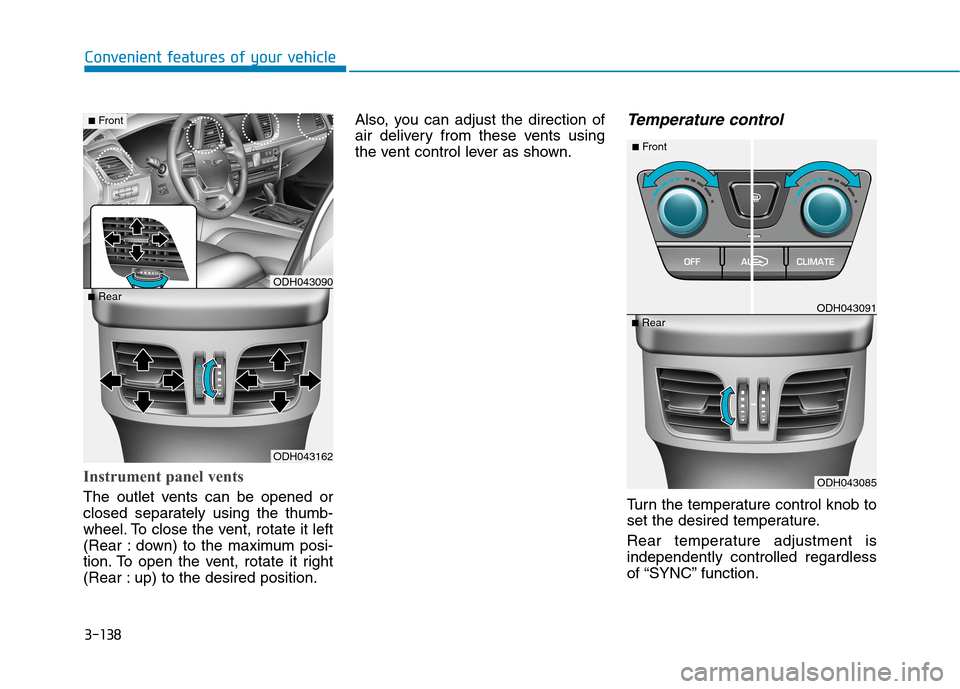
The outlet vents can be opened or
closed separately using the thumb-
wheel. To close the vent, rotate it left
(Rear : down) to the maximum posi-
tion. To open the vent, rotate it right
(Rear : up) to the desired position.Also, you can adjust the direction of
air delivery from these vents using
the vent control lever as shown.
Temperature control
Turn the temperature control knob to
set the desired temperature.
Rear temperature adjustment is
independently controlled regardless
of “SYNC” function.
ODH043162
■RearODH043090
■Front
ODH043085
■RearODH043091
■Front
Page 237 of 501
3-143
Convenient features of your vehicle
3
Climate information screen
selection button
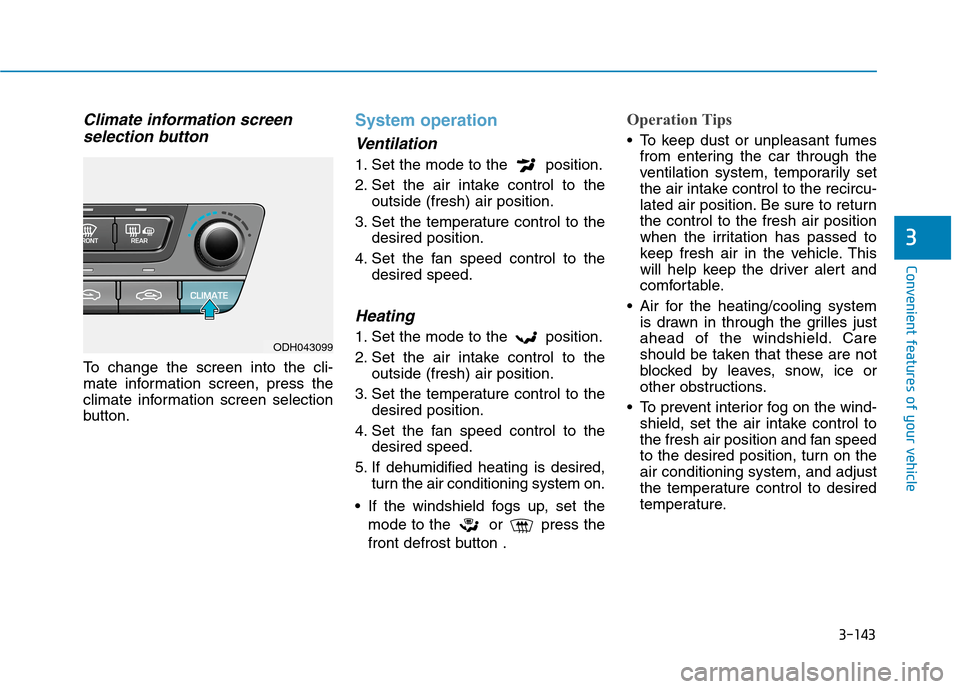
To change the screen into the cli-
mate information screen, press the
climate information screen selection
button.
System operation
Ventilation
1. Set the mode to the position.
2. Set the air intake control to the
outside (fresh) air position.
3. Set the temperature control to the
desired position.
4. Set the fan speed control to the
desired speed.
Heating
1. Set the mode to the position.
2. Set the air intake control to the
outside (fresh) air position.
3. Set the temperature control to the
desired position.
4. Set the fan speed control to the
desired speed.
5. If dehumidified heating is desired,
turn the air conditioning system on.
If the windshield fogs up, set the
mode to the or press the
front defrost button .
Operation Tips
To keep dust or unpleasant fumes
from entering the car through the
ventilation system, temporarily set
the air intake control to the recircu-
lated air position. Be sure to return
the control to the fresh air position
when the irritation has passed to
keep fresh air in the vehicle. This
will help keep the driver alert and
comfortable.
Air for the heating/cooling system
is drawn in through the grilles just
ahead of the windshield. Care
should be taken that these are not
blocked by leaves, snow, ice or
other obstructions.
To prevent interior fog on the wind-
shield, set the air intake control to
the fresh air position and fan speed
to the desired position, turn on the
air conditioning system, and adjust
the temperature control to desired
temperature.
ODH043099
Page 239 of 501
3-145
Convenient features of your vehicle
3
When using the air conditioning
system, you may notice clear water
dripping (or even puddling) on the
ground under the passenger side
of the vehicle. This is a normal sys-
tem operation characteristic.
Operating the air conditioning sys-
tem in the recirculated air position
provides maximum cooling, how-
ever, continual operation in this
mode may cause the air inside the
vehicle to become stale.
During cooling operation, you may
occasionally notice a misty air flow
because of rapid cooling and
humid air intake. This is a normal
system operation characteristic.Climate control air filter
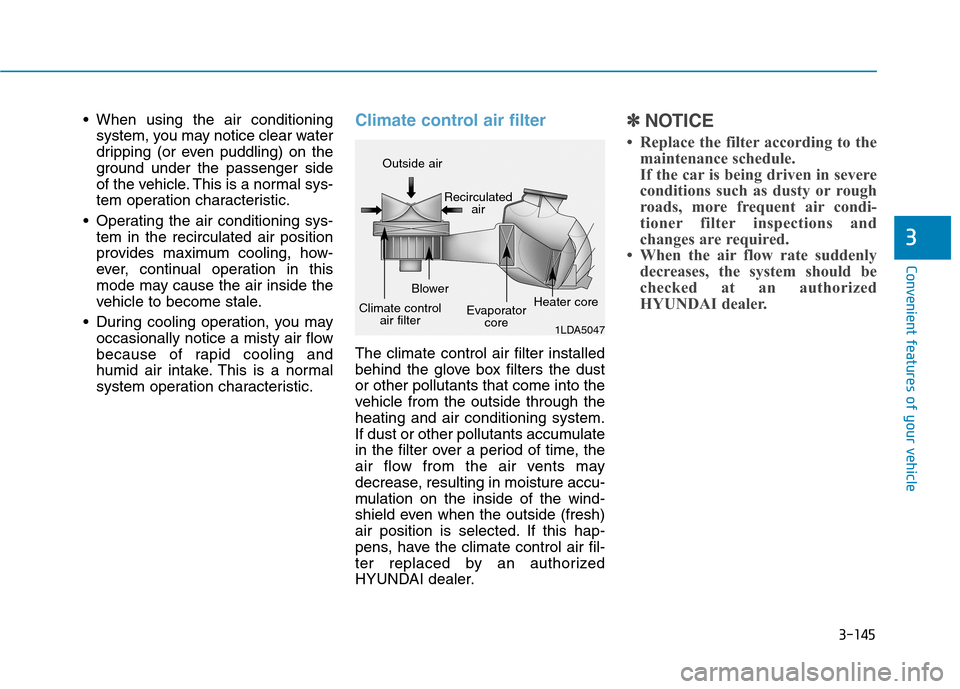
The climate control air filter installed
behind the glove box filters the dust
or other pollutants that come into the
vehicle from the outside through the
heating and air conditioning system.
If dust or other pollutants accumulate
in the filter over a period of time, the
air flow from the air vents may
decrease, resulting in moisture accu-
mulation on the inside of the wind-
shield even when the outside (fresh)
air position is selected. If this hap-
pens, have the climate control air fil-
ter replaced by an authorized
HYUNDAI dealer.
✽ ✽
NOTICE
• Replace the filter according to the
maintenance schedule.
If the car is being driven in severe
conditions such as dusty or rough
roads, more frequent air condi-
tioner filter inspections and
changes are required.
• When the air flow rate suddenly
decreases, the system should be
checked at an authorized
HYUNDAI dealer.
1LDA5047
Outside air
Recirculated
air
Climate control
air filterBlower
Evaporator
coreHeater core
Page 241 of 501
3-147
Convenient features of your vehicle
3
W WI
IN
ND
DS
SH
HI
IE
EL
LD
D
D
DE
EF
FR
RO
OS
ST
TI
IN
NG
G
A
AN
ND
D
D
DE
EF
FO
OG
GG
GI
IN
NG
G
For maximum defrosting, set the
temperature control to the extreme
right/hot position and the fan speed
control to the highest speed.
If warm air to the floor is desired
while defrosting or defogging, set the
mode to the floor-defrost position.
Before driving, clear all snow and
ice from the windshield, rear win-
dow, outside rear view mirrors, and
all side windows.
Clear all snow and ice from the
hood and air inlet in the cowl grill to
improve heater and defroster effi-
ciency and to reduce the probability
of fogging up the inside of the wind-
shield.
✽ ✽
NOTICE
If the engine temperature is still cold
after starting, then a brief engine
warm up period may be required for
the vented air flow to become warm
or hot.
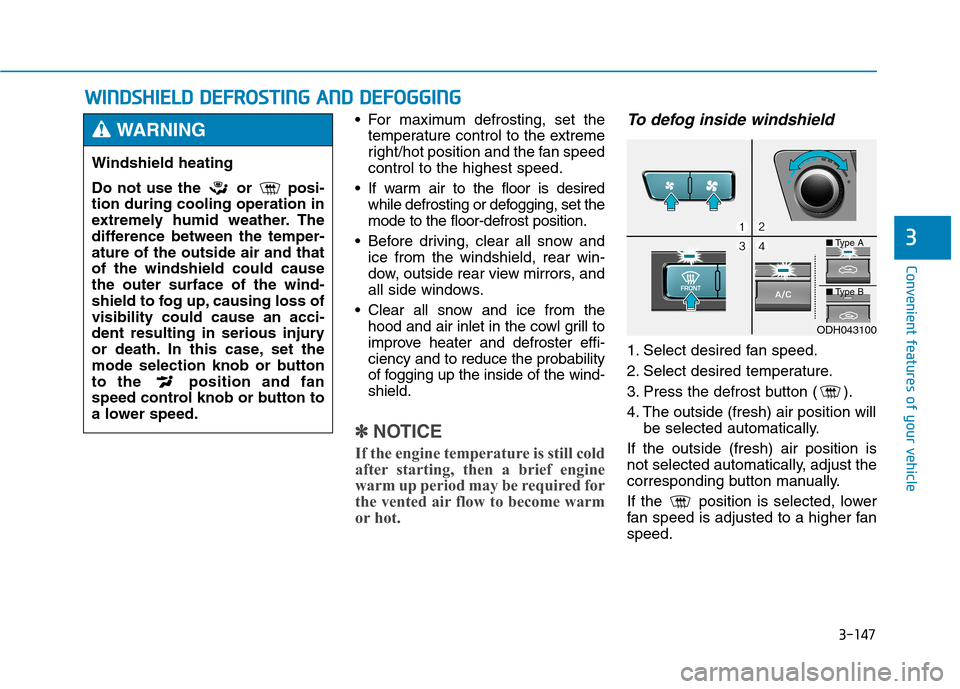
To defog inside windshield
1. Select desired fan speed.
2. Select desired temperature.
3. Press the defrost button ( ).
4. The outside (fresh) air position will
be selected automatically.
If the outside (fresh) air position is
not selected automatically, adjust the
corresponding button manually.
If the position is selected, lower
fan speed is adjusted to a higher fan
speed.
Windshield heating
Do not use the or posi-
tion during cooling operation in
extremely humid weather. The
difference between the temper-
ature of the outside air and that
of the windshield could cause
the outer surface of the wind-
shield to fog up, causing loss of
visibility could cause an acci-
dent resulting in serious injury
or death. In this case, set the
mode selection knob or button
to the position and fan
speed control knob or button to
a lower speed.
WARNING
ODH043100
■Type A
■Type B