door lock Hyundai Genesis 2015 Owner's Guide
[x] Cancel search | Manufacturer: HYUNDAI, Model Year: 2015, Model line: Genesis, Model: Hyundai Genesis 2015Pages: 501, PDF Size: 38.76 MB
Page 133 of 501
3-39
Convenient features of your vehicle
3
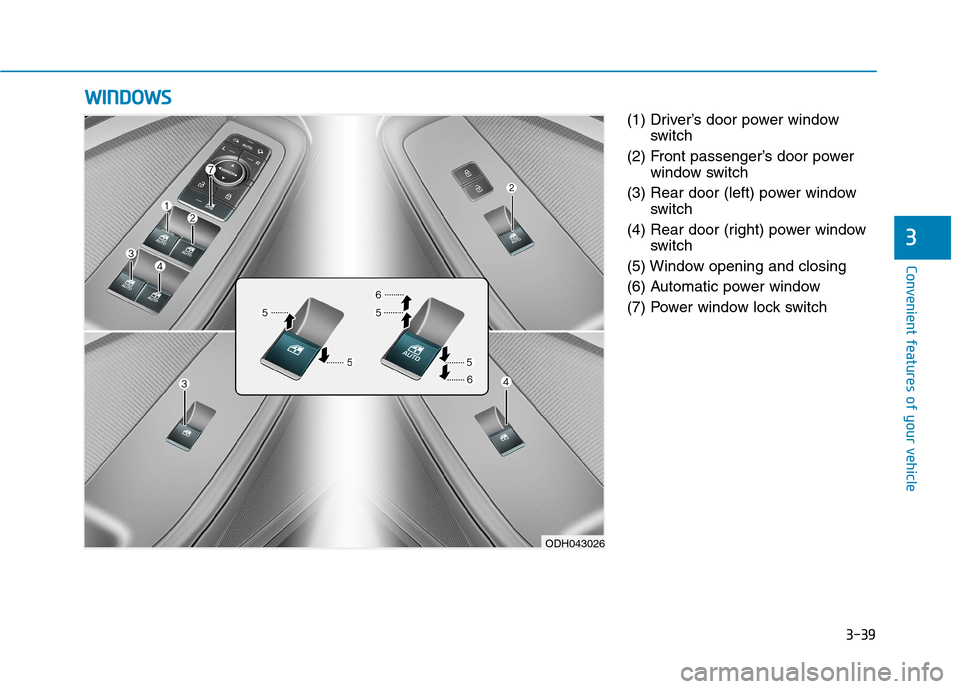
(1) Driver’s door power window
switch
(2) Front passenger’s door power
window switch
(3) Rear door (left) power window
switch
(4) Rear door (right) power window
switch
(5) Window opening and closing
(6) Automatic power window
(7) Power window lock switch
W WI
IN
ND
DO
OW
WS
S
ODH043026
Page 134 of 501
3-40
Convenient features of your vehicle
Power windows
The Engine Start/Stop button must
be in the ON position to be able to
raise or lower the windows. Each
door has a Power Window switch to
control that door's window. The driv-
er has a Power Window Lock switch
which can block the operation of pas-
senger windows. The power windows
will operate for approximately 30
seconds after the Engine Start/Stop
button is placed in the ACC or OFF
position. However, if the front doors
are opened, the Power Windows
cannot be operated even within the
30 second period.
✽ ✽
NOTICE
• In cold and wet climates, power
windows may not work properly
due to freezing conditions.
• While driving with the rear win-
dows down or with the sunroof (if
equipped) opened (or partially
opened), your vehicle may demon-
strate a wind buffeting or pulsation
noise. This noise is normal and can
be reduced or eliminated by taking
the following actions. If the noise
occurs with one or both of the rear
windows down, partially lower
both front windows approximately
one inch. If you experience the
noise with the sunroof open, slight-
ly close the sunroof.
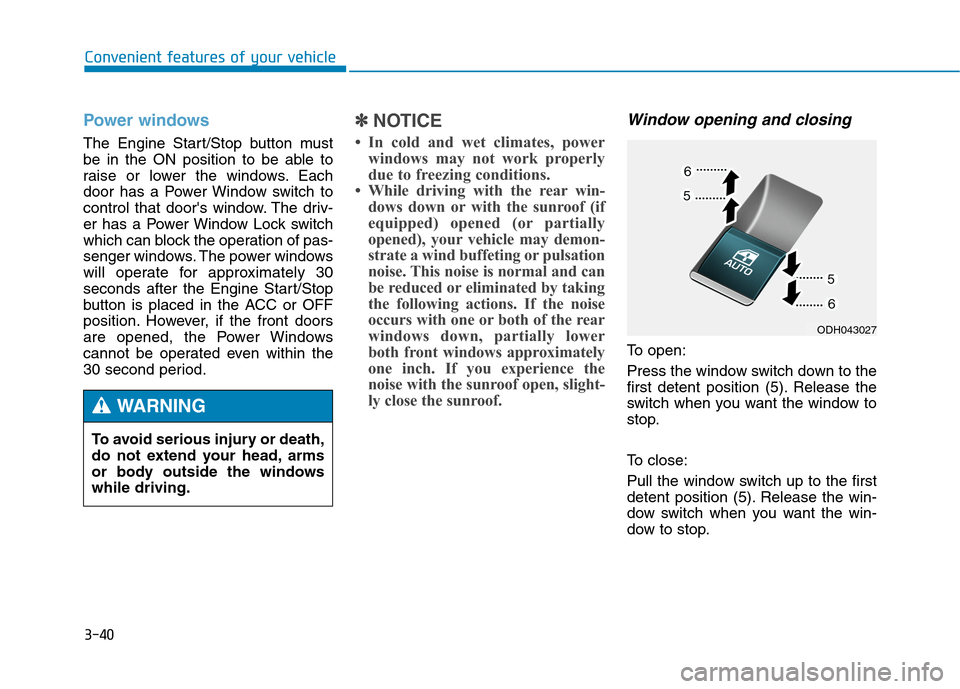
Window opening and closing
To open:
Press the window switch down to the
first detent position (5). Release the
switch when you want the window to
stop.
To close:
Pull the window switch up to the first
detent position (5). Release the win-
dow switch when you want the win-
dow to stop. To avoid serious injury or death,
do not extend your head, arms
or body outside the windows
while driving.
WARNING
ODH043027
Page 136 of 501
3-42
Convenient features of your vehicle
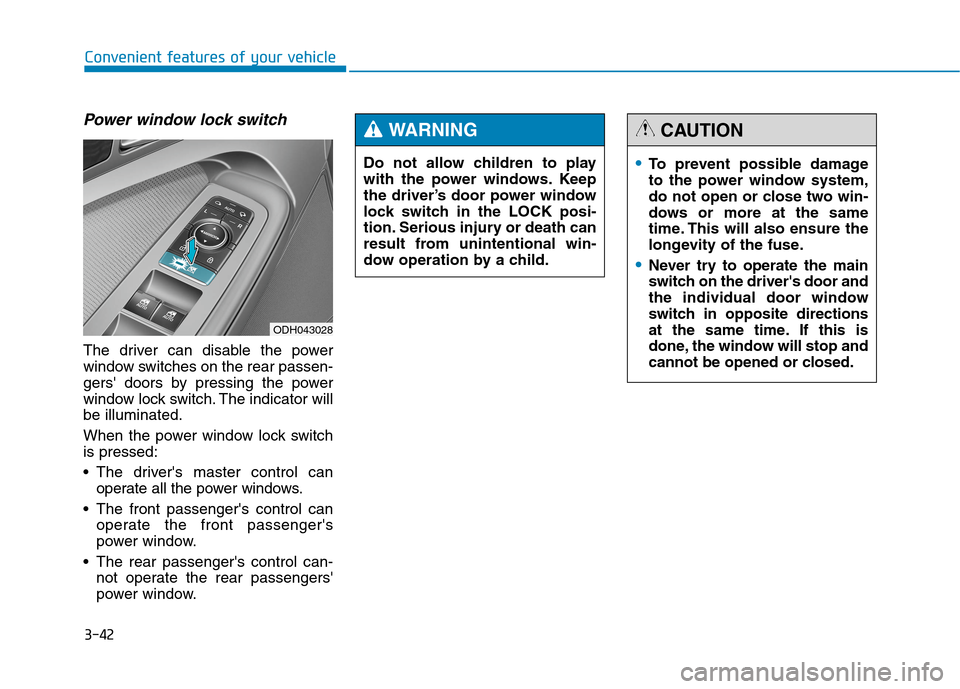
Power window lock switch
The driver can disable the power
window switches on the rear passen-
gers' doors by pressing the power
window lock switch. The indicator will
be illuminated.
When the power window lock switch
is pressed:
The driver's master control can
operate all the power windows.
The front passenger's control can
operate the front passenger's
power window.
The rear passenger's control can-
not operate the rear passengers'
power window.
ODH043028
To prevent possible damage
to the power window system,
do not open or close two win-
dows or more at the same
time. This will also ensure the
longevity of the fuse.
Never try to operate the main
switch on the driver's door and
the individual door window
switch in opposite directions
at the same time. If this is
done, the window will stop and
cannot be opened or closed.
CAUTION
Do not allow children to play
with the power windows. Keep
the driver’s door power window
lock switch in the LOCK posi-
tion. Serious injury or death can
result from unintentional win-
dow operation by a child.
WARNING
Page 143 of 501
3-49
Convenient features of your vehicle
3
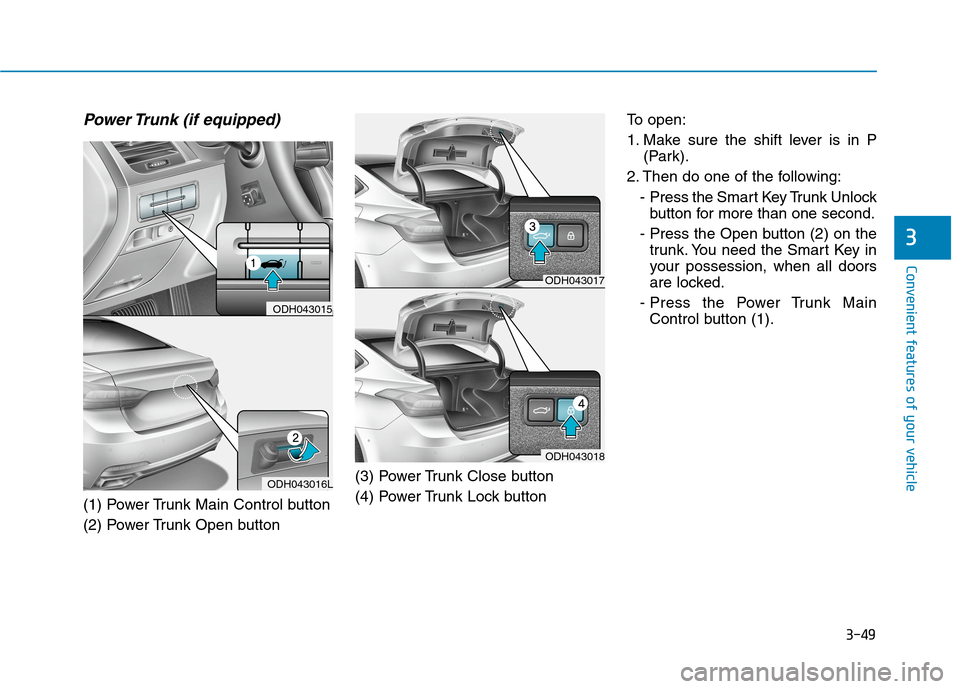
Power Trunk (if equipped)
(1) Power Trunk Main Control button
(2) Power Trunk Open button(3) Power Trunk Close button
(4) Power Trunk Lock buttonTo open:
1. Make sure the shift lever is in P
(Park).
2. Then do one of the following:
- Press the Smart Key Trunk Unlock
button for more than one second.
- Press the Open button (2) on the
trunk. You need the Smart Key in
your possession, when all doors
are locked.
- Press the Power Trunk Main
Control button (1).
ODH043016L
ODH043015
ODH043017
ODH043018
Page 144 of 501
3-50
Convenient features of your vehicle
To close:
Do one of the following:
- Press the Power Trunk Main
Control button (1) until the Power
Trunk is closed securely.
- Press the Close button (3) on the
trunk.
- Press the Lock button (4) on the
trunk while carrying the Smart Key
with all the vehicle’s doors closed.
All doors will lock and arm the theft
alarm system.
If you push a button or switch while
the trunk is opening or closing, it
could stop moving. Press any button
to operate the Power Trunk again.
✽ ✽
NOTICE
The Power Trunk Lock button will
not work if you press the button
when:
- Any door is open.
- The Engine Start/Stop button is
not in the OFF position.
- The Smart Key is in the vehicle.
Never leave children or animals
unattended in your vehicle.
Children or animals might oper-
ate the power trunk that could
result in injury to themselves or
others, or damage to the vehicle.
WARNING
Always keep the trunk lid com-
pletely closed while the vehicle is
in motion. If it is left open or ajar,
poisonous exhaust gases con-
taining carbon monoxide (CO)
may enter the vehicle and seri-
ous illness or death may result.
WARNING
Make sure there are no people
or objects around the trunk
before opening or closing the
Power Trunk. Wait until the trunk
is open fully and stopped
before loading or unloading
cargo from the vehicle.
WARNING
Page 149 of 501
3-55
Convenient features of your vehicle
3
How to use the Smart Trunk
The trunk can be opened with no-
touch activation satisfying all the
conditions below.
After 15 seconds when all doors
are closed and locked
Positioned in the detecting area for
more than 3 seconds.
✽ ✽
NOTICE
• The Smart Trunk does not operate
when:
- The smart key is detected within
15 seconds after the doors are
closed and locked, and is contin-
uously detected.
- The smart key is detected within
15 seconds after the doors are
closed and locked, and within 60
inches (1.5 m) from the front
door handles. (for vehicles
equipped with Welcome Light)
- A door is not locked or closed.
- The smart key is in the vehicle. 1. Setting
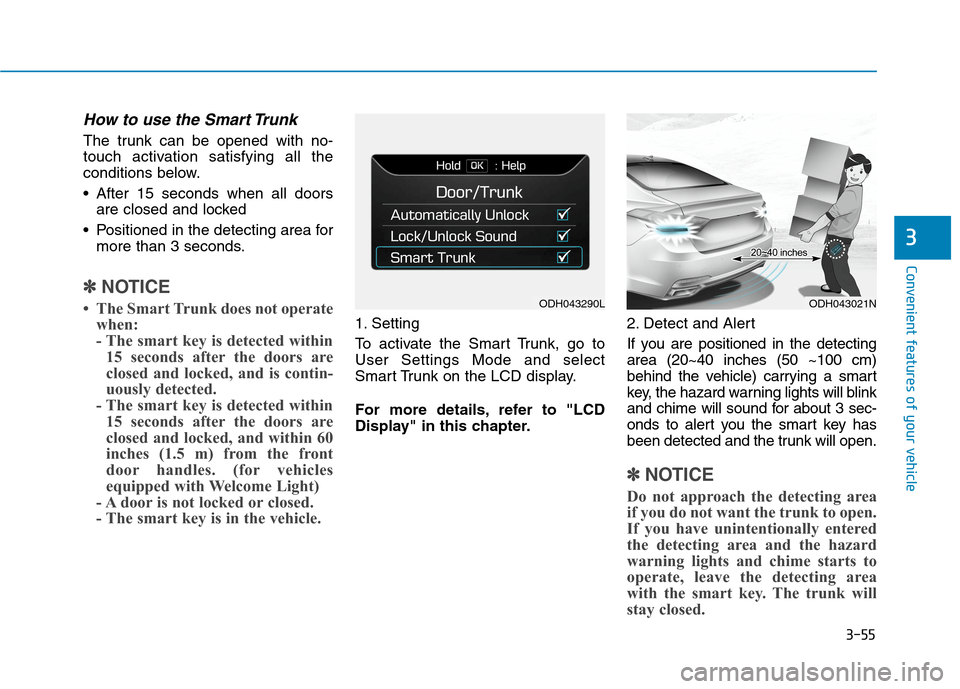
To activate the Smart Trunk, go to
User Settings Mode and select
Smart Trunk on the LCD display.
For more details, refer to "LCD
Display" in this chapter.2. Detect and Alert
If you are positioned in the detecting
area (20~40 inches (50 ~100 cm)
behind the vehicle) carrying a smart
key, the hazard warning lights will blink
and chime will sound for about 3 sec-
onds to alert you the smart key has
been detected and the trunk will open.
✽ ✽
NOTICE
Do not approach the detecting area
if you do not want the trunk to open.
If you have unintentionally entered
the detecting area and the hazard
warning lights and chime starts to
operate, leave the detecting area
with the smart key. The trunk will
stay closed.
ODH043290LODH043021N
Page 150 of 501
3-56
Convenient features of your vehicle
3. Automatic opening
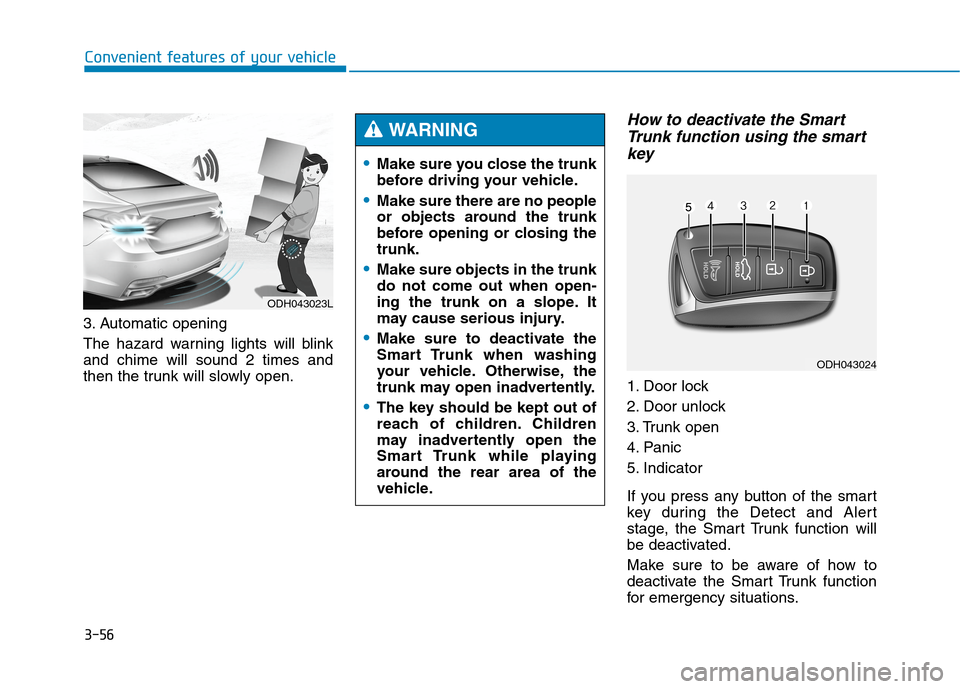
The hazard warning lights will blink
and chime will sound 2 times and
then the trunk will slowly open.
How to deactivate the Smart
Trunk function using the smart
key
1. Door lock
2. Door unlock
3. Trunk open
4. Panic
5. Indicator
If you press any button of the smart
key during the Detect and Alert
stage, the Smart Trunk function will
be deactivated.
Make sure to be aware of how to
deactivate the Smart Trunk function
for emergency situations.
ODH043023L
Make sure you close the trunk
before driving your vehicle.
Make sure there are no people
or objects around the trunk
before opening or closing the
trunk.
Make sure objects in the trunk
do not come out when open-
ing the trunk on a slope. It
may cause serious injury.
Make sure to deactivate the
Smart Trunk when washing
your vehicle. Otherwise, the
trunk may open inadvertently.
The key should be kept out of
reach of children. Children
may inadvertently open the
Smart Trunk while playing
around the rear area of the
vehicle.
WARNING
ODH043024
Page 151 of 501
3-57
Convenient features of your vehicle
3
✽ ✽
NOTICE
• If you press the door unlock but-
ton (2), the Smart Trunk function
will be deactivated temporarily.
But, if you do not open any door
for 30 seconds, the smart trunk
function will be activated again.
• If you press the trunk open button
(3) for more than 1 second, the
trunk opens.
• If you press the door lock button
(1) or trunk open button (3) when
the Smart Trunk function is not in
the Detect and Alert stage, the
smart trunk function will not be
deactivated.
• In case you have deactivated the
Smart Trunk function by pressing
the smart key button and opened a
door, the smart trunk function can
be activated again by closing and
locking all doors.
Detecting area
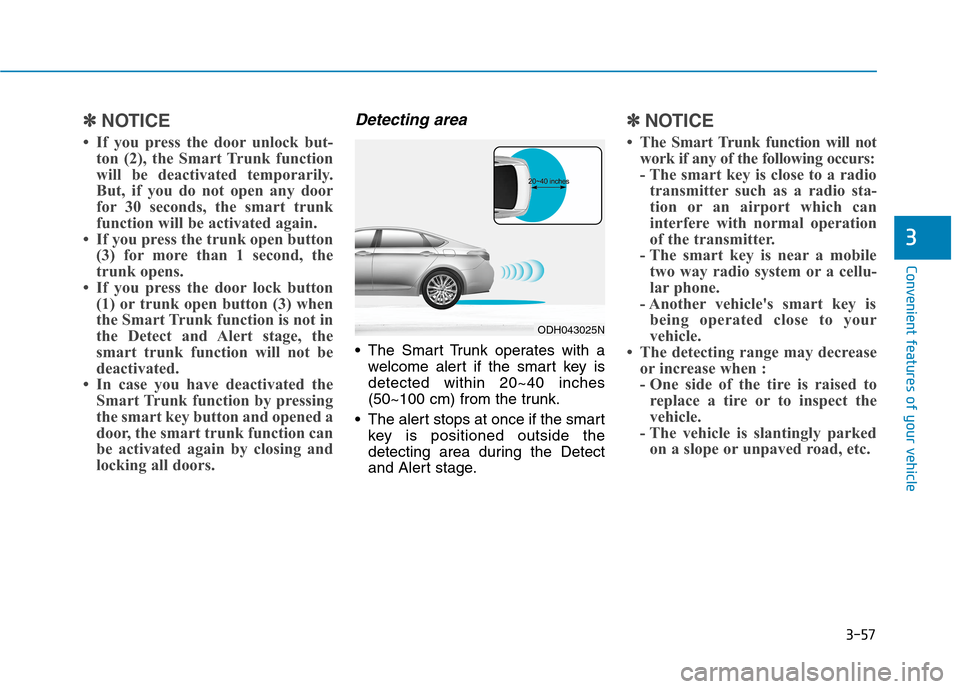
The Smart Trunk operates with a
welcome alert if the smart key is
detected within 20~40 inches
(50~100 cm) from the trunk.
The alert stops at once if the smart
key is positioned outside the
detecting area during the Detect
and Alert stage.
✽ ✽
NOTICE
• The Smart Trunk function will not
work if any of the following occurs:
- The smart key is close to a radio
transmitter such as a radio sta-
tion or an airport which can
interfere with normal operation
of the transmitter.
- The smart key is near a mobile
two way radio system or a cellu-
lar phone.
- Another vehicle's smart key is
being operated close to your
vehicle.
• The detecting range may decrease
or increase when :
- One side of the tire is raised to
replace a tire or to inspect the
vehicle.
- The vehicle is slantingly parked
on a slope or unpaved road, etc.
ODH043025N
Page 152 of 501
3-58
Convenient features of your vehicle
Fuel filler door
Opening the fuel filler door
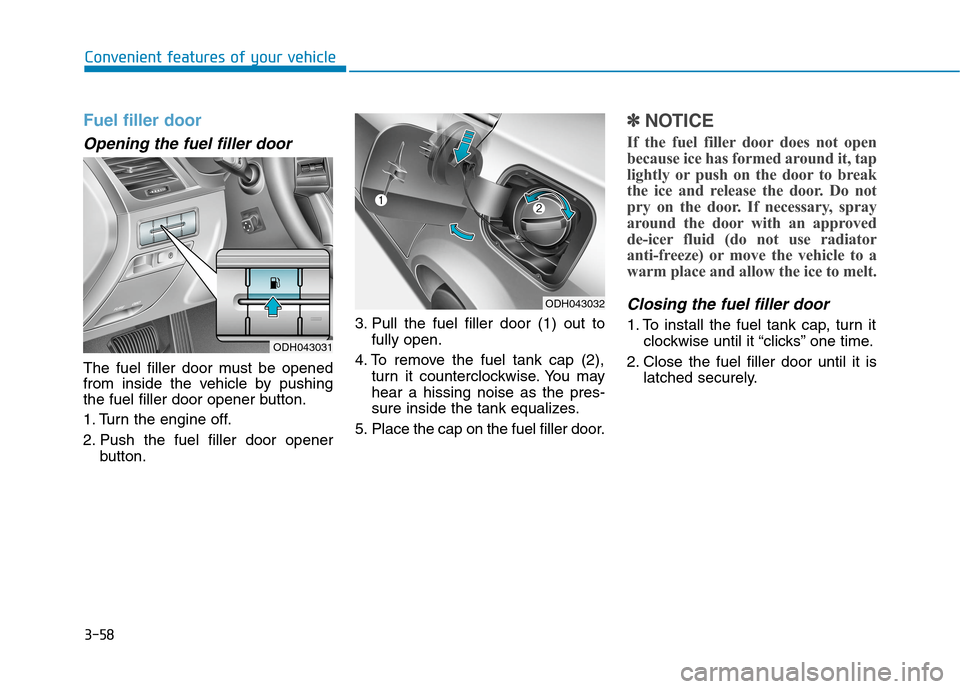
The fuel filler door must be opened
from inside the vehicle by pushing
the fuel filler door opener button.
1. Turn the engine off.
2. Push the fuel filler door opener
button.3. Pull the fuel filler door (1) out to
fully open.
4. To remove the fuel tank cap (2),
turn it counterclockwise. You may
hear a hissing noise as the pres-
sure inside the tank equalizes.
5. Place the cap on the fuel filler door.
✽ ✽
NOTICE
If the fuel filler door does not open
because ice has formed around it, tap
lightly or push on the door to break
the ice and release the door. Do not
pry on the door. If necessary, spray
around the door with an approved
de-icer fluid (do not use radiator
anti-freeze) or move the vehicle to a
warm place and allow the ice to melt.
Closing the fuel filler door
1. To install the fuel tank cap, turn it
clockwise until it “clicks” one time.
2. Close the fuel filler door until it is
latched securely.
ODH043032
ODH043031
Page 168 of 501
3-74
Convenient features of your vehicle
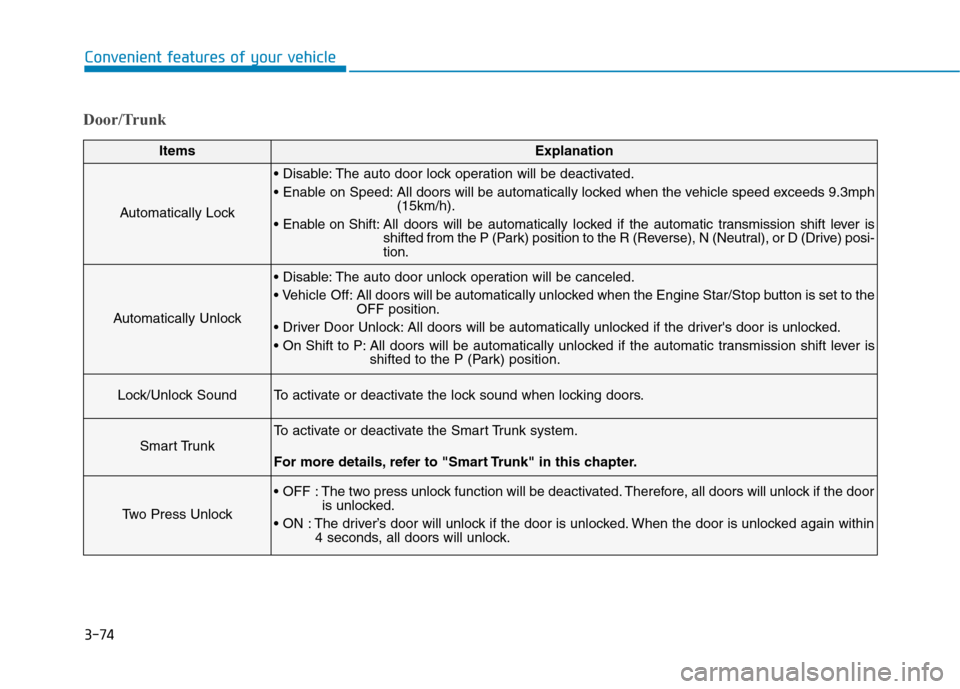
Door/Trunk
ItemsExplanation
Automatically Lock
The auto door lock operation will be deactivated.
All doors will be automatically locked when the vehicle speed exceeds 9.3mph
(15km/h).
All doors will be automatically locked if the automatic transmission shift lever is
shifted from the P (Park) position to the R (Reverse), N (Neutral), or D (Drive) posi-
tion.
Automatically Unlock
The auto door unlock operation will be canceled.
Off: All doors will be automatically unlocked when the Engine Star/Stop button is set to the
OFF position.
All doors will be automatically unlocked if the driver's door is unlocked.
All doors will be automatically unlocked if the automatic transmission shift lever is
shifted to the P (Park) position.
Lock/Unlock SoundTo activate or deactivate the lock sound when locking doors.
Smart Trunk
To activate or deactivate the Smart Trunk system.
For more details, refer to "Smart Trunk" in this chapter.
Two Press Unlock
The two press unlock function will be deactivated. Therefore, all doors will unlock if the door
is unlocked.
The driver’s door will unlock if the door is unlocked. When the door is unlocked again within
4 seconds, all doors will unlock.