lock Hyundai Genesis 2015 Workshop Manual
[x] Cancel search | Manufacturer: HYUNDAI, Model Year: 2015, Model line: Genesis, Model: Hyundai Genesis 2015Pages: 501, PDF Size: 38.76 MB
Page 151 of 501
3-57
Convenient features of your vehicle
3
✽ ✽
NOTICE
• If you press the door unlock but-
ton (2), the Smart Trunk function
will be deactivated temporarily.
But, if you do not open any door
for 30 seconds, the smart trunk
function will be activated again.
• If you press the trunk open button
(3) for more than 1 second, the
trunk opens.
• If you press the door lock button
(1) or trunk open button (3) when
the Smart Trunk function is not in
the Detect and Alert stage, the
smart trunk function will not be
deactivated.
• In case you have deactivated the
Smart Trunk function by pressing
the smart key button and opened a
door, the smart trunk function can
be activated again by closing and
locking all doors.
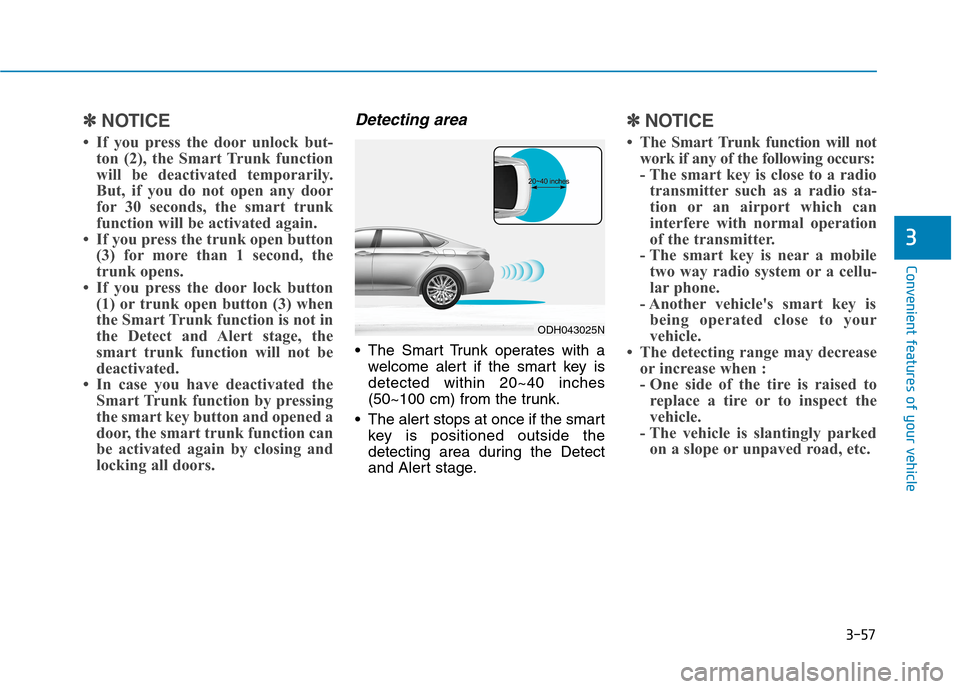
Detecting area
The Smart Trunk operates with a
welcome alert if the smart key is
detected within 20~40 inches
(50~100 cm) from the trunk.
The alert stops at once if the smart
key is positioned outside the
detecting area during the Detect
and Alert stage.
✽ ✽
NOTICE
• The Smart Trunk function will not
work if any of the following occurs:
- The smart key is close to a radio
transmitter such as a radio sta-
tion or an airport which can
interfere with normal operation
of the transmitter.
- The smart key is near a mobile
two way radio system or a cellu-
lar phone.
- Another vehicle's smart key is
being operated close to your
vehicle.
• The detecting range may decrease
or increase when :
- One side of the tire is raised to
replace a tire or to inspect the
vehicle.
- The vehicle is slantingly parked
on a slope or unpaved road, etc.
ODH043025N
Page 152 of 501
3-58
Convenient features of your vehicle
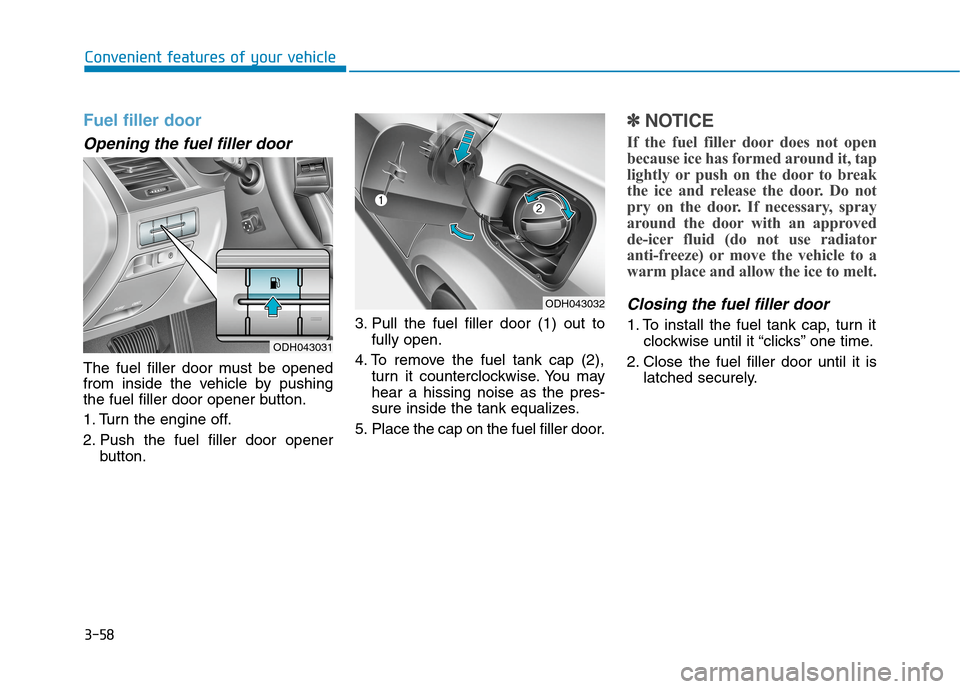
Fuel filler door
Opening the fuel filler door
The fuel filler door must be opened
from inside the vehicle by pushing
the fuel filler door opener button.
1. Turn the engine off.
2. Push the fuel filler door opener
button.3. Pull the fuel filler door (1) out to
fully open.
4. To remove the fuel tank cap (2),
turn it counterclockwise. You may
hear a hissing noise as the pres-
sure inside the tank equalizes.
5. Place the cap on the fuel filler door.
✽ ✽
NOTICE
If the fuel filler door does not open
because ice has formed around it, tap
lightly or push on the door to break
the ice and release the door. Do not
pry on the door. If necessary, spray
around the door with an approved
de-icer fluid (do not use radiator
anti-freeze) or move the vehicle to a
warm place and allow the ice to melt.
Closing the fuel filler door
1. To install the fuel tank cap, turn it
clockwise until it “clicks” one time.
2. Close the fuel filler door until it is
latched securely.
ODH043032
ODH043031
Page 168 of 501
3-74
Convenient features of your vehicle
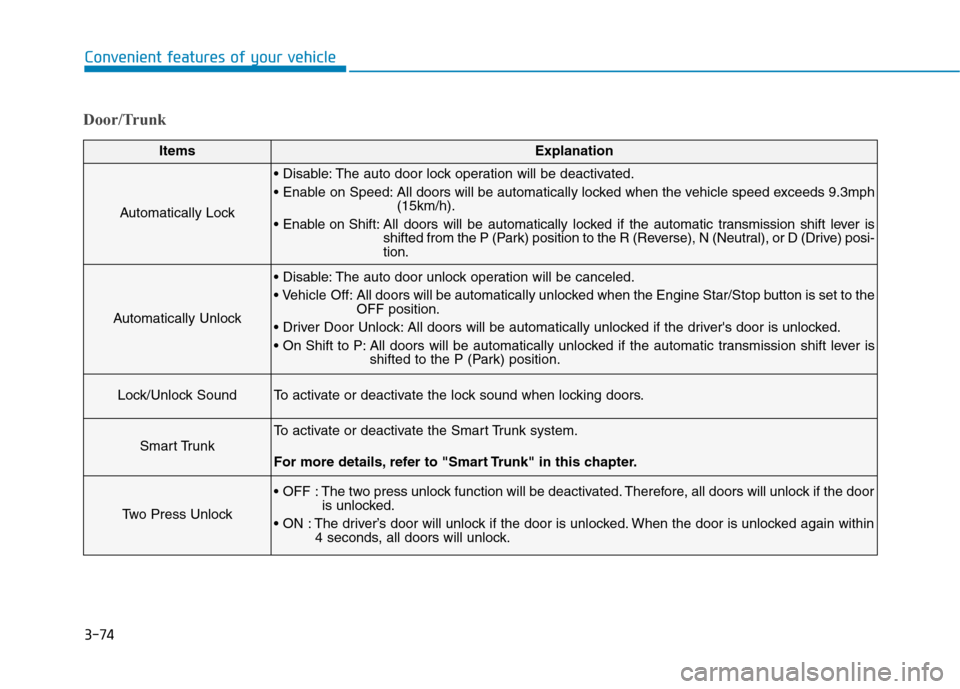
Door/Trunk
ItemsExplanation
Automatically Lock
The auto door lock operation will be deactivated.
All doors will be automatically locked when the vehicle speed exceeds 9.3mph
(15km/h).
All doors will be automatically locked if the automatic transmission shift lever is
shifted from the P (Park) position to the R (Reverse), N (Neutral), or D (Drive) posi-
tion.
Automatically Unlock
The auto door unlock operation will be canceled.
Off: All doors will be automatically unlocked when the Engine Star/Stop button is set to the
OFF position.
All doors will be automatically unlocked if the driver's door is unlocked.
All doors will be automatically unlocked if the automatic transmission shift lever is
shifted to the P (Park) position.
Lock/Unlock SoundTo activate or deactivate the lock sound when locking doors.
Smart Trunk
To activate or deactivate the Smart Trunk system.
For more details, refer to "Smart Trunk" in this chapter.
Two Press Unlock
The two press unlock function will be deactivated. Therefore, all doors will unlock if the door
is unlocked.
The driver’s door will unlock if the door is unlocked. When the door is unlocked again within
4 seconds, all doors will unlock.
Page 190 of 501
3-96
Convenient features of your vehicle
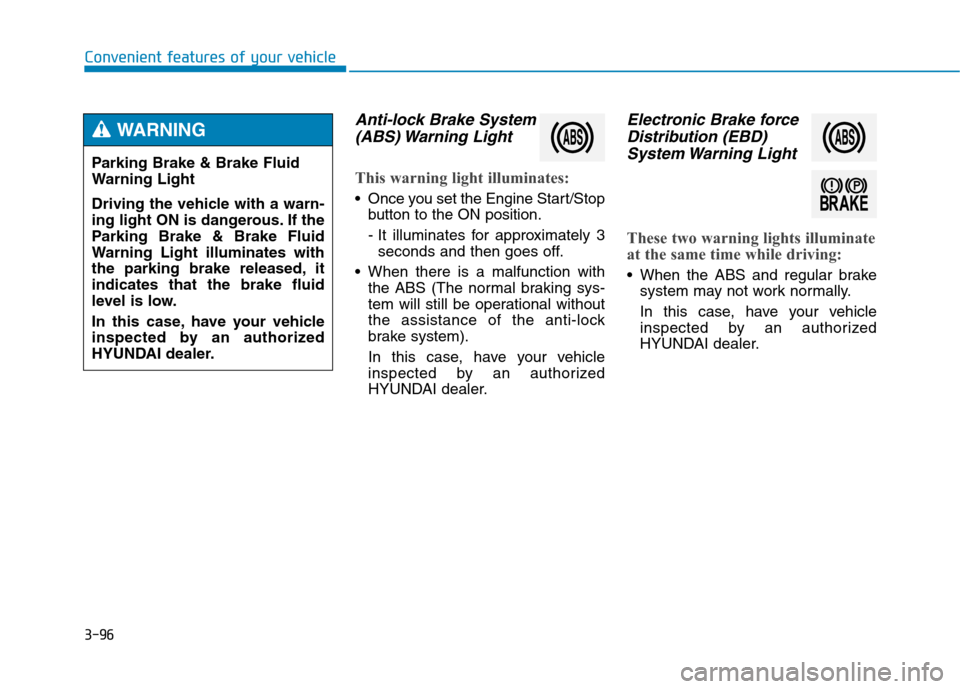
Anti-lock Brake System
(ABS) Warning Light
This warning light illuminates:
Once you set the Engine Start/Stop
button to the ON position.
- It illuminates for approximately 3
seconds and then goes off.
When there is a malfunction with
the ABS (The normal braking sys-
tem will still be operational without
the assistance of the anti-lock
brake system).
In this case, have your vehicle
inspected by an authorized
HYUNDAI dealer.
Electronic Brake force
Distribution (EBD)
System Warning Light
These two warning lights illuminate
at the same time while driving:
When the ABS and regular brake
system may not work normally.
In this case, have your vehicle
inspected by an authorized
HYUNDAI dealer. Parking Brake & Brake Fluid
Warning Light
Driving the vehicle with a warn-
ing light ON is dangerous. If the
Parking Brake & Brake Fluid
Warning Light illuminates with
the parking brake released, it
indicates that the brake fluid
level is low.
In this case, have your vehicle
inspected by an authorized
HYUNDAI dealer.
WARNING
Page 208 of 501
3-114
Convenient features of your vehicle
Front fog lamp (if equipped)
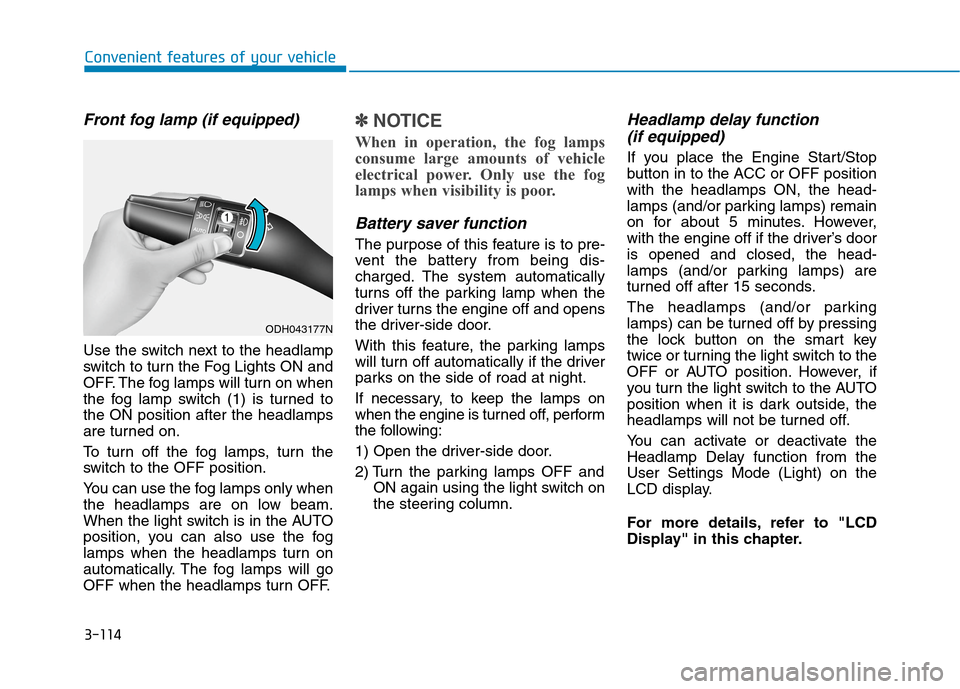
Use the switch next to the headlamp
switch to turn the Fog Lights ON and
OFF. The fog lamps will turn on when
the fog lamp switch (1) is turned to
the ON position after the headlamps
are turned on.
To turn off the fog lamps, turn the
switch to the OFF position.
You can use the fog lamps only when
the headlamps are on low beam.
When the light switch is in the AUTO
position, you can also use the fog
lamps when the headlamps turn on
automatically. The fog lamps will go
OFF when the headlamps turn OFF.
✽ ✽
NOTICE
When in operation, the fog lamps
consume large amounts of vehicle
electrical power. Only use the fog
lamps when visibility is poor.
Battery saver function
The purpose of this feature is to pre-
vent the battery from being dis-
charged. The system automatically
turns off the parking lamp when the
driver turns the engine off and opens
the driver-side door.
With this feature, the parking lamps
will turn off automatically if the driver
parks on the side of road at night.
If necessary, to keep the lamps on
when the engine is turned off, perform
the following:
1) Open the driver-side door.
2) Turn the parking lamps OFF and
ON again using the light switch on
the steering column.
Headlamp delay function
(if equipped)
If you place the Engine Start/Stop
button in to the ACC or OFF position
with the headlamps ON, the head-
lamps (and/or parking lamps) remain
on for about 5 minutes. However,
with the engine off if the driver’s door
is opened and closed, the head-
lamps (and/or parking lamps) are
turned off after 15 seconds.
The headlamps (and/or parking
lamps) can be turned off by pressing
the lock button on the smart key
twice or turning the light switch to the
OFF or AUTO position. However, if
you turn the light switch to the AUTO
position when it is dark outside, the
headlamps will not be turned off.
You can activate or deactivate the
Headlamp Delay function from the
User Settings Mode (Light) on the
LCD display.
For more details, refer to "LCD
Display" in this chapter.
ODH043177N
Page 210 of 501
3-116
Convenient features of your vehicle
Headlamp leveling device
(if equipped)
Automatically adjusts the headlamp
beam level according to the number
of passengers and loading weight in
the luggage area.
If the Headlight Leveling Device is
not working properly have your vehi-
cle inspected by an authorized
HYUNDAI dealer.
Headlamp washer (if equipped)
Washer fluid will be sprayed on the
headlamps at the same time you
operate the windshield washer when:
1. The Engine Start/Stop button is in
the ON position.
2. The light switch is in the headlamp
position (low beam).
✽ ✽
NOTICE
• Check the headlamp washers peri-
odically to confirm that the wash-
er fluid is being sprayed properly
onto the headlamp lenses.
• The headlamp washer can be
operated 15 minutes after the last
operation.
Welcome system (if equipped)
Welcome light (if equipped)
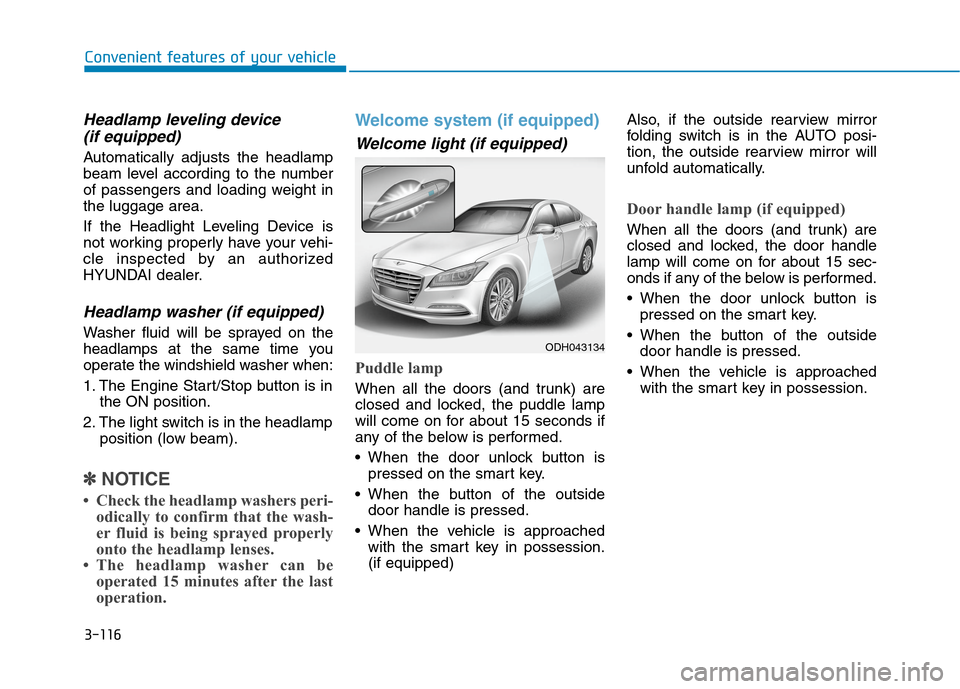
Puddle lamp
When all the doors (and trunk) are
closed and locked, the puddle lamp
will come on for about 15 seconds if
any of the below is performed.
When the door unlock button is
pressed on the smart key.
When the button of the outside
door handle is pressed.
When the vehicle is approached
with the smart key in possession.
(if equipped)Also, if the outside rearview mirror
folding switch is in the AUTO posi-
tion, the outside rearview mirror will
unfold automatically.
Door handle lamp (if equipped)
When all the doors (and trunk) are
closed and locked, the door handle
lamp will come on for about 15 sec-
onds if any of the below is performed.
When the door unlock button is
pressed on the smart key.
When the button of the outside
door handle is pressed.
When the vehicle is approached
with the smart key in possession.
ODH043134
Page 211 of 501
3-117
Convenient features of your vehicle
3
Headlamp and Parking lamp
When the headlamp (lamp switch in
the headlamp or AUTO position) is on
and all doors (and trunk) are locked
and closed, the parking lamp and
headlamp will come on for 15 seconds
if/or any of the below is performed.
When the door unlock button is
pressed on the smart key.
At this time, if you press the door lock
or unlock button on the smart key the
parking lamp and headlamp will turn
off immediately.
You can activate or deactivate the
Welcome Light from the User
Settings Mode (Light) on the LCD
display.
For more details, refer to "LCD
Display" in this chapter.
Interior lamp
When the interior lamp switch is in
the DOOR position and all doors (and
trunk) are closed and locked, the
room lamp will come on for 30 sec-
onds if any of the below is performed.
When the door unlock button is
pressed on the smart key.
When the button of the outside
door handle is pressed.
At this time, if you press the door lock
or unlock button on the smart key the
room lamp will turn off immediately.
Interior lights
Do not use the interior lights
when driving in the dark. The inte-
rior lights may obscure your view
and cause an accident.
WARNING
Do not use the interior lights for
extended periods when the
engine is turned off or the bat-
tery will discharge.
CAUTION
Page 212 of 501
3-118
Convenient features of your vehicle
Interior lamp AUTO cut
The interior lamps will automatically
go off approximately 20 minutes after
the engine is turned off and the
doors closed. If a door is opened, the
lamp will go off 40 minutes after the
engine is turned off. If the doors are
locked by the smart key and the vehi-
cle enters the armed stage of the
theft alarm system, the lamps will go
off five seconds later.
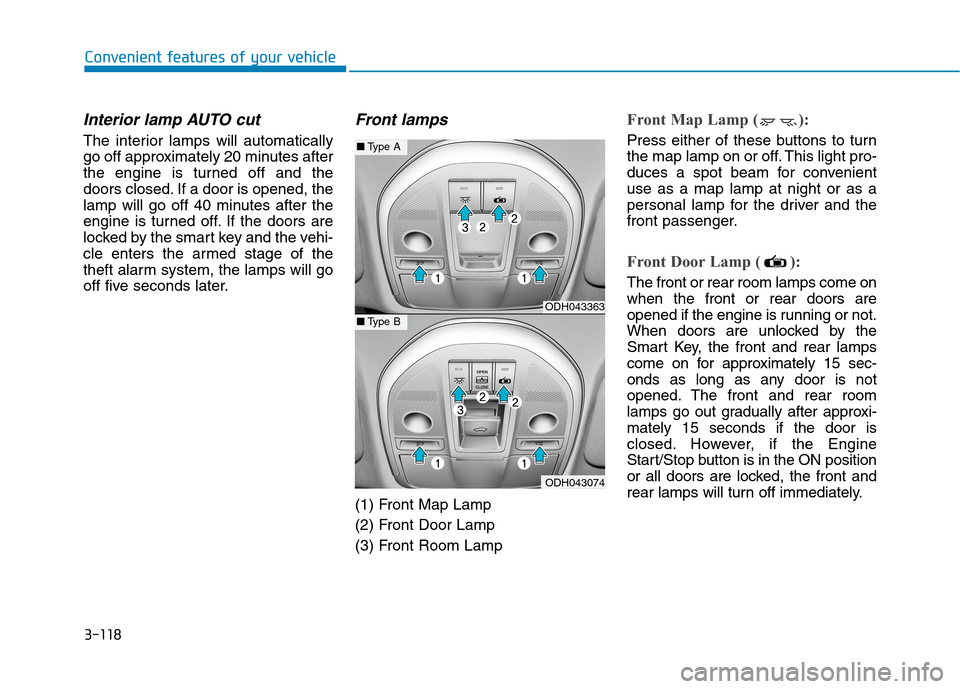
Front lamps
(1) Front Map Lamp
(2) Front Door Lamp
(3) Front Room Lamp
Front Map Lamp ( ):
Press either of these buttons to turn
the map lamp on or off. This light pro-
duces a spot beam for convenient
use as a map lamp at night or as a
personal lamp for the driver and the
front passenger.
Front Door Lamp ( ):
The front or rear room lamps come on
when the front or rear doors are
opened if the engine is running or not.
When doors are unlocked by the
Smart Key, the front and rear lamps
come on for approximately 15 sec-
onds as long as any door is not
opened. The front and rear room
lamps go out gradually after approxi-
mately 15 seconds if the door is
closed. However, if the Engine
Start/Stop button is in the ON position
or all doors are locked, the front and
rear lamps will turn off immediately.
ODH043363
ODH043074
■Type A
■Type B
Page 215 of 501
3-121
Convenient features of your vehicle
3
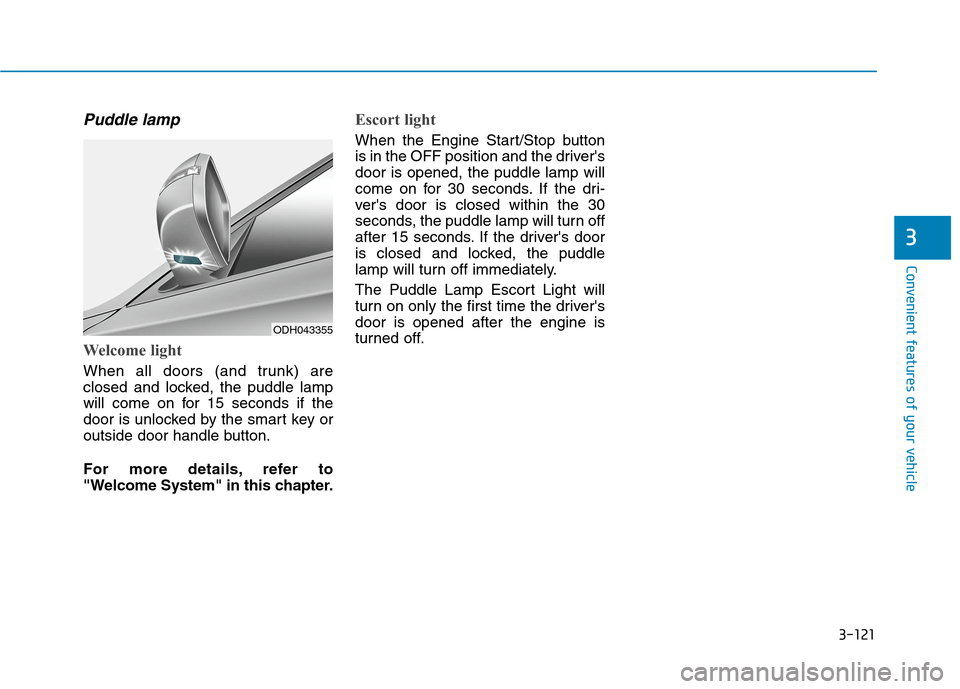
Puddle lamp
Welcome light
When all doors (and trunk) are
closed and locked, the puddle lamp
will come on for 15 seconds if the
door is unlocked by the smart key or
outside door handle button.
For more details, refer to
"Welcome System" in this chapter.
Escort light
When the Engine Start/Stop button
is in the OFF position and the driver's
door is opened, the puddle lamp will
come on for 30 seconds. If the dri-
ver's door is closed within the 30
seconds, the puddle lamp will turn off
after 15 seconds. If the driver's door
is closed and locked, the puddle
lamp will turn off immediately.
The Puddle Lamp Escort Light will
turn on only the first time the driver's
door is opened after the engine is
turned off.
ODH043355
Page 223 of 501
3-129
Convenient features of your vehicle
3
Non-operational conditions of
Parking Assist System
Parking Assist System may not
operate normally when:
Moisture is frozen to the sensor.
Sensor is covered with foreign mat-
ter, such as snow or water, or the
sensor cover is blocked.
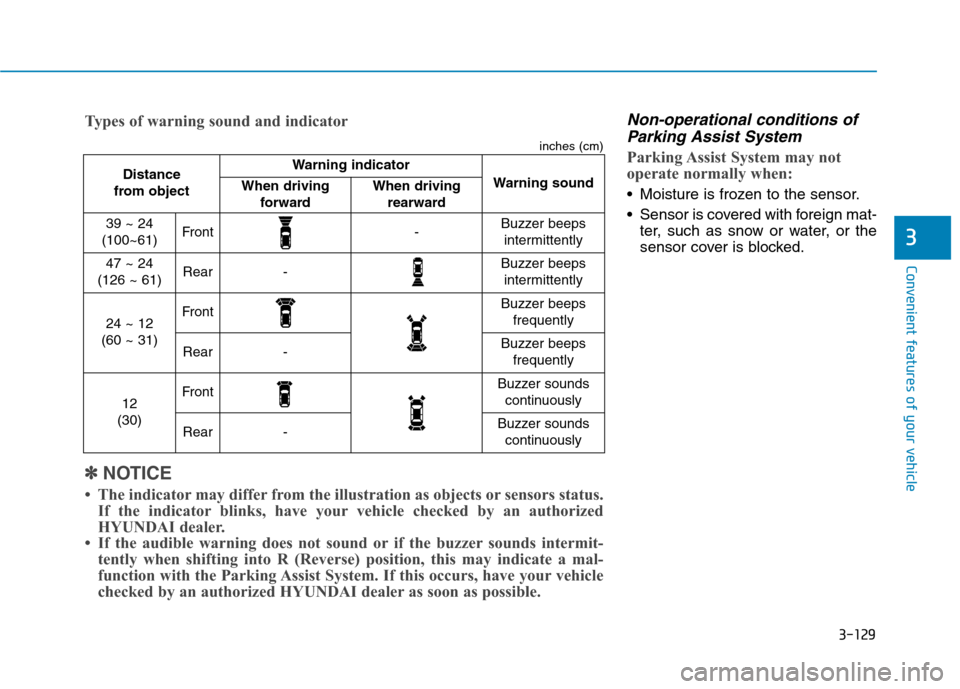
Distance
from object Warning indicator
Warning soundWhen driving
forwardWhen driving
rearward
39 ~ 24
(100~61)Front-Buzzer beeps
intermittently
47 ~ 24
(126 ~ 61)Rear-Buzzer beeps
intermittently
24 ~ 12
(60 ~ 31)FrontBuzzer beeps
frequently
Rear-Buzzer beeps
frequently
12
(30)FrontBuzzer sounds
continuously
Rear-Buzzer sounds
continuously
✽ ✽
NOTICE
• The indicator may differ from the illustration as objects or sensors status.
If the indicator blinks, have your vehicle checked by an authorized
HYUNDAI dealer.
• If the audible warning does not sound or if the buzzer sounds intermit-
tently when shifting into R (Reverse) position, this may indicate a mal-
function with the Parking Assist System. If this occurs, have your vehicle
checked by an authorized HYUNDAI dealer as soon as possible. Types of warning sound and indicator
inches (cm)