tow Hyundai Genesis 2015 Owner's Manual
[x] Cancel search | Manufacturer: HYUNDAI, Model Year: 2015, Model line: Genesis, Model: Hyundai Genesis 2015Pages: 501, PDF Size: 38.76 MB
Page 17 of 501
F17
Special driving conditions ...................................5-86
Hazardous driving conditions.......................................5-86
Rocking the vehicle ........................................................5-86
Smooth cornering ...........................................................5-87
Driving at night ................................................................5-87
Driving in the rain ...........................................................5-88
Driving in flooded areas ................................................5-88
Winter driving .......................................................5-89
Snow or icy conditions ..................................................5-89
Vehicle load limit ..................................................5-92
Tire loading information label......................................5-93
Trailer towing .......................................................5-97
Hazard warning flasher ........................................6-2
In case of an emergency while driving ..............6-2
If the engine stalls while driving ...................................6-2
If the engine stalls at a crossroad or crossing ........6-2
If you have a flat tire while driving..............................6-3
If the engine will not start ...................................6-3
If the engine doesn't turn over or turns over
slowly ..................................................................................6-3
If the engine turns over normally but doesn't
start.......................................................................................6-3
Jump starting ..........................................................6-4
Push-starting .....................................................................6-6
If the engine overheats ........................................6-7
Tire Pressure Monitoring System (TPMS).........6-9
Check tire pressure...........................................................6-9
Tire pressure monitoring system ................................6-10
Low tire pressure telltale ..............................................6-11
Low tire pressure position and tire pressure
telltale ................................................................................6-11
TPMS (Tire Pressure Monitoring System)
malfunction indicator .....................................................6-12
Changing a tire with TPMS...........................................6-13
If you have a flat tire..........................................6-15
Jack and tools ..................................................................6-15
Changing tires .................................................................6-16
Jack label ...........................................................................6-21
Towing ...................................................................6-22
Towing service .................................................................6-22
Removable towing hook ................................................6-23
Emergency towing ..........................................................6-24
F17
6What to do in an emergency
Page 22 of 501
1-3
Your vehicle at a glance
E EX
XT
TE
ER
RI
IO
OR
R
O
OV
VE
ER
RV
VI
IE
EW
W
(
(I
II
I)
)
1
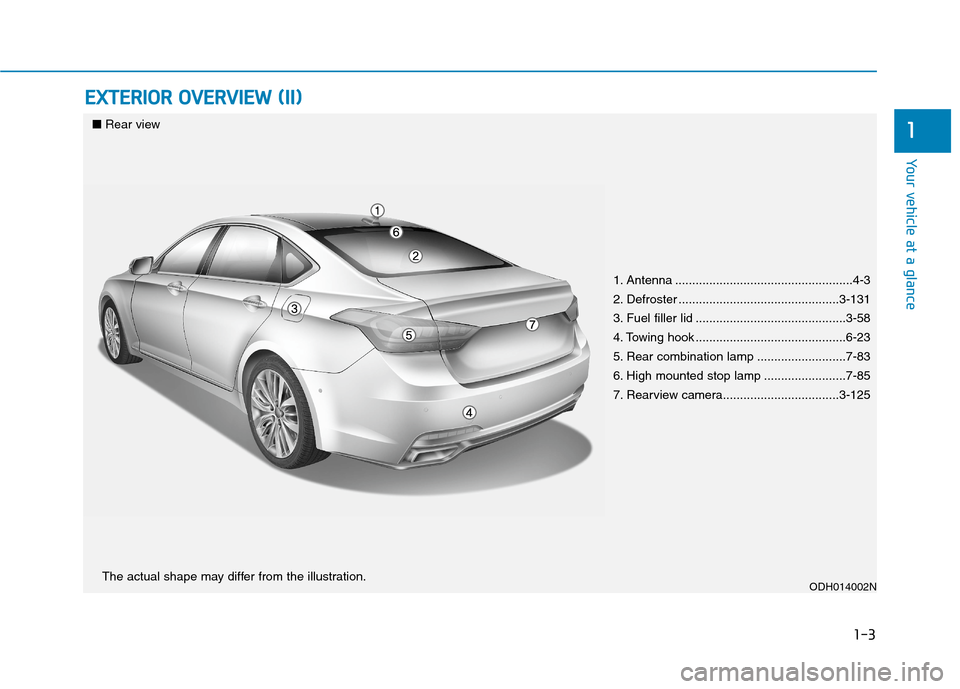
1. Antenna ....................................................4-3
2. Defroster ...............................................3-131
3. Fuel filler lid ............................................3-58
4. Towing hook ............................................6-23
5. Rear combination lamp ..........................7-83
6. High mounted stop lamp ........................7-85
7. Rearview camera..................................3-125
ODH014002N
■Rear view
The actual shape may differ from the illustration.
Page 71 of 501
2-45
Safety system of your vehicle
2
5. Remove as much slack from the
belt as possible by pushing down
on the child restraint system while
feeding the shoulder belt back into
the retractor.
6. Push and pull on the child restraint
system to confirm that the seat
belt is holding it firmly in place. If it
is not, release the seat belt and
repeat steps 2 through 6.
7. Double check that the retractor is
in the “Automatic Locking” mode
by attempting to pull more of the
seat belt out of the retractor. If you
cannot, the retractor is in the
“Automatic Locking” mode.
If your CRS manufacturer instructs or
recommends you to use a tether
anchor with the lap/shoulder belt,
refer to the previous pages for more
information.✽ ✽
NOTICE
When the seat belt is allowed to
retract to its fully stowed position, the
retractor will automatically switch
from the “Automatic Locking” mode
to the emergency lock mode for nor-
mal adult usage.
To remove the child restraint, press
the release button on the buckle and
then pull the lap/shoulder belt out of
the restraint and allow the seat belt
to retract fully.If the retractor is not in the
“Automatic Locking” mode, the
child restraint can move when
your vehicle turns or stops sud-
denly. A child can be seriously
injured or killed if the child
restraint is not properly anchored
in the car, including manually
pulling the seat belt all the way
out to shift the rectractor to the
“Automatic Locking” mode.
WARNING
Page 84 of 501
2-58
Safety system of your vehicle
The OCS may not function properly if
the passenger takes actions which
can affect the classification system.
These include:
Failing to sit in an upright position.
Leaning against the door or center
console.
Sitting towards the sides of the
front of the seat.
Putting their legs on the dashboard
or resting them on other locations
which reduce the passenger
weight on the front seat.
Wearing the seat belt improperly.
Reclining the seatback.
Wearing a thick cloth like ski wear
or hip protection wear.
Put on the seat an additional thick
cushion.
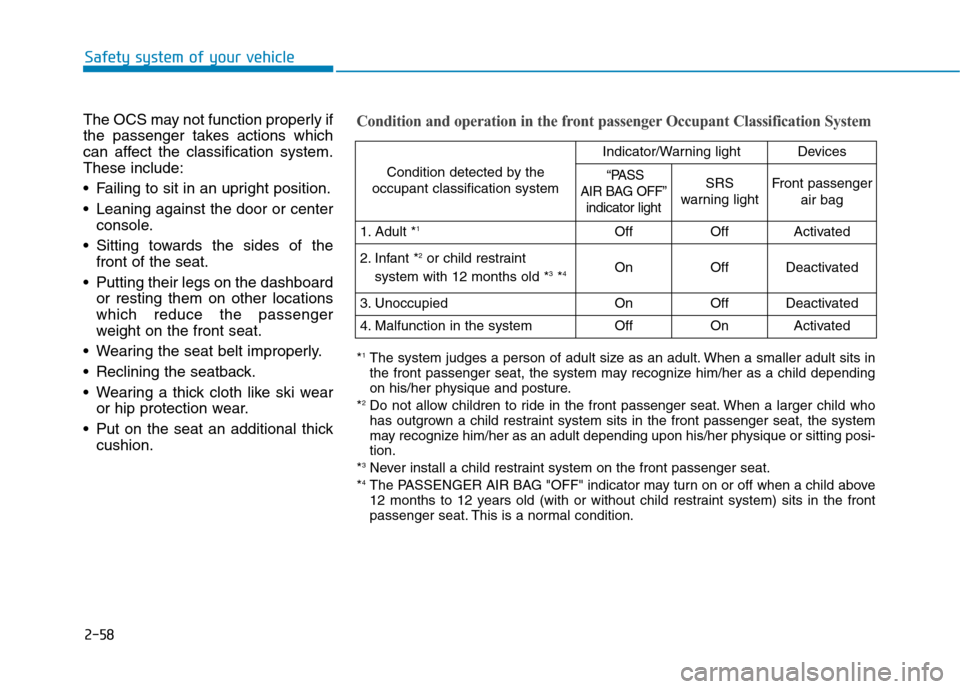
Condition and operation in the front passenger Occupant Classification System
Condition detected by the
occupant classification system
Indicator/Warning lightDevices
“PASS
AIR BAG OFF”
indicator lightSRS
warning lightFront passenger
air bag
1. Adult *1OffOffActivated
2. Infant *2or child restraint
system with 12 months old *3*4 OnOffDeactivated
3. Unoccupied OnOffDeactivated
4. Malfunction in the systemOffOnActivated
*1The system judges a person of adult size as an adult. When a smaller adult sits in
the front passenger seat, the system may recognize him/her as a child depending
on his/her physique and posture.
*
2Do not allow children to ride in the front passenger seat. When a larger child who
has outgrown a child restraint system sits in the front passenger seat, the system
may recognize him/her as an adult depending upon his/her physique or sitting posi-
tion.
*
3Never install a child restraint system on the front passenger seat.
*4The PASSENGER AIR BAG "OFF" indicator may turn on or off when a child above
12 months to 12 years old (with or without child restraint system) sits in the front
passenger seat. This is a normal condition.
Page 85 of 501
2-59
Safety system of your vehicle
2
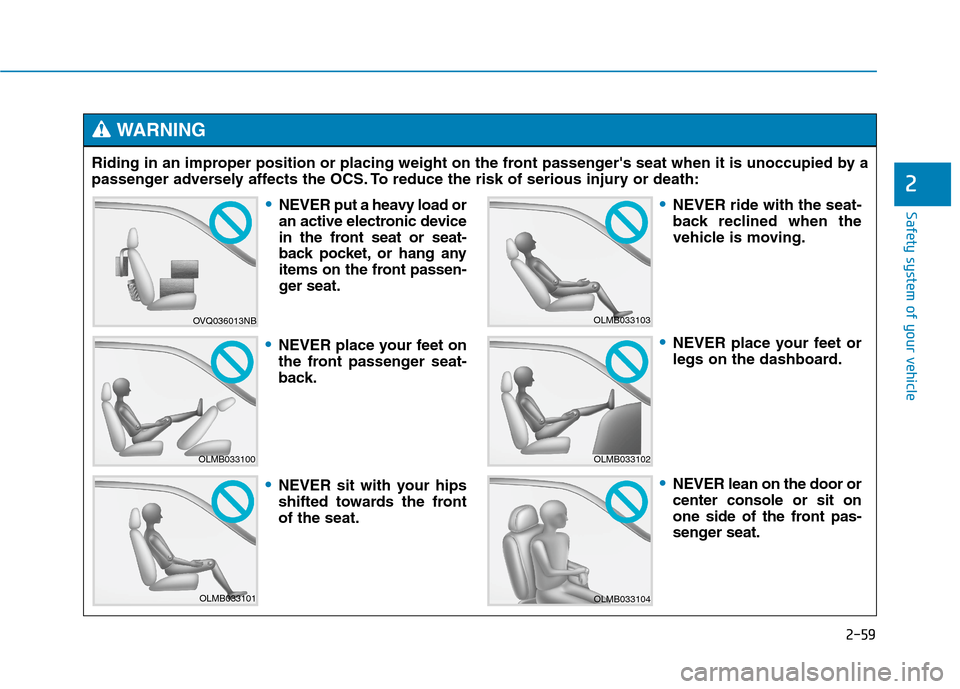
Riding in an improper position or placing weight on the front passenger's seat when it is unoccupied by a
passenger adversely affects the OCS. To reduce the risk of serious injury or death:
WARNING
OVQ036013NB
OLMB033100
OLMB033101
OLMB033103
OLMB033102
OLMB033104
NEVER put a heavy load or
an active electronic device
in the front seat or seat-
back pocket, or hang any
items on the front passen-
ger seat.
NEVER place your feet on
the front passenger seat-
back.
NEVER sit with your hips
shifted towards the front
of the seat.
NEVER ride with the seat-
back reclined when the
vehicle is moving.
NEVER place your feet or
legs on the dashboard.
NEVER lean on the door or
center console or sit on
one side of the front pas-
senger seat.
Page 87 of 501
2-61
Safety system of your vehicle
2
Why Didn’t My Air Bag Go Off
in a Collision? (Air bags are
not designed to inflate in
every collision.)
There are certain types of accidents
in which the air bag would not be
expected to provide additional protec-
tion. These include rear impacts, sec-
ond or third collisions in multiple
impact accidents, as well as low
speed impacts. Damage to the vehicle
indicates a collision energy absorp-
tion, and is not an indicator of whether
or not an air bag should have inflated.
Air bag collision sensors
NEVER place a rear-facing or
front-facing child restraint in
the front passenger’s seat of
the vehicle.
An inflating frontal air bag
could forcefully strike a child
resulting in serious injury or
death.
Always properly restrain chil-
dren in an appropriate child
restraint in the rear seat of the
vehicle.
WARNING
To reduce the risk of an air bag
deploying unexpectedly and
causing serious injury or death:
Do not hit or allow any objects
to impact the locations where
air bags or sensors are
installed.
(Continued)
(Continued)
Do not perform maintenance
on or around the air bag sen-
sors. If the location or angle of
the sensors is altered, the air
bags may deploy when they
should not or may not deploy
when they should.
Do not install bumper guards
or replace the bumper with a
non-genuine HYUNDAI parts.
This may adversely affect the
collision and air bag deploy-
ment performance.
Press the Engine Start/Stop
button to the OFF or ACC
position when the vehicle is
being towed to prevent inad-
vertent air bag deployment.
Have all air bag repairs con-
ducted by an authorized
HYUNDAI dealer.
WARNING
Page 100 of 501
3-6
Start-up
You can start the engine without
inserting the key.
For more information, refer to the
Engine Start/Stop button in chap-
ter 5.
Mechanical key
If the Smart Key does not operate
normally, you can lock or unlock the
door by using the mechanical key.
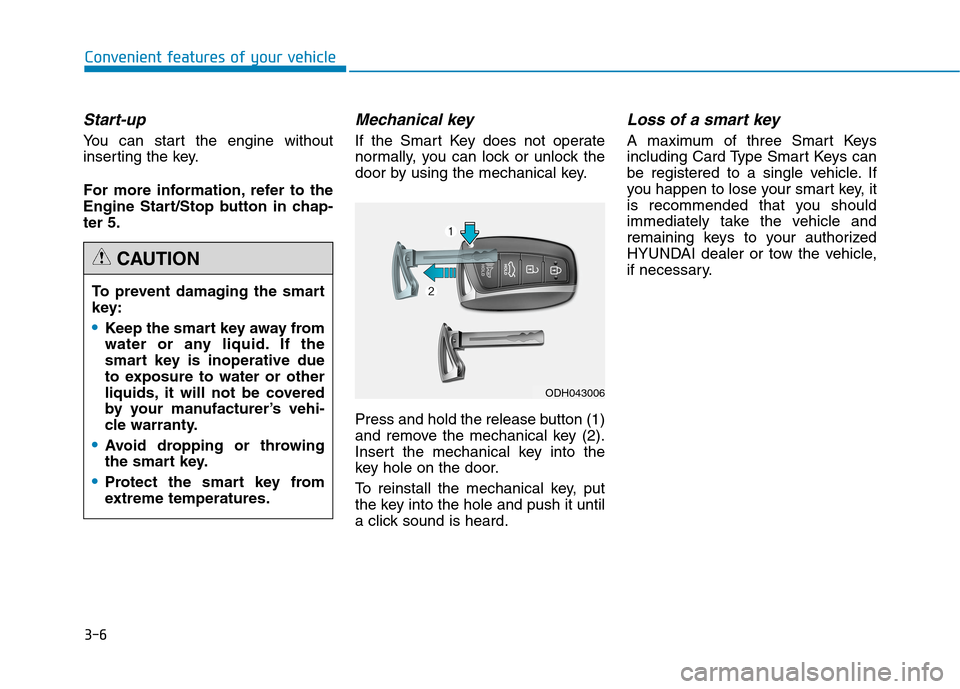
Press and hold the release button (1)
and remove the mechanical key (2).
Insert the mechanical key into the
key hole on the door.
To reinstall the mechanical key, put
the key into the hole and push it until
a click sound is heard.
Loss of a smart key
A maximum of three Smart Keys
including Card Type Smart Keys can
be registered to a single vehicle. If
you happen to lose your smart key, it
is recommended that you should
immediately take the vehicle and
remaining keys to your authorized
HYUNDAI dealer or tow the vehicle,
if necessary.
Convenient features of your vehicle
To prevent damaging the smart
key:
•Keep the smart key away from
water or any liquid. If the
smart key is inoperative due
to exposure to water or other
liquids, it will not be covered
by your manufacturer’s vehi-
cle warranty.
Avoid dropping or throwing
the smart key.
Protect the smart key from
extreme temperatures.
CAUTION
ODH043006
Page 105 of 501
3-11
Convenient features of your vehicle
Operating door locks from
outside the vehicle
Mechanical key
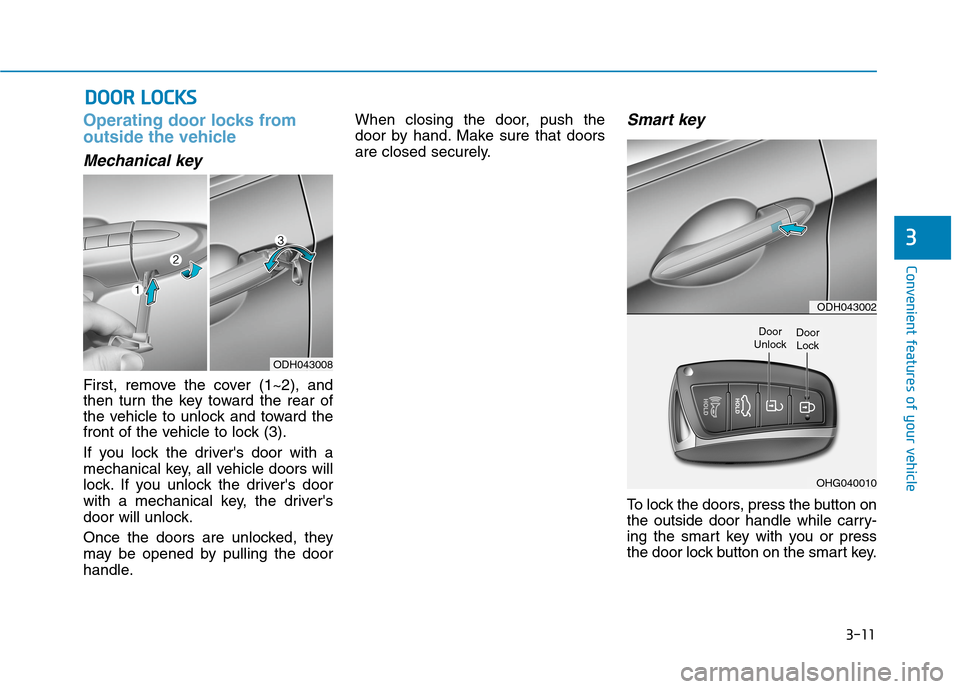
First, remove the cover (1~2), and
then turn the key toward the rear of
the vehicle to unlock and toward the
front of the vehicle to lock (3).
If you lock the driver's door with a
mechanical key, all vehicle doors will
lock. If you unlock the driver's door
with a mechanical key, the driver's
door will unlock.
Once the doors are unlocked, they
may be opened by pulling the door
handle.When closing the door, push the
door by hand. Make sure that doors
are closed securely.
Smart key
To lock the doors, press the button on
the outside door handle while carry-
ing the smart key with you or press
the door lock button on the smart key.
D DO
OO
OR
R
L
LO
OC
CK
KS
S
3
ODH043008
ODH043002
OHG040010
Door
UnlockDoor
Lock
Page 111 of 501
3-17
Convenient features of your vehicle
3
Recalling positions from memory
1. Check that the shift lever is in P
(Park) while the Engine Start/Stop
button is in the ON position.
2. Press the desired memory button
(1 or 2). The system will beep
once, and then the driver's seat
position, outside rearview mirror
position, steering wheel position,
instrument panel illumination
intensity and head-up display
height/brightness will automatical-
ly adjust to the stored positions.
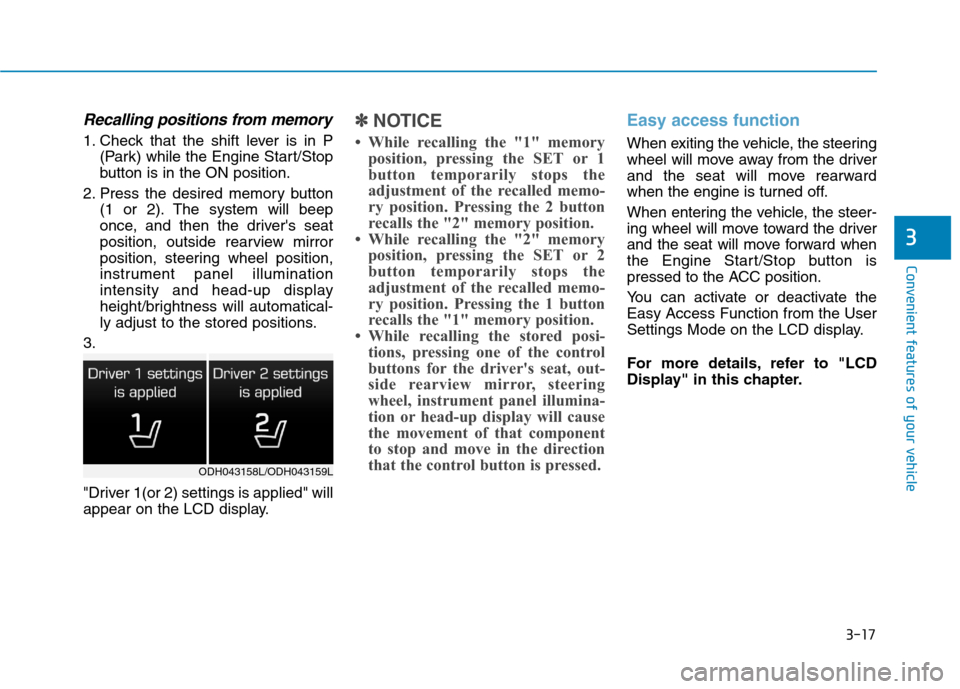
3.
"Driver 1(or 2) settings is applied" will
appear on the LCD display.
✽ ✽
NOTICE
• While recalling the "1" memory
position, pressing the SET or 1
button temporarily stops the
adjustment of the recalled memo-
ry position. Pressing the 2 button
recalls the "2" memory position.
• While recalling the "2" memory
position, pressing the SET or 2
button temporarily stops the
adjustment of the recalled memo-
ry position. Pressing the 1 button
recalls the "1" memory position.
• While recalling the stored posi-
tions, pressing one of the control
buttons for the driver's seat, out-
side rearview mirror, steering
wheel, instrument panel illumina-
tion or head-up display will cause
the movement of that component
to stop and move in the direction
that the control button is pressed.
Easy access function
When exiting the vehicle, the steering
wheel will move away from the driver
and the seat will move rearward
when the engine is turned off.
When entering the vehicle, the steer-
ing wheel will move toward the driver
and the seat will move forward when
the Engine Start/Stop button is
pressed to the ACC position.
You can activate or deactivate the
Easy Access Function from the User
Settings Mode on the LCD display.
For more details, refer to "LCD
Display" in this chapter.
ODH043158L/ODH043159L
Page 112 of 501
3-18
Convenient features of your vehicle
S ST
TE
EE
ER
RI
IN
NG
G
W
WH
HE
EE
EL
L
Electric power steering (EPS)
The system assists you with steering
the vehicle. If the engine is turned off
or if the power steering system
becomes inoperative, you may still
steer the vehicle, but it will require
increased steering effort.
Should you notice any change in the
effort required to steer during normal
vehicle operation, we recommend
that the system be checked by an
authorized HYUNDAI dealer.
✽ ✽
NOTICE
The following symptoms may occur
during normal vehicle operation:
• The steering effort may be high
immediately after placing the
Engine Start/Stop button in the
ON position.
This happens as the system per-
forms the EPS system diagnostics.
When the diagnostics is complet-
ed, the steering wheel will return
to its normal condition.
• A click noise may be heard from
the EPS relay after the Engine
Start/Stop button is in the ON or
OFF position.
• Motor noise may be heard when
the vehicle is at stop or at a low
driving speed.
• When you operate the steering
wheel in low temperature, abnor-
mal noise may occur. If tempera-
ture rises, the noise will disappear.
This is a normal condition.
Tilt steering / Telescope steering
Adjust the steering wheel so it points
toward your chest, not toward your
face. Make sure you can see the
instrument panel warning lights and
gauges. After adjusting, push the
steering wheel both up and down to
be certain it is locked in position.
Always adjust the position of the
steering wheel before driving.
If the Electric Power Steering
System does not operate nor-
mally, the warning light ( ) will
illuminate on the instrument
cluster. The steering wheel will
require increase effort. Take
your vehicle to an authorized
HYUNDAI dealer and have the
system checked as soon as
possible.
CAUTIONNEVER adjust the steering
wheel while driving. This may
cause loss of vehicle control
resulting in an accident.
WARNING