boot Hyundai Genesis 2016 - RHD (UK, Australia) User Guide
[x] Cancel search | Manufacturer: HYUNDAI, Model Year: 2016, Model line: Genesis, Model: Hyundai Genesis 2016Pages: 502, PDF Size: 13.19 MB
Page 130 of 502

3-39
Convenient features of your vehicle
3
✽NOTICE
In cold and wet climates, boot lock
and boot mechanisms may not work
properly due to freezing conditions.
Power Boot Non-Opening or
Closing Conditions:
• The Power Boot will not open or
close automatically, when the vehi-
cle is moving more than 1.8 mph
(3 km/h).
• The Power Boot can be operated
when the engine is not running.
However, the Power Boot operation
consumes large amounts of vehicle
electric power. To prevent the bat-
tery from draining, do not operate it
excessively (e.g., more than
approximately 10 times repeatedly.)
• Do not modify or repair any part of
the Power Boot by yourself. This
must be done by a HYUNDAI
authorised repairer.
• Before jacking up the vehicle to
change a tyre or repair the vehicle,
open the Power Boot. Do not oper-
ate the Power Boot when the vehi-
cle is raised or this could cause the
Power Boot to operate improperly.
• If there are obstacles such as snow
on the Power Boot, it may not open
automatically. After removing the
obstacle, try to open it again.
Automatic stop and reverse
If, during power opening or closing,
the boot is blocked by an object or
part of someone’s body, the power
boot will detect the resistance and it
will stop movement or move to the
full open position to allow the object
to be cleared.
However, if the resistance is weak
such as from an object that is thin or
soft, or the boot is near the latched
position, the automatic stop and
reversal may not detect the resist-
ance and the closing operation will
continue. Also, if the Power Boot is
forced by a strong impact, the auto-
matic stop and reversal may operate.
•Do not close or open the Power
Boot manually. This may cause
damage to the Power Boot. If it
is necessary to close or open
the Power Boot manually when
the battery is drained or dis-
connected, do not apply exces-
sive force.
•Do not leave the Power Boot
open for a long period of time.
This may drain the battery.
•To prevent damage to the
boot lift cylinders and the
attached hardware, always
close the boot before driving.
CAUTION
ODH043019
Page 131 of 502
3-40
Convenient features of your vehicle
If the automatic stop and reverse fea-
ture operates more than twice during
one opening or closing operation, the
Power Boot may stop at that position.
If this occurs, close the boot manual-
ly and operate the boot automatical-
ly again.
To reset the power boot
If the battery has been discharged or
disconnected, or if the related fuse
has been replaced or disconnected,
reset the Power Boot as follows:
1. Move the shift lever to the P (Park)
position.
2. Close the boot manually.
If the Power Boot doesn't work prop-
erly after performing the above pro-
cedure, we recommend that the sys-
tem be checked by a HYUNDAI
authorised repairer.
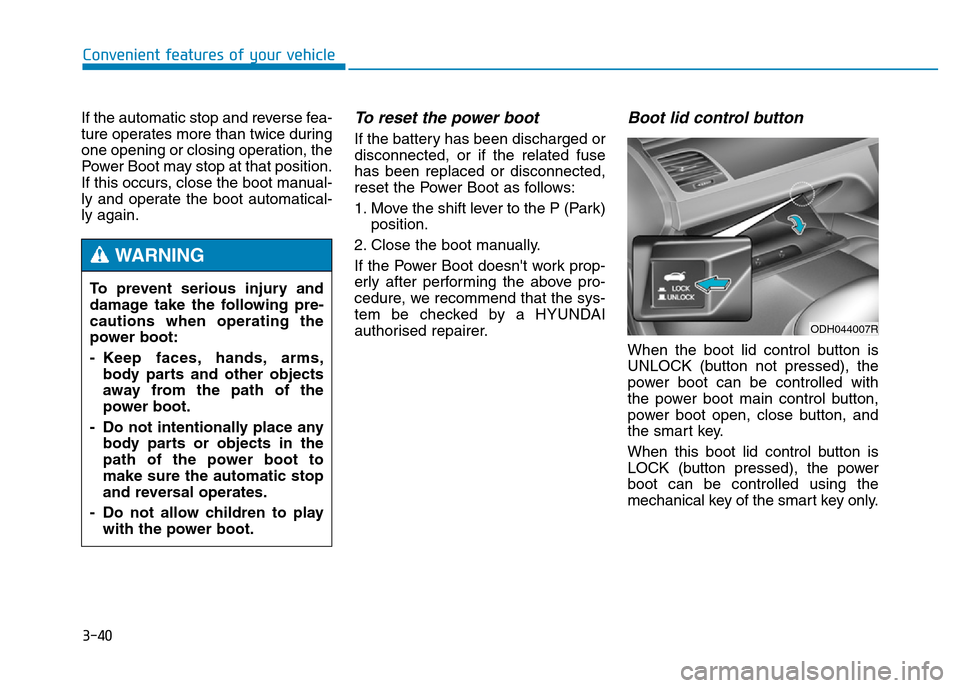
Boot lid control button
When the boot lid control button is
UNLOCK (button not pressed), the
power boot can be controlled with
the power boot main control button,
power boot open, close button, and
the smart key.
When this boot lid control button is
LOCK (button pressed), the power
boot can be controlled using the
mechanical key of the smart key only. To prevent serious injury and
damage take the following pre-
cautions when operating the
power boot:
- Keep faces, hands, arms,
body parts and other objects
away from the path of the
power boot.
- Do not intentionally place any
body parts or objects in the
path of the power boot to
make sure the automatic stop
and reversal operates.
- Do not allow children to play
with the power boot.
WARNING
ODH044007R
Page 132 of 502
3-41
Convenient features of your vehicle
3
Even though the boot lid control but-
ton is in the LOCK position (button
pressed), the boot will still be pro-
pelled upward by mechanical force if
the boot is manually opened more
than 10 degrees beyond the fully
closed position. In addition, if the
boot is manually closed to the sec-
ondary latch position, the boot will be
electrically moved to the fully latched
position.Emergency boot safety
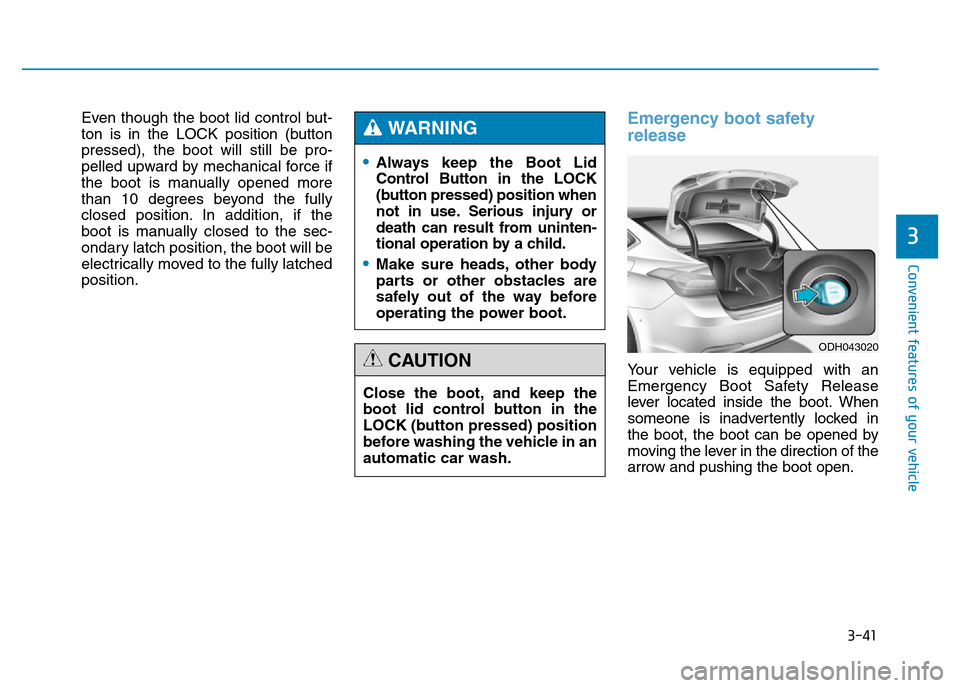
release
Your vehicle is equipped with an
Emergency Boot Safety Release
lever located inside the boot. When
someone is inadvertently locked in
the boot, the boot can be opened by
moving the lever in the direction of the
arrow and pushing the boot open.
•Always keep the Boot Lid
Control Button in the LOCK
(button pressed) position when
not in use. Serious injury or
death can result from uninten-
tional operation by a child.
•Make sure heads, other body
parts or other obstacles are
safely out of the way before
operating the power boot.
WARNING
Close the boot, and keep the
boot lid control button in the
LOCK (button pressed) position
before washing the vehicle in an
automatic car wash.
CAUTION
ODH043020
Page 133 of 502
3-42
Convenient features of your vehicle
•You and your passengers
must be aware of the location
of the Emergency Boot Safety
Release lever in this vehicle
and how to open the boot in
case you are accidentally
locked in the boot.
•NEVER allow anyone to occu-
py the boot of the vehicle at
any time. If the boot is partial-
ly or totally latched and the
person is unable to get out,
serious injury or death could
occur due to lack of ventila-
tion, exhaust fumes and rapid
heat build-up, or because of
exposure to cold weather con-
ditions. The boot is also a
highly dangerous location in
the event of a crash because it
is not a protected occupant
space but is a part of the vehi-
cle’s crush zone.
(Continued)
(Continued)
•Your vehicle should be kept
locked and the Smart Key
should be kept out of the reach
of children. Parents should
teach their children about the
dangers of playing in boots.
•Use the release lever for
emergencies only.
WARNING
Page 134 of 502
3-43
Convenient features of your vehicle
3
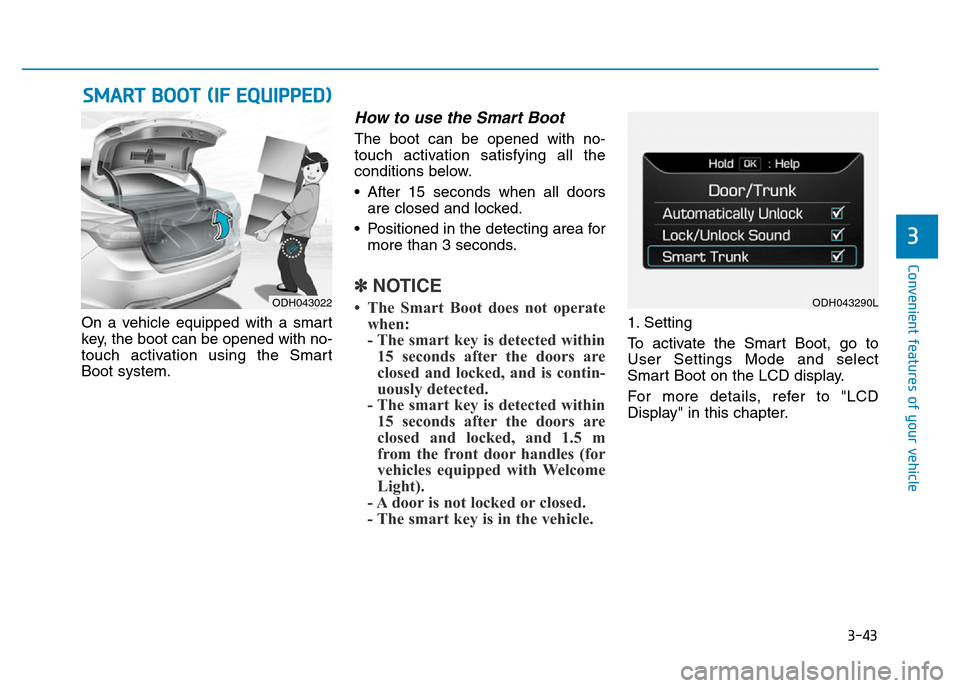
On a vehicle equipped with a smart
key, the boot can be opened with no-
touch activation using the Smart
Boot system.
How to use the Smart Boot
The boot can be opened with no-
touch activation satisfying all the
conditions below.
• After 15 seconds when all doors
are closed and locked.
• Positioned in the detecting area for
more than 3 seconds.
✽NOTICE
• The Smart Boot does not operate
when:
- The smart key is detected within
15 seconds after the doors are
closed and locked, and is contin-
uously detected.
- The smart key is detected within
15 seconds after the doors are
closed and locked, and 1.5 m
from the front door handles (for
vehicles equipped with Welcome
Light).
- A door is not locked or closed.
- The smart key is in the vehicle. 1. Setting
To activate the Smart Boot, go to
User Settings Mode and select
Smart Boot on the LCD display.
For more details, refer to "LCD
Display" in this chapter.
SMART BOOT (IF EQUIPPED)
ODH043022ODH043290L
Page 135 of 502
3-44
Convenient features of your vehicle
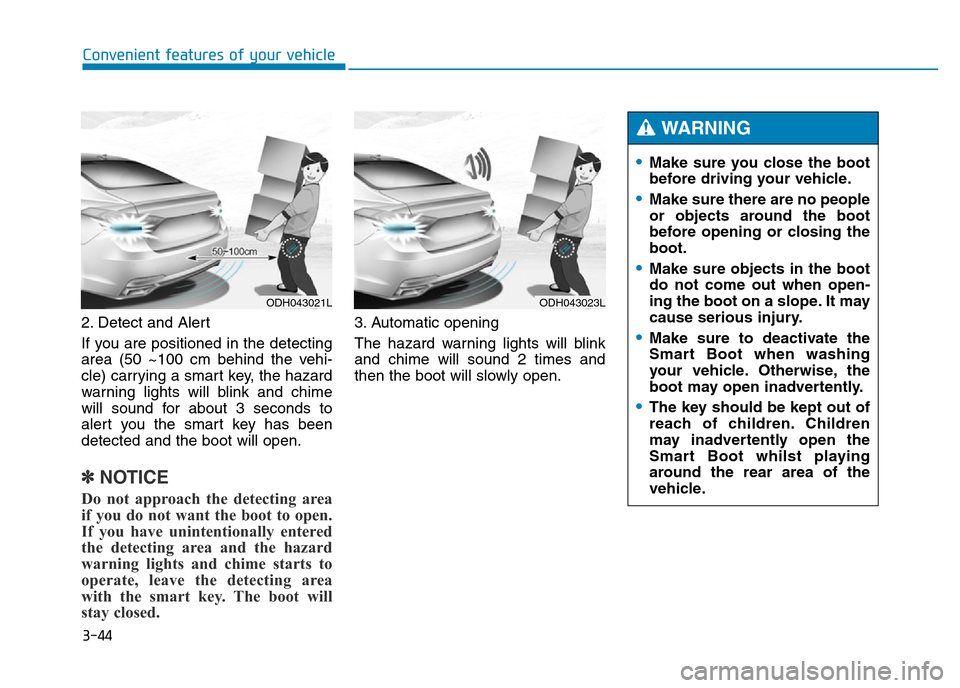
2. Detect and Alert
If you are positioned in the detecting
area (50 ~100 cm behind the vehi-
cle) carrying a smart key, the hazard
warning lights will blink and chime
will sound for about 3 seconds to
alert you the smart key has been
detected and the boot will open.
✽NOTICE
Do not approach the detecting area
if you do not want the boot to open.
If you have unintentionally entered
the detecting area and the hazard
warning lights and chime starts to
operate, leave the detecting area
with the smart key. The boot will
stay closed.
3. Automatic opening
The hazard warning lights will blink
and chime will sound 2 times and
then the boot will slowly open.
ODH043021LODH043023L
•Make sure you close the boot
before driving your vehicle.
•Make sure there are no people
or objects around the boot
before opening or closing the
boot.
•Make sure objects in the boot
do not come out when open-
ing the boot on a slope. It may
cause serious injury.
•Make sure to deactivate the
Smart Boot when washing
your vehicle. Otherwise, the
boot may open inadvertently.
•The key should be kept out of
reach of children. Children
may inadvertently open the
Smart Boot whilst playing
around the rear area of the
vehicle.
WARNING
Page 136 of 502
3-45
Convenient features of your vehicle
3
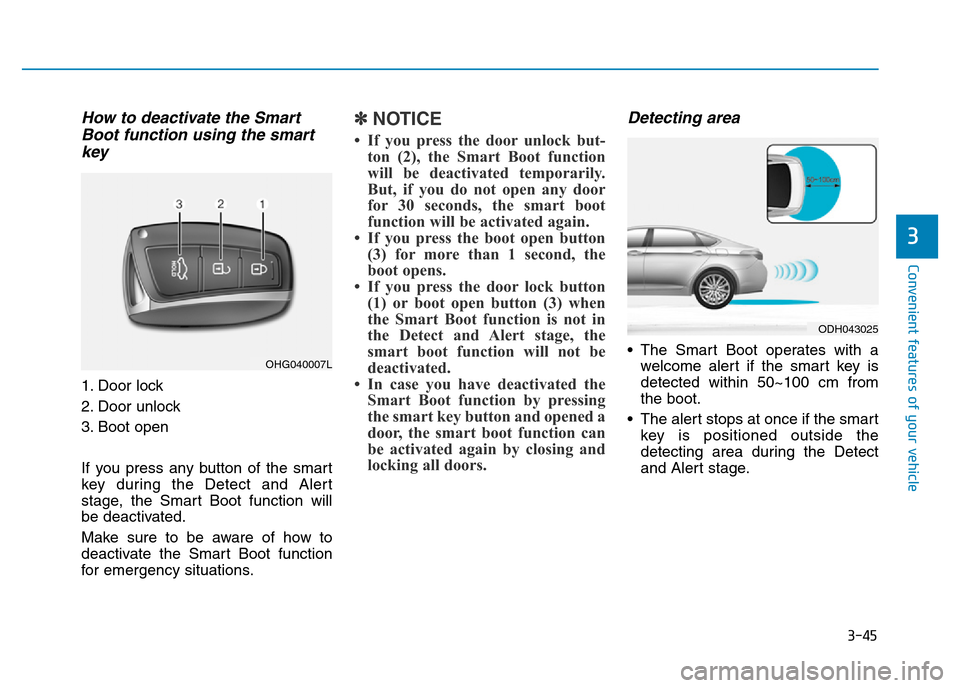
How to deactivate the Smart
Boot function using the smart
key
1. Door lock
2. Door unlock
3. Boot open
If you press any button of the smart
key during the Detect and Alert
stage, the Smart Boot function will
be deactivated.
Make sure to be aware of how to
deactivate the Smart Boot function
for emergency situations.
✽NOTICE
• If you press the door unlock but-
ton (2), the Smart Boot function
will be deactivated temporarily.
But, if you do not open any door
for 30 seconds, the smart boot
function will be activated again.
• If you press the boot open button
(3) for more than 1 second, the
boot opens.
• If you press the door lock button
(1) or boot open button (3) when
the Smart Boot function is not in
the Detect and Alert stage, the
smart boot function will not be
deactivated.
• In case you have deactivated the
Smart Boot function by pressing
the smart key button and opened a
door, the smart boot function can
be activated again by closing and
locking all doors.
Detecting area
• The Smart Boot operates with a
welcome alert if the smart key is
detected within 50~100 cm from
the boot.
• The alert stops at once if the smart
key is positioned outside the
detecting area during the Detect
and Alert stage.OHG040007L
ODH043025
Page 137 of 502
3-46
Convenient features of your vehicle
✽NOTICE
• The Smart Boot function will not
work if any of the following occurs:
- The smart key is close to a radio
transmitter such as a radio sta-
tion or an airport which can
interfere with normal operation
of the transmitter.
- The smart key is near a mobile
two way radio system or a mobile
phone.
- Another vehicle's smart key is
being operated close to your
vehicle.
• The detecting range may decrease
or increase when:
- One side of the tyre is raised to
replace a tyre or to inspect the
vehicle.
- The vehicle is slantingly parked
on a slope or unpaved road, etc.
Page 155 of 502
3-64
Convenient features of your vehicle
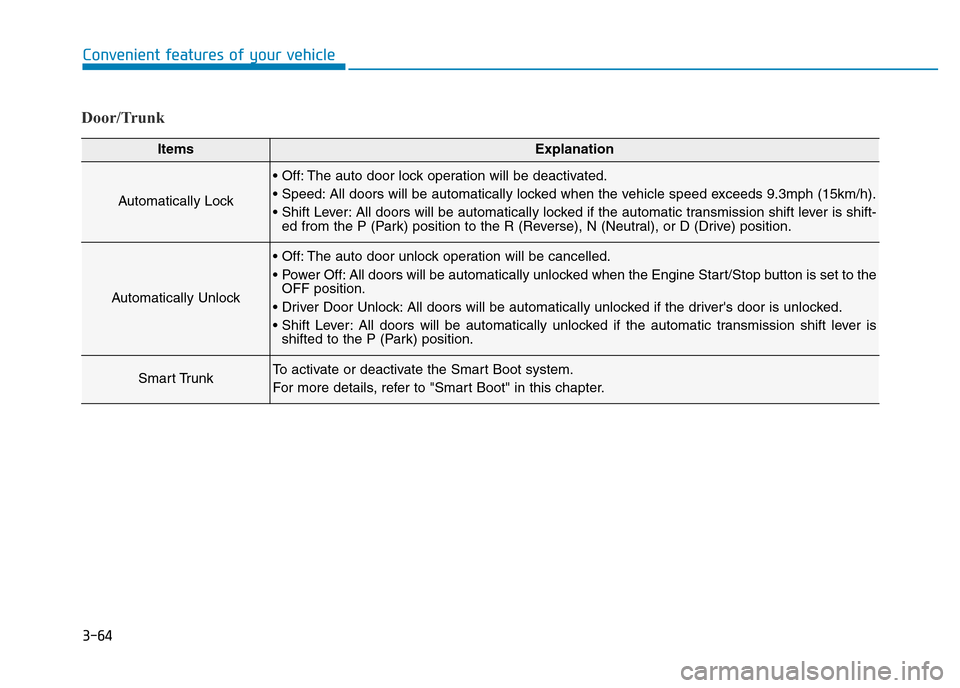
Door/Trunk
ItemsExplanation
Automatically Lock
• Off: The auto door lock operation will be deactivated.
• Speed: All doors will be automatically locked when the vehicle speed exceeds 9.3mph (15km/h).
• Shift Lever: All doors will be automatically locked if the automatic transmission shift lever is shift-
ed from the P (Park) position to the R (Reverse), N (Neutral), or D (Drive) position.
Automatically Unlock
• Off: The auto door unlock operation will be cancelled.
• Power Off: All doors will be automatically unlocked when the Engine Start/Stop button is set to the
OFF position.
• Driver Door Unlock: All doors will be automatically unlocked if the driver's door is unlocked.
• Shift Lever: All doors will be automatically unlocked if the automatic transmission shift lever is
shifted to the P (Park) position.
Smart TrunkTo activate or deactivate the Smart Boot system.
For more details, refer to "Smart Boot" in this chapter.
Page 164 of 502
3-73
Convenient features of your vehicle
3
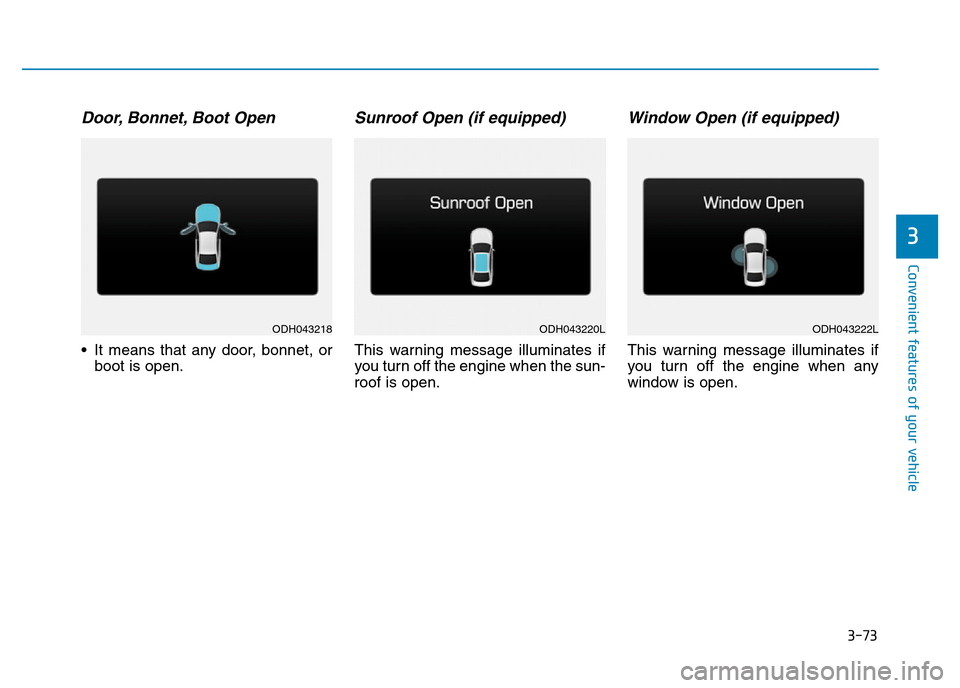
Door, Bonnet, Boot Open
• It means that any door, bonnet, or
boot is open.
Sunroof Open (if equipped)
This warning message illuminates if
you turn off the engine when the sun-
roof is open.
Window Open (if equipped)
This warning message illuminates if
you turn off the engine when any
window is open.
ODH043218ODH043220LODH043222L