mirror Hyundai Genesis 2016 Owner's Manual - RHD (UK, Australia)
[x] Cancel search | Manufacturer: HYUNDAI, Model Year: 2016, Model line: Genesis, Model: Hyundai Genesis 2016Pages: 502, PDF Size: 13.19 MB
Page 13 of 502
1-2
EXTERIOR OVERVIEW (I)
Your vehicle at a glance
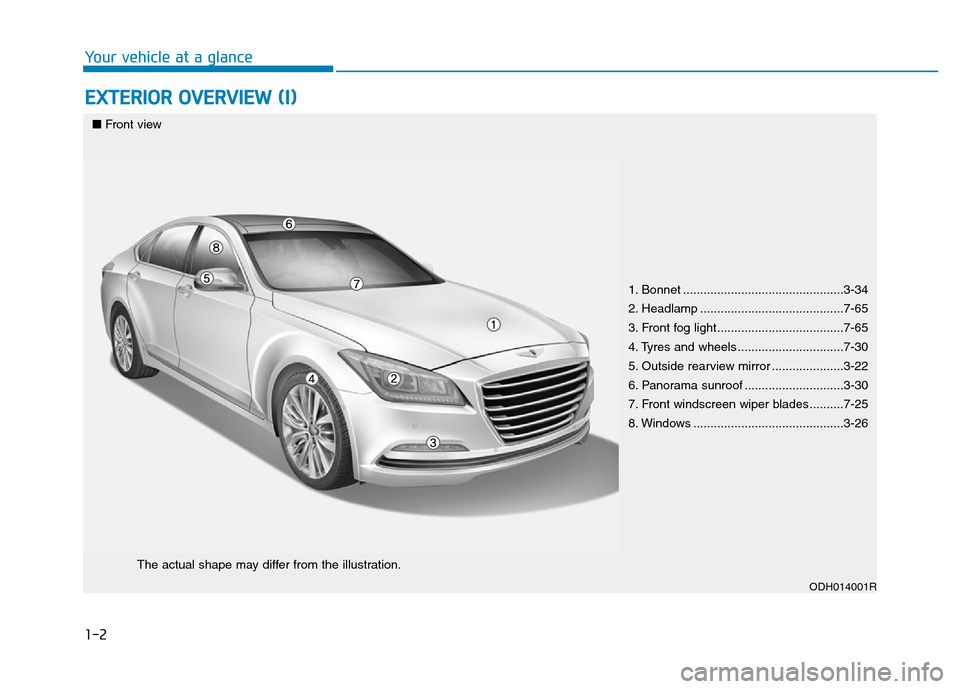
1. Bonnet ...............................................3-34
2. Headlamp ..........................................7-65
3. Front fog light.....................................7-65
4. Tyres and wheels ...............................7-30
5. Outside rearview mirror .....................3-22
6. Panorama sunroof .............................3-30
7. Front windscreen wiper blades ..........7-25
8. Windows ............................................3-26
ODH014001R
■Front view
The actual shape may differ from the illustration.
Page 15 of 502
1-4
Your vehicle at a glance
INTERIOR OVERVIEW
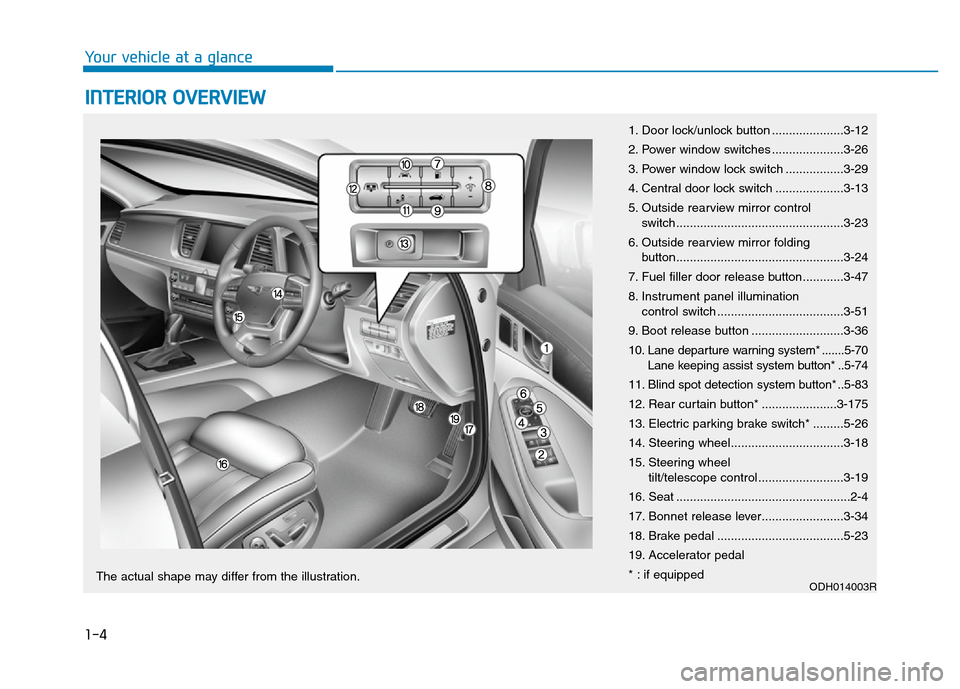
1. Door lock/unlock button .....................3-12
2. Power window switches .....................3-26
3. Power window lock switch .................3-29
4. Central door lock switch ....................3-13
5. Outside rearview mirror control
switch.................................................3-23
6. Outside rearview mirror folding
button.................................................3-24
7. Fuel filler door release button............3-47
8. Instrument panel illumination
control switch .....................................3-51
9. Boot release button ...........................3-36
10. Lane departure warning system* .......5-70
Lane keeping assist system button* ..5-74
11. Blind spot detection system button* ..5-83
12. Rear curtain button* ......................3-175
13. Electric parking brake switch* .........5-26
14. Steering wheel.................................3-18
15. Steering wheel
tilt/telescope control .........................3-19
16. Seat ...................................................2-4
17. Bonnet release lever........................3-34
18. Brake pedal .....................................5-23
19. Accelerator pedal
* : if equipped
ODH014003RThe actual shape may differ from the illustration.
Page 92 of 502
Convenient features of your vehicle
Accessing your vehicle .........................................3-4
Smart key ............................................................................3-4
Smart key precautions .....................................................3-7
Immobiliser System ........................................................3-10
Door locks .............................................................3-11
Operating door locks from outside the vehicle .....3-11
Power Door Latch ...........................................................3-12
Operating door locks from inside the vehicle ........3-12
Auto door lock/unlock features ................................3-14
Child-protector rear door locks ..................................3-14
Theft-alarm system.............................................3-15
Driver position memory system .........................3-16
Storing memory positions .............................................3-16
Easy access function .....................................................3-17
Steering wheel......................................................3-18
Electric power steering (EPS) ......................................3-18
Tilt steering/Telescope steering .................................3-19
Heated steering wheel ...................................................3-20
Horn ....................................................................................3-20
Mirrors ...................................................................3-21
Inside rearview mirror....................................................3-21
Outside rearview mirror ..............................................3-22
Reverse parking aid function.......................................3-25
Windows ................................................................3-26
Power windows ................................................................3-26
Panorama sunroof ...............................................3-30
Sunshade ...........................................................................3-30
Sliding the sunroof ........................................................3-31
Tilting the sunroof ........................................................3-31
Closing the sunroof ........................................................3-32
Resetting the sunroof ....................................................3-33
Bonnet ...................................................................3-34
Opening the bonnet ......................................................3-34
Closing the bonnet ..........................................................3-34
Boot........................................................................3-36
Non-Powered Boot.........................................................3-36
Power Boot .......................................................................3-37
Emergency boot safety release ..................................3-41
Smart boot ............................................................3-43
Fuel filler door .....................................................3-47
Opening the fuel filler door .........................................3-47
Closing the fuel filler door ...........................................3-47
Emergency fuel filler lid release .................................3-49
Instrument cluster................................................3-50
Instrument Cluster Control............................................3-51
LCD Display Control ........................................................3-52
Gauges ...............................................................................3-52
3
Page 95 of 502
3-4
Convenient features of your vehicle
Smart key
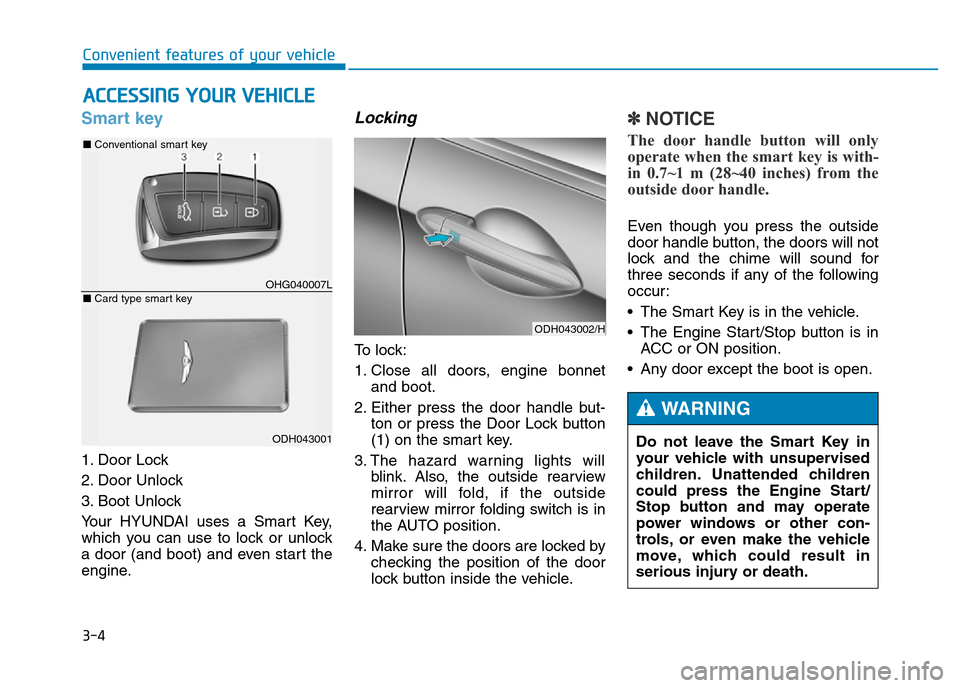
1. Door Lock
2. Door Unlock
3. Boot Unlock
Your HYUNDAI uses a Smart Key,
which you can use to lock or unlock
a door (and boot) and even start the
engine.
Locking
To lock:
1. Close all doors, engine bonnet
and boot.
2. Either press the door handle but-
ton or press the Door Lock button
(1) on the smart key.
3. The hazard warning lights will
blink. Also, the outside rearview
mirror will fold, if the outside
rearview mirror folding switch is in
the AUTO position.
4. Make sure the doors are locked by
checking the position of the door
lock button inside the vehicle.
✽NOTICE
The door handle button will only
operate when the smart key is with-
in 0.7~1 m (28~40 inches) from the
outside door handle.
Even though you press the outside
door handle button, the doors will not
lock and the chime will sound for
three seconds if any of the following
occur:
• The Smart Key is in the vehicle.
• The Engine Start/Stop button is in
ACC or ON position.
• Any door except the boot is open.
ACCESSING YOUR VEHICLE
ODH043002/H
Do not leave the Smart Key in
your vehicle with unsupervised
children. Unattended children
could press the Engine Start/
Stop button and may operate
power windows or other con-
trols, or even make the vehicle
move, which could result in
serious injury or death.
WARNING
OHG040007L
■Conventional smart key
ODH043001
■Card type smart key
Page 96 of 502
3-5
Convenient features of your vehicle
Unlocking
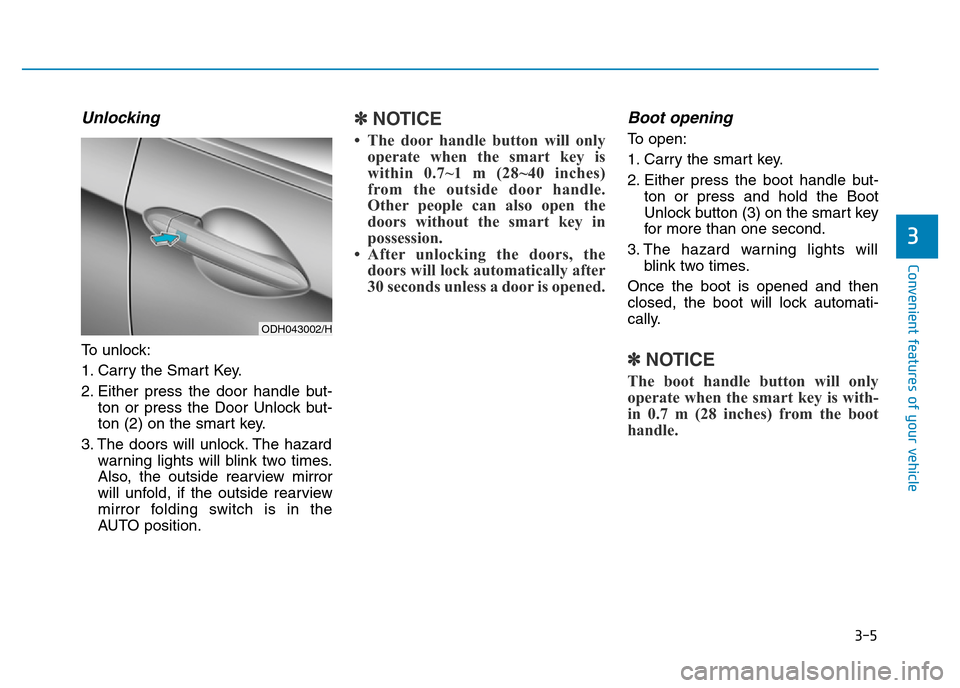
To unlock:
1. Carry the Smart Key.
2. Either press the door handle but-
ton or press the Door Unlock but-
ton (2) on the smart key.
3. The doors will unlock. The hazard
warning lights will blink two times.
Also, the outside rearview mirror
will unfold, if the outside rearview
mirror folding switch is in the
AUTO position.
✽NOTICE
• The door handle button will only
operate when the smart key is
within 0.7~1 m (28~40 inches)
from the outside door handle.
Other people can also open the
doors without the smart key in
possession.
• After unlocking the doors, the
doors will lock automatically after
30 seconds unless a door is opened.
Boot opening
To open:
1. Carry the smart key.
2. Either press the boot handle but-
ton or press and hold the Boot
Unlock button (3) on the smart key
for more than one second.
3. The hazard warning lights will
blink two times.
Once the boot is opened and then
closed, the boot will lock automati-
cally.
✽NOTICE
The boot handle button will only
operate when the smart key is with-
in 0.7 m (28 inches) from the boot
handle.
3
ODH043002/H
Page 107 of 502
3-16
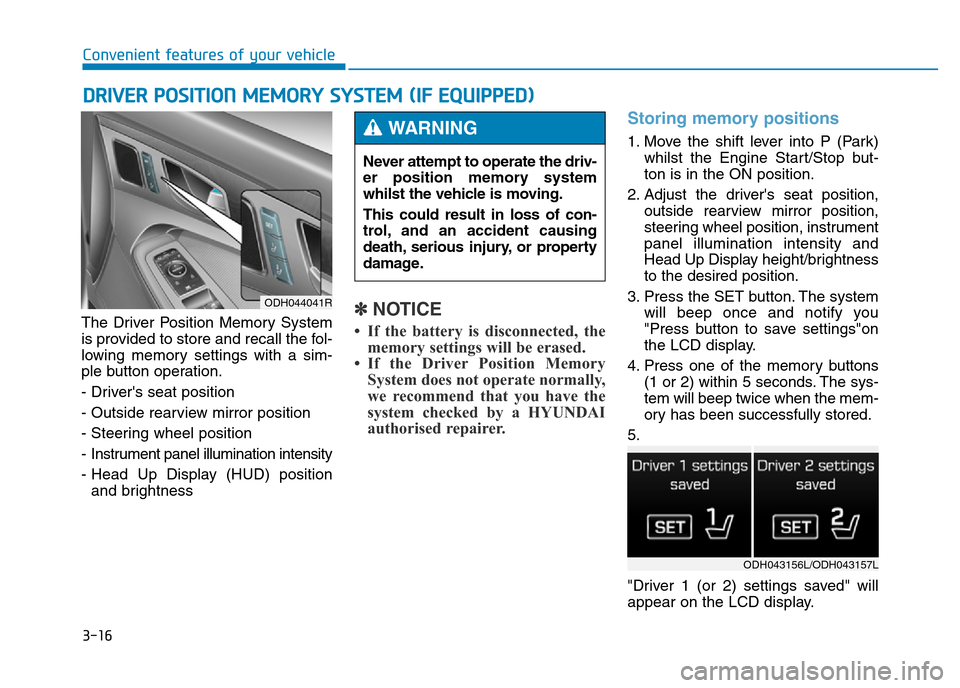
The Driver Position Memory System
is provided to store and recall the fol-
lowing memory settings with a sim-
ple button operation.
- Driver's seat position
- Outside rearview mirror position
- Steering wheel position
- Instrument panel illumination intensity
- Head Up Display (HUD) position
and brightness✽NOTICE
• If the battery is disconnected, the
memory settings will be erased.
• If the Driver Position Memory
System does not operate normally,
we recommend that you have the
system checked by a HYUNDAI
authorised repairer.
Storing memory positions
1. Move the shift lever into P (Park)
whilst the Engine Start/Stop but-
ton is in the ON position.
2. Adjust the driver's seat position,
outside rearview mirror position,
steering wheel position, instrument
panel illumination intensity and
Head Up Display height/brightness
to the desired position.
3. Press the SET button. The system
will beep once and notify you
"Press button to save settings"on
the LCD display.
4. Press one of the memory buttons
(1 or 2) within 5 seconds. The sys-
tem will beep twice when the mem-
ory has been successfully stored.
5.
"Driver 1 (or 2) settings saved" will
appear on the LCD display.
DRIVER POSITION MEMORY SYSTEM (IF EQUIPPED)
Convenient features of your vehicle
Never attempt to operate the driv-
er position memory system
whilst the vehicle is moving.
This could result in loss of con-
trol, and an accident causing
death, serious injury, or property
damage.
WARNING
ODH043156L/ODH043157L
ODH044041R
Page 108 of 502
3-17
Convenient features of your vehicle
Recalling memory position
1. Move the shift lever into P (Park)
whilst the Engine Start/Stop but-
ton is in the ON position.
2. Press the desired memory button
(1 or 2). The system will beep
once, and then the driver's seat
position, outside rearview mirror
position, steering wheel position,
instrument panel illumination
intensity and Head Up Display
height/brightness will automatical-
ly adjust to the stored positions.
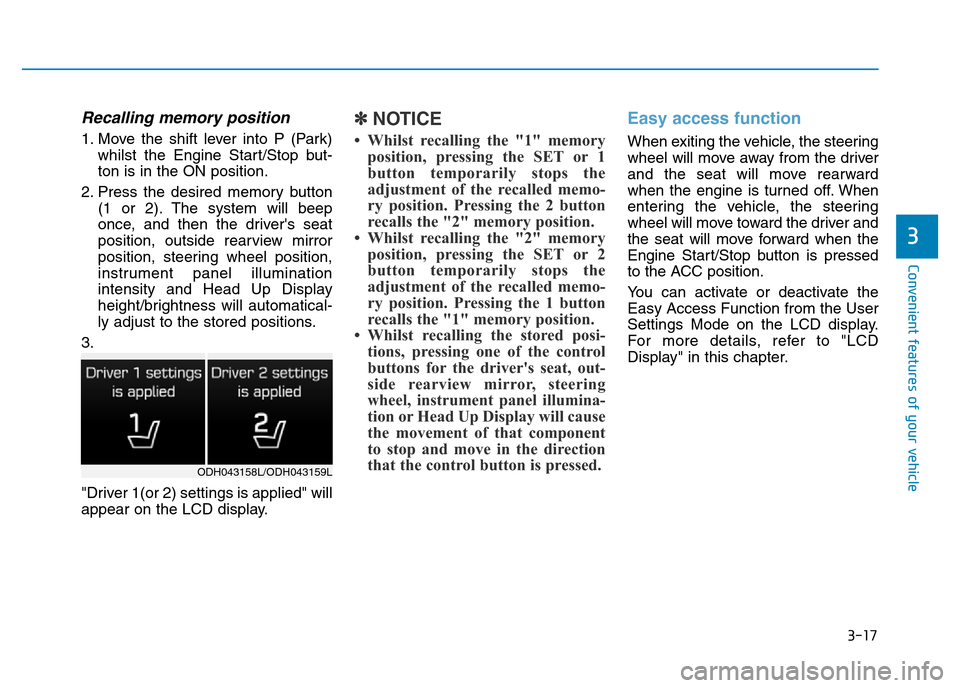
3.
"Driver 1(or 2) settings is applied" will
appear on the LCD display.
✽NOTICE
• Whilst recalling the "1" memory
position, pressing the SET or 1
button temporarily stops the
adjustment of the recalled memo-
ry position. Pressing the 2 button
recalls the "2" memory position.
• Whilst recalling the "2" memory
position, pressing the SET or 2
button temporarily stops the
adjustment of the recalled memo-
ry position. Pressing the 1 button
recalls the "1" memory position.
• Whilst recalling the stored posi-
tions, pressing one of the control
buttons for the driver's seat, out-
side rearview mirror, steering
wheel, instrument panel illumina-
tion or Head Up Display will cause
the movement of that component
to stop and move in the direction
that the control button is pressed.
Easy access function
When exiting the vehicle, the steering
wheel will move away from the driver
and the seat will move rearward
when the engine is turned off. When
entering the vehicle, the steering
wheel will move toward the driver and
the seat will move forward when the
Engine Start/Stop button is pressed
to the ACC position.
You can activate or deactivate the
Easy Access Function from the User
Settings Mode on the LCD display.
For more details, refer to "LCD
Display" in this chapter.
3
ODH043158L/ODH043159L
Page 112 of 502
3-21
Convenient features of your vehicle
3
MIRRORS
Inside rearview mirror
Before you start driving, adjust the
rearview mirror to the centre on the
view through the rear window.
Electric Chromic Mirror (ECM)
(if equipped)
The electric rearview mirror automati-
cally controls the glare from the head-
lamp of the car behind you in night-
time or low light driving conditions.
When the engine is running, the
glare is automatically controlled by
the sensor mounted in the rearview
mirror. The sensor detects the light
level around the vehicle, and auto-
matically adjusts to control the head-
lamp glare from vehicles behind you.
Whenever the shift lever is placed in
R (Reverse), the mirror will automat-
ically go to the brightest setting in
order to improve the driver’s view
behind the vehicle. Make sure your line of sight is
not obstructed. Do not place
objects in the rear seat, cargo
area, or behind the rear head
restraints which could interfere
with your vision through the
rear window.
WARNING
To prevent serious injury during
an accident or deployment of
the air bag, do not modify the
rearview mirror and do not
install a wide mirror.
WARNING
NEVER adjust the mirror whilst
driving. This may cause loss of
vehicle control resulting in an
accident.
WARNING
Page 113 of 502
3-22
Convenient features of your vehicle
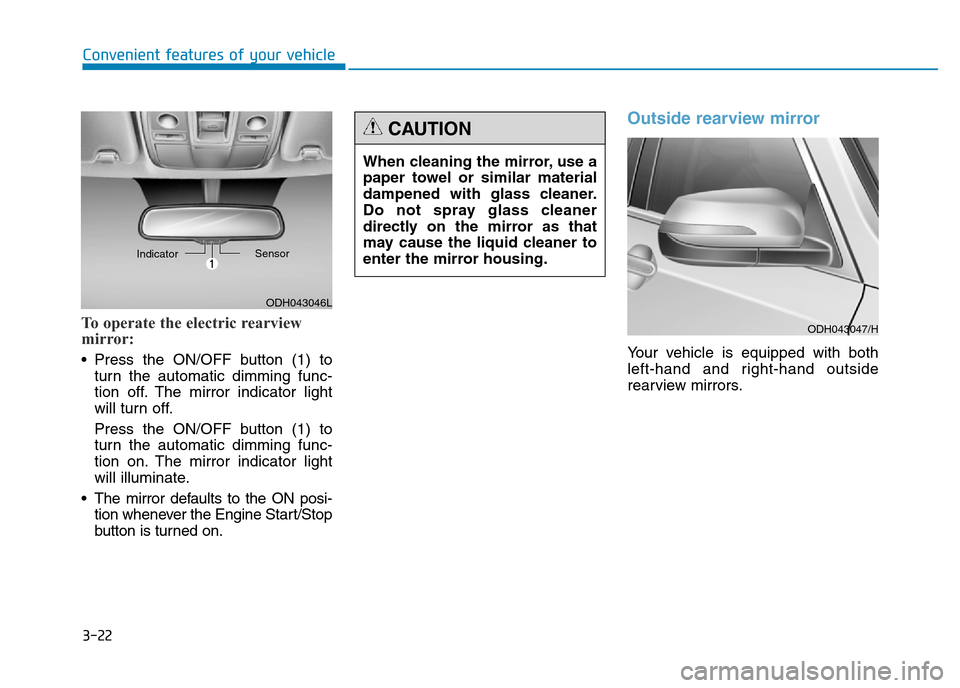
To operate the electric rearview
mirror:
• Press the ON/OFF button (1) to
turn the automatic dimming func-
tion off. The mirror indicator light
will turn off.
Press the ON/OFF button (1) to
turn the automatic dimming func-
tion on. The mirror indicator light
will illuminate.
• The mirror defaults to the ON posi-
tion whenever the Engine Start/Stop
button is turned on.
Outside rearview mirror
Your vehicle is equipped with both
left-hand and right-hand outside
rearview mirrors.
ODH043046L IndicatorSensor
When cleaning the mirror, use a
paper towel or similar material
dampened with glass cleaner.
Do not spray glass cleaner
directly on the mirror as that
may cause the liquid cleaner to
enter the mirror housing.
CAUTION
ODH043047/H
Page 114 of 502
3-23
Convenient features of your vehicle
3
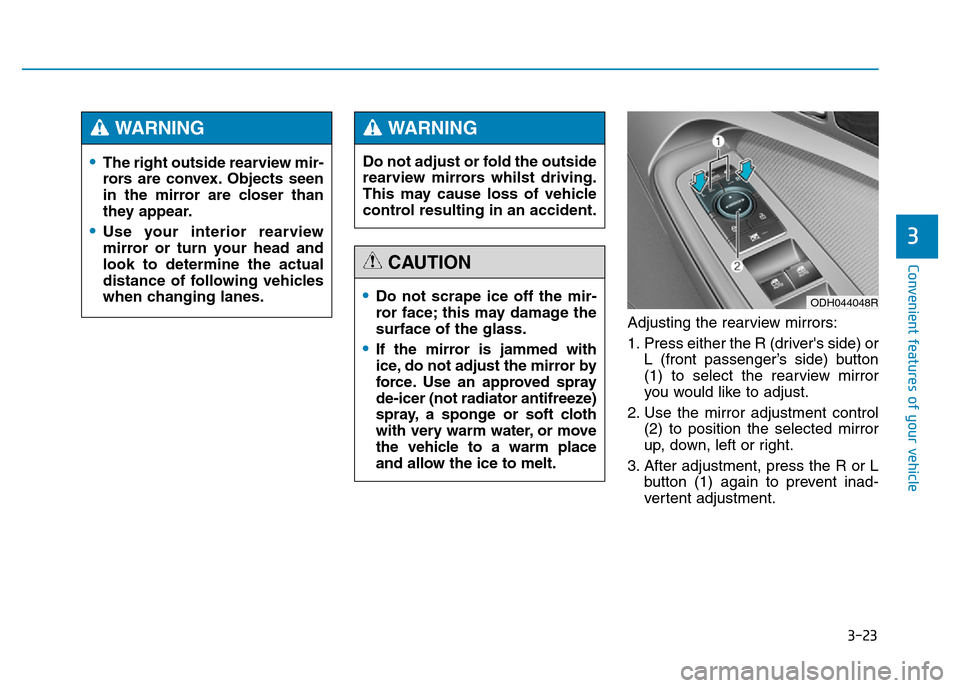
Adjusting the rearview mirrors:
1. Press either the R (driver's side) or
L (front passenger’s side) button
(1) to select the rearview mirror
you would like to adjust.
2. Use the mirror adjustment control
(2) to position the selected mirror
up, down, left or right.
3. After adjustment, press the R or L
button (1) again to prevent inad-
vertent adjustment.
•The right outside rearview mir-
rors are convex. Objects seen
in the mirror are closer than
they appear.
•Use your interior rearview
mirror or turn your head and
look to determine the actual
distance of following vehicles
when changing lanes.
WARNING
Do not adjust or fold the outside
rearview mirrors whilst driving.
This may cause loss of vehicle
control resulting in an accident.
WARNING
•Do not scrape ice off the mir-
ror face; this may damage the
surface of the glass.
•If the mirror is jammed with
ice, do not adjust the mirror by
force. Use an approved spray
de-icer (not radiator antifreeze)
spray, a sponge or soft cloth
with very warm water, or move
the vehicle to a warm place
and allow the ice to melt.
CAUTION
ODH044048R