display Hyundai Genesis Coupe 2010 Owner's Guide
[x] Cancel search | Manufacturer: HYUNDAI, Model Year: 2010, Model line: Genesis Coupe, Model: Hyundai Genesis Coupe 2010Pages: 322, PDF Size: 25.93 MB
Page 176 of 322
Features of your vehicle
124
4
1. RANDOM Play Button
Press the button for less than 0.8 second
to to activate or deactivate the random
playback of the songs within the current
category. Press the button for longer than
0.8 second to randomly play all songs in
the entire album of the iPod. Press the
button once again to cancel the mode.
2. REPEAT Button
Press the button to repeat the song cur-
rently played.
3. SEEK TRACK UP/DOWN Button
] button for
less than 0.8 second to play from the
beginning of the song currently played.
Press the button for less than 0.8 sec-ond and press again within 1 second to
play the previous track. Press the but-
ton for 0.8 second or longer to play
songs reverse direction in fast speed.
] button for less than 0.8 second to move to the next
track. Press the button for 0.8 second or
longer to play the song in forward direc-
tion in fast speed. 4. AUX Selection Button
If iPod is connected, it switches to the
iPod mode from the previous mode to
play the song files stored in the iPod.
5. AST Button
Scans each song in the iPod for 10 sec-
onds. Press the button once again tocancel scanning.
6. Display
Displays the current time, mode, play
track number, play time, RDM, RPT and
AST status.
7. FOLDER UP/DOWN Button
] button to move the
category and display the first song in
the category. Press [ENTER] button to
move to the category displayed. It will
play the first song in the folder.
] button to move the category and display the first song in
the category. Press [ENTER] button to
move to the category displayed.
(PLAYLISTS ➟
ARTISTS ➟ ALBUMS ➟
GENRES ➟ SONGS ➟ COMPOSERS ➟
PLAYLIST ➟...) 8. TUNE FILE UP/DOWN Button
] button to select
the next song and press [ENTER] but-
ton to play.
] button to select the previous song and press [ENTER]
button to play.
9. INFO Button
Displays the information of the file cur-
rently played in the order of TITLE ➟
ARTIST ➟ALBUM ➟NORMAL DISPLAY
➟ TITLE ➟... (Displays no information if
the file has no song information.)
Page 177 of 322
4125
Features of your vehicle
✽✽NOTICE FOR USING iPod
DEVICE
Some iPod models might not sup- port the communication protocol
and the files will not be played.
(iPod models supported: Mini, 4G,
Photo, Nano, 5G)
The order of search or playback of songs in the iPod can be different
from the order searched in the
audio system.
If the iPod crashes due to its own
malfunction, reset the iPod. (Reset:
Refer to iPod manual)
An iPod may not operate normally on low battery.CAUTION IN USING
iPod DEVICE
You need the power cable exclu- sive for an iPod in order to oper-ate an iPod with the buttons on the audio system. The PC cableprovided by Apple may cause a
malfunction and do not use it forvehicle use.
When connecting the device with an iPod cable, push in the jack
fully to not to interfere with com-munication.
When adjusting the sound effects of an iPod and the audio system,the sound effects of both devices
will overlap and might reduce ordistort the quality of the sound.
Deactivate (turn off) the equalizer function of an iPod when adjust-ing the audio system’s volume,
and turn off the equalizer of the audio system when using theequalizer of an iPod.
(Continued)
(Continued) When the iPod cable is connected, the system can be switched to theAUX mode even without the iPoddevice and can cause noise.
Disconnect the iPod cable whenyou are not using the iPod device.
When the iPod is not used for the audio system, the iPod cable has
to be separate from iPod devices.Origin display of iPod may not be displayed.
Page 193 of 322
Driving your vehicle
16
5
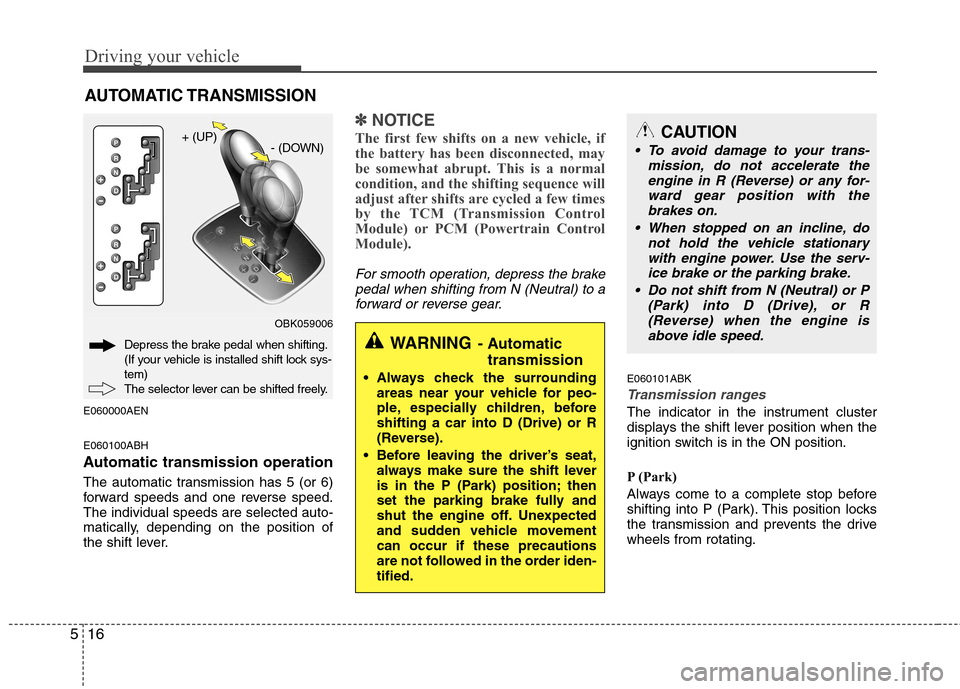
E060000AEN E060100ABH
Automatic transmission operation
The automatic transmission has 5 (or 6)
forward speeds and one reverse speed.The individual speeds are selected auto-
matically, depending on the position of
the shift lever.
✽✽
NOTICE
The first few shifts on a new vehicle, if
the battery has been disconnected, may
be somewhat abrupt. This is a normal
condition, and the shifting sequence will
adjust after shifts are cycled a few times
by the TCM (Transmission Control
Module) or PCM (Powertrain Control
Module).
For smooth operation, depress the brake pedal when shifting from N (Neutral) to aforward or reverse gear.
E060101ABK
Transmission ranges
The indicator in the instrument cluster
displays the shift lever position when the
ignition switch is in the ON position.
P (Park)
Always come to a complete stop before
shifting into P (Park). This position locks
the transmission and prevents the drivewheels from rotating.
AUTOMATIC TRANSMISSION
OBK059006
Depress the brake pedal when shifting.
(If your vehicle is installed shift lock sys-tem)
The selector lever can be shifted freely. + (UP)
- (DOWN)
WARNING- Automatic
transmission
Always check the surrounding areas near your vehicle for peo-
ple, especially children, beforeshifting a car into D (Drive) or R
(Reverse).
Before leaving the driver’s seat, always make sure the shift lever
is in the P (Park) position; then
set the parking brake fully and
shut the engine off. Unexpected
and sudden vehicle movementcan occur if these precautions
are not followed in the order iden-tified.
CAUTION
To avoid damage to your trans-
mission, do not accelerate the
engine in R (Reverse) or any for- ward gear position with thebrakes on.
When stopped on an incline, do not hold the vehicle stationarywith engine power. Use the serv-ice brake or the parking brake.
Do not shift from N (Neutral) or P (Park) into D (Drive), or R
(Reverse) when the engine isabove idle speed.
Page 284 of 322
741
Maintenance
91 - Load Index, a numerical codeassociated with the maximum
load the tire can carry.
W - Speed Rating Symbol. See the
speed rating chart in this section
for additional information.
Wheel size designation
Wheels are also marked with impor-
tant information that you need if you
ever have to replace one. The follow-
ing explains what the letters and
numbers in the wheel size designa-tion mean.
Example wheel size designation: 7.5JX18
7.5 - Rim width in inches. J - Rim contour designation.
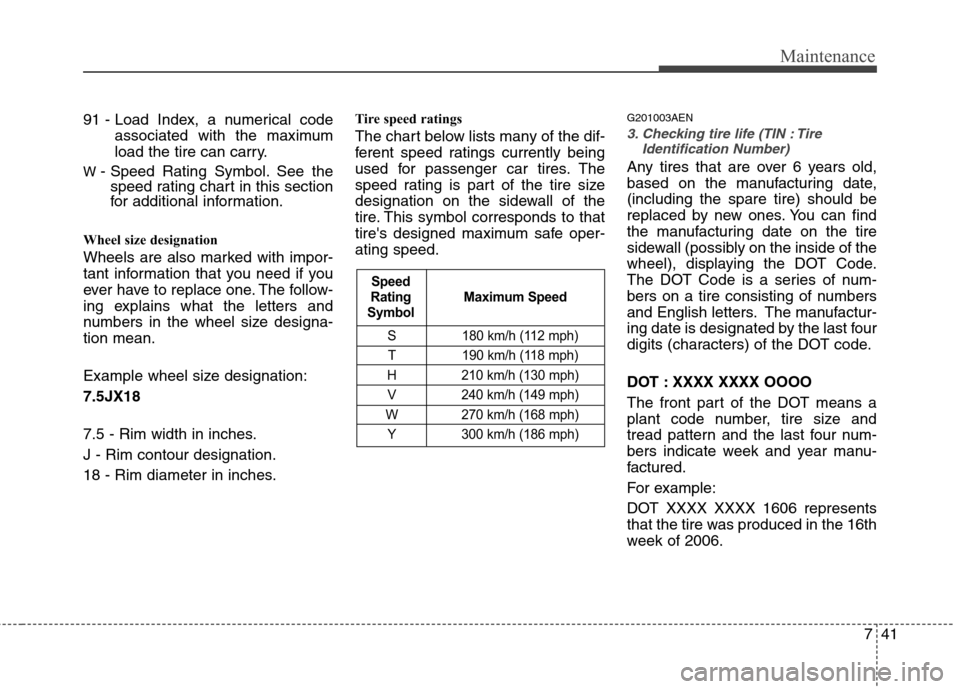
18 - Rim diameter in inches. Tire speed ratings
The chart below lists many of the dif-
ferent speed ratings currently being
used for passenger car tires. The
speed rating is part of the tire size
designation on the sidewall of the
tire. This symbol corresponds to that
tire's designed maximum safe oper-ating speed.
G201003AEN3. Checking tire life (TIN : Tire
Identification Number)
Any tires that are over 6 years old,
based on the manufacturing date,(including the spare tire) should be
replaced by new ones. You can find
the manufacturing date on the tire
sidewall (possibly on the inside of the
wheel), displaying the DOT Code.
The DOT Code is a series of num-
bers on a tire consisting of numbers
and English letters. The manufactur-
ing date is designated by the last four
digits (characters) of the DOT code.
DOT : XXXX XXXX OOOO
The front part of the DOT means a
plant code number, tire size and
tread pattern and the last four num-
bers indicate week and year manu-
factured.
For example:
DOT XXXX XXXX 1606 represents
that the tire was produced in the 16th
week of 2006.
S 180 km/h (112 mph)
T 190 km/h (118 mph)
H 210 km/h (130 mph) V 240 km/h (149 mph)
W 270 km/h (168 mph)
Y 300 km/h (186 mph)
Maximum Speed
Speed
Rating
Symbol