ignition Hyundai Genesis Coupe 2011 User Guide
[x] Cancel search | Manufacturer: HYUNDAI, Model Year: 2011, Model line: Genesis Coupe, Model: Hyundai Genesis Coupe 2011Pages: 343, PDF Size: 34.28 MB
Page 66 of 343
349
Safety features of your vehicle
C041100ABK SRS Care
The SRS is virtually maintenance-free
and so there are no parts you can safely
service by yourself. If the SRS air bag
warnin light does not illuminate when
you turn the ignition ON, or if it continu-
ously remains on, have your vehicle
immediately inspected by an authorized
HYUNDAI dealer.
Any work on the SRS system, such as
removing, installing, repairing, or any
work on the steering wheel, the frontpassenger's panel, front seats and roof
rails must be performed by an authorized
HYUNDAI dealer. Improper handling of
the SRS system may result in serious
personal injury.
WARNING
Modification to SRS components or wiring, including the addition
of any kind of badges to the pad
covers or modifications to the
body structure, can adversely
affect SRS performance and lead
to possible injury.
For cleaning the air bag pad cov- ers, use only a soft, dry cloth or
one which has been moistened
with plain water. Solvents or
cleaners could adversely affect
the air bag covers and proper
deployment of the system.
No objects should be placed over
or near the air bag modules on the
steering wheel, instrument panel,
and the front passenger's panel
above the glove box, because any
such object could cause harm if the
vehicle is in a crash severe enough
to cause the air bags to inflate.
(Continued)
(Continued)
If the air bags inflate, they must be replaced by an authorized
HYUNDAI dealer.
Do not tamper with or disconnect SRS wiring, or other components
of the SRS system. Doing so
could result in injury, due to acci-
dental inflation of the air bags or
by rendering the SRS inopera-
tive.
If components of the air bag sys- tem must be discarded, or if the
vehicle must be scrapped, certain
safety precautions must be
observed. An authorized
HYUNDAI dealer knows these
precautions and can give you the
necessary information. Failure to
follow these precautions and pro-cedures could increase the risk
of personal injury.
If your car was flooded and has soaked carpeting or water on the
flooring, you shouldn't try to start
the engine; have the car towed to
an authorized HYUNDAI dealer.
Page 71 of 343
43
Features of your vehicle
D010100AEN
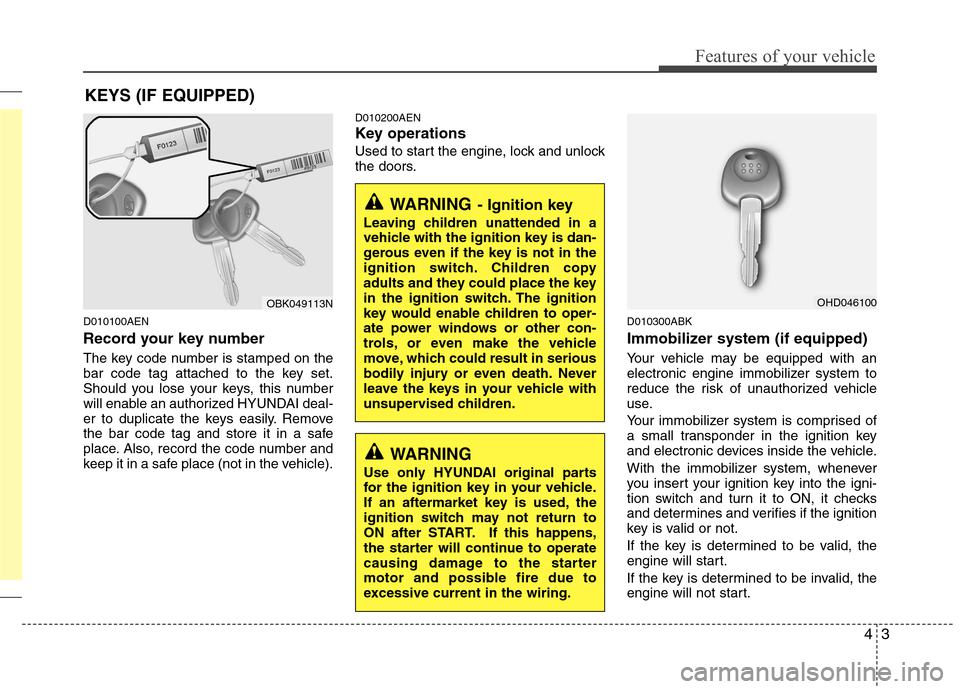
Record your key number
The key code number is stamped on the
bar code tag attached to the key set.
Should you lose your keys, this number
will enable an authorized HYUNDAI deal-
er to duplicate the keys easily. Remove
the bar code tag and store it in a safe
place. Also, record the code number and
keep it in a safe place (not in the vehicle).D010200AEN
Key operations
Used to start the engine, lock and unlock
the doors.
D010300ABK
Immobilizer system (if equipped)
Your vehicle may be equipped with an
electronic engine immobilizer system to
reduce the risk of unauthorized vehicle
use.
Your immobilizer system is comprised of
a small transponder in the ignition key
and electronic devices inside the vehicle.
With the immobilizer system, whenever
you insert your ignition key into the igni-
tion switch and turn it to ON, it checks
and determines and verifies if the ignition
key is valid or not.
If the key is determined to be valid, the
engine will start.
If the key is determined to be invalid, the
engine will not start.
KEYS (IF EQUIPPED)
WARNING
- Ignition key
Leaving children unattended in a
vehicle with the ignition key is dan-
gerous even if the key is not in the
ignition switch. Children copy
adults and they could place the key
in the ignition switch. The ignition
key would enable children to oper-
ate power windows or other con-
trols, or even make the vehicle
move, which could result in serious
bodily injury or even death. Never
leave the keys in your vehicle with
unsupervised children.
OBK049113N
WARNING
Use only HYUNDAI original parts
for the ignition key in your vehicle.
If an aftermarket key is used, the
ignition switch may not return to
ON after START. If this happens,
the starter will continue to operate
causing damage to the starter
motor and possible fire due to
excessive current in the wiring.
OHD046100
Page 72 of 343
Features of your vehicle
4
4
To deactivate the immobilizer sys-
tem:
Insert the ignition key into the key cylin-
der and turn it to the ON position.
To activate the immobilizer system:
Turn the ignition key to the OFF position.
The immobilizer system activates auto-
matically. Without a valid ignition key for
your vehicle, the engine will not start.
✽✽ NOTICE
When starting the engine, do not use the
key with other immobilizer keys around.
Otherwise the engine may not start or
may stop soon after it starts. Keep each
key separate in order to avoid a starting
malfunction. ✽
✽
NOTICE
If you need additional keys or lose your
keys, consult an authorized HYUNDAI
dealer.
CAUTION
The transponder in your ignition key is an important part of the
immobilizer system. It is designedto give years of trouble-free service,however you should avoid expo-sure to moisture, static electricity
and rough handling. Immobilizersystem malfunction could occur.
CAUTION
Do not put metal accessories nearthe ignition switch. Metal acces-
sories may interrupt the transpon-der signal and may prevent theengine from being started.
WARNING
In order to prevent theft of your
vehicle, do not leave spare keys
anywhere in your vehicle. Your
Immobilizer password is a cus-
tomer unique password and should
be kept confidential. Do not leave
this number anywhere in your vehi-
cle.
CAUTION
Do not change, alter or adjust the immobilizer system because it
could cause the immobilizer sys- tem to malfunction and should onlybe serviced by an authorized HYUNDAI dealer.
Malfunctions caused by improperalterations, adjustments or modifi-cations to the immobilizer system are not covered by your vehicle
manufacturer warranty.
Page 73 of 343
45
Features of your vehicle
D040000ABK
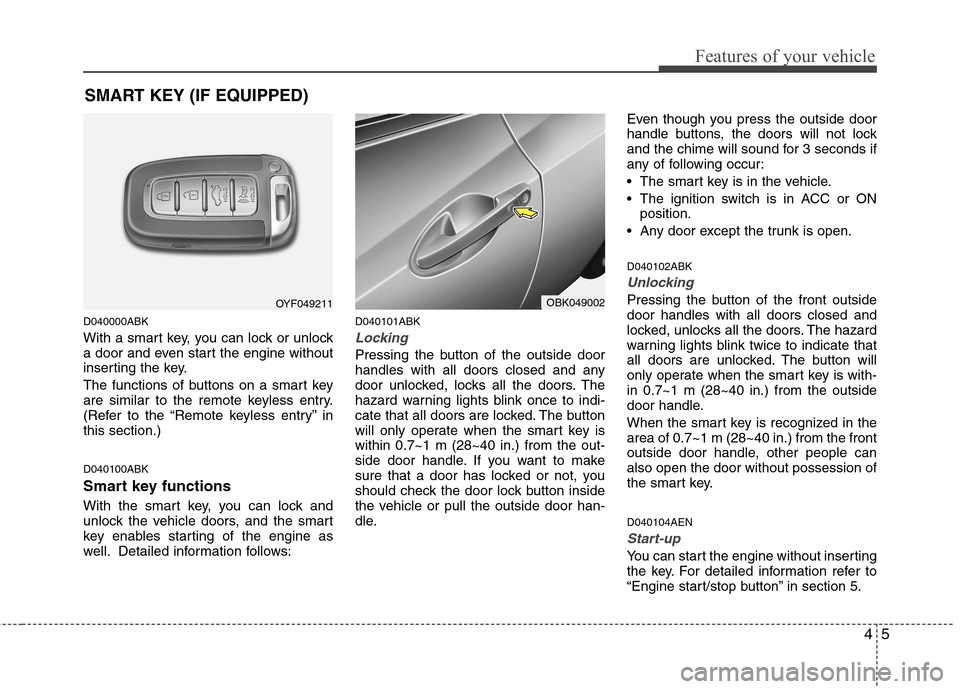
With a smart key, you can lock or unlock
a door and even start the engine without
inserting the key.
The functions of buttons on a smart key
are similar to the remote keyless entry.
(Refer to the “Remote keyless entry” inthis section.) D040100ABK
Smart key functions
With the smart key, you can lock and
unlock the vehicle doors, and the smart
key enables starting of the engine as
well. Detailed information follows:D040101ABK
Locking
Pressing the button of the outside door
handles with all doors closed and any
door unlocked, locks all the doors. The
hazard warning lights blink once to indi-
cate that all doors are locked. The button
will only operate when the smart key iswithin 0.7~1 m (28~40 in.) from the out-
side door handle. If you want to make
sure that a door has locked or not, you
should check the door lock button inside
the vehicle or pull the outside door han-
dle.Even though you press the outside door
handle buttons, the doors will not lock
and the chime will sound for 3 seconds if
any of following occur:
The smart key is in the vehicle.
The ignition switch is in ACC or ON
position.
Any door except the trunk is open. D040102ABK
Unlocking
Pressing the button of the front outside door handles with all doors closed and
locked, unlocks all the doors. The hazard
warning lights blink twice to indicate that
all doors are unlocked. The button will
only operate when the smart key is with-in 0.7~1 m (28~40 in.) from the outside
door handle.
When the smart key is recognized in the area of 0.7~1 m (28~40 in.) from the front
outside door handle, other people canalso open the door without possession of
the smart key. D040104AEN
Start-up
You can start the engine without inserting
the key. For detailed information refer to
“Engine start/stop button” in section 5.
SMART KEY (IF EQUIPPED)
OYF049211OBK049002
Page 77 of 343
49
Features of your vehicle
D020200AEN
Transmitter precautions
✽✽NOTICE
The transmitter will not work if any of
following occur:
The ignition key is in the ignition switch.
You exceed the operating distance
limit (about 30 m [90 feet]).
The battery in the transmitter is
weak.
Other vehicles or objects may be
blocking the signal.
The weather is extremely cold.
The transmitter is close to a radio transmitter such as a radio station or
an airport which can interfere with
normal operation of the transmitter.
When the transmitter does not work
correctly, open and close the door with
the ignition key. If you have a problem
with the transmitter, contact an author-
ized HYUNDAI dealer.
D020300ABK
Battery replacement
The transmitter uses a 3 volt lithium bat-
tery which will normally last for several
years. When replacement is necessary,
use the following procedure.
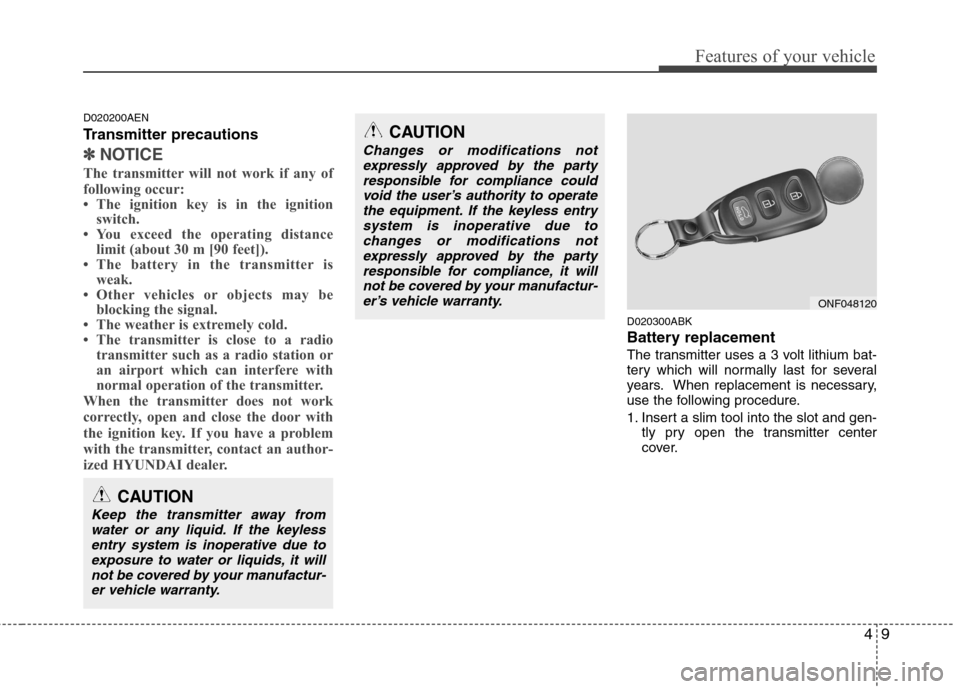
1. Insert a slim tool into the slot and gen- tly pry open the transmitter center
cover.
CAUTION
Changes or modifications not
expressly approved by the party
responsible for compliance couldvoid the user’s authority to operatethe equipment. If the keyless entry system is inoperative due to
changes or modifications notexpressly approved by the partyresponsible for compliance, it will
not be covered by your manufactur-er’s vehicle warranty.
ONF048120
CAUTION
Keep the transmitter away from
water or any liquid. If the keylessentry system is inoperative due to exposure to water or liquids, it willnot be covered by your manufactur-
er vehicle warranty.
Page 79 of 343
411
Features of your vehicle
THEFT-ALARM SYSTEM (IF EQUIPPED)
D030000APB
This system is designed to provide pro-
tection from unauthorized entry into the
car. This system is operated in three
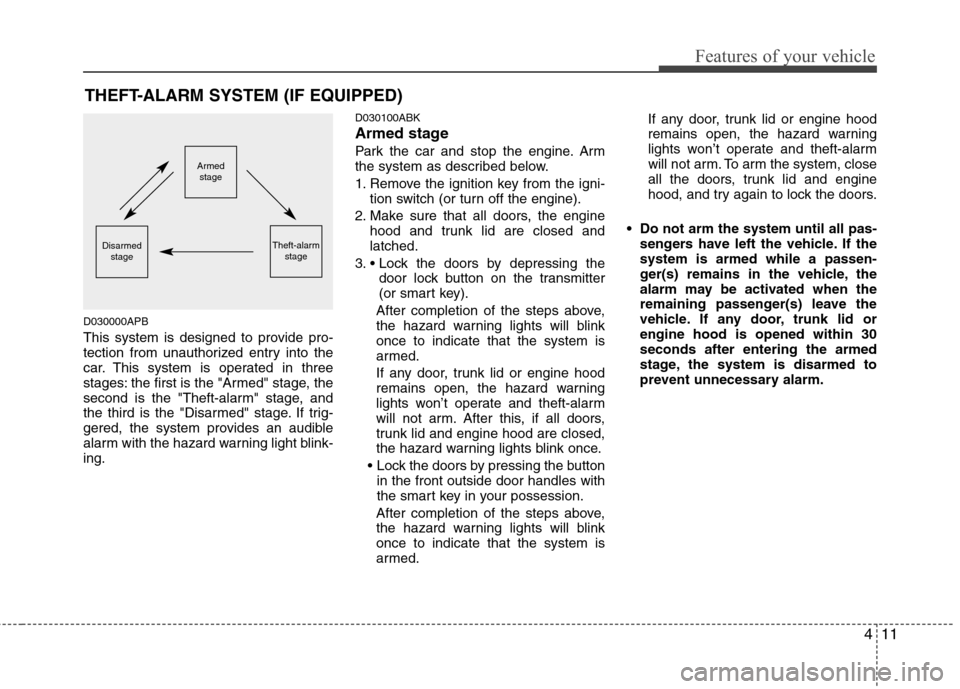
stages: the first is the "Armed" stage, the
second is the "Theft-alarm" stage, and
the third is the "Disarmed" stage. If trig-
gered, the system provides an audible
alarm with the hazard warning light blink-ing. D030100ABK
Armed stage
Park the car and stop the engine. Arm
the system as described below.
1. Remove the ignition key from the igni-
tion switch (or turn off the engine).
2. Make sure that all doors, the engine hood and trunk lid are closed and latched.
3. door lock button on the transmitter
(or smart key).
After completion of the steps above,
the hazard warning lights will blinkonce to indicate that the system is
armed.
If any door, trunk lid or engine hood
remains open, the hazard warning
lights won’t operate and theft-alarm
will not arm. After this, if all doors,
trunk lid and engine hood are closed,
the hazard warning lights blink once.
in the front outside door handles with
the smart key in your possession.
After completion of the steps above,
the hazard warning lights will blinkonce to indicate that the system is
armed. If any door, trunk lid or engine hood
remains open, the hazard warning
lights won’t operate and theft-alarm
will not arm. To arm the system, close
all the doors, trunk lid and engine
hood, and try again to lock the doors.
Do not arm the system until all pas- sengers have left the vehicle. If thesystem is armed while a passen-
ger(s) remains in the vehicle, the
alarm may be activated when the
remaining passenger(s) leave the
vehicle. If any door, trunk lid orengine hood is opened within 30seconds after entering the armed
stage, the system is disarmed to
prevent unnecessary alarm.
Armedstage
Theft-alarm stageDisarmedstage
Page 80 of 343
Features of your vehicle
12
4
D030200ABH-EE
Theft-alarm stage
The alarm will be activated if any of the
following occurs while the system is
armed.
A door is opened without using the
transmitter (or smart key).
The trunk is opened without using the transmitter (or smart key).
✽✽ NOTICE
If the trunk is opened by using the
transmitter (or smart key), the alarm
will not be activated, but doors, hood,
and ignition switch keep arming condi-
tion.
Once the trunk is opened and then
closed, the trunk will be locked and
armed automatically.
The engine hood is opened.
The horn will sound and the hazard
warning lights will blink continuously for
approximately 30 seconds. To turn off the
system, unlock the doors with the trans-
mitter (or smart key). D030400ABK-EE
Disarmed stage
The system will be disarmed when the
doors are unlocked with the transmitter
(or smart key).
After depressing the unlock button, the
hazard warning lights will blink twice to
indicate that the system is disarmed.
After depressing the unlock button, if any
door is not opened within 30 seconds,
the system will be rearmed.
✽✽
NOTICE
Avoid trying to start the engine while the alarm is activated. The vehicle
starter motor is disabled during the
theft-alarm stage.
If the system is not disarmed with the
transmitter, insert the key into the
ignition switch, turn the ignition
switch to the ON position and wait for
30 seconds. Then the system will be
disarmed. (Except China)
If you lose your keys, consult your
authorized HYUNDAI dealer.
CAUTION
Do not change, alter or adjust the
theft-alarm system because it could
cause the theft-alarm system to malfunction and should only beserviced by an authorized HYUNDAIdealer.
Malfunctions caused by improperalterations, adjustments or modifi-cations to the theft-alarm system are not covered by your vehicle
manufacturer warranty.
Page 81 of 343
413
Features of your vehicle
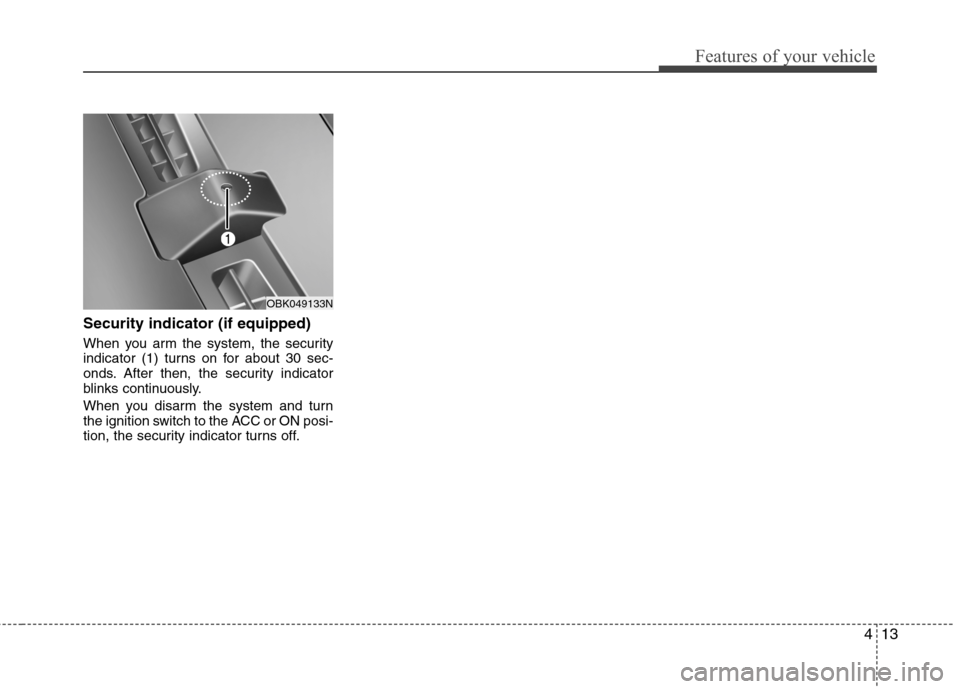
Security indicator (if equipped)
When you arm the system, the security
indicator (1) turns on for about 30 sec-
onds. After then, the security indicator
blinks continuously.
When you disarm the system and turn
the ignition switch to the ACC or ON posi-
tion, the security indicator turns off.
OBK049133N
Page 83 of 343
415
Features of your vehicle
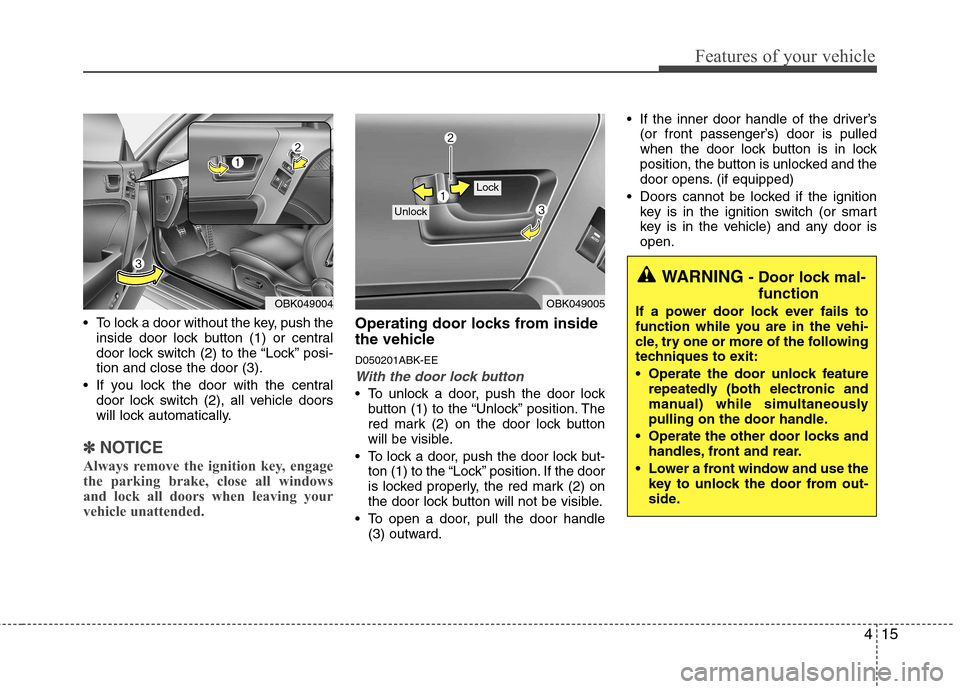
To lock a door without the key, push theinside door lock button (1) or central
door lock switch (2 ) to the “Lock” posi-
tion and close the door (3).
If you lock the door with the central door lock switch (2), all vehicle doors
will lock automatically.
✽✽ NOTICE
Always remove the ignition key, engage
the parking brake, close all windows
and lock all doors when leaving your
vehicle unattended.
Operating door locks from inside
the vehicle D050201ABK-EE
With the door lock button
To unlock a door, push the door lock button (1) to the “Unlock” position. The
red mark (2) on the door lock button
will be visible.
To lock a door, push the door lock but- ton (1) to the “Lock” position. If the door
is locked properly, the red mark (2) on
the door lock button will not be visible.
To open a door, pull the door handle (3) outward. If the inner door handle of the driver’s
(or front passenger’s) door is pulled
when the door lock button is in lock
position, the button is unlocked and the
door opens. (if equipped)
Doors cannot be locked if the ignition key is in the ignition switch (or smart
key is in the vehicle) and any door isopen.
OBK049005
Lock
Unlock
WARNING - Door lock mal-
function
If a power door lock ever fails to
function while you are in the vehi-
cle, try one or more of the following
techniques to exit:
Operate the door unlock feature repeatedly (both electronic and
manual) while simultaneously
pulling on the door handle.
Operate the other door locks and handles, front and rear.
Lower a front window and use the key to unlock the door from out-
side.
OBK049004
Page 84 of 343
Features of your vehicle
16
4
D050202ABK
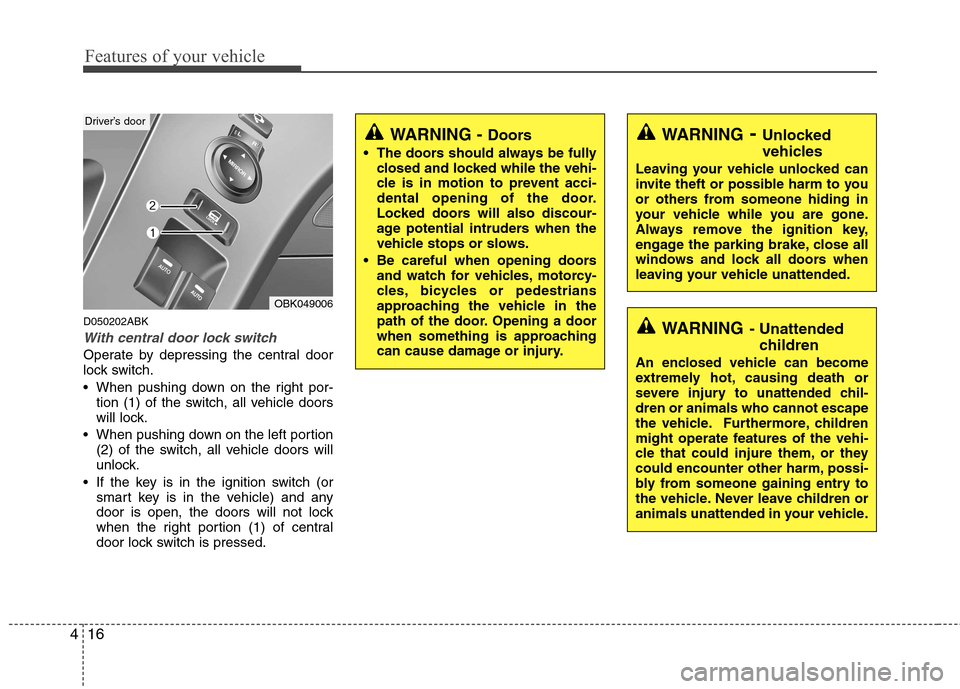
With central door lock switch
Operate by depressing the central door
lock switch.
When pushing down on the right por-
tion (1) of the switch, all vehicle doors
will lock.
When pushing down on the left portion (2) of the switch, all vehicle doors will
unlock.
If the key is in the ignition switch (or smart key is in the vehicle) and any
door is open, the doors will not lock
when the right portion (1) of central
door lock switch is pressed.
WARNING - Unlocked
vehicles
Leaving your vehicle unlocked can
invite theft or possible harm to you
or others from someone hiding in
your vehicle while you are gone.
Always remove the ignition key,
engage the parking brake, close all
windows and lock all doors when
leaving your vehicle unattended.
WARNING - Unattended
children
An enclosed vehicle can become
extremely hot, causing death or
severe injury to unattended chil-dren or animals who cannot escape
the vehicle. Furthermore, children
might operate features of the vehi-
cle that could injure them, or they
could encounter other harm, possi-
bly from someone gaining entry to
the vehicle. Never leave children or
animals unattended in your vehicle.
WARNING - Doors
The doors should always be fully closed and locked while the vehi-
cle is in motion to prevent acci-
dental opening of the door.
Locked doors will also discour-
age potential intruders when the
vehicle stops or slows.
Be careful when opening doors and watch for vehicles, motorcy-
cles, bicycles or pedestrians
approaching the vehicle in the
path of the door. Opening a door
when something is approaching
can cause damage or injury.
OBK049006
Driver’s door