ignition Hyundai Genesis Coupe 2012 Workshop Manual
[x] Cancel search | Manufacturer: HYUNDAI, Model Year: 2012, Model line: Genesis Coupe, Model: Hyundai Genesis Coupe 2012Pages: 391, PDF Size: 6.59 MB
Page 162 of 391
485
Features of your vehicle
D240208ABK
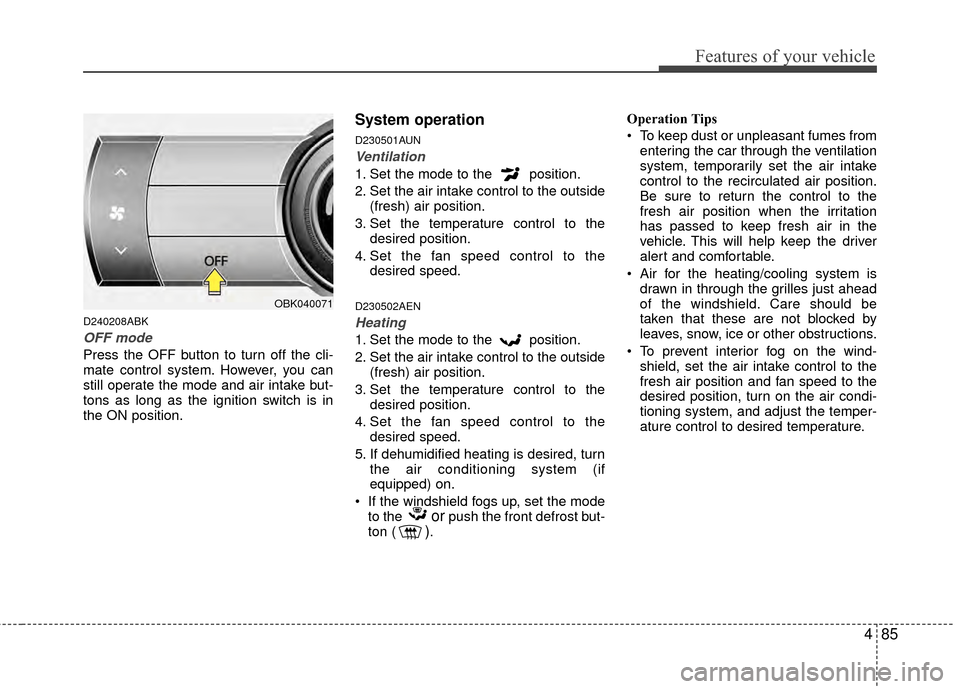
OFF mode
Press the OFF button to turn off the cli-
mate control system. However, you can
still operate the mode and air intake but-
tons as long as the ignition switch is in
the ON position.
System operation
D230501AUN
Ventilation
1. Set the mode to the position.
2. Set the air intake control to the outside(fresh) air position.
3. Set the temperature control to the desired position.
4. Set the fan speed control to the desired speed.
D230502AEN
Heating
1. Set the mode to the position.
2. Set the air intake control to the outside(fresh) air position.
3. Set the temperature control to the desired position.
4. Set the fan speed control to the desired speed.
5. If dehumidified heating is desired, turn the air conditioning system (if
equipped) on.
If the windshield fogs up, set the mode to the
orpush the front defrost but-
ton (). Operation Tips
To keep dust or unpleasant fumes from
entering the car through the ventilation
system, temporarily set the air intake
control to the recirculated air position.
Be sure to return the control to the
fresh air position when the irritation
has passed to keep fresh air in the
vehicle. This will help keep the driver
alert and comfortable.
Air for the heating/cooling system is drawn in through the grilles just ahead
of the windshield. Care should be
taken that these are not blocked by
leaves, snow, ice or other obstructions.
To prevent interior fog on the wind- shield, set the air intake control to the
fresh air position and fan speed to the
desired position, turn on the air condi-
tioning system, and adjust the temper-
ature control to desired temperature.
OBK040071
Page 168 of 391
491
Features of your vehicle
D250300AUN-EU
Defogging logic
To reduce the possibility of fogging up
the inside of the windshield, the air intake
is controlled automatically according to
certain conditions such as or
position. To cancel or return the defog-
ging logic, perform the following steps:
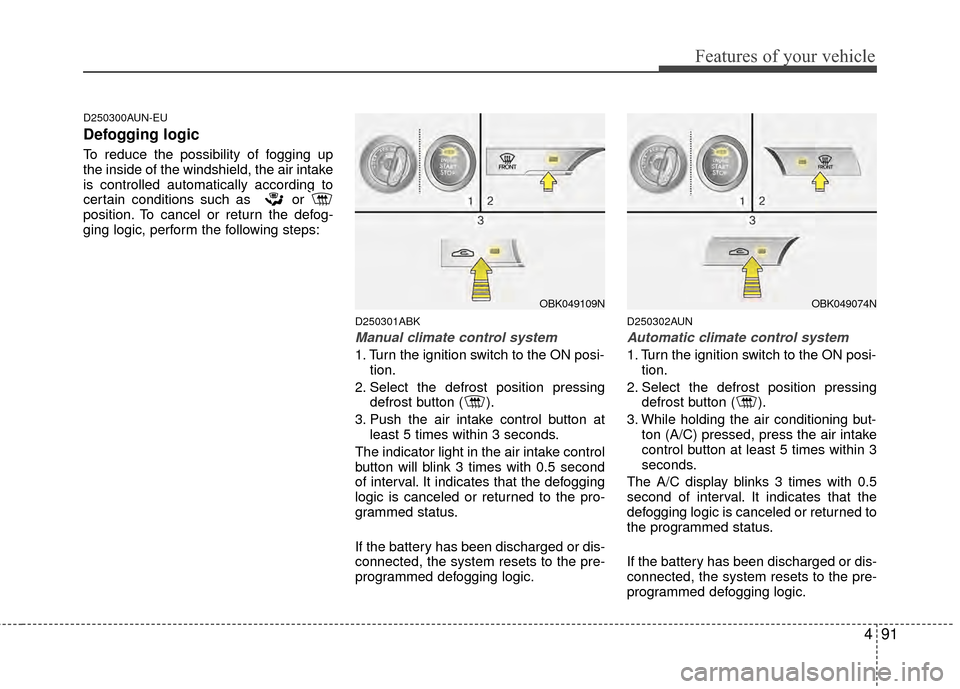
D250301ABK
Manual climate control system
1. Turn the ignition switch to the ON posi-tion.
2. Select the defrost position pressing defrost button ( ).
3. Push the air intake control button at least 5 times within 3 seconds.
The indicator light in the air intake control
button will blink 3 times with 0.5 second
of interval. It indicates that the defogging
logic is canceled or returned to the pro-
grammed status.
If the battery has been discharged or dis-
connected, the system resets to the pre-
programmed defogging logic.
D250302AUN
Automatic climate control system
1. Turn the ignition switch to the ON posi- tion.
2. Select the defrost position pressing defrost button ( ).
3. While holding the air conditioning but- ton (A/C) pressed, press the air intake
control button at least 5 times within 3
seconds.
The A/C display blinks 3 times with 0.5
second of interval. It indicates that the
defogging logic is canceled or returned to
the programmed status.
If the battery has been discharged or dis-
connected, the system resets to the pre-
programmed defogging logic.
OBK049109NOBK049074N
Page 176 of 391
499
Features of your vehicle
D281400ABK
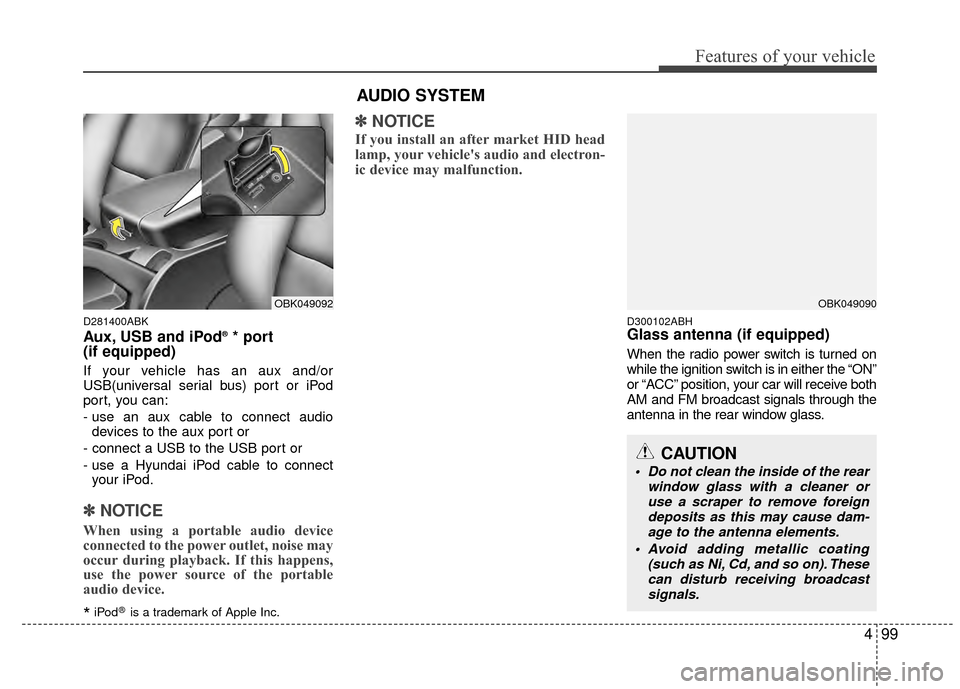
Aux, USB and iPod®* port
(if equipped)
If your vehicle has an aux and/or
USB(universal serial bus) port or iPod
port, you can:
- use an aux cable to connect audio
devices to the aux port or
- connect a USB to the USB port or
- use a Hyundai iPod cable to connect your iPod.
✽ ✽ NOTICE
When using a portable audio device
connected to the power outlet, noise may
occur during playback. If this happens,
use the power source of the portable
audio device.
*iPod®is a trademark of Apple Inc.
✽ ✽NOTICE
If you install an after market HID head
lamp, your vehicle's audio and electron-
ic device may malfunction.
D300102ABHGlass antenna (if equipped)
When the radio power switch is turned on
while the ignition switch is in either the “ON”
or “ACC” position, your car will receive both
AM and FM broadcast signals through the
antenna in the rear window glass.
OBK049090
CAUTION
Do not clean the inside of the rear
window glass with a cleaner oruse a scraper to remove foreigndeposits as this may cause dam- age to the antenna elements.
Avoid adding metallic coating (such as Ni, Cd, and so on). Thesecan disturb receiving broadcastsignals.
AUDIO SYSTEM
OBK049092
Page 183 of 391
Features of your vehicle
106
4
Using RADIO, SET UP, VOLUME
CONTROL
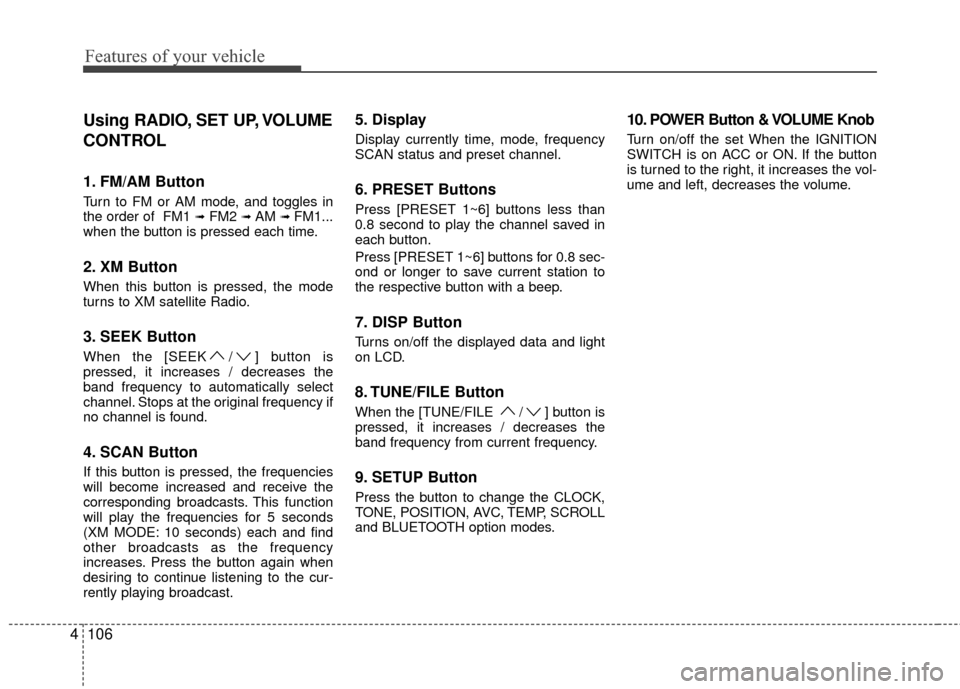
1. FM/AM Button
Turn to FM or AM mode, and toggles in
the order of FM1 ➟FM2 ➟ AM ➟ FM1...
when the button is pressed each time.
2. XM Button
When this button is pressed, the mode
turns to XM satellite Radio.
3. SEEK Button
When the [SEEK / ] button is
pressed, it increases / decreases the
band frequency to automatically select
channel. Stops at the original frequency if
no channel is found.
4. SCAN Button
If this button is pressed, the frequencies
will become increased and receive the
corresponding broadcasts. This function
will play the frequencies for 5 seconds
(XM MODE: 10 seconds) each and find
other broadcasts as the frequency
increases. Press the button again when
desiring to continue listening to the cur-
rently playing broadcast.
5. Display
Display currently time, mode, frequency
SCAN status and preset channel.
6. PRESET Buttons
Press [PRESET 1~6] buttons less than
0.8 second to play the channel saved in
each button.
Press [PRESET 1~6] buttons for 0.8 sec-
ond or longer to save current station to
the respective button with a beep.
7. DISP Button
Turns on/off the displayed data and light
on LCD.
8. TUNE/FILE Button
When the [TUNE/FILE / ] button is
pressed, it increases / decreases the
band frequency from current frequency.
9. SETUP Button
Press the button to change the CLOCK,
TONE, POSITION, AVC, TEMP, SCROLL
and BLUETOOTH option modes.
10. POWER Button & VOLUME Knob
Turn on/off the set When the IGNITION
SWITCH is on ACC or ON. If the button
is turned to the right, it increases the vol-
ume and left, decreases the volume.
Page 185 of 391
Features of your vehicle
108
4
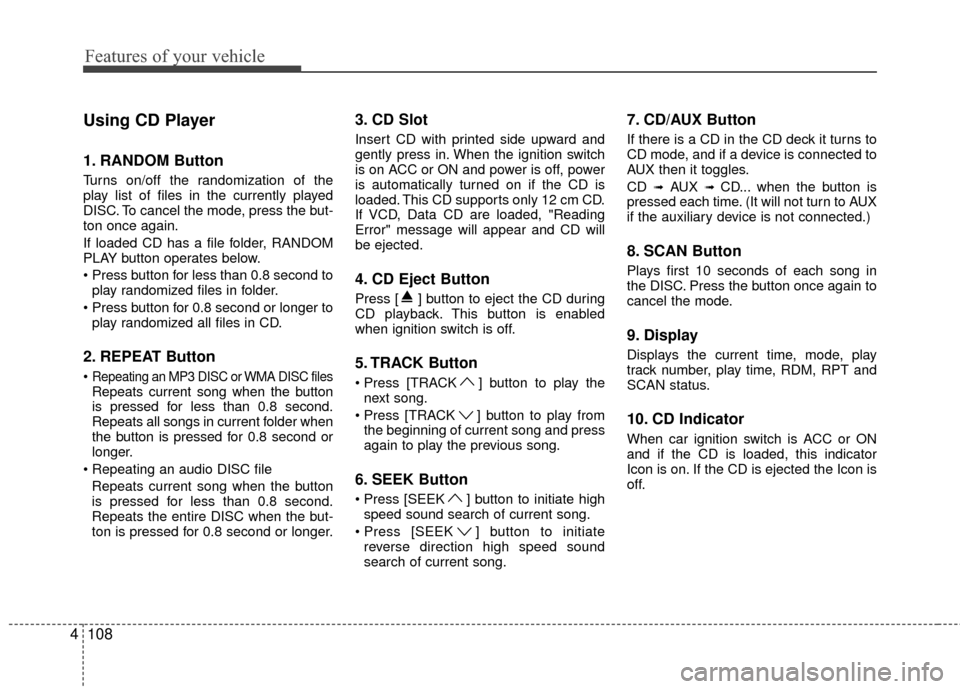
Using CD Player
1. RANDOM Button
Turns on/off the randomization of the
play list of files in the currently played
DISC. To cancel the mode, press the but-
ton once again.
If loaded CD has a file folder, RANDOM
PLAY button operates below.
play randomized files in folder.
play randomized all files in CD.
2. REPEAT Button
Repeating an MP3 DISC or WMA DISC filesRepeats current song when the button
is pressed for less than 0.8 second.
Repeats all songs in current folder when
the button is pressed for 0.8 second or
longer.
Repeats current song when the button
is pressed for less than 0.8 second.
Repeats the entire DISC when the but-
ton is pressed for 0.8 second or longer.
3. CD Slot
Insert CD with printed side upward and
gently press in. When the ignition switch
is on ACC or ON and power is off, power
is automatically turned on if the CD is
loaded. This CD supports only 12 cm CD.
If VCD, Data CD are loaded, "Reading
Error" message will appear and CD will
be ejected.
4. CD Eject Button
Press [ ] button to eject the CD during
CD playback. This button is enabled
when ignition switch is off.
5. TRACK Button
] button to play the next song.
] button to play from the beginning of current song and press
again to play the previous song.
6. SEEK Button
] button to initiate highspeed sound search of current song.
] button to initiate reverse direction high speed sound
search of current song.
7. CD/AUX Button
If there is a CD in the CD deck it turns to
CD mode, and if a device is connected to
AUX then it toggles.
CD
➟AUX ➟ CD... when the button is
pressed each time. (It will not turn to AUX
if the auxiliary device is not connected.)
8. SCAN Button
Plays first 10 seconds of each song in
the DISC. Press the button once again to
cancel the mode.
9. Display
Displays the current time, mode, play
track number, play time, RDM, RPT and
SCAN status.
10. CD Indicator
When car ignition switch is ACC or ON
and if the CD is loaded, this indicator
Icon is on. If the CD is ejected the Icon is
off.
Page 195 of 391
Features of your vehicle
118
4
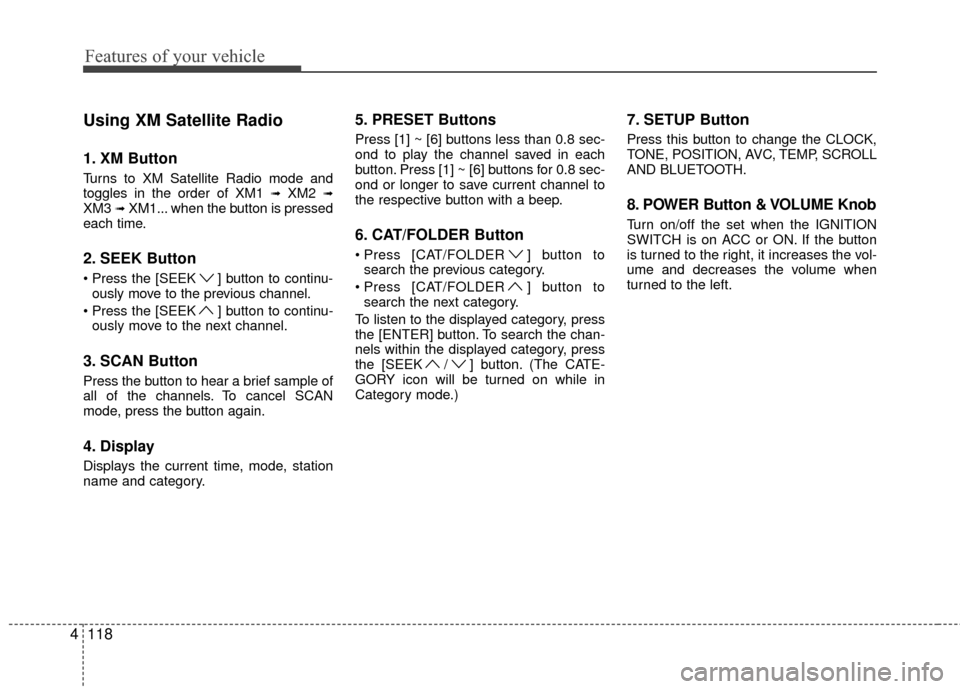
Using XM Satellite Radio
1. XM Button
Turns to XM Satellite Radio mode and
toggles in the order of XM1 ➟XM2 ➟XM3 ➟XM1... when the button is pressed
each time.
2. SEEK Button
] button to continu- ously move to the previous channel.
] button to continu- ously move to the next channel.
3. SCAN Button
Press the button to hear a brief sample of
all of the channels. To cancel SCAN
mode, press the button again.
4. Display
Displays the current time, mode, station
name and category.
5. PRESET Buttons
Press [1] ~ [6] buttons less than 0.8 sec-
ond to play the channel saved in each
button. Press [1] ~ [6] buttons for 0.8 sec-
ond or longer to save current channel to
the respective button with a beep.
6. CAT/FOLDER Button
[CAT/FOLDER ] button tosearch the previous category.
[CAT/FOLDER ] button to search the next category.
To listen to the displayed category, press
the [ENTER] button. To search the chan-
nels within the displayed category, press
the [SEEK / ] button. (The CATE-
GORY icon will be turned on while in
Category mode.)
7. SETUP Button
Press this button to change the CLOCK,
TONE, POSITION, AVC, TEMP, SCROLL
AND BLUETOOTH.
8. POWER Button & VOLUME Knob
Turn on/off the set when the IGNITION
SWITCH is on ACC or ON. If the button
is turned to the right, it increases the vol-
ume and decreases the volume when
turned to the left.
Page 206 of 391
4129
Features of your vehicle
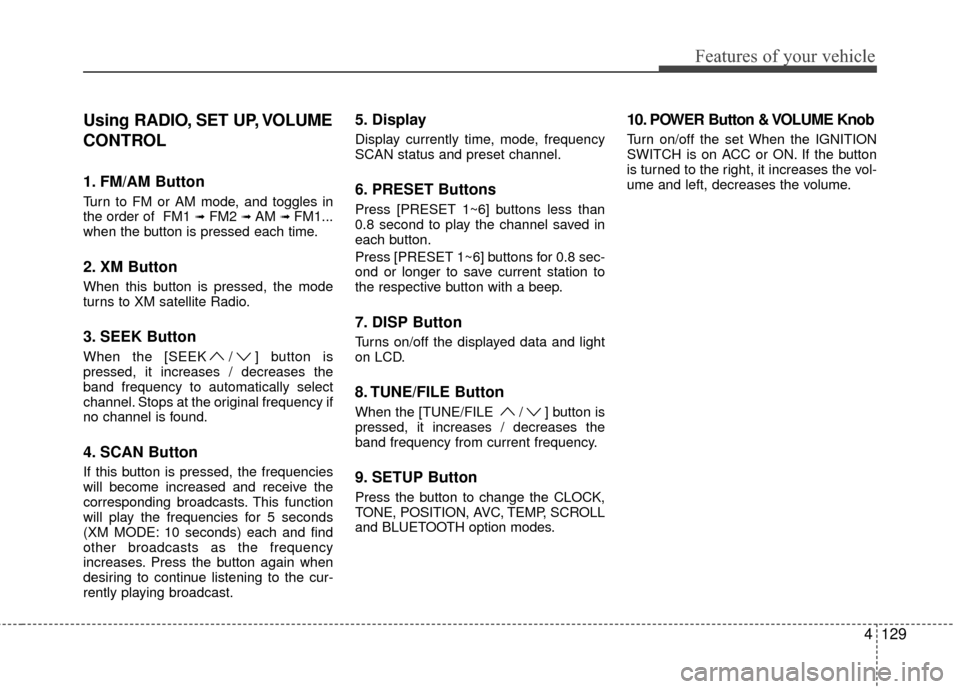
Using RADIO, SET UP, VOLUME
CONTROL
1. FM/AM Button
Turn to FM or AM mode, and toggles in
the order of FM1 ➟FM2 ➟ AM ➟ FM1...
when the button is pressed each time.
2. XM Button
When this button is pressed, the mode
turns to XM satellite Radio.
3. SEEK Button
When the [SEEK / ] button is
pressed, it increases / decreases the
band frequency to automatically select
channel. Stops at the original frequency if
no channel is found.
4. SCAN Button
If this button is pressed, the frequencies
will become increased and receive the
corresponding broadcasts. This function
will play the frequencies for 5 seconds
(XM MODE: 10 seconds) each and find
other broadcasts as the frequency
increases. Press the button again when
desiring to continue listening to the cur-
rently playing broadcast.
5. Display
Display currently time, mode, frequency
SCAN status and preset channel.
6. PRESET Buttons
Press [PRESET 1~6] buttons less than
0.8 second to play the channel saved in
each button.
Press [PRESET 1~6] buttons for 0.8 sec-
ond or longer to save current station to
the respective button with a beep.
7. DISP Button
Turns on/off the displayed data and light
on LCD.
8. TUNE/FILE Button
When the [TUNE/FILE / ] button is
pressed, it increases / decreases the
band frequency from current frequency.
9. SETUP Button
Press the button to change the CLOCK,
TONE, POSITION, AVC, TEMP, SCROLL
and BLUETOOTH option modes.
10. POWER Button & VOLUME Knob
Turn on/off the set When the IGNITION
SWITCH is on ACC or ON. If the button
is turned to the right, it increases the vol-
ume and left, decreases the volume.
Page 208 of 391
4131
Features of your vehicle
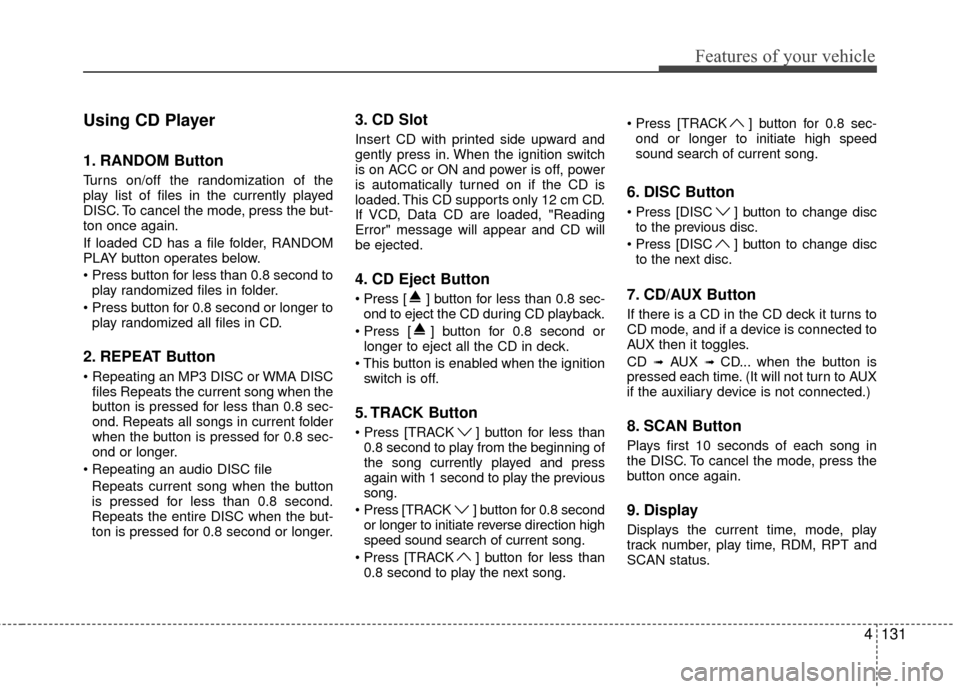
Using CD Player
1. RANDOM Button
Turns on/off the randomization of the
play list of files in the currently played
DISC. To cancel the mode, press the but-
ton once again.
If loaded CD has a file folder, RANDOM
PLAY button operates below.
play randomized files in folder.
play randomized all files in CD.
2. REPEAT Button
files Repeats the current song when the
button is pressed for less than 0.8 sec-
ond. Repeats all songs in current folder
when the button is pressed for 0.8 sec-
ond or longer.
Repeats current song when the button
is pressed for less than 0.8 second.
Repeats the entire DISC when the but-
ton is pressed for 0.8 second or longer.
3. CD Slot
Insert CD with printed side upward and
gently press in. When the ignition switch
is on ACC or ON and power is off, power
is automatically turned on if the CD is
loaded. This CD supports only 12 cm CD.
If VCD, Data CD are loaded, "Reading
Error" message will appear and CD will
be ejected.
4. CD Eject Button
] button for less than 0.8 sec-ond to eject the CD during CD playback.
] button for 0.8 second or longer to eject all the CD in deck.
switch is off.
5. TRACK Button
] button for less than0.8 second to play from the beginning of
the song currently played and press
again with 1 second to play the previous
song.
Press [TRACK ] button for 0.8 second or longer to initiate reverse direction high
speed sound search of current song.
] button for less than 0.8 second to play the next song. ] button for 0.8 sec-
ond or longer to initiate high speed
sound search of current song.
6. DISC Button
[DISC ] button to change discto the previous disc.
[DISC ] button to change disc to the next disc.
7. CD/AUX Button
If there is a CD in the CD deck it turns to
CD mode, and if a device is connected to
AUX then it toggles.
CD
➟AUX ➟ CD... when the button is
pressed each time. (It will not turn to AUX
if the auxiliary device is not connected.)
8. SCAN Button
Plays first 10 seconds of each song in
the DISC. To cancel the mode, press the
button once again.
9. Display
Displays the current time, mode, play
track number, play time, RDM, RPT and
SCAN status.
Page 218 of 391
4141
Features of your vehicle
Using XM Satellite Radio
1. XM Button
Turns to XM Satellite Radio mode and
toggles in the order of XM1 ➟XM2 ➟XM3➟XM1... when the button is pressed each
time.
2. SEEK Button
] button to continu- ously move to the previous channel.
] button to continu- ously move to the next channel.
3. SCAN Button
Press the button to hear a brief sample of
all of the channels. To cancel SCAN
mode, press the button again.
4. Display
Displays the current time, mode, station
name and category.
5. PRESET Buttons
Press [1] ~ [6] buttons less than 0.8 sec-
ond to play the channel saved in each
button. Press [1] ~ [6] button for 0.8 sec-
ond or longer to save current channel to
the respective button with a beep.
6. CAT/FOLDER Button
[CAT/FOLDER ] button tosearch the previous category.
[CAT/FOLDER ] button to search the next category.
To listen to the displayed category, press
the [ENTER] button. To search the chan-
nels within the displayed category, press
the [SEEK / ] button. (The CATE-
GORY icon will be turned on while in
Category mode.)
7. SETUP Button
Press this button to change the CLOCK,
TONE, POSITION, AVC, TEMP, SCROLL
AND BLUETOOTH.
8. POWER Button & VOLUME Knob
Turn on/off the set when the IGNITION
SWITCH is on ACC or ON. If the button
is turned to the right, it increases the vol-
ume and decreases the volume when
turned to the left.
Page 230 of 391
53
Driving your vehicle
E020100AUN
Before entering vehicle
• Be sure that all windows, outside mir-ror(s), and outside lights are clean.
Check the condition of the tires.
Check under the vehicle for any sign of leaks.
Be sure there are no obstacles behind you if you intend to back up.
E020200AUN
Necessary inspections
Fluid levels, such as engine oil, engine
coolant, brake fluid, and washer fluid
should be checked on a regular basis, with
the exact interval depending on the fluid.
Further details are provided in section 7,
“Maintenance”.
E020300AUN
Before starting
Close and lock all doors.
Position the seat so that all controls are
easily reached.
Adjust the inside and outside rearview mirrors.
Be sure that all lights work.
Check all gauges.
Check the operation of warning lights when the ignition switch is turned to
the ON position.
Release the parking brake and make sure the brake warning light goes out.
For safe operation, be sure you are famil-
iar with your vehicle and its equipment.
BEFORE DRIVING
WARNING
All passengers must be properly
belted whenever the vehicle is mov-
ing. Refer to “Seat belts” in section
3 for more information on their
proper use.
CALIFORNIA PROPOSI-
TION 65 WARNING
Engine exhaust and a wide variety
of automobile components and
parts, including components found
in the interior furnishings in a vehi-
cle, contain or emit chemicals
known to the State of California to
cause cancer and birth defects and
reproductive harm. In addition, cer-
tain fluids contained in vehicles
and certain products of component
wear contain or emit chemicals
known to the State of California to
cause cancer and birth defects or
other reproductive harm.
WARNING
Always check the surrounding
areas near your vehicle for people,
especially children, before putting a
car into D (Drive) or R (Reverse).
WARNING
Driving while distracted can result in
a loss of vehicle control, that may
lead to an accident, severe personal
injury, and death. The driver’s pri-
mary responsibility is in the safe and
legal operation of a vehicle, and use
of any handheld devices, other
equipment, or vehicle systems which
take the driver’s eyes, attention and
focus away from the safe operation
of a vehicle or which are not permis-
sible by law should never be used
during operation of the vehicle.