ENGINE PART HYUNDAI GENESIS COUPE 2014 User Guide
[x] Cancel search | Manufacturer: HYUNDAI, Model Year: 2014, Model line: GENESIS COUPE, Model: HYUNDAI GENESIS COUPE 2014Pages: 438, PDF Size: 40.35 MB
Page 172 of 438
Features of your vehicle
88 4
Windshield washers
In the OFF position, pull the lever
gently toward you to spray washer
fluid on the windshield and to run the
wipers 1-3 cycles.
Use this function when the wind-
shield is dirty.
The spray and wiper operation will
continue until you release the lever.
If the washer does not work, check
the washer fluid level. If the fluid level
is not sufficient, you will need to add
appropriate non-abrasive windshield
washer fluid to the washer reservoir.
The reservoir filler neck is located in
the front of the engine compartment
on the passenger side.
CAUTION
To prevent possible damage to
the washer pump, do not oper-
ate the washer when the fluid
reservoir is empty.
WARNING
Do not use the washer in freez-
ing temperatures without first
warming the windshield with the
defrosters; the washer solution
could freeze on contact with the
windshield and obscure your
vision.
CAUTION
To prevent possible damage
to the wipers or windshield,
do not operate the wipers
when the windshield is dry.
To prevent damage to the
wiper blades, do not use gaso-
line, kerosene, paint thinner,
or other solvents on or near
them.
To prevent damage to the
wiper arms and other compo-
nents, do not attempt to move
the wipers manually.
Page 253 of 438
53
Driving your vehicle
Before entering vehicle
• Be sure that all windows, outside
mirror(s), and outside lights are
clean.
Check the condition of the tires.
Check under the vehicle for any
sign of leaks.
Be sure there are no obstacles
behind you if you intend to back up.
Necessary inspections
Fluid levels, such as engine oil,
engine coolant, brake fluid, and
washer fluid should be checked on a
regular basis, with the exact interval
depending on the fluid. Further
details are provided in section 7,
“Maintenance”.CALIFORNIA PROPO-
SITION 65 WARNING
Engine exhaust and a wide vari-
ety of automobile components
and parts, including compo-
nents found in the interior fur-
nishings in a vehicle, contain or
emit chemicals known to the
State of California to cause can-
cer and birth defects and repro-
ductive harm. In addition, cer-
tain fluids contained in vehicles
and certain products of compo-
nent wear contain or emit chem-
icals known to the State of
California to cause cancer and
birth defects or other reproduc-
tive harm.
BEFORE DRIVING
WARNING
Driving while distracted can
result in a loss of vehicle con-
trol, that may lead to an acci-
dent, severe personal injury,
and death. The driver’s primary
responsibility is in the safe and
legal operation of a vehicle, and
use of any handheld devices,
other equipment, or vehicle sys-
tems which take the driver’s
eyes, attention and focus away
from the safe operation of a
vehicle or which are not permis-
sible by law should never be
used during operation of the
vehicle.
Page 261 of 438
511
Driving your vehicle
1. Carry the smart key or leave it
inside the vehicle.
2. Make sure the parking brake is
firmly applied.
3.Manual Transmission- Depress
the clutch pedal fully and shift the
transmission into Neutral. Depress
the brake and clutch pedal fully.
Automatic Transmission- Place
the transmission shift lever in P
(Park). Depress the brake pedal
fully.
You can also start the engine
when the shift lever is in the N
(Neutral) position.
4. Press the engine start/stop button.
It should be started without
depressing the accelerator.
5. Do not wait for the engine to warm
up while the vehicle remains sta-
tionary.
Start driving at moderate engine
speeds. (Steep accelerating and
decelerating should be avoided.)Even if the smart key is in the vehi-
cle, if it is far away from you, the
engine may not start.
When the engine start/stop button
is in the ACC or ON position, if any
door is open, the system checks
for the smart key. If the smart key is
not in the vehicle, and if all doors
are closed, the chime will sound for
about 5 seconds. Keep the smart
key in the vehicle, when using the
ACC position or if the vehicle
engine is on.
WARNING
The engine will start by press-
ing the engine start/stop button,
only when the smart key is in
the vehicle. Never allow chil-
dren or any person who is unfa-
miliar with the vehicle to touch
the engine start/stop button or
related parts.
CAUTION
If the engine stalls while you are
in motion, do not attempt to
move the shift lever to the P
(Park) position. If traffic and
road conditions permit, you may
put the shift lever in the
N(Neutral) position while the
vehicle is still moving and press
the engine start/stop button in
an attempt to restart the engine.
Page 264 of 438
Driving your vehicle
14 5
During cold weather, shifting may
be difficult until the transmission
lubricant has warmed up. This is
normal and not harmful to the
transmission.
If you've come to a complete stop
and it's hard to shift into 1st or
R(Reverse), put the shift lever in
N(Neutral) position and release the
clutch. Press the clutch pedal back
down, and then shift into 1st or
R(Reverse) gear position.Using the clutch
The clutch should be pressed all the
way to the floor before shifting, then
released slowly. The clutch pedal
should always be fully released while
driving. Do not rest your foot on the
clutch pedal while driving. This can
cause unnecessary wear. Do not
partially engage the clutch to hold
the car on an incline. This causes
unnecessary wear. Use the foot
brake or parking brake to hold the
car on an incline. Do not operate the
clutch pedal rapidly and repeatedly.
CAUTION
To avoid premature clutch
wear and damage, do not
drive with your foot resting on
the clutch pedal. Also, don’t
use the clutch to hold the
vehicle stopped on an uphill
grade, while waiting for a traf-
fic light, etc.
Do not use the shift lever as a
handrest during driving, as
this can result in premature
wear of the transmission shift
forks.
WARNING
Before leaving the driver’s seat,
always set the parking brake
fully and shut the engine off.
Then make sure the transmis-
sion is shifted into 1st gear
when the vehicle is parked on a
level or uphill grade, and shifted
into R (Reverse) on a downhill
grade. Unexpected and sudden
vehicle movement can occur if
these precautions are not fol-
lowed in the order identified.
Page 275 of 438
525
Driving your vehicle
Power brakes
Your vehicle has power-assisted
brakes that adjust automatically
through normal usage.
In the event that the power-assisted
brakes lose power because of a
stalled engine or some other reason,
you can still stop your vehicle by
applying greater force to the brake
pedal than you normally would. The
stopping distance, however, will be
longer.
When the engine is not running, the
reserve brake power is partially
depleted each time the brake pedal
is applied. Do not pump the brake
pedal when the power assist has
been interrupted.
Pump the brake pedal only when
necessary to maintain steering con-
trol on slippery surfaces.
BRAKE SYSTEM
WARNING - Brakes
Do not drive with your foot
resting on the brake pedal.
This will create abnormal high
brake temperatures, exces-
sive brake lining and pad
wear, and increased stopping
distances.
When descending a long or
steep hill, shift to a lower gear
and avoid continuous applica-
tion of the brakes. Continuous
brake application will cause
the brakes to overheat and
could result in a temporary
loss of braking performance.
Wet brakes may impair the
vehicle’s ability to safely slow
down; the vehicle may also
pull to one side when the
brakes are applied. Applying
the brakes lightly will indicate
whether they have been
affected in this way. Always
test your brakes in this fash-
ion after driving through deep
water.
(Continued)(Continued)
To dry the brakes, apply them
lightly while maintaining a safe
forward speed until brake per-
formance returns to normal.
Always, confirm the position of
the brake and accelerator
pedal before driving. If you
don't check the position of the
accelerator and brake pedal
before driving, you may
depress the accelerator
instead of the brake pedal. It
may cause a serious accident.
Page 280 of 438
Driving your vehicle
30 5
✽
✽
NOTICE
A click sound may be heard in the
engine compartment when the vehi-
cle begins to move after the engine is
started. These conditions are normal
and indicate that the anti-lock brake
system is functioning properly.
Even with the anti-lock brake sys-
tem, your vehicle still requires suf-
ficient stopping distance. Always
maintain a safe distance from the
vehicle in front of you.
Always slow down when cornering.
The anti-lock brake system cannot
prevent accidents resulting from
excessive speeds.
On loose or uneven road surfaces,
operation of the anti-lock brake
system may result in a longer stop-
ping distance than for vehicles
equipped with a conventional
brake system.
✽ ✽
NOTICE
When you jump start your vehicle
because of a drained battery, the
engine may not run as smoothly and
the ABS warning light may turn on
at the same time. This happens
because of the low battery voltage. It
does not mean your ABS is malfunc-
tioning.
• Do not pump your brakes!
• Have the battery recharged before
driving the vehicle.
W-78
CAUTION
If the ABS warning light is on
and stays on, you may have a
problem with the ABS. In this
case, however, your regular
brakes will work normally.
The ABS warning light will stay
on for approximately 3 seconds
after the ignition switch is ON.
During that time, the ABS will
go through self-diagnosis and
the light will go off if everything
is normal. If the light stays on,
you may have a problem with
your ABS. Contact an author-
ized HYUNDAI dealer as soon
as possible.
CAUTION
When you drive on a road hav-
ing poor traction, such as an
icy road, and operate your
brakes continuously, the ABS
will be active continuously and
the ABS warning light may illu-
minate. Pull your car over to a
safe place and stop the engine.
Restart the engine. If the ABS
warning light is off, then your
ABS system is normal.
Otherwise, you may have a
problem with the ABS. Contact
an authorized HYUNDAI dealer
as soon as possible.
Page 281 of 438
531
Driving your vehicle
Electronic stability control
(ESC)
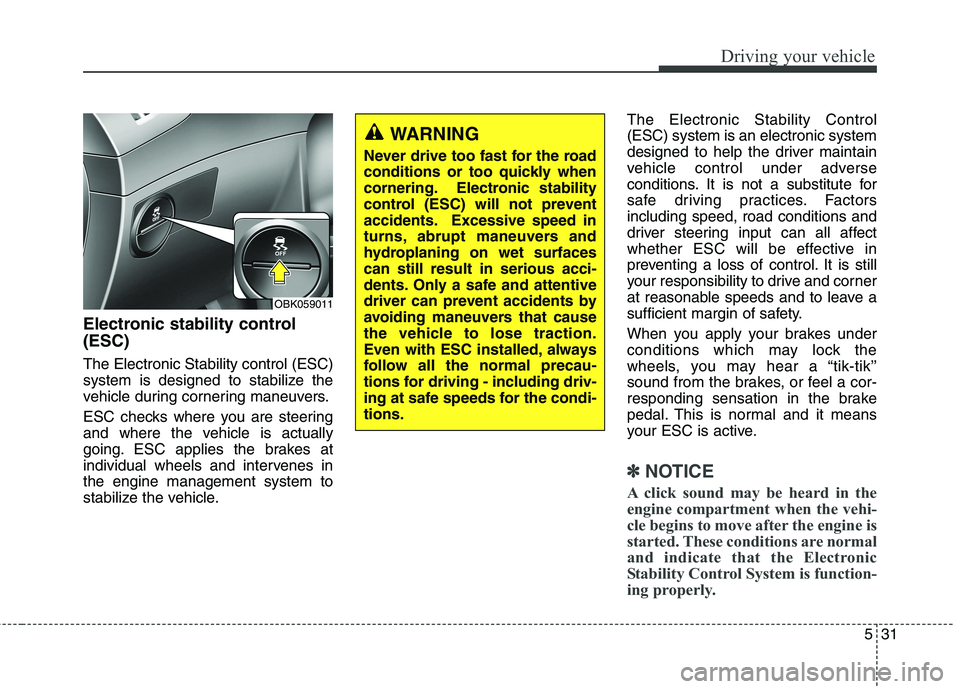
The Electronic Stability control (ESC)
system is designed to stabilize the
vehicle during cornering maneuvers.
ESC checks where you are steering
and where the vehicle is actually
going. ESC applies the brakes at
individual wheels and intervenes in
the engine management system to
stabilize the vehicle.The Electronic Stability Control
(ESC) system is an electronic system
designed to help the driver maintain
vehicle control under adverse
conditions. It is not a substitute for
safe driving practices. Factors
including speed, road conditions and
driver steering input can all affect
whether ESC will be effective in
preventing a loss of control. It is still
your responsibility to drive and corner
at reasonable speeds and to leave a
sufficient margin of safety.
When you apply your brakes under
conditions which may lock the
wheels, you may hear a “tik-tik’’
sound from the brakes, or feel a cor-
responding sensation in the brake
pedal. This is normal and it means
your ESC is active.
✽ ✽
NOTICE
A click sound may be heard in the
engine compartment when the vehi-
cle begins to move after the engine is
started. These conditions are normal
and indicate that the Electronic
Stability Control System is function-
ing properly.
WARNING
Never drive too fast for the road
conditions or too quickly when
cornering. Electronic stability
control (ESC) will not prevent
accidents. Excessive speed in
turns, abrupt maneuvers and
hydroplaning on wet surfaces
can still result in serious acci-
dents. Only a safe and attentive
driver can prevent accidents by
avoiding maneuvers that cause
the vehicle to lose traction.
Even with ESC installed, always
follow all the normal precau-
tions for driving - including driv-
ing at safe speeds for the condi-
tions.
OBK059011
Page 287 of 438
537
Driving your vehicle
The cruise control system allows you
to program the vehicle to maintain a
constant speed without pressing the
accelerator pedal.
This system is designed to function
above approximately 25 mph (40
km/h).✽ ✽
NOTICE
During normal cruise control opera-
tion, when the SET switch is activat-
ed or reactivated after applying the
brakes, the cruise control will ener-
gize after approximately 3 seconds.
This delay is normal.
✽ ✽
NOTICE
To activate cruise control, depress
the brake pedal at least once after
turning the ignition switch to the ON
position or starting the engine. This
is to check if the brake switch which
is important part to cancel cruise
control is in normal condition.
CRUISE CONTROL SYSTEM (IF EQUIPPED)
WARNING
If the cruise control is left on,
(CRUISE indicator light in the
instrument cluster illuminat-
ed) the cruise control can be
switched on accidentally.
Keep the cruise control sys-
tem off (CRUISE indicator
light OFF) when the cruise
control is not in use, to avoid
inadvertently setting a speed.
Use the cruise control system
only when traveling on open
highways in good weather.
(Continued)
(Continued)
Do not use the cruise control
when it may not be safe to
keep the car at a constant
speed, for instance, driving in
heavy or varying traffic, or on
slippery (rainy, icy or snow-
covered) or winding roads or
over 6% up-hill or down-hill
roads.
Pay particular attention to the
driving conditions whenever
using the cruise control sys-
tem.
Be careful when driving down-
hill using the cruise control
system, which may increase
the vehicle speed.
WARNING- Misuse cruise
control
Do not use cruise control if the
traffic situation does not allow
you to drive safely at a constant
speed and with sufficient dis-
tance to the vehicle in front.
Page 301 of 438
551
Driving your vehicle
To keep locks from freezing
To keep the locks from freezing,
squirt an approved de-icer fluid or
glycerine into the key opening. If a
lock is covered with ice, squirt it with
an approved de-icing fluid to remove
the ice. If the lock is frozen internally,
you may be able to thaw it out by
using a heated key. Handle the heat-
ed key with care to avoid injury.
Use approved window washer
anti-freeze in system
To keep the water in the window
washer system from freezing, add an
approved window washer anti-freeze
solution in accordance with instruc-
tions on the container. Window wash-
er anti-freeze is available from an
authorized HYUNDAI dealer and
most auto parts outlets. Do not use
engine coolant or other types of anti-
freeze as these may damage the
paint finish.
Don't let your parking brake
freeze
Under some conditions your parking
brake can freeze in the engaged
position. This is most likely to hap-
pen when there is an accumulation
of snow or ice around or near the
rear brakes or if the brakes are wet.
If there is a risk the parking brake
may freeze, apply it only temporarily
while you put the gear shift lever in P
and block the rear wheels so the car
cannot roll. Then release the parking
brake.
Don't let ice and snow accu-
mulate underneath
Under some conditions, snow and
ice can build up under the fenders
and interfere with the steering. When
driving in severe winter conditions
where this may happen, you should
periodically check underneath the
car to be sure the movement of the
front wheels and the steering com-
ponents is not obstructed.
Carry emergency equipment
Depending on the severity of the
weather where you drive your car,
you should carry appropriate emer-
gency equipment. Some of the items
you may want to carry include tire
chains, tow straps or chains, flash-
light, emergency flares, sand, a
shovel, jumper cables, a window
scraper, gloves, ground cloth, cover-
alls, a blanket, etc.
Don't place foreign objects or
materials in the engine com-
partment
Placement of foreign object or mate-
rials which prevent cooling of the
engine, in the engine compartment,
may cause a failure or combustion.
The manufacturer is not responsible
for the damage caused by such
placement.
Page 313 of 438
65
What to do in an emergency
Jump starting procedure
1. Make sure the booster battery is
12-volt and that its negative termi-
nal is grounded.
2. If the booster battery is in another
vehicle, do not allow the vehicles
to touch.
3. Turn off all unnecessary electrical
loads.
4. Connect the jumper cables in the
exact sequence shown in the illus-
tration. First connect one end of a
jumper cable to the positive termi-
nal of the discharged battery (1),
then connect the other end to the
positive terminal on the booster
battery (2).
Proceed to connect one end of the
other jumper cable to the negative
terminal of the booster battery (3),
then the other end to a solid, sta-
tionary, metallic point (for example,
the engine lifting bracket) away
from the battery (4). Do not con-
nect it to or near any part that
moves when the engine is cranked.
Do not allow the jumper cables to
contact anything except the correct
battery terminals or the correct
ground. Do not lean over the bat-
tery when making connections.5. Start the engine of the vehicle with
the booster battery and let it run at
2,000 rpm, then start the engine of
the vehicle with the discharged
battery.
6. After jump start of your vehicle run
the vehicle for at least 15 minutes
either at idle or driving the vehicle
before turning off the engine. This
will assure the vehicle can be
started next time after the engine
is shut off.
If the cause of your battery discharg-
ing is not apparent, you should have
your vehicle checked by an author-
ized HYUNDAI dealer.
Push-starting
Your manual transmission-equipped
vehicle should not be push-started
because it might damage the emis-
sion control system.
Vehicles equipped with automatic
transmission cannot be push-started.
Follow the directions in this section
for jump-starting.
WARNING
Never tow a vehicle to start it
because the sudden surge for-
ward when the engine starts
could cause a collision with the
tow vehicle.
CAUTION - Battery cables
Do not connect the jumper
cable from the negative terminal
of the booster battery to the
negative terminal of the dis-
charged battery. This can cause
the discharged battery to over-
heat and crack, releasing bat-
tery acid.