bluetooth HYUNDAI GENESIS COUPE 2014 User Guide
[x] Cancel search | Manufacturer: HYUNDAI, Model Year: 2014, Model line: GENESIS COUPE, Model: HYUNDAI GENESIS COUPE 2014Pages: 438, PDF Size: 40.35 MB
Page 246 of 438
Features of your vehicle
162 4
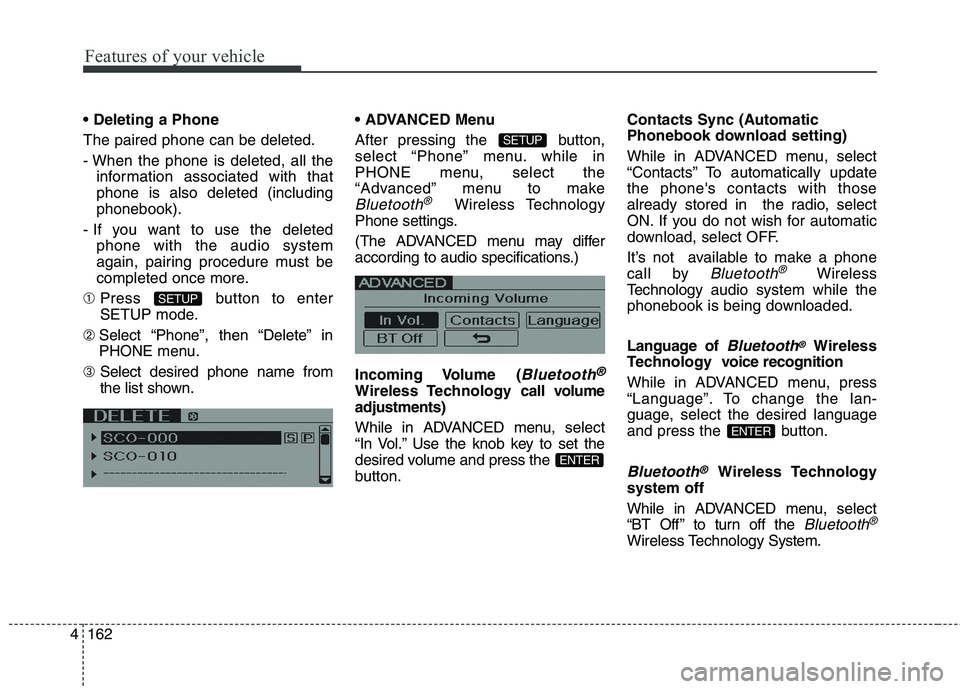
The paired phone can be deleted.
- When the phone is deleted, all the
information associated with that
phone is also deleted (including
phonebook).
- If you want to use the deleted
phone with the audio system
again, pairing procedure must be
completed once more.
➀Press button to enter
SETUP mode.
➁ Select “Phone”, then “Delete” in
PHONE menu.
➂ Select desired phone name from
the list shown. Menu
After pressing the button,
select “Phone” menu. while in
PHONE menu, select the
“Advanced” menu to make
Bluetooth®Wireless Technology
Phone settings.
(The ADVANCED menu may differ
according to audio specifications.)
Incoming Volume (
Bluetooth®
Wireless Technology call volume
adjustments)
While in ADVANCED menu, select
“In Vol.” Use the knob key to set the
desired volume and press the
button.Contacts Sync (Automatic
Phonebook download setting)
While in ADVANCED menu, select
“Contacts” To automatically update
the phone's contacts with those
already stored in the radio, select
ON. If you do not wish for automatic
download, select OFF.
It’s not available to make a phone
call by
Bluetooth®Wireless
Technologyaudio system while the
phonebook is being downloaded.
Language of
Bluetooth®Wireless
Technology voice recognition
While in ADVANCED menu, press
“Language”. To change the lan-
guage, select the desired language
and press the button.
Bluetooth®Wireless Technology
system off
While in ADVANCED menu, select
“BT Off ” to turn off the
Bluetooth®
Wireless TechnologySystem.
ENTER
ENTER
SETUP
SETUP
Page 247 of 438
4163
Features of your vehicle
■Voice Recognition Activation
The voice recognition engine con-
tained in the
Bluetooth®Wireless
TechnologySystem can be activat-
ed in the following conditions:
- Button Activation
The voice recognition system will
be active when the button is
pressed and after the sound of a
Beep.
- Active Listening
The voice recognition system will
be active for a period of time when
the Voice Recognition system has
asked for a customer response.
The system can recognize single
digits from zero to nine while num-
ber greater than ten will not be rec-
ognized.
The system shall cancel voice
recognition mode in following
cases : When pressing the but-
ton and saying cancel following the
beep. When not making a call and
pressing the button. When
voice recognition has failed 3 con-
secutive times. At any time if you say “help”, the
system will announce what com-
mands are available.
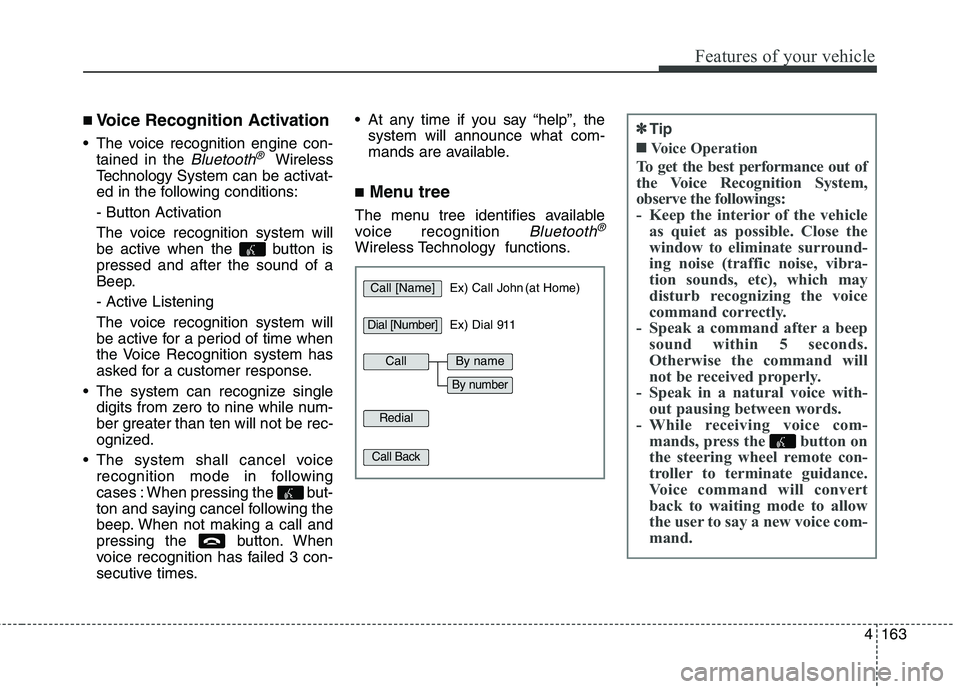
■Menu tree
The menu tree identifies available
voice recognition
Bluetooth®
Wireless Technology functions.
✽ ✽
Tip
■Voice Operation
To get the best performance out of
the Voice Recognition System,
observe the followings:
- Keep the interior of the vehicle
as quiet as possible. Close the
window to eliminate surround-
ing noise (traffic noise, vibra-
tion sounds, etc), which may
disturb recognizing the voice
command correctly.
- Speak a command after a beep
sound within 5 seconds.
Otherwise the command will
not be received properly.
- Speak in a natural voice with-
out pausing between words.
- While receiving voice com-
mands, press the button on
the steering wheel remote con-
troller to terminate guidance.
Voice command will convert
back to waiting mode to allow
the user to say a new voice com-
mand.
Call [Name]Ex) Call John (at Home)
Ex) Dial 911
Dial [Number]
Redial
Call Back
CallBy name
By number
Page 249 of 438
4165
Features of your vehicle
■Bluetooth®Wireless
Technology Audio Speaker
Adaptation
Speaker adaptation will improve per-
formance of voice recognition sys-
tem to a particular user voice.
This will degrade the performance for
other users.
➀ Press button for 10sec.
➁ Say “Record profile”.
➂ Say “Yes”.
➃ Say the word displayed on Radio.
➀ Press button for 10sec.
➁ Say “Delete profile”.
➂ Say “Yes”.
Page 429 of 438
Index
2I
ABS (Anti-lock brake system)·····························5-29
Active headrest················································3-9
Air bag warning labels······································3-63
Air bag warning light·······································3-40
Air bags·······················································3-36
Air bag warning labels··································3-63
Air bag warning light····································3-40
Collision sensors·········································3-55
Curtain air bag············································3-54
Driver's and passenger's front air bag·················3-48
Occupant classification system·························3-43
Side impact air bag·······································3-52
SRS components and functions························3-39
Air cleaner····················································7-32
Alarm system(see the Theft-alarm system)··············4-14
alcohol and methanol·········································1-4
Antenna (Glass)············································4-128
Anti-lock brake system (ABS)·····························5-29
Appearance care
Exterior care··············································7-76
Interior care···············································7-82
Appearance care·············································7-76
Ashtray······················································4-122
Audio control···············································4-138
Audio system···············································4-128
Audio control············································4-138Bluetooth Hands free···································4-155
Bluetooth
®Wireless Technology·····················4-155
Glass antenna············································4-128
IPOD······················································4-149
Steering wheel audio control··························4-129
USB device··············································4-145
XM satellite Radio······································4-150
Auto Cruise (see the cruise control system)·············5-37
Automatic climate control system·······················4-102
Air conditioning·········································4-111
Climate control air filter · · ·······················4-100, 112
Automatic tranmission······································5-17
Shift lock··················································5-22
Sports mode···············································5-20
Automatic tranmission fluid·······························7-31
Aux, USB and iPod port··································4-127
Base curb weight·············································5-57
Battery·························································7-39
Battery saver function·······································4-82
Before driving·················································5-3
Bluetooth Hands free······································4-155
Bluetooth
®Wireless Technology························4-155
Bottle holders, see cup holders···························4-122
A
B