reset HYUNDAI GENESIS COUPE 2014 User Guide
[x] Cancel search | Manufacturer: HYUNDAI, Model Year: 2014, Model line: GENESIS COUPE, Model: HYUNDAI GENESIS COUPE 2014Pages: 438, PDF Size: 40.35 MB
Page 191 of 438
4107
Features of your vehicle
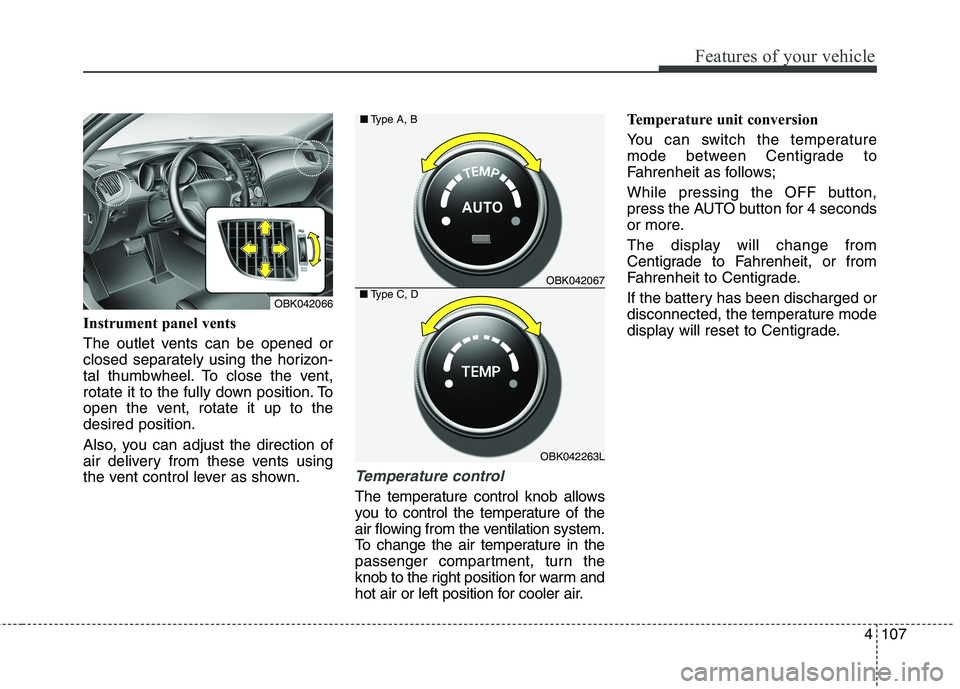
Instrument panel vents
The outlet vents can be opened or
closed separately using the horizon-
tal thumbwheel. To close the vent,
rotate it to the fully down position. To
open the vent, rotate it up to the
desired position.
Also, you can adjust the direction of
air delivery from these vents using
the vent control lever as shown.
Temperature control
The temperature control knob allows
you to control the temperature of the
air flowing from the ventilation system.
To change the air temperature in the
passenger compartment, turn the
knob to the right position for warm and
hot air or left position for cooler air.Temperature unit conversion
You can switch the temperature
mode between Centigrade to
Fahrenheit as follows;
While pressing the OFF button,
press the AUTO button for 4 seconds
or more.
The display will change from
Centigrade to Fahrenheit, or from
Fahrenheit to Centigrade.
If the battery has been discharged or
disconnected, the temperature mode
display will reset to Centigrade.
OBK042067
OBK042263L ■Type A, B
■Type C, DOBK042066
Page 202 of 438
Features of your vehicle
118 4
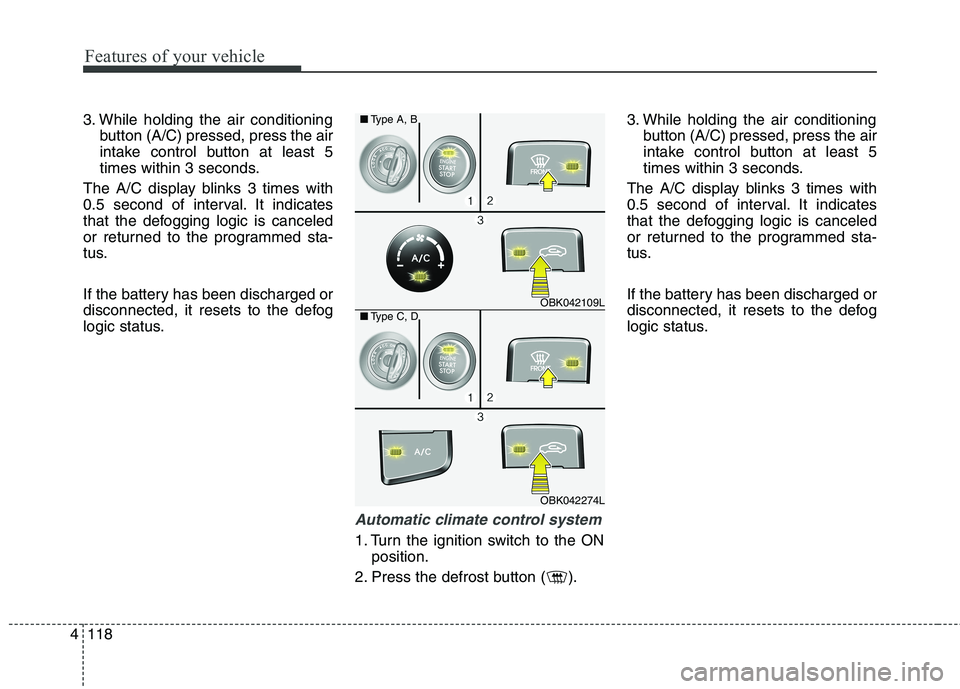
3. While holding the air conditioning
button (A/C) pressed, press the air
intake control button at least 5
times within 3 seconds.
The A/C display blinks 3 times with
0.5 second of interval. It indicates
that the defogging logic is canceled
or returned to the programmed sta-
tus.
If the battery has been discharged or
disconnected, it resets to the defog
logic status.
Automatic climate control system
1. Turn the ignition switch to the ON
position.
2. Press the defrost button ( ).3. While holding the air conditioning
button (A/C) pressed, press the air
intake control button at least 5
times within 3 seconds.
The A/C display blinks 3 times with
0.5 second of interval. It indicates
that the defogging logic is canceled
or returned to the programmed sta-
tus.
If the battery has been discharged or
disconnected, it resets to the defog
logic status.
OBK042109L
OBK042274L ■Type A, B
■Type C, D
Page 203 of 438
4119
Features of your vehicle
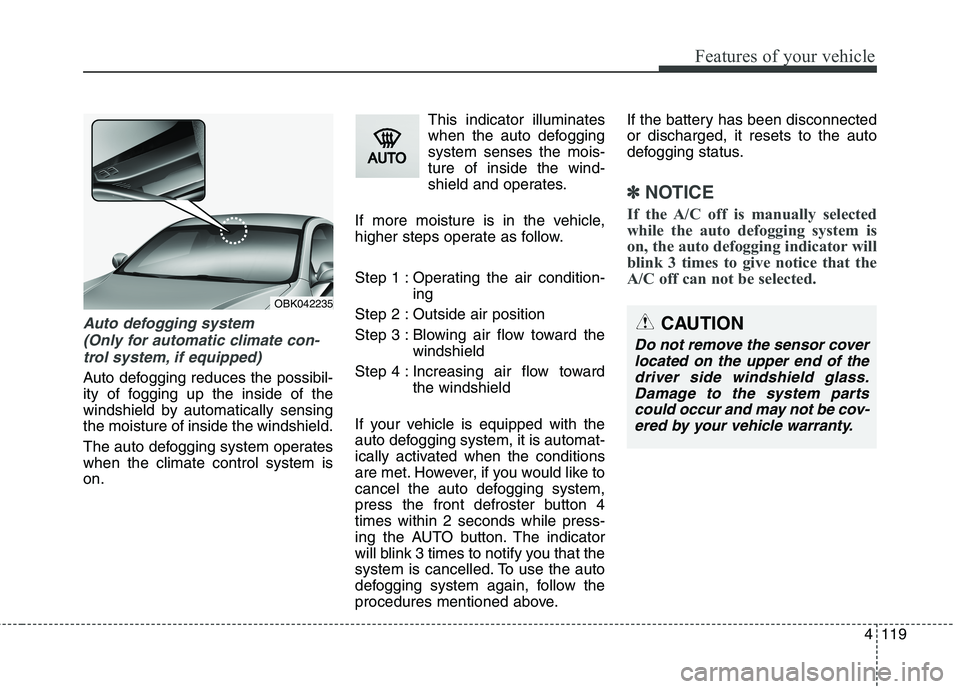
Auto defogging system
(Only for automatic climate con-
trol system, if equipped)
Auto defogging reduces the possibil-
ity of fogging up the inside of the
windshield by automatically sensing
the moisture of inside the windshield.
The auto defogging system operates
when the climate control system is
on.This indicator illuminates
when the auto defogging
system senses the mois-
ture of inside the wind-
shield and operates.
If more moisture is in the vehicle,
higher steps operate as follow.
Step 1 : Operating the air condition-
ing
Step 2 : Outside air position
Step 3 : Blowing air flow toward the
windshield
Step 4 : Increasing air flow toward
the windshield
If your vehicle is equipped with the
auto defogging system, it is automat-
ically activated when the conditions
are met. However, if you would like to
cancel the auto defogging system,
press the front defroster button 4
times within 2 seconds while press-
ing the AUTO button. The indicator
will blink 3 times to notify you that the
system is cancelled. To use the auto
defogging system again, follow the
procedures mentioned above.If the battery has been disconnected
or discharged, it resets to the auto
defogging status.
✽ ✽
NOTICE
If the A/C off is manually selected
while the auto defogging system is
on, the auto defogging indicator will
blink 3 times to give notice that the
A/C off can not be selected.
OBK042235
CAUTION
Do not remove the sensor cover
located on the upper end of the
driver side windshield glass.
Damage to the system parts
could occur and may not be cov-
ered by your vehicle warranty.
Page 208 of 438
Features of your vehicle
124 4
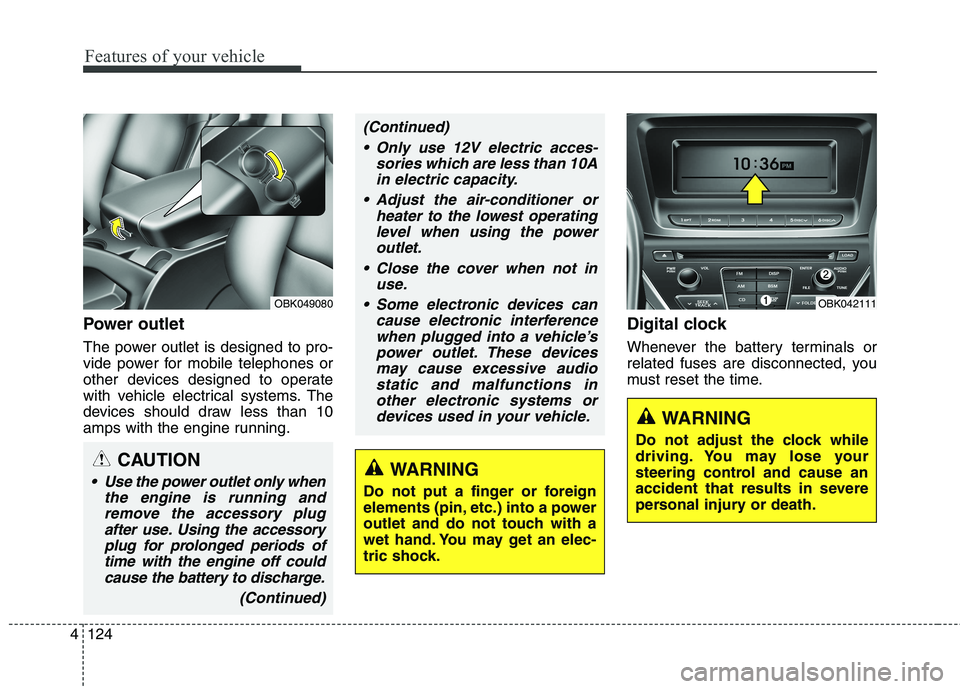
Power outlet
The power outlet is designed to pro-
vide power for mobile telephones or
other devices designed to operate
with vehicle electrical systems. The
devices should draw less than 10
amps with the engine running.
Digital clock
Whenever the battery terminals or
related fuses are disconnected, you
must reset the time.
WARNING
Do not adjust the clock while
driving. You may lose your
steering control and cause an
accident that results in severe
personal injury or death.
OBK042111OBK049080
CAUTION
Use the power outlet only when
the engine is running and
remove the accessory plug
after use. Using the accessory
plug for prolonged periods of
time with the engine off could
cause the battery to discharge.
(Continued)
(Continued)
Only use 12V electric acces-
sories which are less than 10A
in electric capacity.
Adjust the air-conditioner or
heater to the lowest operating
level when using the power
outlet.
Close the cover when not in
use.
Some electronic devices can
cause electronic interference
when plugged into a vehicle’s
power outlet. These devices
may cause excessive audio
static and malfunctions in
other electronic systems or
devices used in your vehicle.
WARNING
Do not put a finger or foreign
elements (pin, etc.) into a power
outlet and do not touch with a
wet hand. You may get an elec-
tric shock.
Page 213 of 438
4129
Features of your vehicle
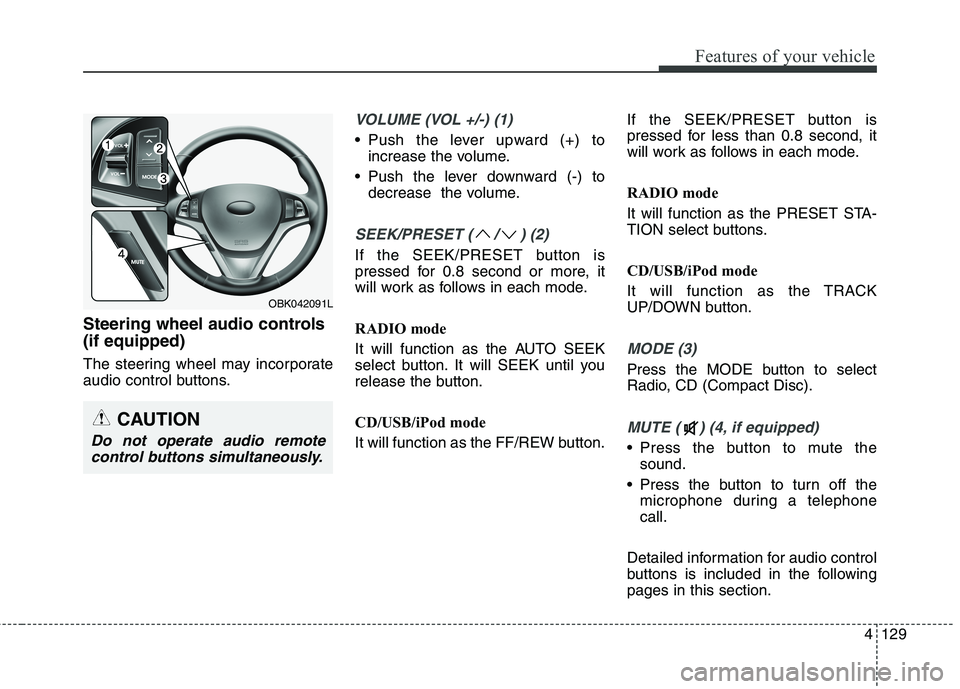
Steering wheel audio controls
(if equipped)
The steering wheel may incorporate
audio control buttons.
VOLUME (VOL +/-) (1)
Push the lever upward (+) to
increase the volume.
Push the lever downward (-) to
decrease the volume.
SEEK/PRESET ( / ) (2)
If the SEEK/PRESET button is
pressed for 0.8 second or more, it
will work as follows in each mode.
RADIO mode
It will function as the AUTO SEEK
select button. It will SEEK until you
release the button.
CD/USB/iPod mode
It will function as the FF/REW button.If the SEEK/PRESET button is
pressed for less than 0.8 second, it
will work as follows in each mode.
RADIO mode
It will function as the PRESET STA-
TION select buttons.
CD/USB/iPod mode
It will function as the TRACK
UP/DOWN button.
MODE (3)
Press the MODE button to select
Radio, CD (Compact Disc).
MUTE ( ) (4, if equipped)
Press the button to mute the
sound.
Press the button to turn off the
microphone during a telephone
call.
Detailed information for audio control
buttons is included in the following
pages in this section.
CAUTION
Do not operate audio remote
control buttons simultaneously.
OBK042091L
Page 224 of 438
Features of your vehicle
140 4
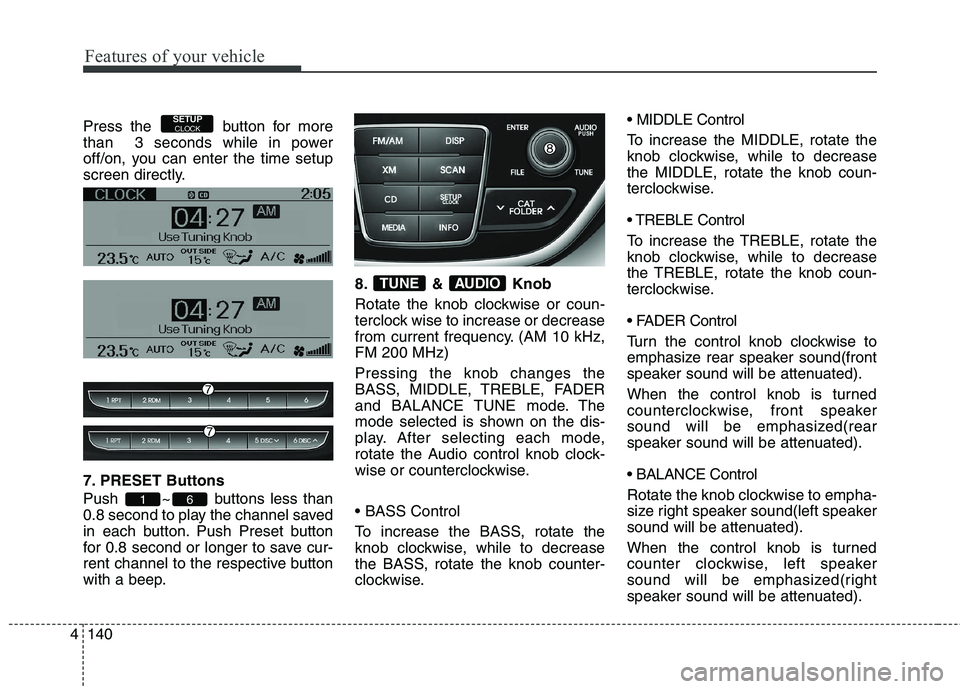
Press the button for more
than 3 seconds while in power
off/on, you can enter the time setup
screen directly.
7. PRESET Buttons
Push ~ buttons less than
0.8 second to play the channel saved
in each button. Push Preset button
for 0.8 second or longer to save cur-
rent channel to the respective button
with a beep.8. & Knob
Rotate the knob clockwise or coun-
terclock wise to increase or decrease
from current frequency. (AM 10 kHz,
FM 200 MHz)
Pressing the knob changes the
BASS, MIDDLE, TREBLE, FADER
and BALANCE TUNE mode. The
mode selected is shown on the dis-
play. After selecting each mode,
rotate the Audio control knob clock-
wise or counterclockwise.
To increase the BASS, rotate the
knob clockwise, while to decrease
the BASS, rotate the knob counter-
clockwise. MIDDLE Control
To increase the MIDDLE, rotate the
knob clockwise, while to decrease
the MIDDLE, rotate the knob coun-
terclockwise.
Control
To increase the TREBLE, rotate the
knob clockwise, while to decrease
the TREBLE, rotate the knob coun-
terclockwise.
Turn the control knob clockwise to
emphasize rear speaker sound(front
speaker sound will be attenuated).
When the control knob is turned
counterclockwise, front speaker
sound will be emphasized(rear
speaker sound will be attenuated).
Rotate the knob clockwise to empha-
size right speaker sound(left speaker
sound will be attenuated).
When the control knob is turned
counter clockwise, left speaker
sound will be emphasized(right
speaker sound will be attenuated).
AUDIOTUNE
61
SETUPCLOCK
Page 226 of 438
Features of your vehicle
142 4
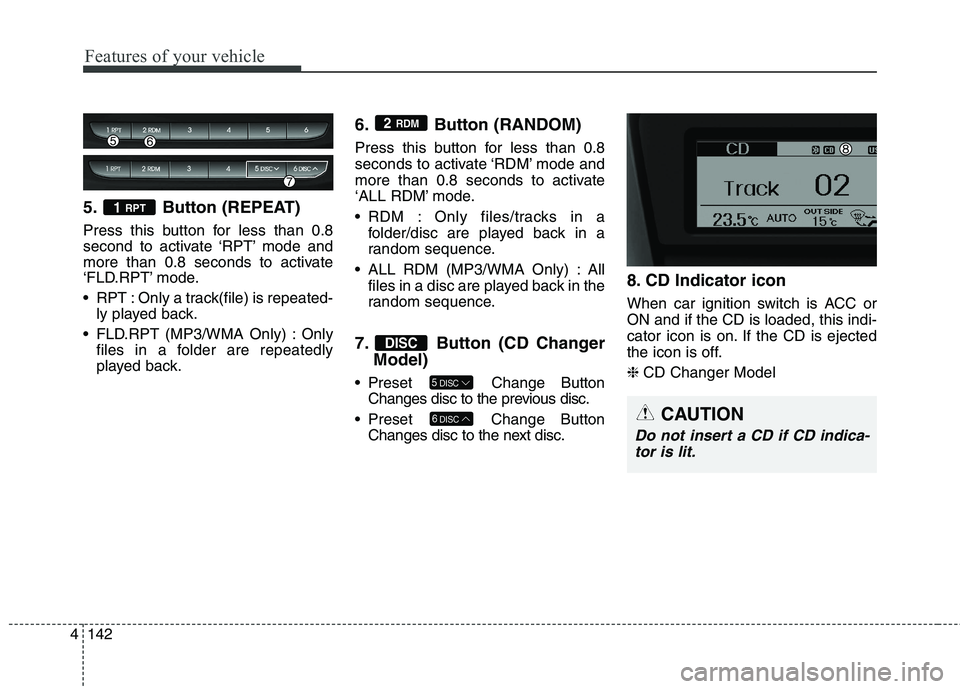
5. Button (REPEAT)
Press this button for less than 0.8
second to activate ‘RPT’ mode and
more than 0.8 seconds to activate
‘FLD.RPT’ mode.
RPT : Only a track(file) is repeated-
ly played back.
FLD.RPT (MP3/WMA Only) : Only
files in a folder are repeatedly
played back.
6. Button (RANDOM)
Press this button for less than 0.8
seconds to activate ‘RDM’ mode and
more than 0.8 seconds to activate
‘ALL RDM’ mode.
RDM : Only files/tracks in a
folder/disc are played back in a
random sequence.
ALL RDM (MP3/WMA Only) : All
files in a disc are played back in the
random sequence.
7. Button (CD Changer
Model)
Preset Change Button
Changes disc to the previous disc.
Preset Change Button
Changes disc to the next disc.
8. CD Indicator icon
When car ignition switch is ACC or
ON and if the CD is loaded, this indi-
cator icon is on. If the CD is ejected
the icon is off.
❈CD Changer Model
6DISC
5DISC
DISC
2 RDM
1 RPT
CAUTION
Do not insert a CD if CD indica-
tor is lit.
Page 233 of 438
4149
Features of your vehicle
✽ ✽
NOTICE FOR USING
THE iPod®DEVICE
• Some iPod models might not
support the communication
protocol and the files will not be
played.
Supported iPod models:
- iPod Mini
- iPod 4th(Photo) ~ 6th(Classic)
generation
- iPod Nano 1st~4th generation
- iPod Touch 1st~2nd generation
• The order of search or playback
of songs in the iPod can be dif-
ferent from the order searched
in the audio system.
• If the iPod disabled due to its
own malfunction, reset the iPod.
(Reset: Refer to iPod manual)
• An iPod may not operate nor-
mally on low battery.
(Continued)(Continued)
• Some iPod devices, such as the
iPhone, can be connected
through the Bluetooth®
Wireless Technology interface.
The device must have audio
Bluetooth
®Wireless Technology
capability (such as for stereo
headphone Bluetooth
®Wireless
Technology). The device can
play, but it will not be controlled
by the audio system.
CAUTION IN USING
THE iPod®DEVICE
The Hyundai iPod Power
Cable is needed in order to
operate iPod with the audio
buttons on the audio system.
The USB cable provided by
Apple may cause malfunction
and should not be used for
Hyundai vehicles.
❋ ❋
The Hyundai iPod Power
Cable may be purchased
through your Hyundai
Dealership.
When connecting iPod with
the iPod Power Cable, insert
the connector to the multime-
dia socket completely. If not
inserted completely, commu-
nications between iPod and
audio may be interrupted.
(Continued)
Page 238 of 438
Features of your vehicle
154 4
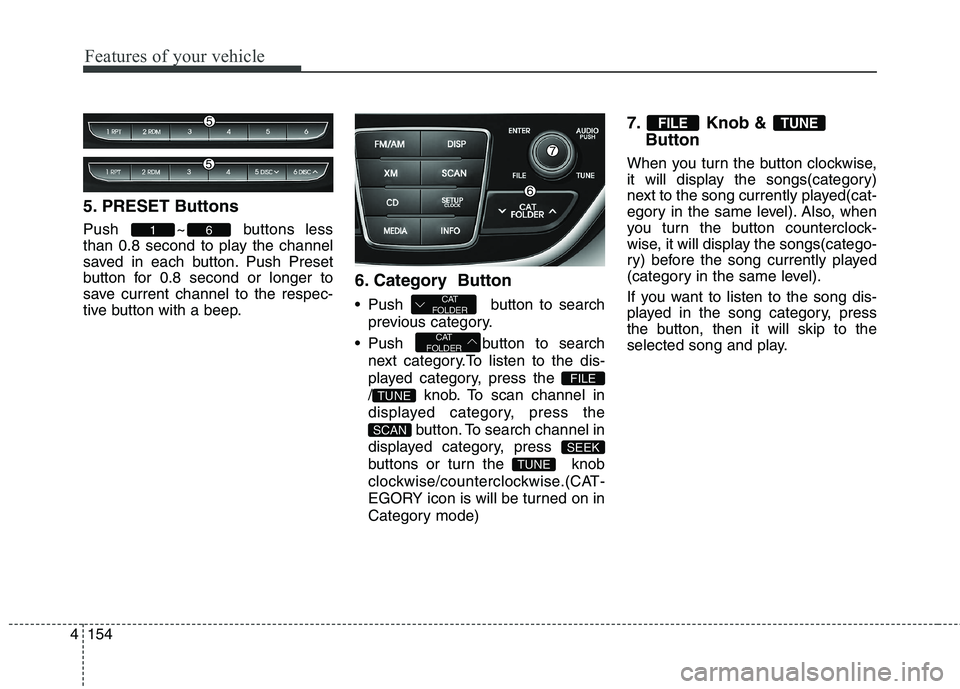
5. PRESET Buttons
Push ~ buttons less
than 0.8 second to play the channel
saved in each button. Push Preset
button for 0.8 second or longer to
save current channel to the respec-
tive button with a beep.
6. Category Button
Push button to search
previous category.
Push button to search
next category.To listen to the dis-
played category, press the
/ knob. To scan channel in
displayed category, press the
button. To search channel in
displayed category, press
buttons or turn the knob
clockwise/counterclockwise.(CAT-
EGORY icon is will be turned on in
Category mode)
7. Knob &
Button
When you turn the button clockwise,
it will display the songs(category)
next to the song currently played(cat-
egory in the same level). Also, when
you turn the button counterclock-
wise, it will display the songs(catego-
ry) before the song currently played
(category in the same level).
If you want to listen to the song dis-
played in the song category, press
the button, then it will skip to the
selected song and play.
TUNEFILE
TUNE
SEEK
SCAN
TUNE
FILE
CAT
FOLDER
CAT
FOLDER
61
Page 290 of 438
Driving your vehicle
40 5
Operate the parking brake. Do not
operate the parking brake while
driving except in an emergency sit-
uation.
Each of these actions will cancel
cruise control operation (the SET
indicator light in the instrument clus-
ter will go off), but it will not turn the
system off. If you wish to resume
cruise control operation, move the
lever up (to RES+). You will return to
your previously preset speed.
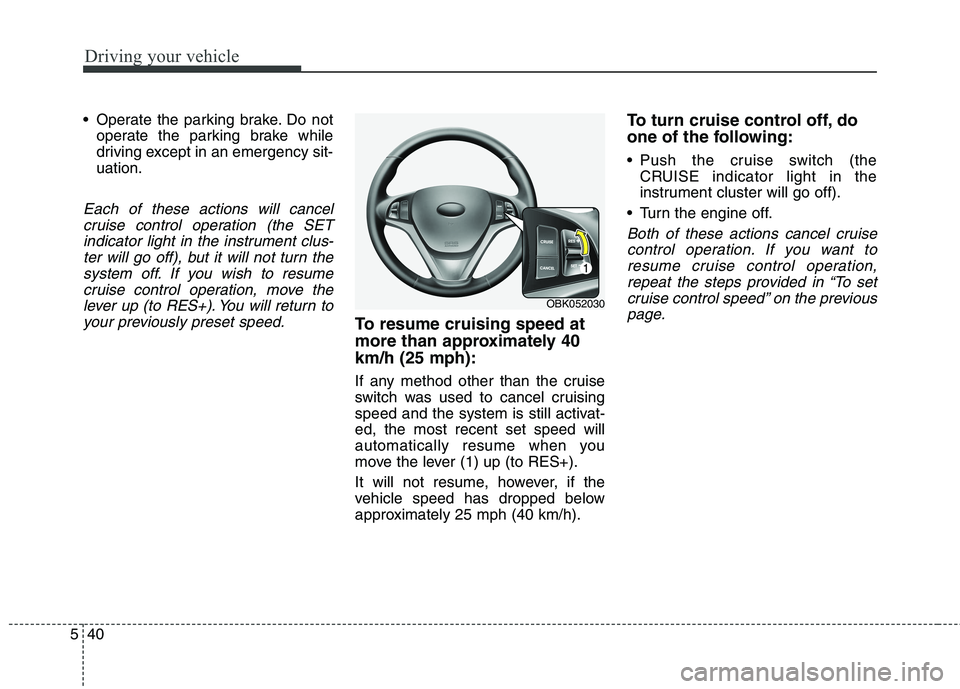
To resume cruising speed at
more than approximately 40
km/h (25 mph):
If any method other than the cruise
switch was used to cancel cruising
speed and the system is still activat-
ed, the most recent set speed will
automatically resume when you
move the lever (1) up (to RES+).
It will not resume, however, if the
vehicle speed has dropped below
approximately 25 mph (40 km/h).
To turn cruise control off, do
one of the following:
Push the cruise switch (the
CRUISE indicator light in the
instrument cluster will go off).
Turn the engine off.
Both of these actions cancel cruise
control operation. If you want to
resume cruise control operation,
repeat the steps provided in “To set
cruise control speed” on the previous
page.
OBK052030