parking brake Hyundai Genesis Coupe 2015 User Guide
[x] Cancel search | Manufacturer: HYUNDAI, Model Year: 2015, Model line: Genesis Coupe, Model: Hyundai Genesis Coupe 2015Pages: 438, PDF Size: 40.35 MB
Page 158 of 438
Features of your vehicle
74 4
Non-operational conditions of
rear parking assist system
The rear parking assist system
may not operate properly when:
1. Moisture is frozen to the sensor. (It
will operate normally when the
moisture has been cleared.)
2. The sensor is covered with foreign
matter, such as snow or water, or
the sensor cover is blocked. (It will
operate normally when the materi-
al is removed or the sensor is no
longer blocked.)
3. Driving on uneven road surfaces
(unpaved roads, gravel, bumps,
gradient).
4. Objects generating excessive
noise (vehicle horns, loud motor-
cycle engines, or truck air brakes)
are within range of the sensor.
5. Heavy rain or water spray exists.
6. Wireless transmitters or mobile
phones are within range of the
sensor.
7. The sensor is covered with snow.The detecting range may decrease
when:
1. The sensor is stained with foreign
matter such as snow or water.
(The sensing range will return to
normal when removed.)
2. Outside air temperature is
extremely hot or cold.
The following objects may not be
recognized by the sensor:
1. Sharp or slim objects such as
ropes, chains or small poles.
2. Objects which tend to absorb the
sensor frequency such as clothes,
spongy material or snow.
3. Undetectable objects smaller than
40 in. (1 m) in height and narrower
than 6 in. (14 cm) in diameter.
Rear parking assist system
precautions
The rear parking assist system
may not sound sequentially
depending on the speed and
shapes of the objects detected.
The rear parking assist system
may malfunction if the vehicle
bumper height or sensor installa-
tion has been modified or dam-
aged. Any non-factory installed
equipment or accessories may
also interfere with the sensor per-
formance.
The sensor may not recognize
objects less than 15 in. (40 cm)
from the sensor, or it may sense an
incorrect distance. Use caution.
When the sensor is frozen or
stained with snow, dirt, or water,
the sensor may be inoperative until
the stains are removed using a soft
cloth.
Do not push, scratch or strike the
sensor. Sensor damage could
occur.
Page 162 of 438
Features of your vehicle
78 4
Non-operational conditions of
parking assist system
Parking assist system may not
operate normally when:
1. Moisture is frozen to the sensor. (It
will operate normally when mois-
ture melts.)
2. Sensor is covered with foreign
matter, such as snow or water, or
the sensor cover is blocked. (It will
operate normally when the materi-
al is removed or the sensor is no
longer blocked.)
3. Sensor is stained with foreign mat-
ter such as snow or water.
(Sensing range will return to nor-
mal when removed.)
4.The parking assist button is off.
There is a possibility of parking
assist system malfunction when:
1. Driving on uneven road surfaces
such as unpaved roads, gravel,
bumps, or gradient.
2. Objects generating excessive noise
such as vehicle horns, loud motor-
cycle engines, or truck air brakes
can interfere with the sensor.
3. Heavy rain or water spray.
4. Wireless transmitters or mobile
phones present near the sensor.
5. Sensor is covered with snow.
CAUTION
This system can only sense
objects within the range and
location of the sensors;
It can not detect objects in
other areas where sensors are
not installed. Also, small or
slim objects, such as poles or
objects located between sen-
sors may not be detected by
the sensors.
Always visually check behind
the vehicle when backing up.
Be sure to inform any drivers
of the vehicle that may be
unfamiliar with the system
regarding the systems capa-
bilities and limitations.
Page 167 of 438
483
Features of your vehicle
Daytime running light
(if equipped)
Daytime Running Lights (DRL) can
make it easier for others to see the
front of your vehicle during the day.
DRL can be helpful in many different
driving conditions, and it is especially
helpful after dawn and before sunset.
The DRL system turns OFF when:
1. The multifunction switch is in the
OFF position. (if equipped)
2. The headlights are ON.
3. The turn signal is ON. (the blinking
side of the DRL will turn off)
4. The hazard warning light is ON.
5. The parking brake is applied.
6. Engine stops.
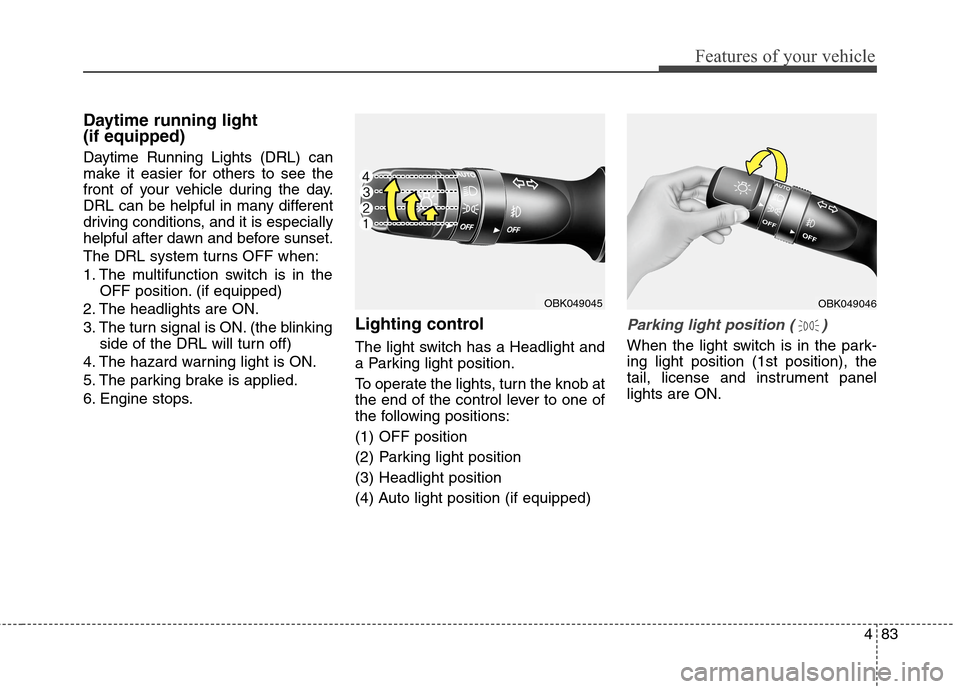
Lighting control
The light switch has a Headlight and
a Parking light position.
To operate the lights, turn the knob at
the end of the control lever to one of
the following positions:
(1) OFF position
(2) Parking light position
(3) Headlight position
(4) Auto light position (if equipped)
Parking light position ( )
When the light switch is in the park-
ing light position (1st position), the
tail, license and instrument panel
lights are ON.
OBK049046OBK049045
Page 254 of 438
Before starting
Close and lock all doors.
Position the seat so that all con-
trols are easily reached.
Adjust the inside and outside
rearview mirrors.
Be sure that all lights work.
Check all gauges.
Check the operation of warning
lights when the ignition switch is
turned to the ON position.
Release the parking brake and
make sure the brake warning light
goes out.
For safe operation, be sure you are
familiar with your vehicle and its
equipment.
Driving your vehicle
4 5
WARNING
When you intend to park or
stop the vehicle with the
engine on, be careful not to
depress the accelerator pedal
for a long period of time. It may
overheat the engine or exhaust
system and cause a fire.
When you make a sudden stop
or turn the steering wheel rap-
idly, loose objects may drop on
the floor and it could interfere
with the operation of the foot
pedals, possibly causing an
accident. Keep all things in the
vehicle safely stored.
If you do not focus on driving,
it may cause an accident. Be
careful when operating what
may disturb driving such as
audio or heater. It is the
responsibility of the driver to
always drive safely.
WARNING
All passengers must be proper-
ly belted whenever the vehicle
is moving. Refer to “Seat belts”
in section 3 for more informa-
tion on their proper use.
WARNING- Driving under
the influence of alcohol or
drugs
Drinking and driving is danger-
ous. Drunk driving is the num-
ber one contributor to the high-
way death toll each year. Even a
small amount of alcohol will
affect your reflexes, percep-
tions and judgment. Driving
while under the influence of
drugs is as dangerous or more
dangerous than driving drunk.
You are much more likely to
have a serious accident if you
drink or take drugs and drive.
If you are drinking or taking
drugs, don’t drive. Do not ride
with a driver who has been drink-
ing or taking drugs. Choose a
designated driver or call a cab.
WARNING
Always check the surrounding
areas near your vehicle for peo-
ple, especially children, before
putting a car into D (Drive) or R
(Reverse).
Page 256 of 438
Driving your vehicle
6 5
START
Turn the ignition switch to the START
position to start the engine. The
engine will crank until you release
the key; then it returns to the ON
position. The brake warning lamp
can be checked in this position.WARNING - Ignition
switch
Never turn the ignition switch
to LOCK or ACC while the vehi-
cle is moving. This would result
in loss of directional control
and braking function, which
could cause an accident.
The anti-theft steering column
lock is not a substitute for the
parking brake. Before leaving
the driver’s seat, always make
sure the shift lever is engaged
in 1st gear for the manual
transmission or P (Park) for the
automatic transmission, set
the parking brake fully and
shut the engine off.
Unexpected and sudden vehi-
cle movement may occur if
these precautions are not
taken.
(Continued)(Continued)
Never reach for the ignition
switch, or any other controls
through the steering wheel
while the vehicle is in motion.
The presence of your hand or
arm in this area could cause a
loss of vehicle control, an
accident and serious bodily
injury or death.
Do not place any movable
objects around the driver’s
seat as they may move while
driving, interfere with the driv-
er and lead to an accident.
Page 257 of 438
57
Driving your vehicle
Starting the engine
1. Make sure the parking brake is
applied.
2.Manual Transmission- Depress
the clutch pedal fully and shift the
transmission into Neutral. Depress
the brake and clutch pedal fully.
Automatic Transmission- Place
the transmission shift lever in P
(Park). Depress the brake pedal
fully.
You can also start the engine
when the shift lever is in the N
(Neutral) position.
3. Turn the ignition switch to START
and hold it there until the engine
starts (a maximum of 10 sec-
onds), then release the key.
It should be started without
depressing the accelerator.
4. Do not wait for the engine to warm
up while the vehicle remains sta-
tionary.
Start driving at moderate engine
speeds. (Steep accelerating and
decelerating should be avoided.)WARNING
Always wear appropriate shoes
when operating your vehicle.
Unsuitable shoes (high heels,
ski boots,etc.) may interfere
with your ability to use the
brake, accelerator and the
clutch pedal (if equipped).
CAUTION
If the engine stalls while you are
in motion, do not attempt to
move the shift lever to the P
(Park) position. If traffic and
road conditions permit, you may
put the shift lever in the N
(Neutral) position while the
vehicle is still moving and turn
the ignition switch to the START
position in an attempt to restart
the engine.
CAUTION
Do not engage the starter for
more than 10 seconds. If the
engine stalls or fails to start, wait
5 to 10 seconds before re-engag-
ing the starter. Improper use of
the starter may damage it.
Page 260 of 438
Driving your vehicle
10 5
Starting the engineWARNING
Never press the ENGINE
START/STOP button while the
vehicle is in motion. This
would result in loss of direc-
tional control and braking
function, which could cause
an accident.
The anti-theft steering column
lock (if equipped) is not a sub-
stitute for the parking brake.
Before leaving the driver’s
seat, always make sure the
shift lever is engaged in 1st
gear for the manual transmis-
sion or P (Park) for the auto-
matic transmission
,set the
parking brake fully and shut
the engine off. Unexpected
and sudden vehicle move-
ment may occur if these pre-
cautions are not taken.
(Continued)
(Continued)
Never reach for the engine
start/stop button, or any other
controls through the steering
wheel while the vehicle is in
motion. The presence of your
hand or arm in this area could
cause a loss of vehicle con-
trol, an accident and serious
bodily injury or death.
Do not place any movable
objects around the driver’s
seat as they may move while
driving, interfere with the driv-
er and lead to an accident.
WARNING
Always wear appropriate shoes
when operating your vehicle.
Unsuitable shoes (high heels,
ski boots, etc.) may interfere
with your ability to use the
brake, accelerator and clutch
pedal (if equipped).
Page 261 of 438
511
Driving your vehicle
1. Carry the smart key or leave it
inside the vehicle.
2. Make sure the parking brake is
firmly applied.
3.Manual Transmission- Depress
the clutch pedal fully and shift the
transmission into Neutral. Depress
the brake and clutch pedal fully.
Automatic Transmission- Place
the transmission shift lever in P
(Park). Depress the brake pedal
fully.
You can also start the engine
when the shift lever is in the N
(Neutral) position.
4. Press the engine start/stop button.
It should be started without
depressing the accelerator.
5. Do not wait for the engine to warm
up while the vehicle remains sta-
tionary.
Start driving at moderate engine
speeds. (Steep accelerating and
decelerating should be avoided.)Even if the smart key is in the vehi-
cle, if it is far away from you, the
engine may not start.
When the engine start/stop button
is in the ACC or ON position, if any
door is open, the system checks
for the smart key. If the smart key is
not in the vehicle, and if all doors
are closed, the chime will sound for
about 5 seconds. Keep the smart
key in the vehicle, when using the
ACC position or if the vehicle
engine is on.
WARNING
The engine will start by press-
ing the engine start/stop button,
only when the smart key is in
the vehicle. Never allow chil-
dren or any person who is unfa-
miliar with the vehicle to touch
the engine start/stop button or
related parts.
CAUTION
If the engine stalls while you are
in motion, do not attempt to
move the shift lever to the P
(Park) position. If traffic and
road conditions permit, you may
put the shift lever in the
N(Neutral) position while the
vehicle is still moving and press
the engine start/stop button in
an attempt to restart the engine.
Page 264 of 438
Driving your vehicle
14 5
During cold weather, shifting may
be difficult until the transmission
lubricant has warmed up. This is
normal and not harmful to the
transmission.
If you've come to a complete stop
and it's hard to shift into 1st or
R(Reverse), put the shift lever in
N(Neutral) position and release the
clutch. Press the clutch pedal back
down, and then shift into 1st or
R(Reverse) gear position.Using the clutch
The clutch should be pressed all the
way to the floor before shifting, then
released slowly. The clutch pedal
should always be fully released while
driving. Do not rest your foot on the
clutch pedal while driving. This can
cause unnecessary wear. Do not
partially engage the clutch to hold
the car on an incline. This causes
unnecessary wear. Use the foot
brake or parking brake to hold the
car on an incline. Do not operate the
clutch pedal rapidly and repeatedly.
CAUTION
To avoid premature clutch
wear and damage, do not
drive with your foot resting on
the clutch pedal. Also, don’t
use the clutch to hold the
vehicle stopped on an uphill
grade, while waiting for a traf-
fic light, etc.
Do not use the shift lever as a
handrest during driving, as
this can result in premature
wear of the transmission shift
forks.
WARNING
Before leaving the driver’s seat,
always set the parking brake
fully and shut the engine off.
Then make sure the transmis-
sion is shifted into 1st gear
when the vehicle is parked on a
level or uphill grade, and shifted
into R (Reverse) on a downhill
grade. Unexpected and sudden
vehicle movement can occur if
these precautions are not fol-
lowed in the order identified.
Page 268 of 438
Driving your vehicle
18 5
✽
✽
NOTICE
The first few shifts on a new vehicle
may be somewhat abrupt. This is a
normal condition, and the shifting
sequence will adjust after shifts are
cycled a few times by the TCM
(Transmission Control Module) or
PCM (Powertrain Control Module).
For smooth operation, depress the
brake pedal when shifting from N
(Neutral) to a forward or reverse
gear.
WARNING- Automatic
transmission
Always check the surrounding
areas near your vehicle for
people, especially children,
before shifting a car into D
(Drive) or R (Reverse).
Before leaving the driver’s
seat, always make sure the
shift lever is in the P (Park)
position; then set the parking
brake fully and shut the
engine off. Unexpected and
sudden vehicle movement
can occur if these precautions
are not followed in the order
identified.CAUTION
To avoid damage to your
transmission, do not acceler-
ate the engine in R (Reverse)
or any forward gear position
with the brakes on.
When stopped on an incline,
do not hold the vehicle sta-
tionary with engine power.
Use the service brake or the
parking brake.
Do not shift from N (Neutral)
or P (Park) into D (Drive), or R
(Reverse) when the engine is
above idle speed.