steering Hyundai Genesis Coupe 2015 User Guide
[x] Cancel search | Manufacturer: HYUNDAI, Model Year: 2015, Model line: Genesis Coupe, Model: Hyundai Genesis Coupe 2015Pages: 438, PDF Size: 40.35 MB
Page 81 of 438
Safety features of your vehicle
60 3
SRS Care
The SRS is virtually maintenance-
free and there are no parts you can
safely service by yourself. If the SRS
air bag warning light " " does not
illuminate, when you turn the ignition
on, or continuously remains on, have
your vehicle immediately inspected
by an authorized HYUNDAI dealer.
Any work on the SRS system, such
as removing, installing, repairing, or
any work on the steering wheel, the
front passenger's panel, front seats
and roof rails must be performed by
an authorized HYUNDAI dealer.
Improper handling of the SRS sys-
tem may result in serious personal
injury.WARNING
Modification to SRS compo-
nents or wiring, including the
addition of any kind of badges
to the pad covers or modifica-
tions to the body structure,
can adversely affect SRS per-
formance and lead to possible
injury.
For cleaning the air bag pad
covers, use only a soft, dry
cloth or one which has been
moistened with plain water.
Solvents or cleaners could
adversely affect the air bag
covers and proper deploy-
ment of the system.
No objects should be placed
over or near the air bag mod-
ules on the steering wheel,
instrument panel, and the
front passenger's panel above
the glove box, because any
such object could cause harm
if the vehicle is in a crash
severe enough to cause the
air bags to inflate.
(Continued)
(Continued)
If the air bags inflate, they
must be replaced by an
authorized HYUNDAI dealer.
Do not tamper with or discon-
nect SRS wiring, or other
components of the SRS sys-
tem. Doing so could result in
injury, due to accidental infla-
tion of the air bags or by ren-
dering the SRS inoperative.
If components of the air bag
system must be discarded, or
if the vehicle must be
scrapped, certain safety pre-
cautions must be observed.
An authorized HYUNDAI deal-
er knows these precautions
and can give you the neces-
sary information. Failure to
follow these precautions and
procedures could increase
the risk of personal injury.
If your car was flooded and
has soaked carpeting or water
on the flooring, you shouldn't
try to start the engine; have
the car towed to an authorized
HYUNDAI dealer.
Page 85 of 438
Features of your vehicle
Keys . . . . . . . . . . . . . . . . . . . . . . . . . . . . . . . . . . . . . 4-3
• Record your key number . . . . . . . . . . . . . . . . . . . . . 4-3
. . . . . . . . . . . . . . . . . . . . . . . . . . . . . . 4-3
. . . . . . . . . . . . . . . . . . . . . . . . . . 4-4
Smart key . . . . . . . . . . . . . . . . . . . . . . . . . . . . . . . . 4-6
. . . . . . . . . . . . . . . . . . . . . . . . . . 4-6
. . . . . . . . . . . . . . . . . . . . . . . . 4-7
. . . . . . . . . . . . . . . . . . . . . . . . . 4-8
. . . . . . . 4-10
Remote keyless entry . . . . . . . . . . . . . . . . . . . . . . . . 4-11
. . . . . . . . . . 4-11
. . . . . . . . . . . . . . . . . . . . . . . . 4-12
. . . . . . . . . . . . . . . . . . . . . . . . . . . 4-13
Theft-alarm system . . . . . . . . . . . . . . . . . . . . . . . . 4-14
Door locks . . . . . . . . . . . . . . . . . . . . . . . . . . . . . . . . 4-16
. . . . . . . . . . . . . . . . . . . . . . . . . . . 4-16
. . . . . . . . . . . . . . . . . . . . . . . . . . . . 4-18
. . . . . . . . . . . . . . . . 4-19
Trunk . . . . . . . . . . . . . . . . . . . . . . . . . . . . . . . . . . . 4-20
Windows . . . . . . . . . . . . . . . . . . . . . . . . . . . . . . . . . 4-22
Hood . . . . . . . . . . . . . . . . . . . . . . . . . . . . . . . . . . . . 4-26Fuel filler lid . . . . . . . . . . . . . . . . . . . . . . . . . . . . . . 4-27
Sunroof . . . . . . . . . . . . . . . . . . . . . . . . . . . . . . . . . . 4-30
Steering wheel . . . . . . . . . . . . . . . . . . . . . . . . . . . . 4-33
. . . . . . . . . . . . . . . . . . . . . . . . . . . . . . 4-33
. . . . . . . . . . . . . . . . . . . . . 4-34
. . . . . . . . . . . . . . . . . . . . . . . . . . . . . . . . . . . . . . 4-34
Mirrors . . . . . . . . . . . . . . . . . . . . . . . . . . . . . . . . . . 4-35
. . . . . . . . . . . . . . . . . . . . . . . 4-35
. . . . . . . . . . . . . . . . . . . . . . 4-44
Instrument cluster . . . . . . . . . . . . . . . . . . . . . . . . . 4-45
. . . . . . . . . . . . . . . . . 4-46
. . . . . . . . . . . . . . . . . . . . . . . . . . . . . . . . . . . . . 4-46
- Trip computer . . . . . . . . . . . . . . . . . . . . . . . . . . . . . 4-49
- User settings mode . . . . . . . . . . . . . . . . . . . . . . . . . . 4-53
- LCD display warnings . . . . . . . . . . . . . . . . . . . . . . . 4-56
. . . . . . 4-61
Multi gauge. . . . . . . . . . . . . . . . . . . . . . . . . . . . . . . 4-71
Rear parking assist system . . . . . . . . . . . . . . . . . . 4-73
Parking assist system. . . . . . . . . . . . . . . . . . . . . . . 4-76
Rear camera display . . . . . . . . . . . . . . . . . . . . . . . 4-80
Hazard warning flasher . . . . . . . . . . . . . . . . . . . . 4-81
4
Page 117 of 438

433
Features of your vehicle
❈For more detailed information,
contact an authorized HYUNDAI
dealer.Power steering
Power steering uses energy from the
engine to assist you in steering the
vehicle. If the engine is off or if the
power steering system becomes
inoperative, the vehicle may still be
steered, but it will require increased
steering effort.
Should you notice any change in the
effort required to steer during normal
vehicle operation, have the power
steering checked by an authorized
HYUNDAI dealer.
✽ ✽
NOTICE
If the power steering drive belt
breaks or if the power steering
pump malfunctions, the steering
effort will greatly increase.
✽ ✽
NOTICE
If the vehicle is parked for extended
periods outside in cold weather
(below -14°F/10°C), the power steer-
ing may require increased effort
when the engine is first started. This
is caused by increased fluid viscosity
due to the cold weather and does not
indicate a malfunction.
When this happens, increase the
engine RPM by depressing accelera-
tor until the RPM reaches 1,500 rpm
then release or let the engine idle for
two or three minutes to warm up the
fluid.
CAUTION
Never hold the steering wheel
against a stop (extreme right or
left turn) for more than 5 sec-
onds with the engine running.
Holding the steering wheel for
more than 5 seconds in either
position may cause damage to
the power steering pump.
CAUTION
If the sunroof is not reset when
the vehicle battery is discon-
nected or discharged, or related
fuse is blown, the sunroof may
operate improperly.
STEERING WHEEL
Page 118 of 438
Features of your vehicle
34 4
Tilt and telescope steering
Tilt and telescope steering allows
you to adjust the steering wheel posi-
tion before you drive. You can also
raise or pull it to give your legs more
room when you exit and enter the
vehicle.
The steering wheel should be posi-
tioned so that it is comfortable for
you to drive, while permitting you to
see the instrument panel warning
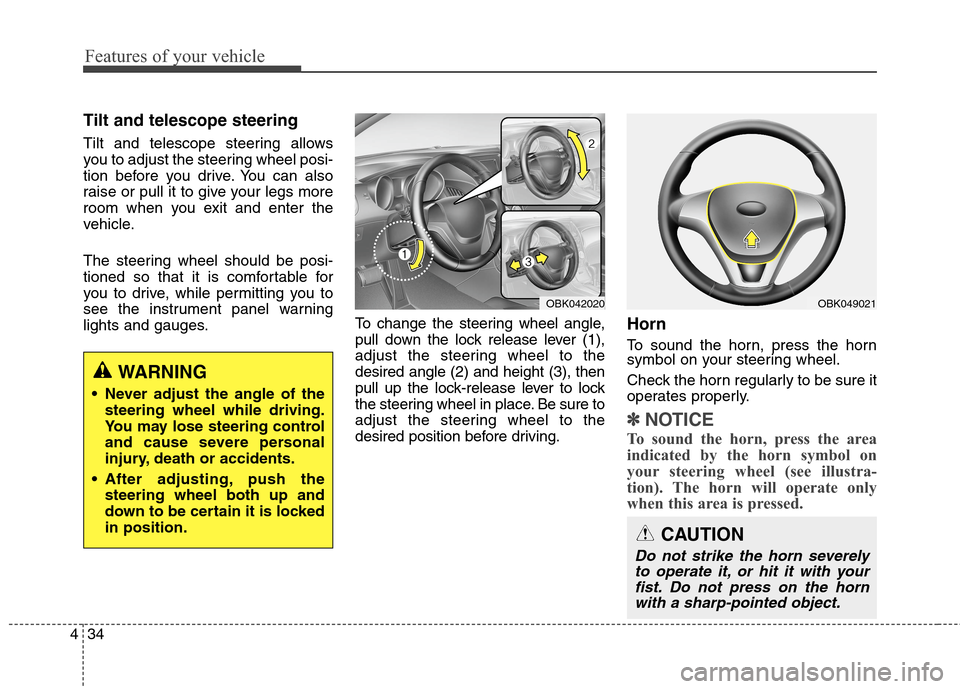
lights and gauges.To change the steering wheel angle,
pull down the lock release lever (1),
adjust the steering wheel to the
desired angle (2) and height (3), then
pull up the lock-release lever to lock
the steering wheel in place. Be sure to
adjust the steering wheel to the
desired position before driving.
Horn
To sound the horn, press the horn
symbol on your steering wheel.
Check the horn regularly to be sure it
operates properly.
✽ ✽
NOTICE
To sound the horn, press the area
indicated by the horn symbol on
your steering wheel (see illustra-
tion). The horn will operate only
when this area is pressed.
CAUTION
Do not strike the horn severely
to operate it, or hit it with your
fist. Do not press on the horn
with a sharp-pointed object.
OBK049021OBK042020
WARNING
Never adjust the angle of the
steering wheel while driving.
You may lose steering control
and cause severe personal
injury, death or accidents.
After adjusting, push the
steering wheel both up and
down to be certain it is locked
in position.
Page 153 of 438
469
Features of your vehicle
ESC indicator
(Electronic Stability
Control)
The ESC indicator will illuminate
when the ignition switch is turned
ON, but should go off after approxi-
mately 3 seconds. When the ESC is
on, it monitors the driving conditions.
Under normal driving conditions, the
ESC light will remain off. When a
slippery or low traction condition is
encountered, the ESC will operate,
and the ESC indicator will blink to
indicate the ESC is operating.
The ESC indicator stays on when the
ESC may have a malfunction. Take
your car to an authorized HYUNDAI
dealer and have the system
checked.
ESC OFF indicator
The ESC OFF indicator will illumi-
nate when the ignition switch is
turned ON, but should go off after
approximately 3 seconds. To switch
to ESC OFF mode, press the ESC
OFF button . The ESC OFF indica-
tor will illuminate indicating the
ESC is deactivated.
With the ESC system in the stand by
position, if you use the parking brake
to stop the vehicle due abnormal
brake operation, the ESC system
may be stopped and ESC OFF indi-
cator may illuminate for about 5
minutes.
Cruise indicator (if equipped)
CRUISE indicator
The indicator light illuminates when
the cruise control system is enabled.
The cruise indicator light in the
instrument cluster is illuminated
when the cruise control ON-OFF but-
ton on the steering wheel is pushed.
The indicator light turns off when the
cruise control ON-OFF button is
pushed again. For more information
about the use of cruise control, refer to
“Cruise control system” in section 5.
CAUTION
Do not use the parking brake to
stop the vehicle, except in an
emergency situation.
CRUISE
Page 166 of 438
Features of your vehicle
82 4
Battery saver function
The purpose of this feature is to
prevent the battery from being dis-
charged. The system automatically
turns off the exterior lights when
the driver removes the ignition key
(smart key : turns off the engine)
and opens the driver-side door. (in
that order)
With this feature, the parking lights
will be turned off automatically if
the driver parks on the side of road
at night.
If necessary, to keep the lights on
when the ignition key is removed
(smart key : turns off the engine),
perform the following:
1) Open the driver-side door.
2) Turn the parking lights OFF and
ON again using the light switch
on the steering column.
Headlight escort function
(if equipped)
If you turn the ignition switch to the
ACC or OFF position with the head-
lights ON, the headlights (and/or tail
lights) remain on for about 5 minutes.
However, if the driver’s door is
opened and closed, the headlights
are turned off after 15 seconds.
The headlights can be turned off by
pressing the lock button on the trans-
mitter (or smart key) twice or turning
the light switch to the OFF or Auto
position.
However, if you turn the light switch to
the Auto position when it is dark outside,
the headlights will not be turned off.
Headlamp welcome function
(if equipped)
When the headlight switch is in the
ON or AUTO position and all doors
(and trunk) are closed and locked, if
you press the door unlock button on
the transmitter (or the smart key), the
parking light will come on for about
15 seconds. At this time, if you press
the door lock button on the transmit-
ter (or smart key) the parking light
will turn off immediately.
LIGHTING
CAUTION
If the driver gets out of the vehi-
cle through other doors (except
driver’s door), the battery saver
function does not operate and
the headlight escort function
does not turn off automatically.
Therefore, it causes the battery
to be discharged. In this case,
make sure to turn off the lamp
before getting out of the vehicle.
Page 208 of 438
Features of your vehicle
124 4
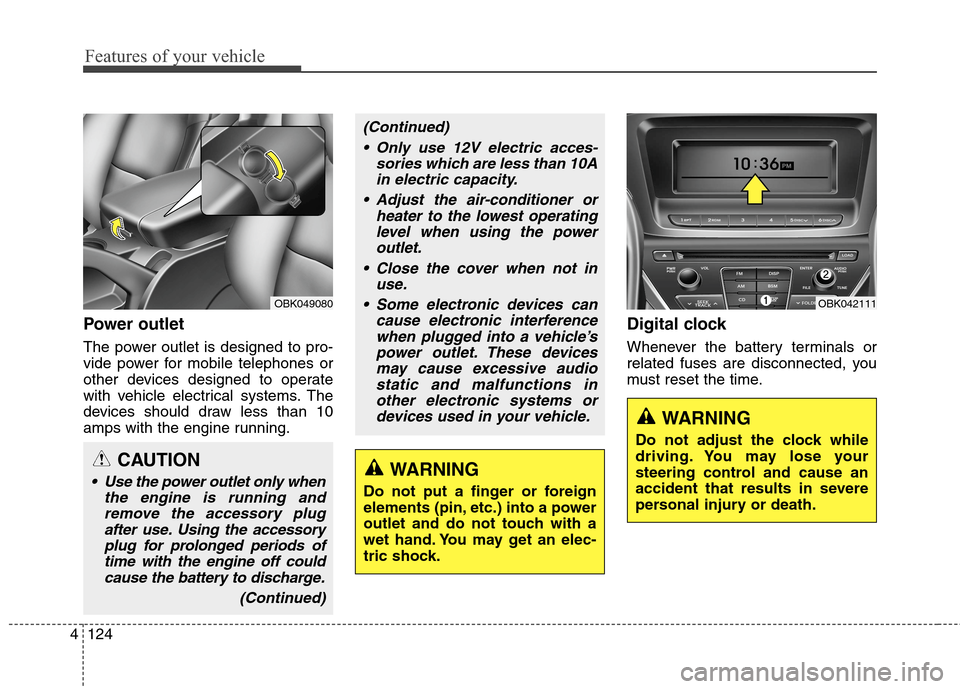
Power outlet
The power outlet is designed to pro-
vide power for mobile telephones or
other devices designed to operate
with vehicle electrical systems. The
devices should draw less than 10
amps with the engine running.
Digital clock
Whenever the battery terminals or
related fuses are disconnected, you
must reset the time.
WARNING
Do not adjust the clock while
driving. You may lose your
steering control and cause an
accident that results in severe
personal injury or death.
OBK042111OBK049080
CAUTION
Use the power outlet only when
the engine is running and
remove the accessory plug
after use. Using the accessory
plug for prolonged periods of
time with the engine off could
cause the battery to discharge.
(Continued)
(Continued)
Only use 12V electric acces-
sories which are less than 10A
in electric capacity.
Adjust the air-conditioner or
heater to the lowest operating
level when using the power
outlet.
Close the cover when not in
use.
Some electronic devices can
cause electronic interference
when plugged into a vehicle’s
power outlet. These devices
may cause excessive audio
static and malfunctions in
other electronic systems or
devices used in your vehicle.
WARNING
Do not put a finger or foreign
elements (pin, etc.) into a power
outlet and do not touch with a
wet hand. You may get an elec-
tric shock.
Page 213 of 438
4129
Features of your vehicle
Steering wheel audio controls
(if equipped)
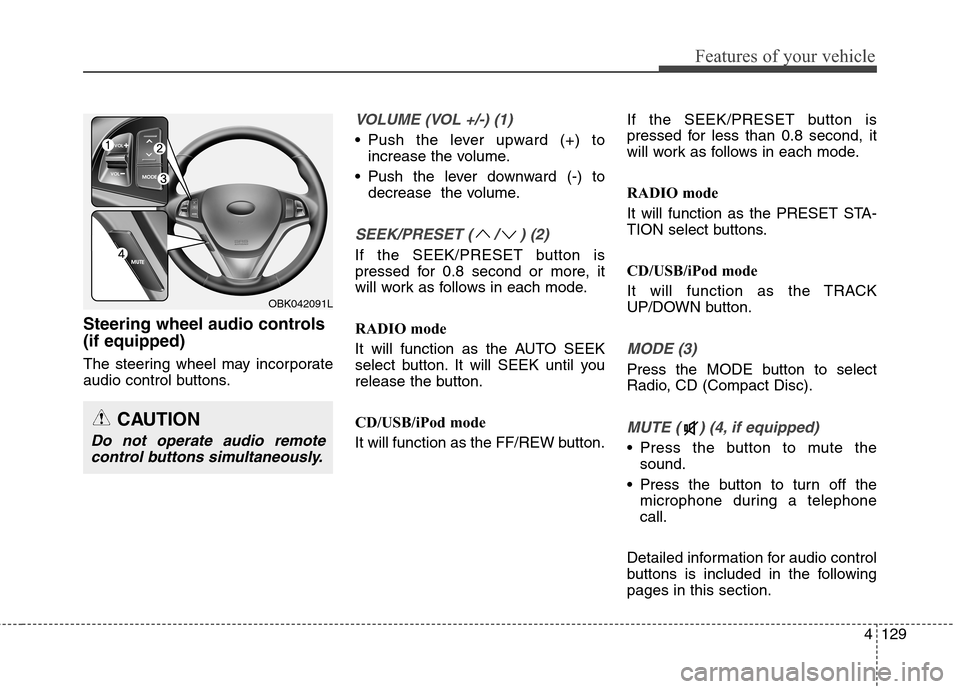
The steering wheel may incorporate
audio control buttons.
VOLUME (VOL +/-) (1)
Push the lever upward (+) to
increase the volume.
Push the lever downward (-) to
decrease the volume.
SEEK/PRESET ( / ) (2)
If the SEEK/PRESET button is
pressed for 0.8 second or more, it
will work as follows in each mode.
RADIO mode
It will function as the AUTO SEEK
select button. It will SEEK until you
release the button.
CD/USB/iPod mode
It will function as the FF/REW button.If the SEEK/PRESET button is
pressed for less than 0.8 second, it
will work as follows in each mode.
RADIO mode
It will function as the PRESET STA-
TION select buttons.
CD/USB/iPod mode
It will function as the TRACK
UP/DOWN button.
MODE (3)
Press the MODE button to select
Radio, CD (Compact Disc).
MUTE ( ) (4, if equipped)
Press the button to mute the
sound.
Press the button to turn off the
microphone during a telephone
call.
Detailed information for audio control
buttons is included in the following
pages in this section.
CAUTION
Do not operate audio remote
control buttons simultaneously.
OBK042091L
Page 242 of 438
Features of your vehicle
158 4
■
Receiving a Phone Call
When receiving a phone call, a ring-
tone is audible from speakers and
the audio system changes into tele-
phone mode.
When receiving a phone call,
“Incoming call” message and incom-
ing phone number (if available) are
displayed on the audio.
- Press button on the steering
wheel.
- Press button on the steering
wheel.
- Use VOLUME buttons on the steer-
ing wheel.
(Secret Call):
- Press and hold button on the
steering wheel until the audio sys-
tem transfers a call to the phone.
■Talking on the Phone
When talking on the phone, “Active
Call” message and the other party’s
phone number (if available) are dis-
played on the audio.
- Press button on the steering
wheel.
✽ ✽
NOTICE
In the following situations, you or
the other party may have difficulty
hearing each other:
1. Speaking at the same time, your
voice may not reach each other
parties. (This is not a malfunction.)
Speak alternately with the other
party on the phone.
2. Keep the
Bluetooth®Wireless
Technology
volume to a low level.
High-level volume may result in
distortion and echo.
3. When driving on a rough road.
4. When driving at high speeds.
5. When the window is open.
6. When the air conditioning vents
are facing the microphone.
7. When the sound of the air condi-
tioning fan is loud.
Page 247 of 438
4163
Features of your vehicle
■Voice Recognition Activation
The voice recognition engine con-
tained in the
Bluetooth®Wireless
TechnologySystem can be activat-
ed in the following conditions:
- Button Activation
The voice recognition system will
be active when the button is
pressed and after the sound of a
Beep.
- Active Listening
The voice recognition system will
be active for a period of time when
the Voice Recognition system has
asked for a customer response.
The system can recognize single
digits from zero to nine while num-
ber greater than ten will not be rec-
ognized.
The system shall cancel voice
recognition mode in following
cases : When pressing the but-
ton and saying cancel following the
beep. When not making a call and
pressing the button. When
voice recognition has failed 3 con-
secutive times. At any time if you say “help”, the
system will announce what com-
mands are available.
■Menu tree
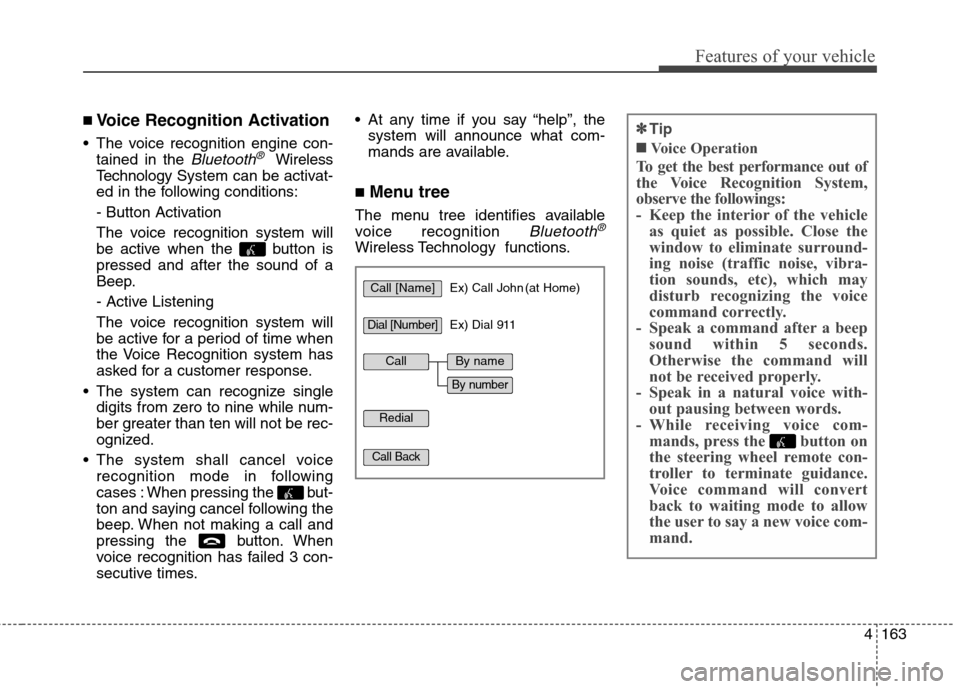
The menu tree identifies available
voice recognition
Bluetooth®
Wireless Technology functions.
✽ ✽
Tip
■Voice Operation
To get the best performance out of
the Voice Recognition System,
observe the followings:
- Keep the interior of the vehicle
as quiet as possible. Close the
window to eliminate surround-
ing noise (traffic noise, vibra-
tion sounds, etc), which may
disturb recognizing the voice
command correctly.
- Speak a command after a beep
sound within 5 seconds.
Otherwise the command will
not be received properly.
- Speak in a natural voice with-
out pausing between words.
- While receiving voice com-
mands, press the button on
the steering wheel remote con-
troller to terminate guidance.
Voice command will convert
back to waiting mode to allow
the user to say a new voice com-
mand.
Call [Name]Ex) Call John (at Home)
Ex) Dial 911
Dial [Number]
Redial
Call Back
CallBy name
By number