ignition Hyundai Genesis Coupe 2015 Repair Manual
[x] Cancel search | Manufacturer: HYUNDAI, Model Year: 2015, Model line: Genesis Coupe, Model: Hyundai Genesis Coupe 2015Pages: 438, PDF Size: 40.35 MB
Page 218 of 438
Features of your vehicle
134 4
CAUTION
Operating the device while
driving could lead to acci-
dents due to a lack of atten-
tion to external surroundings.
First park the vehicle before
operating the device.
Adjust the volume to levels
that allow the driver to hear
sounds from outside of the
vehicle. Driving in a state
where external sounds cannot
be heard may lead to acci-
dents.
Pay attention to the volume
setting when turning the
device on. A sudden output of
extreme volume upon turning
the device on could lead to
hearing impairment. (Adjust
the volume to a suitable levels
before turning off the device.)
(Continued)
WARNING
Do not stare at the screen while
driving. Staring at the screen
for prolonged periods of time
could lead to traffic accidents.
Do not disassemble, assemble,
or modify the audio system.
Such acts could result in acci-
dents, fire, or electric shock.
Using the phone while driving
may lead to a lack of attention
of traffic conditions and
increase the likelihood of acci-
dents. Use the phone feature
after parking the vehicle.
Heed caution not to spill water
or introduce foreign objects
into the device. Such acts
could lead to smoke, fire, or
product malfunction.
(Continued)
(Continued)
Please refrain from use if the
screen is blank or no sound
can be heard as these signs
may indicate product malfunc-
tion. Continued use in such
conditions could lead to acci-
dents(fires, electric shock) or
product malfunctions.
Do not touch the antenna dur-
ing thunder or lightening as
such acts may lead to light-
ning induced electric shock.
Do not stop or park in parking-
restricted areas to operate the
product. Such acts could lead
to traffic accidents.
Use the system with the vehi-
cle ignition turned on.
Prolonged use with the igni-
tion turned off could result in
battery discharge.
Page 219 of 438
4135
Features of your vehicle
(Continued)
Turn on the car ignition before
using this device. Do not oper-
ate the audio system for long
periods of time with the igni-
tion turned off as such opera-
tions may lead to battery dis-
charge.
Do not subject the device to
severe shock or impact. Direct
pressure onto the front side of
the monitor may cause dam-
age to the LCD or touch
screen.
When cleaning the device,
make sure to turn off the
device and use a dry and
smooth cloth. Never use
tough materials, chemical
cloths, or solvents (alcohol,
benzene, thinners, etc.) as
such materials may damage
the device panel or cause
color/quality deterioration
(Continued)(Continued)
When cleaning the device,
make sure to turn off the
device and use a dry and
smooth cloth. Never use
tough materials, chemical
cloths, or solvents (alcohol,
benzene, thinners, etc.) as
such materials may damage
the device panel or cause
color/quality deterioration
Do not place beverages close
to the audio system. Spilling
beverages may lead to system
malfunction.
In case of product malfunc-
tion, please contact your place
of purchase or After Service
center.
Placing the audio system
within an electromagnetic
environment may result in
noise interference.
(Continued)(Continued)
If the air freshener gets on to
audio system or plastics, then
it could cause the crack due to
its chemical reaction. Please
be careful when you use air
fresheners near those prod-
ucts. Especially be careful
when you have attached air
freshener on the air vents. The
liquid can be flow down.
Page 222 of 438
Features of your vehicle
138 4
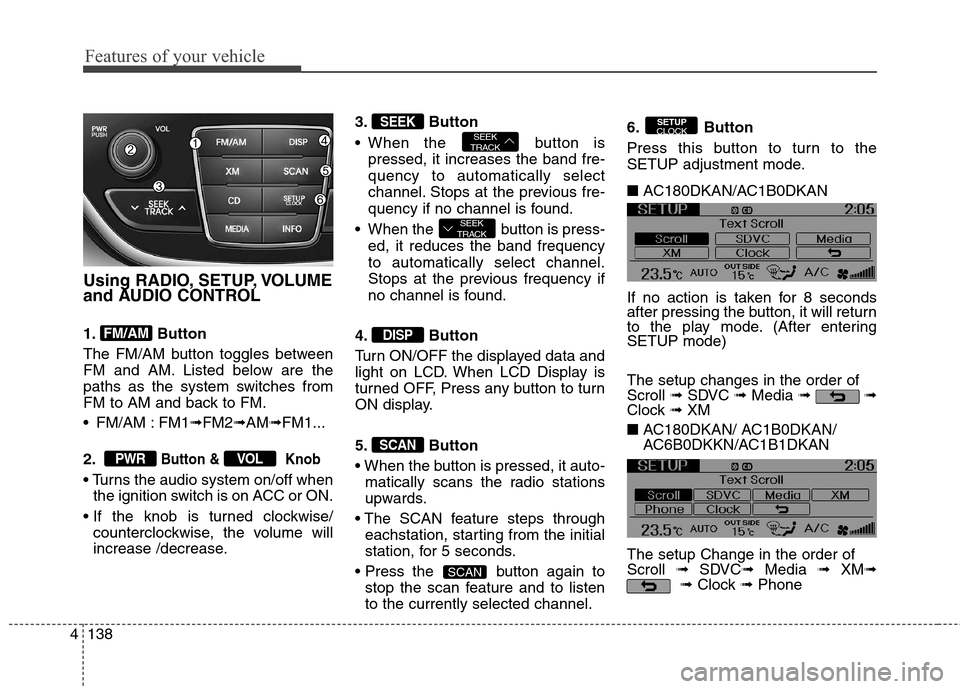
Using RADIO, SETUP, VOLUME
and AUDIO CONTROL
1. Button
The FM/AM button toggles between
FM and AM. Listed below are the
paths as the system switches from
FM to AM and back to FM.
FM/AM : FM1➟FM2➟AM➟FM1...
2.
Button & Knob
the ignition switch is on ACC or ON.
counterclockwise, the volume will
increase /decrease.3. Button
When the button is
pressed, it increases the band fre-
quency to automatically select
channel. Stops at the previous fre-
quency if no channel is found.
When the button is press-
ed, it reduces the band frequency
to automatically select channel.
Stops at the previous frequency if
no channel is found.
4. Button
Turn ON/OFF the displayed data and
light on LCD. When LCD Display is
turned OFF, Press any button to turn
ON display.
5. Button
matically scans the radio stations
upwards.
eachstation, starting from the initial
station, for 5 seconds.
button again to
stop the scan feature and to listen
to the currently selected channel.6. Button
Press this button to turn to the
SETUP adjustment mode.
■ AC180DKAN/AC1B0DKAN
If no action is taken for 8 seconds
after pressing the button, it will return
to the play mode. (After entering
SETUP mode)
The setup changes in the order of
Scroll ➟SDVC ➟Media ➟ ➟
Clock ➟ XM
■ AC180DKAN/ AC1B0DKAN/
AC6B0DKKN/AC1B1DKAN
The setup Change in the order of
Scroll ➟SDVC➟Media ➟ XM➟
➟Clock ➟Phone
SETUP
CLOCK
SCAN
SCAN
DISP
SEEK
TRACK
SEEK
TRACKSEEK
VOLPWR
FM/AM
Page 226 of 438
Features of your vehicle
142 4
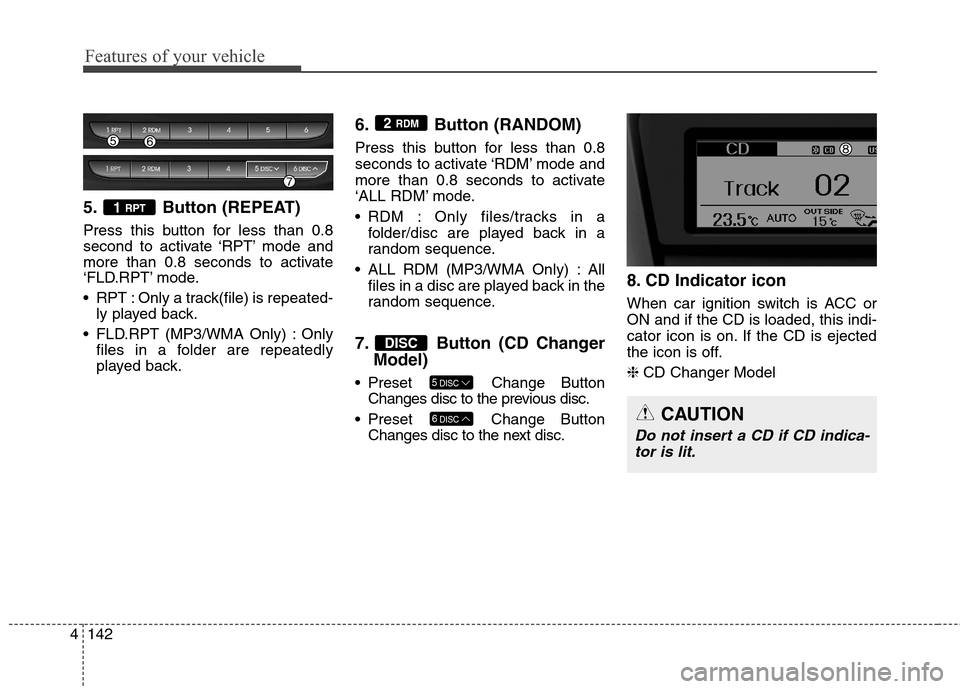
5. Button (REPEAT)
Press this button for less than 0.8
second to activate ‘RPT’ mode and
more than 0.8 seconds to activate
‘FLD.RPT’ mode.
RPT : Only a track(file) is repeated-
ly played back.
FLD.RPT (MP3/WMA Only) : Only
files in a folder are repeatedly
played back.
6. Button (RANDOM)
Press this button for less than 0.8
seconds to activate ‘RDM’ mode and
more than 0.8 seconds to activate
‘ALL RDM’ mode.
RDM : Only files/tracks in a
folder/disc are played back in a
random sequence.
ALL RDM (MP3/WMA Only) : All
files in a disc are played back in the
random sequence.
7. Button (CD Changer
Model)
Preset Change Button
Changes disc to the previous disc.
Preset Change Button
Changes disc to the next disc.
8. CD Indicator icon
When car ignition switch is ACC or
ON and if the CD is loaded, this indi-
cator icon is on. If the CD is ejected
the icon is off.
❈CD Changer Model
6DISC
5DISC
DISC
2 RDM
1 RPT
CAUTION
Do not insert a CD if CD indica-
tor is lit.
Page 227 of 438
4143
Features of your vehicle
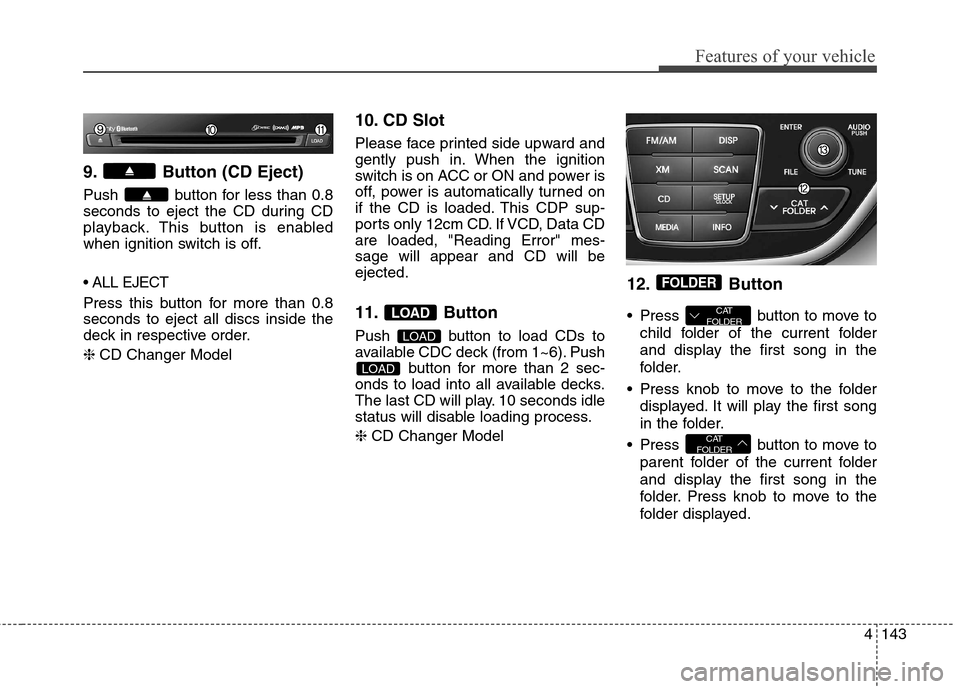
9. Button (CD Eject)
Push button for less than 0.8
seconds to eject the CD during CD
playback. This button is enabled
when ignition switch is off.
Press this button for more than 0.8
seconds to eject all discs inside the
deck in respective order.
❈CD Changer Model
10. CD Slot
Please face printed side upward and
gently push in. When the ignition
switch is on ACC or ON and power is
off, power is automatically turned on
if the CD is loaded. This CDP sup-
ports only 12cm CD. If VCD, Data CD
are loaded, "Reading Error" mes-
sage will appear and CD will be
ejected.
11. Button
Push button to load CDs to
available CDC deck (from 1~6). Push
button for more than 2 sec-
onds to load into all available decks.
The last CD will play. 10 seconds idle
status will disable loading process.
❈CD Changer Model
12. Button
Press button to move to
child folder of the current folder
and display the first song in the
folder.
Press knob to move to the folder
displayed. It will play the first song
in the folder.
Press button to move to
parent folder of the current folder
and display the first song in the
folder. Press knob to move to the
folder displayed.
CAT
FOLDER
CAT
FOLDER
FOLDER
LOAD
LOAD
LOAD
Page 239 of 438
4155
Features of your vehicle
CAUTION IN USING
Bluetooth®Wireless
Technology
CELLULAR
PHONE
Do not use a cellular phone or
perform Bluetooth®Wireless
Technology
settings (e.g. pairing
a phone) while driving.
Some Bluetooth®Wireless
Technology
-enabled phones
may not be recognized by the
system or fully compatible
with the system.
Before using Bluetooth
®
Wireless Technology related fea-
tures of the audio system,
refer your phone’s User’s
Manual for phone-side
Bluetooth
®Wireless Technology
operations.
The phone must be paired to
the audio system to use
Bluetooth®Wireless Technology
related features.
(Continued)
(continued)
You will not be able to use the
hands-free feature when your
phone (in the car) is outside of
the cellular service area (e.g.
in a tunnel, in a underground,
in a mountainous area, etc.).
f the cellular phone signal is
poor or the vehicles interior
noise is too loud, it may be diffi-
cult to hear the other person’s
voice during a call.
Do not place the phone near
or inside metallic objects, oth-
erwise communications with
Bluetooth
®Wireless Technology
system or cellular service sta-
tions can be disturbed.
While a phone is connected
through Bluetooth
®Wireless
Technology
your phone may
discharge quicker than usual
for additional Bluetooth
®
Wireless Technology-related
operations.
(Continued)
(continued)
Some cellular phones or other
devices may cause interfer-
ence noise or malfunction to
audio system. In this case,
storing the device in a differ-
ent location may resolve the
situation.
Please save your phone name
in English, or your phone
name may not be displayed
correctly.
If Priority is set upon vehicle
ignition(IGN/ACC ON), the
Bluetooth
®Wireless Technology
phone will be automatically
connected.
Even if you are outside, the
Bluetooth
®Wireless Technology
phone will be automatically
connected once you are in the
vicinity of the vehicle.
If you do not want automatic
Bluetooth
®Wireless Technology
power off.
(Continued)
Page 254 of 438
Before starting
Close and lock all doors.
Position the seat so that all con-
trols are easily reached.
Adjust the inside and outside
rearview mirrors.
Be sure that all lights work.
Check all gauges.
Check the operation of warning
lights when the ignition switch is
turned to the ON position.
Release the parking brake and
make sure the brake warning light
goes out.
For safe operation, be sure you are
familiar with your vehicle and its
equipment.
Driving your vehicle
4 5
WARNING
When you intend to park or
stop the vehicle with the
engine on, be careful not to
depress the accelerator pedal
for a long period of time. It may
overheat the engine or exhaust
system and cause a fire.
When you make a sudden stop
or turn the steering wheel rap-
idly, loose objects may drop on
the floor and it could interfere
with the operation of the foot
pedals, possibly causing an
accident. Keep all things in the
vehicle safely stored.
If you do not focus on driving,
it may cause an accident. Be
careful when operating what
may disturb driving such as
audio or heater. It is the
responsibility of the driver to
always drive safely.
WARNING
All passengers must be proper-
ly belted whenever the vehicle
is moving. Refer to “Seat belts”
in section 3 for more informa-
tion on their proper use.
WARNING- Driving under
the influence of alcohol or
drugs
Drinking and driving is danger-
ous. Drunk driving is the num-
ber one contributor to the high-
way death toll each year. Even a
small amount of alcohol will
affect your reflexes, percep-
tions and judgment. Driving
while under the influence of
drugs is as dangerous or more
dangerous than driving drunk.
You are much more likely to
have a serious accident if you
drink or take drugs and drive.
If you are drinking or taking
drugs, don’t drive. Do not ride
with a driver who has been drink-
ing or taking drugs. Choose a
designated driver or call a cab.
WARNING
Always check the surrounding
areas near your vehicle for peo-
ple, especially children, before
putting a car into D (Drive) or R
(Reverse).
Page 255 of 438
55
Driving your vehicle
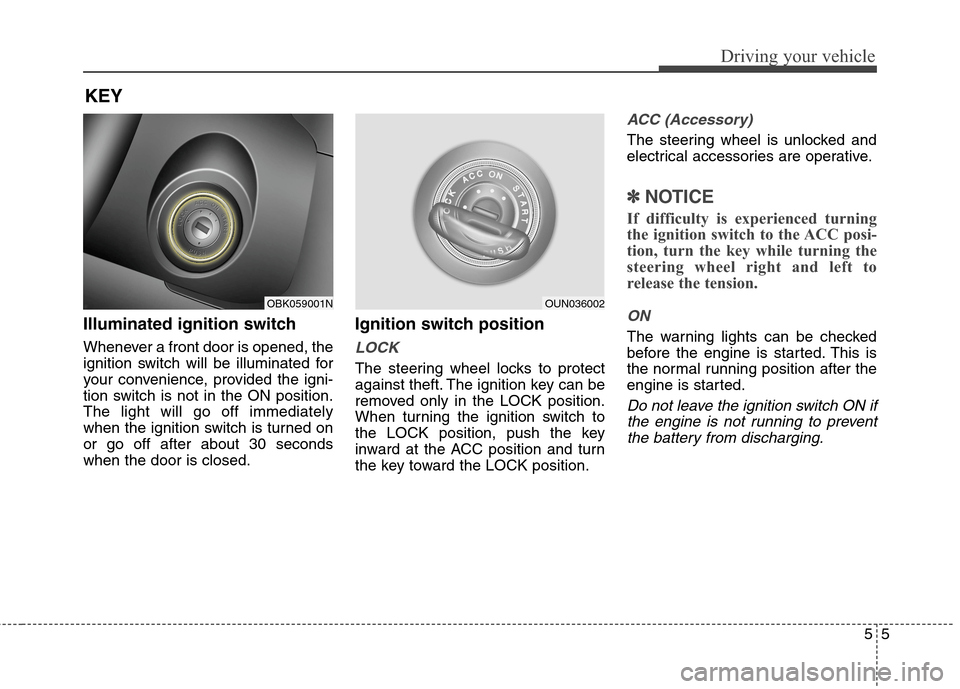
Illuminated ignition switch
Whenever a front door is opened, the
ignition switch will be illuminated for
your convenience, provided the igni-
tion switch is not in the ON position.
The light will go off immediately
when the ignition switch is turned on
or go off after about 30 seconds
when the door is closed.
Ignition switch position
LOCK
The steering wheel locks to protect
against theft. The ignition key can be
removed only in the LOCK position.
When turning the ignition switch to
the LOCK position, push the key
inward at the ACC position and turn
the key toward the LOCK position.
ACC (Accessory)
The steering wheel is unlocked and
electrical accessories are operative.
✽ ✽
NOTICE
If difficulty is experienced turning
the ignition switch to the ACC posi-
tion, turn the key while turning the
steering wheel right and left to
release the tension.
ON
The warning lights can be checked
before the engine is started. This is
the normal running position after the
engine is started.
Do not leave the ignition switch ON if
the engine is not running to prevent
the battery from discharging.
KEY
OBK059001NOUN036002
Page 256 of 438
Driving your vehicle
6 5
START
Turn the ignition switch to the START
position to start the engine. The
engine will crank until you release
the key; then it returns to the ON
position. The brake warning lamp
can be checked in this position.WARNING - Ignition
switch
Never turn the ignition switch
to LOCK or ACC while the vehi-
cle is moving. This would result
in loss of directional control
and braking function, which
could cause an accident.
The anti-theft steering column
lock is not a substitute for the
parking brake. Before leaving
the driver’s seat, always make
sure the shift lever is engaged
in 1st gear for the manual
transmission or P (Park) for the
automatic transmission, set
the parking brake fully and
shut the engine off.
Unexpected and sudden vehi-
cle movement may occur if
these precautions are not
taken.
(Continued)(Continued)
Never reach for the ignition
switch, or any other controls
through the steering wheel
while the vehicle is in motion.
The presence of your hand or
arm in this area could cause a
loss of vehicle control, an
accident and serious bodily
injury or death.
Do not place any movable
objects around the driver’s
seat as they may move while
driving, interfere with the driv-
er and lead to an accident.
Page 257 of 438
57
Driving your vehicle
Starting the engine
1. Make sure the parking brake is
applied.
2.Manual Transmission- Depress
the clutch pedal fully and shift the
transmission into Neutral. Depress
the brake and clutch pedal fully.
Automatic Transmission- Place
the transmission shift lever in P
(Park). Depress the brake pedal
fully.
You can also start the engine
when the shift lever is in the N
(Neutral) position.
3. Turn the ignition switch to START
and hold it there until the engine
starts (a maximum of 10 sec-
onds), then release the key.
It should be started without
depressing the accelerator.
4. Do not wait for the engine to warm
up while the vehicle remains sta-
tionary.
Start driving at moderate engine
speeds. (Steep accelerating and
decelerating should be avoided.)WARNING
Always wear appropriate shoes
when operating your vehicle.
Unsuitable shoes (high heels,
ski boots,etc.) may interfere
with your ability to use the
brake, accelerator and the
clutch pedal (if equipped).
CAUTION
If the engine stalls while you are
in motion, do not attempt to
move the shift lever to the P
(Park) position. If traffic and
road conditions permit, you may
put the shift lever in the N
(Neutral) position while the
vehicle is still moving and turn
the ignition switch to the START
position in an attempt to restart
the engine.
CAUTION
Do not engage the starter for
more than 10 seconds. If the
engine stalls or fails to start, wait
5 to 10 seconds before re-engag-
ing the starter. Improper use of
the starter may damage it.