audio Hyundai Genesis Coupe 2015 Owner's Manual
[x] Cancel search | Manufacturer: HYUNDAI, Model Year: 2015, Model line: Genesis Coupe, Model: Hyundai Genesis Coupe 2015Pages: 438, PDF Size: 40.35 MB
Page 86 of 438
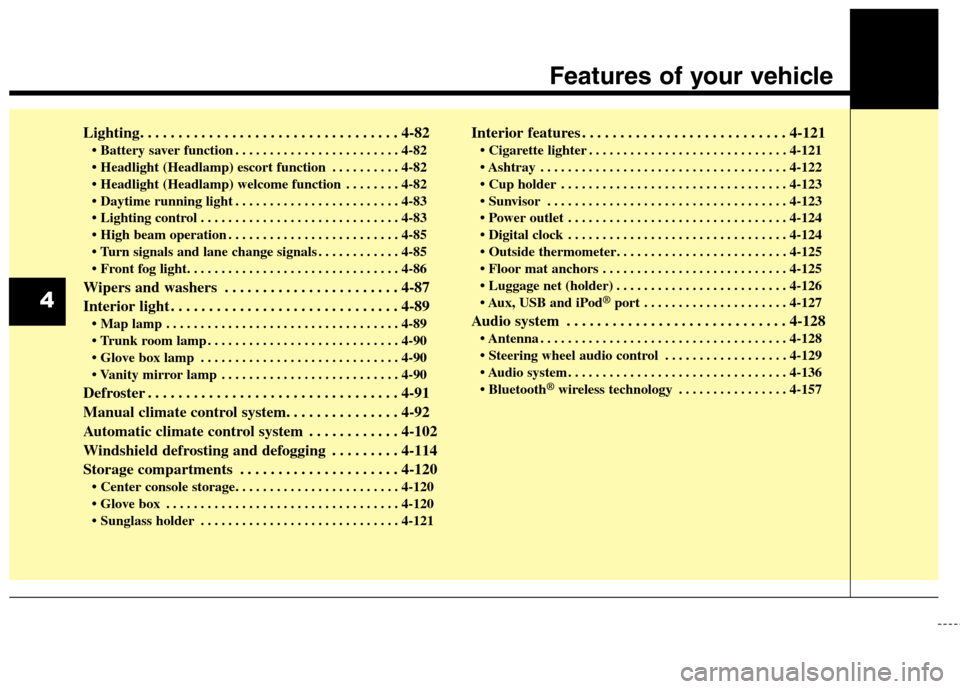
Lighting. . . . . . . . . . . . . . . . . . . . . . . . . . . . . . . . . . 4-82
. . . . . . . . . . . . . . . . . . . . . . . . 4-82
. . . . . . . . . . 4-82
. . . . . . . . 4-82
. . . . . . . . . . . . . . . . . . . . . . . . 4-83
. . . . . . . . . . . . . . . . . . . . . . . . . . . . . 4-83
. . . . . . . . . . . . . . . . . . . . . . . . . 4-85
. . . . . . . . . . . . 4-85
Wipers and washers . . . . . . . . . . . . . . . . . . . . . . . 4-87
Interior light . . . . . . . . . . . . . . . . . . . . . . . . . . . . . . 4-89
. . . . . . . . . . . . . . . . . . . . . . . . . . . . . . . . . . 4-89
. . . . . . . . . . . . . . . . . . . . . . . . . . . . 4-90
. . . . . . . . . . . . . . . . . . . . . . . . . . . . . 4-90
. . . . . . . . . . . . . . . . . . . . . . . . . . 4-90
Defroster . . . . . . . . . . . . . . . . . . . . . . . . . . . . . . . . . 4-91
Manual climate control system. . . . . . . . . . . . . . . 4-92
Automatic climate control system . . . . . . . . . . . . 4-102
Windshield defrosting and defogging . . . . . . . . . 4-114
Storage compartments . . . . . . . . . . . . . . . . . . . . . 4-120
. . . . . . . . . . . . . . . . . . . . . . . . . . . . . . . . . . 4-120
. . . . . . . . . . . . . . . . . . . . . . . . . . . . . 4-121
Interior features . . . . . . . . . . . . . . . . . . . . . . . . . . . 4-121
. . . . . . . . . . . . . . . . . . . . . . . . . . . . . 4-121
. . . . . . . . . . . . . . . . . . . . . . . . . . . . . . . . . . . . 4-122
. . . . . . . . . . . . . . . . . . . . . . . . . . . . . . . . . 4-123
. . . . . . . . . . . . . . . . . . . . . . . . . . . . . . . . . . . 4-123
. . . . . . . . . . . . . . . . . . . . . . . . . . . . . . . . 4-124
. . . . . . . . . . . . . . . . . . . . . . . . . . . . . . . . 4-124
. . . . . . . . . . . . . . . . . . . . . . . . . . . 4-125
. . . . . . . . . . . . . . . . . . . . . . . . . 4-126
USB and iPod
®port . . . . . . . . . . . . . . . . . . . . . 4-127
Audio system . . . . . . . . . . . . . . . . . . . . . . . . . . . . . 4-128
. . . . . . . . . . . . . . . . . . . . . . . . . . . . . . . . . . . . 4-128
. . . . . . . . . . . . . . . . . . 4-129
. . . . . . . . . . . . . . . . . . . . . . . . . . . . . . . . 4-136
®wireless technology . . . . . . . . . . . . . . . . 4-157
4
Features of your vehicle
Page 208 of 438
Features of your vehicle
124 4
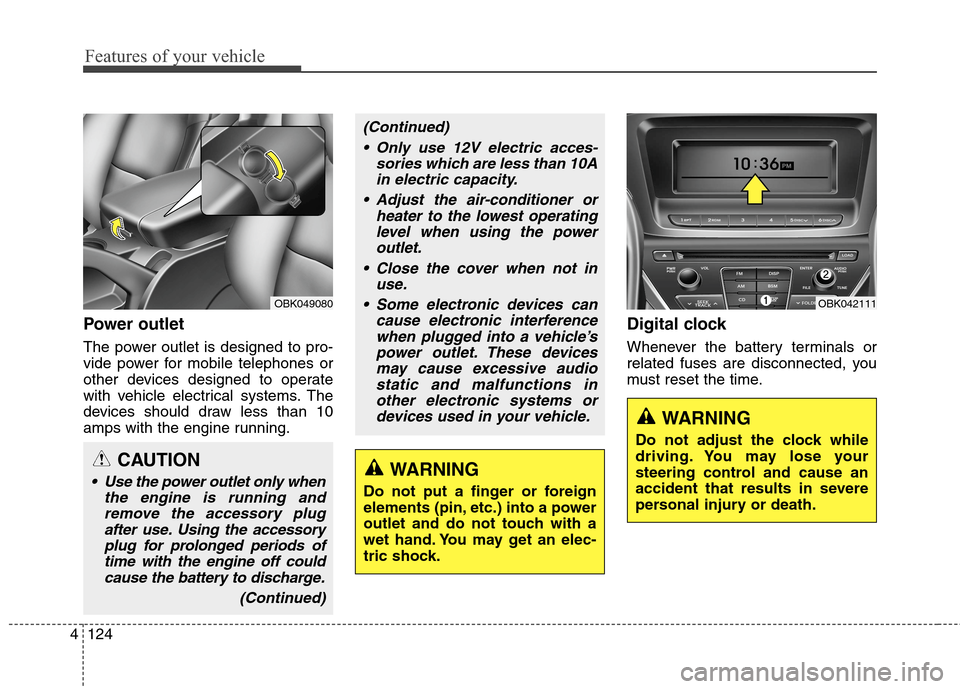
Power outlet
The power outlet is designed to pro-
vide power for mobile telephones or
other devices designed to operate
with vehicle electrical systems. The
devices should draw less than 10
amps with the engine running.
Digital clock
Whenever the battery terminals or
related fuses are disconnected, you
must reset the time.
WARNING
Do not adjust the clock while
driving. You may lose your
steering control and cause an
accident that results in severe
personal injury or death.
OBK042111OBK049080
CAUTION
Use the power outlet only when
the engine is running and
remove the accessory plug
after use. Using the accessory
plug for prolonged periods of
time with the engine off could
cause the battery to discharge.
(Continued)
(Continued)
Only use 12V electric acces-
sories which are less than 10A
in electric capacity.
Adjust the air-conditioner or
heater to the lowest operating
level when using the power
outlet.
Close the cover when not in
use.
Some electronic devices can
cause electronic interference
when plugged into a vehicle’s
power outlet. These devices
may cause excessive audio
static and malfunctions in
other electronic systems or
devices used in your vehicle.
WARNING
Do not put a finger or foreign
elements (pin, etc.) into a power
outlet and do not touch with a
wet hand. You may get an elec-
tric shock.
Page 209 of 438
![Hyundai Genesis Coupe 2015 Owners Manual 4125
Features of your vehicle
Setup the clock
With audio off
1. Press the [SETUP] or [Clock] but-
ton(1) until the clock of the display
blinks.
2. Set the clock by turning the
knob(2) and press it.
Wi](/img/35/14686/w960_14686-208.png "Hyundai Genesis Coupe 2015 Owners Manual 4125
Features of your vehicle
Setup the clock
With audio off
1. Press the [SETUP] or [Clock] but-
ton(1) until the clock of the display
blinks.
2. Set the clock by turning the
knob(2) and press it.
Wi")
4125
Features of your vehicle
Setup the clock
With audio off
1. Press the [SETUP] or [Clock] but-
ton(1) until the clock of the display
blinks.
2. Set the clock by turning the
knob(2) and press it.
With audio on
1. Press the [SETUP] or [Clock] but-
ton (1).
2. Select the clock menu by turning
the knob (2).
3. Set the clock by turning the
knob(2) and press it.
Outside thermometer
The current outside temperature is
displayed in 1°F (1°C) increments.
The temperature range is between -
30°F~140°F (-30°C ~ 60°C).
The outside temperature on the dis-
play may not change immediately
like a general thermometer to pre-
vent the driver from being inattentive.
Floor mat anchor(s)
When using a floor mat on the front
floor carpet, make sure it attaches to
the floor mat anchor(s) in your vehi-
cle. This keeps the floor mat from
sliding forward.
OBK049112NOXM049228
■Type A■Type B
Page 211 of 438
4127
Features of your vehicle
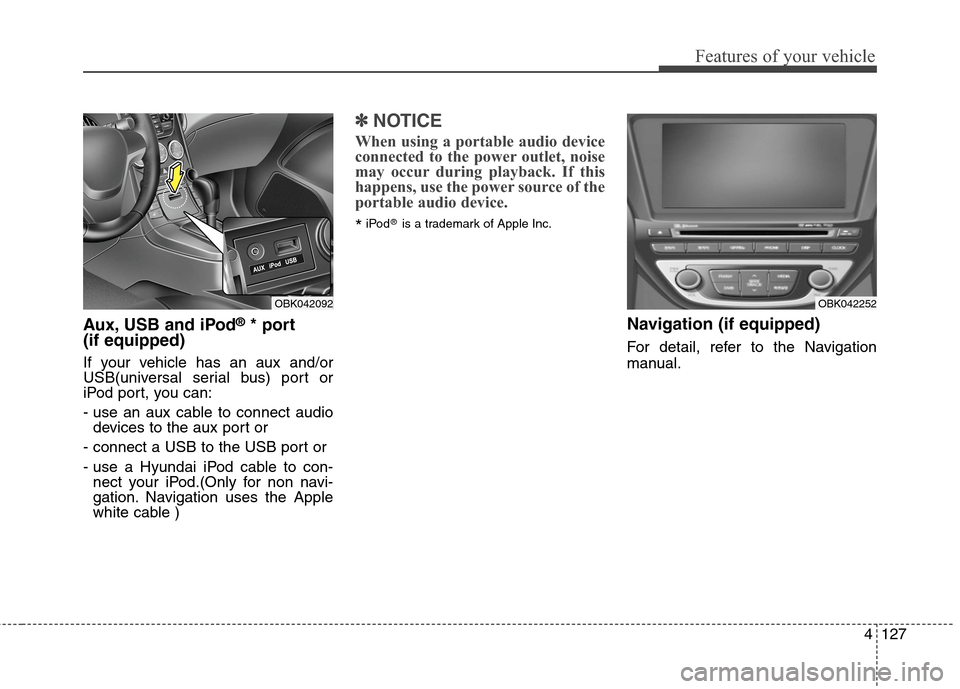
Aux, USB and iPod®* port
(if equipped)
If your vehicle has an aux and/or
USB(universal serial bus) port or
iPod port, you can:
- use an aux cable to connect audio
devices to the aux port or
- connect a USB to the USB port or
- use a Hyundai iPod cable to con-
nect your iPod.(Only for non navi-
gation. Navigation uses the Apple
white cable )
✽ ✽
NOTICE
When using a portable audio device
connected to the power outlet, noise
may occur during playback. If this
happens, use the power source of the
portable audio device.
*iPod®is a trademark of Apple Inc.
Navigation (if equipped)
For detail, refer to the Navigation
manual.
OBK042092OBK042252
Page 212 of 438
Features of your vehicle
128 4
✽
✽
NOTICE
• If you install an after market HID
head lamp, your vehicle's audio
and electronic device may mal-
function.
• Prevent chemicals such as per-
fume, cosmetic oil, sun cream,
hand cleaner, and air freshener
from contacting the interior parts
because they may cause damage
or discoloration.
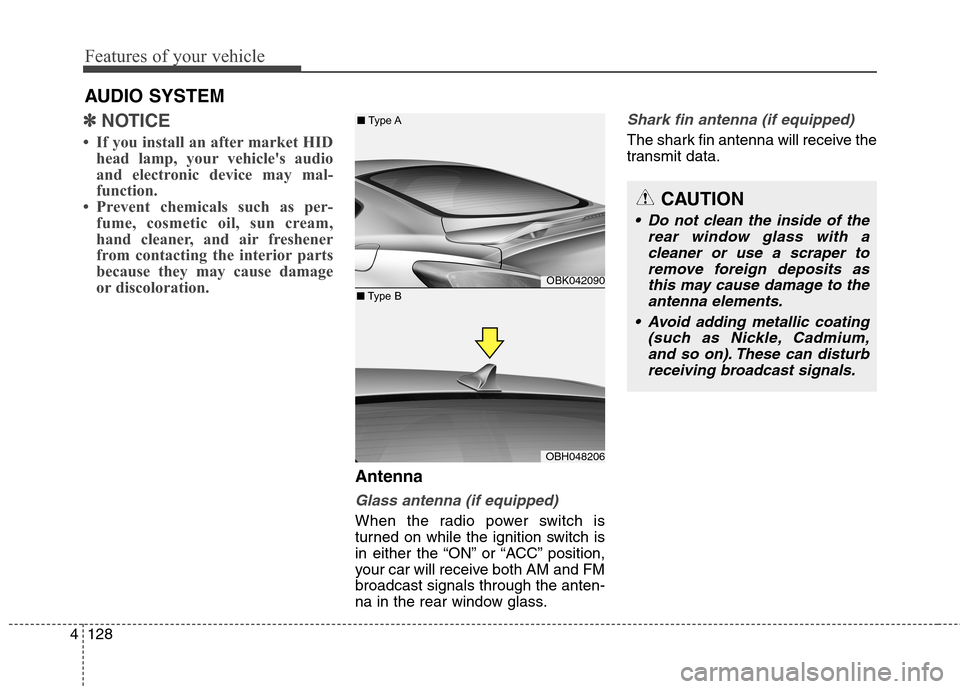
Antenna
Glass antenna (if equipped)
When the radio power switch is
turned on while the ignition switch is
in either the “ON” or “ACC” position,
your car will receive both AM and FM
broadcast signals through the anten-
na in the rear window glass.
Shark fin antenna (if equipped)
The shark fin antenna will receive the
transmit data.
CAUTION
• Do not clean the inside of the
rear window glass with a
cleaner or use a scraper to
remove foreign deposits as
this may cause damage to the
antenna elements.
Avoid adding metallic coating
(such as Nickle, Cadmium,
and so on). These can disturb
receiving broadcast signals.
AUDIO SYSTEM
OBK042090
OBH048206
■Type A
■Type B
Page 213 of 438
4129
Features of your vehicle
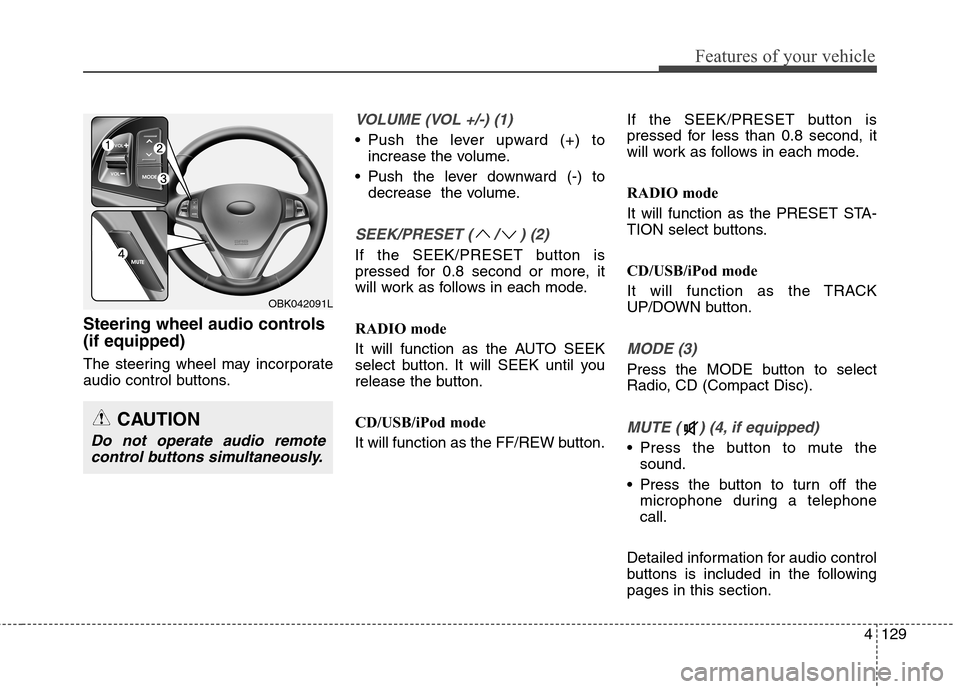
Steering wheel audio controls
(if equipped)
The steering wheel may incorporate
audio control buttons.
VOLUME (VOL +/-) (1)
Push the lever upward (+) to
increase the volume.
Push the lever downward (-) to
decrease the volume.
SEEK/PRESET ( / ) (2)
If the SEEK/PRESET button is
pressed for 0.8 second or more, it
will work as follows in each mode.
RADIO mode
It will function as the AUTO SEEK
select button. It will SEEK until you
release the button.
CD/USB/iPod mode
It will function as the FF/REW button.If the SEEK/PRESET button is
pressed for less than 0.8 second, it
will work as follows in each mode.
RADIO mode
It will function as the PRESET STA-
TION select buttons.
CD/USB/iPod mode
It will function as the TRACK
UP/DOWN button.
MODE (3)
Press the MODE button to select
Radio, CD (Compact Disc).
MUTE ( ) (4, if equipped)
Press the button to mute the
sound.
Press the button to turn off the
microphone during a telephone
call.
Detailed information for audio control
buttons is included in the following
pages in this section.
CAUTION
Do not operate audio remote
control buttons simultaneously.
OBK042091L
Page 214 of 438
Features of your vehicle
130 4
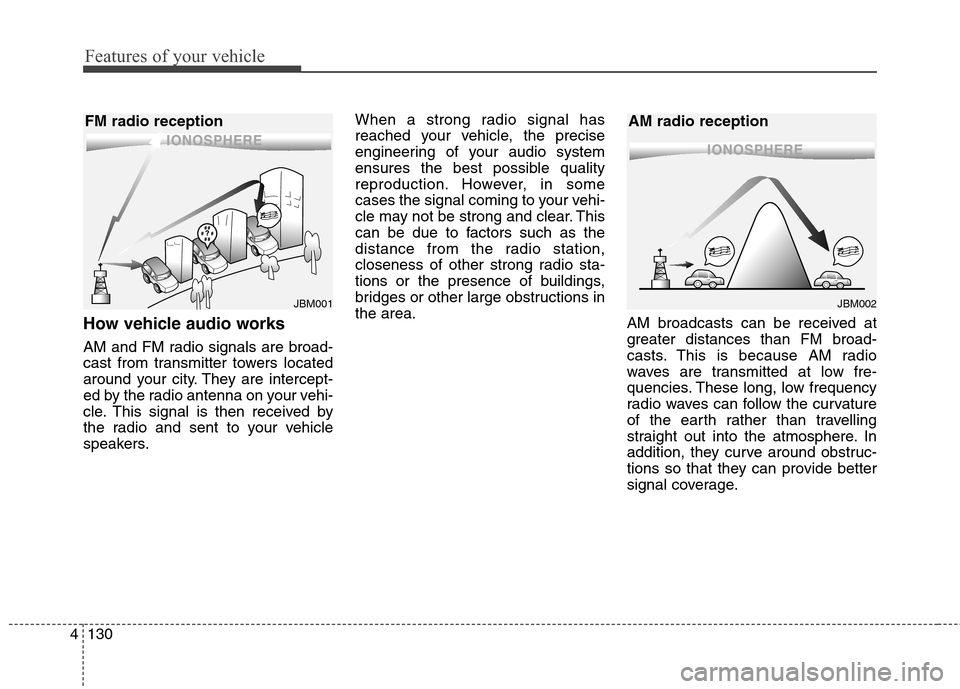
How vehicle audio works
AM and FM radio signals are broad-
cast from transmitter towers located
around your city. They are intercept-
ed by the radio antenna on your vehi-
cle. This signal is then received by
the radio and sent to your vehicle
speakers.When a strong radio signal has
reached your vehicle, the precise
engineering of your audio system
ensures the best possible quality
reproduction. However, in some
cases the signal coming to your vehi-
cle may not be strong and clear. This
can be due to factors such as the
distance from the radio station,
closeness of other strong radio sta-
tions or the presence of buildings,
bridges or other large obstructions in
the area.
AM broadcasts can be received at
greater distances than FM broad-
casts. This is because AM radio
waves are transmitted at low fre-
quencies. These long, low frequency
radio waves can follow the curvature
of the earth rather than travelling
straight out into the atmosphere. In
addition, they curve around obstruc-
tions so that they can provide better
signal coverage.
JBM002
AM radio reception
JBM001
FM radio reception
Page 217 of 438
4133
Features of your vehicle
Using a cellular phone or a two-
way radio
When a cellular phone is used inside
the vehicle, noise may be produced
from the audio equipment. This does
not mean that something is wrong
with the audio equipment. In such a
case, use the cellular phone at a
place as far as possible from the
audio equipment.
Care of discs
If the temperature inside the car is
too high, open the car windows for
ventilation before using your car
audio.
It is illegal to copy and use
MP3/WMA/WAVE files without per-
mission. Use CDs that are created
only by lawful means.
Do not apply volatile agents such as
benzene and thinner, normal clean-
ers and magnetic sprays made for
analogue disc onto CDs.
To prevent the disc surface from
getting damaged. Hold and carry
CDs by the edges or the edges of
the center hole only.
Clean the disc surface with a piece
of soft cloth before playback (wipe it
from the center to the outside
edge).
Do not damage the disc surface or
attach pieces of sticky tape or paper
onto it.
Make sure on undesirable matter
other than CDs are inserted into the
CD player (Do not insert more than
one CD at a time). Keep CDs in their cases after use to
protect them from scratches or dirt.
Depending on the type of CD-
R/CD-RW CDs, certain CDs may
not operate normally according to
manufacturing companies or mak-
ing and recording methods. In such
circumstances, if you still continue
to use those CDs, they may cause
the malfunction of your car audio
system.
✽ ✽
NOTICE - Playing an
Incompatible Copy
Protected Audio CD
Some copy protected CDs, which do
not comply with the international
audio CD standards (Red Book),
may not play on your car audio.
Please note that if you try to play
copy protected CDs and the CD
player does not perform correctly
the CDs maybe defective, not the CD
player.
WARNING
Do not use a cellular phone
while driving. Stop at a safe
location to use a cellular phone.
WARNING
When using a communication
system such a cellular phone or
a radio set inside the vehicle, a
separate external antenna must
be fitted. When a cellular phone
or a radio set is used with an
internal antenna alone, it may
interfere with the vehicle's elec-
trical system and adversely
affect safe operation of the vehi-
cle.
Page 218 of 438
Features of your vehicle
134 4
CAUTION
Operating the device while
driving could lead to acci-
dents due to a lack of atten-
tion to external surroundings.
First park the vehicle before
operating the device.
Adjust the volume to levels
that allow the driver to hear
sounds from outside of the
vehicle. Driving in a state
where external sounds cannot
be heard may lead to acci-
dents.
Pay attention to the volume
setting when turning the
device on. A sudden output of
extreme volume upon turning
the device on could lead to
hearing impairment. (Adjust
the volume to a suitable levels
before turning off the device.)
(Continued)
WARNING
Do not stare at the screen while
driving. Staring at the screen
for prolonged periods of time
could lead to traffic accidents.
Do not disassemble, assemble,
or modify the audio system.
Such acts could result in acci-
dents, fire, or electric shock.
Using the phone while driving
may lead to a lack of attention
of traffic conditions and
increase the likelihood of acci-
dents. Use the phone feature
after parking the vehicle.
Heed caution not to spill water
or introduce foreign objects
into the device. Such acts
could lead to smoke, fire, or
product malfunction.
(Continued)
(Continued)
Please refrain from use if the
screen is blank or no sound
can be heard as these signs
may indicate product malfunc-
tion. Continued use in such
conditions could lead to acci-
dents(fires, electric shock) or
product malfunctions.
Do not touch the antenna dur-
ing thunder or lightening as
such acts may lead to light-
ning induced electric shock.
Do not stop or park in parking-
restricted areas to operate the
product. Such acts could lead
to traffic accidents.
Use the system with the vehi-
cle ignition turned on.
Prolonged use with the igni-
tion turned off could result in
battery discharge.
Page 219 of 438
4135
Features of your vehicle
(Continued)
Turn on the car ignition before
using this device. Do not oper-
ate the audio system for long
periods of time with the igni-
tion turned off as such opera-
tions may lead to battery dis-
charge.
Do not subject the device to
severe shock or impact. Direct
pressure onto the front side of
the monitor may cause dam-
age to the LCD or touch
screen.
When cleaning the device,
make sure to turn off the
device and use a dry and
smooth cloth. Never use
tough materials, chemical
cloths, or solvents (alcohol,
benzene, thinners, etc.) as
such materials may damage
the device panel or cause
color/quality deterioration
(Continued)(Continued)
When cleaning the device,
make sure to turn off the
device and use a dry and
smooth cloth. Never use
tough materials, chemical
cloths, or solvents (alcohol,
benzene, thinners, etc.) as
such materials may damage
the device panel or cause
color/quality deterioration
Do not place beverages close
to the audio system. Spilling
beverages may lead to system
malfunction.
In case of product malfunc-
tion, please contact your place
of purchase or After Service
center.
Placing the audio system
within an electromagnetic
environment may result in
noise interference.
(Continued)(Continued)
If the air freshener gets on to
audio system or plastics, then
it could cause the crack due to
its chemical reaction. Please
be careful when you use air
fresheners near those prod-
ucts. Especially be careful
when you have attached air
freshener on the air vents. The
liquid can be flow down.