door lock HYUNDAI GENESIS COUPE ULTIMATE 2016 Owner's Manual
[x] Cancel search | Manufacturer: HYUNDAI, Model Year: 2016, Model line: GENESIS COUPE ULTIMATE, Model: HYUNDAI GENESIS COUPE ULTIMATE 2016Pages: 475, PDF Size: 14.35 MB
Page 108 of 475
425
Features of your vehicle
CAUTION
To prevent possible damageto the power window system,do not open or close two win-dows or more at the sametime. This will also ensure thelongevity of the fuse.
Never try to operate the main switch on the driver's doorand the individual door win-dow switch in opposing direc-tions at the same time. If thisis done, the window will stopand cannot be opened orclosed.
WARNING - Windows
Never leave the keys in your vehicle with unsupervised
children, when the Engine is
running.
NEVER leave any child unat- tended in the vehicle. Even
very young children may inad-
vertently cause the vehicle to
move, entangle themselves in
the windows, or otherwise
injure themselves or others.
Always double check to make sure all arms, hands, head
and other obstructions are
safely out of the way before
closing a window.
Do not allow children to play with the power windows. Keep
the driver’s door power win-
dow lock switch in the LOCK
position (depressed). Serious
injury can result from uninten-
tional window operation by
the child.
Do not extend a face or arms outside through the window
opening while driving.
Page 110 of 475
427
Features of your vehicle
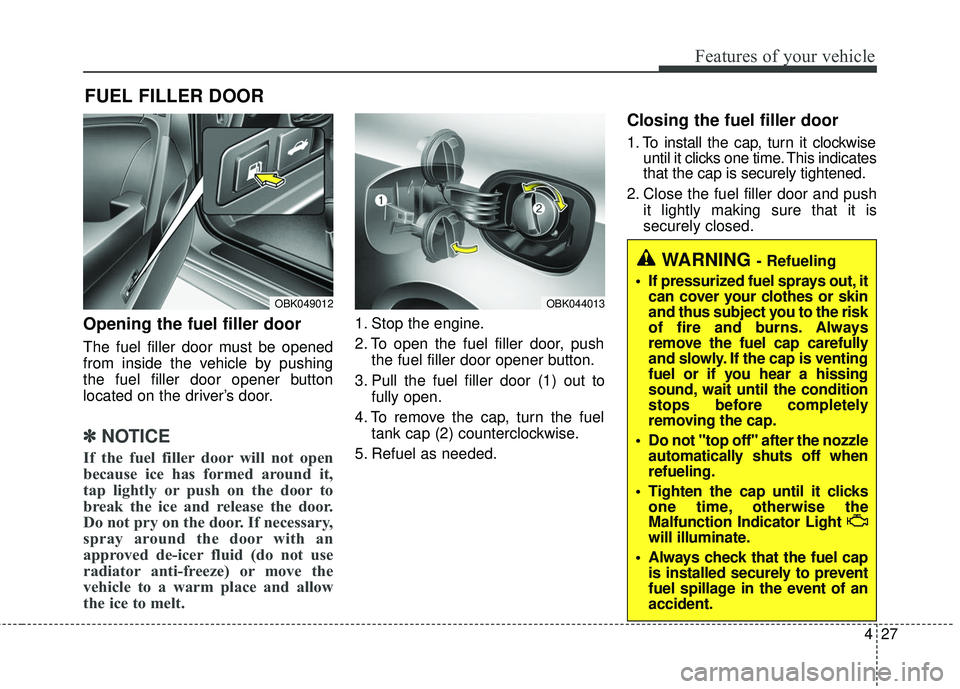
Opening the fuel filler door
The fuel filler door must be opened
from inside the vehicle by pushing
the fuel filler door opener button
located on the driver’s door.
✽ ✽NOTICE
If the fuel filler door will not open
because ice has formed around it,
tap lightly or push on the door to
break the ice and release the door.
Do not pry on the door. If necessary,
spray around the door with an
approved de-icer fluid (do not use
radiator anti-freeze) or move the
vehicle to a warm place and allow
the ice to melt.
1. Stop the engine.
2. To open the fuel filler door, push
the fuel filler door opener button.
3. Pull the fuel filler door (1) out to fully open.
4. To remove the cap, turn the fuel tank cap (2) counterclockwise.
5. Refuel as needed.
Closing the fuel filler door
1. To install the cap, turn it clockwise until it clicks one time. This indicates
that the cap is securely tightened.
2. Close the fuel filler door and push it lightly making sure that it is
securely closed.
FUEL FILLER DOOR
WARNING - Refueling
If pressurized fuel sprays out, it can cover your clothes or skin
and thus subject you to the risk
of fire and burns. Always
remove the fuel cap carefully
and slowly. If the cap is venting
fuel or if you hear a hissing
sound, wait until the condition
stops before completely
removing the cap.
Do not "top off" after the nozzle automatically shuts off when
refueling.
Tighten the cap until it clicks one time, otherwise the
Malfunction Indicator Light
will illuminate.
Always check that the fuel cap is installed securely to prevent
fuel spillage in the event of an
accident.
OBK049012OBK044013
Page 121 of 475
Features of your vehicle
38
4
To adjust the Zone setting:
1. Determine the desired Zone
Number based upon your current
location on the Zone Map.
2. Press and hold the button for 6 seconds, the current Zone
Number will appear on the display.
3. Pressing and holding the button again will cause the numbers to
increment (Note: they will repeat
…13, 14, 15, 1, 2, …). Releasing
the button when the desired Zone
Number appears on the display
will set the new Zone.
4. Within about 5 seconds the com- pass will start displaying a com-
pass heading again. There are some conditions that can
cause changes to the vehicle mag-
nets, such as installing a ski rack or
a CB antenna. Body repair work on
the vehicle can also cause changes
to the vehicle's magnetic field. In
these situations, the compass will
need to be re-calibrated to quickly
correct these changes. To re-cali-
brate the compass:
1. Press and hold the button for
more than 9 seconds. When the
compass memory is cleared a "C"
will appear in the display.
2. To calibrate the compass, drive the vehicle in 2 complete circles at
less than 5 mph (8 km/h). Integrated HomeLink®Wireless
Control System
The HomeLink
®Wireless Control
System provides a convenient way to
replace up to three hand-held radio-
frequency (RF) transmitters with a
single built-in device. This innovative
feature will learn the radio frequency
codes of most current transmitters to
operate devices such as gate opera-
tors, garage door openers, entry
door locks, security systems, even
home lighting. Both standard and
rolling code-equipped transmitters
can be programmed by following the
outlined procedures. Additional
HomeLink
®information can be found
at: www.homelink.com or by calling
1-800-355-3515.
Page 124 of 475
441
Features of your vehicle
4. Firmly press, hold for 5 secondsand release the programmed
HomeLink
®button up to two sepa-
rate times to activate the door. If the
door does not activate, press and
hold the just-trained HomeLink
®
button and observe the indicator
light.
stantly, programming is complete
and your device should activate
when the HomeLink
®button is
pressed and released.
for 2 seconds and then turns to
a constant light, continue with
"Programming" steps 5-7 to com-
plete the programming of a rolling
code equipped device (most com-
monly a garage door opener).
5. At the garage door opener receiv- er (motor-head unit) in the garage,
locate the "leam" or "smart" but-
ton. This can usually be found
where the hanging antenna wire is
attached to the motor-head unit. 6. Firmly press and release the
"leam" or "smart" button. (The
name and color of the button vary
by manufacturer). There are 30
seconds to initiate step 7.
7. Return to the vehicle and firmly press, hold for 2 seconds
and release the programmed
HomeLink
®button. Repeat the
"press/hold/release" sequence a
second time, and, depending on
the brand of the garage door
opener (or other rolling code
equipped device), repeat this
sequence a third time to complete
the programming process.
HomeLink
®should now activate your
rolling code equipped device. Gate operator & Canadian
programming
During programming, your handheld
transmitter may automatically stop
transmitting. Continue to press
the Integrated HomeLink
®Wireless
Control System button (note steps
2 through 4 in the Standard
Programming portion of this docu-
ment) while you press and re-press
("cycle") your handheld transmitter
every two seconds until the frequen-
cy signal has been learned. The indi-
cator light will flash slowly and then
rapidly after several seconds upon
successful training.
Operating HomeLink
®
To operate, simply press and release
the programmed HomeLink®button.
Activation will now occur for the
trained device (i.e. garage door open-
er, gate operator, security system,
entry door lock, home/office lighting,
etc.). For convenience, the hand-held
transmitter of the device may also be
used at any time.
Page 136 of 475
453
Features of your vehicle
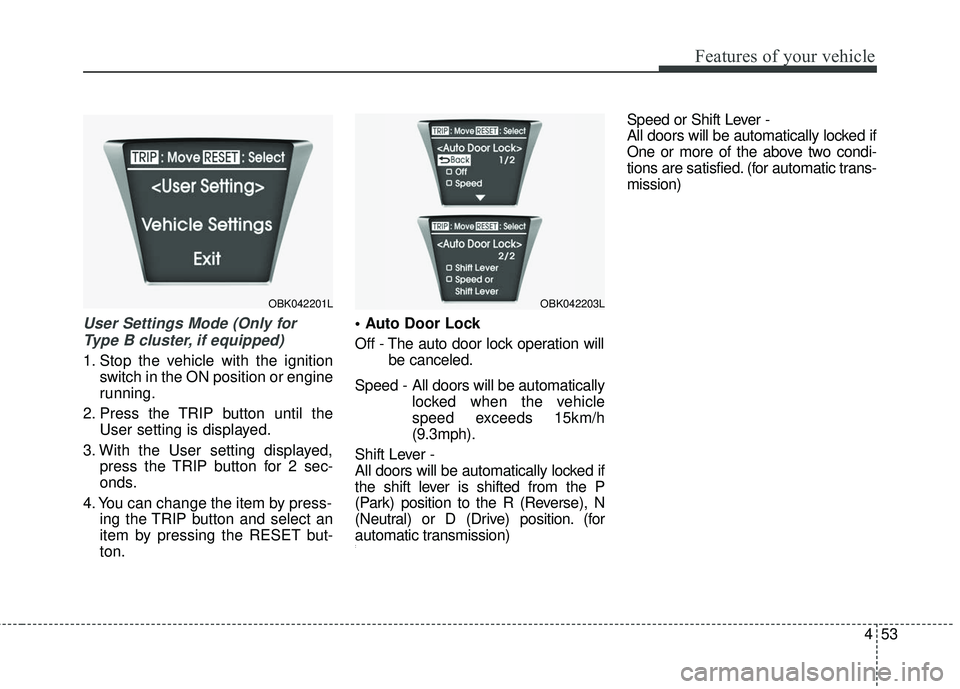
User Settings Mode (Only forType B cluster, if equipped)
1. Stop the vehicle with the ignition switch in the ON position or engine
running.
2. Press the TRIP button until the User setting is displayed.
3. With the User setting displayed, press the TRIP button for 2 sec-
onds.
4. You can change the item by press- ing the TRIP button and select an
item by pressing the RESET but-
ton.
Off - The auto door lock operation will
be canceled.
Speed - All doors will be automatically locked when the vehicle
speed exceeds 15km/h
(9.3mph).
Shift Lever -
All doors will be automatically locked if
the shift lever is shifted from the P
(Park) position to the R (Reverse), N
(Neutral) or D (Drive) position. (for
automatic transmission)
:
Speed or Shift Lever -
All doors will be automatically locked if
One or more of the above two condi-
tions are satisfied. (for automatic trans-
mission)
OBK042201LOBK042203L
Page 137 of 475
Features of your vehicle
54
4
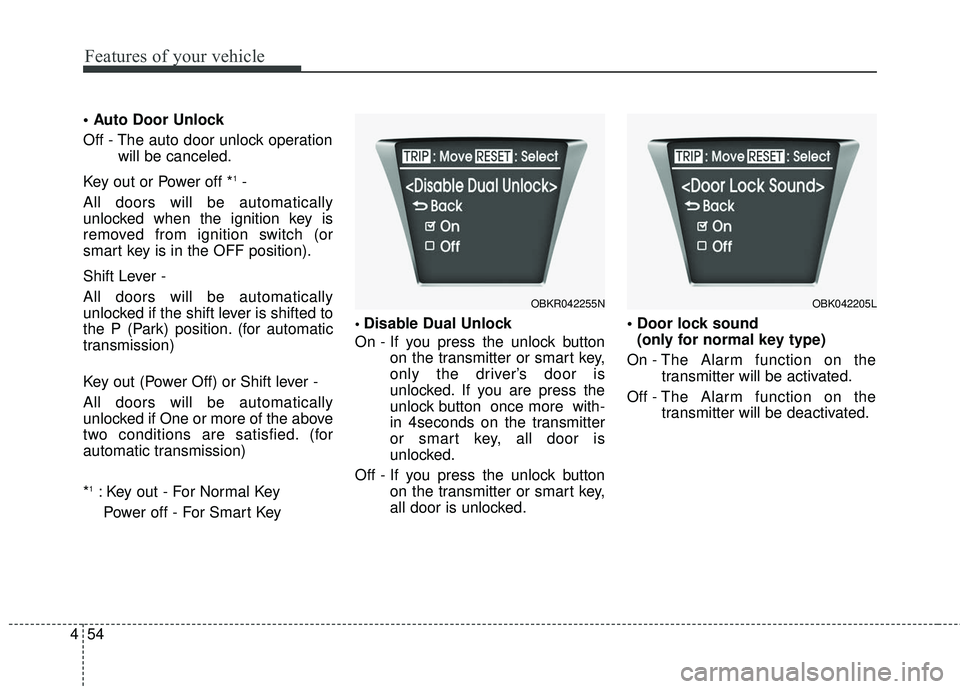
Off - The auto door unlock operation
will be canceled.
Key out or Power off *
1-
All doors will be automatically
unlocked when the ignition key is
removed from ignition switch (or
smart key is in the OFF position).
Shift Lever -
All doors will be automatically
unlocked if the shift lever is shifted to
the P (Park) position. (for automatic
transmission)
Key out (Power Off) or Shift lever -
All doors will be automatically
unlocked if One or more of the above
two conditions are satisfied. (for
automatic transmission)
*
1: Key out - For Normal Key Power off - For Smart Key
Disable Dual Unlock
On - If you press the unlock button on the transmitter or smart key,
only the driver’s door is
unlocked. If you are press the
unlock button once more with-
in 4seconds on the transmitter
or smart key, all door is
unlocked.
Off - If you press the unlock button on the transmitter or smart key,
all door is unlocked.
(only for normal key type)
On - The Alarm function on the transmitter will be activated.
Off - The Alarm function on the
transmitter will be deactivated.
OBK042205LOBKR042255N
Page 153 of 475
Features of your vehicle
70
4
Cruise SET indicator
The indicator light illuminates when
the cruise function switch (SET- or
RES+) is ON.
The cruise SET indicator light in the
instrument cluster is illuminated
when the cruise control switch (SET-
or RES+) is pushed. The cruise SET
indicator light does not illuminate
when the cruise control switch (CAN-
CEL) is pushed or the system is dis-
engaged.Key reminder warning chime
Without smart key
If the driver’s door is opened while
the ignition key is left in the ignition
switch (ACC or LOCK position), the
key reminder warning chime will
sound. This is to prevent you from
locking your keys in the vehicle. The
chime sounds until the key is
removed from the ignition switch or
the driver’s door is closed.
With smart key
If the driver’s door is opened while
the smart key is in the vehicle with
the engine start/stop button in ACC
or the smart key is in the smart key
holder with the engine start/stop but-
ton in OFF, the key reminder warning
chime will sound.
The chime sounds until the smart
key is removed from the smart key
holder or the driver’s door is closed.
KEY OUT indicator
(if equipped)
When the ignition switch is in the
ACC or ON position, if any door is
open, the system checks for the
smart key. If the smart key is not in
the vehicle, the indicator will blink,
and if all doors are closed, the chime
will also sound for about 5 seconds.
The indicator will turn off while the
vehicle is moving. Keep the smart
key in the vehicle.
KEY
OUTSET
Page 165 of 475
Features of your vehicle
82
4
Battery saver function
The purpose of this feature is to
prevent the battery from being dis-
charged. The system automatically
turns off the exterior lights when
the driver removes the ignition key
(smart key : turns off the engine)
and opens the driver-side door. (in
that order)
With this feature, the parking lights will be turned off automatically if
the driver parks on the side of road
at night.
If necessary, to keep the lights on
when the ignition key is removed
(smart key : turns off the engine),
perform the following:
1) Open the driver-side door.
2) Turn the parking lights OFF and ON again using the light switch
on the steering column.
Headlight escort function
(if equipped)
If you turn the ignition switch to the
ACC or OFF position with the head-
lights ON, the headlights (and/or tail
lights) remain on for about 5 minutes.
However, if the driver’s door is
opened and closed, the headlights
are turned off after 15 seconds.
The headlights can be turned off by
pressing the lock button on the trans-
mitter (or smart key) twice or turning
the light switch to the OFF or Auto
position.
However, if you turn the light switch to
the Auto position when it is dark outside,
the headlights will not be turned off.
Headlamp welcome function
(if equipped)
When the headlight switch is in the
ON or AUTO position and all doors
(and trunk) are closed and locked, if
you press the door unlock button on
the transmitter (or the smart key), the
parking light will come on for about
15 seconds. At this time, if you press
the door lock button on the transmit-
ter (or smart key) the parking light
will turn off immediately.
LIGHTING
CAUTION
If the driver gets out of the vehi-cle through other doors (exceptdriver’s door), the battery saverfunction does not operate andthe headlight escort functiondoes not turn off automatically.Therefore, it causes the batteryto be discharged. In this case,make sure to turn off the lampbefore getting out of the vehicle.
Page 172 of 475
489
Features of your vehicle
Map lamp
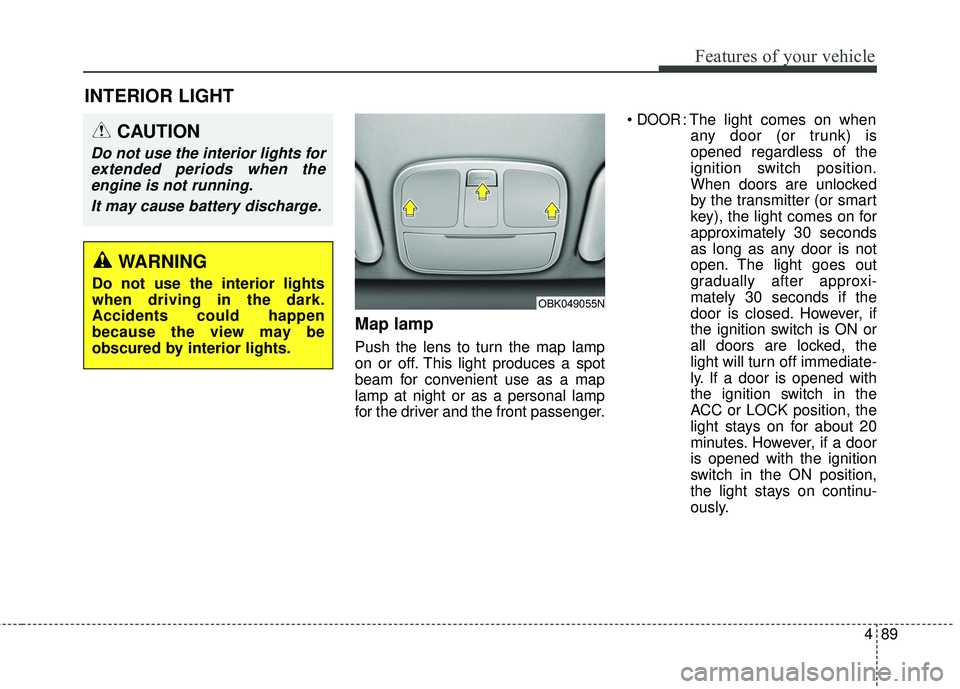
Push the lens to turn the map lamp
on or off. This light produces a spot
beam for convenient use as a map
lamp at night or as a personal lamp
for the driver and the front passenger.
DOOR: The light comes on when
any door (or trunk) is
opened regardless of the
ignition switch position.
When doors are unlocked
by the transmitter (or smart
key), the light comes on for
approximately 30 seconds
as long as any door is not
open. The light goes out
gradually after approxi-
mately 30 seconds if the
door is closed. However, if
the ignition switch is ON or
all doors are locked, the
light will turn off immediate-
ly. If a door is opened with
the ignition switch in the
ACC or LOCK position, the
light stays on for about 20
minutes. However, if a door
is opened with the ignition
switch in the ON position,
the light stays on continu-
ously.
INTERIOR LIGHT
CAUTION
Do not use the interior lights forextended periods when theengine is not running.
It may cause battery discharge.
OBK049055N
WARNING
Do not use the interior lights
when driving in the dark.
Accidents could happen
because the view may be
obscured by interior lights.
Page 204 of 475
4121
Features of your vehicle
Sunglass holder
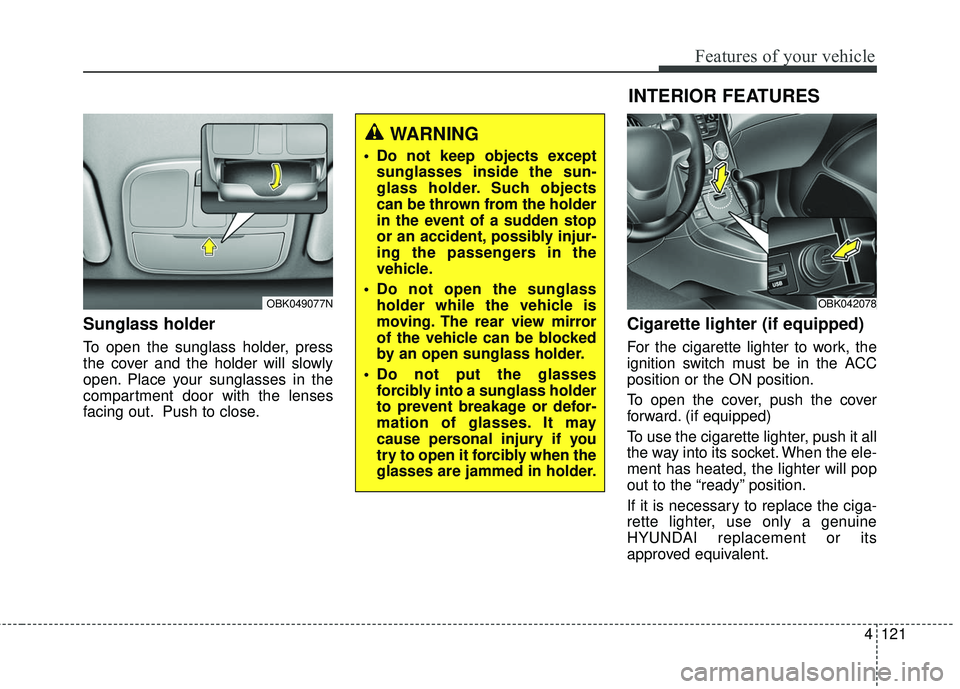
To open the sunglass holder, press
the cover and the holder will slowly
open. Place your sunglasses in the
compartment door with the lenses
facing out. Push to close.
Cigarette lighter (if equipped)
For the cigarette lighter to work, the
ignition switch must be in the ACC
position or the ON position.
To open the cover, push the cover
forward. (if equipped)
To use the cigarette lighter, push it all
the way into its socket. When the ele-
ment has heated, the lighter will pop
out to the “ready” position.
If it is necessary to replace the ciga-
rette lighter, use only a genuine
HYUNDAI replacement or its
approved equivalent.
OBK049077N
WARNING
Do not keep objects exceptsunglasses inside the sun-
glass holder. Such objects
can be thrown from the holder
in the event of a sudden stop
or an accident, possibly injur-
ing the passengers in the
vehicle.
Do not open the sunglass holder while the vehicle is
moving. The rear view mirror
of the vehicle can be blocked
by an open sunglass holder.
Do not put the glasses forcibly into a sunglass holder
to prevent breakage or defor-
mation of glasses. It may
cause personal injury if you
try to open it forcibly when the
glasses are jammed in holder.
OBK042078
INTERIOR FEATURES