power HYUNDAI GENESIS COUPE ULTIMATE 2016 Owners Manual
[x] Cancel search | Manufacturer: HYUNDAI, Model Year: 2016, Model line: GENESIS COUPE ULTIMATE, Model: HYUNDAI GENESIS COUPE ULTIMATE 2016Pages: 475, PDF Size: 14.35 MB
Page 18 of 475
Your vehicle at a glance
42
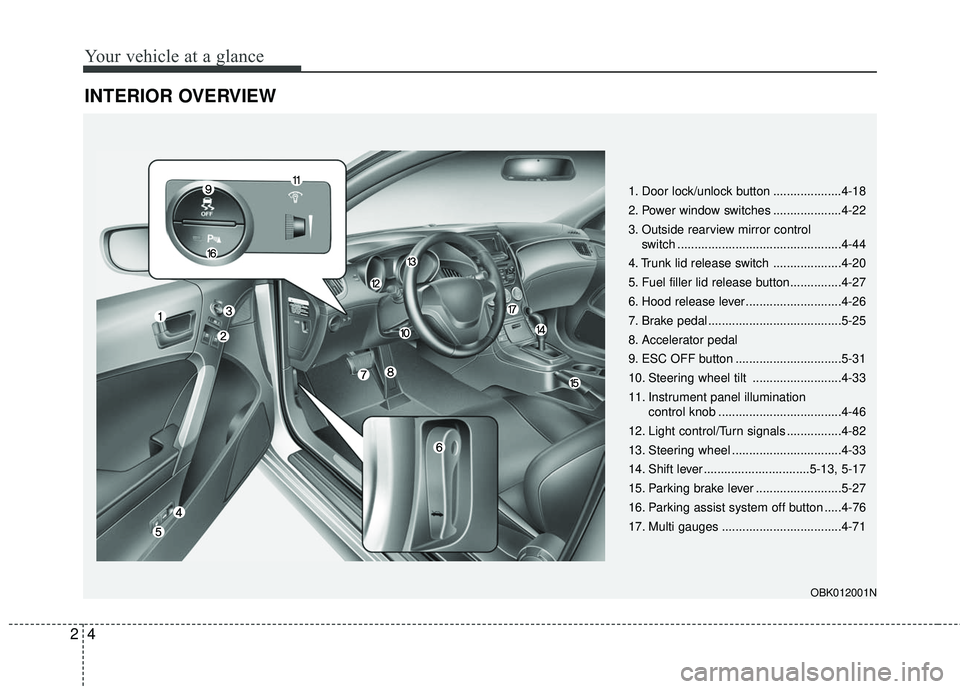
INTERIOR OVERVIEW
1. Door lock/unlock button ....................4-18
2. Power window switches ....................4-22
3. Outside rearview mirror control switch ................................................4-44
4. Trunk lid release switch ....................4-20
5. Fuel filler lid release button...............4-27
6. Hood release lever ............................4-26
7. Brake pedal .......................................5-25
8. Accelerator pedal
9. ESC OFF button ...............................5-31
10. Steering wheel tilt ..........................4-33
11. Instrument panel illumination control knob ....................................4-46
12. Light control/Turn signals ................4-82
13. Steering wheel ................................4-33
14. Shift lever ...............................5-13, 5-17
15. Parking brake lever .........................5-27
16. Parking assist system off button .....4-76
17. Multi gauges ...................................4-71
OBK012001N
Page 20 of 475
Your vehicle at a glance
62
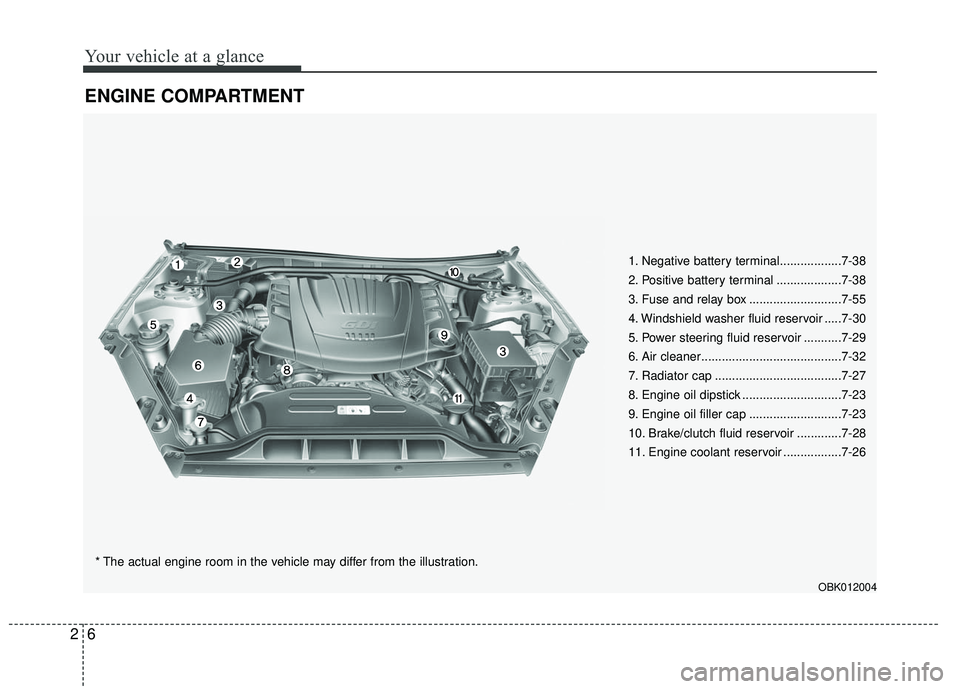
ENGINE COMPARTMENT
1. Negative battery terminal..................7-38
2. Positive battery terminal ...................7-38
3. Fuse and relay box ...........................7-55
4. Windshield washer fluid reservoir .....7-30
5. Power steering fluid reservoir ...........7-29
6. Air cleaner.........................................7-32
7. Radiator cap .....................................7-27
8. Engine oil dipstick .............................7-23
9. Engine oil filler cap ...........................7-23
10. Brake/clutch fluid reservoir .............7-28
11. Engine coolant reservoir .................7-26
* The actual engine room in the vehicle may differ from the illustration.
OBK012004
Page 25 of 475
35
Safety features of your vehicle
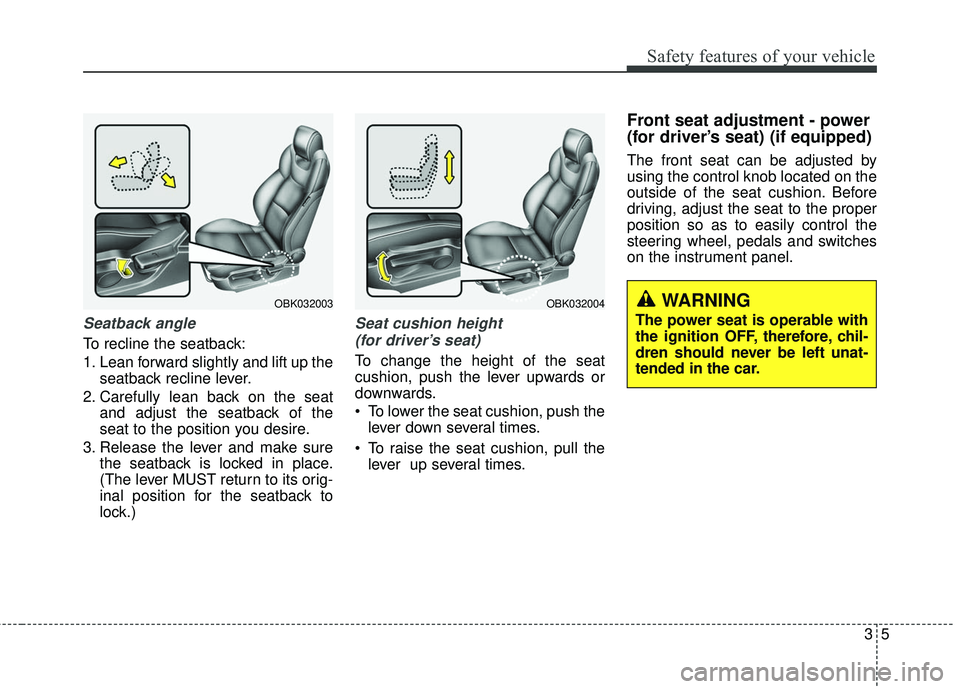
Seatback angle
To recline the seatback:
1. Lean forward slightly and lift up theseatback recline lever.
2. Carefully lean back on the seat and adjust the seatback of the
seat to the position you desire.
3. Release the lever and make sure the seatback is locked in place.
(The lever MUST return to its orig-
inal position for the seatback to
lock.)
Seat cushion height
(for driver’s seat)
To change the height of the seat
cushion, push the lever upwards or
downwards.
• To lower the seat cushion, push the lever down several times.
To raise the seat cushion, pull the lever up several times.
Front seat adjustment - power
(for driver’s seat) (if equipped)
The front seat can be adjusted by
using the control knob located on the
outside of the seat cushion. Before
driving, adjust the seat to the proper
position so as to easily control the
steering wheel, pedals and switches
on the instrument panel.
OBK032003OBK032004WARNING
The power seat is operable with
the ignition OFF , therefore, chil-
dren should never be left unat-
tended in the car.
Page 26 of 475
Safety features of your vehicle
63
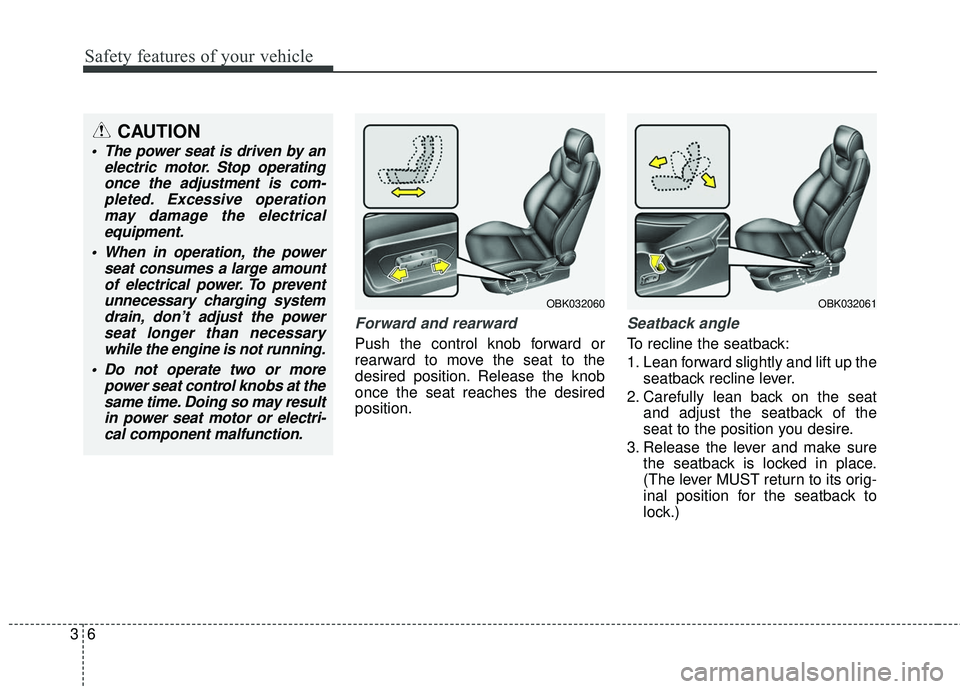
Forward and rearward
Push the control knob forward or
rearward to move the seat to the
desired position. Release the knob
once the seat reaches the desired
position.
Seatback angle
To recline the seatback:
1. Lean forward slightly and lift up theseatback recline lever.
2. Carefully lean back on the seat and adjust the seatback of the
seat to the position you desire.
3. Release the lever and make sure the seatback is locked in place.
(The lever MUST return to its orig-
inal position for the seatback to
lock.)
CAUTION
The power seat is driven by anelectric motor. Stop operatingonce the adjustment is com-pleted. Excessive operationmay damage the electricalequipment.
When in operation, the power seat consumes a large amountof electrical power. To preventunnecessary charging systemdrain, don’t adjust the powerseat longer than necessarywhile the engine is not running.
Do not operate two or more power seat control knobs at thesame time. Doing so may resultin power seat motor or electri-cal component malfunction.
OBK032060OBK032061
Page 86 of 475
43
Features of your vehicle
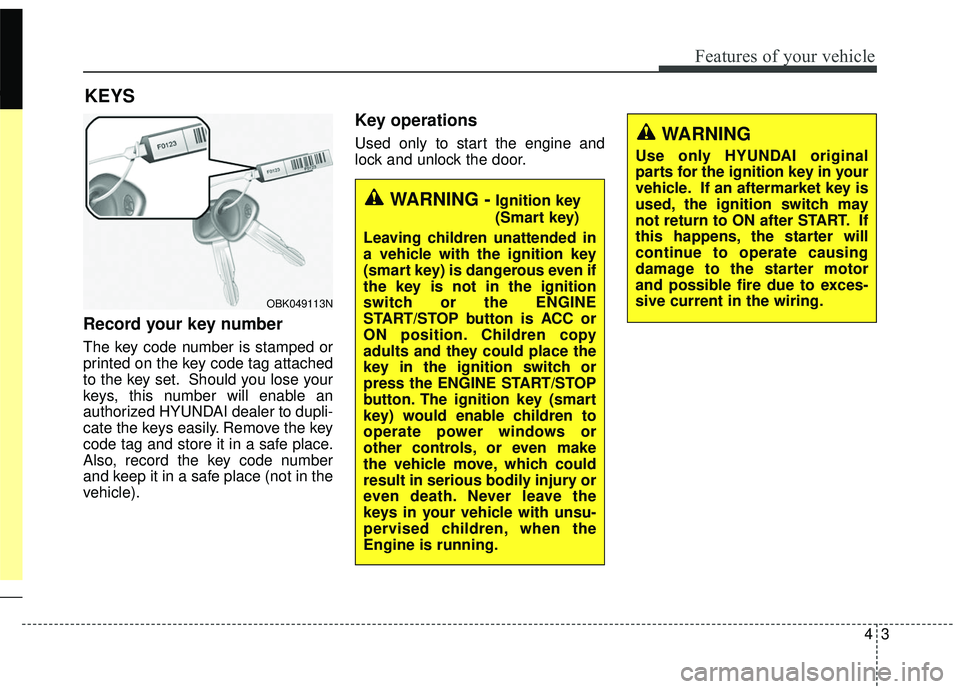
Record your key number
The key code number is stamped or
printed on the key code tag attached
to the key set. Should you lose your
keys, this number will enable an
authorized HYUNDAI dealer to dupli-
cate the keys easily. Remove the key
code tag and store it in a safe place.
Also, record the key code number
and keep it in a safe place (not in the
vehicle).
Key operations
Used only to start the engine and
lock and unlock the door.
KEYS
WARNING -Ignition key
(Smart key)
Leaving children unattended in
a vehicle with the ignition key
(smart key) is dangerous even if
the key is not in the ignition
switch or the ENGINE
START/STOP button is ACC or
ON position. Children copy
adults and they could place the
key in the ignition switch or
press the ENGINE START/STOP
button. The ignition key (smart
key) would enable children to
operate power windows or
other controls, or even make
the vehicle move, which could
result in serious bodily injury or
even death. Never leave the
keys in your vehicle with unsu-
pervised children, when the
Engine is running.
WARNING
Use only HYUNDAI original
parts for the ignition key in your
vehicle. If an aftermarket key is
used, the ignition switch may
not return to ON after START. If
this happens, the starter will
continue to operate causing
damage to the starter motor
and possible fire due to exces-
sive current in the wiring.
OBK049113N
Page 101 of 475
Features of your vehicle
18
4
Operating door locks from
inside the vehicle
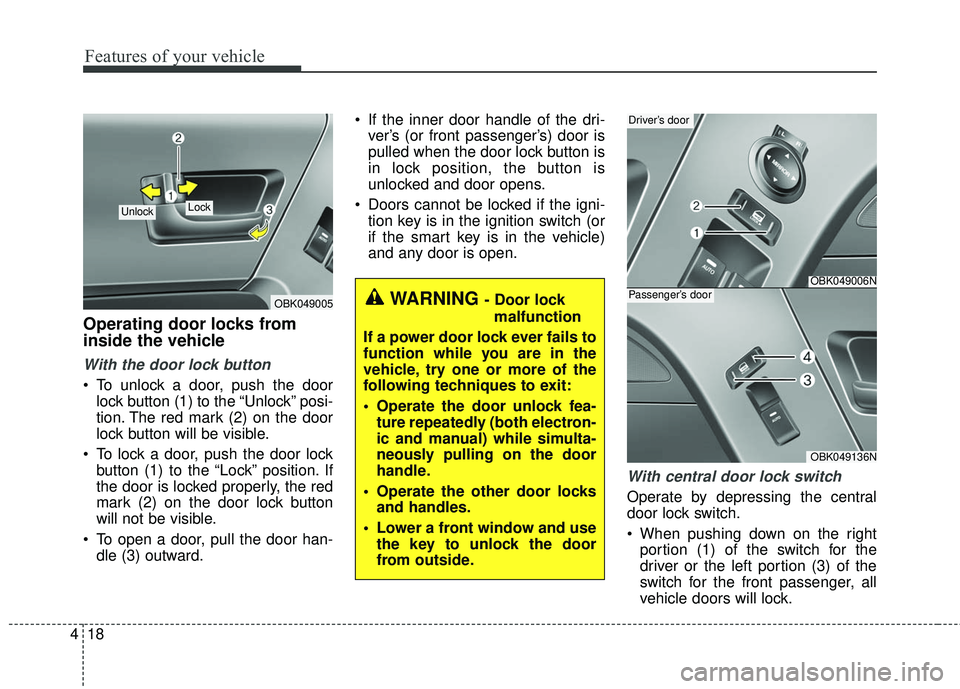
With the door lock button
To unlock a door, push the door
lock button (1) to the “Unlock” posi-
tion. The red mark (2) on the door
lock button will be visible.
To lock a door, push the door lock button (1) to the “Lock” position. If
the door is locked properly, the red
mark (2) on the door lock button
will not be visible.
To open a door, pull the door han- dle (3) outward. If the inner door handle of the dri-
ver’s (or front passenger’s) door is
pulled when the door lock button is
in lock position, the button is
unlocked and door opens.
Doors cannot be locked if the igni- tion key is in the ignition switch (or
if the smart key is in the vehicle)
and any door is open.
With central door lock switch
Operate by depressing the central
door lock switch.
When pushing down on the rightportion (1) of the switch for the
driver or the left portion (3) of the
switch for the front passenger, all
vehicle doors will lock.
OBK049005
Lock Unlock
WARNING - Door lock
malfunction
If a power door lock ever fails to
function while you are in the
vehicle, try one or more of the
following techniques to exit:
Operate the door unlock fea- ture repeatedly (both electron-
ic and manual) while simulta-
neously pulling on the door
handle.
Operate the other door locks and handles.
Lower a front window and use the key to unlock the door
from outside.
OBK049006N
Driver’s door
OBK049136N
Passenger’s door
Page 105 of 475
Features of your vehicle
22
4
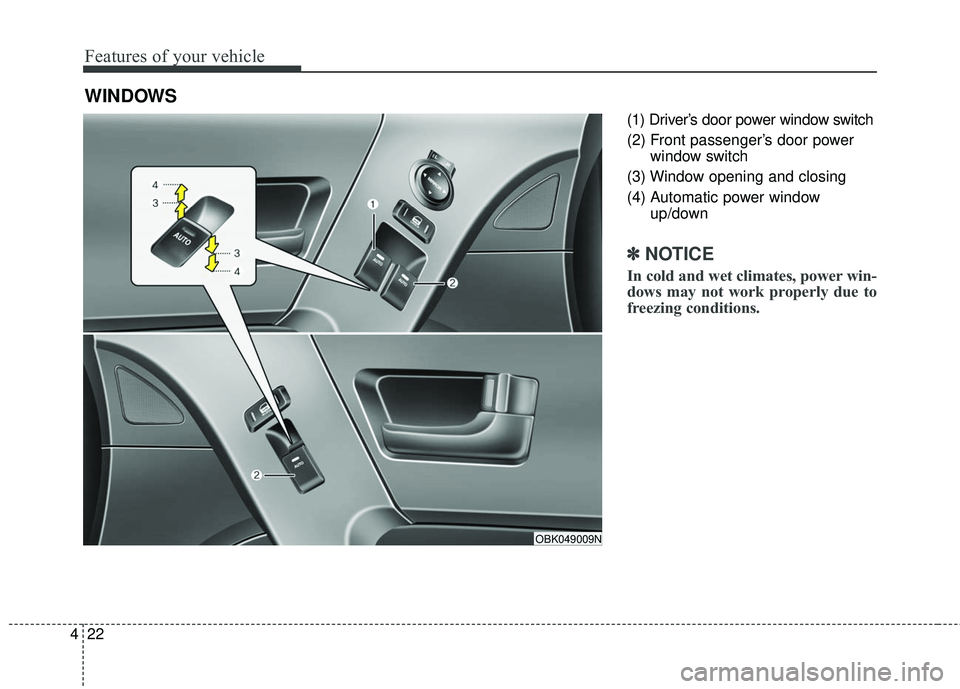
(1) Driver’s door power window switch
(2) Front passenger’s door power
window switch
(3) Window opening and closing
(4) Automatic power window up/down
✽ ✽NOTICE
In cold and wet climates, power win-
dows may not work properly due to
freezing conditions.
WINDOWS
OBK049009N
Page 106 of 475
423
Features of your vehicle
Power windows
The ignition switch must be in the ON
position for power windows to oper-
ate.
Each door has a power window
switch that controls the door's win-
dow. The power windows can be
operated for approximately 30 sec-
onds after the ignition key is removed
or turned to the ACC or LOCK posi-
tion. However, if the doors open, the
power windows cannot be operated
within the 30 second period after
ignition key is removed or turned to
the ACC or LOCK position.
✽ ✽NOTICE
While driving with the sunroof in an
open (or partially open) position,
your vehicle may demonstrate a
wind buffeting or pulsation noise.
This noise is a normal occurrence
and can be reduced or eliminated by
slightly reducing the size of the sun-
roof opening.
Window opening and closing
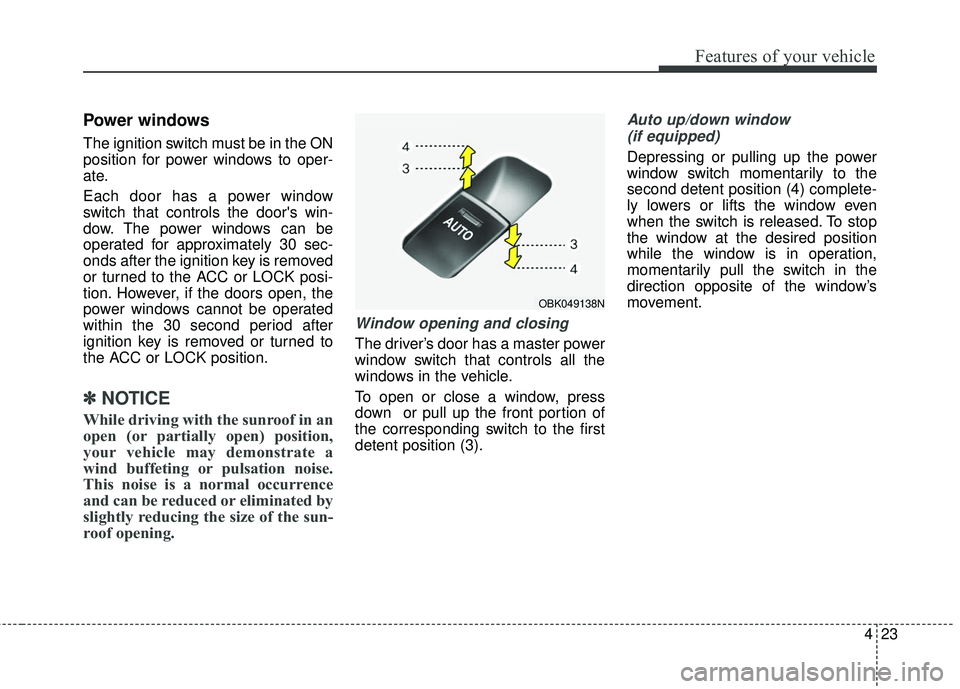
The driver’s door has a master power
window switch that controls all the
windows in the vehicle.
To open or close a window, press
down or pull up the front portion of
the corresponding switch to the first
detent position (3).
Auto up/down window
(if equipped)
Depressing or pulling up the power
window switch momentarily to the
second detent position (4) complete-
ly lowers or lifts the window even
when the switch is released. To stop
the window at the desired position
while the window is in operation,
momentarily pull the switch in the
direction opposite of the window’s
movement.
OBK049138N
Page 107 of 475
Features of your vehicle
24
4
If the power window is not operated
correctly, the automatic power win-
dow system must be reset as follows:
1. Turn the ignition switch to the ON
position.
2. Open the window fully by manual down(press the front portion of the
switch to the first detent position.).
3. Turn the ignition switch to the OFF position and to the ON position
again within 2 seconds.
4. Press the front portion of the switch 3 times within 5 seconds.
5. Close the window and continue pulling up on the power window
switch for at least 1 second after
the window is completely closed. Automatic reversal
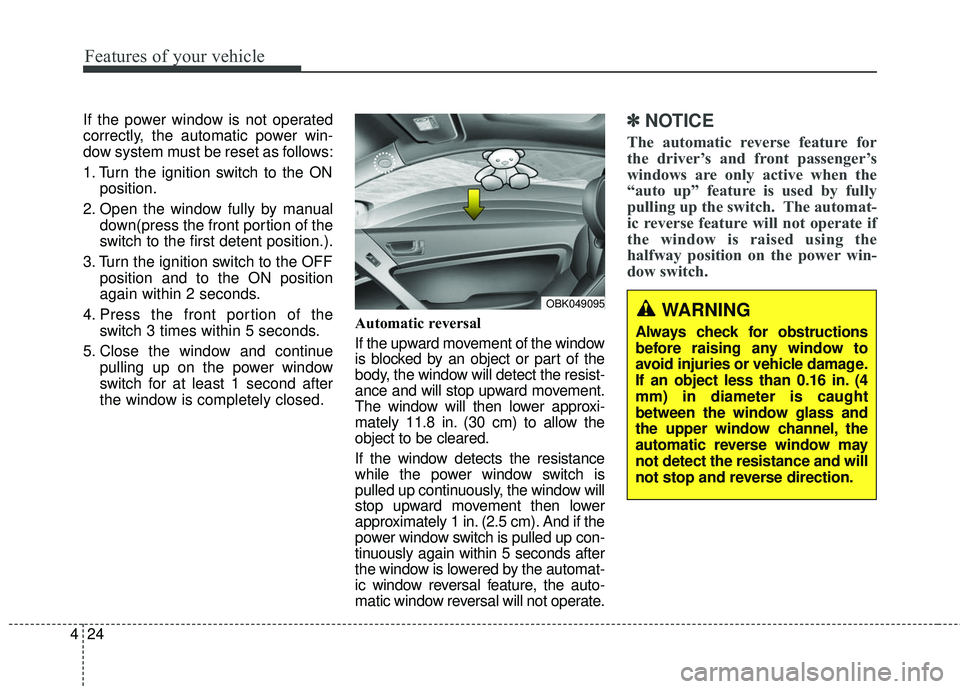
If the upward movement of the window
is blocked by an object or part of the
body, the window will detect the resist-
ance and will stop upward movement.
The window will then lower approxi-
mately 11.8 in. (30 cm) to allow the
object to be cleared.
If the window detects the resistance
while the power window switch is
pulled up continuously, the window will
stop upward movement then lower
approximately 1 in. (2.5 cm). And if the
power window switch is pulled up con-
tinuously again within 5 seconds after
the window is lowered by the automat-
ic window reversal feature, the auto-
matic window reversal will not operate.✽ ✽
NOTICE
The automatic reverse feature for
the driver’s and front passenger’s
windows are only active when the
“auto up” feature is used by fully
pulling up the switch. The automat-
ic reverse feature will not operate if
the window is raised using the
halfway position on the power win-
dow switch.
WARNING
Always check for obstructions
before raising any window to
avoid injuries or vehicle damage.
If an object less than 0.16 in. (4
mm) in diameter is caught
between the window glass and
the upper window channel, the
automatic reverse window may
not detect the resistance and will
not stop and reverse direction.
OBK049095
Page 108 of 475
425
Features of your vehicle
CAUTION
To prevent possible damageto the power window system,do not open or close two win-dows or more at the sametime. This will also ensure thelongevity of the fuse.
Never try to operate the main switch on the driver's doorand the individual door win-dow switch in opposing direc-tions at the same time. If thisis done, the window will stopand cannot be opened orclosed.
WARNING - Windows
Never leave the keys in your vehicle with unsupervised
children, when the Engine is
running.
NEVER leave any child unat- tended in the vehicle. Even
very young children may inad-
vertently cause the vehicle to
move, entangle themselves in
the windows, or otherwise
injure themselves or others.
Always double check to make sure all arms, hands, head
and other obstructions are
safely out of the way before
closing a window.
Do not allow children to play with the power windows. Keep
the driver’s door power win-
dow lock switch in the LOCK
position (depressed). Serious
injury can result from uninten-
tional window operation by
the child.
Do not extend a face or arms outside through the window
opening while driving.