manual transmission HYUNDAI GENESIS G70 2019 Owner's Manual
[x] Cancel search | Manufacturer: HYUNDAI, Model Year: 2019, Model line: GENESIS G70, Model: HYUNDAI GENESIS G70 2019Pages: 516, PDF Size: 12.84 MB
Page 316 of 516
5-67
Driving your vehicle
5
COMFORT mode
COMFORT mode is a
normal drive mode that
provides smooth driving
and comfortable riding.
• When COMFORT mode is select-
ed by pressing the DRIVE MODE
selection button, the COMFORT
indicator will illuminate.
SPORT
SPORT mode manages
the driving dynamics by
automatically adjusting
the steering effort, and
the engine and transmission control
logic for enhanced driver perform-
ance.
• When SPORT mode is selected by
pressing the DRIVE MODE selec-
tion button, the SPORT indicator
will illuminate.
• Whenever the engine is restarted,
the drive mode will revert back to
COMFORT mode. If SPORT mode
is desired, re-select SPORT mode.• When SPORT mode is activated:
- The engine rpm will tend to
remain a little higher for a brief
time even after releasing the
accelerator. This is typical when
the SPORT mode is activated.
- Upshifts are delayed when accel-
erating
Information
In SPORT mode, the fuel efficiency
may decrease.
CUSTOM mode
In CUSTOM mode, the
driver can select sepa-
rate modes and combine
them on the infotainment
system screen.
- Engine/Transmission: ECO/COM-
FORT/SPORT
- Steering wheel: COMFORT/SPORT
- Suspension: COMFORT/SPORT
- All-Wheel Drive (AWD) system:
ECO/COMFORT/SPORT
For more details, refer to the sep-
arately supplied manual with your
vehicle.
• When CUSTOM mode is selected
by pressing the DRIVE MODE
selection button, the CUSTOM
mode indicator will illuminate.
i
Page 319 of 516
5-70
Driving your vehicle
• The driving mode automatically
changes to SMART SPORT, when
you abruptly accelerate the vehicle
or repetitively operate the steering
wheel (Your driving is categorized
to be aggressive.). In this mode,
your vehicle drives in a lower gear
for abrupt accelerating/decelerat-
ing and increases the engine brake
performance.
• You may still sense the engine
braking performance, even when
you release the accelerator pedal
in SMART SPORT mode. It is
because your vehicle remains in
lower gear over a certain period of
time for next acceleration. Thus, it
is a normal driving situation, not
indicating any malfunction.
• The driving mode automatically
changes to SMART SPORT mode
only in harsh driving situations. In
most of the normal driving situa-
tions, the driving mode sets to be
either in SMART ECO mode or in
SMART COMFORT mode.
Limitation of SMART mode
The SMART mode may be limited in
following situations. (The OFF indica-
tor illuminates in those situations.)
• The driver manually moves the
shift lever :
It deactivates SMART mode. The
vehicle drives, as the driver manu-
ally moves the shift lever.
• The cruise control is activated :
The cruise control system may
deactivate the SMART mode when
the vehicle is controlled by the set
speed of the smart cruise control
system. (SMART mode is not
deactivated just by activating the
cruise control system.)
• The transmission oil temperature is
either extremely low or extremely
high :
The SMART mode can be active in
most of the normal driving situa-
tions. However, an extremely high/
low transmission oil temperature
may temporarily deactivate the
SMART mode, because the trans-
mission condition is out of normal
operation condition.
ECO mode
When the drive mode is
set to ECO mode, the
engine and transmission
control logic are changed
to maximize fuel efficien-
cy.
• When ECO mode is selected by
rotating the DRIVE MODE selec-
tion knob, the ECO indicator will
illuminate.
• If the vehicle is set to ECO mode,
when the engine is turned off and
restarted the drive mode setting
will remain in ECO mode.
Information
Fuel efficiency depends on the driver's
driving habit and road condition.
i
Page 320 of 516
5-71
Driving your vehicle
5
When ECO mode is activated:
• The acceleration response may be
slightly reduced if the accelerator
pedal is depressed moderately.
• The air conditioner performance
may be limited.
• The shift pattern of the automatic
transmission may change.
• The engine noise may be louder at
some automatic transmission
shifts as down-shift requires press-
ing down more on the accelerator.
The above situations are normal
conditions when ECO mode is acti-
vated to help improve fuel efficiency.
Limitation of ECO mode operation:
If the following conditions occur while
ECO mode is operating, the system
operation is limited even though
there is no change in the ECO indi-
cator.• When the coolant temperature is
low:
The system will be limited until
engine performance becomes nor-
mal.
• When driving up a hill:
The system will be limited to gain
power when driving uphill because
engine torque is restricted.
• When driving the vehicle with the
automatic transmission gear shift
lever in manual mode.
The system will be limited accord-
ing to the shift location.
COMFORT mode
COMFORT mode is a
normal drive mode that
provides smooth driving
and comfortable riding.
• When COMFORT mode is select-
ed by rotating the DRIVE MODE
selection knob, the COMFORT
indicator will illuminate.
SPORT
SPORT mode manages
the driving dynamics by
automatically adjusting
the steering effort, and
the engine and transmission control
logic for enhanced driver perform-
ance.
• When SPORT mode is selected by
rotating the DRIVE MODE selec-
tion knob, the SPORT indicator will
illuminate.
• Whenever the engine is restarted,
the drive mode will revert back to
COMFORT mode. If SPORT mode
is desired, re-select SPORT mode.
• When SPORT mode is activated:
- The engine rpm will tend to
remain a little higher for a brief
time even after releasing the
accelerator. This is typical when
the SPORT mode is activated.
- Upshifts are delayed when accel-
erating
Information
In SPORT mode, the fuel efficiency
may decrease.
i
Page 321 of 516
5-72
Driving your vehicle
CUSTOM mode
In CUSTOM mode, the
driver can select sepa-
rate modes and combine
them on the infotainment
system screen.
- Engine/Transmission: ECO/COM-
FORT/SPORT
- Steering wheel: COMFORT/SPORT
- Suspension: COMFORT/SPORT
- All-Wheel Drive (AWD) system:
ECO/COMFORT/SPORT
For more details, refer to the sep-
arately supplied manual with your
vehicle.
• When CUSTOM mode is selected
by rotating the DRIVE MODE
selection knob, the CUSTOM
mode indicator will illuminate.
Smart shift on trip computer
Select the Trip Computer mode ( )
on the instrument cluster LCD display
and move to the smart shift screen.
Then, the driver can see the drive
mode selected and the drive mode
which is automatically switched by
the SMART mode.
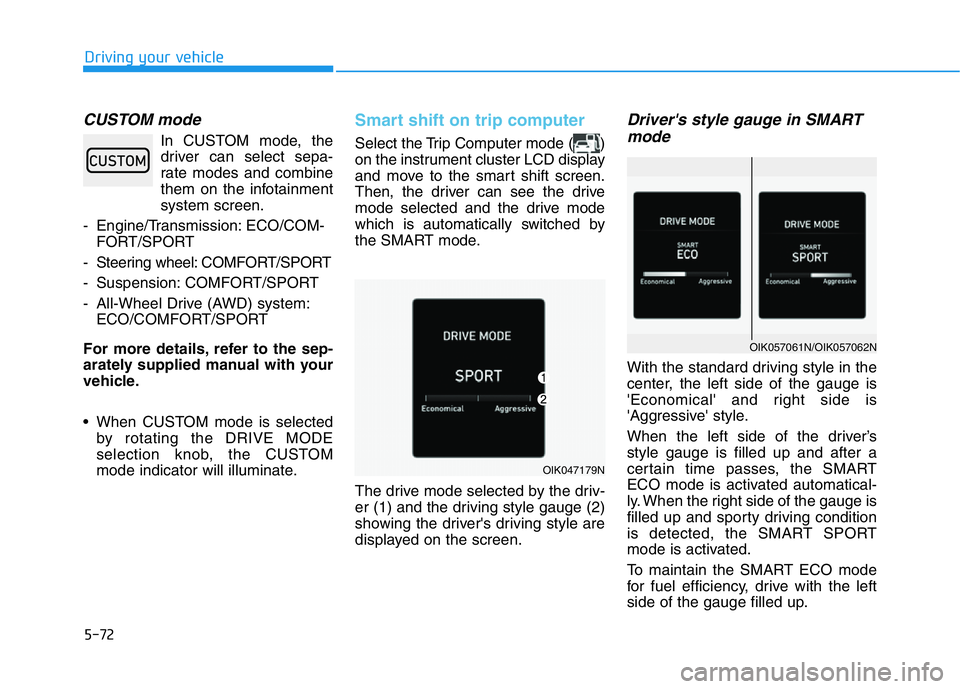
The drive mode selected by the driv-
er (1) and the driving style gauge (2)
showing the driver's driving style are
displayed on the screen.
Driver's style gauge in SMART
mode
With the standard driving style in the
center, the left side of the gauge is
'Economical' and right side is
'Aggressive' style.
When the left side of the driver’s
style gauge is filled up and after a
certain time passes, the SMART
ECO mode is activated automatical-
ly. When the right side of the gauge is
filled up and sporty driving condition
is detected, the SMART SPORT
mode is activated.
To maintain the SMART ECO mode
for fuel efficiency, drive with the left
side of the gauge filled up.
OIK047179N
OIK057061N/OIK057062N
Page 357 of 516
5-108
Driving your vehicle
Cruise Control Operation
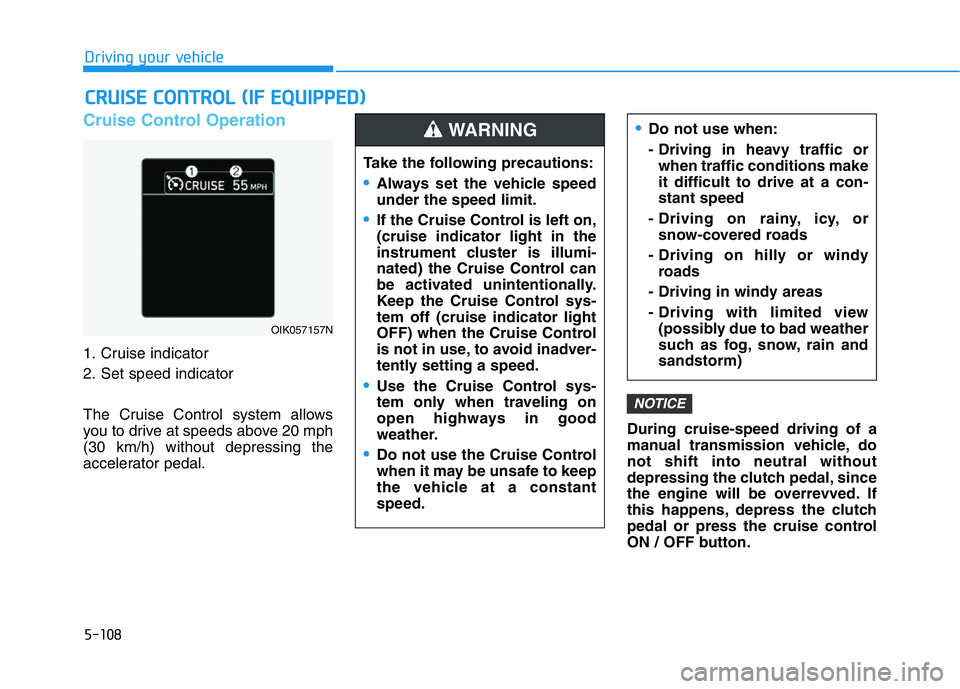
1. Cruise indicator
2. Set speed indicator
The Cruise Control system allows
you to drive at speeds above 20 mph
(30 km/h) without depressing the
accelerator pedal.During cruise-speed driving of a
manual transmission vehicle, do
not shift into neutral without
depressing the clutch pedal, since
the engine will be overrevved. If
this happens, depress the clutch
pedal or press the cruise control
ON / OFF button.
NOTICE
CRUISE CONTROL (IF EQUIPPED)
Page 358 of 516
5-109
Driving your vehicle
5
Information
• During normal cruise control opera-
tion, when the SET switch is activat-
ed or reactivated after applying the
brakes, the cruise control will ener-
gize after approximately 3 seconds.
This delay is normal.
• Before activating the cruise control
function, the system will check to
verify that the brake switch is oper-
ating normally. Depress the brake
pedal at least once after turning ON
the ignition or starting the engine.
To set Cruise Control speed
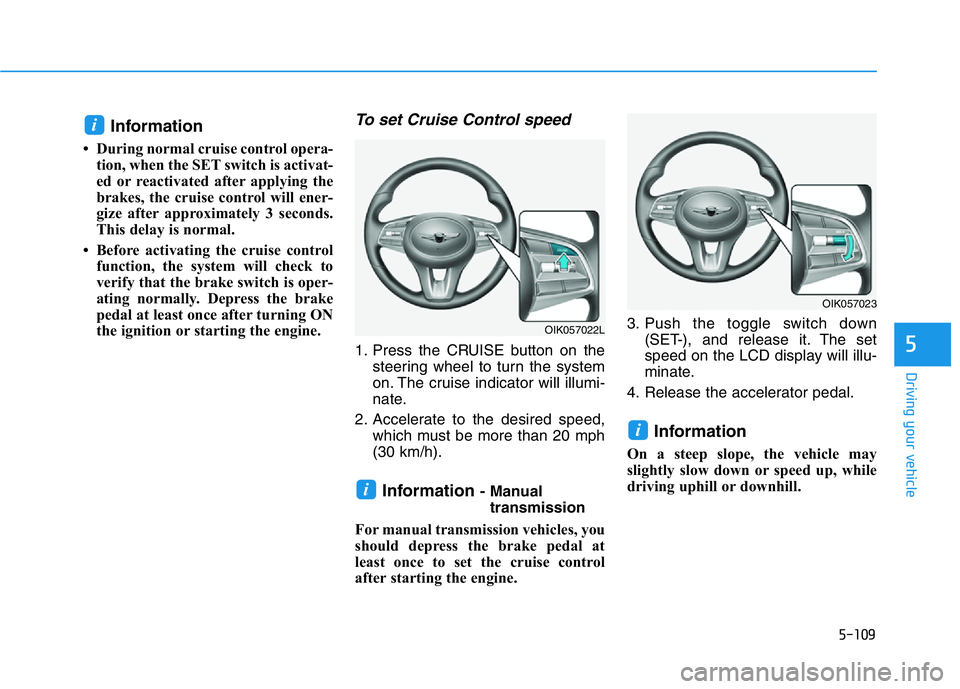
1. Press the CRUISE button on the
steering wheel to turn the system
on. The cruise indicator will illumi-
nate.
2. Accelerate to the desired speed,
which must be more than 20 mph
(30 km/h).
Information - Manual
transmission
For manual transmission vehicles, you
should depress the brake pedal at
least once to set the cruise control
after starting the engine.3. Push the toggle switch down
(SET-), and release it. The set
speed on the LCD display will illu-
minate.
4. Release the accelerator pedal.
Information
On a steep slope, the vehicle may
slightly slow down or speed up, while
driving uphill or downhill.
i
i
i
OIK057023
OIK057022L
Page 360 of 516
5-111
Driving your vehicle
5
To temporarily accelerate with
the Cruise Control ON
Depress the accelerator pedal. When
you take your foot off the accelerator,
the vehicle will return to the previ-
ously set speed.
If you push the toggle switch down
(SET-) at the increased speed, the
Cruise Control will maintain the
increased speed.
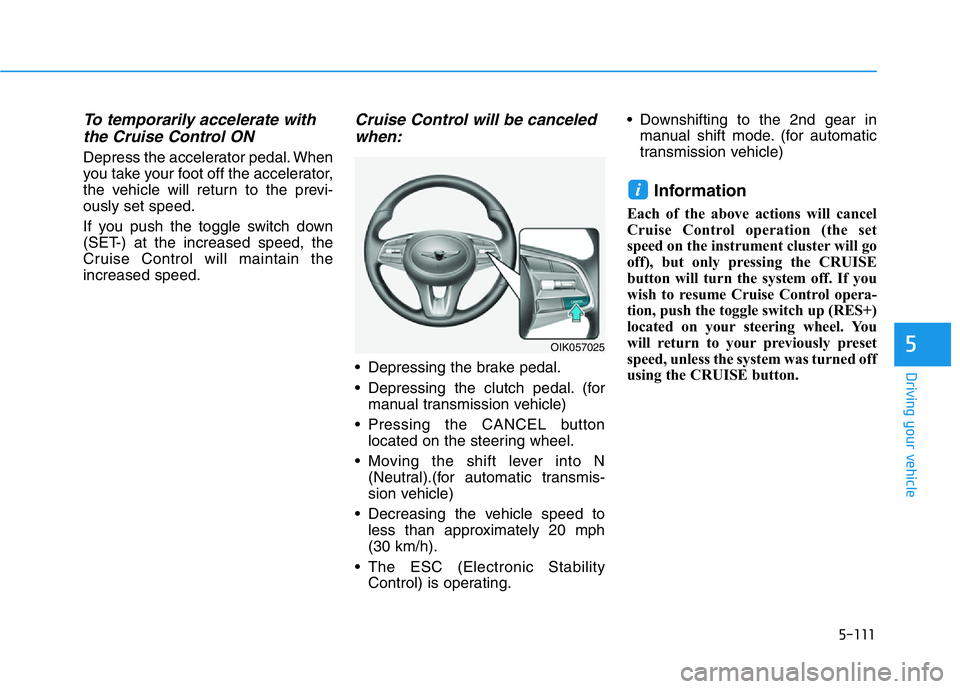
Cruise Control will be canceled
when:
• Depressing the brake pedal.
• Depressing the clutch pedal. (for
manual transmission vehicle)
• Pressing the CANCEL button
located on the steering wheel.
• Moving the shift lever into N
(Neutral).(for automatic transmis-
sion vehicle)
• Decreasing the vehicle speed to
less than approximately 20 mph
(30 km/h).
• The ESC (Electronic Stability
Control) is operating.• Downshifting to the 2nd gear in
manual shift mode. (for automatic
transmission vehicle)
Information
Each of the above actions will cancel
Cruise Control operation (the set
speed on the instrument cluster will go
off), but only pressing the CRUISE
button will turn the system off. If you
wish to resume Cruise Control opera-
tion, push the toggle switch up (RES+)
located on your steering wheel. You
will return to your previously preset
speed, unless the system was turned off
using the CRUISE button.
i
OIK057025
Page 396 of 516
6-3
What to do in an emergency
Do not apply the brakes immedi-
ately or attempt to pull off the road
as this may cause loss of vehicle
control resulting in an accident.
When the vehicle has slowed to
such a speed that it is safe to do
so, brake carefully and pull off the
road. Drive off the road as far as
possible and park on firm, level
ground. If you are on a divided
highway, do not park in the median
area between the two traffic lanes.
• When the vehicle is stopped, press
the hazard warning flasher button,
shift the vehicle to P (Park, for
automatic transmission vehicle) or
neutral (for manual transmission
vehicle), apply the parking brake,
and press the Engine Start/Stop
button to the OFF position.
• Have all passengers get out of the
vehicle. Be sure they all get out on
the side of the vehicle that is away
from traffic.
• When changing a flat tire, follow
the instructions provided later in
this chapter.If the Engine Doesn't Turn
Over or Turns Over Slowly
• Be sure to shift the vehicle to N
(Neutral) or P (Park) if it is an auto-
matic transmission vehicle. The
engine starts only when the vehicle
is in N (Neutral) or P (Park).
• Check the battery connections to
be sure they are clean and tight.
• Turn on the interior light. If the light
dims or goes out when you operate
the starter, the battery is drained.
Do not push or pull the vehicle to
start it. This could cause damage to
your vehicle. See instructions for
"Jump Starting" provided in this
chapter.
If the Engine Turns Over
Normally but Doesn't Start
Check the fuel level and add fuel if
necessary.
If the engine still does not start, have
your vehicle checked by an author-
ized retailer of Genesis Branded
products.
6
IF THE ENGINE WILL NOT START
Push or pull starting the vehicle
may cause the catalytic con-
verter to overload which can
lead to damage to the emission
control system.
CAUTION
Page 398 of 516
6-5
What to do in an emergency
6
Jump starting procedure
Information
Your vehicle has a battery in the trunk
compartment, but when you jump
start your vehicle, use the jumper ter-
minal in the engine compartment.
1. Position the vehicles close enough
that the jumper cables will reach,
but do not allow the vehicles to
touch.
2. Avoid fans or any moving parts in
the engine compartment at all
times, even when the vehicles are
turned off.
3. Turn off all electrical devices such
as radios, lights, air conditioning,
etc. Put the vehicles in P (Park, for
automatic transmission vehicle) or
neutral (for manual transmission
vehicle), and apply the parking
brake. Turn both vehicles OFF.4. Open the engine hood.
5. Remove the engine room fuse box
cover.
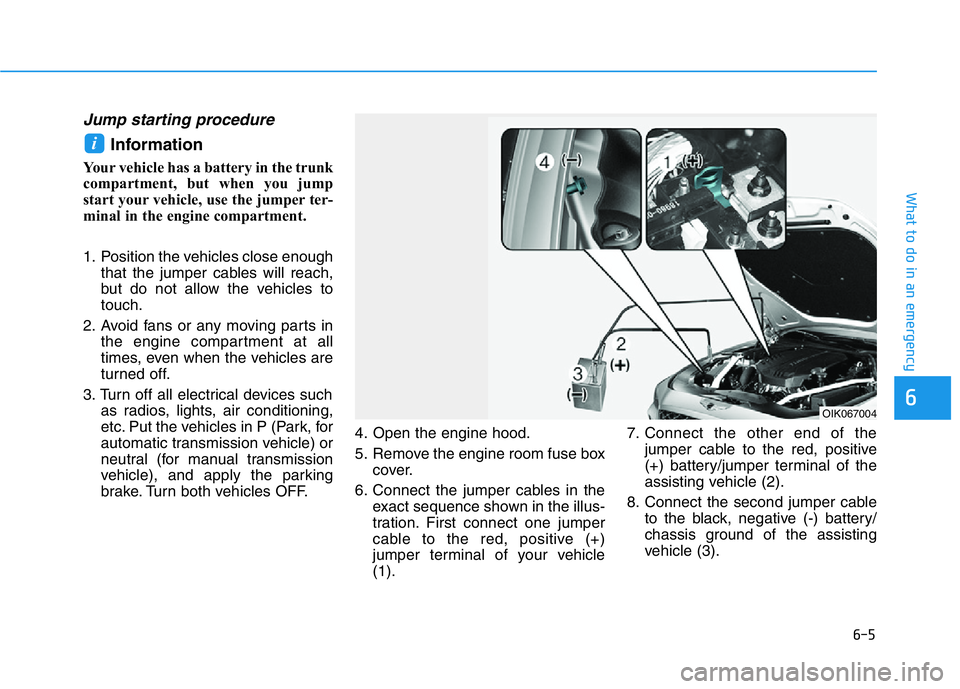
6. Connect the jumper cables in the
exact sequence shown in the illus-
tration. First connect one jumper
cable to the red, positive (+)
jumper terminal of your vehicle
(1).7. Connect the other end of the
jumper cable to the red, positive
(+) battery/jumper terminal of the
assisting vehicle (2).
8. Connect the second jumper cable
to the black, negative (-) battery/
chassis ground of the assisting
vehicle (3).
i
OIK067004
Page 399 of 516
6-6
What to do in an emergency
9. Connect the other end of the sec-
ond jumper cable to the black,
negative (-) chassis ground of
your vehicle (4).
Do not allow the jumper cables to
contact anything except the cor-
rect battery or jumper terminals or
the correct ground. Do not lean
over the battery when making
connections.
10. Start the engine of the assisting
vehicle and let it run at approxi-
mately 2,000 rpm for a few min-
utes. Then start your vehicle.
11. Operate your vehicle for at least
30 minutes of driving or at least 60
minutes of engine running at idle
before shutting off the engine.
Without sufficient time to charge
the battery the vehicle will reoccur
another no start. You can also visit
your nearest Dealer to request the
battery be charged and tested.
If your vehicle will not start after a
few attempts, it probably requires
servicing. In this event please seek
qualified assistance. If the cause of
your battery discharging is not
apparent, have your vehicle checked
by an authorized retailer of Genesis
Branded products.Disconnect the jumper cables in the
exact reverse order you connected
them:
1. Disconnect the jumper cable from
the black, negative (-) chassis
ground of your vehicle (4).
2. Disconnect the other end of the
jumper cable from the black, neg-
ative (-) battery/chassis ground of
the assisting vehicle (3).
3. Disconnect the second jumper
cable from the red, positive (+)
battery/jumper terminal of the
assisting vehicle (2).
4. Disconnect the other end of the
jumper cable from the red, positive
(+) jumper terminal of your vehicle
(1).
Push-starting
Vehicles equipped with automatic
transmission cannot be push-start-
ed.
Follow the directions in this chapter
for jump-starting.If your temperature gage indicates
overheating, you experience a loss
of power, or hear loud pinging or
knocking, the engine may be over-
heating. If this happens, you should:
1. Pull off the road and stop as soon
as it is safe to do so.
2. Shift the vehicle to P (Park, for
automatic transmission vehicle) or
neutral (for manual transmission
vehicle), and apply the parking
brake. If the air conditioning is ON,
turn it OFF.
3. If engine coolant is running out
under the vehicle or steam is com-
ing out from the hood, stop the
engine. Do not open the hood until
the coolant has stopped running
or the steaming has stopped. If
there is no visible loss of engine
coolant and no steam, leave the
engine running and check to be
sure the engine cooling fan is
operating. If the fan is not running,
turn the engine off.
IF THE ENGINE OVERHEATS