audio HYUNDAI GENESIS G80 2012 User Guide
[x] Cancel search | Manufacturer: HYUNDAI, Model Year: 2012, Model line: GENESIS G80, Model: HYUNDAI GENESIS G80 2012Pages: 332, PDF Size: 20.46 MB
Page 168 of 332
4107
Features of your vehicle
CAUTION IN USING
USB DEVICE
To use an external USB device, make sure the device is notmounted when starting up the
vehicle and mount the deviceafter starting up.
If you start the vehicle when the USB device is mounted, it maydamage the USB device. (USB is
not ESA)
If the vehicle is started up or turned off while the external USBdevice is connected, the external
USB device may not work.
It may not play inauthentic MP3 or WMA files.
1) It can only play MP3 files with the compression rate between8Kbps~320Kbps.
2) It can only play WMA music files with the compression ratebetween 8Kbps~320Kbps.
Take cautions for static electricity when mounting or dismountingthe external USB device.
An encoded MP3 PLAYER is not recognizable.
(Continued)
(Continued) Depending on the condition of the external USB device, the con-nected external USB device can
be unrecognizable.
When the formatted byte/sector setting of External USB devices isnot either 512BYTE or 2048BYTE,
then the device will not be recog-nized.
Use only a USB device formatted to FAT 12/16/32.
USB devices without USB IF authentication may not be recog-nizable.
Make sure the USB connection terminal does not come in contactwith a human body or any object.
If you repeat mounting or dis- mounting USB device in a shortperiod of time, it may break thedevice.
You might hear a strange noise when mounting or dismounting aUSB device.
(Continued)(Continued) If you dismount the external USB device during playback in USBmode, the external USB device can
be damaged or malfunction.Therefore, mount the external USBdevice when the engine is turned
off or in another mode.
Depending on the type and capac- ity of the external USB device orthe type of the files stored in the
device, there is a difference in thetime taken for recognition of the device, but this is not an indicatorof trouble and you only have to
wait.
Do not use the USB device for other purposes than playing music files.
Use of USB accessories such as recharger or heater using USB I/Fmay lower performance or cause
trouble.
If you use devices such as a USB hub you purchased separately,the vehicle’s audio system may
not recognize the USB device. Connect the USB device directlyto the multimedia terminal of the vehicle.
(Continued)
Page 169 of 332
Features of your vehicle
108
4
(Continued)
If USB device is divided by logical drives, only the music files on thehighest-priority drive are recog-
nized by car audio.
Devices such as MP3 Player/ Cellular phone/Digital camerathose are not recognizable by
standard USB I/F can be unrecog-nizable.
USB devices other than standard- ized goods (METAL COVER TYPE
USB) can be unrecognizable.
USB flash memory reader (such as CF, SD, microSD, etc.) or exter-nal-HDD type devices can beunrecognizable.
Music files protected by DRM (DIGITAL RIGHTS MANAGEMENT)are not recognizalbe.
The data in the USB memory may lost while using this AUDIO, It is
recommeded to back up impor- tant data on a personal.
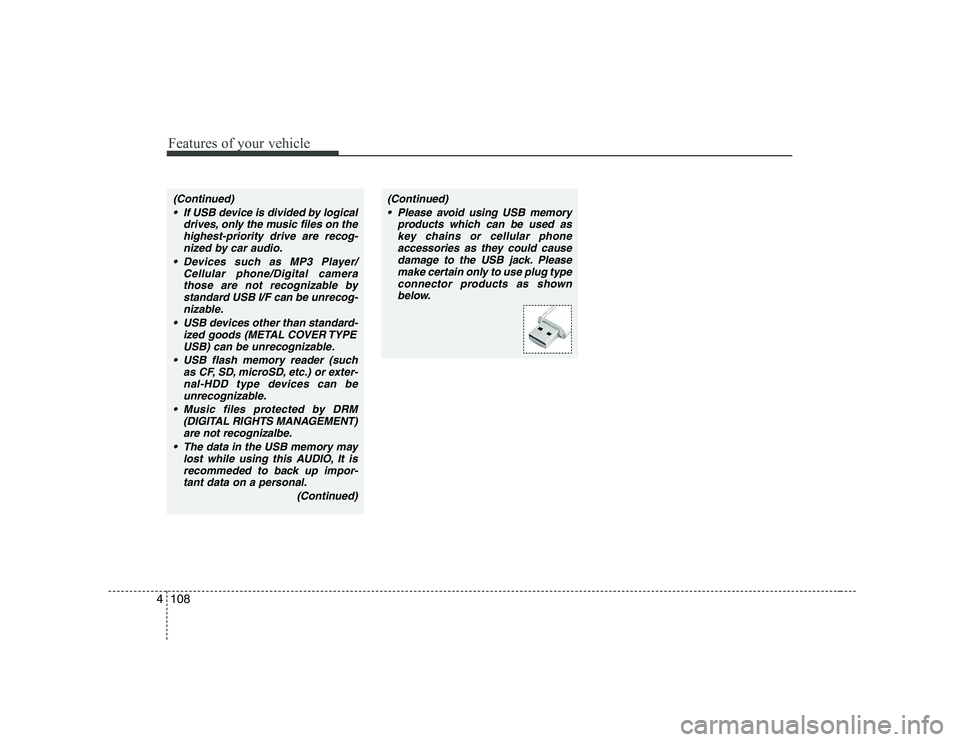
(Continued)(Continued) Please avoid using USB memory products which can be used askey chains or cellular phone
accessories as they could cause damage to the USB jack. Pleasemake certain only to use plug type
connector products as shownbelow.
Page 180 of 332
4119
Features of your vehicle
CAUTION IN USING
USB DEVICE
To use an external USB device, make sure the device is notmounted when starting up the
vehicle and mount the deviceafter starting up.
If you start the vehicle when the USB device is mounted, it maydamage the USB device. (USB is
not ESA)
If the vehicle is started up or turned off while the external USBdevice is connected, the external
USB device may not work.
It may not play inauthentic MP3 or WMA files.
1) It can only play MP3 files with the compression rate between8Kbps~320Kbps.
2) It can only play WMA music files with the compression ratebetween 8Kbps~320Kbps.
Take cautions for static electricity when mounting or dismountingthe external USB device.
An encoded MP3 PLAYER is not recognizable.
(Continued)
(Continued) Depending on the condition of the external USB device, the con-nected external USB device can
be unrecognizable.
When the formatted byte/sector setting of External USB devices isnot either 512BYTE or 2048BYTE,
then the device will not be recog-nized.
Use only a USB device formatted to FAT 12/16/32.
USB devices without USB IF authentication may not be recog-nizable.
Make sure the USB connection terminal does not come in contactwith a human body or any object.
If you repeat mounting or dis- mounting USB device in a shortperiod of time, it may break thedevice.
You might hear a strange noise when mounting or dismounting aUSB device.
(Continued)(Continued) If you dismount the external USB device during playback in USBmode, the external USB device can
be damaged or malfunction.Therefore, mount the external USBdevice when the engine is turned
off or in another mode.
Depending on the type and capac- ity of the external USB device orthe type of the files stored in the
device, there is a difference in thetime taken for recognition of the device, but this is not an indicatorof trouble and you only have to
wait.
Do not use the USB device for other purposes than playing music files.
Use of USB accessories such as recharger or heater using USB I/Fmay lower performance or cause
trouble.
If you use devices such as a USB hub you purchased separately,the vehicle’s audio system may
not recognize the USB device. Connect the USB device directlyto the multimedia terminal of the vehicle.
(Continued)
Page 181 of 332
Features of your vehicle
120
4
(Continued)
If USB device is divided by logical drives, only the music files on thehighest-priority drive are recog-
nized by car audio.
Devices such as MP3 Player/ Cellular phone/Digital camerathose are not recognizable by
standard USB I/F can be unrecog-nizable.
USB devices other than standard- ized goods (METAL COVER TYPE
USB) can be unrecognizable.
USB flash memory reader (such as CF, SD, microSD, etc.) or exter-nal-HDD type devices can beunrecognizable.
Music files protected by DRM (DIGITAL RIGHTS MANAGEMENT)are not recognizalbe.
The data in the USB memory may lost while using this AUDIO, It is
recommeded to back up impor-tant data on a personal.
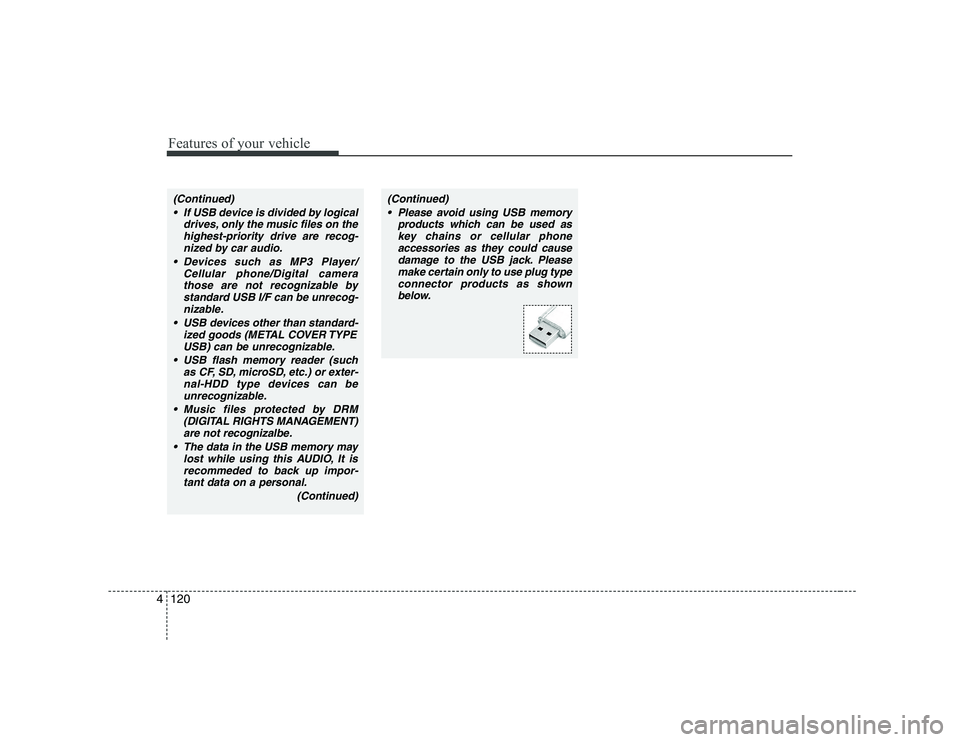
(Continued)(Continued) Please avoid using USB memory products which can be used askey chains or cellular phone
accessories as they could causedamage to the USB jack. Pleasemake certain only to use plug type
connector products as shown below.
Page 283 of 332
733
Maintenance
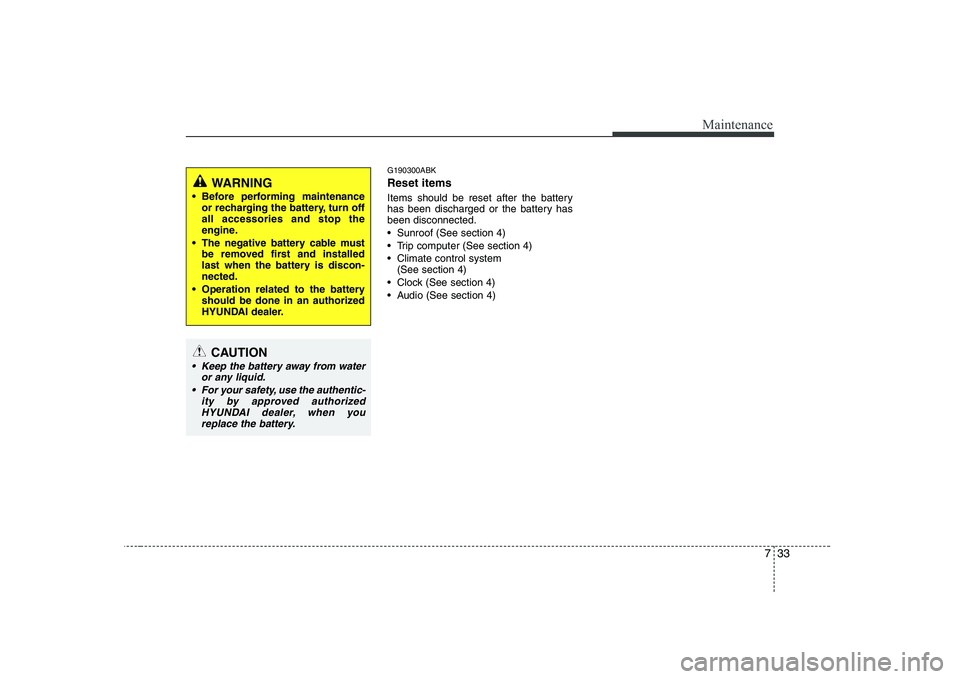
G190300ABK Reset items
Items should be reset after the battery
has been discharged or the battery hasbeen disconnected.
Sunroof (See section 4)
Trip computer (See section 4)
Climate control system (See section 4)
Clock (See section 4)
Audio (See section 4)
WARNING
Before performing maintenance or recharging the battery, turn off all accessories and stop the
engine.
The negative battery cable must be removed first and installed
last when the battery is discon-nected.
Operation related to the battery should be done in an authorized
HYUNDAI dealer.
CAUTION
Keep the battery away from water
or any liquid.
For your safety, use the authentic- ity by approved authorized
HYUNDAI dealer, when you replace the battery.
Page 299 of 332
749
Maintenance
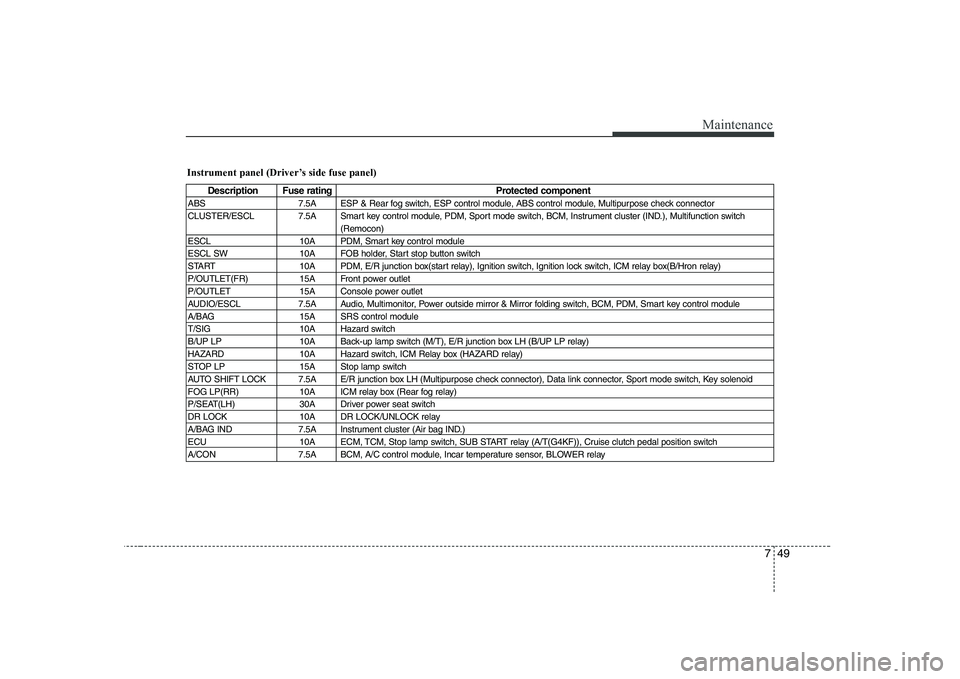
Instrument panel (Driver’s side fuse panel)
Description Fuse ratingProtected component
ABS 7.5A ESP & Rear fog switch, ESP control module, ABS control module, Multipurpose check connector
CLUSTER/ESCL 7.5A Smart key control module, PDM, Sport mode switch, BCM, Instrument cluster (IND.), Multifunction switch (Remocon)
ESCL 10A PDM, Smart key control module
ESCL SW 10A FOB holder, Start stop button switch
START 10A PDM, E/R junction box(start relay), Ignition switch, Ignition lock switch, ICM relay box(B/Hron relay)
P/OUTLET(FR) 15A Front power outlet
P/OUTLET 15A Console power outlet
AUDIO/ESCL 7.5A Audio, Multimonitor, Power outside mirror & Mirror folding switch, BCM, PDM, Smart key control module
A/BAG 15A SRS control module
T/SIG 10A Hazard switch
B/UP LP 10A Back-up lamp switch (M/T), E/R junction box LH (B/UP LP relay)
HAZARD 10A Hazard switch, ICM Relay box (HAZARD relay)
STOP LP 15A Stop lamp switch
AUTO SHIFT LOCK 7.5A E/R junction box LH (Multipurpose check connector), Data link connector, Sport mode switch, Key solenoid
FOG LP(RR) 10A ICM relay box (Rear fog relay)
P/SEAT(LH) 30A Driver power seat switch
DR LOCK 10A DR LOCK/UNLOCK relay
A/BAG IND 7.5A Instrument cluster (Air bag IND.)
ECU 10A ECM, TCM, Stop lamp switch, SUB START relay (A/T(G4KF)), Cruise clutch pedal position switch
A/CON 7.5A BCM, A/C control module, Incar temperature sensor, BLOWER relay
Page 300 of 332
Maintenance
50
7
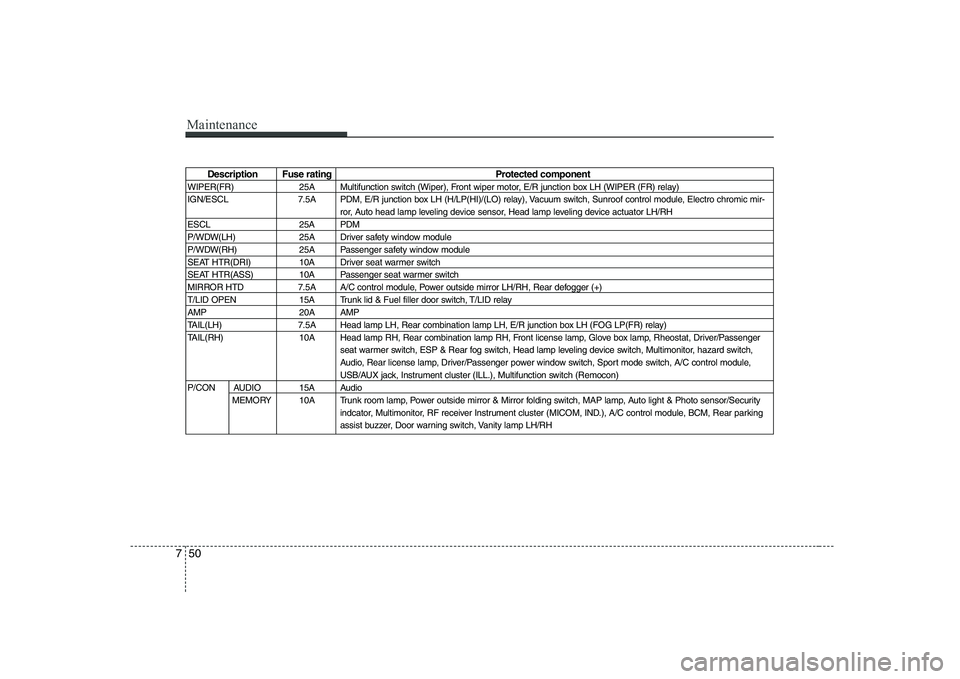
Description Fuse rating Protected component
WIPER(FR) 25A Multifunction switch (Wiper), Front wiper motor, E/R junction box LH (WIPER (FR) relay)
IGN/ESCL 7.5A PDM, E/R junction box LH (H/LP(HI)/(LO) relay), Vacuum switch, Sunroof control module, Electro chromic mir- ror, Auto head lamp leveling device sensor, Head lamp leveling device actuator LH/RH
ESCL 25A PDM
P/WDW(LH) 25A Driver safety window module
P/WDW(RH) 25A Passenger safety window module
SEAT HTR(DRI) 10A Driver seat warmer switch
SEAT HTR(ASS) 10A Passenger seat warmer switch
MIRROR HTD 7.5A A/C control module, Power outside mirror LH/RH, Rear defogger (+)
T/LID OPEN 15A Trunk lid & Fuel filler door switch, T/LID relay
AMP 20A AMP
TAIL(LH) 7.5A Head lamp LH, Rear combination lamp LH, E/R junction box LH (FOG LP(FR) relay)
TAIL(RH) 10A Head lamp RH, Rear combination lamp RH, Front license lamp, Glove box lamp, Rheostat, Driver/Passenger seat warmer switch, ESP & Rear fog switch, Head lamp leveling device switch, Multimonitor, hazard switch,
Audio, Rear license lamp, Driver/Passenger power window switch, Sport mode switch, A/C control module,
USB/AUX jack, Instrument cluster (ILL.), Multifunction switch (Remocon)
P/CON AUDIO 15A Audio MEMORY 10A Trunk room lamp, Power outside mirror & Mirror folding switch, MAP lamp, Auto light & Photo sensor/Security indcator, Multimonitor, RF receiver Instrument cluster (MICOM, IND.), A/C control module, BCM, Rear parking
assist buzzer, Door warning switch, Vanity lamp LH/RH
Page 301 of 332
751
Maintenance
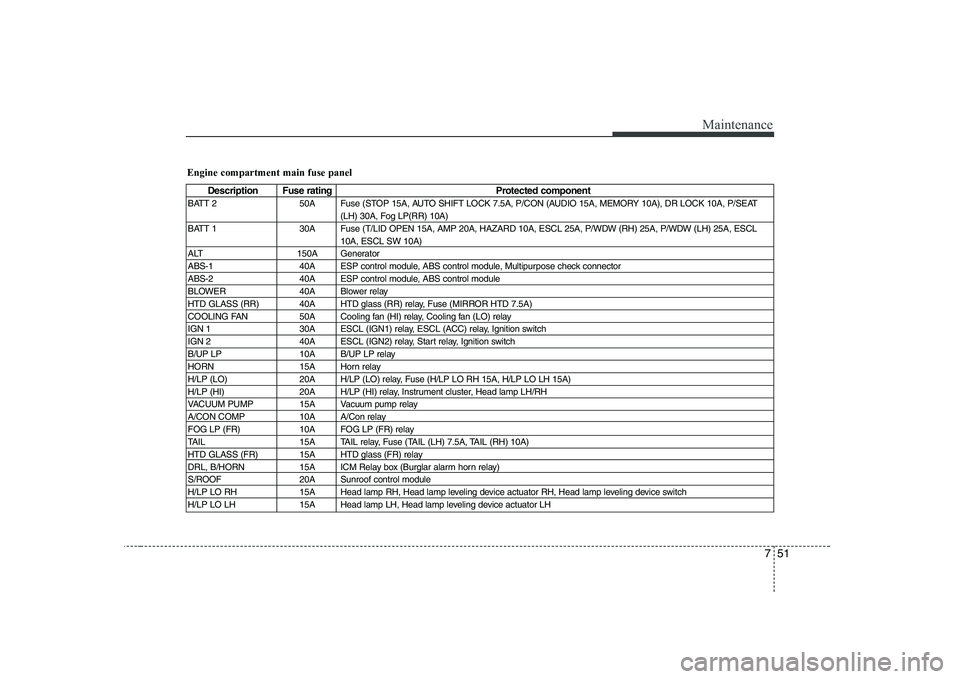
Engine compartment main fuse panel
Description Fuse ratingProtected component
BATT 2 50A Fuse (STOP 15A, AUTO SHIFT LOCK 7.5A, P/CON (AUDIO 15A, MEMORY 10A), DR LOCK 10A, P/SEAT (LH) 30A, Fog LP(RR) 10A)
BATT 1 30A Fuse (T/LID OPEN 15A, AMP 20A, HAZARD 10A, ESCL 25A, P/WDW (RH) 25A, P/WDW (LH) 25A, ESCL 10A, ESCL SW 10A)
ALT 150A Generator
ABS-1 40A ESP control module, ABS control module, Multipurpose check connector
ABS-2 40A ESP control module, ABS control module
BLOWER 40A Blower relay
HTD GLASS (RR) 40A HTD glass (RR) relay, Fuse (MIRROR HTD 7.5A)
COOLING FAN 50A Cooling fan (HI) relay, Cooling fan (LO) relay
IGN 1 30A ESCL (IGN1) relay, ESCL (ACC) relay, Ignition switch
IGN 2 40A ESCL (IGN2) relay, Start relay, Ignition switch
B/UP LP 10A B/UP LP relay
HORN 15A Horn relay
H/LP (LO) 20A H/LP (LO) relay, Fuse (H/LP LO RH 15A, H/LP LO LH 15A)
H/LP (HI) 20A H/LP (HI) relay, Instrument cluster, Head lamp LH/RH
VACUUM PUMP 15A Vacuum pump relay
A/CON COMP 10A A/Con relay
FOG LP (FR) 10A FOG LP (FR) relay
TAIL 15A TAIL relay, Fuse (TAIL (LH) 7.5A, TAIL (RH) 10A)
HTD GLASS (FR) 15A HTD glass (FR) relay
DRL, B/HORN 15A ICM Relay box (Burglar alarm horn relay)
S/ROOF 20A Sunroof control module
H/LP LO RH 15A Head lamp RH, Head lamp leveling device actuator RH, Head lamp leveling device switch
H/LP LO LH 15A Head lamp LH, Head lamp leveling device actuator LH