sensor HYUNDAI GENESIS G80 2014 Owner's Manual
[x] Cancel search | Manufacturer: HYUNDAI, Model Year: 2014, Model line: GENESIS G80, Model: HYUNDAI GENESIS G80 2014Pages: 432, PDF Size: 29.24 MB
Page 151 of 432
Features of your vehicle
72 4
D170000ABH
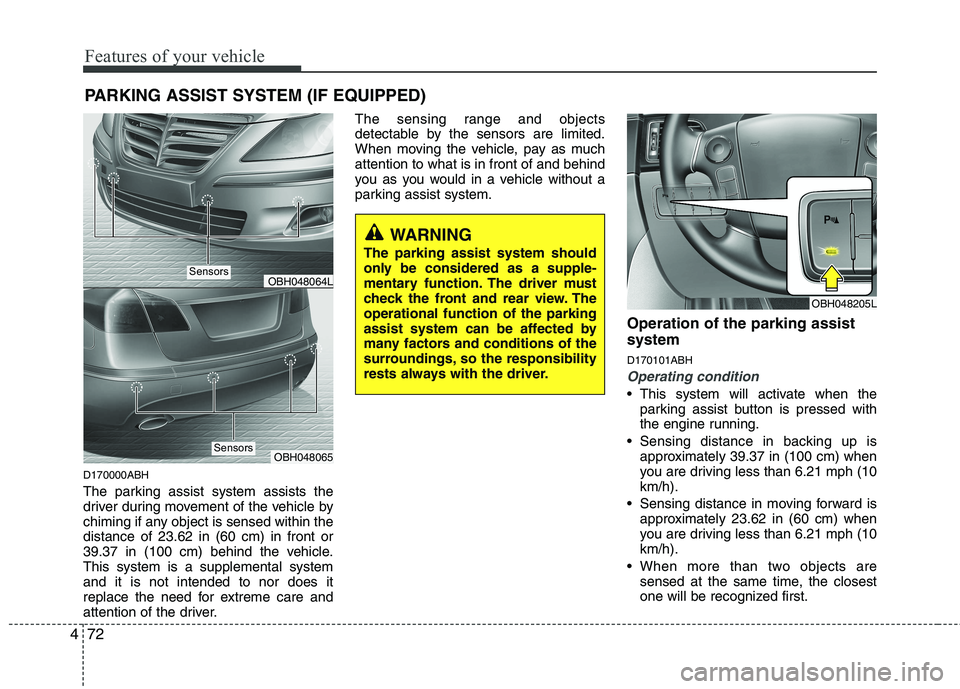
The parking assist system assists the
driver during movement of the vehicle by
chiming if any object is sensed within the
distance of 23.62 in (60 cm) in front or
39.37 in (100 cm) behind the vehicle.
This system is a supplemental system
and it is not intended to nor does it
replace the need for extreme care and
attention of the driver.The sensing range and objects
detectable by the sensors are limited.
When moving the vehicle, pay as much
attention to what is in front of and behind
you as you would in a vehicle without a
parking assist system.
Operation of the parking assist
system
D170101ABH
Operating condition
This system will activate when the
parking assist button is pressed with
the engine running.
Sensing distance in backing up is
approximately 39.37 in (100 cm) when
you are driving less than 6.21 mph (10
km/h).
Sensing distance in moving forward is
approximately 23.62 in (60 cm) when
you are driving less than 6.21 mph (10
km/h).
When more than two objects are
sensed at the same time, the closest
one will be recognized first.
PARKING ASSIST SYSTEM (IF EQUIPPED)
OBH048064L
OBH048065
WARNING
The parking assist system should
only be considered as a supple-
mentary function. The driver must
check the front and rear view. The
operational function of the parking
assist system can be affected by
many factors and conditions of the
surroundings, so the responsibility
rests always with the driver.
OBH048205L
Sensors
Sensors
Page 152 of 432
473
Features of your vehicle
✽ ✽
NOTICE
The parking assist system may not oper-
ate if the vehicle’s distance from the
object is already less than approximate-
ly 9.84 in (25 cm) when the system is
ON.
D170102ABH
Types of warning sound
When an object is 39.37 in (100 cm) to
23.62 in (61 cm) from the rear bumper
: Buzzer beeps intermittently
When an object is 23.62 in (60 cm) to
11.81 in (31 cm) from the front or rear
bumper : Buzzer sounds two beeps
intermittently
When an object is within 11.81 in (30
cm) of the front or rear bumper :
Buzzer sounds continuously.
D170200ABH
Non-operational conditions of
parking assist system
Parking assist system may not oper-
ate normally when:
1. Moisture is frozen to the sensor. (It will
operate normally when the moisture
melts.)
2. The sensor is covered with foreign
matter, such as snow or water, or the
sensor cover is blocked. (It will operate
normally when the material is removed
or the sensor is no longer blocked.)
3. The sensor is stained with foreign mat-
ter such as snow or water. (Sensing
range will return to normal when
removed.)
There is a possibility of parking
assist system malfunction when:
1. Driving on uneven road surfaces such
as unpaved roads, gravel, bumps, or
gradient.
2. Objects generating excessive noise
such as vehicle horns, loud motorcycle
engines, or truck air brakes can inter-
fere with the sensor.
3. Heavy rain or water spray.
4. Wireless transmitters or mobile
phones present near the sensor.
5. Sensor is covered with snow.
Page 153 of 432
Features of your vehicle
74 4
WARNING
Pay close attention when the vehi-
cle is driven close to objects on the
road, particularly pedestrians, and
especially children. Be aware that
some objects may not be detected
by the sensors, due to the objects
distance, size or material, all of
which can limit the effectiveness of
the sensor. Always perform a visual
inspection to make sure the vehicle
is clear of all obstructions before
moving the vehicle in any direction.
Detecting range may decrease when:
1. Outside air temperature is extremely
hot or cold.
2. Undetectable objects smaller than
39.37 in (1 m) and narrower than 5.51
in (14 cm) in diameter.
The following objects may not be rec-
ognized by the sensor:
1. Sharp or slim objects such as ropes,
chains or small poles.
2. Objects, which tend to absorb sensor
frequency such as clothes, spongy
material or snow.
✽ ✽
NOTICE
1. The warning may not sound sequen-
tially depending on the speed and
shapes of the objects detected.
2. The parking assist system may mal-
function if the vehicle bumper height
or sensor installation has been modi-
fied. Any non-factory installed equip-
ment or accessories may also interfere
with the sensor performance.
3. Sensor may not recognize objects less
than 11.81 in (30 cm) from the sensor,
or it may sense an incorrect distance.
Use with caution.
4. When the sensor is frozen or stained
with snow or water, the sensor may be
inoperative until the stains are
removed using a soft cloth.
5. Do not push, scratch or strike the sen-
sor with any hard objects that could
damage the surface of the sensor.
Sensor damage could occur.
✽ ✽
NOTICE
This system can only sense objects with-
in the range and location of the sensors,
it can not detect objects in other areas
where sensors are not installed. Also,
small or slim objects, or objects located
between sensors may not be detected.
Always visually check in front and
behind the vehicle when driving.
Be sure to inform any drivers in the
vehicle that may be unfamiliar with the
system regarding the system’s capabili-
ties and limitations.
Page 158 of 432
479
Features of your vehicle
D190403AUN
Auto light/AFLS position
(if equipped)
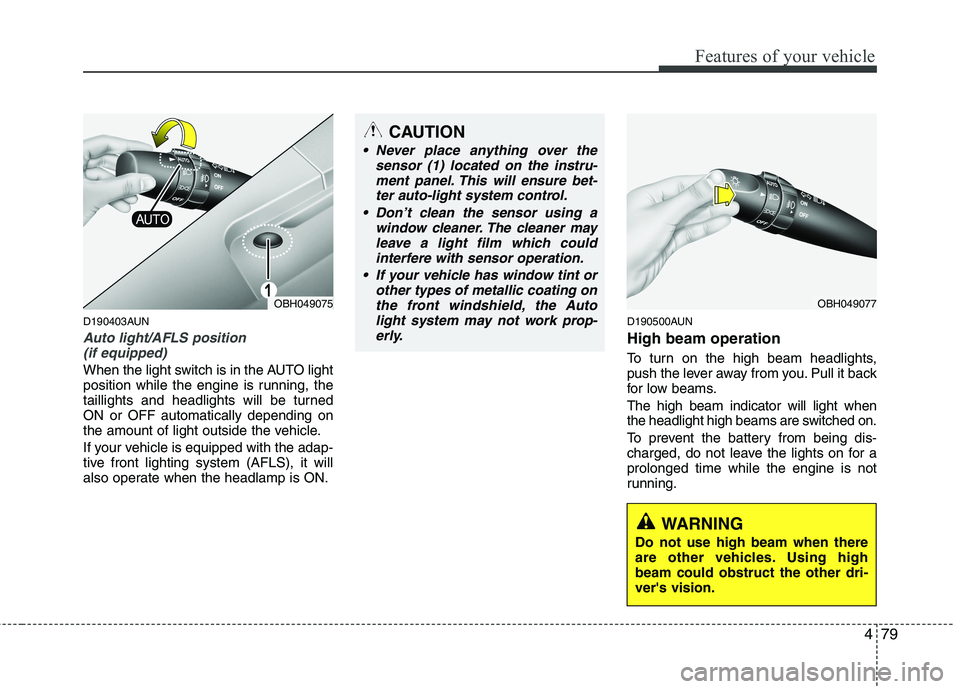
When the light switch is in the AUTO light
position while the engine is running, the
taillights and headlights will be turned
ON or OFF automatically depending on
the amount of light outside the vehicle.
If your vehicle is equipped with the adap-
tive front lighting system (AFLS), it will
also operate when the headlamp is ON.
D190500AUN
High beam operation
To turn on the high beam headlights,
push the lever away from you. Pull it back
for low beams.
The high beam indicator will light when
the headlight high beams are switched on.
To prevent the battery from being dis-
charged, do not leave the lights on for a
prolonged time while the engine is not
running.
OBH049077
CAUTION
Never place anything over the
sensor (1) located on the instru-
ment panel. This will ensure bet-
ter auto-light system control.
Don’t clean the sensor using a
window cleaner. The cleaner may
leave a light film which could
interfere with sensor operation.
If your vehicle has window tint or
other types of metallic coating on
the front windshield, the Auto
light system may not work prop-
erly.
WARNING
Do not use high beam when there
are other vehicles. Using high
beam could obstruct the other dri-
ver's vision.
OBH049075
Page 162 of 432
483
Features of your vehicle
✽ ✽
NOTICE
If there is heavy accumulation of snow
or ice on the windshield, defrost the
windshield for about 10 minutes, or
until the snow and/or ice is removed
before using the windshield wipers to
ensure proper operation.
✽ ✽
NOTICE
• When you operate the wipers, if your
vehicle has a problem in any part of
the wiper operation system, the wiper
may operate in the LO mode regard-
less of the wiper switch position. In
this case, have your vehicle checked
by an authorized HYUNDAI dealer as
soon as possible.
• When the ignition key is removed, the
wiper blade sometimes may move
slightly for reducing the deterioration
of the windshield wipers.
D200101AEN
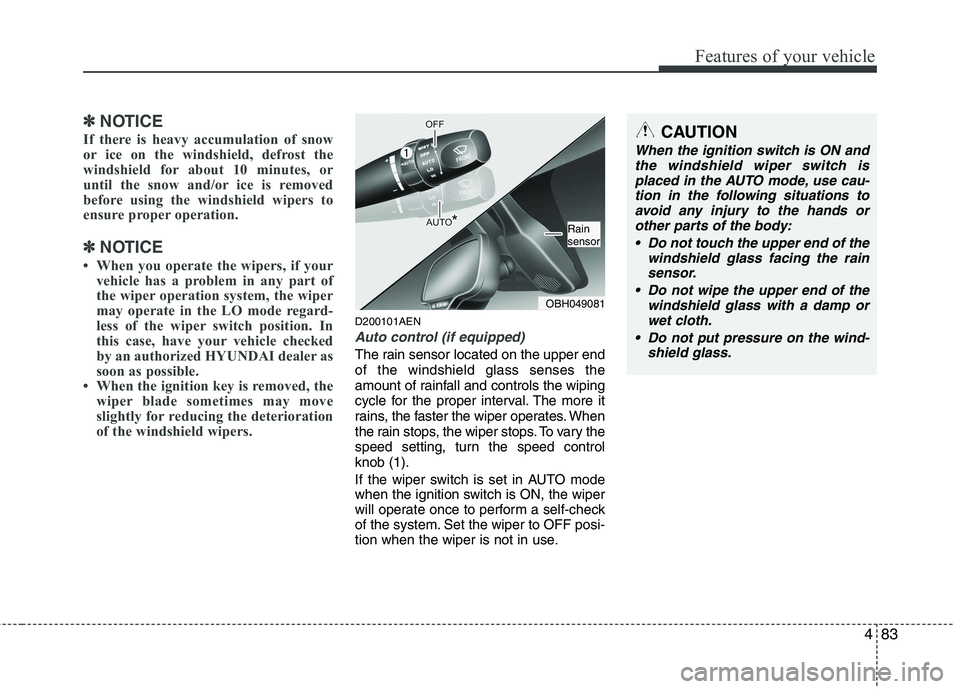
Auto control (if equipped)
The rain sensor located on the upper end
of the windshield glass senses the
amount of rainfall and controls the wiping
cycle for the proper interval. The more it
rains, the faster the wiper operates. When
the rain stops, the wiper stops. To vary the
speed setting, turn the speed control
knob (1).
If the wiper switch is set in AUTO mode
when the ignition switch is ON, the wiper
will operate once to perform a self-check
of the system. Set the wiper to OFF posi-
tion when the wiper is not in use.
CAUTION
When the ignition switch is ON and
the windshield wiper switch is
placed in the AUTO mode, use cau-
tion in the following situations to
avoid any injury to the hands or
other parts of the body:
Do not touch the upper end of the
windshield glass facing the rain
sensor.
Do not wipe the upper end of the
windshield glass with a damp or
wet cloth.
Do not put pressure on the wind-
shield glass.
OBH049081
Rain
sensor
Page 163 of 432
Features of your vehicle
84 4
D200200AUN
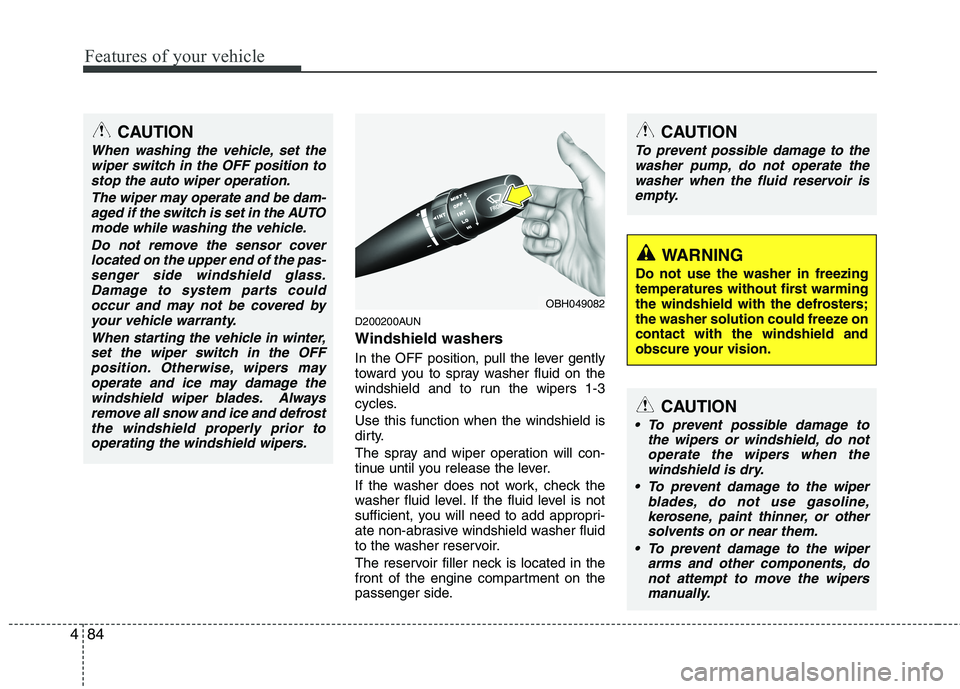
Windshield washers
In the OFF position, pull the lever gently
toward you to spray washer fluid on the
windshield and to run the wipers 1-3
cycles.
Use this function when the windshield is
dirty.
The spray and wiper operation will con-
tinue until you release the lever.
If the washer does not work, check the
washer fluid level. If the fluid level is not
sufficient, you will need to add appropri-
ate non-abrasive windshield washer fluid
to the washer reservoir.
The reservoir filler neck is located in the
front of the engine compartment on the
passenger side.
CAUTION
To prevent possible damage to the
washer pump, do not operate the
washer when the fluid reservoir is
empty.
WARNING
Do not use the washer in freezing
temperatures without first warming
the windshield with the defrosters;
the washer solution could freeze on
contact with the windshield and
obscure your vision.
CAUTION
To prevent possible damage to
the wipers or windshield, do not
operate the wipers when the
windshield is dry.
To prevent damage to the wiper
blades, do not use gasoline,
kerosene, paint thinner, or other
solvents on or near them.
To prevent damage to the wiper
arms and other components, do
not attempt to move the wipers
manually.
OBH049082
CAUTION
When washing the vehicle, set the
wiper switch in the OFF position to
stop the auto wiper operation.
The wiper may operate and be dam-
aged if the switch is set in the AUTO
mode while washing the vehicle.
Do not remove the sensor cover
located on the upper end of the pas-
senger side windshield glass.
Damage to system parts could
occur and may not be covered by
your vehicle warranty.
When starting the vehicle in winter,
set the wiper switch in the OFF
position. Otherwise, wipers may
operate and ice may damage the
windshield wiper blades. Always
remove all snow and ice and defrost
the windshield properly prior to
operating the windshield wipers.
Page 169 of 432
Features of your vehicle
90 4
D240100ABH
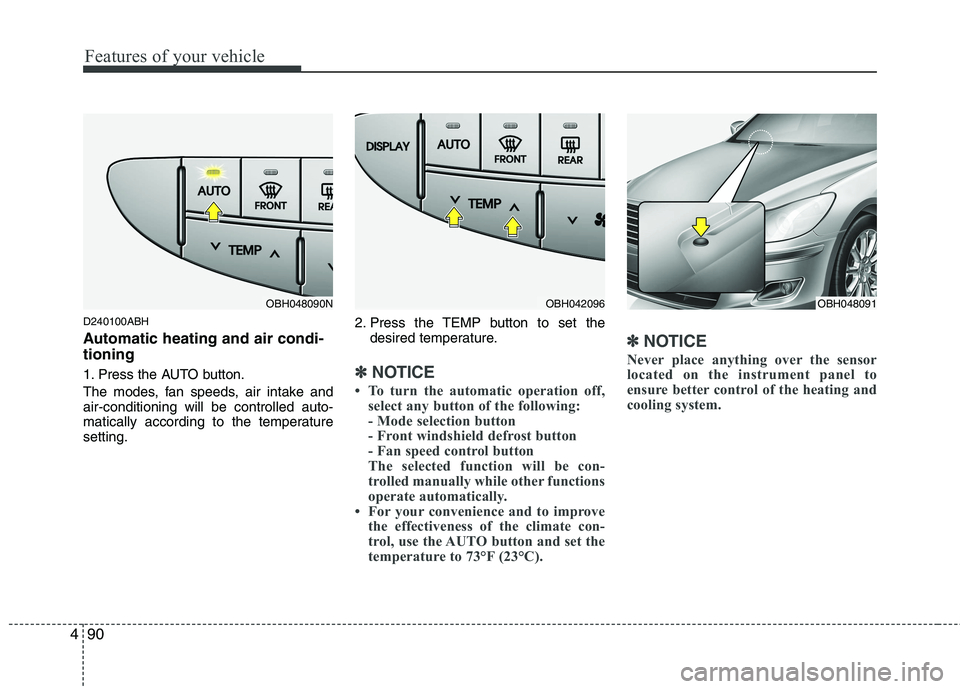
Automatic heating and air condi-
tioning
1. Press the AUTO button.
The modes, fan speeds, air intake and
air-conditioning will be controlled auto-
matically according to the temperature
setting.2. Press the TEMP button to set the
desired temperature.✽ ✽
NOTICE
• To turn the automatic operation off,
select any button of the following:
- Mode selection button
- Front windshield defrost button
- Fan speed control button
The selected function will be con-
trolled manually while other functions
operate automatically.
• For your convenience and to improve
the effectiveness of the climate con-
trol, use the AUTO button and set the
temperature to 73°F (23°C).
✽ ✽
NOTICE
Never place anything over the sensor
located on the instrument panel to
ensure better control of the heating and
cooling system.
OBH048091OBH048090NOBH042096
Page 182 of 432
4103
Features of your vehicle
D250305ABH
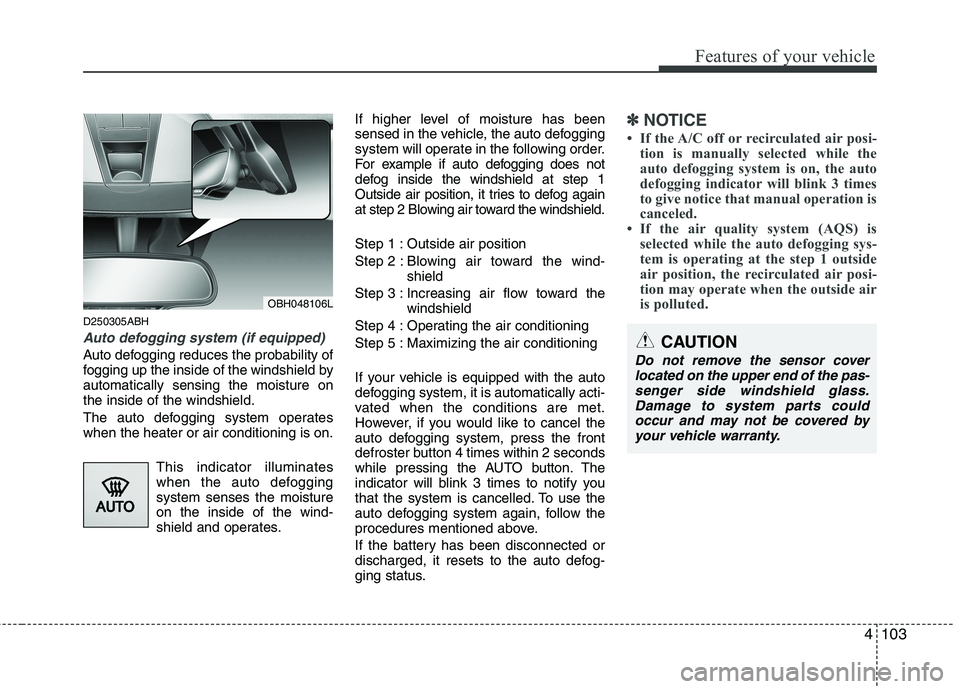
Auto defogging system (if equipped)
Auto defogging reduces the probability of
fogging up the inside of the windshield by
automatically sensing the moisture on
the inside of the windshield.
The auto defogging system operates
when the heater or air conditioning is on.
This indicator illuminates
when the auto defogging
system senses the moisture
on the inside of the wind-
shield and operates.If higher level of moisture has been
sensed in the vehicle, the auto defogging
system will operate in the following order.
For example if auto defogging does not
defog inside the windshield at step 1
Outside air position, it tries to defog again
at step 2 Blowing air toward the windshield.
Step 1 : Outside air position
Step 2 : Blowing air toward the wind-
shield
Step 3 : Increasing air flow toward the
windshield
Step 4 : Operating the air conditioning
Step 5 : Maximizing the air conditioning
If your vehicle is equipped with the auto
defogging system, it is automatically acti-
vated when the conditions are met.
However, if you would like to cancel the
auto defogging system, press the front
defroster button 4 times within 2 seconds
while pressing the AUTO button. The
indicator will blink 3 times to notify you
that the system is cancelled. To use the
auto defogging system again, follow the
procedures mentioned above.
If the battery has been disconnected or
discharged, it resets to the auto defog-
ging status.
✽ ✽
NOTICE
• If the A/C off or recirculated air posi-
tion is manually selected while the
auto defogging system is on, the auto
defogging indicator will blink 3 times
to give notice that manual operation is
canceled.
• If the air quality system (AQS) is
selected while the auto defogging sys-
tem is operating at the step 1 outside
air position, the recirculated air posi-
tion may operate when the outside air
is polluted.
OBH048106L
CAUTION
Do not remove the sensor cover
located on the upper end of the pas-
senger side windshield glass.
Damage to system parts could
occur and may not be covered by
your vehicle warranty.
Page 282 of 432
543
Driving your vehicle
Decreasing the vehicle speed to less
than approximately 6 mph (10 km/h) as
the vehicle in front of you.
The ESC is turned off.
The sensor or the cover is dirty or
obscured with foreign matter.
Each of these actions will cancel smart
cruise control operation (the SET indica-
tor light, set speed and vehicle to vehicle
distance on the LCD screen will go off),
but it will not turn the system off. If you
wish to resume smart cruise control
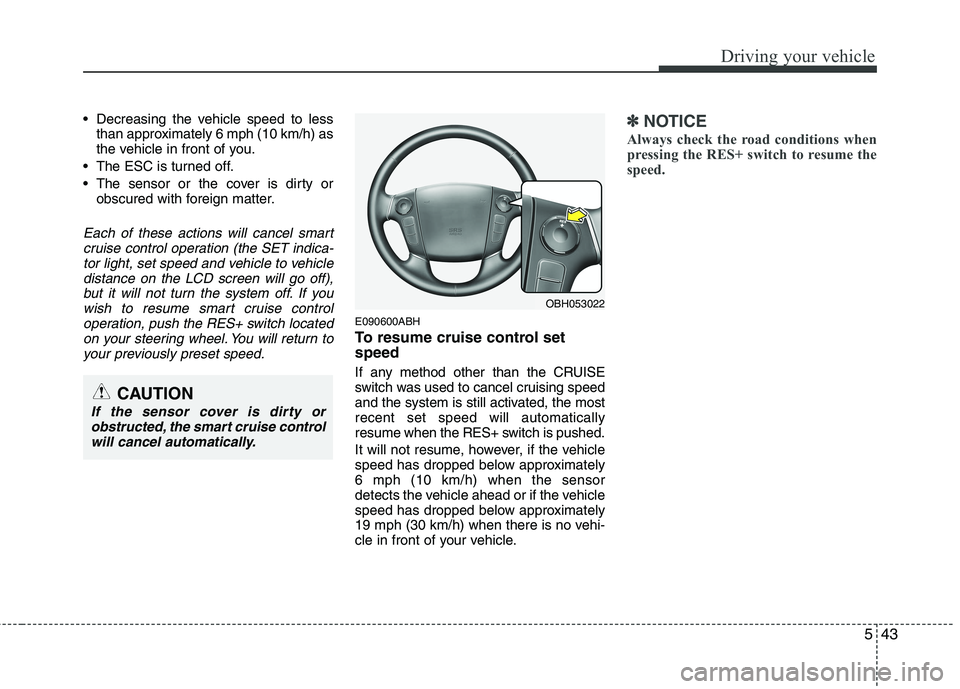
operation, push the RES+ switch located
on your steering wheel. You will return to
your previously preset speed.
E090600ABH
To resume cruise control set
speed
If any method other than the CRUISE
switch was used to cancel cruising speed
and the system is still activated, the most
recent set speed will automatically
resume when the RES+ switch is pushed.
It will not resume, however, if the vehicle
speed has dropped below approximately
6 mph (10 km/h) when the sensor
detects the vehicle ahead or if the vehicle
speed has dropped below approximately
19 mph (30 km/h) when there is no vehi-
cle in front of your vehicle.
✽ ✽
NOTICE
Always check the road conditions when
pressing the RES+ switch to resume the
speed.
OBH053022
CAUTION
If the sensor cover is dirty or
obstructed, the smart cruise control
will cancel automatically.
Page 285 of 432
Driving your vehicle
46 5
If the system is deactivated, you must
actively adjust the vehicle speed, as
well as the distance to the vehicle
ahead by depressing the accelerator or
brake pedal.
Always check the road conditions. Do
not rely on the warning chime.
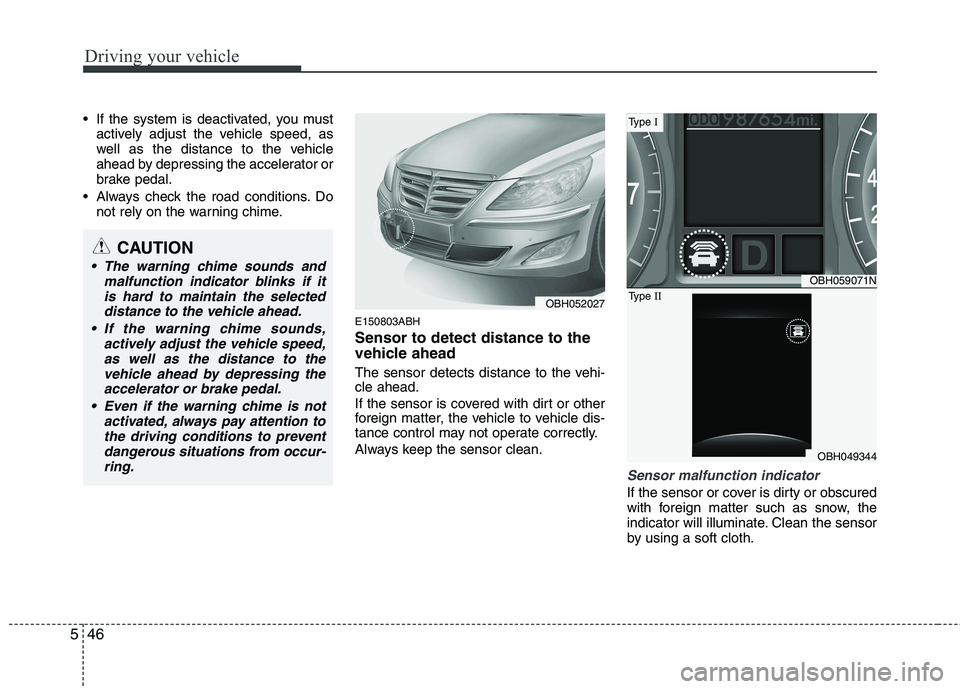
E150803ABH
Sensor to detect distance to the
vehicle ahead
The sensor detects distance to the vehi-
cle ahead.
If the sensor is covered with dirt or other
foreign matter, the vehicle to vehicle dis-
tance control may not operate correctly.
Always keep the sensor clean.
Sensor malfunction indicator
If the sensor or cover is dirty or obscured
with foreign matter such as snow, the
indicator will illuminate. Clean the sensor
by using a soft cloth.
OBH059071N
OBH049344
Type I
Type II
CAUTION
The warning chime sounds and
malfunction indicator blinks if it
is hard to maintain the selected
distance to the vehicle ahead.
If the warning chime sounds,
actively adjust the vehicle speed,
as well as the distance to the
vehicle ahead by depressing the
accelerator or brake pedal.
Even if the warning chime is not
activated, always pay attention to
the driving conditions to prevent
dangerous situations from occur-
ring.
OBH052027