sensor HYUNDAI GENESIS G80 2015 User Guide
[x] Cancel search | Manufacturer: HYUNDAI, Model Year: 2015, Model line: GENESIS G80, Model: HYUNDAI GENESIS G80 2015Pages: 432, PDF Size: 29.24 MB
Page 73 of 432
Safety features of your vehicle
54 3
C040801AEN
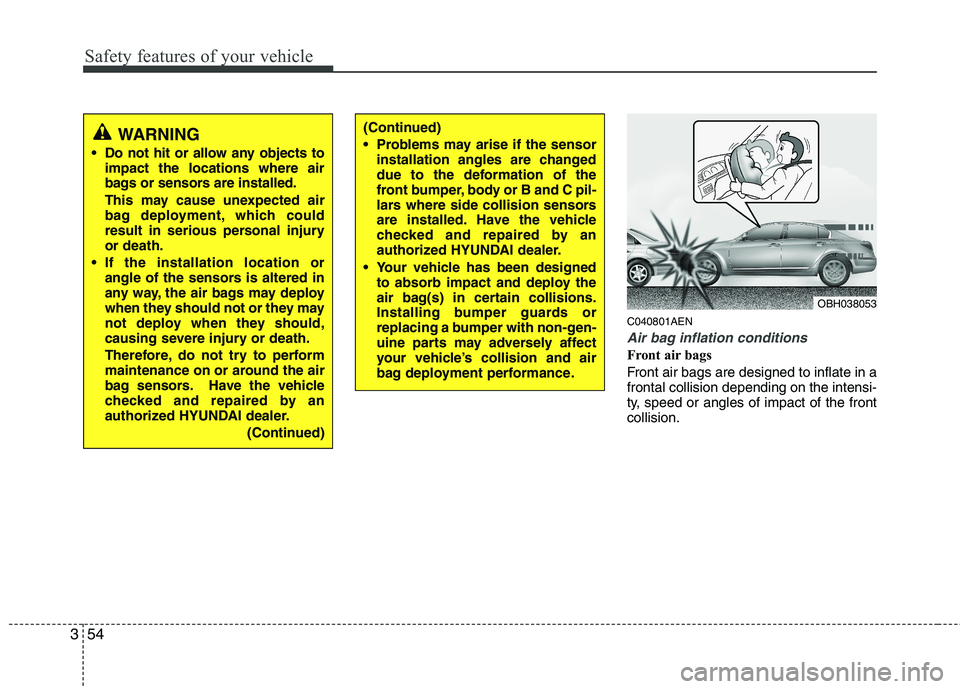
Air bag inflation conditions
Front air bags
Front air bags are designed to inflate in a
frontal collision depending on the intensi-
ty, speed or angles of impact of the front
collision.
OBH038053
WARNING
Do not hit or allow any objects to
impact the locations where air
bags or sensors are installed.
This may cause unexpected air
bag deployment, which could
result in serious personal injury
or death.
If the installation location or
angle of the sensors is altered in
any way, the air bags may deploy
when they should not or they may
not deploy when they should,
causing severe injury or death.
Therefore, do not try to perform
maintenance on or around the air
bag sensors. Have the vehicle
checked and repaired by an
authorized HYUNDAI dealer.
(Continued)
(Continued)
Problems may arise if the sensor
installation angles are changed
due to the deformation of the
front bumper, body or B and C pil-
lars where side collision sensors
are installed. Have the vehicle
checked and repaired by an
authorized HYUNDAI dealer.
Your vehicle has been designed
to absorb impact and deploy the
air bag(s) in certain collisions.
Installing bumper guards or
replacing a bumper with non-gen-
uine parts may adversely affect
your vehicle’s collision and air
bag deployment performance.
Page 74 of 432
355
Safety features of your vehicle
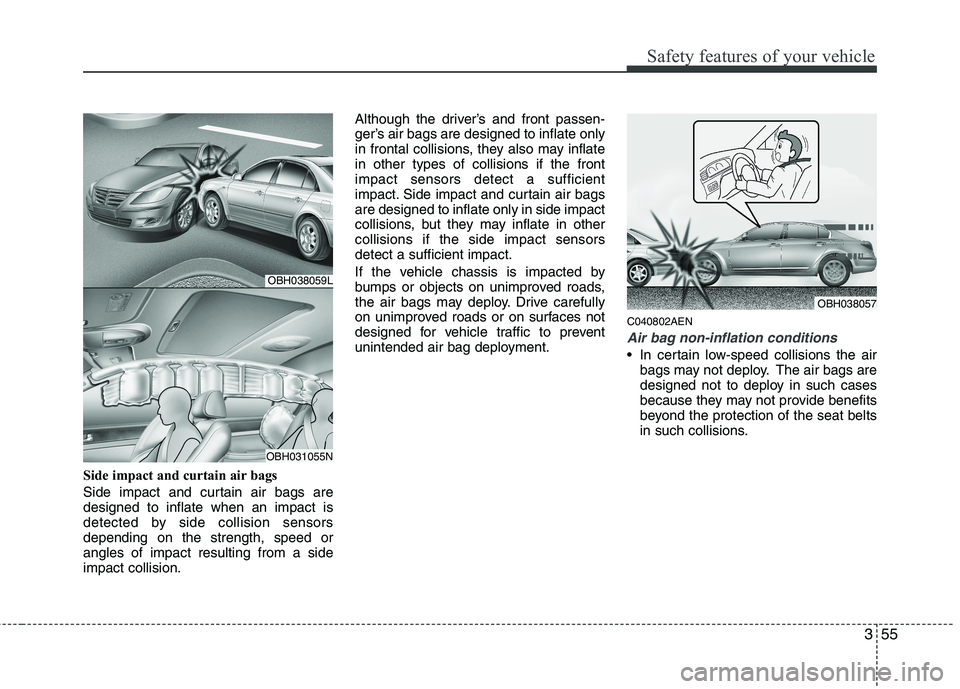
Side impact and curtain air bags
Side impact and curtain air bags are
designed to inflate when an impact is
detected by side collision sensors
depending on the strength, speed or
angles of impact resulting from a side
impact collision.Although the driver’s and front passen-
ger’s air bags are designed to inflate only
in frontal collisions, they also may inflate
in other types of collisions if the front
impact sensors detect a sufficient
impact. Side impact and curtain air bags
are designed to inflate only in side impact
collisions, but they may inflate in other
collisions if the side impact sensors
detect a sufficient impact.
If the vehicle chassis is impacted by
bumps or objects on unimproved roads,
the air bags may deploy. Drive carefully
on unimproved roads or on surfaces not
designed for vehicle traffic to prevent
unintended air bag deployment.
C040802AEN
Air bag non-inflation conditions
In certain low-speed collisions the air
bags may not deploy. The air bags are
designed not to deploy in such cases
because they may not provide benefits
beyond the protection of the seat belts
in such collisions.
OBH038057
OBH038059L
OBH031055N
Page 75 of 432
Safety features of your vehicle
56 3
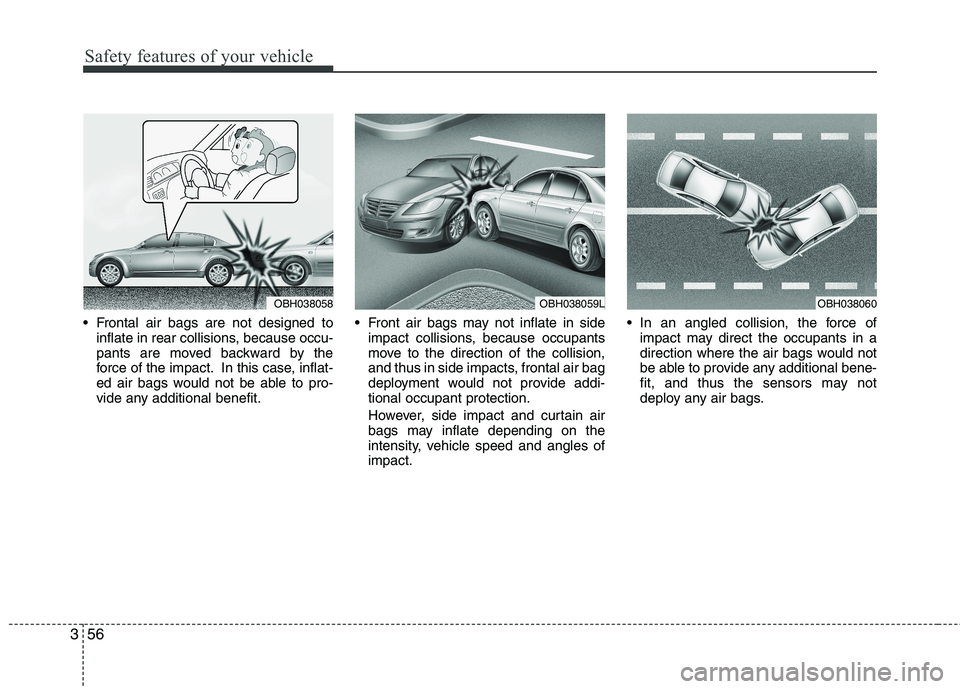
Frontal air bags are not designed to
inflate in rear collisions, because occu-
pants are moved backward by the
force of the impact. In this case, inflat-
ed air bags would not be able to pro-
vide any additional benefit. Front air bags may not inflate in side
impact collisions, because occupants
move to the direction of the collision,
and thus in side impacts, frontal air bag
deployment would not provide addi-
tional occupant protection.
However, side impact and curtain air
bags may inflate depending on the
intensity, vehicle speed and angles of
impact. In an angled collision, the force of
impact may direct the occupants in a
direction where the air bags would not
be able to provide any additional bene-
fit, and thus the sensors may not
deploy any air bags.
OBH038060OBH038059LOBH038058
Page 76 of 432
357
Safety features of your vehicle
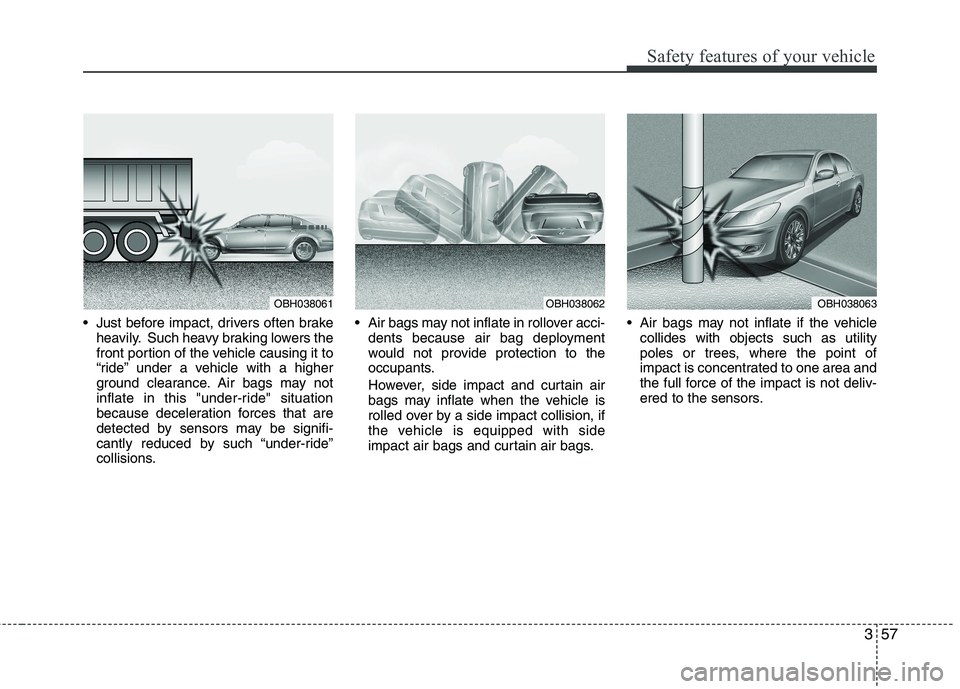
Just before impact, drivers often brake
heavily. Such heavy braking lowers the
front portion of the vehicle causing it to
“ride” under a vehicle with a higher
ground clearance. Air bags may not
inflate in this "under-ride" situation
because deceleration forces that are
detected by sensors may be signifi-
cantly reduced by such “under-ride”
collisions. Air bags may not inflate in rollover acci-
dents because air bag deployment
would not provide protection to the
occupants.
However, side impact and curtain air
bags may inflate when the vehicle is
rolled over by a side impact collision, if
the vehicle is equipped with side
impact air bags and curtain air bags. Air bags may not inflate if the vehicle
collides with objects such as utility
poles or trees, where the point of
impact is concentrated to one area and
the full force of the impact is not deliv-
ered to the sensors.
OBH038061OBH038062OBH038063
Page 118 of 432
439
Features of your vehicle
D140100AUN
Inside rearview mirror
Adjust the rearview mirror to center on
the view through the rear window. Make
this adjustment before you start driving.
D140105AEN
Electric chromic mirror (ECM) with
HomeLink®system and compass
(if equipped)
Your vehicle may be equipped with a
Gentex Automatic-Dimming Mirror with a
Z-Nav™ Electronic Compass Display
and an Integrated HomeLink
®Wireless
Control System. During nighttime driving,
this feature will automatically detect and
reduce rearview mirror glare while the
compass indicates the direction the vehi-
cle is pointed. The HomeLink
®Universal
Transceiver allows you to activate your
garage door(s), electric gate, home light-
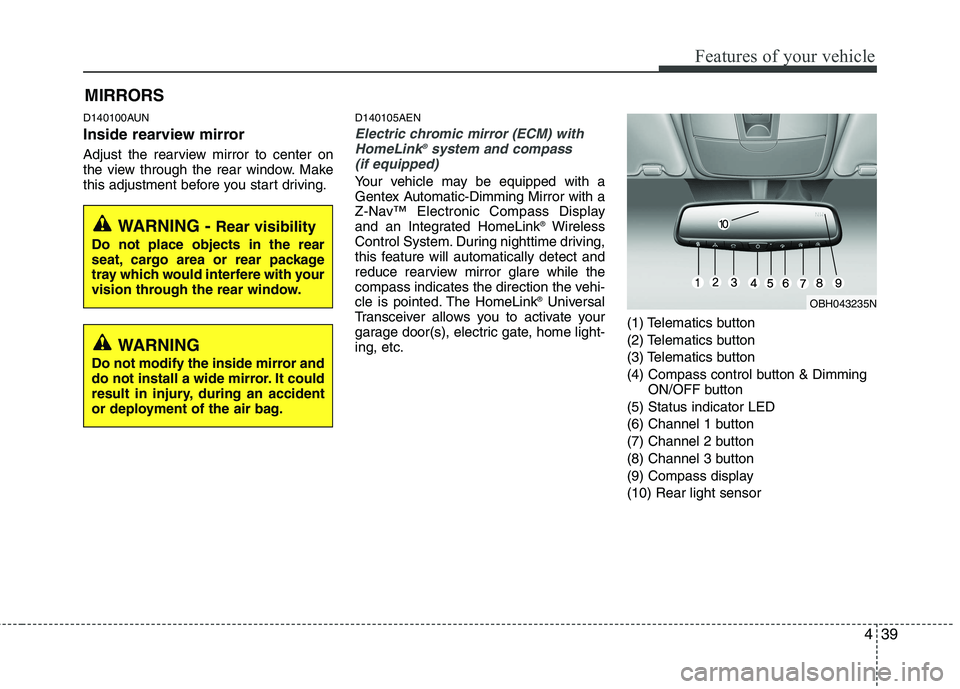
ing, etc.(1) Telematics button
(2) Telematics button
(3) Telematics button
(4) Compass control button & Dimming
ON/OFF button
(5) Status indicator LED
(6) Channel 1 button
(7) Channel 2 button
(8) Channel 3 button
(9) Compass display
(10) Rear light sensor
MIRRORS
WARNING
Do not modify the inside mirror and
do not install a wide mirror. It could
result in injury, during an accident
or deployment of the air bag.
WARNING - Rear visibility
Do not place objects in the rear
seat, cargo area or rear package
tray which would interfere with your
vision through the rear window.
OBH043235N
Page 119 of 432
Features of your vehicle
40 4
Automatic-Dimming Night Vision
Safety™ (NVS®) Mirror
The NVS®Mirror in your vehicle is the
most advanced way to reduce annoying
glare in the rearview mirror during any
driving situation. For more information
regarding NVS
®mirrors and other appli-
cations, please refer to the Gentex web-
site:
www.gentex.com
✽ ✽
NOTICE
The NVS®Mirror automatically reduces
glare during driving conditions based
upon light levels monitored in front of
the vehicle and from the rear of the vehi-
cle. These light sensors are visible
through openings in the front and rear
of the mirror case. Any object that
obstructs either light sensor will
degrade the automatic dimming control
feature.
Automatic-dimming function
Your mirror will automatically dim upon
detecting glare from the vehicles travel-
ing behind you. The auto-dimming func-
tion can be controlled by the Dimming
ON/OFF Button:
1. Pressing and hold the button for 3
seconds turns the autodimming func-
tion OFF which is indicated by the
green Status Indicator LED turning off.
2. Pressing and hold the button for 3
seconds again turns the auto-dimming
function ON which is indicated by the
green Status Indicator LED turning on.
The mirror defaults to the ON position
each time the vehicle is started.Z-Nav™ Compass Display
The NVS™ Mirror in your vehicle is also
equipped with a Z-Nav™ Compass that
shows the vehicle Compass heading in
the Display Window using the 8 basic
cardinal headings (N, NE, E, SE, etc.).
Compass function
The Compass can be turned ON and
OFF and will remember the last state
when the ignition is cycled. To turn the
display feature ON/OFF:
1. Press and release the button within
1 second to turn the display feature
OFF.
2. Press and release the button again
within 1 second to turn the display
back ON.
Additional options can be set with press
and hold sequences of the button and
are detailed below.
There is a difference between magnetic
north and true north. The compass in the
mirror can compensate for this difference
when it knows the Magnetic Zone in
which it is operating. This is set either by
the dealer or by the user. The operating
Zone Numbers for North America are
shown in the figure on the following sec-
tion.
Page 125 of 432
Features of your vehicle
46 4
D140201ABH
Remote control
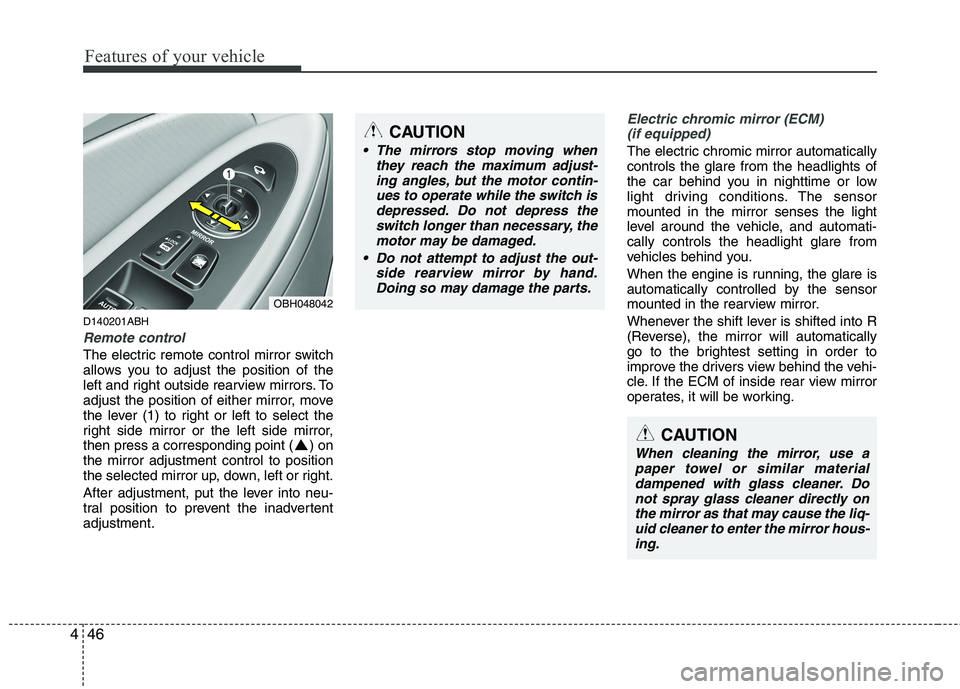
The electric remote control mirror switch
allows you to adjust the position of the
left and right outside rearview mirrors. To
adjust the position of either mirror, move
the lever (1) to right or left to select the
right side mirror or the left side mirror,
then press a corresponding point ( ) on
the mirror adjustment control to position
the selected mirror up, down, left or right.
After adjustment, put the lever into neu-
tral position to prevent the inadvertent
adjustment.
Electric chromic mirror (ECM)
(if equipped)
The electric chromic mirror automatically
controls the glare from the headlights of
the car behind you in nighttime or low
light driving conditions. The sensor
mounted in the mirror senses the light
level around the vehicle, and automati-
cally controls the headlight glare from
vehicles behind you.
When the engine is running, the glare is
automatically controlled by the sensor
mounted in the rearview mirror.
Whenever the shift lever is shifted into R
(Reverse), the mirror will automatically
go to the brightest setting in order to
improve the drivers view behind the vehi-
cle. If the ECM of inside rear view mirror
operates, it will be working.
OBH048042
CAUTION
The mirrors stop moving when
they reach the maximum adjust-
ing angles, but the motor contin-
ues to operate while the switch is
depressed. Do not depress the
switch longer than necessary, the
motor may be damaged.
Do not attempt to adjust the out-
side rearview mirror by hand.
Doing so may damage the parts.
CAUTION
When cleaning the mirror, use a
paper towel or similar material
dampened with glass cleaner. Do
not spray glass cleaner directly on
the mirror as that may cause the liq-
uid cleaner to enter the mirror hous-
ing.
Page 127 of 432
Features of your vehicle
48 4
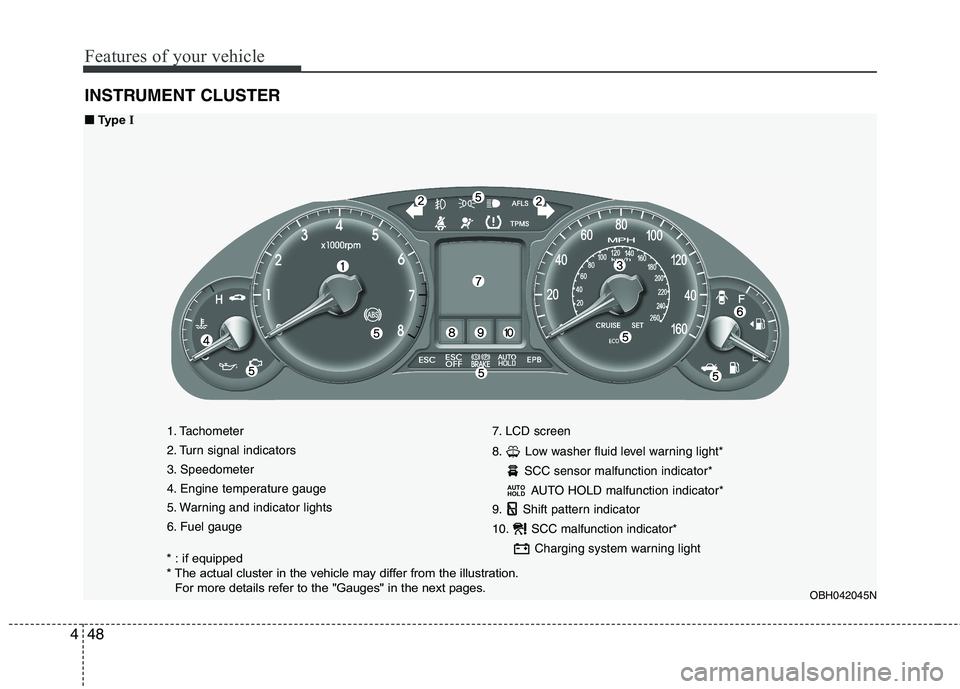
INSTRUMENT CLUSTER
1. Tachometer
2. Turn signal indicators
3. Speedometer
4. Engine temperature gauge
5. Warning and indicator lights
6. Fuel gauge7. LCD screen
8. Low washer fluid level warning light*
SCC sensor malfunction indicator*
AUTO HOLD malfunction indicator*
9. Shift pattern indicator
10. SCC malfunction indicator*
Charging system warning light
AUTO
HOLD
OBH042045N
■ ■
Type I
* : if equipped
* The actual cluster in the vehicle may differ from the illustration.
For more details refer to the "Gauges" in the next pages.
Page 128 of 432
449
Features of your vehicle
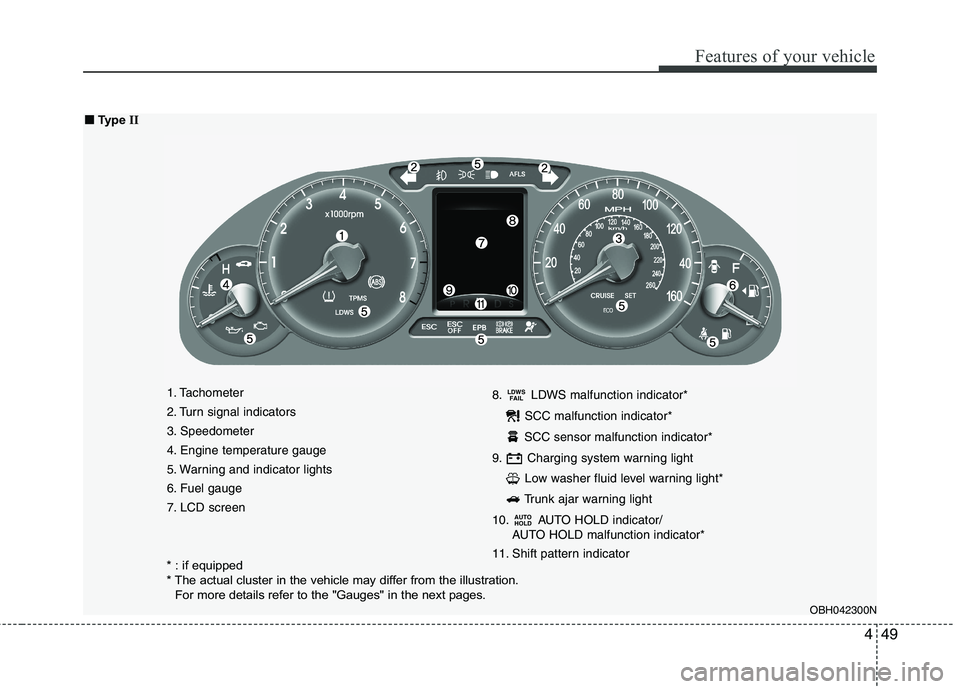
1. Tachometer
2. Turn signal indicators
3. Speedometer
4. Engine temperature gauge
5. Warning and indicator lights
6. Fuel gauge
7. LCD screen8. LDWS malfunction indicator*
SCC malfunction indicator*
SCC sensor malfunction indicator*
9. Charging system warning light
Low washer fluid level warning light*
Trunk ajar warning light
10. AUTO HOLD indicator/
AUTO HOLD malfunction indicator*
11. Shift pattern indicator
AUTO
HOLD
LDWS
FAIL
OBH042300N
■ ■
Type II
* : if equipped
* The actual cluster in the vehicle may differ from the illustration.
For more details refer to the "Gauges" in the next pages.
Page 145 of 432
Features of your vehicle
66 4
D150323AUN-EU
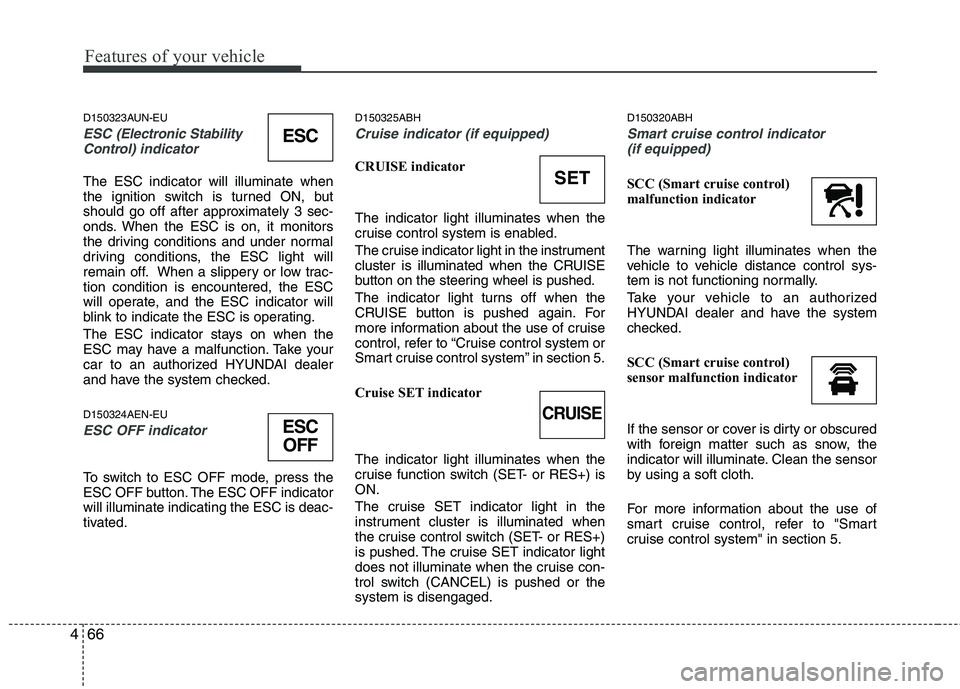
ESC (Electronic Stability
Control)indicator
The ESC indicator will illuminate when
the ignition switch is turned ON, but
should go off after approximately 3 sec-
onds. When the ESC is on, it monitors
the driving conditions and under normal
driving conditions, the ESC light will
remain off. When a slippery or low trac-
tion condition is encountered, the ESC
will operate, and the ESC indicator will
blink to indicate the ESC is operating.
The ESC indicator stays on when the
ESC may have a malfunction. Take your
car to an authorized HYUNDAI dealer
and have the system checked.
D150324AEN-EU
ESC OFF indicator
To switch to ESC OFF mode, press the
ESC OFF button. The ESC OFF indicator
will illuminate indicating the ESC is deac-
tivated.
D150325ABH
Cruise indicator (if equipped)
CRUISE indicator
The indicator light illuminates when the
cruise control system is enabled.
The cruise indicator light in the instrument
cluster is illuminated when the CRUISE
button on the steering wheel is pushed.
The indicator light turns off when the
CRUISE button is pushed again. For
more information about the use of cruise
control, refer to “Cruise control system or
Smart cruise control system” in section 5.
Cruise SET indicator
The indicator light illuminates when the
cruise function switch (SET- or RES+) is
ON.
The cruise SET indicator light in the
instrument cluster is illuminated when
the cruise control switch (SET- or RES+)
is pushed. The cruise SET indicator light
does not illuminate when the cruise con-
trol switch (CANCEL) is pushed or the
system is disengaged.
D150320ABH
Smart cruise control indicator
(if equipped)
SCC (Smart cruise control)
malfunction indicator
The warning light illuminates when the
vehicle to vehicle distance control sys-
tem is not functioning normally.
Take your vehicle to an authorized
HYUNDAI dealer and have the system
checked.
SCC (Smart cruise control)
sensor malfunction indicator
If the sensor or cover is dirty or obscured
with foreign matter such as snow, the
indicator will illuminate. Clean the sensor
by using a soft cloth.
For more information about the use of
smart cruise control, refer to "Smart
cruise control system" in section 5.SET
CRUISE
ESC
ESC
OFF