drive mode HYUNDAI GENESIS G80 2015 Owner's Manual
[x] Cancel search | Manufacturer: HYUNDAI, Model Year: 2015, Model line: GENESIS G80, Model: HYUNDAI GENESIS G80 2015Pages: 432, PDF Size: 29.24 MB
Page 253 of 432
Driving your vehicle
14 5
R (Reverse)
Use this position to drive the vehicle
backward.N (Neutral)
The wheels and transmission are not
engaged. The vehicle will roll freely even
on the slightest incline unless the parking
brake or service brakes are applied.
D (Drive)
This is the normal forward driving posi-
tion. The transmission will automatically
shift through a 8-gear sequence, provid-
ing the best fuel economy and power.
For extra power when passing another
vehicle or climbing grades, depress the
accelerator fully, at which time the trans-
mission will automatically downshift to
the next lower gear (or gears, as appro-
priate).
✽ ✽
NOTICE
Always come to a complete stop before
shifting into D (Drive).
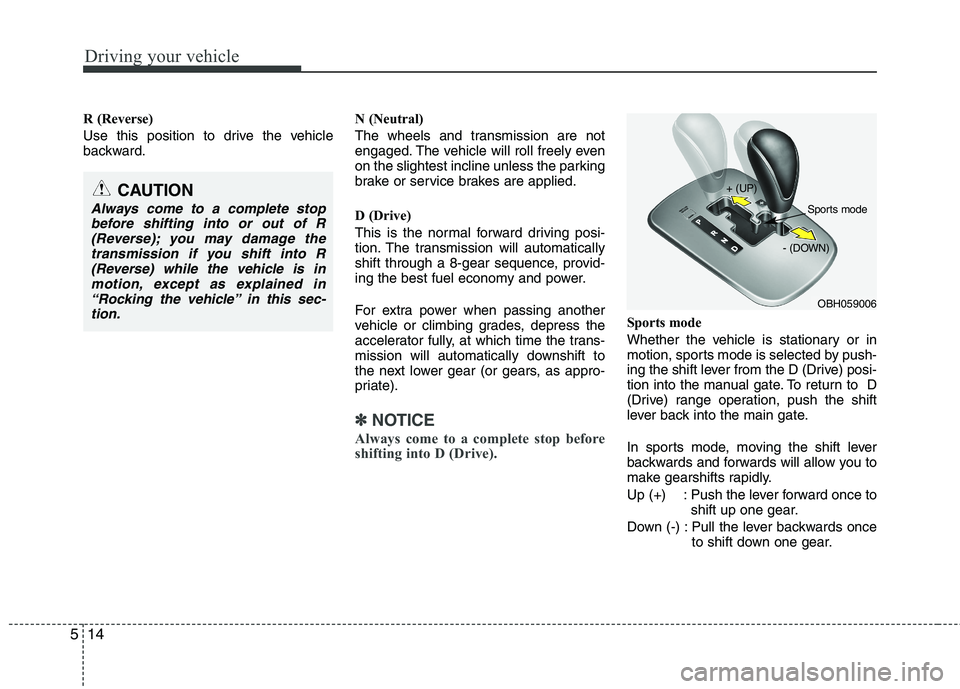
Sports mode
Whether the vehicle is stationary or in
motion, sports mode is selected by push-
ing the shift lever from the D (Drive) posi-
tion into the manual gate. To return to D
(Drive) range operation, push the shift
lever back into the main gate.
In sports mode, moving the shift lever
backwards and forwards will allow you to
make gearshifts rapidly.
Up (+) : Push the lever forward once to
shift up one gear.
Down (-) : Pull the lever backwards once
to shift down one gear.
CAUTION
Always come to a complete stop
before shifting into or out of R
(Reverse); you may damage the
transmission if you shift into R
(Reverse) while the vehicle is in
motion, except as explained in
“Rocking the vehicle” in this sec-
tion.
OBH059006 + (UP)
- (DOWN)
Sports mode
Page 254 of 432
515
Driving your vehicle
✽ ✽
NOTICE
• In sports mode, the driver must exe-
cute upshifts in accordance with road
conditions, taking care to keep the
engine speed below the red zone.
• In sports mode, only the 8 forward
gears can be selected. To reverse or
park the vehicle, move the shift lever
to the R (Reverse) or P (Park) position
as required.
• In sports mode, downshifts are made
automatically when the vehicle slows
down. When the vehicle stops, 1st gear
is automatically selected.
• In sports mode, when the engine rpm
approaches the red zone the transmis-
sion will upshift automatically.
• If the driver moves the lever to +(up)
or -(down) position, the transmission
may not make the requested gear
change if the next gear is outside of
the allowable engine rpm range.
• When driving on a slippery road,
push the shift lever forward into the
+(up) position. This causes the trans-
mission to shift into the 2nd (or 3rd)
gear which is better for smooth driv-
ing on a slippery road. Push the shift
lever to the -(down) side to shift back
to the 1st gear.
E060102BBH
Shift lock system
For your safety, the automatic transmis-
sion has a shift lock system which pre-
vents shifting the transmission from P
(Park) or N (Neutral) into R (Reverse)
unless the brake pedal is depressed.
To shift the transmission from P (Park) or
N (Neutral) into R (Reverse):
1. Depress and hold the brake pedal.
2. Start the engine or turn the ignition
switch to the ON position.
3. Move the shift lever.
If the brake pedal is repeatedly
depressed and released with the shift
lever in the P (Park) position, a chattering
noise near the shift lever may be heard.
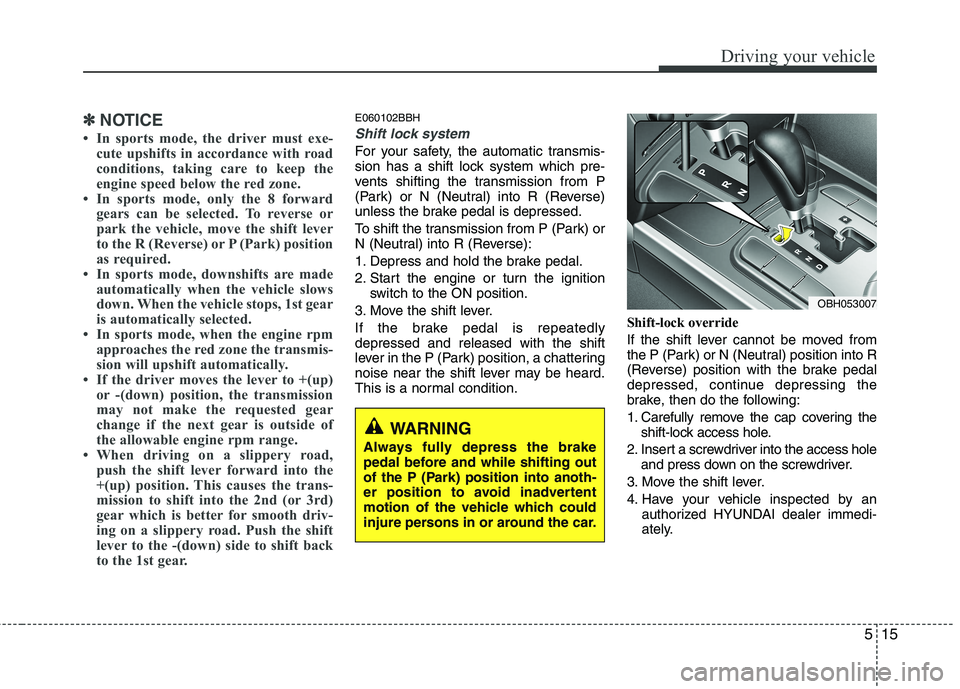
This is a normal condition.Shift-lock override
If the shift lever cannot be moved from
the P (Park) or N (Neutral) position into R
(Reverse) position with the brake pedal
depressed, continue depressing the
brake, then do the following:
1. Carefully remove the cap covering the
shift-lock access hole.
2. Insert a screwdriver into the access hole
and press down on the screwdriver.
3. Move the shift lever.
4. Have your vehicle inspected by an
authorized HYUNDAI dealer immedi-
ately.
WARNING
Always fully depress the brake
pedal before and while shifting out
of the P (Park) position into anoth-
er position to avoid inadvertent
motion of the vehicle which could
injure persons in or around the car.
OBH053007
Page 255 of 432
Driving your vehicle
16 5
Ignition key interlock system
The ignition key cannot be removed
unless the shift lever is in the P (Park)
position. Even if the ignition switch is in
the LOCK position, the key also cannot
be removed.
If your vehicle is equipped with engine
start/stop button, the button will not
change to the OFF position unless the
shift lever is in the P (Park) position.
E060200AEN
Good driving practices
Never move the gear shift lever from P
(Park) or N (Neutral) to any other posi-
tion with the accelerator pedal
depressed.
Never move the gear shift lever into P
(Park) when the vehicle is in motion.
Be sure the car is completely stopped
before you attempt to shift into R
(Reverse) or D (Drive).
Never take the car out of gear and
coast down a hill. This may be
extremely hazardous. Always leave the
car in gear when moving.
Do not "ride" the brakes. This can
cause them to overheat and malfunc-
tion. Instead, when you are driving
down a long hill, slow down, shift into
Sports Mode and shift to a lower gear.
When you do this, engine braking will
help slow the car.
Slow down before shifting to a lower
gear. Otherwise, the lower gear may
not be engaged. Always use the parking brake. Do not
depend on placing the transmission in
P (Park) to keep the car from moving.
Exercise extreme caution when driving
on a slippery surface. Be especially
careful when braking, accelerating or
shifting gears. On a slippery surface,
an abrupt change in vehicle speed can
cause the drive wheels to lose traction
and the vehicle to go out of control.
Optimum vehicle performance and
economy is obtained by smoothly
depressing and releasing the accelera-
tor pedal.
Page 265 of 432
Driving your vehicle
26 5
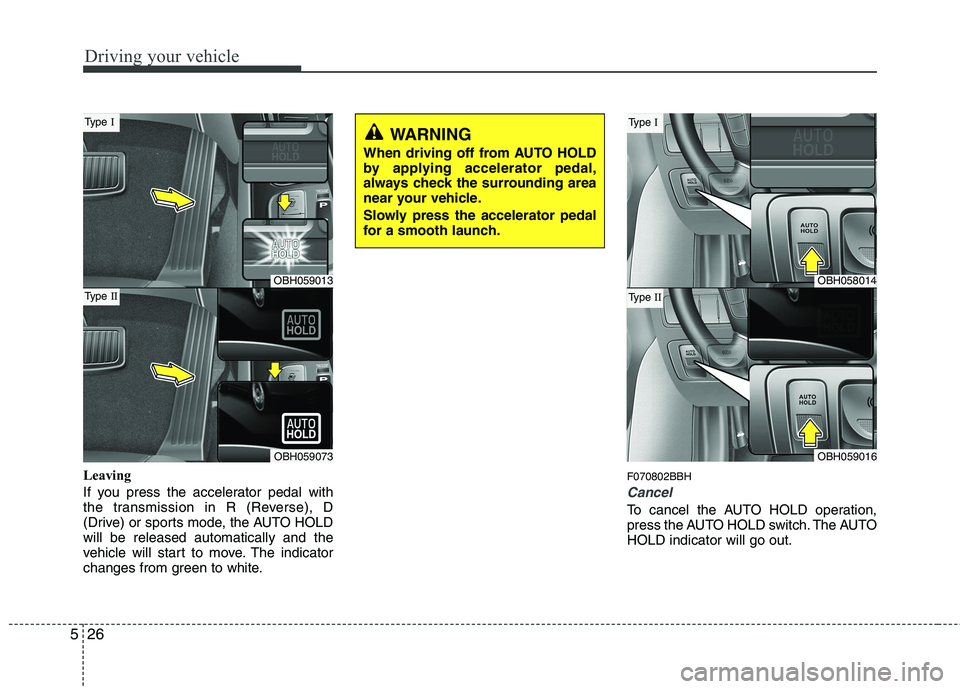
Leaving
If you press the accelerator pedal with
the transmission in R (Reverse), D
(Drive) or sports mode, the AUTO HOLD
will be released automatically and the
vehicle will start to move. The indicator
changes from green to white.F070802BBH
Cancel
To cancel the AUTO HOLD operation,
press the AUTO HOLD switch. The AUTO
HOLD indicator will go out.
WARNING
When driving off from AUTO HOLD
by applying accelerator pedal,
always check the surrounding area
near your vehicle.
Slowly press the accelerator pedal
for a smooth launch.
OBH059013
OBH059073
Type I
Type IIOBH058014
OBH059016
Type I
Type II
Page 292 of 432
553
Driving your vehicle
The LDWS does not operate
when:
The driver turns on the turn signal to
change lane.
However, when the hazard warning
flasher is operating, the LDWS oper-
ates normally.
Operating the wiper switch with HI
mode due to heavy rain.
Driving on the lane line.
✽ ✽
NOTICE
To change lane, operate the turn signal
switch then change the lane.
The LDWS may not warn you even
if the vehicle leaves the lane, or
may warn you even if the vehicle
does not leave the lane when:
The lane can't be visible due to snow,
rain, stain, a puddle or many other
things.
The brightness outside changes sud-
denly.
Not turning on the headlights at night
or in a tunnel.
Difficult to distinguish the color of the
lane marking from the road.
Driving on a steep grade or a curve.
Light reflects from the water on the
road.
The lens or windshield is stained with
foreign matter.
The sensor cannot detect the lane
because of fog, heavy rain or heavy
snow.
The surrounding of the inside rear view
mirror temperature is high due to a
direct sun light.
The lane is very wide or narrow.
The lane line is damaged or indistinct.
A shadow is on the lane line by a medi-
an strip.
There is a mark that looks like lane line.
There is a boundary structure. The distance from vehicle ahead is
very short or the vehicle ahead drives
hiding the lane line.
The vehicle shakes heavily.
The lane number increases or
decreases or the lane lines are cross-
ing.
Putting something on the dashboard.
Driving with the sun in front of you.
Driving in areas under construction.
The lane line is more than two.
Page 293 of 432
Driving your vehicle
54 5
E100000AEN
Your vehicle's fuel economy depends
mainly on your style of driving, where you
drive and when you drive.
Each of these factors affects how many
miles (kilometers) you can get from a gal-
lon (liter) of fuel. To operate your vehicle
as economically as possible, use the fol-
lowing driving suggestions to help save
money in both fuel and repairs:
Drive smoothly. Accelerate at a moder-
ate rate. Don't make "jack-rabbit" starts
or full-throttle shifts and maintain a
steady cruising speed. Don't race
between stoplights. Try to adjust your
speed to that of the other traffic so you
don't have to change speeds unneces-
sarily. Avoid heavy traffic whenever
possible. Always maintain a safe dis-
tance from other vehicles so you can
avoid unnecessary braking. This also
reduces brake wear.
Drive at a moderate speed. The faster
you drive the more fuel your vehicle
uses. Driving at a moderate speed, in
the highest gear appropriate for the
conditions, especially on the highway,
is one of the most effective ways to
reduce fuel consumption. Don't "ride" the brake pedal. This can
increase fuel consumption and also
increase wear on these components.
In addition, driving with your foot rest-
ing on the brake pedal may cause the
brakes to overheat, which reduces
their effectiveness and may lead to
more serious consequences.
Take care of your tires. Keep them
inflated to the recommended pressure.
Incorrect inflation, either too much or
too little, results in unnecessary tire
wear. Check the tire pressures at least
once a month.
Be sure that the wheels are aligned
correctly. Improper alignment can
result from hitting curbs or driving too
fast over irregular surfaces. Poor align-
ment causes faster tire wear and may
also result in other problems as well as
greater fuel consumption. Keep your car in good condition. For
better fuel economy and reduced
maintenance costs, maintain your car
in accordance with the maintenance
schedule in section 7. If you drive your
car in severe conditions, more frequent
maintenance is required (see section 7
for details).
Keep your car clean. For maximum
service, your vehicle should be kept
clean and free of corrosive materials. It
is especially important that mud, dirt,
ice, etc. not be allowed to accumulate
on the underside of the car. This extra
weight can result in increased fuel con-
sumption and also contribute to corro-
sion.
Travel lightly. Don't carry unnecessary
weight in your car. Weight reduces fuel
economy.
Don't let the engine idle longer than
necessary. If you are waiting (and not
in traffic), turn off your engine and
restart only when you're ready to go.
ECONOMICAL OPERATION
Page 427 of 432
Index
2I
Air bag - advanced supplemental restraint system ······ 3-35
Air bag warning label ················································ 3-60
Curtain air bag ··························································· 3-52
Driver's and passenger's front air bag ······················· 3-46
Occupant classification system ································· 3-41
Side impact air bag ···················································· 3-50
SRS components and functions ································· 3-38
Air cleaner ··································································· 7-23
Appearance care ·························································· 7-71
Audio system ····························································· 4-115
Antenna ··································································· 4-115
Bluetooth
®Wireless Technology phone operation ····4-151
HD RadioTM································································4-147
PA710BH ································································· 4-120
PA760BH ································································· 4-133
Steering wheel audio control ··································· 4-115
Automatic climate control system ······························· 4-89
Air conditioning ························································ 4-96
Automatic heating and air conditioning ···················· 4-90
Manual heating and air conditioning ························ 4-91
Rear vent ································································· 4-100
Automatic transmission ··············································· 5-12
Ignition key interlock system ···································· 5-16
Shift lock system ······················································· 5-15
Sports mode ······························································· 5-14Battery ········································································· 7-31
Before driving ································································ 5-3
Brake fluid ··································································· 7-20
Brake system ······························································· 5-18
Anti-lock brake system (ABS) ·································· 5-28
Auto hold ·····································································5-25
Electric parking brake (EPB) ······································5-21
Electronic stability control (ESC) ····························· 5-30
Parking brake ····························································· 5-19
Power brakes ····························································· 5-18
Bulb wattage ·································································· 8-2
California perchlorate notice ······································· 7-80
Child restraint system ·················································· 3-27
Placing a passenger seat belt into the auto lock
mode ········································································ 3-29
Securing a child restraint seat with tether anchor
system ······································································ 3-31
Securing a child restraint seat with child seat lower
anchor system ·························································· 3-33
Climate control air filter ·············································· 7-26
Consumer information ··················································· 8-9
Cruise control system ·················································· 5-36
AB
C