wheel HYUNDAI GENESIS G80 2021 Repair Manual
[x] Cancel search | Manufacturer: HYUNDAI, Model Year: 2021, Model line: GENESIS G80, Model: HYUNDAI GENESIS G80 2021Pages: 516, PDF Size: 81.01 MB
Page 352 of 516
5-97
Driving your vehicle
5
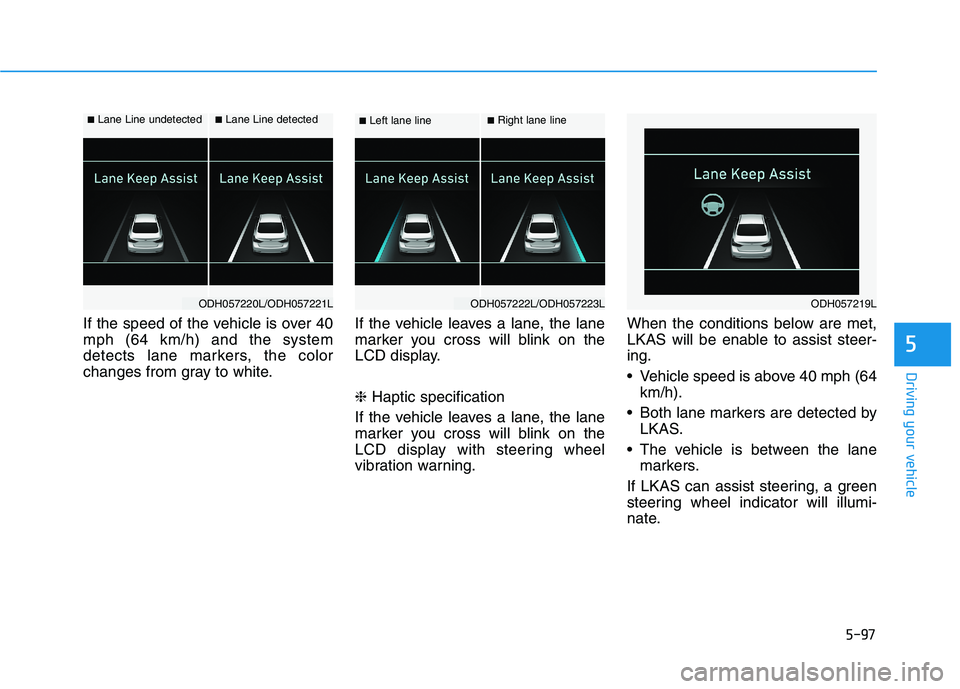
If the speed of the vehicle is over 40
mph (64 km/h) and the system
detects lane markers, the color
changes from gray to white.If the vehicle leaves a lane, the lane
marker you cross will blink on the
LCD display.
❈Haptic specification
If the vehicle leaves a lane, the lane
marker you cross will blink on the
LCD display with steering wheel
vibration warning.When the conditions below are met,
LKAS will be enable to assist steer-
ing.
Vehicle speed is above 40 mph (64
km/h).
Both lane markers are detected by
LKAS.
The vehicle is between the lane
markers.
If LKAS can assist steering, a green
steering wheel indicator will illumi-
nate.
■Left lane line■Right lane line
ODH057222L/ODH057223LODH057219L
■Lane Line undetected■Lane Line detected
ODH057220L/ODH057221L
Page 353 of 516
5-98
Driving your vehicle
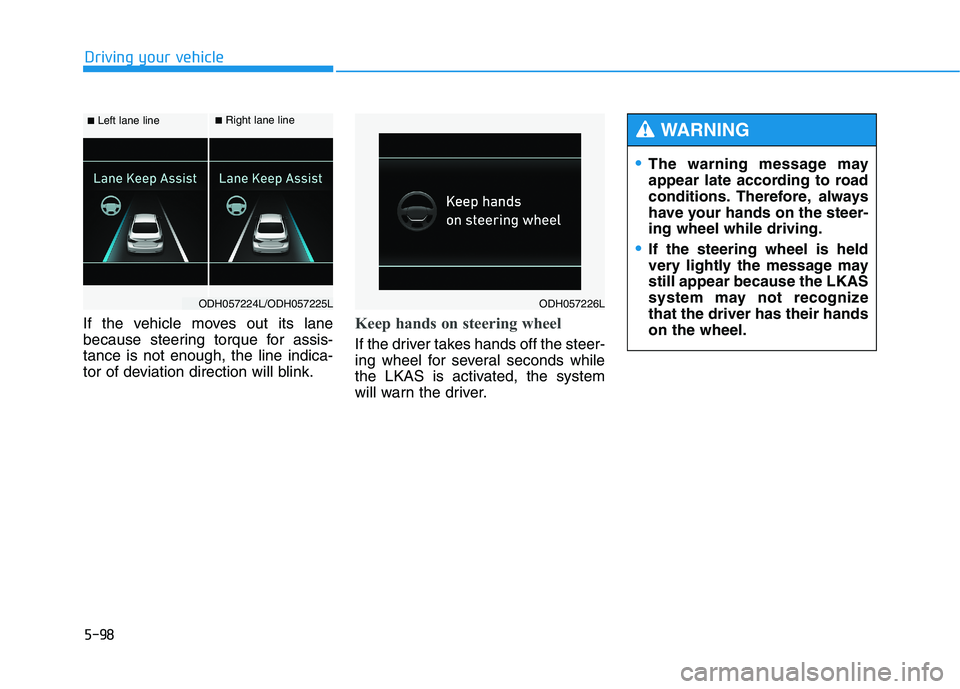
If the vehicle moves out its lane
because steering torque for assis-
tance is not enough, the line indica-
tor of deviation direction will blink.
Keep hands on steering wheel
If the driver takes hands off the steer-
ing wheel for several seconds while
the LKAS is activated, the system
will warn the driver.
■Left lane line■Right lane line
ODH057224L/ODH057225LODH057226L
The warning message may
appear late according to road
conditions. Therefore, always
have your hands on the steer-
ing wheel while driving.
If the steering wheel is held
very lightly the message may
still appear because the LKAS
system may not recognize
that the driver has their hands
on the wheel.
WARNING
Page 354 of 516
5-99
Driving your vehicle
5
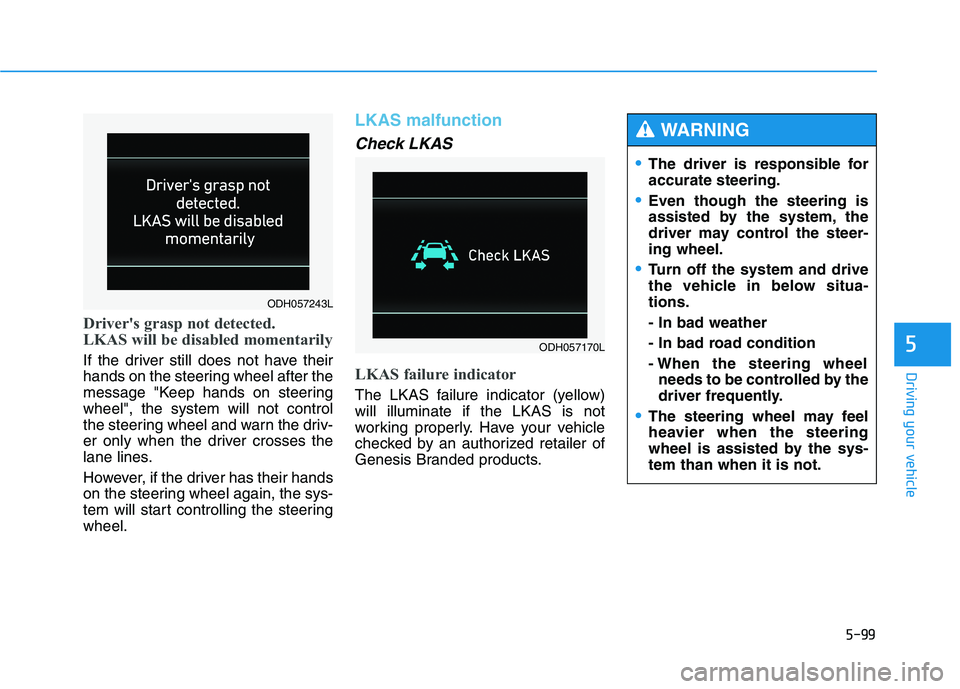
Driver's grasp not detected.
LKAS will be disabled momentarily
If the driver still does not have their
hands on the steering wheel after the
message "Keep hands on steering
wheel", the system will not control
the steering wheel and warn the driv-
er only when the driver crosses the
lane lines.
However, if the driver has their hands
on the steering wheel again, the sys-
tem will start controlling the steering
wheel.
LKAS malfunction
Check LKAS
LKAS failure indicator
The LKAS failure indicator (yellow)
will illuminate if the LKAS is not
working properly. Have your vehicle
checked by an authorized retailer of
Genesis Branded products.
ODH057170L
The driver is responsible for
accurate steering.
Even though the steering is
assisted by the system, the
driver may control the steer-
ing wheel.
Turn off the system and drive
the vehicle in below situa-
tions.
- In bad weather
- In bad road condition
- When the steering wheel
needs to be controlled by the
driver frequently.
The steering wheel may feel
heavier when the steering
wheel is assisted by the sys-
tem than when it is not.
WARNING
ODH057243L
Page 355 of 516
5-100
Driving your vehicle
The system will be cancelled when:
You change lanes with the turn sig-
nal.
- Using the turn signal to change
lanes.
- If you change lanes without the
turn signal on, the steering wheel
might be controlled.
LKAS can transit to steering assist
mode when the car is near to mid-
dle of the lane after system on or
the lane was changed. LKAS can
not assist steering if the vehicle fol-
lows lane marker too close contin-
uously before transition to steering
assist mode.
The control of ESC (Electronic
Stability Control) or VSM (Vehicle
Stability Management) is activated.
The steering will not be assisted
when your drive fast on a sharp
curve.
The steering will not be assisted
when vehicle speed is below 40
mph (64 km/h) and over 110 mph
(177 km/h).
The steering will not be assisted
when you change lanes fast. The steering will not be assisted
when you brake suddenly.
The steering will not be assisted
when the lane is very wide or nar-
row.
The steering will not be assisted
when only one side lane marker is
detected.
There are more than two lane
markers such as a construction
area.
Radius of a curve is too small.
When you turn steering wheel sud-
denly, the LKAS will be disabled
temporarily.
Driving on a steep slope or hill.
Page 356 of 516
5-101
Driving your vehicle
5
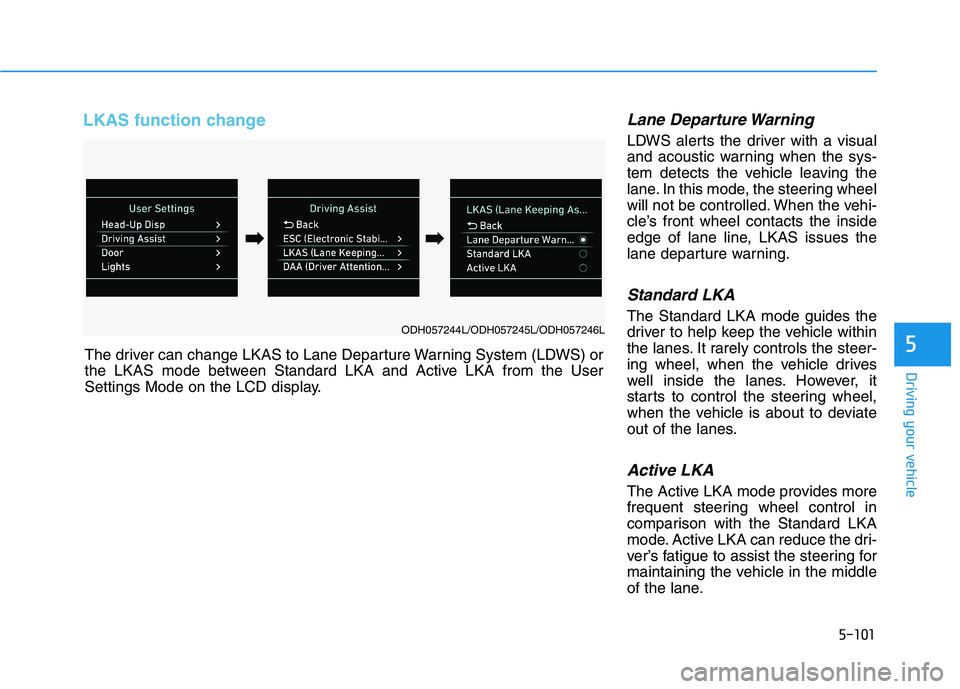
LKAS function change Lane Departure Warning
LDWS alerts the driver with a visual
and acoustic warning when the sys-
tem detects the vehicle leaving the
lane. In this mode, the steering wheel
will not be controlled. When the vehi-
cle’s front wheel contacts the inside
edge of lane line, LKAS issues the
lane departure warning.
Standard LKA
The Standard LKA mode guides the
driver to help keep the vehicle within
the lanes. It rarely controls the steer-
ing wheel, when the vehicle drives
well inside the lanes. However, it
starts to control the steering wheel,
when the vehicle is about to deviate
out of the lanes.
Active LKA
The Active LKA mode provides more
frequent steering wheel control in
comparison with the Standard LKA
mode. Active LKA can reduce the dri-
ver’s fatigue to assist the steering for
maintaining the vehicle in the middle
of the lane. The driver can change LKAS to Lane Departure Warning System (LDWS) or
the LKAS mode between Standard LKA and Active LKA from the User
Settings Mode on the LCD display.
ODH057244L/ODH057245L/ODH057246L
➡ ➡➡
➡
Page 363 of 516
5-108
Driving your vehicle
The Driver Attention Alert sys-
tem may not properly operate
with limited alerting in the fol-
lowing situations:
Not properly recognize lane
(See the LKAS)
Rough or intentionally eva-
sive driving
Large tire pressure deviation,
uneven wear, poor wheel
alignment, etc.
Severe winding road
Uneven road surface condi-
tion
Windy road
The vehicle drives through a
windy area.
(Continued)
(Continued)
The vehicle is controlled by
the following driving assist
systems:
- Lane Keeping Assist System
(LKAS)
- Autonomous Emergency
Braking (AEB) System
- Smart Cruise Control (SCC)
System
CAUTION
Page 364 of 516
5-109
Driving your vehicle
5
Hazardous driving conditions
When hazardous driving conditions
are encountered such as water,
snow, ice, mud or sand:
Drive cautiously and allow extra dis-
tance for braking.
Avoid sudden movements in braking
or steering.
If stuck in snow, mud, or sand, use
second gear. Accelerate slowly to
avoid spinning the drive wheels.
Use sand, rock salt, or other non-slip
material under the drive wheels to
provide traction when stuck in ice,
snow, or mud.
Rocking the vehicle
If it is necessary to rock the vehicle
to free it from snow, sand, or mud,
first turn the steering wheel right and
left to clear the area around your
front wheels. Then, shift back and
forth between R (Reverse) and a for-
ward gear.
Try to avoid spinning the wheels, and
do not race the engine.
To prevent transmission wear, wait
until the wheels stop spinning before
shifting gears. Release the accelera-
tor pedal while shifting, and press
lightly on the accelerator pedal while
the transmission is in gear. Slowly
spinning the wheels in forward and
reverse directions causes a rocking
motion that may free the vehicle.
S SP
PE
EC
CI
IA
AL
L
D
DR
RI
IV
VI
IN
NG
G
C
CO
ON
ND
DI
IT
TI
IO
ON
NS
S
Downshifting with an automatic
transmission while driving on
slippery surfaces can cause an
accident. The sudden change in
tire speed could cause the tires
to skid. Be careful when down-
shifting on slippery surfaces.
WARNING
If the tires spin at high speed the
tires can explode, and you or
others may be injured. Do not
attempt this procedure if people
or objects are anywhere near the
vehicle.
The vehicle can overheat caus-
ing an engine compartment fire
or other damage. Spin the
wheels as little as possible and
avoid spinning the wheels at
speeds over 35 mph (56 km/h) as
indicated on the speedometer.
WARNING
Page 366 of 516
5-111
Driving your vehicle
5
Driving in the rain
Rain and wet roads can make driving
dangerous. Here are a few things to
consider when driving in the rain or
on slick pavement:
Slow down and allow extra follow-
ing distance. A heavy rainfall
makes it harder to see and increas-
es the distance needed to stop
your vehicle.
Turn OFF your Cruise Control. (if
equipped)
Replace your windshield wiper
blades when they show signs of
streaking or missing areas on the
windshield.
Be sure your tires have enough
tread. If your tires do not have
enough tread, making a quick stop
on wet pavement can cause a skid
and possibly lead to an accident.
Refer to "Tire Tread" in chapter 7.
Turn on your headlamps to make it
easier for others to see you.
Driving too fast through large pud-
dles can affect your brakes. If you
must go through puddles, try to
drive through them slowly. If you believe your brakes may be
wet, apply them lightly while driv-
ing until normal braking operation
returns.
Hydroplaning
If the road is wet enough and you are
going fast enough, your vehicle may
have little or no contact with the road
surface and actually ride on the
water. The best advice is SLOW
DOWN when the road is wet. The
risk of hydroplaning increases as the
depth of tire tread decreases.(Refer
to "Tire Tread" in chapter 7.)
Driving in flooded areas
Avoid driving through flooded areas
unless you are sure the water is no
higher than the bottom of the wheel
hub. Drive through any water slowly.
Allow adequate stopping distance
because brake performance may be
reduced.
After driving through water, dry the
brakes by gently applying them sev-
eral times while the vehicle is moving
slowly.
Page 367 of 516
5-112
Driving your vehicle
Snow or icy conditions
You need to keep sufficient distance
between your vehicle and the vehicle
in front of you.
Apply the brakes gently. Speeding,
rapid acceleration, sudden brake
applications, and sharp turns are
potentially very hazardous practices.
During deceleration, use engine
braking to the fullest extent. Sudden
brake applications on snowy or icy
roads may cause skids to occur.
To drive your vehicle in deep snow, it
may be necessary to use snow tires
or to install tire chains on your tires.
Always carry emergency equipment.
Some of the items you may want to
carry include tire chains, tow straps
or chains, a flashlight, emergency
flares, sand, a shovel, jumper cables,
a window scraper, gloves, ground
cloth, coveralls, a blanket, etc.
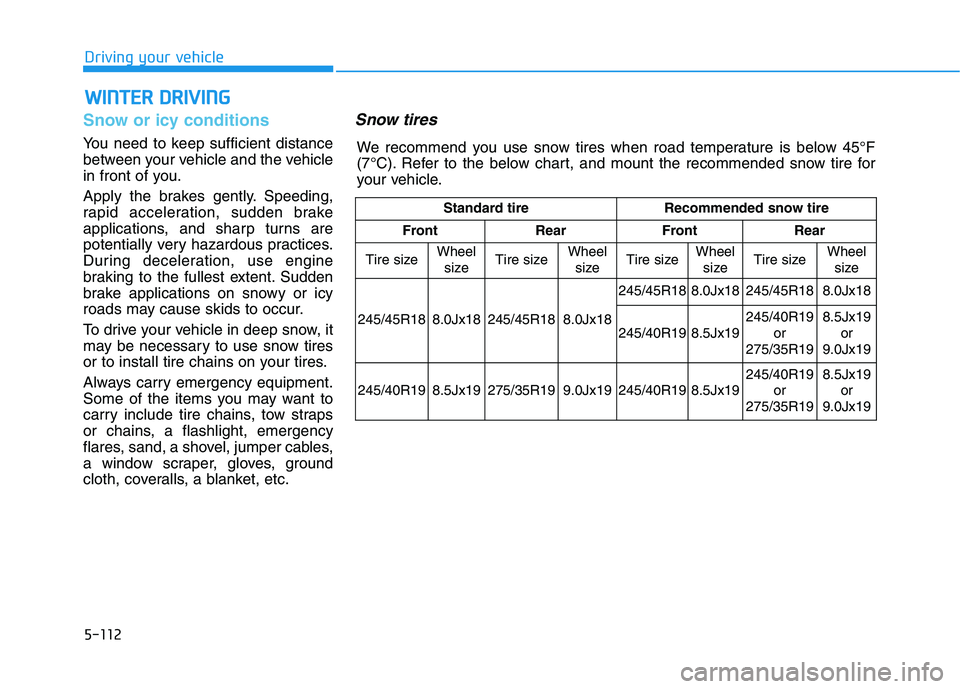
Snow tires
W WI
IN
NT
TE
ER
R
D
DR
RI
IV
VI
IN
NG
G
Standard tire Recommended snow tire
Front Rear Front Rear
Tire sizeWheel
sizeTire sizeWheel
sizeTire size
Wheel
sizeTire sizeWheel
size
245/45R18 8.0Jx18 245/45R18 8.0Jx18 245/45R18
8.0Jx18 245/45R18 8.0Jx18
245/40R19
8.5Jx19245/40R19
or
275/35R198.5Jx19
or
9.0Jx19
245/40R19 8.5Jx19 275/35R19 9.0Jx19 245/40R19
8.5Jx19245/40R19
or
275/35R19 8.5Jx19
or
9.0Jx19
We recommend you use snow tires when road temperature is below 45°F
(7°C). Refer to the below chart, and mount the recommended snow tire for
your vehicle.
Page 368 of 516
5-113
Driving your vehicle
5
If you mount snow tires on your vehi-
cle, make sure to use the same infla-
tion pressure as the original tires.
However, if you mount 245/40R19
size tire on the rear, the tire inflation
pressure should maintain 35psi.
Mount snow tires on all four wheels
to balance your vehicle's handling in
all weather conditions. The traction
provided by snow tires on dry road
may not be as high as your vehicle's
original equipment tires. Check with
the tire dealer for maximum speed
recommendations.
✽ ✽
NOTICE
Do not install studded tires without
first checking local, state and munic-
ipal regulations for possible restric-
tions against their use.
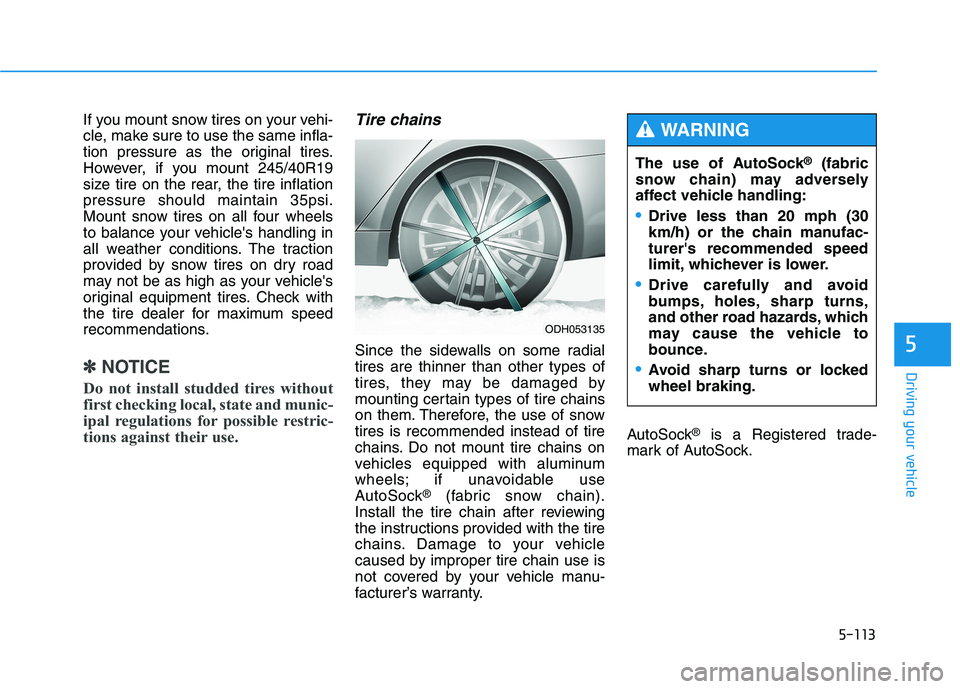
Tire chains
Since the sidewalls on some radial
tires are thinner than other types of
tires, they may be damaged by
mounting certain types of tire chains
on them. Therefore, the use of snow
tires is recommended instead of tire
chains. Do not mount tire chains on
vehicles equipped with aluminum
wheels; if unavoidable use
AutoSock
®(fabric snow chain).
Install the tire chain after reviewing
the instructions provided with the tire
chains. Damage to your vehicle
caused by improper tire chain use is
not covered by your vehicle manu-
facturer’s warranty.AutoSock
®is a Registered trade-
mark of AutoSock.The use of AutoSock
®(fabric
snow chain) may adversely
affect vehicle handling:
Drive less than 20 mph (30
km/h) or the chain manufac-
turer's recommended speed
limit, whichever is lower.
Drive carefully and avoid
bumps, holes, sharp turns,
and other road hazards, which
may cause the vehicle to
bounce.
Avoid sharp turns or locked
wheel braking.
WARNING
ODH053135