set HYUNDAI GENESIS G90 2021 Owners Manual
[x] Cancel search | Manufacturer: HYUNDAI, Model Year: 2021, Model line: GENESIS G90, Model: HYUNDAI GENESIS G90 2021Pages: 538, PDF Size: 13.02 MB
Page 22 of 538
2-2
Safety system of your vehicle
You will find many safety precautions
and recommendations throughout
this section, and throughout this
manual. The safety precautions in
this section are among the most
important.
Always Wear Your Seat Belt
A seat belt is your best protection in
all types of accidents. Air bags are
designed to supplement seat belts,
not replace them. So even though
your vehicle is equipped with air
bags, ALWAYS make sure you and
your passengers wear your seat
belts, and wear them properly.
Restrain All Children
All children under age 13 should ride
in your vehicle properly restrained in
a rear seat, not the front seat. Infants
and small children should be
restrained in an appropriate child
restraint. Larger children should use
a booster seat with the lap/shoulder
belt until they can use the seat belt
properly without a booster seat.
Air Bag Hazards
While air bags can save lives, they
can also cause serious or fatal
injuries to occupants who sit too
close to them, or who are not proper-
ly restrained. Infants, young children,
and shorter adults are at the greatest
risk of being injured by an inflating air
bag. Follow all instructions and warn-
ings in this manual.
Driver Distraction
Driver distraction presents a serious
and potentially deadly danger, espe-
cially for inexperienced drivers.
Safety should be the first concern
when behind the wheel and drivers
need to be aware of the wide array of
potential distractions, such as
drowsiness, reaching for objects,
eating, personal grooming, other
passengers, and using cellular
phones.
Drivers can become distracted when
they take their eyes and attention off
the road or their hands off the wheel
to focus on activities other than driv-
ing. To reduce your risk of distraction
or getting into an accident:
• ALWAYS set up your mobile
devices (i.e., MP3 players, phones,
navigation units, etc.) when your
vehicle is parked or safely stopped.
• ONLY use your mobile device
when allowed by laws and when
conditions permit safe use. NEVER
text or email while driving. Most
states have laws prohibiting drivers
from texting. Some states and
cities also prohibit drivers from
using handheld phones.
• NEVER let the use of a mobile
device distract you from driving.
You have a responsibility to your
passengers and others on the road
to always drive safely, with your
hands on the wheel as well as your
eyes and attention on the road.
IMPORTANT SAFETY PRECAUTIONS
Page 37 of 538
2-17
02
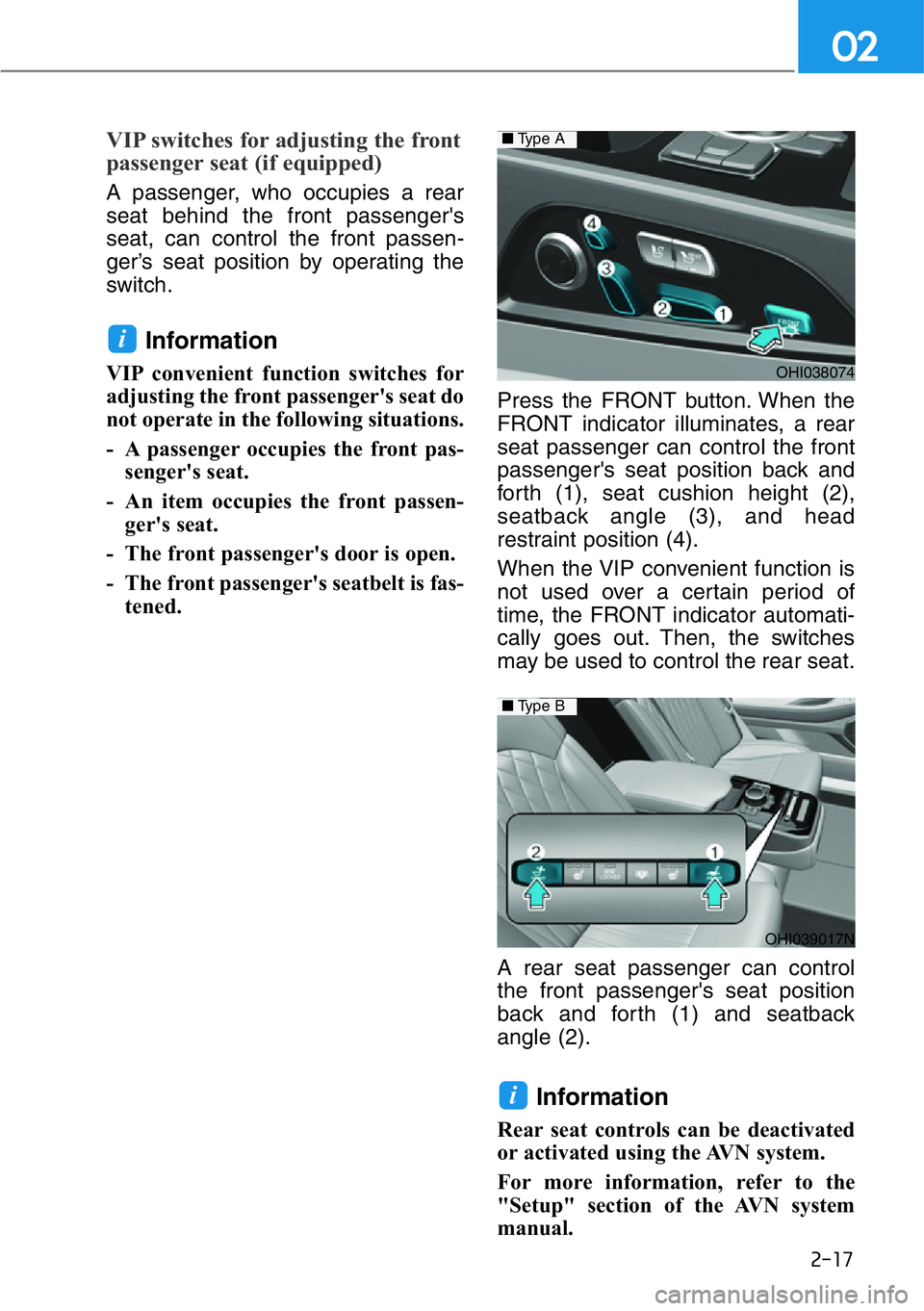
VIP switches for adjusting the front
passenger seat (if equipped)
A passenger, who occupies a rear
seat behind the front passenger's
seat, can control the front passen-
ger’s seat position by operating the
switch.
Information
VIP convenient function switches for
adjusting the front passenger's seat do
not operate in the following situations.
- A passenger occupies the front pas-
senger's seat.
- An item occupies the front passen-
ger's seat.
- The front passenger's door is open.
- The front passenger's seatbelt is fas-
tened. Press the FRONT button. When the
FRONT indicator illuminates, a rear
seat passenger can control the front
passenger's seat position back and
forth (1), seat cushion height (2),
seatback angle (3), and head
restraint position (4).
When the VIP convenient function is
not used over a certain period of
time, the FRONT indicator automati-
cally goes out. Then, the switches
may be used to control the rear seat.
A rear seat passenger can control
the front passenger's seat position
back and forth (1) and seatback
angle (2).
Information
Rear seat controls can be deactivated
or activated using the AVN system.
For more information, refer to the
"Setup" section of the AVN system
manual.
i
i
OHI038074
OHI039017N
■Type B
■Type A
Page 40 of 538
2-20
Safety system of your vehicle
Rear switches operating limita-
tion
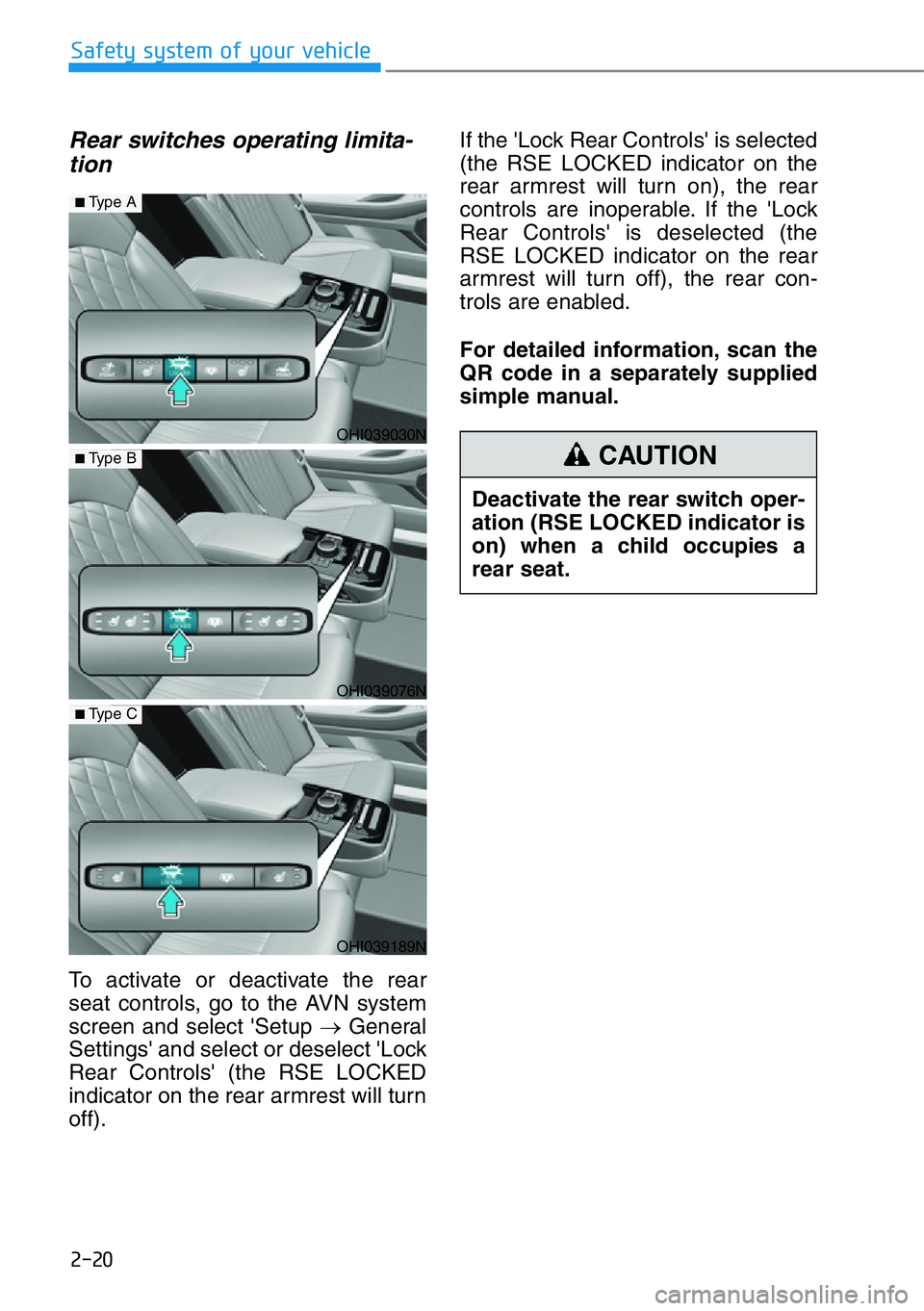
To activate or deactivate the rear
seat controls, go to the AVN system
screen and select 'Setup →General
Settings' and select or deselect 'Lock
Rear Controls' (the RSE LOCKED
indicator on the rear armrest will turn
off).If the 'Lock Rear Controls' is selected
(the RSE LOCKED indicator on the
rear armrest will turn on), the rear
controls are inoperable. If the 'Lock
Rear Controls' is deselected (the
RSE LOCKED indicator on the rear
armrest will turn off), the rear con-
trols are enabled.
For detailed information, scan the
QR code in a separately supplied
simple manual.
Deactivate the rear switch oper-
ation (RSE LOCKED indicator is
on) when a child occupies a
rear seat.
CAUTION
OHI039030N
OHI039076N
OHI039189N
■Type A
■Type B
■Type C
Page 49 of 538
2-29
02
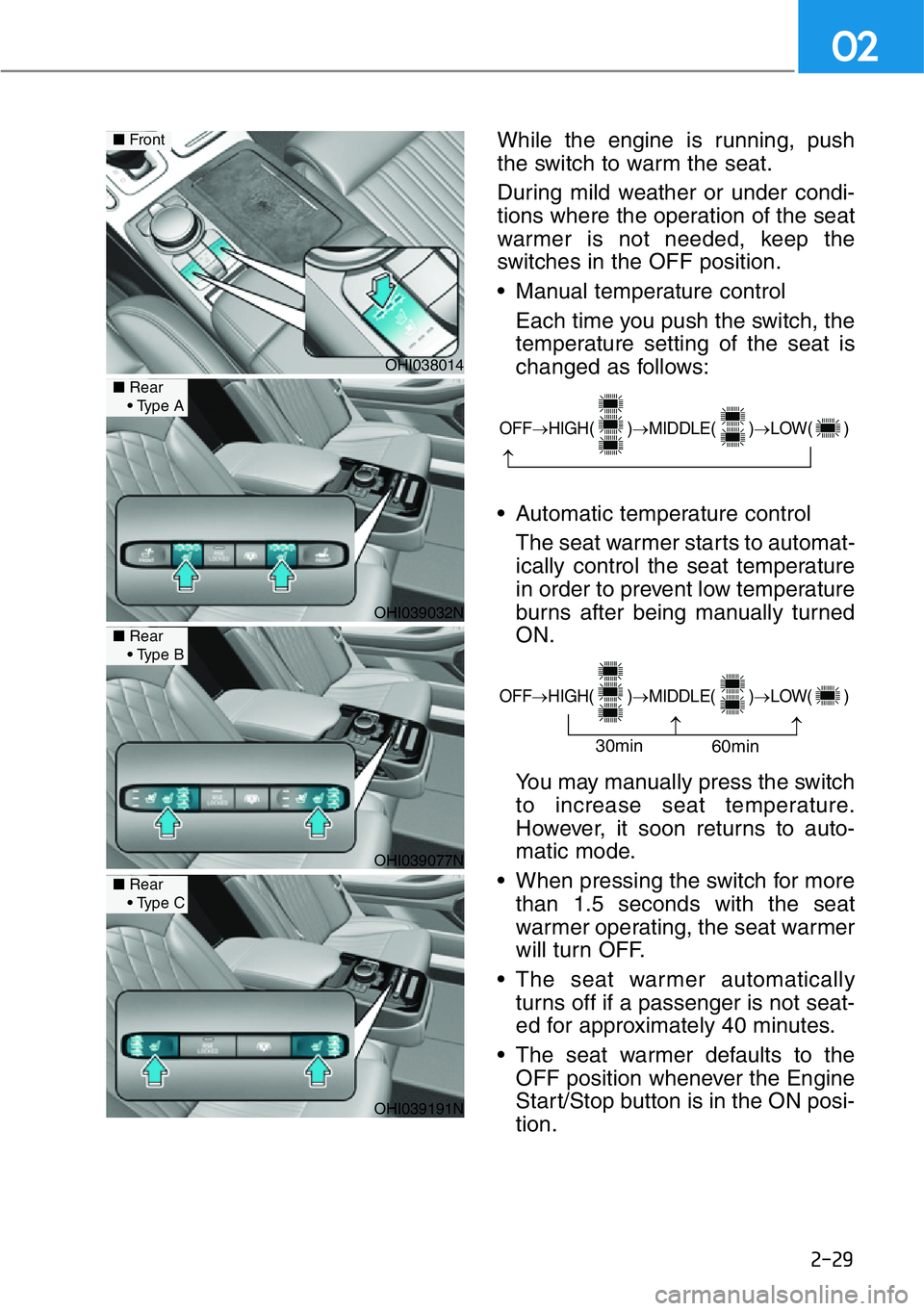
While the engine is running, push
the switch to warm the seat.
During mild weather or under condi-
tions where the operation of the seat
warmer is not needed, keep the
switches in the OFF position.
• Manual temperature control
Each time you push the switch, the
temperature setting of the seat is
changed as follows:
• Automatic temperature control
The seat warmer starts to automat-
ically control the seat temperature
in order to prevent low temperature
burns after being manually turned
ON.
You may manually press the switch
to increase seat temperature.
However, it soon returns to auto-
matic mode.
• When pressing the switch for more
than 1.5 seconds with the seat
warmer operating, the seat warmer
will turn OFF.
• The seat warmer automatically
turns off if a passenger is not seat-
ed for approximately 40 minutes.
• The seat warmer defaults to the
OFF position whenever the Engine
Start/Stop button is in the ON posi-
tion.
OHI038014
■Front
OHI039032N
■Rear
•Type A
OHI039077N
■Rear
•Type B
OHI039191N
■Rear
•Type C
OFF→HIGH( )→MIDDLE( )→LOW( )
→
OFF→HIGH( )→MIDDLE( )→LOW( )
→
→30min
60min
Page 102 of 538
3
3. Convenient Features of
Your Vehicle
Accessing Your Vehicle ................3-3
Smart Key ..........................................3-3
Immobilizer System ........................3-8
Door Locks ....................................3-9
Operating Door Locks from Outside
the Vehicle ......................................3-9
Operating Door Locks from Inside
the Vehicle ......................................3-11
Auto Door Lock and Unlock
Features ..........................................3-13
Child-Protector Rear Door locks....3-13
Safe Exit Assist (SEA) System ........3-14
Theft-Alarm System ....................3-15
Seat Position Memory System ....3-16
Storing Positions into Memory ......3-16
Recalling Positions from Memory..3-17
Resetting the Seat Position Memory
System ............................................3-17
Easy Access Function ....................3-18
Smart Posture Care System ........3-19
Steering wheel ............................3-20
Motor-Driven Power
Steering (MDPS) ............................3-20
Tilt Steering / Telescopic Steering 3-21
Heated Steering Wheel ..................3-21
Horn ................................................3-22
Mirrors ..........................................3-23
Inside Rearview Mirror ..................3-23
Side View Mirrors ..........................3-30
Reverse Parking Aid Function........3-32
Windows ......................................3-33Sunroof ........................................3-37
Sunroof Opening and Closing ......3-38
Tilting the Sunroof ........................3-39
Sunshade ........................................3-39
Resetting the Sunroof ..................3-40
Sunroof Open Warning ..................3-40
Exterior Features ........................3-41
Hood ................................................3-41
Trunk................................................3-42
Smart Trunk ....................................3-48
Fuel Filler Door ................................3-51
Instrument Cluster ......................3-54
Instrument Cluster Control............3-55
Gauges and Meters ........................3-55
Transmission Shift Indicator..........3-59
Warning and Indicator Lights ......3-60
LCD Display Messages ....................3-71
LCD Display..................................3-78
LCD Display Control ......................3-78
LCD Display Modes ........................3-79
Trip Computer ............................3-82
Trip Modes ......................................3-82
Vehicle Settngs ..........................3-85
Head-Up Display ........................3-86
Lighting ......................................3-88
Exterior Lights ................................3-88
Interior Lights ................................3-96
Welcome System ........................3-99
Wipers and Washers ..................3-101
Windshield Wipers ......................3-101
Windshield Washers ....................3-102
Surround View Monitor ............3-104
3
Page 103 of 538
Forward/Reverse Parking Distance
Warning (PDW) ........................3-106
Forward/Reverse Parking Distance
Warning system ..........................3-107
Non-operational Conditions of
Forward/Reverse Parking Distance
Warning system ........................3-109
Parking Distance Warning
(Reverse/Forward ) System
Precautions ..................................3-110
Automatic Climate Control
System..........................................3-111
Automatic Heating and Air
Conditioning ................................3-112
Manual Heating and Air
Conditioning ................................3-113
System Operation ........................3-123
System Maintenance ....................3-124
Defroster ....................................3-126
Rear Window Defroster ................3-126
Front Wiper Deicer........................3-126
Windshield Defrosting and
Defogging ..................................3-127
Auto Defogging System ..............3-129
Climate Control Additional
Features ......................................3-129
Clean Air ......................................3-130
Automatic Ventilation ..................3-130
Sunroof Inside Air Recirculation ..3-131
Setting the Climate Control
System in the AVN System
Screen ..........................................3-131
Storage Compartment ..............3-133
Center Console Storage ..............3-133
Rear Console Storage ..................3-133
Glove Box ......................................3-134
Sunglass Holder ............................3-134
Interior Features ........................3-135
Cup Holder ....................................3-135
Sunvisor ........................................3-136
Rear Mirror ..................................3-136
Power Outlet ..................................3-137
USB Charger ..................................3-138
Wireless Cellular Phone Charging
System ..........................................3-139
Coat hook ......................................3-141
Clock ..............................................3-141
Bag Hanger....................................3-142
Floor Mat Anchor(s) ......................3-142
Rear Window Sunshade ..............3-143
Rear Side Window Sunshade ......3-144
Luggage Net Holder ....................3-145
3
3. Convenient Features of
Your Vehicle
Page 105 of 538
3-4
Convenient features of your vehicle
Unlocking your vehicle
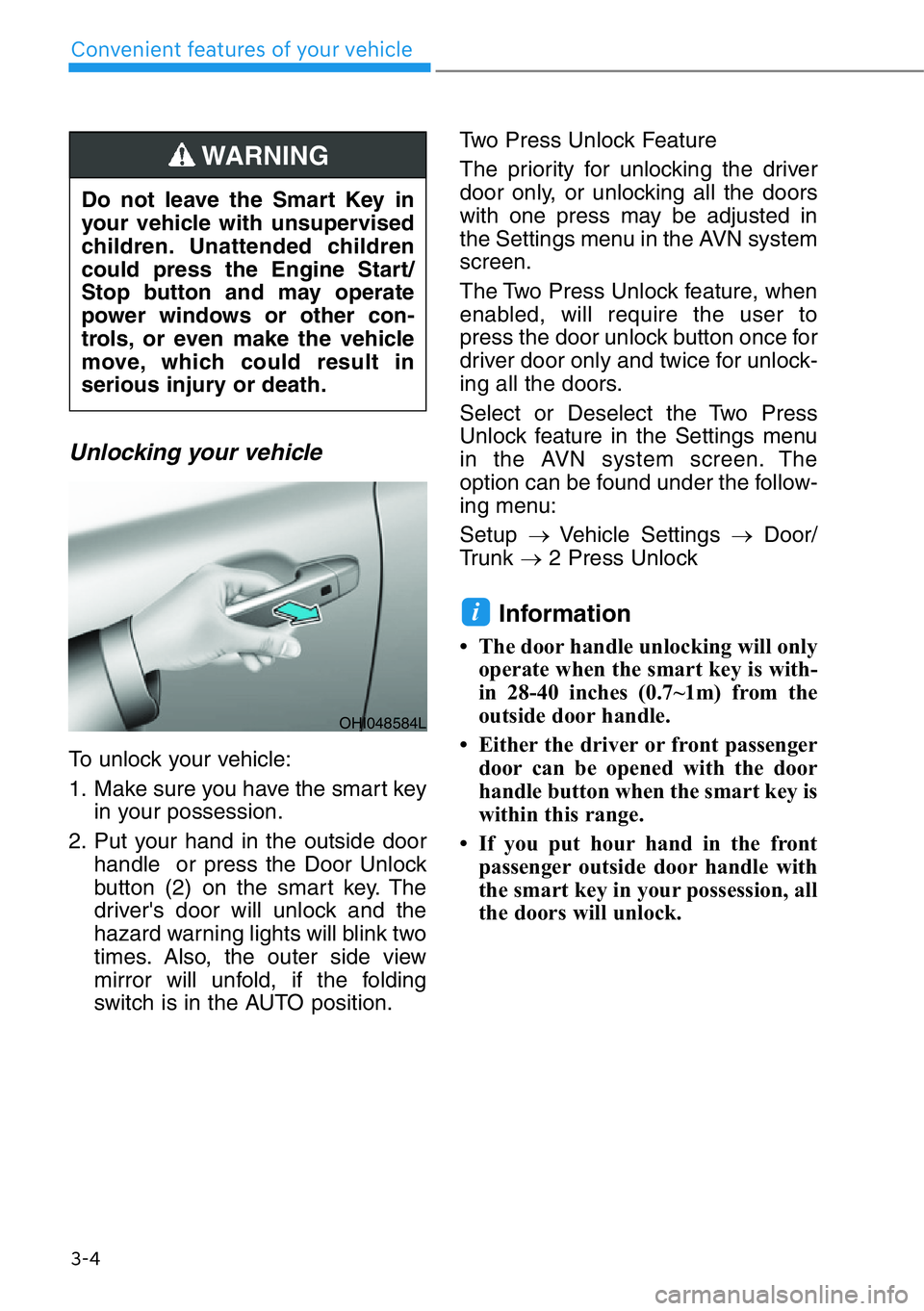
To unlock your vehicle:
1. Make sure you have the smart key
in your possession.
2. Put your hand in the outside door
handle or press the Door Unlock
button (2) on the smart key. The
driver's door will unlock and the
hazard warning lights will blink two
times. Also, the outer side view
mirror will unfold, if the folding
switch is in the AUTO position.Two Press Unlock Feature
The priority for unlocking the driver
door only, or unlocking all the doors
with one press may be adjusted in
the Settings menu in the AVN system
screen.
The Two Press Unlock feature, when
enabled, will require the user to
press the door unlock button once for
driver door only and twice for unlock-
ing all the doors.
Select or Deselect the Two Press
Unlock feature in the Settings menu
in the AVN system screen. The
option can be found under the follow-
ing menu:
Setup →Vehicle Settings →Door/
Trunk →2 Press Unlock
Information
• The door handle unlocking will only
operate when the smart key is with-
in 28-40 inches (0.7~1m) from the
outside door handle.
• Either the driver or front passenger
door can be opened with the door
handle button when the smart key is
within this range.
• If you put hour hand in the front
passenger outside door handle with
the smart key in your possession, all
the doors will unlock.
i
Do not leave the Smart Key in
your vehicle with unsupervised
children. Unattended children
could press the Engine Start/
Stop button and may operate
power windows or other con-
trols, or even make the vehicle
move, which could result in
serious injury or death.
WARNING
OHI048584L
Page 111 of 538
![HYUNDAI GENESIS G90 2021 Owners Manual Smart key
[A] : Unlock, [B] : Lock
To lock:
Press the button on the outside door
handle while carrying the Smart Key
with you or press the Door Lock but-
ton on the Smart Key.
To unlock:
• Put you](/img/35/56119/w960_56119-110.png "HYUNDAI GENESIS G90 2021 Owners Manual Smart key
[A] : Unlock, [B] : Lock
To lock:
Press the button on the outside door
handle while carrying the Smart Key
with you or press the Door Lock but-
ton on the Smart Key.
To unlock:
• Put you")
Smart key
[A] : Unlock, [B] : Lock
To lock:
Press the button on the outside door
handle while carrying the Smart Key
with you or press the Door Lock but-
ton on the Smart Key.
To unlock:
• Put your hand in the driver's out-
side door handle while carrying the
Smart Key with you, the driver's
door will unlock.
Put your hand in the outside door
handle again within 4 seconds,
then all doors will unlock.
• Put your hand in the passenger’s
outside door handle, all doors will
unlock.
• Press the Door Unlock button on
the Smart Key, the driver's door will
unlock.
Press the Door Unlock button on
the Smart Key again within 4 sec-
onds, then all doors will unlock.
• Once the doors are unlocked, they
may be opened by pulling the door
handle.
When closing the door, push the
door by hand. Make sure that doors
are closed securely.
Information
You can change the system to the cen-
tral door unlock mode in the Settings
menu in the AVN system screen to
unlock all the doors when you press
the unlock button one time.
Information
• In cold and wet climates, door lock
and door mechanisms may not work
properly due to freezing conditions.
• If the door is locked/unlocked multi-
ple times in rapid succession with
either the vehicle key or door lock
switch, the system may stop operat-
ing temporarily in order to protect
the circuit and prevent damage to
system components.
Power door latch
If a door isn't closed completely but
is closed to the first detent position,
the door will close automatically.
i
i
3-10
Convenient features of your vehicle
OHI048585L
OHI048011
Page 114 of 538
3-13
03
Auto Door Lock and Unlock
Features
Your vehicle is equipped with features
that will automatically lock or unlock
your vehicle based on settings you
select in the AVN system screen.
Auto LOCK - Enable on Speed
When this feature is set in the AVN
system screen, all the doors will be
locked automatically when the vehi-
cle exceeds 9 mph (15 km/h).
Auto LOCK - Enable on Shift
When this feature is set in the AVN
system screen, all the doors will be
locked automatically when the vehi-
cle is shifted out of P (Park) while the
engine is running. (Only when the
engine is running.)
Auto UNLOCK - On Shift to P
When this feature is set in the AVN
system screen, all the doors will be
unlocked automatically when the
vehicle is shifted back into P (Park).
(Only when the engine is running.)
Auto UNLOCK - Vehicle Off
When this feature is set in the AVN
system screen, all the doors will be
unlocked automatically when the
vehicle is turned off.
For more information on these fea-
tures, scan the QR code in a sepa-
rately supplied simple manual.
Additional Unlock Safety
Feature - Air Bag Deployment
As an additional safety feature, all
doors will be automatically unlocked
when an impact causes the air bags
to deploy.
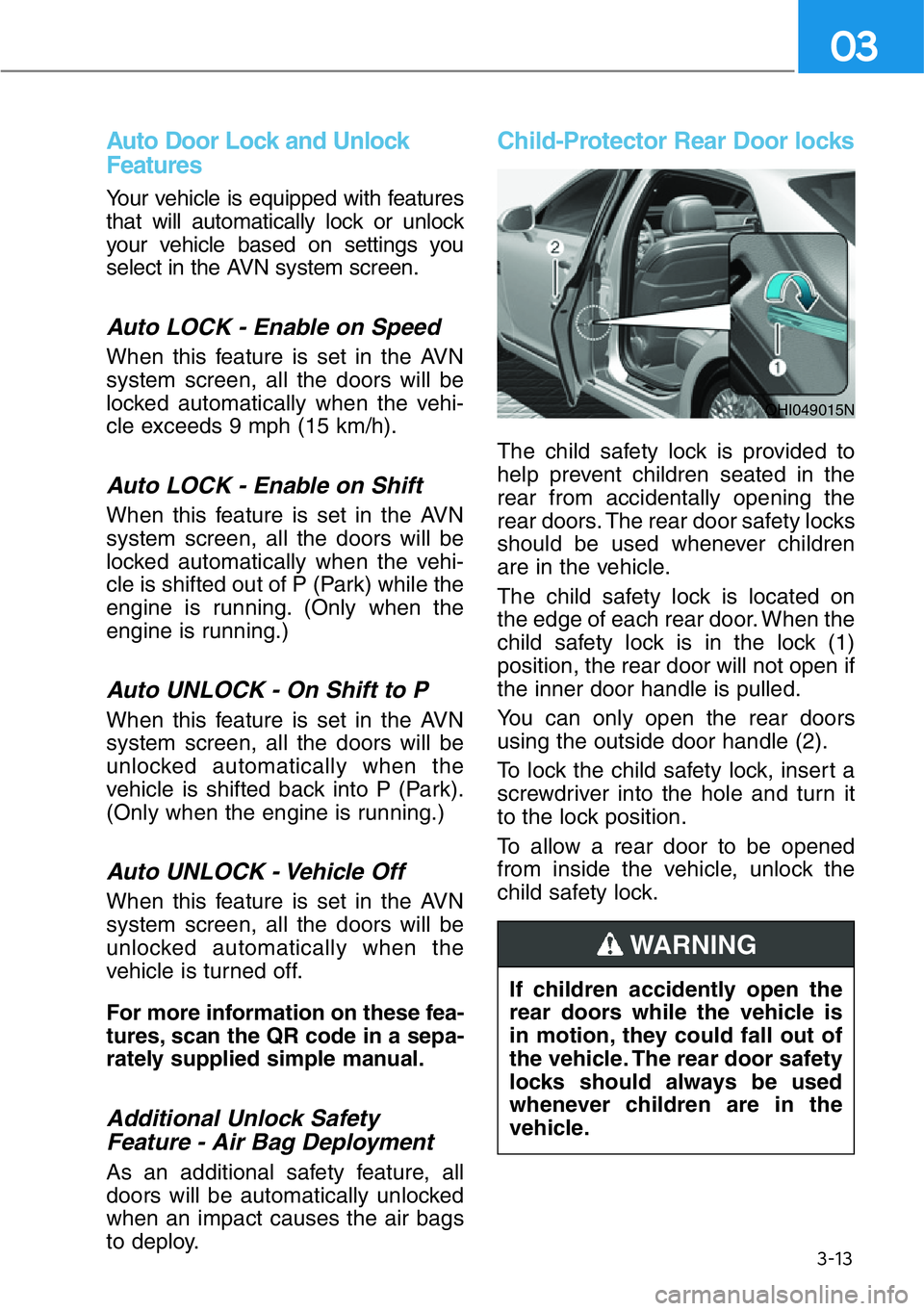
Child-Protector Rear Door locks
The child safety lock is provided to
help prevent children seated in the
rear from accidentally opening the
rear doors. The rear door safety locks
should be used whenever children
are in the vehicle.
The child safety lock is located on
the edge of each rear door. When the
child safety lock is in the lock (1)
position, the rear door will not open if
the inner door handle is pulled.
You can only open the rear doors
using the outside door handle (2).
To lock the child safety lock, insert a
screwdriver into the hole and turn it
to the lock position.
To allow a rear door to be opened
from inside the vehicle, unlock the
child safety lock.
OHI049015N
If children accidently open the
rear doors while the vehicle is
in motion, they could fall out of
the vehicle. The rear door safety
locks should always be used
whenever children are in the
vehicle.
WARNING
Page 115 of 538
3-14
Convenient features of your vehicle
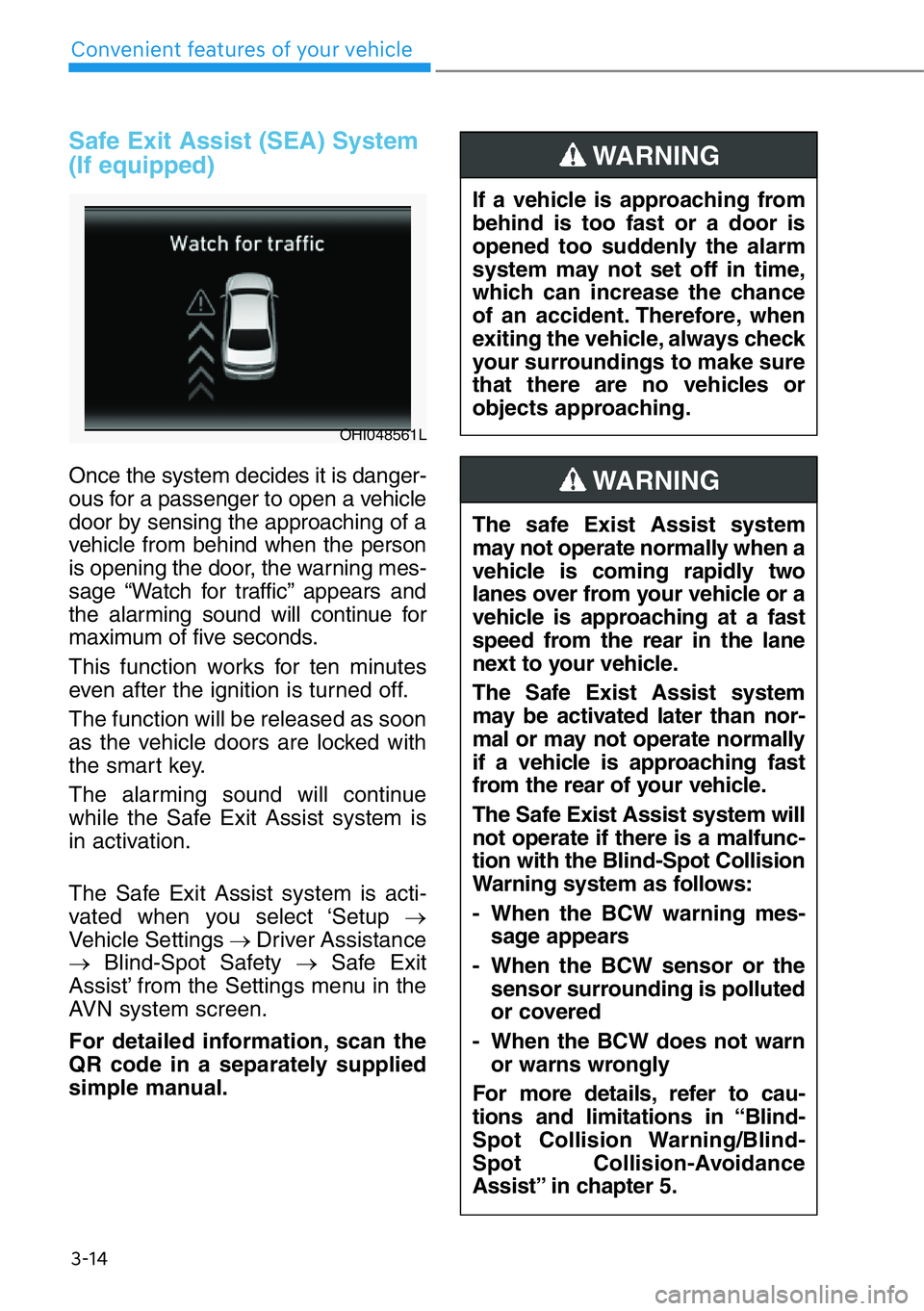
Safe Exit Assist (SEA) System
(If equipped)
Once the system decides it is danger-
ous for a passenger to open a vehicle
door by sensing the approaching of a
vehicle from behind when the person
is opening the door, the warning mes-
sage “Watch for traffic” appears and
the alarming sound will continue for
maximum of five seconds.
This function works for ten minutes
even after the ignition is turned off.
The function will be released as soon
as the vehicle doors are locked with
the smart key.
The alarming sound will continue
while the Safe Exit Assist system is
in activation.
The Safe Exit Assist system is acti-
vated when you select ‘Setup →
Vehicle Settings →Driver Assistance
→Blind-Spot Safety →Safe Exit
Assist’ from the Settings menu in the
AVN system screen.
For detailed information, scan the
QR code in a separately supplied
simple manual.
OHI048561L
If a vehicle is approaching from
behind is too fast or a door is
opened too suddenly the alarm
system may not set off in time,
which can increase the chance
of an accident. Therefore, when
exiting the vehicle, always check
your surroundings to make sure
that there are no vehicles or
objects approaching.
WARNING
The safe Exist Assist system
may not operate normally when a
vehicle is coming rapidly two
lanes over from your vehicle or a
vehicle is approaching at a fast
speed from the rear in the lane
next to your vehicle.
The Safe Exist Assist system
may be activated later than nor-
mal or may not operate normally
if a vehicle is approaching fast
from the rear of your vehicle.
The Safe Exist Assist system will
not operate if there is a malfunc-
tion with the Blind-Spot Collision
Warning system as follows:
- When the BCW warning mes-
sage appears
- When the BCW sensor or the
sensor surrounding is polluted
or covered
- When the BCW does not warn
or warns wrongly
For more details, refer to cau-
tions and limitations in “Blind-
Spot Collision Warning/Blind-
Spot Collision-Avoidance
Assist” in chapter 5.
WARNING