heating HYUNDAI GENESIS GV70 2021 User Guide
[x] Cancel search | Manufacturer: HYUNDAI, Model Year: 2021, Model line: GENESIS GV70, Model: HYUNDAI GENESIS GV70 2021Pages: 647, PDF Size: 49.91 MB
Page 252 of 647
Convenience Features
5-118
WINDSHIELD DEFROSTING AND DEFOGGING
WARNING
Windshield heating
Do not use the
position during
cooling operation in extremely humid
weather. The difference between the
temperature of the outside air and that
of the windshield could cause the outer
surface of the windshield to fog up,
causing loss of visibility could cause
an accident resulting in serious injury
or death. In this case, set the mode
selection to the
position and fan
speed control to a lower speed.
• For maximum defrost performance,
set the temperature control to the
highest temperature setting and
the fan speed control to the highest
setting.
• If warm air to the floor is desired while
defrosting or defogging, set the mode
to the floor-defrost position.
• Before driving, clear all snow and ice
from the windshield, rear window,
side view mirrors, and all side
windows.
• Clear all snow and ice from the
hood and air inlet in the cowl grill
to improve heater and defroster
efficiency and to reduce the
probability of fogging up the inside of
the windshield.
NOTICE
If the engine temperature is still cold
after starting, then a brief engine warm
up period may be required for the
vented air flow to become warm or hot.
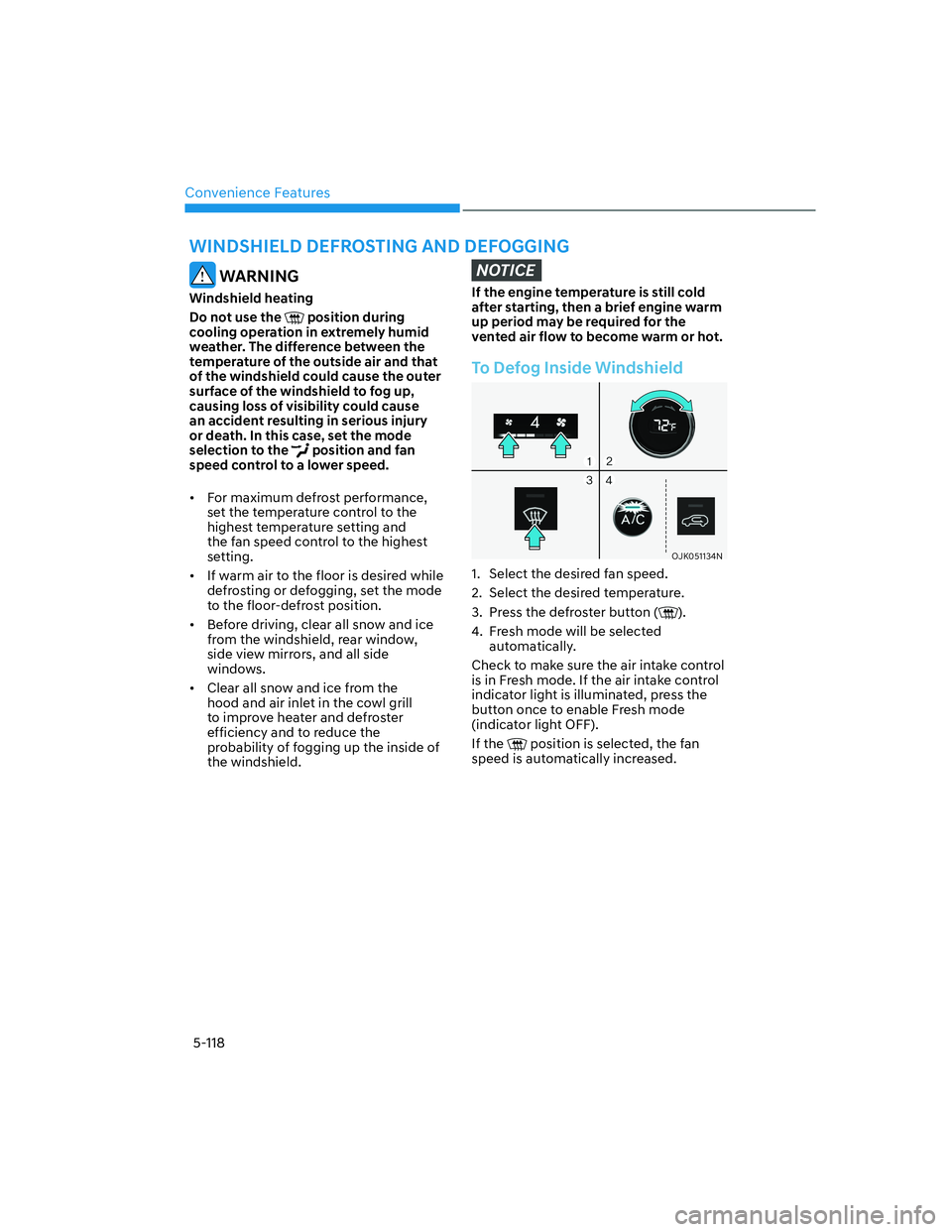
To Defog Inside Windshield
OJK051134NOJK051134N
1. Select the desired fan speed.
2. Select the desired temperature.
3. Press the defroster button (
).
4. Fresh mode will be selected
automatically.
Check to make sure the air intake control
is in Fresh mode. If the air intake control
indicator light is illuminated, press the
button once to enable Fresh mode
(indicator light OFF).
If the
position is selected, the fan
speed is automatically increased.
Page 293 of 647
06
6-19
Good Driving Practices
• Never shift the gear from P (Park) or
N (Neutral) to any other position with
the accelerator pedal depressed.
• Never shift the gear into P (Park) when
the vehicle is in motion.
Be sure the vehicle is completely
stopped before you attempt to shift
into R (Reverse) or D (Drive).
• Do not shift the gear to N (Neutral)
when driving. If the gear is shifted to
N (Neutral) while driving, the vehicle
loses the ability to provide engine
braking. Doing so may increase the
risk of an accident.
Also, shifting the gear back to
D (Drive) while the vehicle is
moving may severely damage the
transmission.
• When driving uphill or downhill,
always shift to D (Drive) for driving
forward or shift to R (Reverse) for
driving rearwards. After selecting
D (Drive) or R (Reverse), check the
gear position indicated on the cluster
before driving. If the vehicle moves in
the opposite direction of the selected
gear, the engine may turn off and
affect braking performance that may
lead to a serious accident.
• Do not drive with your foot resting
on the brake pedal. Even light, but
consistent pedal pressure can result
in the brakes overheating, brake wear
and possibly even brake failure.
• Always apply the parking brake when
leaving the vehicle. Do not depend on
placing the transmission in P (Park) to
keep the vehicle from moving.
• Exercise extreme caution when
driving on a slippery surface. Be
especially careful when braking,
accelerating or shifting gears. On a
slippery surface, an abrupt change
in vehicle speed can cause the drive
wheels to lose traction and may cause
loss of vehicle control resulting in an
accident.
• Optimum vehicle performance and
economy is obtained by smoothly
depressing and releasing the
accelerator.
WARNING
To reduce the risk of SERIOUS INJURY
or DEATH:
• ALWAYS wear your seat belt. In a
collision, an unbelted occupant
is significantly more likely to be
seriously injured or killed than a
properly belted occupant.
• Avoid high speeds when cornering or
turning.
• Do not make quick steering wheel
movements, such as sharp lane
changes or fast, sharp turns.
• The risk of rollover is greatly
increased if you lose control of your
vehicle at highway speeds.
• Loss of control often occurs if two or
more wheels drop off the roadway
and the driver over steers to reenter
the roadway.
• In the event your vehicle leaves
the roadway, do not steer sharply.
Instead, slow down before pulling
back into the travel lanes.
• Genesis Branded Vehicle
recommends you to follow all posted
speed limits.
NOTICE
Kickdown mechanism
Use the kickdown mechanism for
maximum acceleration. Depress the
accelerator pedal beyond the pressure
point. The automatic transmission will
shift to a lower gear depending on the
engine speed.
Page 311 of 647
06
6-37
Good Braking Practices
WARNING
Whenever leaving the vehicle or
parking, always come to a complete
stop and continue to depress the brake
pedal. Shift the gear to the P (Park)
position, then apply the parking brake,
and press the Engine Start/Stop button
to the OFF position.
Vehicles parked with the parking brake
not applied or not fully engaged may
roll inadvertently and may cause injury
to the driver and others. ALWAYS apply
the parking brake before exiting the
vehicle.Wet brakes can be dangerous! The
brakes may get wet if the vehicle is
driven through standing water or if it
is washed. Your vehicle will not stop as
quickly if the brakes are wet. Wet brakes
may cause the vehicle to pull to one side.
To dry the brakes, apply the brakes
lightly until the braking action returns to
normal. If the braking action does not
return to normal, stop as soon as it is safe
to do so and call an authorized retailer of
Genesis Branded products for assistance.
DO NOT drive with your foot resting on
the brake pedal. Even light, but constant
pedal pressure can result in the brakes
overheating, brake wear, and possibly
even brake failure.
If a tire goes flat while you are driving,
apply the brakes gently and keep the
vehicle pointed straight ahead while you
slow down. When you are moving slowly
enough for it to be safe to do so, pull off
the road and stop in a safe location.
Keep your foot firmly on the brake pedal
when the vehicle is stopped to prevent
the vehicle from rolling forward.
Page 324 of 647
Driving Your Vehicle
6-50
Forced to Restart Engine
The engine is automatically restarted in
the following situations.
• The brake vacuum pressure is low
• The engine has stopped for about 5
minutes
• The air conditioning is ON with the fan
speed set to a certain high level
• The front defroster is ON
• The battery is weak
• The cooling and heating performance
of the climate control system is
unsatisfactory
• The vehicle is shifted to P (Park) or R
(Reverse)
• The door is opened or the seatbelt is
unfastened
• The EPB switch is pressed when Auto
Hold is activated
The Auto Stop (
) indicator blinks in
green for 5 seconds on the instrument
cluster when the engine is restarted.
WARNING
When the engine is in Idle Stop mode,
the engine may restart without the
driver taking any action. Before leaving
the vehicle or working on the engine
compartment, turn off the engine by
pressing the ENGINE START/STOP
button to the OFF position.
ISG Malfunction
ISG system may not operate when there
is a malfunction with the ISG sensors or
ISG system.
The following will occur, when there is a
malfunction with the ISG system:
• The Auto Stop (
) indicator will
illuminate in yellow on the instrument
cluster.
• The light on the ISG OFF button will
illuminate.
Contact an authorized retailer of Genesis
Branded products.
NOTICE
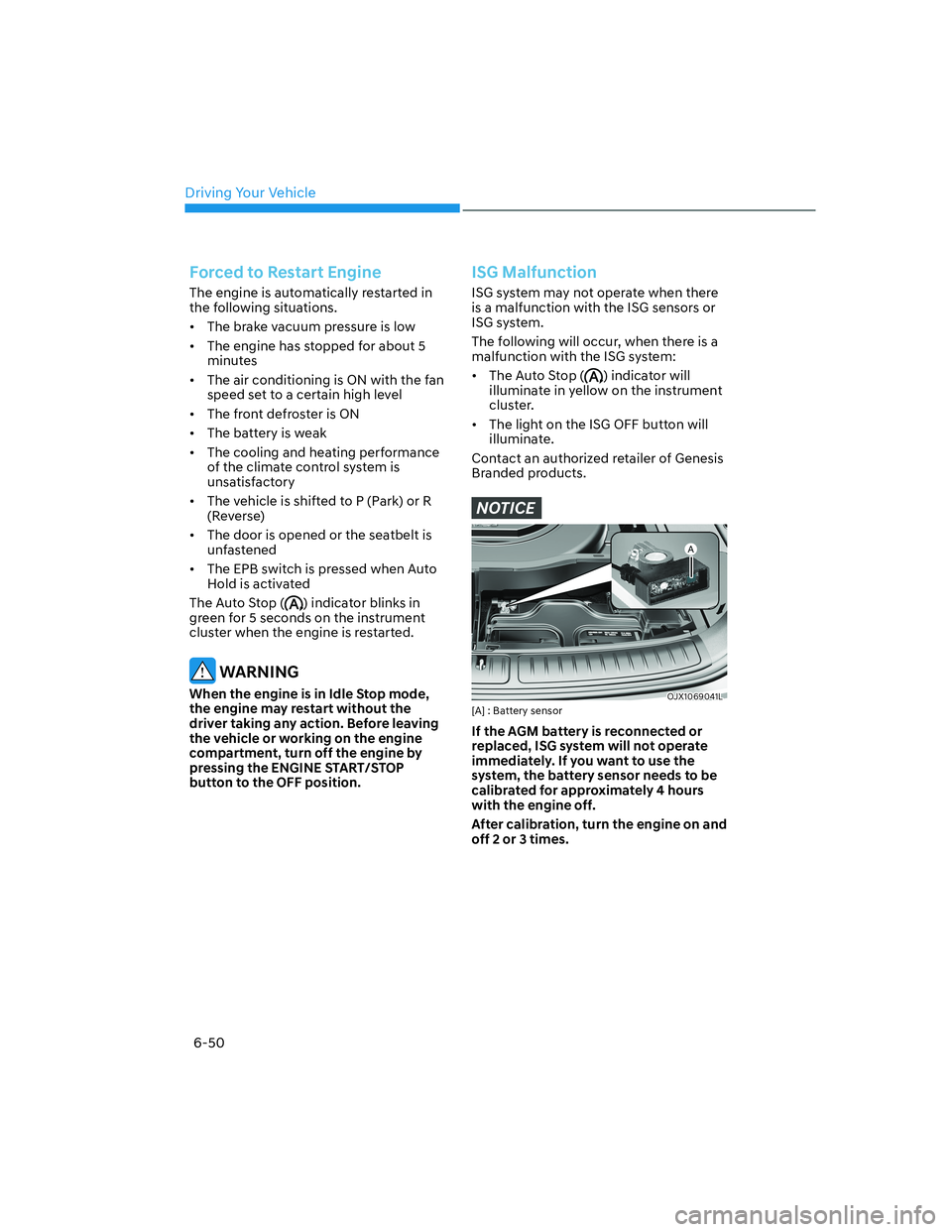
OJX1069041LOJX1069041L[A] : Battery sensor
If the AGM battery is reconnected or
replaced, ISG system will not operate
immediately. If you want to use the
system, the battery sensor needs to be
calibrated for approximately 4 hours
with the engine off.
After calibration, turn the engine on and
off 2 or 3 times.
Page 330 of 647
Driving Your Vehicle
6-56
Rocking the Vehicle
If it is necessary to rock the vehicle to
free it from snow, sand, or mud, first turn
the steering wheel right and left to clear
the area around your front wheels. Then,
shift back and forth between R (Reverse)
and a forward gear.
Try to avoid spinning the wheels, and do
not race the engine.
To prevent transmission wear, wait until
the wheels stop spinning before shifting
gears. Release the accelerator pedal
while shifting, and press lightly on the
accelerator pedal while the transmission
is in gear. Slowly spinning the wheels in
forward and reverse directions causes a
rocking motion that may free the vehicle.
WARNING
If the vehicle is stuck and excessive
wheel spin occurs, the temperature
in the tires can increase very quickly.
If the tires become damaged, a tire
blow out or tire explosion can occur.
This condition is dangerous - you and
others may be injured. Do not attempt
this procedure if people or objects are
anywhere near the vehicle.
If you attempt to free the vehicle, the
vehicle can overheat quickly, possibly
causing an engine compartment fire
or other damage. Try to avoid spinning
the wheels as much as possible to
prevent overheating of either the tires
or the engine. DO NOT allow the vehicle
to spin the wheels above 35 mph (56
km/h).
Information
The ESC system must be turned OFF
before rocking the vehicle.
NOTICE
If you are still stuck after rocking the
vehicle a few times, have the vehicle
pulled out by a tow vehicle to avoid
engine overheating, possible damage to
the transmission, and tire damage. See
“Towing” section in chapter 8.
Smooth Cornering
Avoid braking or gear changing in
corners, especially when roads are wet.
Ideally, corners should always be taken
under gentle acceleration.
Driving at Night
Night driving presents more hazards than
driving in the daylight. Here are some
important tips to remember:
• Slow down and keep more distance
between you and other vehicles, as it
may be more difficult to see at night,
especially in areas where there may
not be any street lights.
• Adjust your mirrors to reduce the glare
from other drivers’ headlamps.
• Keep your headlamps clean and
properly aimed. Dirty or improperly
aimed headlamps will make it much
more difficult to see at night.
• Avoid staring directly at the
headlamps of oncoming vehicles. You
could be temporarily blinded, and it
will take several seconds for your eyes
to readjust to the darkness.
Page 342 of 647
Driving Your Vehicle
6-68
Backing up
Hold the bottom of the steering wheel
with one hand. Then, to move the trailer
to the left, move your hand to the left. To
move the trailer to the right, move your
hand to the right. Always back up slowly
and, if possible, have someone guide
you.
Making turns
When you’re turning with a trailer, make
wider turns than normal. Do this so your
trailer won’t strike soft shoulders, curbs,
road signs, trees, or other objects. Avoid
jerky or sudden maneuvers. Signal well in
advance.
Turn signals
When you tow a trailer, your vehicle has
to have a different turn signal flasher and
extra wiring. The green arrows on your
instrument panel will flash whenever you
signal a turn or lane change. Properly
connected, the trailer lights will also flash
to alert other drivers you’re about to turn,
change lanes, or stop.
When towing a trailer, the green arrows
on your instrument panel will flash for
turns even if the bulbs on the trailer
are burned out. Thus, you may think
drivers behind you are seeing your
signals when, in fact, they are not. It’s
important to check frequently to be sure
the trailer bulbs are still working. You
must also check the lights every time
you disconnect and then reconnect the
wires.
WARNING
Do not connect a trailer lighting system
directly to your vehicle’s lighting
system. Use an approved trailer wiring
harness. Failure to do so could result in
damage to the vehicle electrical system
and/or personal injury. Consult an
authorized retailer of Genesis Branded
products for assistance.
Driving on hills
Reduce speed and shift to a lower gear
before you start down a long or steep
downgrade. If you don’t shift to a lower
gear, you may have to use your brakes
excessively and they would overheat and
may not operate efficiently.
On a long uphill grade, shift to a lower
gear and reduce your speed to around
45 mph (70 km/h) to reduce the
possibility of engine and transmission
overheating.
If your trailer weighs more than the
maximum trailer weight without trailer
brakes and you have an automatic
transmission, you should drive in D
(Drive) when towing a trailer.
Operating your vehicle in D (Drive)
when towing a trailer will minimize heat
build-up and extend the life of your
transmission.
Page 343 of 647
06
6-69
NOTICE
To prevent engine and/or transmission
overheating:
• When towing a trailer on steep
grades (in excess of 6%) pay close
attention to the engine coolant
temperature gauge to ensure the
engine does not overheat. If the
needle of the coolant temperature
gauge moves towards “H” (HOT),
pull over and stop as soon as it is
safe to do so, and allow the engine
to idle until it cools down. You may
proceed once the engine has cooled
sufficiently.
• When towing a trailer, your vehicle
speed may be much slower than the
general flow of traffic, especially
when climbing an uphill grade. Use
the right hand lane when towing a
trailer on an uphill grade. Choose
your vehicle speed according to the
maximum posted speed limit for
vehicles with trailers, the steepness
of the grade, and your trailer weight.
Parking on hills
Generally, if you have a trailer attached
to your vehicle, you should not park your
vehicle on a hill.
However, if you ever have to park your
trailer on a hill, here’s how to do it:
1. Pull the vehicle into the parking space.
Turn the steering wheel in the
direction of the curb (right if headed
down hill, left if headed up hill).
2. Shift the gear to P (Park).
3. Set the parking brake and shut off the
vehicle.
4. Place wheel chocks under the trailer
wheels on the down hill side of the
wheels.
5. Start the vehicle, hold the brakes, shift
to neutral, release the parking brake
and slowly release the brakes until the
trailer chocks absorb the load.
6. Reapply the brakes and parking
brakes.
7. Shift the gear to P (Park) when the
vehicle is parked on a uphill grade and
in R (Reverse) on a downhill.
8. Shut off the vehicle and release the
vehicle brakes but leave the parking
brake set.
WARNING
To prevent serious or fatal injury:
• Do not get out of the vehicle without
the parking brake firmly set. If you
have left the engine running, the
vehicle can move suddenly. You and
others could be seriously or fatally
injured.
• Do not apply the accelerator pedal to
hold the vehicle on an uphill.
Page 344 of 647
Driving Your Vehicle
6-70
Driving the vehicle after it has been
parked on a hill
1. With the gear in P (Park), apply your
brakes and hold the brake pedal down
while you:
• Start your engine;
• Shift into gear; and
• Release the parking brake.
2. Slowly remove your foot from the
brake pedal.
3. Drive slowly until the trailer is clear of
the chocks.
4. Stop and have someone pick up and
store the chocks.
Maintenance When Towing a
Trailer
Your vehicle will need service more
often when you regularly pull a trailer.
Important items to pay particular
attention to include engine oil,
transmission fluid, axle lubricant and
cooling system fluid. Brake condition
is another important item to frequently
check. If you’re trailering, it’s a good
idea to review these items before
you start your trip. Don’t forget to
also maintain your trailer and hitch.
Follow the maintenance schedule that
accompanied your trailer and check it
periodically. Preferably, conduct the
check at the start of each day’s driving.
Most importantly, all hitch nuts and bolts
should be tight.
NOTICE
To prevent vehicle damage:
• Due to higher load during trailer
usage, overheating might occur on
hot days or during uphill driving.
If the coolant gauge indicates
over-heating, switch off the air
conditioner and stop the vehicle in a
safe area to cool down the engine.
• Do not switch off the engine while
the coolant gauge indicates over-
heating.
(Keep the engine idle to cool down
the engine)
• When towing check transmission
fluid more frequently.
Page 540 of 647
08
8 -7
If your temperature gauge indicates overheating, you experience a loss of power, or hear loud pinging or knocking, the engine may be overheating. If this happens, you should:
1. Pull off the road and stop as soon as it is safe to do so.
2. Shift the gear to P (Park) and set the parking brake. If the air conditioning is ON, turn it OFF.
3. If engine coolant is running out under the vehicle or steam is coming out from the hood, stop the engine. Do not open the hood until the coolant has stopped running or the steaming has stopped. If there is no visible loss of engine coolant and no steam, leave the engine running and check to be sure the engine cooling fan is operating. If the fan is not running, turn the engine off.
WARNING
While the engine is running, keep hands, clothing and tools away from the moving parts such as the cooling fan and drive belt to prevent serious injury.
4. Check for coolant leaking from the radiator, hoses or under the vehicle. (If the air conditioning has been in use, it is normal for cold water to be draining from it when you stop.)
5. If engine coolant is leaking out, stop the engine immediately and call the nearest authorized retailer of Genesis Branded products for assistance.
WARNING
Never remove the engine coolant cap and/or liquid-cooled intercooler coolant cap or the drain plug while the engine and radiator are hot.
Hot coolant and steam may blow out under pressure, causing serious injury.
Turn the engine off and wait until the engine cools down. Use extreme care when removing the coolant cap. Wrap a thick towel around it, and turn it counterclockwise slowly. Step back while the pressure is released from the cooling system. When you are sure all the pressure has been released, using a thick towel, and continue turning counterclockwise to remove it.
IF THE ENGINE OVERHEATS
Page 541 of 647
Emergency Situations
8-8
TIRE PRESSURE MONITORING
SYSTEM (TPMS)6. If you cannot find the cause of the overheating, wait until the engine temperature has returned to normal. Then, if coolant has been lost, carefully add coolant to the reservoir to bring the fluid level in the reservoir up to the halfway mark.
7. Proceed with caution, keeping alert for further signs of overheating. If overheating happens again, call an authorized retailer of Genesis Branded products for assistance.
CAUTION
• Serious loss of coolant indicates a leak in the cooling system and should be checked as soon as possible by an authorized retailer of Genesis Branded products.
• When the engine overheats from low engine coolant, suddenly adding engine coolant may cause cracks in the engine. To prevent damage, add engine coolant slowly in small quantities. It may require several refilling cycles to properly fill the engine cooling system. If necessary, an authorized retailer of Genesis Branded products should be consulted to perform this task.
OJK080002LOJK080002L
OJK080036LOJK080036L
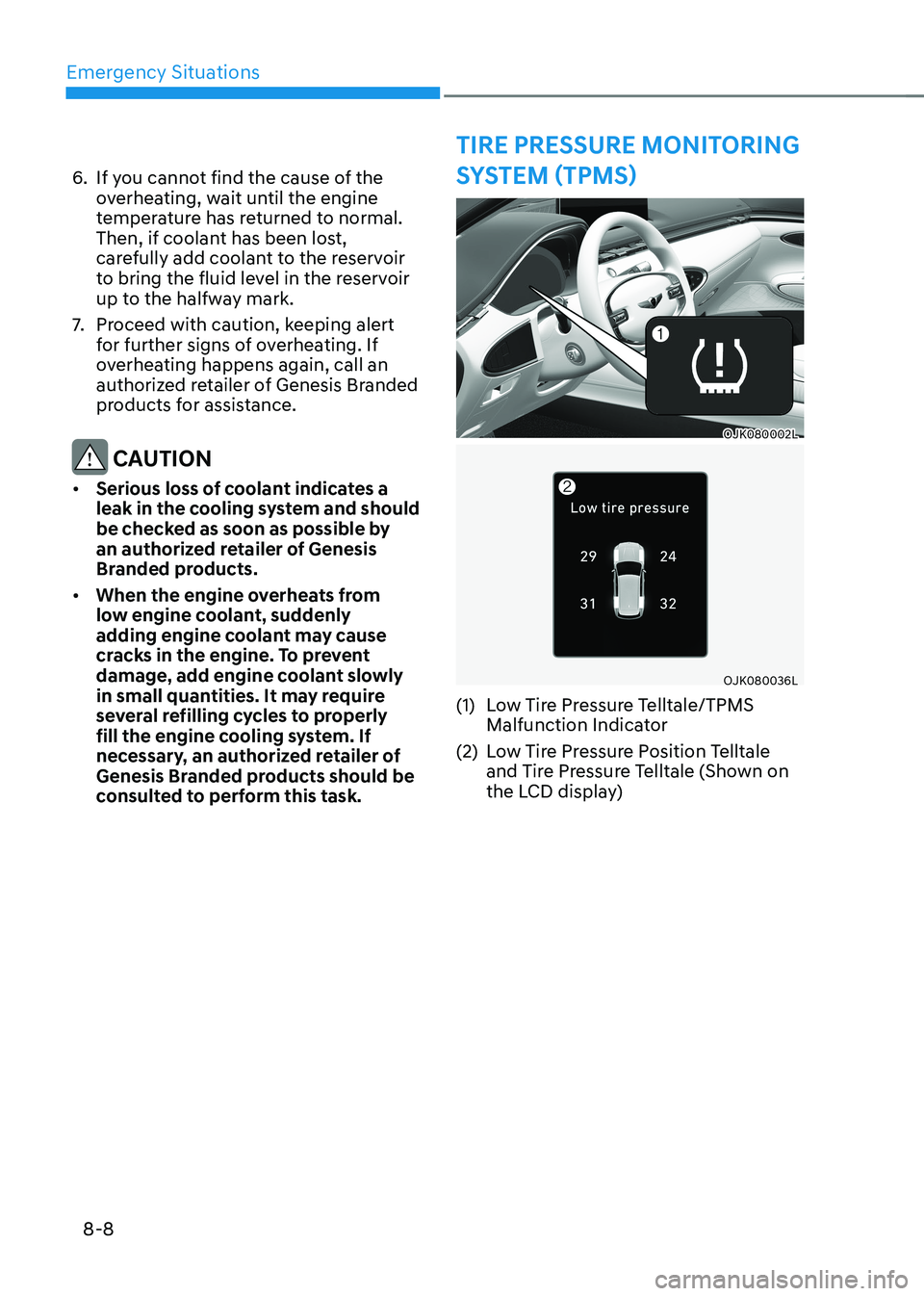
(1) Low Tire Pressure Telltale/TPMS Malfunction Indicator
(2) Low Tire Pressure Position Telltale and Tire Pressure Telltale (Shown on the LCD display)