audio Hyundai Getz 2003 User Guide
[x] Cancel search | Manufacturer: HYUNDAI, Model Year: 2003, Model line: Getz, Model: Hyundai Getz 2003Pages: 444, PDF Size: 13.82 MB
Page 127 of 444
1- 112 FEATURES OF YOUR HYUNDAI
H290F01O-GAT
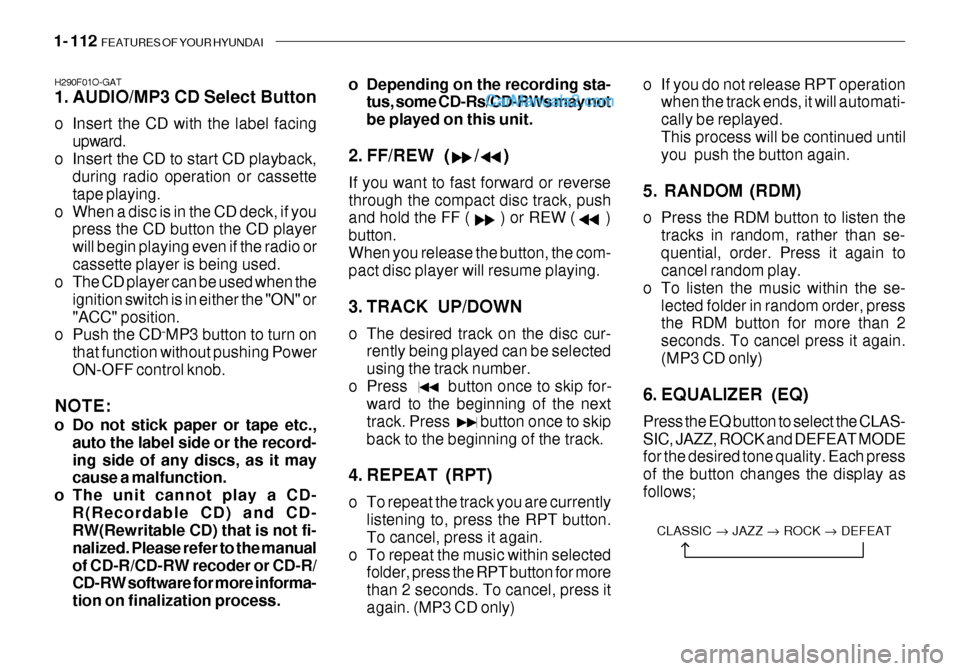
1. AUDIO/MP3 CD Select Button
o Insert the CD with the label facing
upward.
o Insert the CD to start CD playback, during radio operation or cassette tape playing.
o When a disc is in the CD deck, if you press the CD button the CD playerwill begin playing even if the radio orcassette player is being used.
o The CD player can be used when the
ignition switch is in either the "ON" or"ACC" position.
o Push the CD ˜MP3 button to turn on
that function without pushing PowerON-OFF control knob.
NOTE:
o Do not stick paper or tape etc., auto the label side or the record- ing side of any discs, as it may cause a malfunction.
o The unit cannot play a CD- R(Recordable CD) and CD-RW(Rewritable CD) that is not fi- nalized. Please refer to the manualof CD-R/CD-RW recoder or CD-R/ CD-RW software for more informa- tion on finalization process. o Depending on the recording sta-
tus, some CD-Rs/CD-RWs may notbe played on this unit.
2. FF/REW ( / ) If you want to fast forward or reverse through the compact disc track, push and hold the FF ( ) or REW ( ) button.When you release the button, the com- pact disc player will resume playing.
3. TRACK UP/DOWN
o The desired track on the disc cur- rently being played can be selected using the track number.
o Press button once to skip for- ward to the beginning of the nexttrack. Press button once to skipback to the beginning of the track.
4. REPEAT (RPT)
o To repeat the track you are currently listening to, press the RPT button. To cancel, press it again.
o To repeat the music within selected folder, press the RPT button for morethan 2 seconds. To cancel, press itagain. (MP3 CD only) o If you do not release RPT operation
when the track ends, it will automati-cally be replayed.This process will be continued until you push the button again.
5. RANDOM (RDM)
o Press the RDM button to listen the tracks in random, rather than se- quential, order. Press it again to cancel random play.
o To listen the music within the se-
lected folder in random order, pressthe RDM button for more than 2 seconds. To cancel press it again.(MP3 CD only)
6. EQUALIZER (EQ) Press the EQ button to select the CLAS- SIC, JAZZ, ROCK and DEFEAT MODE for the desired tone quality. Each press of the button changes the display asfollows;
CLASSIC JAZZ ROCK DEFEAT
Page 132 of 444
FEATURES OF YOUR HYUNDAI 1- 117
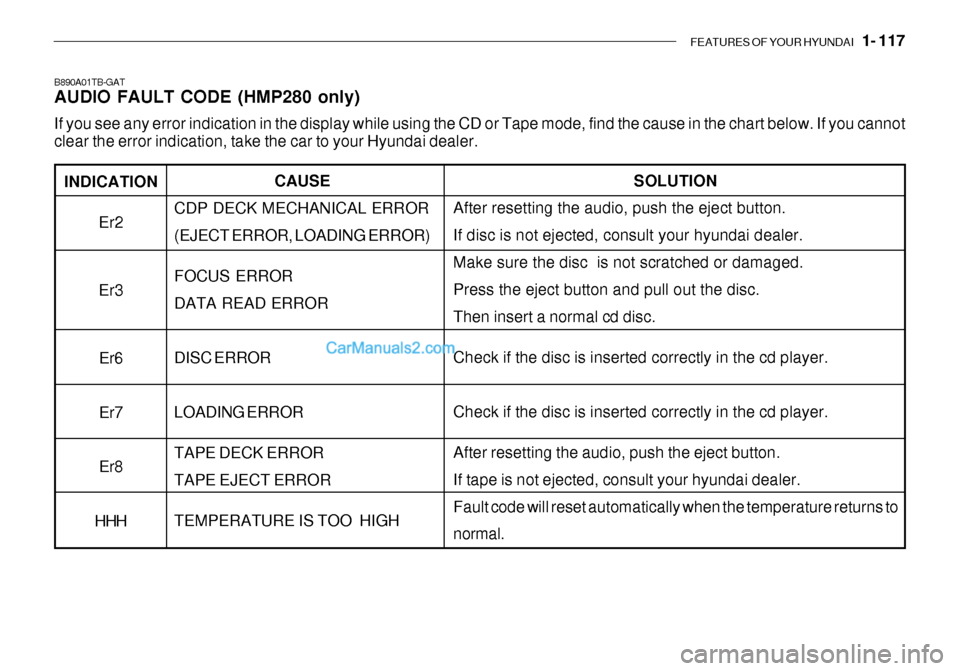
INDICATION
Er2 Er3
Er6 Er7Er8
HHH
B890A01TB-GAT AUDIO FAULT CODE (HMP280 only) If you see any error indication in the display while using the CD or Tape mode, find the cause in the chart below. If you canno t
clear the error indication, take the car to your Hyundai dealer.
SOLUTION
After resetting the audio, push the eject button. If disc is not ejected, consult your hyundai dealer.Make sure the disc is not scratched or damaged. Press the eject button and pull out the disc. Then insert a normal cd disc. Check if the disc is inserted correctly in the cd player. Check if the disc is inserted correctly in the cd player. After resetting the audio, push the eject button. If tape is not ejected, consult your hyundai dealer.Fault code will reset automatically when the temperature returns to normal.
CAUSE
CDP DECK MECHANICAL ERROR (EJECT ERROR, LOADING ERROR) FOCUS ERROR DATA READ ERROR DISC ERROR LOADING ERROR TAPE DECK ERROR TAPE EJECT ERROR TEMPERATURE IS TOO HIGH
Page 134 of 444
FEATURES OF YOUR HYUNDAI 1- 119
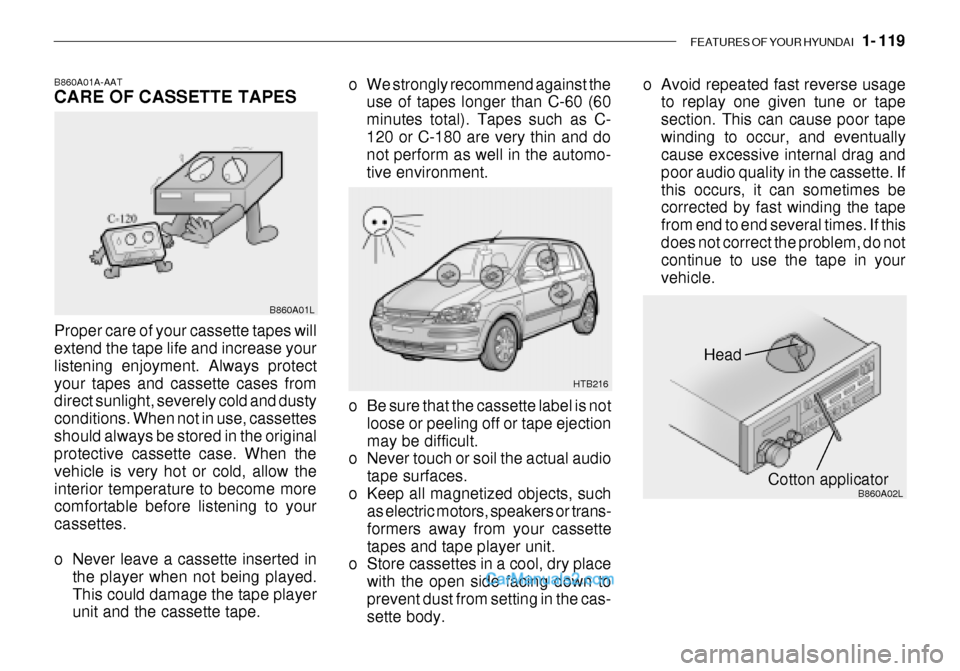
Head
Cotton applicator
HTB216
B860A02L
o Be sure that the cassette label is not
loose or peeling off or tape ejection may be difficult.
o Never touch or soil the actual audio
tape surfaces.
o Keep all magnetized objects, such as electric motors, speakers or trans-formers away from your cassettetapes and tape player unit.
o Store cassettes in a cool, dry place
with the open side facing down toprevent dust from setting in the cas- sette body.
o We strongly recommend against the
use of tapes longer than C-60 (60 minutes total). Tapes such as C-120 or C-180 are very thin and do not perform as well in the automo- tive environment. o Avoid repeated fast reverse usage
to replay one given tune or tapesection. This can cause poor tapewinding to occur, and eventually cause excessive internal drag and poor audio quality in the cassette. Ifthis occurs, it can sometimes be corrected by fast winding the tape from end to end several times. If thisdoes not correct the problem, do not continue to use the tape in your vehicle.
B860A01A-AAT CARE OF CASSETTE TAPES Proper care of your cassette tapes will extend the tape life and increase your listening enjoyment. Always protectyour tapes and cassette cases from direct sunlight, severely cold and dusty conditions. When not in use, cassettesshould always be stored in the original protective cassette case. When the vehicle is very hot or cold, allow theinterior temperature to become more comfortable before listening to your cassettes.
o Never leave a cassette inserted in
the player when not being played. This could damage the tape player unit and the cassette tape. B860A01L
Page 135 of 444
1- 120 FEATURES OF YOUR HYUNDAI
HTB111
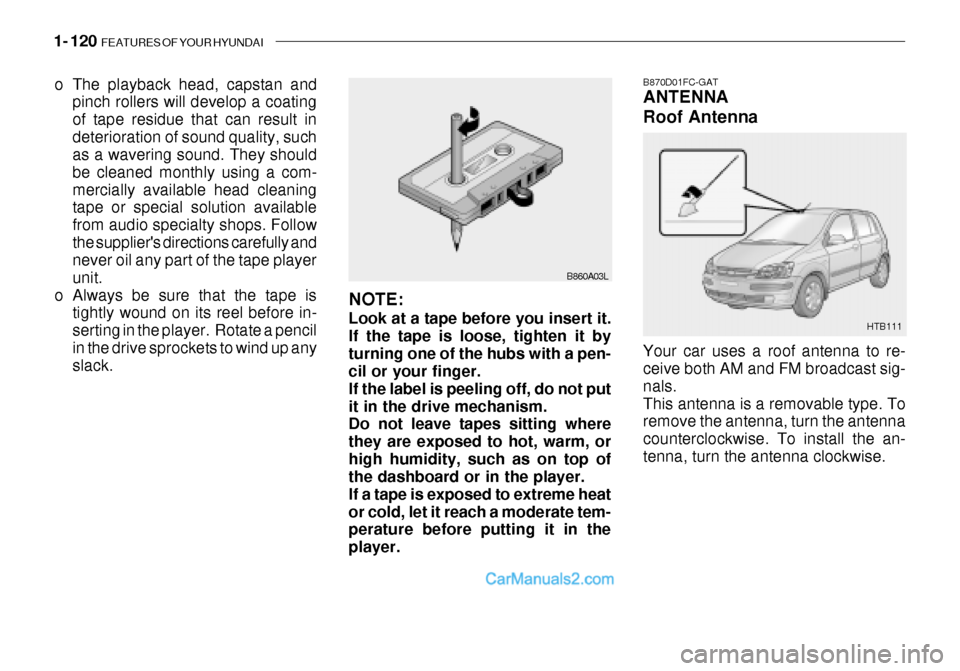
B870D01FC-GAT ANTENNA Roof Antenna Your car uses a roof antenna to re- ceive both AM and FM broadcast sig- nals.This antenna is a removable type. To remove the antenna, turn the antenna counterclockwise. To install the an-tenna, turn the antenna clockwise.
o The playback head, capstan and
pinch rollers will develop a coating of tape residue that can result indeterioration of sound quality, such as a wavering sound. They should be cleaned monthly using a com-mercially available head cleaning tape or special solution available from audio specialty shops. Followthe supplier's directions carefully and never oil any part of the tape player unit.
o Always be sure that the tape is tightly wound on its reel before in-serting in the player. Rotate a pencilin the drive sprockets to wind up any slack. B860A03L
NOTE: Look at a tape before you insert it. If the tape is loose, tighten it byturning one of the hubs with a pen- cil or your finger. If the label is peeling off, do not putit in the drive mechanism. Do not leave tapes sitting where they are exposed to hot, warm, orhigh humidity, such as on top of the dashboard or in the player. If a tape is exposed to extreme heator cold, let it reach a moderate tem- perature before putting it in the player.
Page 227 of 444
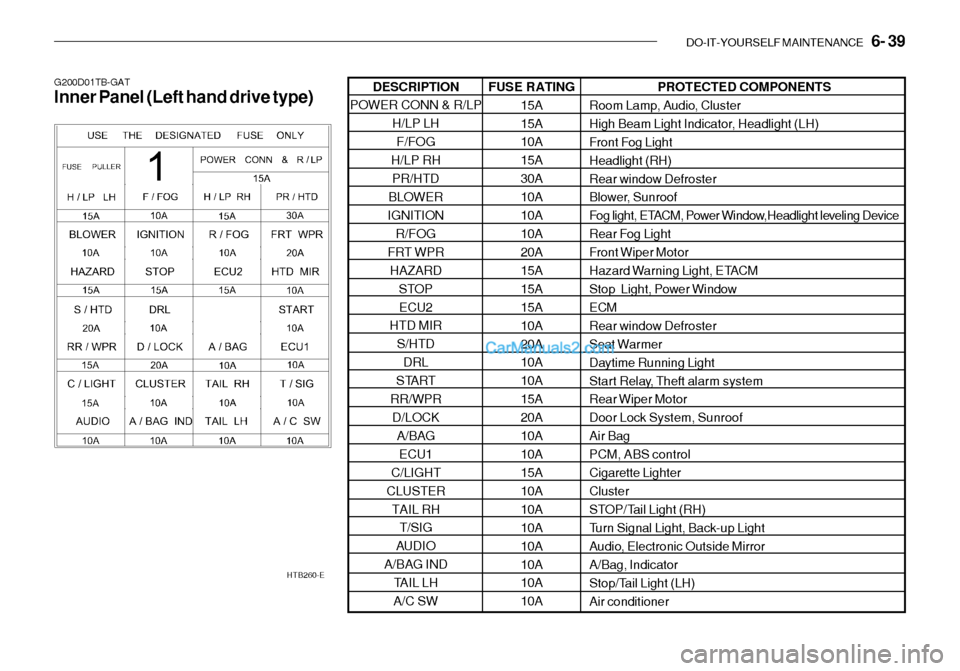
DO-IT-YOURSELF MAINTENANCE 6- 39
PROTECTED COMPONENTS
Room Lamp, Audio, Cluster
High Beam Light Indicator, Headlight (LH)
Front Fog LightHeadlight (RH)
Rear window Defroster
Blower, Sunroof
Fog light, ETACM, Power Window,Headlight leveling Device
Rear Fog Light
Front Wiper Motor
Hazard Warning Light, ETACM
Stop Light, Power Window ECM
Rear window Defroster
Seat Warmer
Daytime Running Light
Start Relay, Theft alarm system
Rear Wiper Motor
Door Lock System, SunroofAir BagPCM, ABS controlCigarette LighterCluster
STOP/Tail Light (RH)
Turn Signal Light, Back-up Light
Audio, Electronic Outside MirrorA/Bag, Indicator
Stop/Tail Light (LH)Air conditioner
G200D01TB-GAT Inner Panel (Left hand drive type)
HTB260-EFUSE RATING15A 15A 10A 15A30A10A10A10A 20A 15A15A15A10A20A 10A 10A15A20A10A10A 15A 10A10A10A10A10A 10A 10A
DESCRIPTION
POWER CONN & R/LP
H/LP LHF/FOG
H/LP RH PR/HTD
BLOWER
IGNITION
R/FOG
FRT WPR HAZARD STOPECU2
HTD MIR
S/HTDDRL
START
RR/WPR D/LOCK
A/BAG
ECU1
C/LIGHT
CLUSTER TAIL RH T/SIG
AUDIO
A/BAG IND TAIL LH
A/C SW
Page 228 of 444
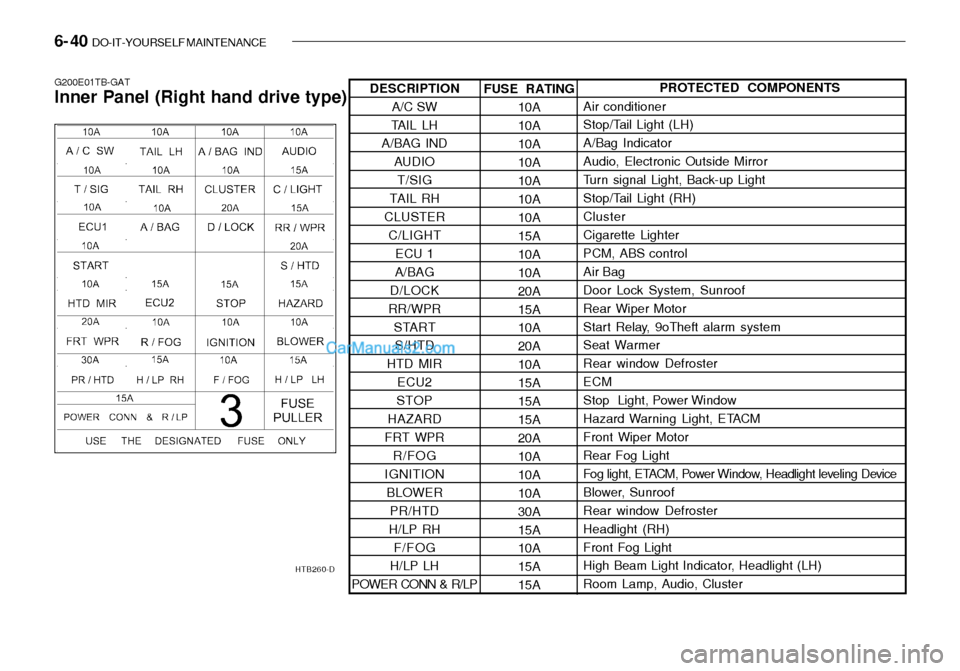
6- 40 DO-IT-YOURSELF MAINTENANCE
G200E01TB-GAT Inner Panel (Right hand drive type)
HTB260-DFUSE RATING10A 10A10A10A10A10A 10A 15A10A10A20A15A 10A 20A10A15A15A15A 20A 10A10A10A30A15A 10A 15A15APROTECTED COMPONENTS
Air conditioner
Stop/Tail Light (LH) A/Bag IndicatorAudio, Electronic Outside Mirror
Turn signal Light, Back-up Light
Stop/Tail Light (RH)Cluster Cigarette Lighter PCM, ABS controlAir BagDoor Lock System, SunroofRear Wiper Motor
Start Relay, 9oTheft alarm system Seat Warmer Rear window DefrosterECM
Stop Light, Power Window
Hazard Warning Light, ETACMFront Wiper Motor Rear Fog Light
Fog light, ETACM, Power Window, Headlight leveling Device
Blower, SunroofRear window DefrosterHeadlight (RH)Front Fog Light
High Beam Light Indicator, Headlight (LH) Room Lamp, Audio, Cluster
DESCRIPTION
A/C SW
TAIL LH
A/BAG IND
AUDIOT/SIG
TAIL RH
CLUSTER C/LIGHT ECU 1
A/BAG
D/LOCK
RR/WPR STARTS/HTD
HTD MIR
ECU2
STOP
HAZARD
FRT WPR R/FOG
IGNITION
BLOWER PR/HTD
H/LP RH F/FOG
H/LP LH
POWER CONN & R/LP
Page 337 of 444
FEATURES OF YOUR HYUNDAI 1- 77
Ionosphere
B750A02L
AM reception
Mountains
Buildings Unobstructed
area
FM radio station
B750A03L
Ionosphere
FM reception
B750A01L Obstructed area
Iron bridges
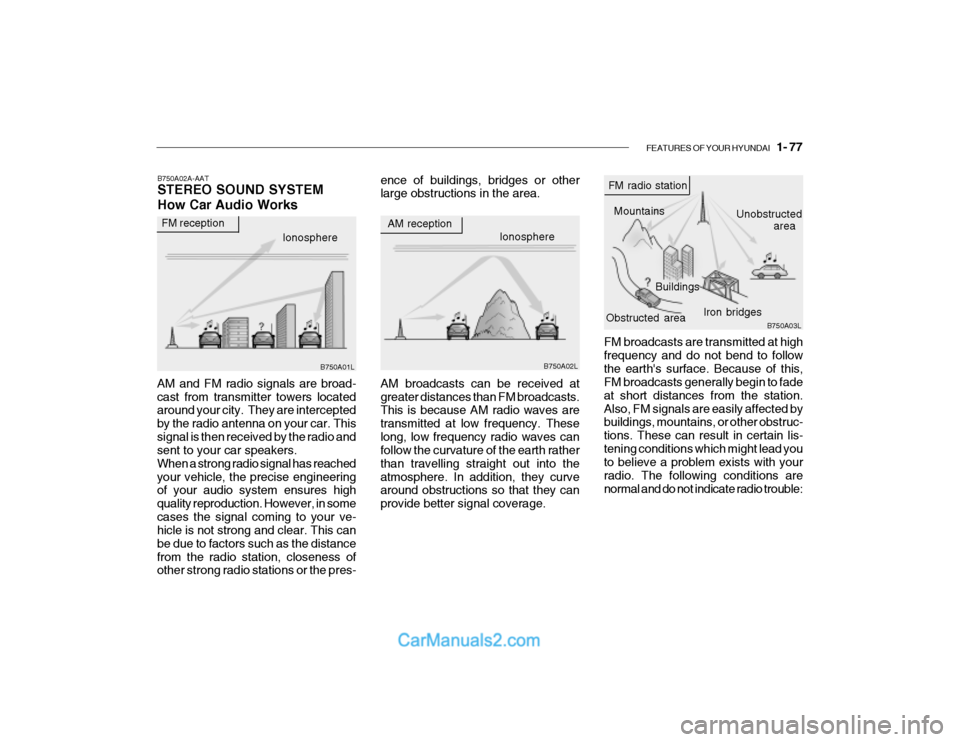
FM broadcasts are transmitted at high frequency and do not bend to followthe earth's surface. Because of this, FM broadcasts generally begin to fade at short distances from the station.Also, FM signals are easily affected by buildings, mountains, or other obstruc- tions. These can result in certain lis-tening conditions which might lead you to believe a problem exists with your radio. The following conditions arenormal and do not indicate radio trouble:
AM broadcasts can be received atgreater distances than FM broadcasts. This is because AM radio waves are transmitted at low frequency. Theselong, low frequency radio waves can follow the curvature of the earth rather than travelling straight out into theatmosphere. In addition, they curve around obstructions so that they can provide better signal coverage.
B750A02A-AAT STEREO SOUND SYSTEM How Car Audio Works
AM and FM radio signals are broad- cast from transmitter towers located around your city. They are intercepted by the radio antenna on your car. Thissignal is then received by the radio and sent to your car speakers. When a strong radio signal has reachedyour vehicle, the precise engineering of your audio system ensures high quality reproduction. However, in somecases the signal coming to your ve- hicle is not strong and clear. This can be due to factors such as the distancefrom the radio station, closeness of other strong radio stations or the pres- ence of buildings, bridges or otherlarge obstructions in the area.
Page 338 of 444
1- 78 FEATURES OF YOUR HYUNDAI
!
B750A04L B750A05L
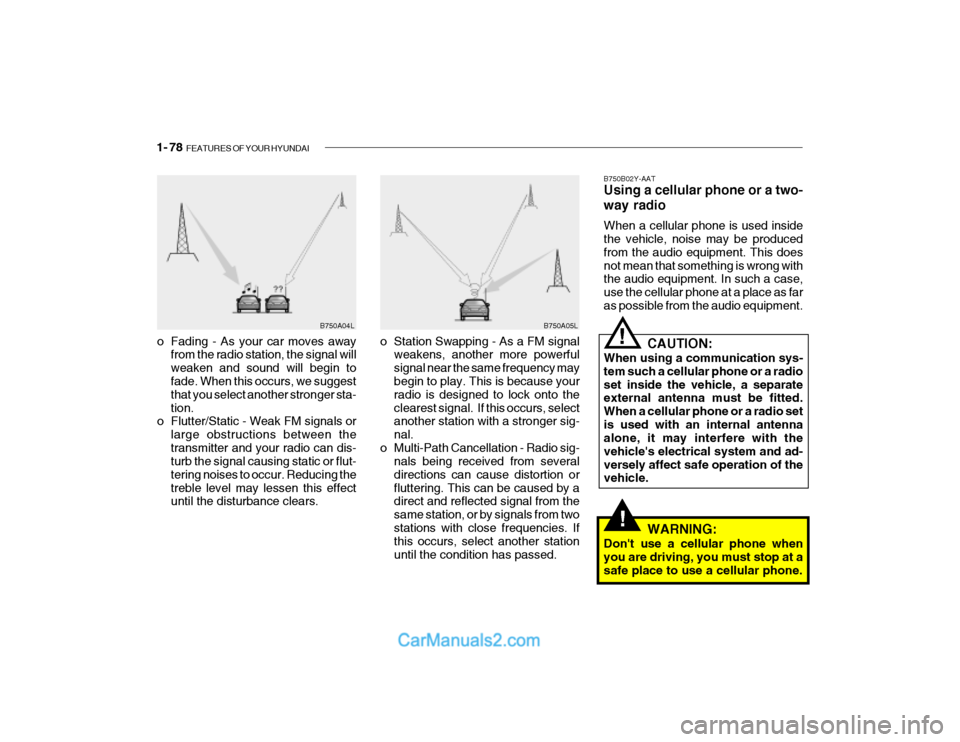
o Station Swapping - As a FM signal weakens, another more powerful signal near the same frequency may begin to play. This is because your radio is designed to lock onto theclearest signal. If this occurs, select another station with a stronger sig- nal.
o Multi-Path Cancellation - Radio sig- nals being received from severaldirections can cause distortion orfluttering. This can be caused by a direct and reflected signal from the same station, or by signals from twostations with close frequencies. If this occurs, select another station until the condition has passed.
o Fading - As your car moves away
from the radio station, the signal willweaken and sound will begin to fade. When this occurs, we suggest that you select another stronger sta-tion.
o Flutter/Static - Weak FM signals or
large obstructions between thetransmitter and your radio can dis- turb the signal causing static or flut- tering noises to occur. Reducing thetreble level may lessen this effect until the disturbance clears. B750B02Y-AAT Using a cellular phone or a two- way radio When a cellular phone is used inside the vehicle, noise may be produced from the audio equipment. This doesnot mean that something is wrong with the audio equipment. In such a case, use the cellular phone at a place as faras possible from the audio equipment.
!
CAUTION:
When using a communication sys- tem such a cellular phone or a radio set inside the vehicle, a separate external antenna must be fitted. When a cellular phone or a radio setis used with an internal antenna alone, it may interfere with the vehicle's electrical system and ad-versely affect safe operation of the vehicle.
WARNING:
Don't use a cellular phone when you are driving, you must stop at a safe place to use a cellular phone.
Page 340 of 444
1- 80 FEATURES OF YOUR HYUNDAI
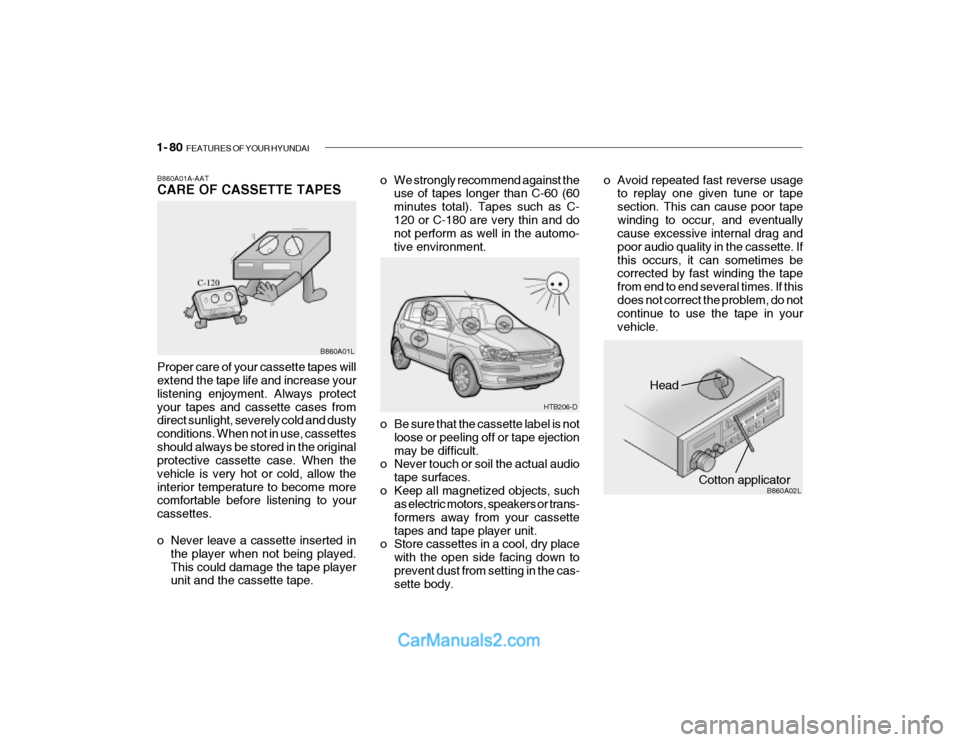
Head
Cotton applicator B860A02L
o Be sure that the cassette label is not
loose or peeling off or tape ejection may be difficult.
o Never touch or soil the actual audio
tape surfaces.
o Keep all magnetized objects, such as electric motors, speakers or trans-formers away from your cassettetapes and tape player unit.
o Store cassettes in a cool, dry place
with the open side facing down toprevent dust from setting in the cas- sette body.
o We strongly recommend against the
use of tapes longer than C-60 (60 minutes total). Tapes such as C-120 or C-180 are very thin and do not perform as well in the automo- tive environment. o Avoid repeated fast reverse usage
to replay one given tune or tapesection. This can cause poor tapewinding to occur, and eventually cause excessive internal drag and poor audio quality in the cassette. Ifthis occurs, it can sometimes be corrected by fast winding the tape from end to end several times. If thisdoes not correct the problem, do not continue to use the tape in your vehicle.
B860A01A-AAT CARE OF CASSETTE TAPES Proper care of your cassette tapes will extend the tape life and increase your listening enjoyment. Always protectyour tapes and cassette cases from direct sunlight, severely cold and dusty conditions. When not in use, cassettesshould always be stored in the original protective cassette case. When the vehicle is very hot or cold, allow theinterior temperature to become more comfortable before listening to your cassettes.
o Never leave a cassette inserted in
the player when not being played. This could damage the tape player unit and the cassette tape. B860A01L
HTB206-D
Page 341 of 444
FEATURES OF YOUR HYUNDAI 1- 81
HTB111
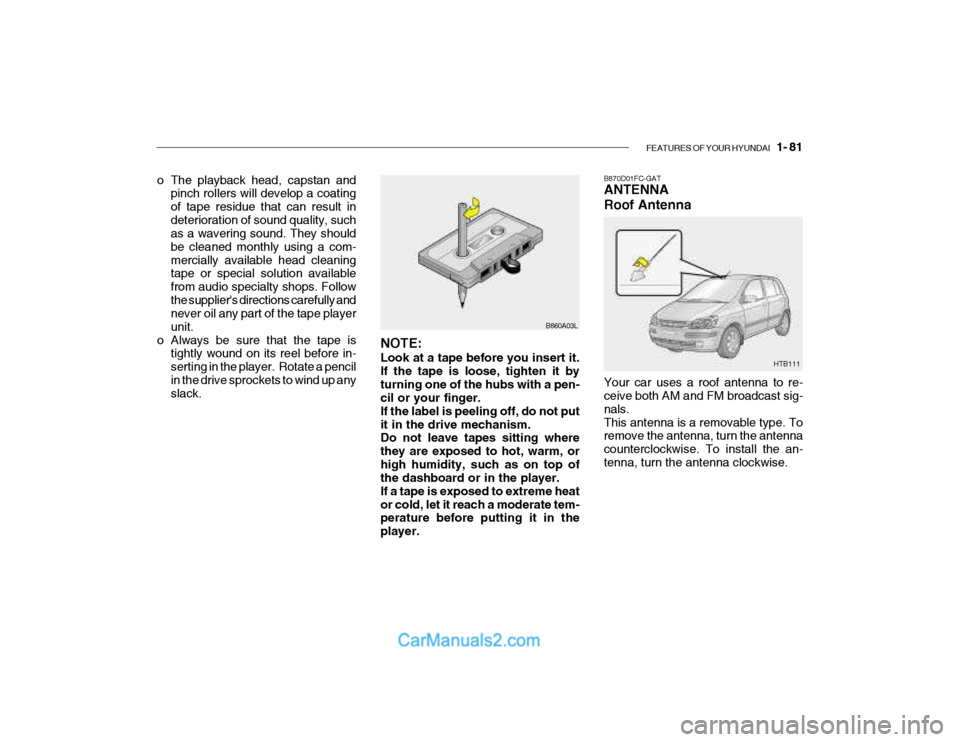
B870D01FC-GAT ANTENNA Roof Antenna Your car uses a roof antenna to re- ceive both AM and FM broadcast sig- nals.This antenna is a removable type. To remove the antenna, turn the antenna counterclockwise. To install the an-tenna, turn the antenna clockwise.
o The playback head, capstan and
pinch rollers will develop a coating of tape residue that can result indeterioration of sound quality, such as a wavering sound. They should be cleaned monthly using a com-mercially available head cleaning tape or special solution available from audio specialty shops. Followthe supplier's directions carefully and never oil any part of the tape player unit.
o Always be sure that the tape is tightly wound on its reel before in-serting in the player. Rotate a pencilin the drive sprockets to wind up any slack. B860A03L
NOTE: Look at a tape before you insert it. If the tape is loose, tighten it byturning one of the hubs with a pen- cil or your finger. If the label is peeling off, do not putit in the drive mechanism. Do not leave tapes sitting where they are exposed to hot, warm, orhigh humidity, such as on top of the dashboard or in the player. If a tape is exposed to extreme heator cold, let it reach a moderate tem- perature before putting it in the player.