set clock Hyundai Getz 2003 User Guide
[x] Cancel search | Manufacturer: HYUNDAI, Model Year: 2003, Model line: Getz, Model: Hyundai Getz 2003Pages: 444, PDF Size: 13.82 MB
Page 122 of 444
FEATURES OF YOUR HYUNDAI 1- 107
HOW TO PRESET STATIONS Six AM and twelve FM stations may be programmed into the memory of theradio. Then, by simply pressing the band select button and/or one of the six station select buttons, you may recallany of these stations instantly. To pro- gram the stations, follow these steps:
o Press band selector to set the band
for AM, FM and FM2.
o Select the desired station to be stored
by seek, scan or manual tuning.
o Determine the preset station select
button you wish to use to access that station.
o Press the station select button for
more than two seconds. Beep soundwill be heard while depressig the button. You should then release the button, and proceed to program thenext desired station. A total of 18 stations can be programmed by se- lecting one AM and two FM stationper button.
o When completed, any preset station
may be recalled by selecting AM,FM or FM2 band and the appropriate station button. CLASSIC
JAZZ ROCK DEFEAT7. EQUALIZER (EQ) Press the EQ button to select the CLAS- SIC, JAZZ, ROCK and DEFEAT MODEfor the desired tone quality. Each press of the button changes the display as follows; BALANCE Control Rotate the knob clockwise to empha- size right speaker sound. (Left speakersound will be attenuated) When the control knob is turned counter clock- wise, left speaker sound will be empha-sized (Right speaker sound will be at- tenuated). TREBLE Control Turn to the left or right for the desired treble tone. FAD (Fader Control) Turn the control knob clockwise to em- phasize rear speaker sound (frontspeaker sound will be attenuated). When the control knob is turned counterclock- wise, front speaker sound will be em-phasized (rear speaker sound will be attenuated).
8. Adjustment Mode select But-
ton (A.MODE).
Pressing the A.MODE button changes the BASS, BALANCE, TREBLE and FADER mode. The mode selected is shown on thedisplay. After selecting the each mode, rotate the volume control knob clockwise orcounterclockwise. BASS Control To increase the bass, rotate the knob clockwise, while to decrease the bass, rotate the knob counterclockwise.
Page 198 of 444
6- 10 DO-IT-YOURSELF MAINTENANCE
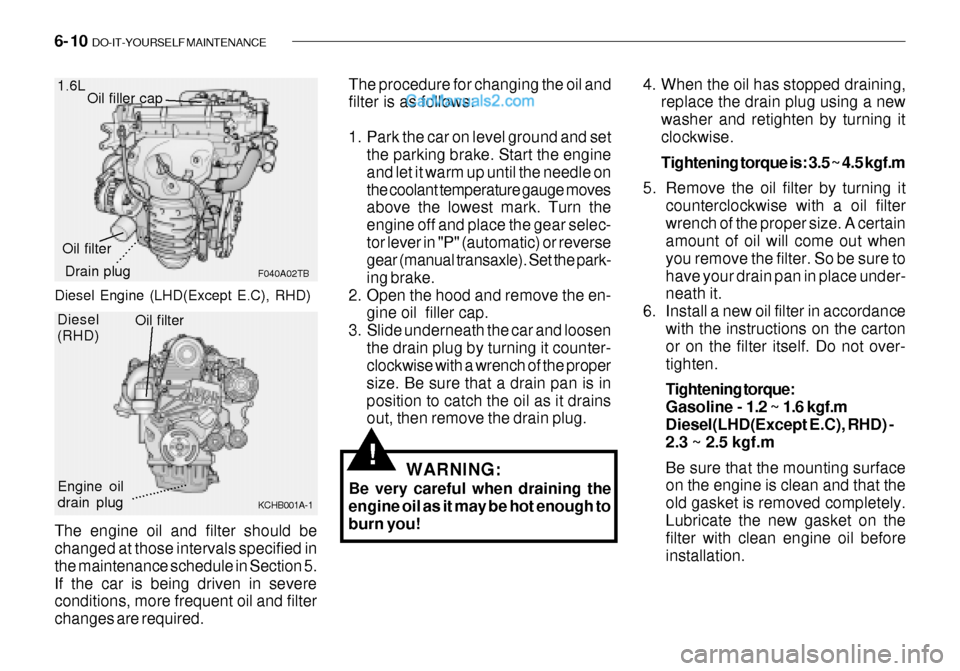
The engine oil and filter should be changed at those intervals specified in the maintenance schedule in Section 5.If the car is being driven in severe conditions, more frequent oil and filter changes are required.1.6L
F040A02TB
Oil filler cap
Drain plug
Oil filter The procedure for changing the oil and filter is as follows:
1. Park the car on level ground and set
the parking brake. Start the engine and let it warm up until the needle onthe coolant temperature gauge moves above the lowest mark. Turn the engine off and place the gear selec-tor lever in "P" (automatic) or reverse gear (manual transaxle). Set the park- ing brake.
2. Open the hood and remove the en- gine oil filler cap.
3. Slide underneath the car and loosen the drain plug by turning it counter- clockwise with a wrench of the proper size. Be sure that a drain pan is inposition to catch the oil as it drains out, then remove the drain plug.
WARNING:
Be very careful when draining theengine oil as it may be hot enough to burn you!
!
4. When the oil has stopped draining, replace the drain plug using a new washer and retighten by turning itclockwise. Tightening torque is: 3.5 ~ 4.5 kgf.m
5. Remove the oil filter by turning it counterclockwise with a oil filter wrench of the proper size. A certain amount of oil will come out when you remove the filter. So be sure tohave your drain pan in place under- neath it.
6. Install a new oil filter in accordance with the instructions on the cartonor on the filter itself. Do not over- tighten. Tightening torque: Gasoline - 1.2 ~ 1.6 kgf.m
Diesel(LHD(Except E.C), RHD) - 2.3 ~ 2.5 kgf.m Be sure that the mounting surface on the engine is clean and that the old gasket is removed completely.Lubricate the new gasket on the filter with clean engine oil before installation.
.........
Diesel (RHD)
KCHB001A-1
Engine oil drain plugOil filter................
Diesel Engine (LHD(Except E.C), RHD)
Page 199 of 444

DO-IT-YOURSELF MAINTENANCE 6- 11
G040B03FC-GAT CHANGING THE OIL AND FILTER
(Diesel Engine: Left hand drivetype (E.C only)) The engine oil and filter should be changed at those intervals specified in the maintenance schedule in Section 5. If the car is being driven in severeconditions, more frequent oil and filter changes are required. The procedure for changing the oil and filter is as follows: 1. Park the car on level ground and set
the parking brake. Start the engine and let it warm up until the needle onthe coolant temperature gauge moves above the lowest mark. Turn the engine off and place the gearselector lever in "P" (automatic) or reverse gear (manual transaxle).
2. Open the hood and remove the en- gine oil filler cap.
3. Slide underneath the car and loosen
the oil pan drain plug by turning it counterclockwise oil pan with a wrench of the proper size. Be sure that a drain pan is in position tocatch the oil as it drains out, then remove the drain plug.
7. Refill the crankcase with the recom-
mended engine oil. Refer to the specification in chapter 9 for engineoil capacity.
8. Start the engine and check to be
sure no oil is leaking from the drainplug or oil filter.
9. Shut off the engine and recheck the
oil level.
NOTE: Always dispose of used engine oil in an environmentally acceptablemanner. It is suggested that it be placed in a sealed container and taken to a service station for recla-mation. Do not pour the oil on the ground or put it into the household trash.
WARNING:
Used motor oil may cause irritationor cancer of the skin if left in con-tact with the skin for prolonged periods of time. Wash your hands thoroughly with soap and warmwater as soon as possible after han- dling used oil.
!
Engine oil drain plug Oil filter
KCHB01A
WARNING:
Be very careful when draining the engine oil as it may be hot enough to burn you!!
4. When the oil has stopped draining, replace the drain plug using a new washer and retighten by turning it clockwise. Oil pan drain plug tightening torque: 3.5 ~ 4.5 kgf.m
............
Page 202 of 444

6- 14 DO-IT-YOURSELF MAINTENANCE
HTB171
G050C01A-GAT To Check the Coolant Level The coolant level can be seen on the side of the plastic coolant reservoir.The level of the coolant should be between the "LOW" and "FULL" lines on the reservoir when the engine iscold. If the level is below the "LOW" mark, add engine coolant to bring it up between "LOW" and "FULL". If thelevel is low, inspect for coolant leaks and recheck the fluid level frequently. If the level drops again, visit yourHyundai dealer for an inspection and diagnosis of the reason. G050D02A-AAT To Change the Coolant The coolant should be changed at those intervals specified in the vehiclemaintenance schedule in Section 5.
CAUTION:
Engine coolant can damage the fin-ish of your car. If you spill engine coolant on the car, wash it off thor- oughly with clean water.
!
1. Park the car on level ground, set the parking brake and remove the ra- diator cap when cool.
2. Be sure your drain receptacle is in place. Open the drain cock on theradiator. Allow all the engine coolantto drain from the cooling system, then securely close the drain cock.
3. Check Section 9 for the capacity of
the cooling system in your car. Then,following the manufacturer's direc- tions on the engine coolant contain-er, add the appropriate quantity of coolant to the radiator. 4. Turn the radiator cap counterclock-
wise without pressing down on it, until it stops. This relieves any pres- sure remaining in the cooling sys- tem. And remove the radiator capby pushing down and turning coun- terclockwise. Now fill the radiator with clean dem-ineralized or distilled water. Con- tinue to add clean demineralized or distilled water in small quantitiesuntil the fluid level stays up in the radiator neck.
Page 244 of 444
10- 2 INDEX
A
Air Bag ...................................................................... 1-34
Air Cleaner Filter ....................................................... 6-17 Air Conditioning
Care ....................................................................... 6-22
Operation ............................................................... 1-82
Switch ..................................................................... 1-81
Air filter ............................................................. 1-83, 6-23
Antenna ................................................................... 1-107
Ashtray ...................................................................... 1-58
Auto Fuel cut Switch ................................................ 1-73 B
Battery .............................................................. 2-16, 6-28 Brake Anti-lock system ..................................................... 2-13
Checking the brakes .............................................. 6-21
Fluid ....................................................................... 6-21
Pedal clearance ..................................................... 6-25
Pedal freeplay ........................................................ 6-25
Practices ................................................................ 2-12
Breaking-In your New Hyundai ................................... 1-3
Bulbs Replacement ................................................... 6-32
Bulbs wattage ........................................................... 6-37 C
Care of Cassette Tapes ......................................... 1-119
Cargo area cover ...................................................... 1-70
Cassette Tape Player Operation
(K220, K240, H280, HMP280) . 1-89, 1-94, 1-99, 1-108
Catalytic Converter ..................................................... 7-3
CD Changer operation (HMP280) .......................... 1-114
Child-Protector Rear Door Lock ................................. 1-8
Child Restraint System ............................................. 1-26
Cigarette Lighter ....................................................... 1-58
Clock ......................................................................... 1-58 Clutch
Pedal freeplay ........................................................ 6-24
Combination Ligh
Headlight flasher .................................................... 1-54
Headlight switch ..................................................... 1-53
High-beam switch .................................................. 1-54
Lane change signal ................................................ 1-53
Turn signal operation ............................................. 1-53
Compact Disc Player Operation (H280, HMP280)
.................................................................. 1-101, 1-111
Console tray .............................................................. 1-59
Cooling Fans ............................................................. 6-29 Corrosion protection
Cleaning the interior ................................................. 4-5
Protecting your Hyundai from corrosion .................. 4-2
Washing and waxing ................................................ 4-3
Page 295 of 444
FEATURES OF YOUR HYUNDAI 1- 35
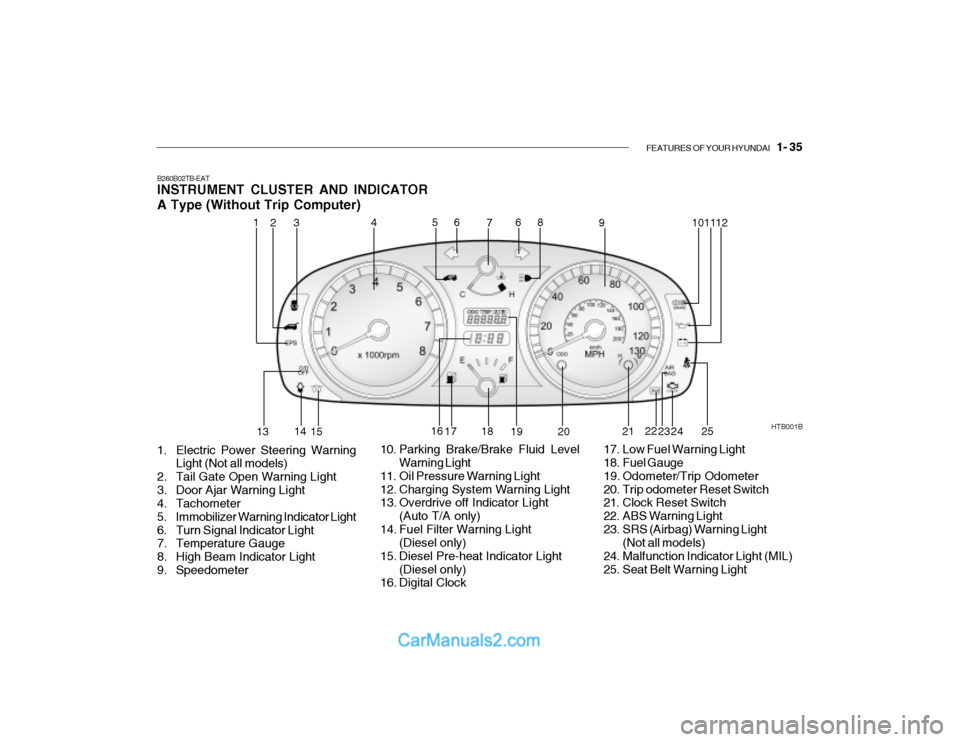
B260B02TB-EAT INSTRUMENT CLUSTER AND INDICATOR A Type (Without Trip Computer)
1. Electric Power Steering Warning Light (Not all models)
2. Tail Gate Open Warning Light
3. Door Ajar Warning Light
4. Tachometer
5. Immobilizer Warning Indicator Light
6. Turn Signal Indicator Light
7. Temperature Gauge
8. High Beam Indicator Light
9. Speedometer HTB001B
10. Parking Brake/Brake Fluid Level Warning Light
11. Oil Pressure Warning Light
12. Charging System Warning Light
13. Overdrive off Indicator Light (Auto T/A only)
14. Fuel Filter Warning Light (Diesel only)
15. Diesel Pre-heat Indicator Light (Diesel only)
16. Digital Clock 17. Low Fuel Warning Light
18. Fuel Gauge
19. Odometer/Trip Odometer
20. Trip odometer Reset Switch
21. Clock Reset Switch
22. ABS Warning Light
23. SRS (Airbag) Warning Light
(Not all models)
24. Malfunction Indicator Light (MIL)
25. Seat Belt Warning Light
1
2
4
53 6
7 8
9 1011
12
13 14
15 16
17 18
19 20 21
22
23 24
6
25
Page 296 of 444
1- 36 FEATURES OF YOUR HYUNDAI
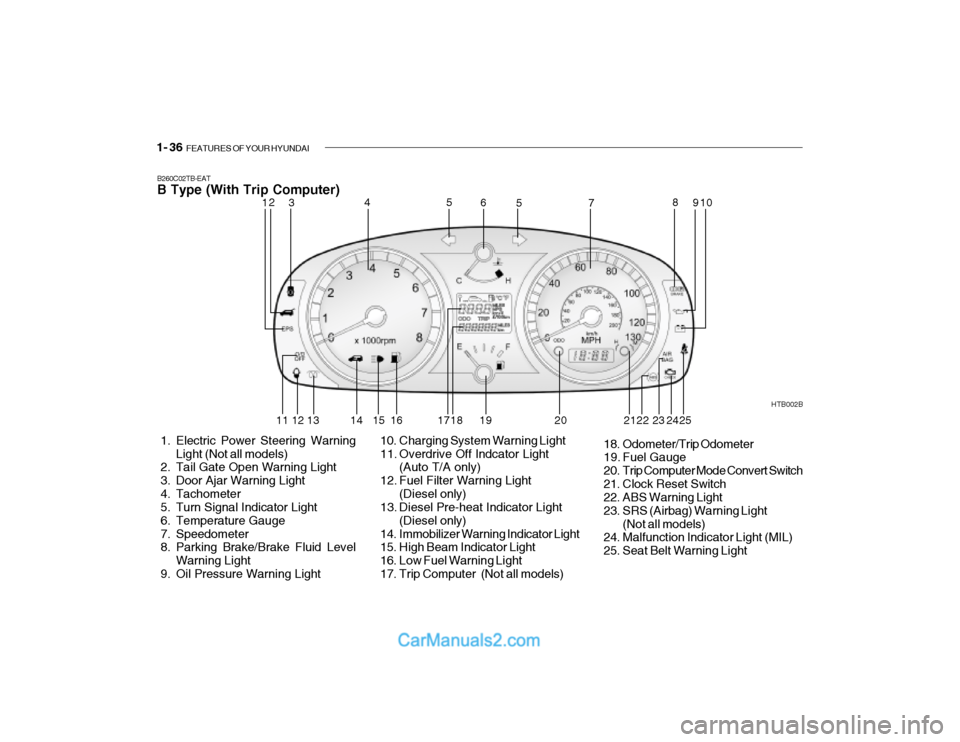
B260C02TB-EAT B Type (With Trip Computer)
1. Electric Power Steering Warning
Light (Not all models)
2. Tail Gate Open Warning Light
3. Door Ajar Warning Light
4. Tachometer
5. Turn Signal Indicator Light
6. Temperature Gauge
7. Speedometer
8. Parking Brake/Brake Fluid Level
Warning Light
9. Oil Pressure Warning Light HTB002B
10. Charging System Warning Light
11. Overdrive Off Indcator Light (Auto T/A only)
12. Fuel Filter Warning Light (Diesel only)
13. Diesel Pre-heat Indicator Light
(Diesel only)
14. Immobilizer Warning Indicator Light
15. High Beam Indicator Light
16. Low Fuel Warning Light
17. Trip Computer (Not all models) 18. Odometer/Trip Odometer
19. Fuel Gauge
20. Trip Computer Mode Convert Switch
21. Clock Reset Switch
22. ABS Warning Light
23. SRS (Airbag) Warning Light
(Not all models)
24. Malfunction Indicator Light (MIL)
25. Seat Belt Warning Light
12 3 4
5
5
6
78
910
11 12 13 14 15 16 17 18 19 20 22 23
242521
Page 311 of 444
FEATURES OF YOUR HYUNDAI 1- 51
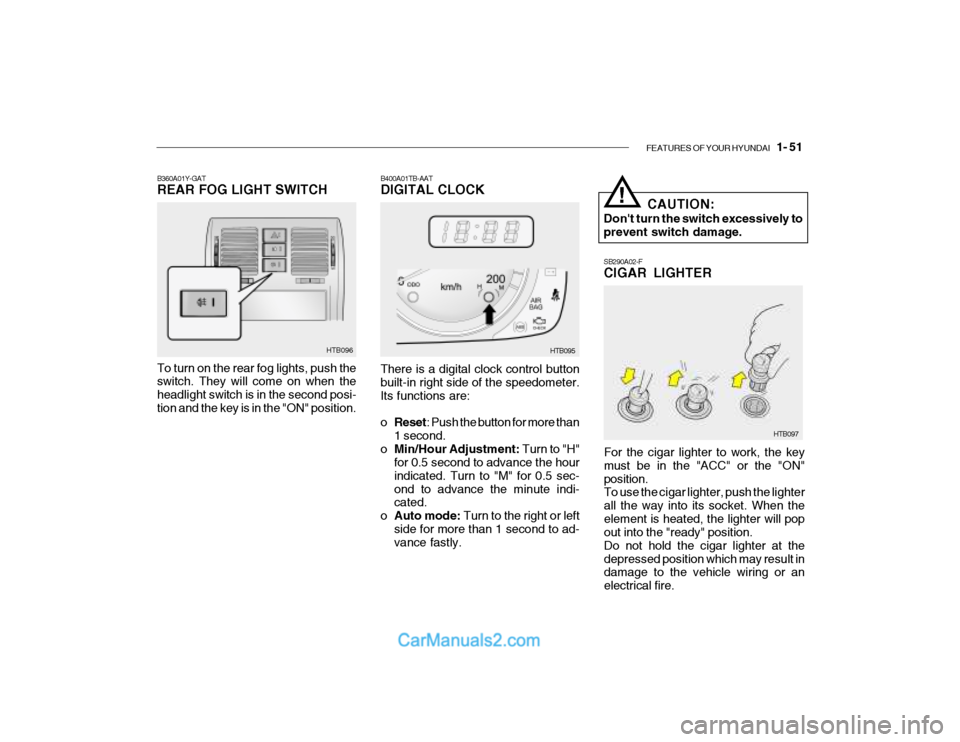
SB290A02-F CIGAR LIGHTER
For the cigar lighter to work, the key must be in the "ACC" or the "ON"position. To use the cigar lighter, push the lighter all the way into its socket. When theelement is heated, the lighter will pop out into the "ready" position. Do not hold the cigar lighter at thedepressed position which may result in damage to the vehicle wiring or an electrical fire.
HTB097
B400A01TB-AAT DIGITAL CLOCK HTB095
There is a digital clock control button built-in right side of the speedometer. Its functions are: o Reset : Push the button for more than
1 second.
o Min/Hour Adjustment: Turn to "H"
for 0.5 second to advance the hour indicated. Turn to "M" for 0.5 sec-ond to advance the minute indi- cated.
o Auto mode: Turn to the right or left
side for more than 1 second to ad-vance fastly. CAUTION:
Don't turn the switch excessively to prevent switch damage.
!
B360A01Y-GAT REAR FOG LIGHT SWITCH To turn on the rear fog lights, push the switch. They will come on when the headlight switch is in the second posi-tion and the key is in the "ON" position. HTB096
Page 315 of 444
FEATURES OF YOUR HYUNDAI 1- 55
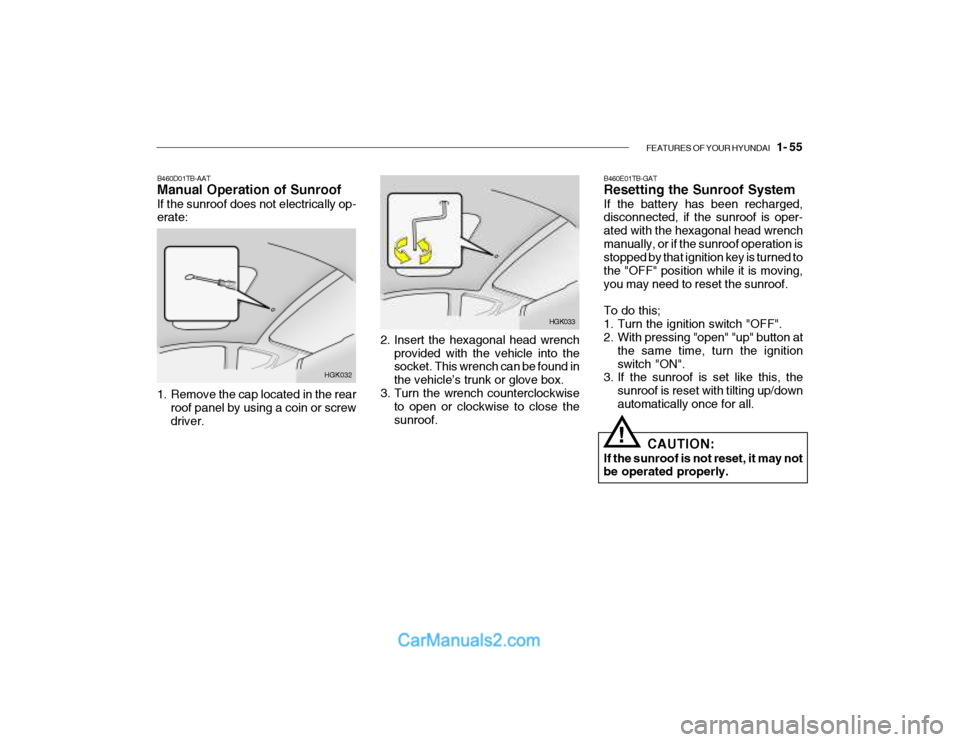
2. Insert the hexagonal head wrench
provided with the vehicle into the socket. This wrench can be found in the vehicle’s trunk or glove box.
3. Turn the wrench counterclockwise to open or clockwise to close thesunroof. HGK033B460E01TB-GAT Resetting the Sunroof System If the battery has been recharged, disconnected, if the sunroof is oper- ated with the hexagonal head wrenchmanually, or if the sunroof operation is stopped by that ignition key is turned to the "OFF" position while it is moving,you may need to reset the sunroof. To do this;
1. Turn the ignition switch "OFF".
2. With pressing "open" "up" button at
the same time, turn the ignition switch "ON".
3. If the sunroof is set like this, the
sunroof is reset with tilting up/downautomatically once for all.
! CAUTION:
If the sunroof is not reset, it may not be operated properly.
B460D01TB-AAT Manual Operation of Sunroof If the sunroof does not electrically op- erate:
HGK032
1. Remove the cap located in the rear roof panel by using a coin or screw driver.