reset Hyundai Getz 2003 Owner's Guide
[x] Cancel search | Manufacturer: HYUNDAI, Model Year: 2003, Model line: Getz, Model: Hyundai Getz 2003Pages: 444, PDF Size: 13.82 MB
Page 122 of 444
FEATURES OF YOUR HYUNDAI 1- 107
HOW TO PRESET STATIONS Six AM and twelve FM stations may be programmed into the memory of theradio. Then, by simply pressing the band select button and/or one of the six station select buttons, you may recallany of these stations instantly. To pro- gram the stations, follow these steps:
o Press band selector to set the band
for AM, FM and FM2.
o Select the desired station to be stored
by seek, scan or manual tuning.
o Determine the preset station select
button you wish to use to access that station.
o Press the station select button for
more than two seconds. Beep soundwill be heard while depressig the button. You should then release the button, and proceed to program thenext desired station. A total of 18 stations can be programmed by se- lecting one AM and two FM stationper button.
o When completed, any preset station
may be recalled by selecting AM,FM or FM2 band and the appropriate station button. CLASSIC
JAZZ ROCK DEFEAT7. EQUALIZER (EQ) Press the EQ button to select the CLAS- SIC, JAZZ, ROCK and DEFEAT MODEfor the desired tone quality. Each press of the button changes the display as follows; BALANCE Control Rotate the knob clockwise to empha- size right speaker sound. (Left speakersound will be attenuated) When the control knob is turned counter clock- wise, left speaker sound will be empha-sized (Right speaker sound will be at- tenuated). TREBLE Control Turn to the left or right for the desired treble tone. FAD (Fader Control) Turn the control knob clockwise to em- phasize rear speaker sound (frontspeaker sound will be attenuated). When the control knob is turned counterclock- wise, front speaker sound will be em-phasized (rear speaker sound will be attenuated).
8. Adjustment Mode select But-
ton (A.MODE).
Pressing the A.MODE button changes the BASS, BALANCE, TREBLE and FADER mode. The mode selected is shown on thedisplay. After selecting the each mode, rotate the volume control knob clockwise orcounterclockwise. BASS Control To increase the bass, rotate the knob clockwise, while to decrease the bass, rotate the knob counterclockwise.
Page 124 of 444
FEATURES OF YOUR HYUNDAI 1- 109
H290D01O-GAT
1. FF/REW
o Fast forward tape winding starts
when the FF ( ) button is pressed during PLAY or REW mode.
o Tape PLAY starts when the FF ( )
button is pressed again during FFmode.
o Tape rewinding starts when the REW
( ) button is pressed during PLAYor FF mode.
o Tape PLAY starts when the REW
( ) button pressed again duringREW mode.
2. AUTO MUSIC Select Press the button to find the starting point of each song in a prerecorded music tape. The quiet space between songs (must have at least 4 sec. gap)can be accepted by the AUTO MUSIC Select button.
o Pressing the button will play the beginning of the next music seg- ment.
o Pressing the button will start replay at the beginning of the musicjust listened to.3. TAPE PROGRAM Button
o This allows you to play the reverse
side of the tape by merely depress- ing the program button. An arrow will appear in the display to show tape direction.
o Push the TAPE button to turn on that function without pushing powerON ˆ
OFF control knob.
4. REPEAT
o To repeat the track you are currently listening to, press the RPT button. To cancel, press again.
o If you do not release RPT operation
when the track ends, it will automati-cally be replayed. This process will be continued until you push the button again.
5. Equalizer (EQ) Press the EQ button to select the CLAS- SIC, JAZZ, ROCK and DEFEAT MODE for the desired tone quality. Each press of the button changes the display asfollows; 6. DOLBY If you get background noise during tape PLAY, you can reduce this consider-ably by merely pressing the DOLBY button. If you want to cancel the DOLBY feature, press the button again.
7. TAPE EJECT
o When the button is pressed with
a cassette loaded, the cassette will eject.
o When the button is pressed during
FF/REW mode, the cassette willeject.
NOTE:
o To assure proper operation of the unit, keep the vehicle interior tem- perature within a normal range by using the vehicle's air condition-ing or heating system.
o When replacing the fuse, replace
it with a fuse having the correctcapacity.
o The preset station frequencies are
all erased when the car battery isdisconnected. Therefore, all data will have to be set again if this should occur.
CLASSIC JAZZ ROCK DEFEAT
Page 132 of 444
FEATURES OF YOUR HYUNDAI 1- 117
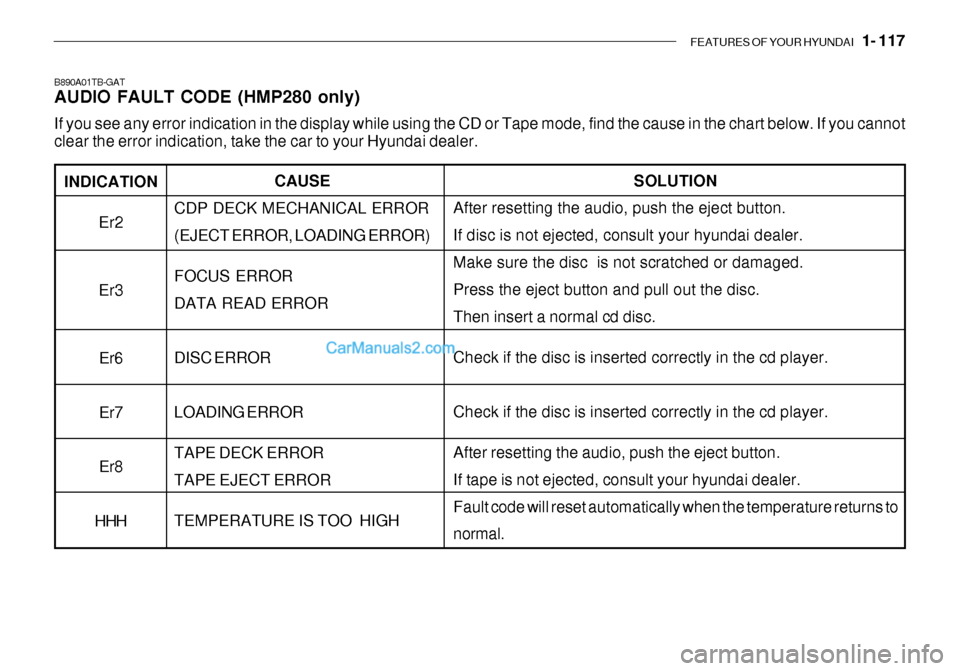
INDICATION
Er2 Er3
Er6 Er7Er8
HHH
B890A01TB-GAT AUDIO FAULT CODE (HMP280 only) If you see any error indication in the display while using the CD or Tape mode, find the cause in the chart below. If you canno t
clear the error indication, take the car to your Hyundai dealer.
SOLUTION
After resetting the audio, push the eject button. If disc is not ejected, consult your hyundai dealer.Make sure the disc is not scratched or damaged. Press the eject button and pull out the disc. Then insert a normal cd disc. Check if the disc is inserted correctly in the cd player. Check if the disc is inserted correctly in the cd player. After resetting the audio, push the eject button. If tape is not ejected, consult your hyundai dealer.Fault code will reset automatically when the temperature returns to normal.
CAUSE
CDP DECK MECHANICAL ERROR (EJECT ERROR, LOADING ERROR) FOCUS ERROR DATA READ ERROR DISC ERROR LOADING ERROR TAPE DECK ERROR TAPE EJECT ERROR TEMPERATURE IS TOO HIGH
Page 295 of 444
FEATURES OF YOUR HYUNDAI 1- 35
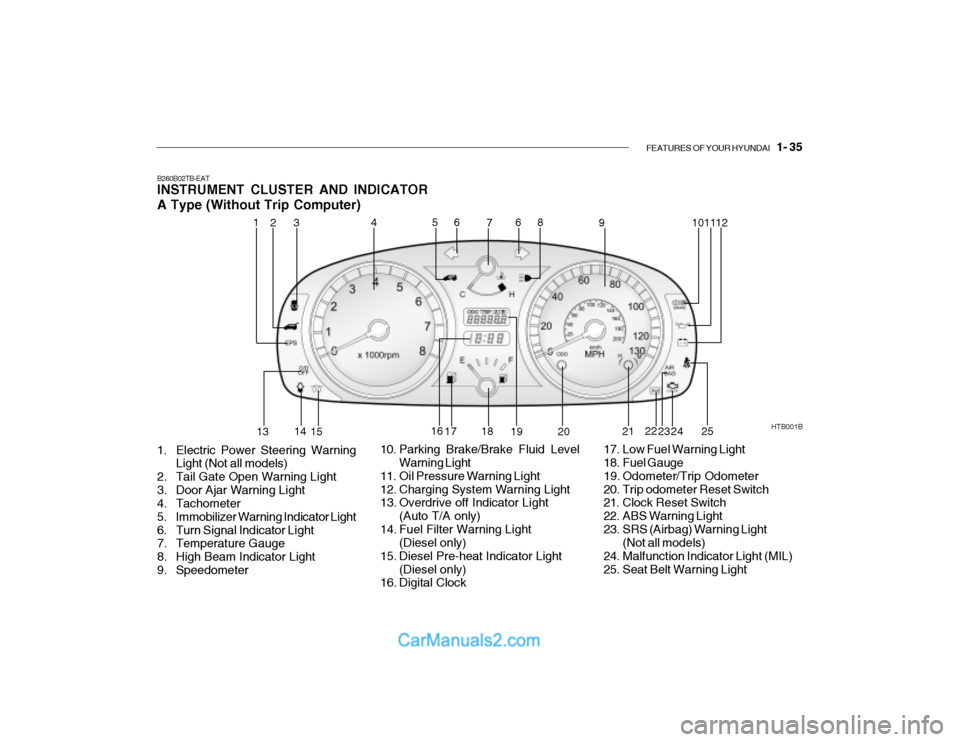
B260B02TB-EAT INSTRUMENT CLUSTER AND INDICATOR A Type (Without Trip Computer)
1. Electric Power Steering Warning Light (Not all models)
2. Tail Gate Open Warning Light
3. Door Ajar Warning Light
4. Tachometer
5. Immobilizer Warning Indicator Light
6. Turn Signal Indicator Light
7. Temperature Gauge
8. High Beam Indicator Light
9. Speedometer HTB001B
10. Parking Brake/Brake Fluid Level Warning Light
11. Oil Pressure Warning Light
12. Charging System Warning Light
13. Overdrive off Indicator Light (Auto T/A only)
14. Fuel Filter Warning Light (Diesel only)
15. Diesel Pre-heat Indicator Light (Diesel only)
16. Digital Clock 17. Low Fuel Warning Light
18. Fuel Gauge
19. Odometer/Trip Odometer
20. Trip odometer Reset Switch
21. Clock Reset Switch
22. ABS Warning Light
23. SRS (Airbag) Warning Light
(Not all models)
24. Malfunction Indicator Light (MIL)
25. Seat Belt Warning Light
1
2
4
53 6
7 8
9 1011
12
13 14
15 16
17 18
19 20 21
22
23 24
6
25
Page 296 of 444
1- 36 FEATURES OF YOUR HYUNDAI
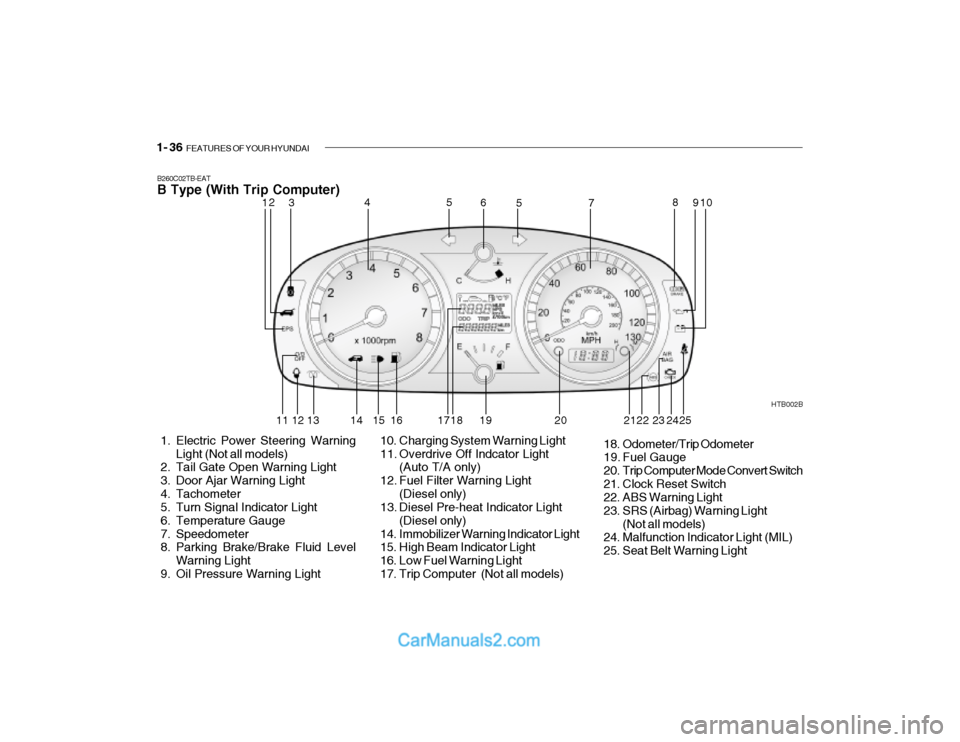
B260C02TB-EAT B Type (With Trip Computer)
1. Electric Power Steering Warning
Light (Not all models)
2. Tail Gate Open Warning Light
3. Door Ajar Warning Light
4. Tachometer
5. Turn Signal Indicator Light
6. Temperature Gauge
7. Speedometer
8. Parking Brake/Brake Fluid Level
Warning Light
9. Oil Pressure Warning Light HTB002B
10. Charging System Warning Light
11. Overdrive Off Indcator Light (Auto T/A only)
12. Fuel Filter Warning Light (Diesel only)
13. Diesel Pre-heat Indicator Light
(Diesel only)
14. Immobilizer Warning Indicator Light
15. High Beam Indicator Light
16. Low Fuel Warning Light
17. Trip Computer (Not all models) 18. Odometer/Trip Odometer
19. Fuel Gauge
20. Trip Computer Mode Convert Switch
21. Clock Reset Switch
22. ABS Warning Light
23. SRS (Airbag) Warning Light
(Not all models)
24. Malfunction Indicator Light (MIL)
25. Seat Belt Warning Light
12 3 4
5
5
6
78
910
11 12 13 14 15 16 17 18 19 20 22 23
242521
Page 303 of 444
FEATURES OF YOUR HYUNDAI 1- 43
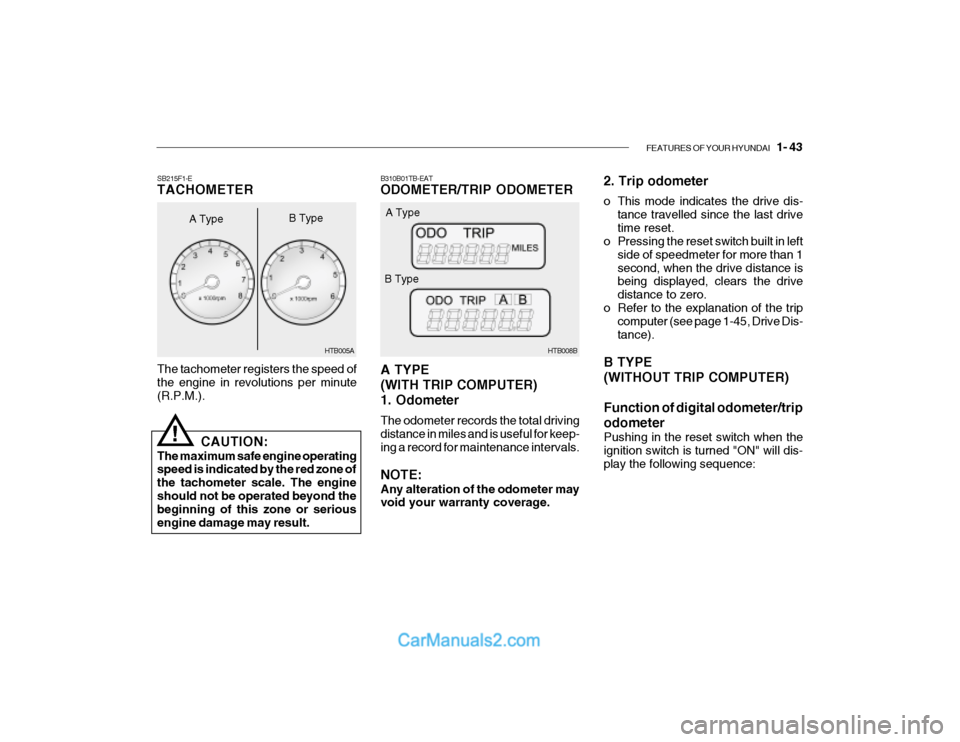
B310B01TB-EAT ODOMETER/TRIP ODOMETER A TYPE (WITH TRIP COMPUTER)1. Odometer The odometer records the total driving distance in miles and is useful for keep- ing a record for maintenance intervals. NOTE: Any alteration of the odometer may void your warranty coverage. HTB008B
A Type
B Type 2. Trip odometer
o This mode indicates the drive dis-
tance travelled since the last drive time reset.
o Pressing the reset switch built in left
side of speedmeter for more than 1second, when the drive distance is being displayed, clears the drive distance to zero.
o Refer to the explanation of the trip computer (see page 1-45, Drive Dis-tance).
B TYPE (WITHOUT TRIP COMPUTER) Function of digital odometer/trip odometer
Pushing in the reset switch when the ignition switch is turned "ON" will dis-play the following sequence:
The tachometer registers the speed of the engine in revolutions per minute (R.P.M.).
SB215F1-E TACHOMETER
A Type
!
CAUTION:
The maximum safe engine operating speed is indicated by the red zone of the tachometer scale. The engineshould not be operated beyond the beginning of this zone or serious engine damage may result. HTB005A
B Type
Page 304 of 444
1- 44 FEATURES OF YOUR HYUNDAI
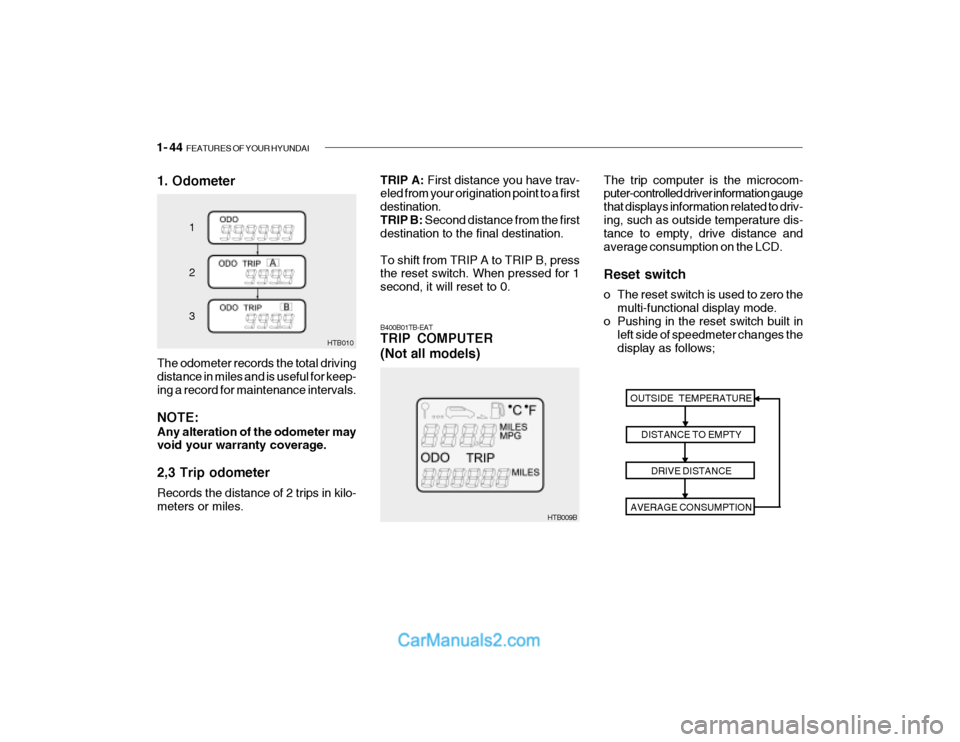
1. Odometer
HTB010
1 2 3
The odometer records the total driving distance in miles and is useful for keep- ing a record for maintenance intervals. NOTE: Any alteration of the odometer may void your warranty coverage. 2,3 Trip odometer Records the distance of 2 trips in kilo- meters or miles.
HTB009B The trip computer is the microcom- puter-controlled driver information gauge that displays information related to driv-ing, such as outside temperature dis- tance to empty, drive distance and average consumption on the LCD. Reset switch
o The reset switch is used to zero the
multi-functional display mode.
o Pushing in the reset switch built in
left side of speedmeter changes the display as follows;
B400B01TB-EAT TRIP COMPUTER (Not all models)
OUTSIDE TEMPERATUREDISTANCE TO EMPTYDRIVE DISTANCE
AVERAGE CONSUMPTION
TRIP A: First distance you have trav-
eled from your origination point to a first destination.TRIP B: Second distance from the first
destination to the final destination. To shift from TRIP A to TRIP B, press the reset switch. When pressed for 1 second, it will reset to 0.
Page 305 of 444
FEATURES OF YOUR HYUNDAI 1- 45
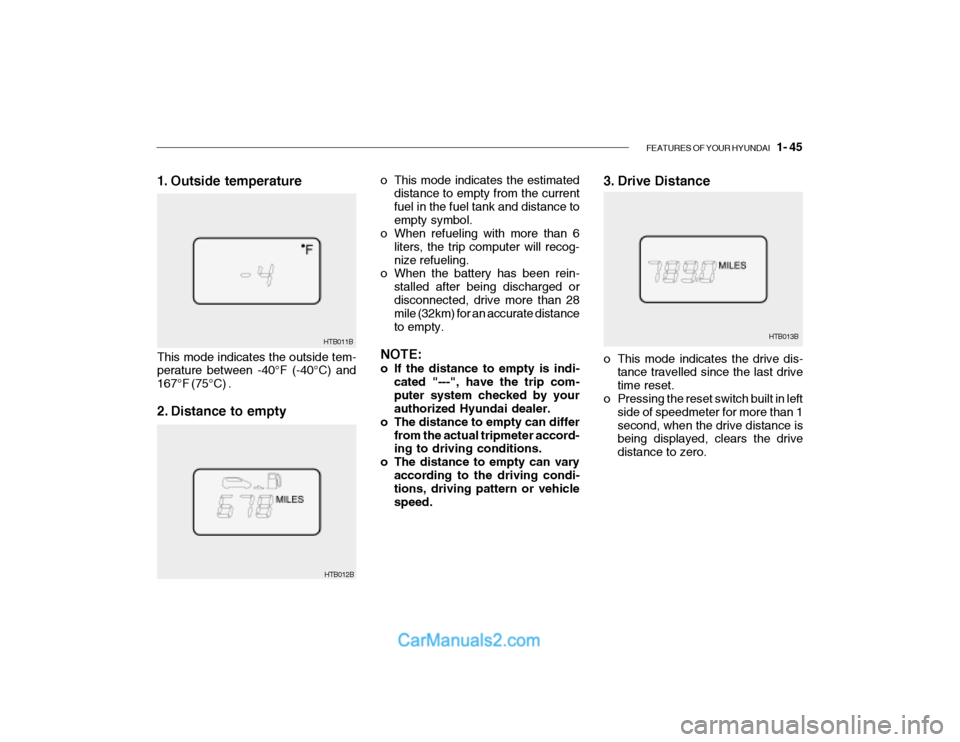
3. Drive Distance
HTB013B
o This mode indicates the estimated
distance to empty from the current fuel in the fuel tank and distance toempty symbol.
o When refueling with more than 6
liters, the trip computer will recog-nize refueling.
o When the battery has been rein-
stalled after being discharged ordisconnected, drive more than 28 mile (32km) for an accurate distance to empty.
NOTE:
o If the distance to empty is indi- cated "---", have the trip com- puter system checked by your authorized Hyundai dealer.
o The distance to empty can differ
from the actual tripmeter accord-ing to driving conditions.
o The distance to empty can vary
according to the driving condi-tions, driving pattern or vehicle speed. o This mode indicates the drive dis-
tance travelled since the last drivetime reset.
o Pressing the reset switch built in left
side of speedmeter for more than 1second, when the drive distance is being displayed, clears the drive distance to zero.
HTB012B
1. Outside temperature This mode indicates the outside tem- perature between -40°F (-40°C) and 167°F (75°C) .
2. Distance to empty
HTB011B
Page 306 of 444
1- 46 FEATURES OF YOUR HYUNDAI
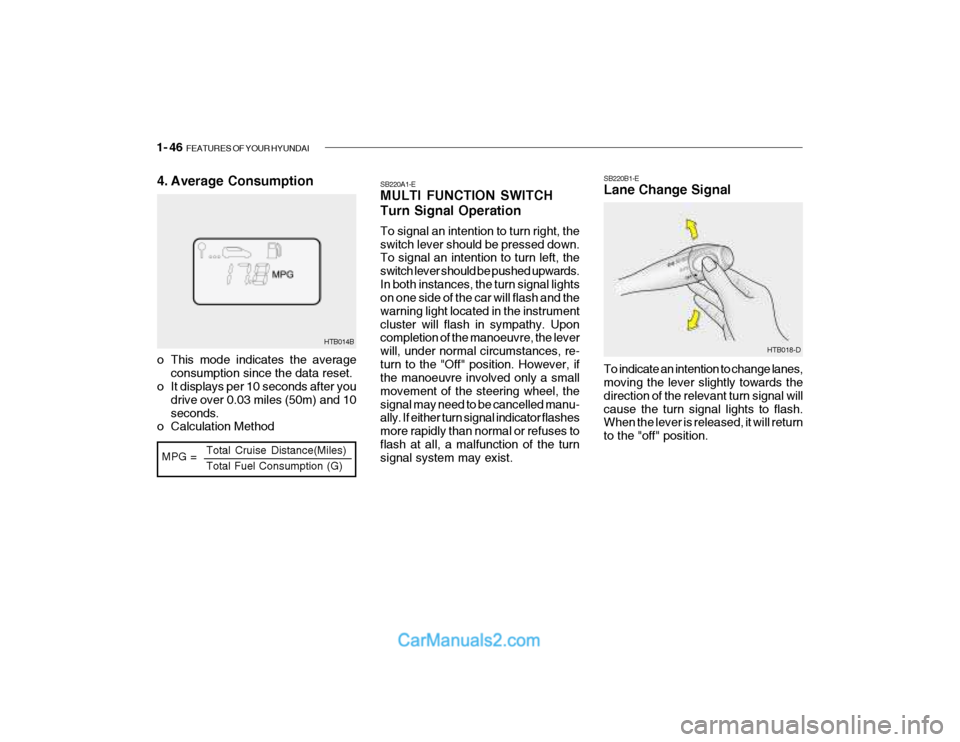
HTB014B
MPG = Total Cruise Distance(Miles) Total Fuel Consumption (G)
4. Average Consumption
o This mode indicates the average
consumption since the data reset.
o It displays per 10 seconds after you
drive over 0.03 miles (50m) and 10 seconds.
o Calculation Method SB220A1-E MULTI FUNCTION SWITCH Turn Signal Operation To signal an intention to turn right, the switch lever should be pressed down. To signal an intention to turn left, the switch lever should be pushed upwards.In both instances, the turn signal lights on one side of the car will flash and the warning light located in the instrumentcluster will flash in sympathy. Upon completion of the manoeuvre, the lever will, under normal circumstances, re-turn to the "Off" position. However, if the manoeuvre involved only a small movement of the steering wheel, thesignal may need to be cancelled manu- ally. If either turn signal indicator flashes more rapidly than normal or refuses toflash at all, a malfunction of the turn signal system may exist. SB220B1-E Lane Change Signal To indicate an intention to change lanes, moving the lever slightly towards the direction of the relevant turn signal willcause the turn signal lights to flash. When the lever is released, it will return to the "off" position.
HTB018-D
Page 311 of 444
FEATURES OF YOUR HYUNDAI 1- 51
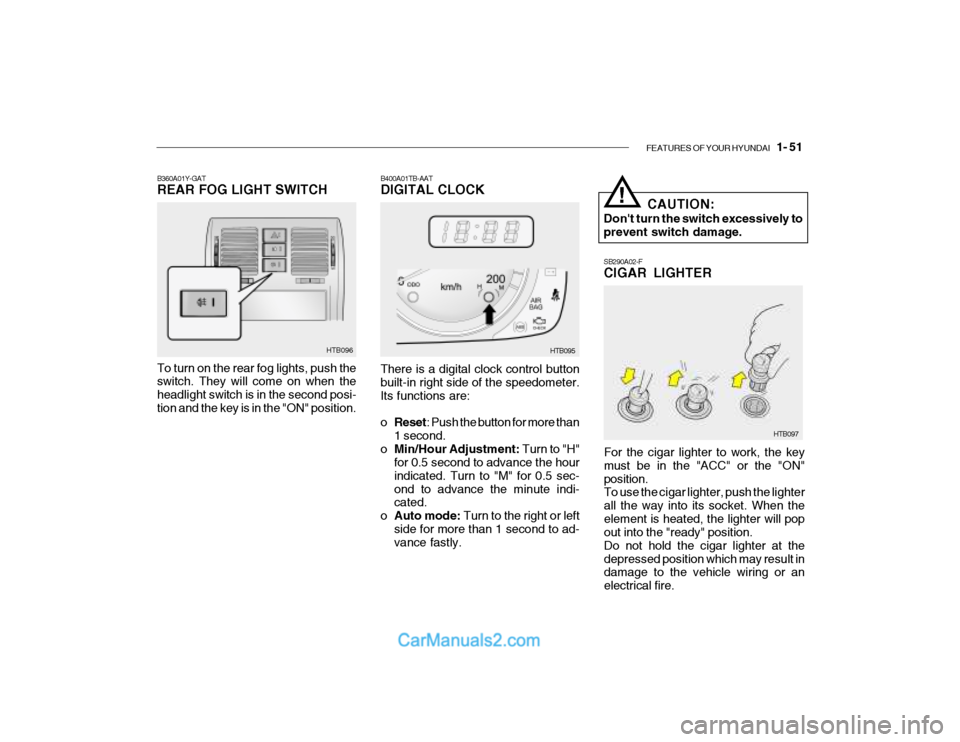
SB290A02-F CIGAR LIGHTER
For the cigar lighter to work, the key must be in the "ACC" or the "ON"position. To use the cigar lighter, push the lighter all the way into its socket. When theelement is heated, the lighter will pop out into the "ready" position. Do not hold the cigar lighter at thedepressed position which may result in damage to the vehicle wiring or an electrical fire.
HTB097
B400A01TB-AAT DIGITAL CLOCK HTB095
There is a digital clock control button built-in right side of the speedometer. Its functions are: o Reset : Push the button for more than
1 second.
o Min/Hour Adjustment: Turn to "H"
for 0.5 second to advance the hour indicated. Turn to "M" for 0.5 sec-ond to advance the minute indi- cated.
o Auto mode: Turn to the right or left
side for more than 1 second to ad-vance fastly. CAUTION:
Don't turn the switch excessively to prevent switch damage.
!
B360A01Y-GAT REAR FOG LIGHT SWITCH To turn on the rear fog lights, push the switch. They will come on when the headlight switch is in the second posi-tion and the key is in the "ON" position. HTB096