OIL Hyundai Getz 2004 Workshop Manual
[x] Cancel search | Manufacturer: HYUNDAI, Model Year: 2004, Model line: Getz, Model: Hyundai Getz 2004Pages: 445, PDF Size: 12.16 MB
Page 258 of 445
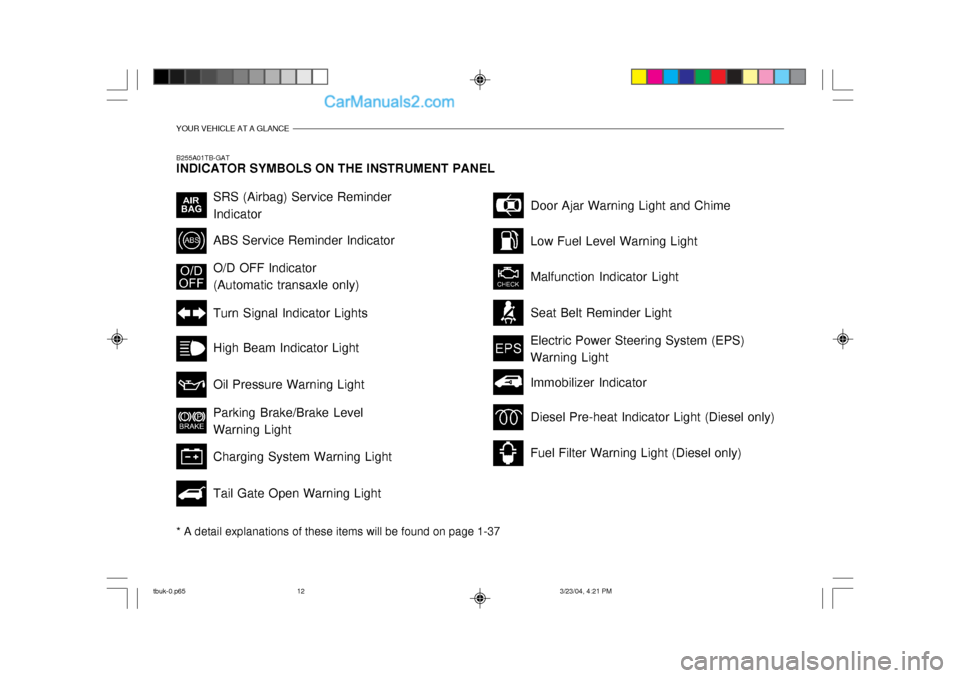
YOUR VEHICLE AT A GLANCE
B255A01TB-GAT INDICATOR SYMBOLS ON THE INSTRUMENT PANEL * A detail explanations of these items will be found on page 1-37
SRS (Airbag) Service Reminder Indicator ABS Service Reminder Indicator Turn Signal Indicator Lights High Beam Indicator Light Oil Pressure Warning Light Parking Brake/Brake Level Warning Light Charging System Warning Light Tail Gate Open Warning LightDoor Ajar Warning Light and Chime
Low Fuel Level Warning Light Malfunction Indicator Light Seat Belt Reminder Light
O/D OFF Indicator (Automatic transaxle only)
Electric Power Steering System (EPS)Warning Light
Diesel Pre-heat Indicator Light (Diesel only)
Fuel Filter Warning Light (Diesel only)
Immobilizer Indicator
tbuk-0.p65
3/23/04, 4:21 PM
12
Page 295 of 445
FEATURES OF YOUR HYUNDAI 1- 37
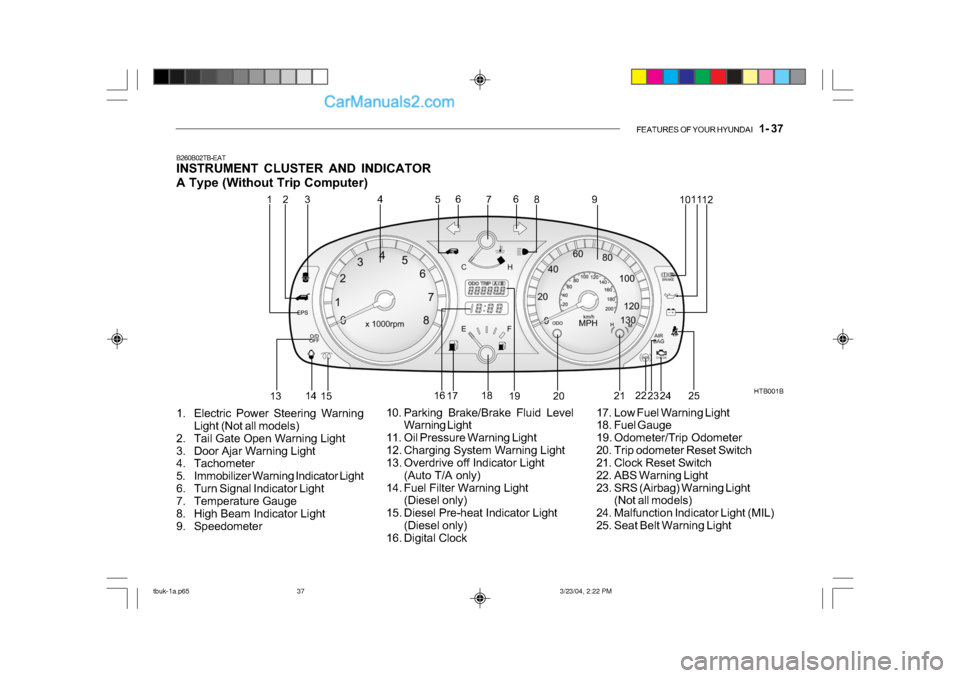
B260B02TB-EAT
INSTRUMENT CLUSTER AND INDICATOR
A Type (Without Trip Computer)
1. Electric Power Steering Warning Light (Not all models)
2. Tail Gate Open Warning Light
3. Door Ajar Warning Light
4. Tachometer
5. Immobilizer Warning Indicator Light
6. Turn Signal Indicator Light
7. Temperature Gauge
8. High Beam Indicator Light
9. Speedometer HTB001B
10. Parking Brake/Brake Fluid Level Warning Light
11. Oil Pressure Warning Light
12. Charging System Warning Light
13. Overdrive off Indicator Light (Auto T/A only)
14. Fuel Filter Warning Light (Diesel only)
15. Diesel Pre-heat Indicator Light (Diesel only)
16. Digital Clock 17. Low Fuel Warning Light
18. Fuel Gauge
19. Odometer/Trip Odometer
20. Trip odometer Reset Switch
21. Clock Reset Switch
22. ABS Warning Light
23. SRS (Airbag) Warning Light
(Not all models)
24. Malfunction Indicator Light (MIL)
25. Seat Belt Warning Light
1
2
4
53 6
7 8
9 1011
12
13 14
15 16
17 18
19 20 21
22
23 24
6
25
tbuk-1a.p65 3/23/04, 2:22 PM
37
Page 296 of 445
1- 38 FEATURES OF YOUR HYUNDAI
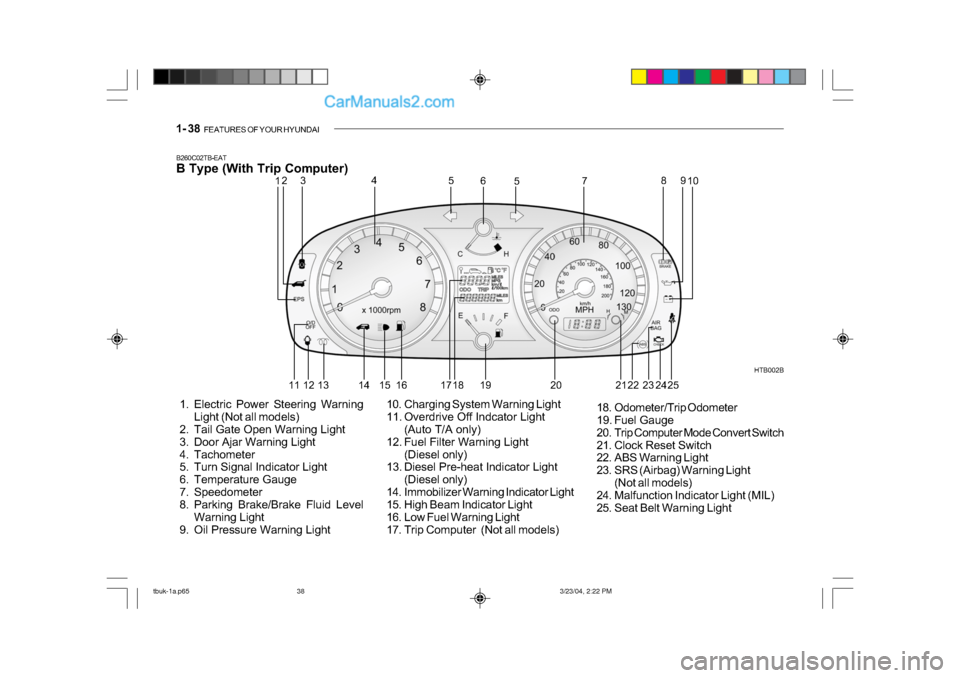
B260C02TB-EAT
B Type (With Trip Computer)
1. Electric Power Steering Warning
Light (Not all models)
2. Tail Gate Open Warning Light
3. Door Ajar Warning Light
4. Tachometer
5. Turn Signal Indicator Light
6. Temperature Gauge
7. Speedometer
8. Parking Brake/Brake Fluid Level
Warning Light
9. Oil Pressure Warning Light HTB002B
10. Charging System Warning Light
11. Overdrive Off Indcator Light (Auto T/A only)
12. Fuel Filter Warning Light (Diesel only)
13. Diesel Pre-heat Indicator Light
(Diesel only)
14. Immobilizer Warning Indicator Light
15. High Beam Indicator Light
16. Low Fuel Warning Light
17. Trip Computer (Not all models) 18. Odometer/Trip Odometer
19. Fuel Gauge
20. Trip Computer Mode Convert Switch
21. Clock Reset Switch
22. ABS Warning Light
23. SRS (Airbag) Warning Light
(Not all models)
24. Malfunction Indicator Light (MIL)
25. Seat Belt Warning Light
12 3 4
5
5
6
78
910
11 12 13 14 15 16 17 18 19 20 22 23
24 2521
tbuk-1a.p65 3/23/04, 2:22 PM
38
Page 298 of 445
1- 40 FEATURES OF YOUR HYUNDAI
!
SB210J1-E
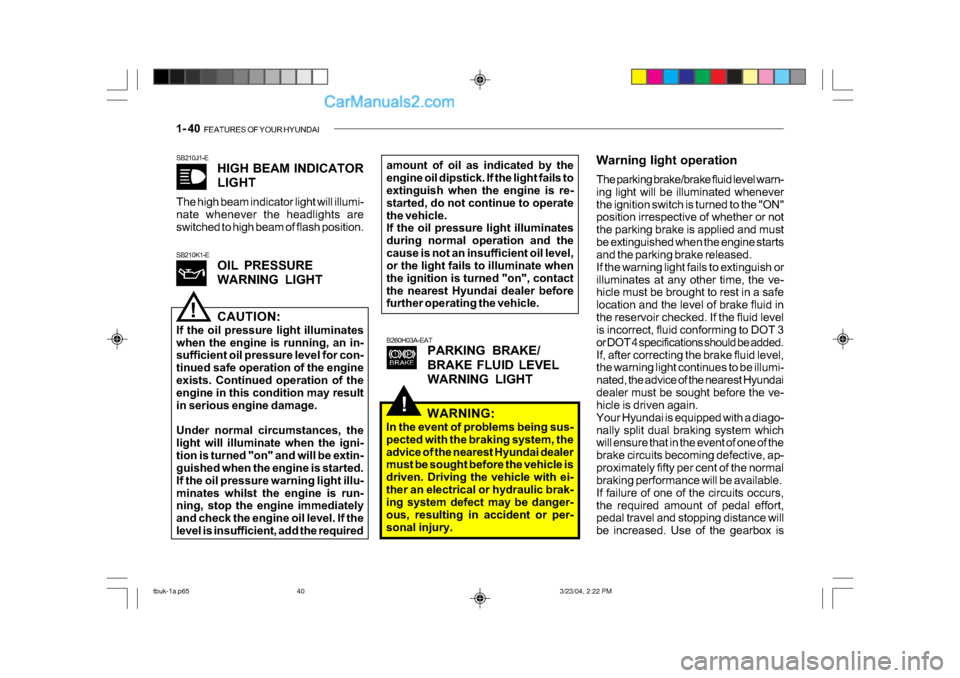
HIGH BEAM INDICATOR
LIGHT
The high beam indicator light will illumi-
nate whenever the headlights are
switched to high beam of flash position.
B260H03A-EATPARKING BRAKE/
BRAKE FLUID LEVEL
WARNING LIGHT
SB210K1-E
OIL PRESSURE
WARNING LIGHT
!CAUTION:
If the oil pressure light illuminates
when the engine is running, an in-
sufficient oil pressure level for con-
tinued safe operation of the engine
exists. Continued operation of the
engine in this condition may result
in serious engine damage.
Under normal circumstances, the
light will illuminate when the igni-
tion is turned "on" and will be extin-
guished when the engine is started.
If the oil pressure warning light illu-
minates whilst the engine is run-
ning, stop the engine immediately
and check the engine oil level. If the
level is insufficient, add the required amount of oil as indicated by the
engine oil dipstick. If the light fails to
extinguish when the engine is re-
started, do not continue to operate
the vehicle.
If the oil pressure light illuminates
during normal operation and the
cause is not an insufficient oil level,
or the light fails to illuminate when
the ignition is turned "on", contact
the nearest Hyundai dealer before
further operating the vehicle.
Warning light operation
The parking brake/brake fluid level warn-
ing light will be illuminated whenever
the ignition switch is turned to the "ON"
position irrespective of whether or not
the parking brake is applied and must
be extinguished when the engine starts
and the parking brake released.
If the warning light fails to extinguish or
illuminates at any other time, the ve-
hicle must be brought to rest in a safe
location and the level of brake fluid in
the reservoir checked. If the fluid level
is incorrect, fluid conforming to DOT 3
or DOT 4 specifications should be added.
If, after correcting the brake fluid level,
the warning light continues to be illumi-
nated, the advice of the nearest Hyundai
dealer must be sought before the ve-
hicle is driven again.
Your Hyundai is equipped with a diago-
nally split dual braking system which
will ensure that in the event of one of the
brake circuits becoming defective, ap-
proximately fifty per cent of the normal
braking performance will be available.
If failure of one of the circuits occurs,
the required amount of pedal effort,
pedal travel and stopping distance will
be increased. Use of the gearbox is
WARNING:
In the event of problems being sus-
pected with the braking system, the
advice of the nearest Hyundai dealer
must be sought before the vehicle is
driven. Driving the vehicle with ei-
ther an electrical or hydraulic brak-
ing system defect may be danger-
ous, resulting in accident or per-
sonal injury.
tbuk-1a.p65 3/23/04, 2:22 PM
40
Page 320 of 445
1- 62 FEATURES OF YOUR HYUNDAI
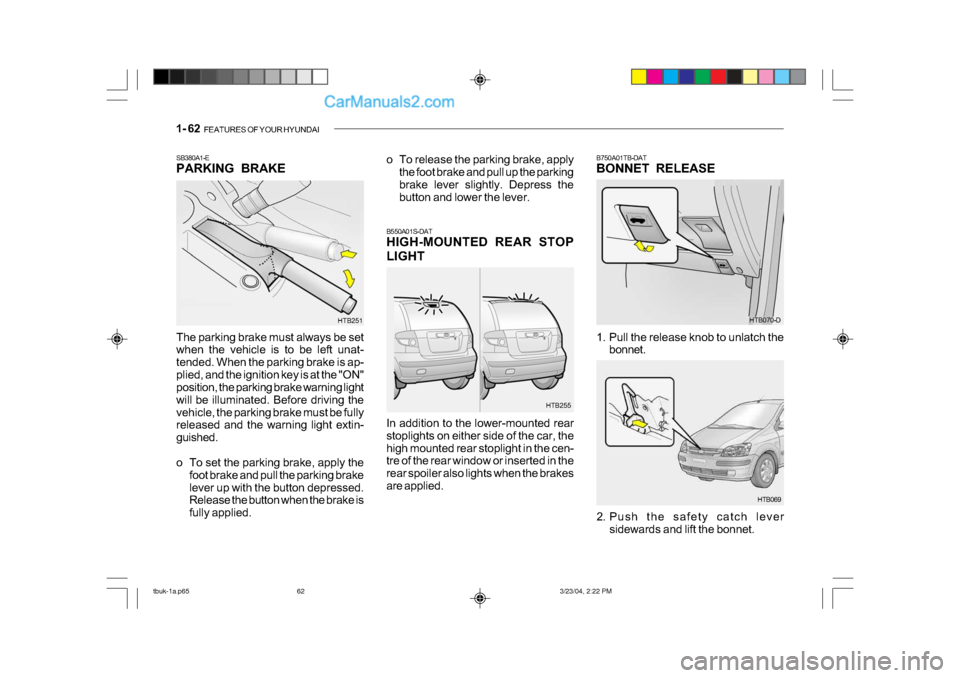
The parking brake must always be set
when the vehicle is to be left unat-
tended. When the parking brake is ap-
plied, and the ignition key is at the "ON"
position, the parking brake warning light
will be illuminated. Before driving the
vehicle, the parking brake must be fully
released and the warning light extin-
guished.
o To set the parking brake, apply the
foot brake and pull the parking brake
lever up with the button depressed.
Release the button when the brake is
fully applied.
SB380A1-E
PARKING BRAKE
B550A01S-DAT
HIGH-MOUNTED REAR STOP
LIGHT
In addition to the lower-mounted rear
stoplights on either side of the car, the
high mounted rear stoplight in the cen-
tre of the rear window or inserted in the
rear spoiler also lights when the brakes
are applied.
HTB251
HTB255
o To release the parking brake, apply
the foot brake and pull up the parking
brake lever slightly. Depress the
button and lower the lever.
B750A01TB-DAT
BONNET RELEASE
HTB070-D
1. Pull the release knob to unlatch the bonnet.
HTB069
2. Push the safety catch lever sidewards and lift the bonnet.
tbuk-1a.p65 3/23/04, 2:22 PM
62
Page 325 of 445
FEATURES OF YOUR HYUNDAI 1- 67
!
B545C01TB-EAT
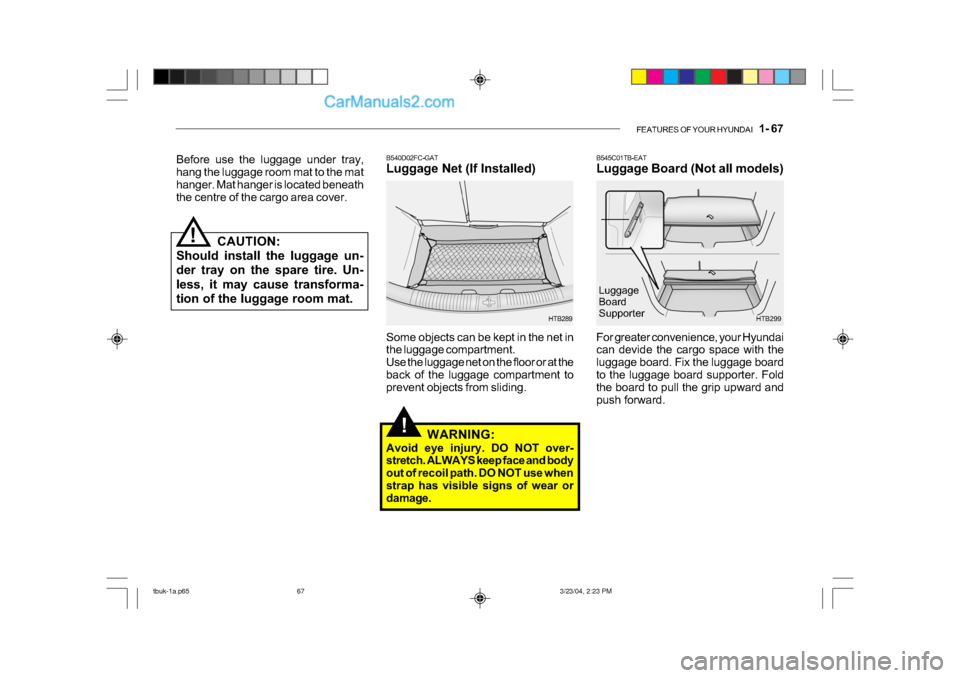
Luggage Board (Not all models)
HTB299
For greater convenience, your Hyundai
can devide the cargo space with the
luggage board. Fix the luggage board
to the luggage board supporter. Fold
the board to pull the grip upward and
push forward. Luggage
Board
SupporterB540D02FC-GAT
Luggage Net (If Installed)
Some objects can be kept in the net in
the luggage compartment.
Use the luggage net on the floor or at the
back of the luggage compartment to
prevent objects from sliding.
HTB289
WARNING:
Avoid eye injury. DO NOT over-
stretch. ALWAYS keep face and body
out of recoil path. DO NOT use when
strap has visible signs of wear or
damage.
Before use the luggage under tray,
hang the luggage room mat to the mat
hanger. Mat hanger is located beneath
the centre of the cargo area cover.
CAUTION:
Should install the luggage un-
der tray on the spare tire. Un-
less, it may cause transforma-
tion of the luggage room mat.
!
tbuk-1a.p65 3/23/04, 2:23 PM
67
Page 340 of 445
1- 82 FEATURES OF YOUR HYUNDAI
Storage
When not in use, place your discs in
their individual cases and store them in
a cool place away from the sun, heat,
and dust.
Do not grip or pull out the disc with your
hand while the disc is being pulled into
the unit by the self loading mechanism.
Do not pull the unit from the dash
immediately after a disc is inserted or
the eject switch has been pressed. If
the unit is pulled out before an opera-
tion is completed, the disc will be un-
stable in the unit and may be dam-
aged.
Do not attempt to insert a disc into the
unit when the unit is out of the dash or
the power is off.
B850A01F-AAT
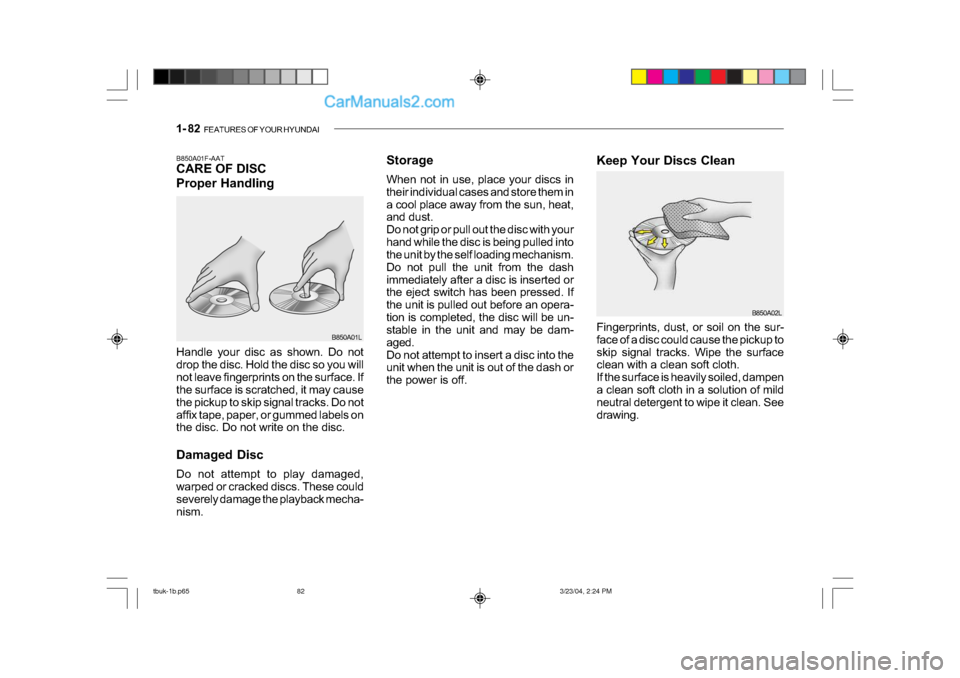
CARE OF DISC
Proper Handling
Handle your disc as shown. Do not
drop the disc. Hold the disc so you will
not leave fingerprints on the surface. If
the surface is scratched, it may cause
the pickup to skip signal tracks. Do not
affix tape, paper, or gummed labels on
the disc. Do not write on the disc.
Damaged Disc
Do not attempt to play damaged,
warped or cracked discs. These could
severely damage the playback mecha-
nism.
B850A01L
B850A02L
Keep Your Discs Clean
Fingerprints, dust, or soil on the sur-
face of a disc could cause the pickup to
skip signal tracks. Wipe the surface
clean with a clean soft cloth.
If the surface is heavily soiled, dampen
a clean soft cloth in a solution of mild
neutral detergent to wipe it clean. See
drawing.
tbuk-1b.p65
3/23/04, 2:24 PM
82
Page 341 of 445
FEATURES OF YOUR HYUNDAI 1- 83
Head
Cotton applicator B860A02L
o Be sure that the cassette label is not
loose or peeling off or tape ejection
may be difficult.
o Never touch or soil the actual audio
tape surfaces.
o Keep all magnetized objects, such as electric motors, speakers or trans-
formers away from your cassette
tapes and tape player unit.
o Store cassettes in a cool, dry place
with the open side facing down to
prevent dust from setting in the cas-
sette body.
o We strongly recommend against the
use of tapes longer than C-60 (60
minutes total). Tapes such as C-
120 or C-180 are very thin and do
not perform as well in the automo-
tive environment. o Avoid repeated fast reverse usage
to replay one given tune or tape
section. This can cause poor tape
winding to occur, and eventually
cause excessive internal drag and
poor audio quality in the cassette. If
this occurs, it can sometimes be
corrected by fast winding the tape
from end to end several times. If this
does not correct the problem, do not
continue to use the tape in your
vehicle.
B860A01A-AAT
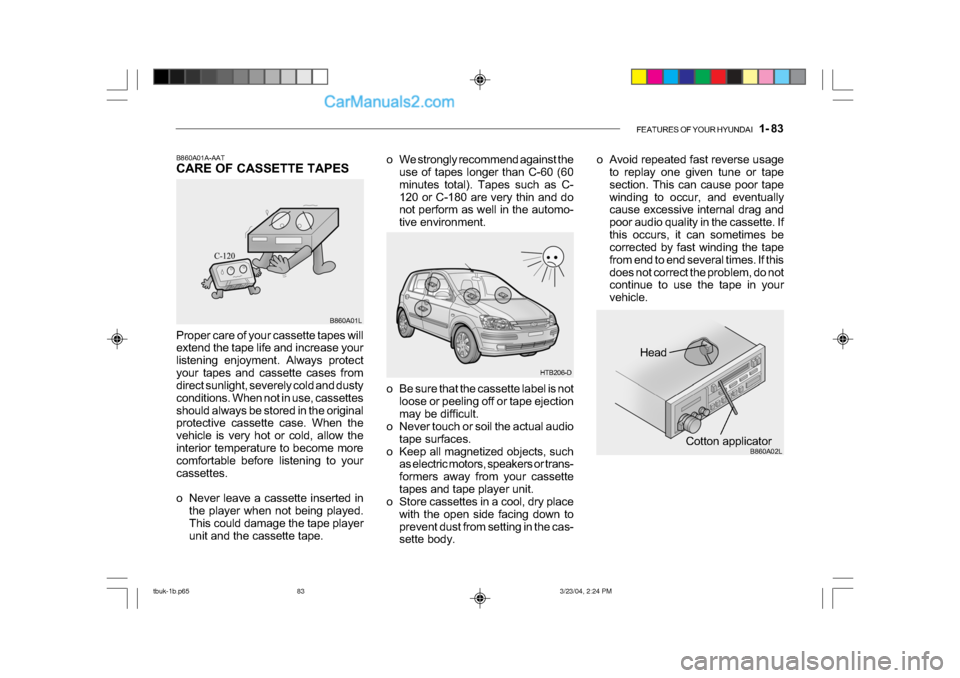
CARE OF CASSETTE TAPES
Proper care of your cassette tapes will
extend the tape life and increase your
listening enjoyment. Always protect
your tapes and cassette cases from
direct sunlight, severely cold and dusty
conditions. When not in use, cassettes
should always be stored in the original
protective cassette case. When the
vehicle is very hot or cold, allow the
interior temperature to become more
comfortable before listening to your
cassettes.
o Never leave a cassette inserted in
the player when not being played.
This could damage the tape player
unit and the cassette tape. B860A01L
HTB206-D
tbuk-1b.p65
3/23/04, 2:24 PM
83
Page 342 of 445

1- 84 FEATURES OF YOUR HYUNDAI
HTB111
B870D01FC-GAT
ANTENNA
Roof Antenna
Your car uses a roof antenna to re-
ceive both AM and FM broadcast sig-
nals.
This antenna is a removable type. To
remove the antenna, turn the antenna
counterclockwise. To install the an-
tenna, turn the antenna clockwise.
o The playback head, capstan and
pinch rollers will develop a coating
of tape residue that can result in
deterioration of sound quality, such
as a wavering sound. They should
be cleaned monthly using a com-
mercially available head cleaning
tape or special solution available
from audio specialty shops. Follow
the supplier's directions carefully and
never oil any part of the tape player
unit.
o Always be sure that the tape is tightly wound on its reel before in-
serting in the player. Rotate a pencil
in the drive sprockets to wind up any
slack. B860A03L
NOTE:
Look at a tape before you insert it.
If the tape is loose, tighten it by
turning one of the hubs with a pen-
cil or your finger.
If the label is peeling off, do not put
it in the drive mechanism.
Do not leave tapes sitting where
they are exposed to hot, warm, or
high humidity, such as on top of
the dashboard or in the player.
If a tape is exposed to extreme heat
or cold, let it reach a moderate tem-
perature before putting it in the
player.
tbuk-1b.p65 3/23/04, 2:24 PM
84
Page 346 of 445
DRIVING YOUR HYUNDAI 2- 3
!
C020A01O-EAT BEFORE STARTING THE EN- GINE Before you start the engine, you should always:
1. Look around the vehicle to be sure
there are no flat tyres, puddles of oil or water or other indications of pos- sible trouble.
2. After entering the car, check to be
sure the parking brake is engaged.
3. Check that all windows, and lights are clean.
4. Check that the interior and exterior
mirrors are clean and in position.
5. Check your seat, seatback and
headrestraint to be sure they are intheir proper positions.
6. Close all the doors.
7. Fasten your seat belt and be sure
that all other occupants have fas- tened theirs.
8. Turn off all lights and accessories that are not needed.
9. When you turn the ignition switch to "ON" check that all appropriate warn-ing lights are operating and that youhave sufficient fuel. 10.Check the operation of warning
lights and all bulbs when key is inthe "ON" position.
WARNING: (DIESEL ENGINE)
To ensure that sufficient vacuum exists within the brake system dur-ing cold weather start-up condi-tions, it is necessary to run theengine at idle for several seconds after starting the engine. SC040A1-F COMBINATION IGNITION SWITCH AND STEERING LOCK To Start the Engine
o If your Hyundai is equipped with a
manual transaxle, place the shift lever in neutral and depress theclutch pedal fully.
o If your Hyundai has an automatic
transaxle, place the shift lever in "P" (park).
o To start the engine, insert the igni-
tion key and turn it to the "START" position. Release it as soon as theengine starts. Do not hold the key inthe "START" position for more that 15 seconds.
NOTE: For safety, the engine will not start if the shift lever is not in "P" or "N"Position (automatic transaxle).
tbuk-2.p65 3/23/04, 4:55 PM
3