button Hyundai Getz 2008 User Guide
[x] Cancel search | Manufacturer: HYUNDAI, Model Year: 2008, Model line: Getz, Model: Hyundai Getz 2008Pages: 383, PDF Size: 9.23 MB
Page 82 of 383
1- 70 FEATURES OF YOUR HYUNDAI
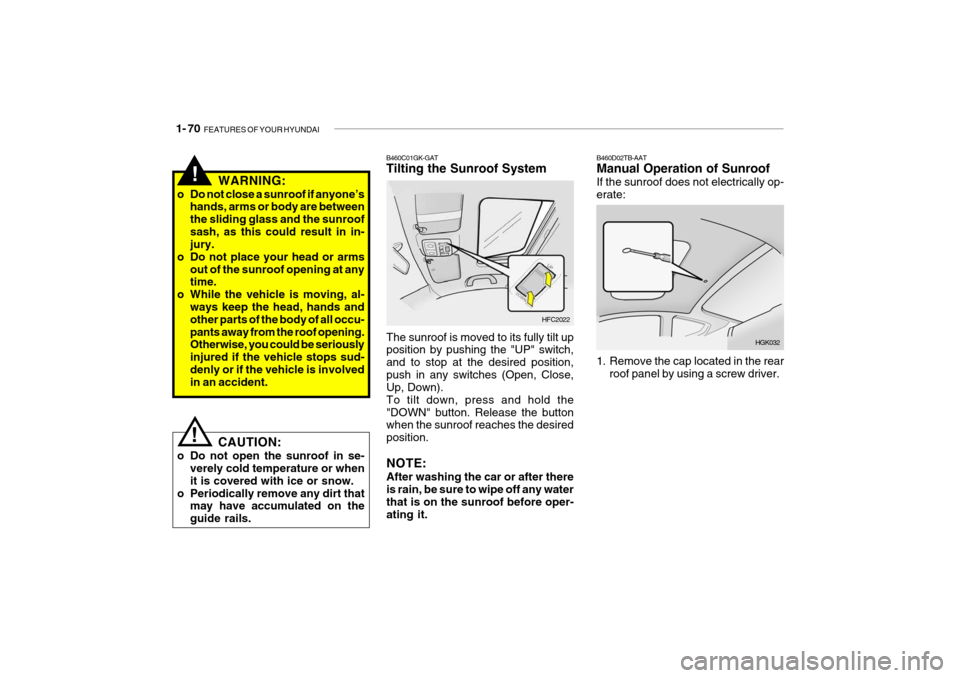
B460D02TB-AAT Manual Operation of Sunroof If the sunroof does not electrically op- erate:
HGK032
1. Remove the cap located in the rear roof panel by using a screw driver.
HFC2022
B460C01GK-GAT Tilting the Sunroof System
The sunroof is moved to its fully tilt up position by pushing the "UP" switch, and to stop at the desired position,push in any switches (Open, Close, Up, Down). To tilt down, press and hold the"DOWN" button. Release the button when the sunroof reaches the desired position. NOTE: After washing the car or after there is rain, be sure to wipe off any water that is on the sunroof before oper-ating it.
WARNING:
o Do not close a sunroof if anyone’s hands, arms or body are betweenthe sliding glass and the sunroofsash, as this could result in in- jury.
o Do not place your head or arms
out of the sunroof opening at anytime.
o While the vehicle is moving, al-
ways keep the head, hands andother parts of the body of all occu- pants away from the roof opening. Otherwise, you could be seriously injured if the vehicle stops sud-denly or if the vehicle is involved in an accident.
CAUTION:
o Do not open the sunroof in se- verely cold temperature or when it is covered with ice or snow.
o Periodically remove any dirt that may have accumulated on theguide rails.
!
!
Page 83 of 383
FEATURES OF YOUR HYUNDAI 1- 71
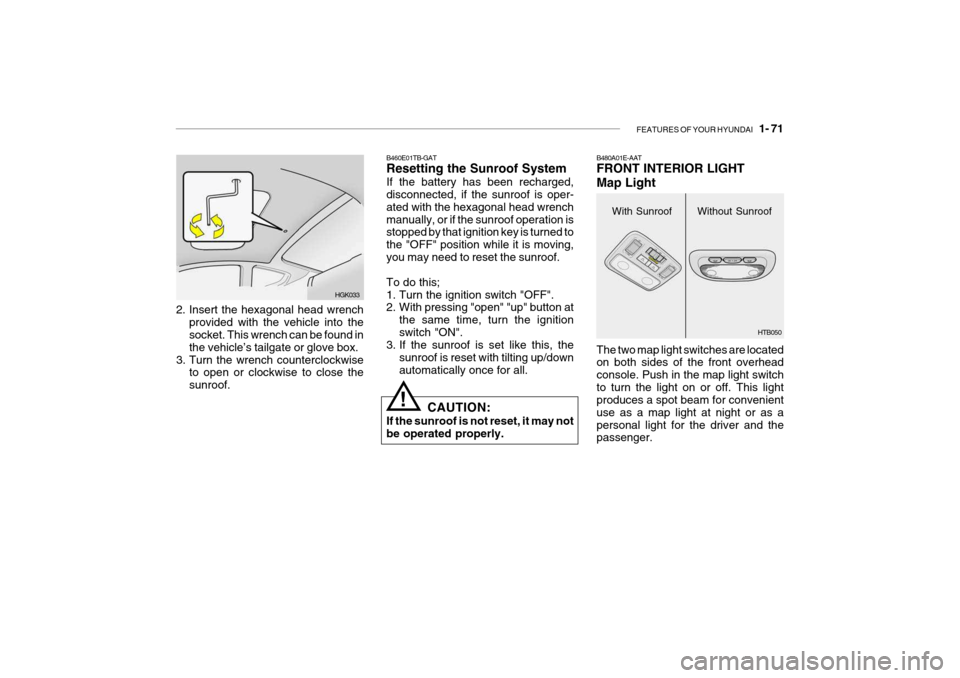
2. Insert the hexagonal head wrench
provided with the vehicle into the socket. This wrench can be found in the vehicle’s tailgate or glove box.
3. Turn the wrench counterclockwise to open or clockwise to close thesunroof. HGK033B460E01TB-GAT Resetting the Sunroof System If the battery has been recharged, disconnected, if the sunroof is oper- ated with the hexagonal head wrenchmanually, or if the sunroof operation is stopped by that ignition key is turned to the "OFF" position while it is moving,you may need to reset the sunroof. To do this;
1. Turn the ignition switch "OFF".
2. With pressing "open" "up" button at
the same time, turn the ignition switch "ON".
3. If the sunroof is set like this, the
sunroof is reset with tilting up/downautomatically once for all.
! CAUTION:
If the sunroof is not reset, it may not be operated properly.
With Sunroof
B480A01E-AAT FRONT INTERIOR LIGHT Map Light The two map light switches are located on both sides of the front overhead console. Push in the map light switchto turn the light on or off. This light produces a spot beam for convenient use as a map light at night or as apersonal light for the driver and the passenger.Without Sunroof
HTB050
Page 84 of 383
1- 72 FEATURES OF YOUR HYUNDAI
B500A01A-AAT GLOVE BOX
HTB101
WARNING:
Do not keep objects such as sharp or unsuitable things inside the spec- tacle case. Such objects can bethrown out in the event of a sudden stop or an accident, possibly injur- ing the passengers in the vehicle.
!
HTB102
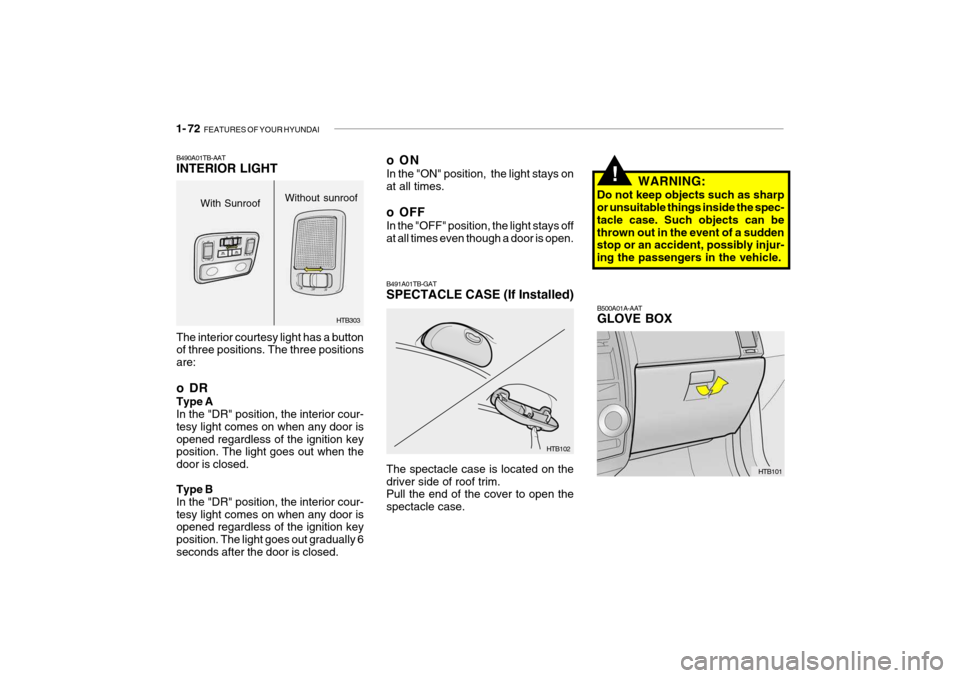
B491A01TB-GAT SPECTACLE CASE (If Installed) The spectacle case is located on the driver side of roof trim. Pull the end of the cover to open the spectacle case.
The interior courtesy light has a button of three positions. The three positions are:
oDR Type A In the "DR" position, the interior cour- tesy light comes on when any door isopened regardless of the ignition key position. The light goes out when the door is closed. Type B In the "DR" position, the interior cour-tesy light comes on when any door is opened regardless of the ignition key position. The light goes out gradually 6seconds after the door is closed.
B490A01TB-AAT INTERIOR LIGHT
HTB303
With Sunroof
Without sunroof
oON In the "ON" position, the light stays on at all times.
o OFF In the "OFF" position, the light stays off at all times even though a door is open.
Page 88 of 383
1- 76 FEATURES OF YOUR HYUNDAI
!
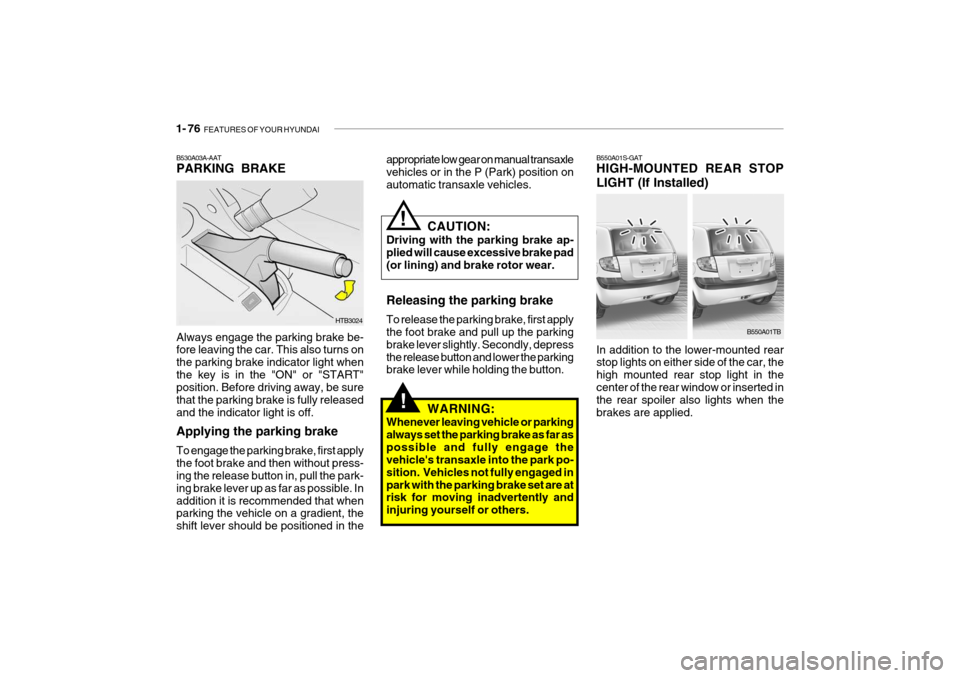
Always engage the parking brake be- fore leaving the car. This also turns on the parking brake indicator light whenthe key is in the "ON" or "START" position. Before driving away, be sure that the parking brake is fully releasedand the indicator light is off. Applying the parking brake To engage the parking brake, first apply the foot brake and then without press- ing the release button in, pull the park- ing brake lever up as far as possible. Inaddition it is recommended that when parking the vehicle on a gradient, the shift lever should be positioned in the
B530A03A-AAT PARKING BRAKE
B550A01S-GATHIGH-MOUNTED REAR STOP
LIGHT (If Installed) In addition to the lower-mounted rear stop lights on either side of the car, the high mounted rear stop light in thecenter of the rear window or inserted in the rear spoiler also lights when the brakes are applied.
HTB3024
B550A01TB
CAUTION:
Driving with the parking brake ap- plied will cause excessive brake pad (or lining) and brake rotor wear.
!
Releasing the parking brake To release the parking brake, first apply the foot brake and pull up the parking brake lever slightly. Secondly, depressthe release button and lower the parking brake lever while holding the button. WARNING:
Whenever leaving vehicle or parking always set the parking brake as far aspossible and fully engage the vehicle's transaxle into the park po- sition. Vehicles not fully engaged inpark with the parking brake set are at risk for moving inadvertently and injuring yourself or others.
appropriate low gear on manual transaxle vehicles or in the P (Park) position on automatic transaxle vehicles.
Page 104 of 383
1- 92 FEATURES OF YOUR HYUNDAI
B740A01A-AAT AIR CONDITIONING SWITCH (If Installed)
B730A01FC-GAT Operation Tips
o To keep dust or unpleasant fumes
from entering the car through the ventilation system, temporarily set the air intake control at "Recircula- tion". Be sure to return the control to"Fresh" when the irritation has passed to keep fresh air in the ve- hicle. This will help keep the driveralert and comfortable.
o Air for the heating/cooling system is
drawn in through the grilles justahead of the windshield. Care should be taken that these are not blocked by leaves, snow, ice or other ob-structions.
o To prevent interior fog on the wind-
shield, set the air intake control tothe fresh air ( ) position and fan speed to the desired position.
To remove the frost or exterior fog on the windshield:
o Set the air intake control to the fresh
( ) position.
o Set the air flow control to the defrost ( ) position
o Set the temperature control to warm.
o Set the fan speed control to position
"3" or "4".
NOTE: When the A/C is operated continu- ously on the floor-defrost level ( ) or defrost level ( ), it may cause fog to form on the exterior wind-shield. If this occurs, set the air flow control to the face level posi- tion ( ) and fan speed control tothe low position. The air conditioning is turned on by pushing the A/C button on the heating/ air conditioning control panel.
HTB037
Page 109 of 383
FEATURES OF YOUR HYUNDAI 1- 97
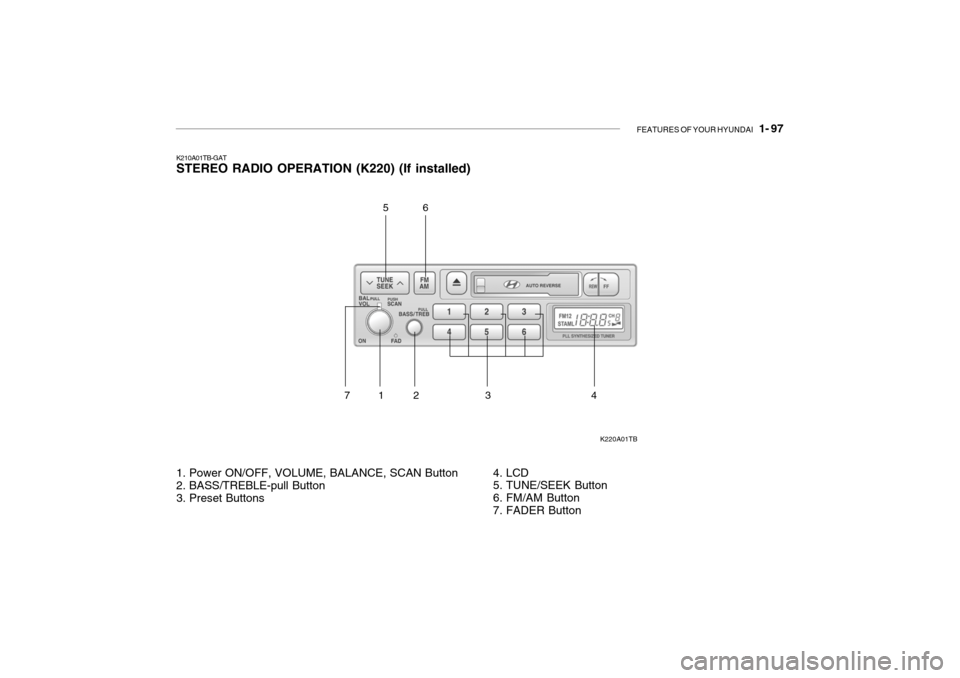
K210A01TB-GAT STEREO RADIO OPERATION (K220) (If installed)
K220A01TB
1. Power ON/OFF, VOLUME, BALANCE, SCAN Button
2. BASS/TREBLE-pull Button
3. Preset Buttons 4. LCD
5. TUNE/SEEK Button
6. FM/AM Button
7. FADER Button
12 3 456
7
Page 110 of 383

1- 98 FEATURES OF YOUR HYUNDAI
5. TUNE Press the button not more than 1 second then frequency is increased.Likewise press the button not more than 1 second to decrease the fre- quency.
o SEEK Press the button for over 1 second, then it will tune to the next receivablehigher frequency station. Likewise, press the button for over 1 second then it will tune to the next receivablelower frequency station.If the selected station is in the preset memory, memo- rized channel will be on the display too. 6. FM/AM Button FM/AM band button, which is used to change the band repeatedly in follow- ing manner. FM1 FM2 AM FM1
(FM1 FM2 M L FM1 : Europe)
K210B01TB-GAT 1. POWER ON/OFF, VOLUME Rotate the Power switch clockwise to turn on the audio when the ignitionswitch is at ACC or ON position. Once the system is on, you can increase or decrease the volume by rotating theknob clockwise or counter-clockwise.
o BALANCE Further pull the volume button and rotate clockwise to emphasize right sound speaker. Or rotate counter-clockwise to empha-size left sound speaker.
o SCAN Button When this button is pressed, the fre- quency will be increased to be tuned to the next receivable station one afteranother, receiving each station for 5 seconds. if the desirable station is tuned, press this button (scan) againto cancel scan function.
2. BASS/TREBLE-pull Press this button to pop up. Rotate the knob clockwise to increase the Bassand rotate to counter-clockwise to de- crease the Bass. Further pull the button and rotate clock-wise to increase the Treble. Or rotate counter-clockwise to de- crease the Treble. After adjustmentpress the button. 3. PRESET ( 1 ~ 6 ) Press any of these buttons not more than 2 seconds to listen to the station in memory. Press the preset button for 2 seconds or more, then the currentstation will be stored into the memory of the preset button. 4. LCD LCD shows the following information; band of FM1/FM2/AM/(L)/(M) fre-quency, preset channel number, ST in case of FM Stereo.
Page 111 of 383

FEATURES OF YOUR HYUNDAI 1- 99
7. Fader (If installed) This button is located top side of the volume switch. Rotate clockwise toattenuate front speaker sound. Rotate counter-clockwise to attenuate rear speaker sound.
!
CAUTION:
o Do not place beverages close to the audio system. The playback mechanism may be damaged ifyou spill them.
o Do not impact on the audio sys-
tem, or the playback mechanismcould be damaged.
Page 112 of 383
1- 100 FEATURES OF YOUR HYUNDAI
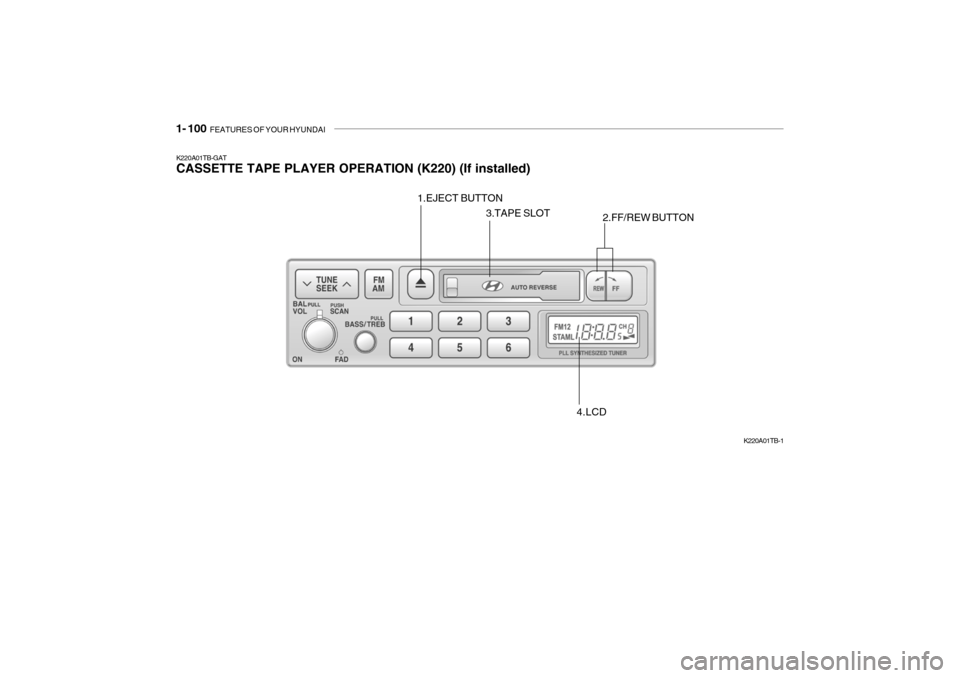
K220A01TB-GAT CASSETTE TAPE PLAYER OPERATION (K220) (If installed)
K220A01TB-1
1.EJECT BUTTON
2.FF/REW BUTTON
3.TAPE SLOT
4.LCD
Page 113 of 383

FEATURES OF YOUR HYUNDAI 1- 101
K220B01TB-GAT 1. Tape Eject Button ( ) Press this button to eject the cassette tape. 2. Cassette tape loading slot Insert the tape into the loading slot as the open side faces the right. 3. FF/REW, tape side selection
Button
Press "REW " button to fast backward the tape, Press "FF" button to fast forward the tape.While the cassette is in operation, press these button altogether to play reverse side. 4. LCD LCD shows the tape direction ( or ) of the cassette in play.
! CAUTION:
o Do not insert anything like coins into the player slot as damage to the unit may occur.
o Do not place beverages close to the audio system. The playbackmechanism may be damaged ifyou spill them.
o Do not impact on the audio sys-
tem, or the playback mechanismcould be damaged.