instrument cluster Hyundai Getz 2008 Owner's Manual
[x] Cancel search | Manufacturer: HYUNDAI, Model Year: 2008, Model line: Getz, Model: Hyundai Getz 2008Pages: 383, PDF Size: 9.23 MB
Page 9 of 383

YOUR VEHICLE AT A GLANCE
F9
1. Headlight Leveling Switch (If installed)
2. Front Fog Light Switch (If installed)
3. Multi-Function Light Switch
4. Instrument Cluster
5. Horn and Driver's Airbag (If installed)
6. Windshield Wiper/Washer Switch
7. Digital Clock
8. Hazard Warning Light
9. Audio System (If installed)
10. Passenger's Airbag (If installed)
11. Glove Box
CAUTION:
When installing a container of liquid air freshener inside a vehicle, do not place it near the instrument cluster nor on the instrument panel pad surface. If there is any leakage from the air freshener onto these areas (instrument cluster, instrument panel pad or air ventilator), it may damage these parts.If the liquid from the air freshener doesleak onto these areas, wash them with water immediately. 12. Hood Release Lever
13. Fuse Box
14. Audio Remote Control Switch (If installed)
15. Heating/Air Conditioning Control Panel
(If installed)
16. Cigarette Lighter
17. Ashtray
18. Front Drink Holder
19. Shift Lever (If installed)
20. Parking Brake Lever
21. Rear Drink Holder
!
Page 11 of 383

YOUR VEHICLE AT A GLANCE
F11
1. Glove Box
2. Passenger's Airbag (If installed)
3. Audio System (If installed)
4. Hazard Warning Light
5. Digital Clock
6. Windshield Wiper/Washer Switch
7. Horn and Driver's Airbag (If installed)
8. Instrument Cluster
9. Multi-Function Light Switch
10. Headlight Leveling Switch (If installed)
11. Rear Drink Holder
CAUTION:
When installing a container of liquid air freshener inside a vehicle, do not place it near the instrument cluster nor on the instrument panel pad surface. If there is any leakage from the air freshener onto these areas (instrument cluster, instrument panel pad or air ventilator), it may damage these parts. If the liquid from the air freshener does leak onto these areas, wash them with water immediately. 12. Parking Brake Lever
13. Shift Lever (If installed)
14. Front Drink Holder
15. Ashtray
16. Power Outlet (If installed)
17. Heating/Air Conditioning Control Panel
(If installed)
18. Audio Remote Control Switch (If installed)
19. Fuse Box
20. Hood Release Lever
!
Page 13 of 383

1. FEATURES OF YOUR HYUNDAI
Fuel Recommendations ................................................................... 1-2
Breaking in Your New Hyundai ........................................................ 1-4
key (Immobilizer system) ................................................................. 1-5
Door locks (Theft-alarm system) ..................................................... 1-9Power windows.............................................................................. 1-13
Seat ................................................................................................ 1-13
Seat Belt ......................................................................................... 1-21
Child restraint system .................................................................... 1-28
Supplemental restraint (AIRBAG) system .....................................1-36
Instrument cluster and indicator lights ............................................1-44
Warning Light and Indicator ............................................................ 1-48
Trip computer ................................................................................. 1-57
Multi-Function Light Switch............................................................ 1-59
Windshield wiper/Washer Switch ...................................................1-61
Sunroof ........................................................................................... 1-69
Mirror ......... ..................................................................................... 1-73
Hood R elease ................................................................................ 1-77
How to use luggage Room ............................................................. 1-80
Heating and cooling control ............................................................ 1-86
Stereo sound system ..................................................................... 1-95
Audio system ................................................................................. 1-97
Antenna ........................................................................................ 1-128
1
Page 51 of 383
FEATURES OF YOUR HYUNDAI 1- 39
CAUTION:
When installing a container of liq- uid air freshener inside a vehicle, do not place it near the instrumentcluster nor on the instrument panel pad surface. If there is any leakage from the air freshener onto theseareas (instrument cluster, instru- ment panel pad or air ventilator), it may damage these parts. If the liq-uid from the air freshener does leak onto these areas, wash them with water immediately.
!
!
WARNING:
o When the SRS is activated, there may be a loud noise and fine dust will be released throughout thevehicle. These conditions are normal and are not hazardous. However, the fine dust generatedduring airbag deployment may cause skin irritation. Be sure to wash your hands and face thor-oughly with lukewarm water and a mild soap after an accident in which the airbags were deployed.
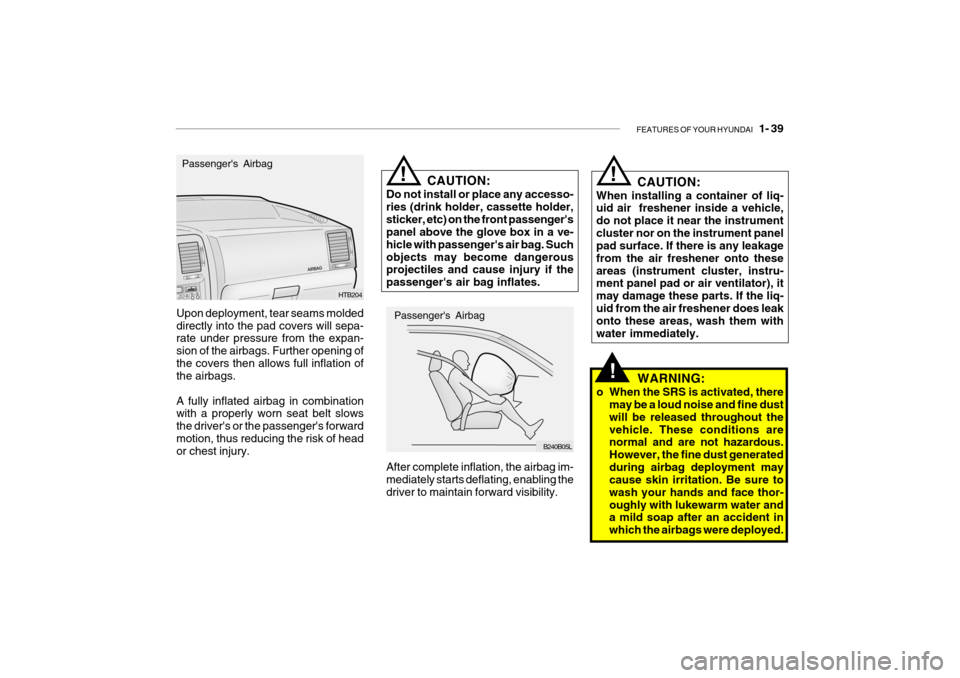
Upon deployment, tear seams molded directly into the pad covers will sepa- rate under pressure from the expan- sion of the airbags. Further opening ofthe covers then allows full inflation of the airbags. A fully inflated airbag in combination with a properly worn seat belt slows the driver's or the passenger's forwardmotion, thus reducing the risk of head or chest injury. HTB204
Passenger's Airbag
After complete inflation, the airbag im- mediately starts deflating, enabling thedriver to maintain forward visibility. Passenger's Airbag
B240B05L
!CAUTION:
Do not install or place any accesso- ries (drink holder, cassette holder,sticker, etc) on the front passenger's panel above the glove box in a ve- hicle with passenger's air bag. Suchobjects may become dangerous projectiles and cause injury if the passenger's air bag inflates.
Page 56 of 383
1- 44 FEATURES OF YOUR HYUNDAI
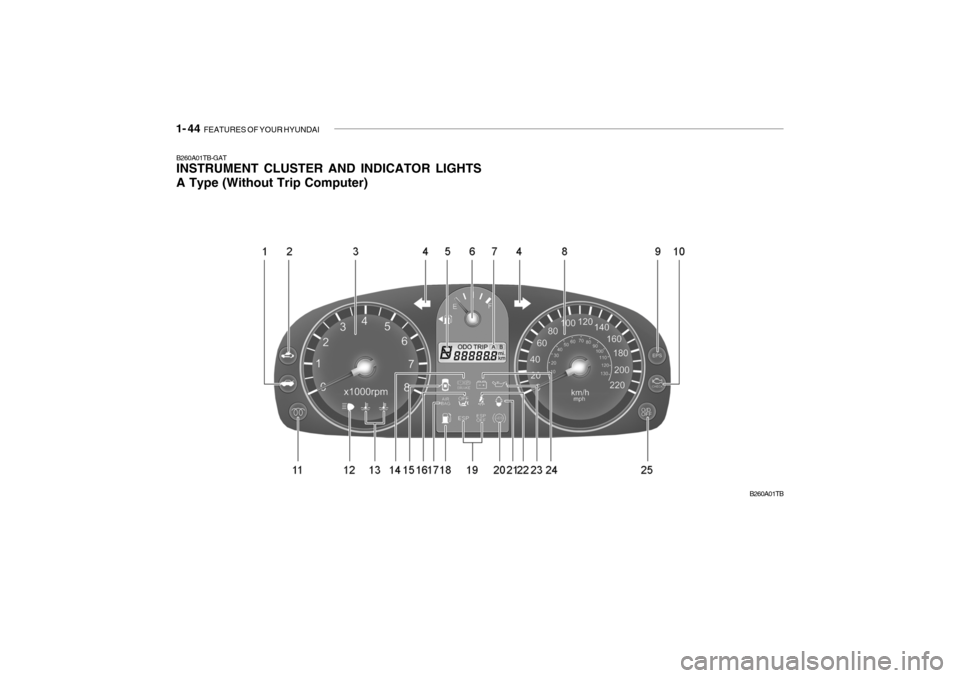
B260A01TB-GAT INSTRUMENT CLUSTER AND INDICATOR LIGHTS A Type (Without Trip Computer)
B260A01TB
Page 155 of 383
DRIVING YOUR HYUNDAI 2- 15
!WARNING:
Electronic stability program is only a driving aid; all normal precautionsfor driving in inclement weather and on slippery road surfaces should be observed.
C310B01JM-AAT ESP ON/OFF Mode When the ESP is operating, the ESP indicator in the instrument cluster will blink. If you turn the system off by pressingthe ESP switch, the ESP-OFF indica- tor will come on and stay on. In the ESP-OFF mode, the stability controlwill be deactivated. Adjust your driving accordingly. To turn the system back on, press the switch again. The ESP-OFF indicator should go off. NOTE: The ESP mode will automatically be turned ON after the engine is turned off and restarted. C310D01JM-AAT Indicators and Warning The indicators should illuminate when the ignition key is turned to ON orSTART but should go out after three seconds. If the indicators do not illuminate, or theESP or ESP-OFF indicator does not go out after 3 seconds, have the vehicle checked by an authorized dealer. Should there be any unusual conditions in the device while driving, ESP-OFFindicator illuminates as a warning. If ESP-OFF indicator illuminates, pull your car to a safe place and stop theengine. Then, start the engine again to check if the ESP-OFF indicator goes out. If the indicator remains lit even after the engine has been started, have your carchecked by an authorized Hyundai dealer.
C140A02A-GAT DRIVING FOR ECONOMY You can save fuel and get more kilo- meters from your car if you followthese suggestions:
o Drive smoothly. Accelerate at a
moderate rate. Don't make "jack- rabbit" starts or full-throttle shifts and maintain a steady cruisingspeed. Don't race between stop- lights. Try to adjust your speed to that of the other traffic so you don'thave to change speeds unneces- sarily. Avoid heavy traffic whenever possible.Always maintain a safe distance from other vehicles so you can avoid unnecessary braking. This also re-duces brake wear.
o Drive at a moderate speed. The faster
you drive, the more fuel your caruses. Driving at a moderate speed, especially on the highway, is one of the most effective ways to reducefuel consumption.
Page 252 of 383

10- 4 INDEX
H Hazard Warning System ............................................. 1-64
Headlight Aiming Adjustm ent ...................................... 6-31
Headlight Leveling Device S ystem .............................1-68
Headlight flasher ......................................................... 1-60
Headlight switch ......................................................... 1-59
Heating and cooling control ........................................ 1-86
Heating and Ventilation ............................................... 1-87
Air flow control ......................................................... 1-88
Air intake control ..................................................... 1-88
Bi-level heating ........................................................ 1-91
Fan speed control .................................................... 1-87
Temperature control ................................................. 1-90
High-Mounted Rear Stop Light.................................... 1-76
Hood Release ............................................................. 1-77
How to use luggage room ........................................... 1-80
Horn ............................................................................ 1-84
IIgnition Switch ............................................................. 2-3
Immobilizer System ..................................................... 1-5
Instrument Cluster and Indicator light ......................... 1-46
IInterior Light Interior light .............................................................. 1-72
Map light .................................................................. 1-71
Intermittent Wiper ....................................................... 1-63
JJump Starting .............................................................. 3-3 K
Key .............................................................................. 1-4
If you lose your keys .............................................. 3-14
Positions ................................................................... 2-4
Keyless entry system ................................................. 1-11
LLane change si gnal ..................................................... 1-59
Lubrication Chart .......................................................... 9-4
Luggage Net ............................................................... 1-81
Luggage Board ............................................................ 1-81
Luggage Under Tray ................................................... 1-80
Lumbar Support Control .............................................. 1-16
MMaintenance Intervals Explanation of scheduled maintenance items................................................................................. 5-8
Maintenance under severe usage conditions ............ 5-7
Scheduled maintenance ............................................ 5-4
Service requirements ................................................ 5-2
Mirrors
Day-night inside rearview ......... ................................1-75
Outside rearview mirror heater .................................1-75
O
Odometer .................................................................... 1-56
Outside rear view mirror ............................................. 1-73
Electric type ............................................................ 1-74
Manual type ............................................................. 1-73
Page 265 of 383

YOUR VEHICLE AT A GLANCE
F9
1. Glove Box
2. Passenger's Airbag
3. Hazard Warning Light
4. Digital Clock
5. Windshield Wiper/Washer Switch
6. Horn and Driver's Airbag
7. Instrument Cluster
8. Multi-Function Light Switch
9. Headlight Leveling Switch (Not all models)
10. Rear Drink Holder
CAUTION:
When installing a container of liquid air freshener inside a vehicle, do not place it near the instrumentcluster nor on the instrument panel pad surface. If there is any leakage from the air freshener onto these areas (instrument cluster, instrument panel pad or air ventilator), it may damage these parts. If the liquid from the air freshener does leak onto these areas, wash them with water immediately. 11. Parking Brake Lever
12. Shift Lever (Not all models)
13. Front Drink Holder
14. Ashtray
15. Cigar Lighter
16. Heating/Air Conditioning Control Panel
(Not all models)
17. Audio Remote Control Switch (Not all models)
18. Fuse Box
19. Hood Release Lever
!
Page 291 of 383
DRIVING YOUR HYUNDAI 2- 13
HTB217-D
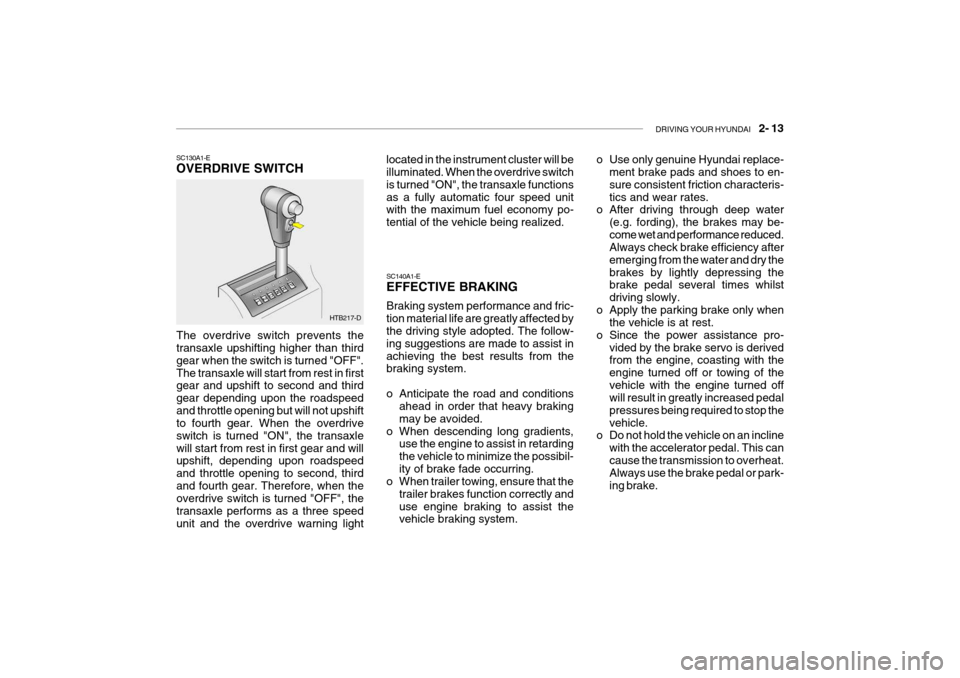
SC130A1-E OVERDRIVE SWITCH
The overdrive switch prevents the transaxle upshifting higher than third gear when the switch is turned "OFF".The transaxle will start from rest in first gear and upshift to second and third gear depending upon the roadspeedand throttle opening but will not upshift to fourth gear. When the overdrive switch is turned "ON", the transaxlewill start from rest in first gear and will upshift, depending upon roadspeed and throttle opening to second, thirdand fourth gear. Therefore, when the overdrive switch is turned "OFF", the transaxle performs as a three speedunit and the overdrive warning light located in the instrument cluster will be illuminated. When the overdrive switch is turned "ON", the transaxle functionsas a fully automatic four speed unit with the maximum fuel economy po- tential of the vehicle being realized. SC140A1-E EFFECTIVE BRAKING Braking system performance and fric- tion material life are greatly affected by the driving style adopted. The follow- ing suggestions are made to assist inachieving the best results from the braking system.
o Anticipate the road and conditions
ahead in order that heavy braking may be avoided.
o When descending long gradients, use the engine to assist in retardingthe vehicle to minimize the possibil-ity of brake fade occurring.
o When trailer towing, ensure that the
trailer brakes function correctly anduse engine braking to assist the vehicle braking system. o Use only genuine Hyundai replace-
ment brake pads and shoes to en- sure consistent friction characteris-tics and wear rates.
o After driving through deep water
(e.g. fording), the brakes may be-come wet and performance reduced. Always check brake efficiency after emerging from the water and dry thebrakes by lightly depressing the brake pedal several times whilst driving slowly.
o Apply the parking brake only when the vehicle is at rest.
o Since the power assistance pro- vided by the brake servo is derived from the engine, coasting with the engine turned off or towing of thevehicle with the engine turned off will result in greatly increased pedal pressures being required to stop thevehicle.
o Do not hold the vehicle on an incline
with the accelerator pedal. This cancause the transmission to overheat. Always use the brake pedal or park- ing brake.
Page 293 of 383
DRIVING YOUR HYUNDAI 2- 15
!
It is not a substitute for safe driving practices. Factors including speed, road conditions and driver steering input canall affect whether ESP will be effective in preventing a loss of control. It is still your responsibility to drive and cornerat reasonable speeds and to leave a sufficient margin of safety.
WARNING:
Electronic stability program is a driv- ing aid; all normal precautions for driving in inclement weather and on slippery road surfaces should beobserved.
! CAUTION:
Driving with varying tyre or wheel size may cause the ESP system to malfunction. When replacing tyres,make sure they are the same size as your original tyres. C310D01JM-EAT Indicators and Warning The indicators should illuminate when the ignition key is turned to ON orSTART but should go out after approxi- mately 3 seconds. If the indicators do not illuminate, or theESP-OFF indicator does not go out after approximately 3 seconds, have the vehicle checked by Hyundaiauthorised repairer. Should there be any unusual conditions in the device whilst driving, ESP-OFF indicator illuminates as a warning. If ESP-OFF indicator illuminates, pullyour car to a safe place and stop the engine. Then, start the engine again to check ifthe ESP-OFF indicator goes out. If the indicator remains lit even after the engine has been started, have your car checked by Hyundai authorised repairer.
C310B01JM-AAT ESP ON/OFF Mode When the ESP is operating, the ESP indicator in the instrument cluster willblink. If you turn the system off by pressing the ESP switch, the ESP-OFF indica-tor will come on and stay on. In the ESP-OFF mode, the stability control will be deactivated. Adjust your drivingaccordingly. To turn the system back on, press the switch again. The ESP- OFF indicator should go off. NOTE: The ESP mode will automatically be turned ON after the engine is turned off and restarted.